Sound works through HDMI output but not internal speakers.

Leduskia

New member
Local time
6:44 AM
Messages
9
I've just received my Laptop back from repair and all seems to be well, I had my screen panel replaced, gpu replaced(from 570m to 670m), new hard drive and CPU fan. However the problem I seem to be having is that internal speakers are completely not working.

I can see that bolume bar in for my internal speakers is actually changing but there is no sound. My system is not muted (unless there's some secret button I'm missing out on) No matter what i try it seems that sound will not work through my internal speakers, I've plugged in my Razer headset(Kraken) that works with my other computer but is not even detected when plugged in the Audio jacks of my laptop(Doesnt even pick up the microphone) and this did work before I sent it out for repair. Sound only works through HDMI output into a TV/Monitor.

Now I'm not sure if this some software configuration that I have to do or something physical with the hardware but I would prefer to not have to send it back as it would take a month to get back to me and also the repair company states that if the problem is due to software then they will charge.

I assume it's a conflict that Realtek HD audio manager is having or something but none of my devices show up on the RealtekHD Audio Manager nor do I get a pop up when a device is detected(which is what normally would of happened)

System:
MSI GT780DX
I5 2430
GTX 670m
Win 7 64 bit
8gb Ram

Edit: After some more looking around, I really do believe that what I had thought earlier was causing the problem. I believe that the GTX 670m may be causing some sort of conflict, however earlier today I did do everything from reformatting to uninstalling and reinstalling Nvidia drivers and it didnt work) Seems like other people are also having similar problems. http://www.sevenforums.com/sound-audio/185620-hdmi-sound-output-works-just-fine-audio-jacks-not-all-new-pc-2.html
 
Last edited:

My Computer My Computer

At a glance

Win 7 Home Premium 64 bitIntel Core i5 2430m @ 2.4ghz -3.0ghz8gb ram @ 1600mhzGTX 670M
Computer type
Laptop
Computer Manufacturer/Model Number
MSI GT780DX
OS
Win 7 Home Premium 64 bit
CPU
Intel Core i5 2430m @ 2.4ghz -3.0ghz
Memory
8gb ram @ 1600mhz
Graphics Card(s)
GTX 670M
Hard Drives
750gb 7200RPM
Antivirus
MSE
Browser
Chrome
What is set as default in the Output Devices?

Right click the volume control, select output devices, set realtek audio (or speakers) as default.

Repeat for input devices to get the mic working
 

My Computer My Computer

At a glance

Windows 7 Ultimate x64Intel Core2 Quad Q8300 2.5GhzKingston HyperX 4x1GB DDR2 1066MhzAsus/Nvidia 9500GT 1GB
Computer type
PC/Desktop
Computer Manufacturer/Model Number
Self Build
OS
Windows 7 Ultimate x64
CPU
Intel Core2 Quad Q8300 2.5Ghz
Motherboard
Asus P5QD Turbo
Memory
Kingston HyperX 4x1GB DDR2 1066Mhz
Graphics Card(s)
Asus/Nvidia 9500GT 1GB
Sound Card
On-Board HD
Monitor(s) Displays
22" Widescreen TFT
Screen Resolution
1920x1080
Hard Drives
2x 320Gb Seagate SATAII RAID 0
2x 80Gb Seagate SATAII RAID 0
1x 1tb hybrid (8gb ssd)
PSU
650w
Case
ATX
Cooling
140mm front, 120mm Rear, 80mm Chipset + stock CPU and GPU
Keyboard
Plastic one
Mouse
Plastic one
Internet Speed
4Mbps
Other Info
Laptop: HP Elitebook 2560p
i5 @2.7Ghz 4GB DDR3
What is set as default in the Output Devices?

Right click the volume control, select output devices, set realtek audio (or speakers) as default.

Repeat for input devices to get the mic working

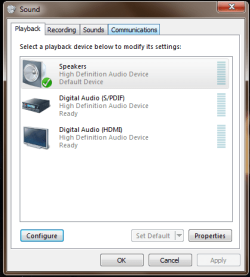
By volume control do you mean the sound manager thing which has the tabs of "Playback, Recordings, Sounds" etc? If so my speakers are set as the default device but this changes nothing and my mic is no detected in the recordings(it says line not plugged in)

If you mean the volume icon in the bottom right corner, when I right click on that all i get is Volume mixer, Playback devices, Recording Devices and Sounds and also volume control options.

I can provide screen shots if needed be.
 

My Computer My Computer

At a glance

Win 7 Home Premium 64 bitIntel Core i5 2430m @ 2.4ghz -3.0ghz8gb ram @ 1600mhzGTX 670M
Computer type
Laptop
Computer Manufacturer/Model Number
MSI GT780DX
OS
Win 7 Home Premium 64 bit
CPU
Intel Core i5 2430m @ 2.4ghz -3.0ghz
Memory
8gb ram @ 1600mhz
Graphics Card(s)
GTX 670M
Hard Drives
750gb 7200RPM
Antivirus
MSE
Browser
Chrome
Playback devices (sorry on an XP machine at work right now)
 

My Computer My Computer

At a glance

Windows 7 Ultimate x64Intel Core2 Quad Q8300 2.5GhzKingston HyperX 4x1GB DDR2 1066MhzAsus/Nvidia 9500GT 1GB
Computer type
PC/Desktop
Computer Manufacturer/Model Number
Self Build
OS
Windows 7 Ultimate x64
CPU
Intel Core2 Quad Q8300 2.5Ghz
Motherboard
Asus P5QD Turbo
Memory
Kingston HyperX 4x1GB DDR2 1066Mhz
Graphics Card(s)
Asus/Nvidia 9500GT 1GB
Sound Card
On-Board HD
Monitor(s) Displays
22" Widescreen TFT
Screen Resolution
1920x1080
Hard Drives
2x 320Gb Seagate SATAII RAID 0
2x 80Gb Seagate SATAII RAID 0
1x 1tb hybrid (8gb ssd)
PSU
650w
Case
ATX
Cooling
140mm front, 120mm Rear, 80mm Chipset + stock CPU and GPU
Keyboard
Plastic one
Mouse
Plastic one
Internet Speed
4Mbps
Other Info
Laptop: HP Elitebook 2560p
i5 @2.7Ghz 4GB DDR3
I would uninstall the sound manager sofware and just use windows (unless it has features you really need or like)
 

My Computer My Computer

At a glance

Windows 7 Ultimate x64Intel Core2 Quad Q8300 2.5GhzKingston HyperX 4x1GB DDR2 1066MhzAsus/Nvidia 9500GT 1GB
Computer type
PC/Desktop
Computer Manufacturer/Model Number
Self Build
OS
Windows 7 Ultimate x64
CPU
Intel Core2 Quad Q8300 2.5Ghz
Motherboard
Asus P5QD Turbo
Memory
Kingston HyperX 4x1GB DDR2 1066Mhz
Graphics Card(s)
Asus/Nvidia 9500GT 1GB
Sound Card
On-Board HD
Monitor(s) Displays
22" Widescreen TFT
Screen Resolution
1920x1080
Hard Drives
2x 320Gb Seagate SATAII RAID 0
2x 80Gb Seagate SATAII RAID 0
1x 1tb hybrid (8gb ssd)
PSU
650w
Case
ATX
Cooling
140mm front, 120mm Rear, 80mm Chipset + stock CPU and GPU
Keyboard
Plastic one
Mouse
Plastic one
Internet Speed
4Mbps
Other Info
Laptop: HP Elitebook 2560p
i5 @2.7Ghz 4GB DDR3
Playback devices (sorry on an XP machine at work right now)

I would uninstall the sound manager sofware and just use windows (unless it has features you really need or like)

I see, well yes my speakers are set to default device. I am starting to think It's really my GPU thats causing a mess. The laptop came with a GTX 570m but they replaced it with a GTX 670m which although better, Im sure my laptop doesnt have the power to handle or not configured to do so... I also happen to have very jumpy usage with this GPU in Video games (drops from 70-90% usage to 11% constantly)

*I'm sorry, by sound devices manager i was simply referring to "sounds" from the control panel.

Edit: According to notebookcheck, the power consumption of GTX 570m and GTX 670m is very similar to the old 470m, so I'm really not sure about the power issue...
 

My Computer My Computer

At a glance

Win 7 Home Premium 64 bitIntel Core i5 2430m @ 2.4ghz -3.0ghz8gb ram @ 1600mhzGTX 670M
Computer type
Laptop
Computer Manufacturer/Model Number
MSI GT780DX
OS
Win 7 Home Premium 64 bit
CPU
Intel Core i5 2430m @ 2.4ghz -3.0ghz
Memory
8gb ram @ 1600mhz
Graphics Card(s)
GTX 670M
Hard Drives
750gb 7200RPM
Antivirus
MSE
Browser
Chrome
Can you check the device manager for exclamation marks?
 

My Computer My Computer

At a glance

Windows 7 Ultimate x64Intel Core2 Quad Q8300 2.5GhzKingston HyperX 4x1GB DDR2 1066MhzAsus/Nvidia 9500GT 1GB
Computer type
PC/Desktop
Computer Manufacturer/Model Number
Self Build
OS
Windows 7 Ultimate x64
CPU
Intel Core2 Quad Q8300 2.5Ghz
Motherboard
Asus P5QD Turbo
Memory
Kingston HyperX 4x1GB DDR2 1066Mhz
Graphics Card(s)
Asus/Nvidia 9500GT 1GB
Sound Card
On-Board HD
Monitor(s) Displays
22" Widescreen TFT
Screen Resolution
1920x1080
Hard Drives
2x 320Gb Seagate SATAII RAID 0
2x 80Gb Seagate SATAII RAID 0
1x 1tb hybrid (8gb ssd)
PSU
650w
Case
ATX
Cooling
140mm front, 120mm Rear, 80mm Chipset + stock CPU and GPU
Keyboard
Plastic one
Mouse
Plastic one
Internet Speed
4Mbps
Other Info
Laptop: HP Elitebook 2560p
i5 @2.7Ghz 4GB DDR3
Can you check the device manager for exclamation marks?

There isn't a single exclamation mark for anything in the device manager.
 

My Computer My Computer

At a glance

Win 7 Home Premium 64 bitIntel Core i5 2430m @ 2.4ghz -3.0ghz8gb ram @ 1600mhzGTX 670M
Computer type
Laptop
Computer Manufacturer/Model Number
MSI GT780DX
OS
Win 7 Home Premium 64 bit
CPU
Intel Core i5 2430m @ 2.4ghz -3.0ghz
Memory
8gb ram @ 1600mhz
Graphics Card(s)
GTX 670M
Hard Drives
750gb 7200RPM
Antivirus
MSE
Browser
Chrome
sound.png

Home from work now. Can you send a screen shot of this window?
 

My Computer My Computer

At a glance

Windows 7 Ultimate x64Intel Core2 Quad Q8300 2.5GhzKingston HyperX 4x1GB DDR2 1066MhzAsus/Nvidia 9500GT 1GB
Computer type
PC/Desktop
Computer Manufacturer/Model Number
Self Build
OS
Windows 7 Ultimate x64
CPU
Intel Core2 Quad Q8300 2.5Ghz
Motherboard
Asus P5QD Turbo
Memory
Kingston HyperX 4x1GB DDR2 1066Mhz
Graphics Card(s)
Asus/Nvidia 9500GT 1GB
Sound Card
On-Board HD
Monitor(s) Displays
22" Widescreen TFT
Screen Resolution
1920x1080
Hard Drives
2x 320Gb Seagate SATAII RAID 0
2x 80Gb Seagate SATAII RAID 0
1x 1tb hybrid (8gb ssd)
PSU
650w
Case
ATX
Cooling
140mm front, 120mm Rear, 80mm Chipset + stock CPU and GPU
Keyboard
Plastic one
Mouse
Plastic one
Internet Speed
4Mbps
Other Info
Laptop: HP Elitebook 2560p
i5 @2.7Ghz 4GB DDR3
2jb8c1w.png
 

My Computer My Computer

At a glance

Win 7 Home Premium 64 bitIntel Core i5 2430m @ 2.4ghz -3.0ghz8gb ram @ 1600mhzGTX 670M
Computer type
Laptop
Computer Manufacturer/Model Number
MSI GT780DX
OS
Win 7 Home Premium 64 bit
CPU
Intel Core i5 2430m @ 2.4ghz -3.0ghz
Memory
8gb ram @ 1600mhz
Graphics Card(s)
GTX 670M
Hard Drives
750gb 7200RPM
Antivirus
MSE
Browser
Chrome
Well if it's not MUTED via a FN key?
Well if not muted via level set to 0 in playback |properties| level tab.
Well if not muted in the volume control, and talking the hardwired speakers, someone forgot to reconnect the wire on the motherboard when they put it back together then.

Also, I'd try disabling HDMI audio if not being used.
 

My Computer My Computer

At a glance

Windows 7 Ultimate Retail Box (64-bit install...AMD FX-8350 CPU v1.15 (or 1.0F) BIOS was requ...8G CAS-7 G-Skill DDR3 @1333 (2 fours) [mobo n...Radeon HD 7950 [3 gigs of GDDR5] MSI Twin Fro...
Computer type
PC/Desktop
Computer Manufacturer/Model Number
Self Built Custom
OS
Windows 7 Ultimate Retail Box (64-bit installed) + Service Pack 1
CPU
AMD FX-8350 CPU v1.15 (or 1.0F) BIOS was required!
Motherboard
MSI 890FXA-GD70
Memory
8G CAS-7 G-Skill DDR3 @1333 (2 fours) [mobo nonOC max rec'd]
Graphics Card(s)
Radeon HD 7950 [3 gigs of GDDR5] MSI Twin Frozr model
Sound Card
Realtek High Definition Audio (onboard mobo, ALC-889 chip)
Monitor(s) Displays
2 WS LED Monitors: One LG One Viewsonic
Screen Resolution
1920 by 1080
Hard Drives
SSD for OS: Samsung 840 Pro
SSD for VM and utilities: Adata SX900
7200 RPM SATA HDs for the rest: Hitachi and Seagate
PSU
Corsair TX850 - 850W max, in service since August 2010.
Case
Thermaltake Armor A90
Cooling
Thermaltake Spin Q CPU Cooler, in service since August 2010
Keyboard
Logitech G11
Mouse
Logitech M310 Wireless
Internet Speed
100 Megabit broadband supposedly upgraded from 50 (Cable)
Antivirus
Bitdefender Internet Security 2014 suite
Browser
Pale Moon 64-bit main, also IceDragon, Opera, and Maxthon.
Other Info
CompTIA A+ certified (220-800 series) in July 2013.
Back
Top