Surround sound works via HDMI, but not WMV's, no audio

Modifyinc

New member
Local time
7:43 AM
Messages
38
Hey everyone, new to this site, I've got a bit of a problem with my audio with my new installation of Windows 7. Previously I had Vista installed, and had no problems with my Realtek HD audio. Installed Windows 7 everything looked good, then realized my Sony A/V receiver model SA-WCT100 was not outputting my movie collection in surround 5.1 like it use to using Vista. I figured, that’s cool, probably need to install ac3filter_1_51a, I had to in Vista, and it worked a treat when I enabled SPDIF pass through. I guess I should mention I’m using HDMI all the way through, from my PC to the receiver, from the receiver to the LCD. Well, that didn't fix it, everything still plays in stereo. After scratching my head and clicking here and there, I finally found a little tab in the sound settings of my Realtek HDMI setting called 'Custom'. I selected it, it said to enable AC3, DTS, etc click this box will require a restart. I said awesome, sounds like just what I need. I clicked, and rebooted. I went into WMC, and setup my audio wizard again, and selected 5.1, and tested, and this time it reported 5.1 on my Sony receiver as before it only showed 2 channels (Stereo). I played some of my DVD rips, and bam my DVD rips were playing surround sound again. I was like that was easy enough. I went to test my Blu-Ray rips that I had converted to WMV HD using TMPGEnc Xpress 4.0, and the video started to play, and I was like, wheres the damn sound. I noticed on the receiver, it didn't report anything for sound. I had no idea what was going on. My surround sound was finally working for everything, but my WMV HD videos had no sound output. I mean I can't even get stereo or anything out of them now. At least before the WMV played in stereo, now I can't hear anything.

Please someone tell me what could be the problem, I don't know what else to try. I don't want to have to revert back to stereo, and disable the magic box under custom in my sound setting.

I have downloaded the latest Realtek drivers form Realtek, version 2.35 for the ATI HDMI audio, and the Digital Audio. I also have the latest drivers for my integrated Radeon 3200 graphics card. I read that sometimes a high resolution can affect the audio, so I lowered my resolution from 1080p, and that didn't help, which I figured it wouldn't.

Mike
 

My Computer My Computer

At a glance

Windows 7AMD Athlon 64 X2 Dual Core Processor 5000 2.6...4GBRadeon 3200
Computer Manufacturer/Model Number
Custom Built
OS
Windows 7
CPU
AMD Athlon 64 X2 Dual Core Processor 5000 2.6 Ghz
Motherboard
Gigabyte MA78GM
Memory
4GB
Graphics Card(s)
Radeon 3200
Sound Card
RealTek HD
Monitor(s) Displays
Samsung LCD
Hard Drives
1TB WD
600GB WD
320GB WD
320GB WD
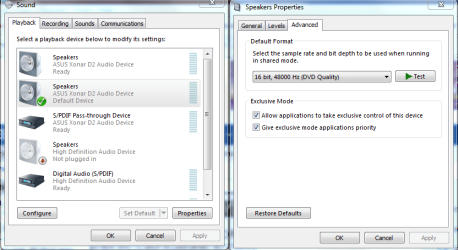
Try switching to DVD quality play back.
 

Attachments

  • application control of this device.PNG
    application control of this device.PNG
    34.8 KB · Views: 446

My Computer My Computer

At a glance

Windows 7 Ult, Windows 8.1 Pro,Q9650-4.275GHz, E8600 4.5GHz, E6750-3.8GHzG.Skill PC2 9600 1200Mhz 5 5 5 15 2TGTX480
Computer type
PC/Desktop
Computer Manufacturer/Model Number
Home built
OS
Windows 7 Ult, Windows 8.1 Pro,
CPU
Q9650-4.275GHz, E8600 4.5GHz, E6750-3.8GHz
Motherboard
Evga 780i FTW
Memory
G.Skill PC2 9600 1200Mhz 5 5 5 15 2T
Graphics Card(s)
GTX480
Sound Card
Asus Xonar D2
Monitor(s) Displays
HannsG
Screen Resolution
1680X1050
Hard Drives
GSkill Phoenix Pro 120GB SSD
PSU
ThermalTake Toughpower 1000Watt modular
Case
ThermalTake XaserV
Cooling
Xigmatek S1283
Keyboard
Logitech G15
Mouse
Logitech G9
Internet Speed
T1
I'm pretty sure I have already tried that, as I have tried all the easy things. I will check though when I get home. It seems like that was greyed out, and I couldn't change it, I'll let you know.
Thanks for the reply though.
 

My Computer My Computer

At a glance

Windows 7AMD Athlon 64 X2 Dual Core Processor 5000 2.6...4GBRadeon 3200
Computer Manufacturer/Model Number
Custom Built
OS
Windows 7
CPU
AMD Athlon 64 X2 Dual Core Processor 5000 2.6 Ghz
Motherboard
Gigabyte MA78GM
Memory
4GB
Graphics Card(s)
Radeon 3200
Sound Card
RealTek HD
Monitor(s) Displays
Samsung LCD
Hard Drives
1TB WD
600GB WD
320GB WD
320GB WD
Ok, I checked and sure enough, that is already selected for DVD, and I was right I can't change it to anything else. It is locked on DVD which is good I assume. I'm surprised I havn't got much feedback for this. I'm going to reinstall before I get to deep into it. If I still can't get it, I guess I'l try going back to Vista. I hope it works this time, but I doubt it, this was already a fresh installation.

Any suggestions to make sure I have a trouble free re install of Window 7 and my Realtek HD audio drivers?
 

My Computer My Computer

At a glance

Windows 7AMD Athlon 64 X2 Dual Core Processor 5000 2.6...4GBRadeon 3200
Computer Manufacturer/Model Number
Custom Built
OS
Windows 7
CPU
AMD Athlon 64 X2 Dual Core Processor 5000 2.6 Ghz
Motherboard
Gigabyte MA78GM
Memory
4GB
Graphics Card(s)
Radeon 3200
Sound Card
RealTek HD
Monitor(s) Displays
Samsung LCD
Hard Drives
1TB WD
600GB WD
320GB WD
320GB WD
Reinstalled, samething, same exact problem.

Can anyone confirm that has WMV clips (perferablly converted from Blu Ray using TMPGEnc Xpress) do you have surround sound using your HDMI to A/V receiver to LCD using Realtek in Windows 7? If you do and it's working, please tell me your setup.

I can't be the only one with this problem. I know theres other people out there that has built there movie libary by converting there Blu Rays to WMV. If you want to them to play on your 360 extender, you pretty much have to.

Maybe I just need to take this up with realtek, since it seems to be a driver issue. If everything is ouputting suround sound but the WMV's, then there must be something the audio drivers are missing, right?

Is it normal that my sound card says that HDCP is not supported? It says it isn't under the realtek HDMI sound setings. I don't think that would be my problem, since AnyDVD removes most protections including HDCP.
 

My Computer My Computer

At a glance

Windows 7AMD Athlon 64 X2 Dual Core Processor 5000 2.6...4GBRadeon 3200
Computer Manufacturer/Model Number
Custom Built
OS
Windows 7
CPU
AMD Athlon 64 X2 Dual Core Processor 5000 2.6 Ghz
Motherboard
Gigabyte MA78GM
Memory
4GB
Graphics Card(s)
Radeon 3200
Sound Card
RealTek HD
Monitor(s) Displays
Samsung LCD
Hard Drives
1TB WD
600GB WD
320GB WD
320GB WD
I finally decided to go back to Vista, didn't want to but didn't have much of a choice. Everything is working great, I have surround sound again for my WMV's using AC3Filter. Windows 7 Audio architect is broken or somethig and AC3Filter refuses to work in W7. It works great in Vista, and it looks like I will be sticking with Vista for awhile. I know you could look at this and say well, it's AC3Filter fault for not working in W7, it can go both ways. One thing that stood out was in Vista, w/o using AC3Filter I still had stereo with my WMV's. In W7, there is no audio with my WMV's, no audio at all.
 

My Computer My Computer

At a glance

Windows 7AMD Athlon 64 X2 Dual Core Processor 5000 2.6...4GBRadeon 3200
Computer Manufacturer/Model Number
Custom Built
OS
Windows 7
CPU
AMD Athlon 64 X2 Dual Core Processor 5000 2.6 Ghz
Motherboard
Gigabyte MA78GM
Memory
4GB
Graphics Card(s)
Radeon 3200
Sound Card
RealTek HD
Monitor(s) Displays
Samsung LCD
Hard Drives
1TB WD
600GB WD
320GB WD
320GB WD
Back
Top