Increased RAM causes Win 7 to hang on boot

cptdzastr

New member
Local time
3:29 AM
Messages
10
I recently upgraded my display to a larger monitor, and as a result my games have increased their load on my system memory. To compensate, I added an additional 4 GB of RAM to the 2 GB I already had. I discovered, however, that Win 7 32 bit still has the memory address limits, and the system only recognized 3 out of the 6 GB of RAM. Since I have a 64 bit processor, I decided to change over to 64 bit to take advantage of the new hardware.

However, attempts to install Windows 7 with 6 GB of RAM failed; the system hung up during installation at about the "Completing installation" point, with a black screen. I removed the new memory and got past the installer errors. But now, whenever I run with the new chips (and I've changed them once already with the same result, so I doubt its hardware error) Windows hangs up during boot (the Windows logo stops waving). The repair facility from the disc doesn't correct the error, and about half the time causes the "BOOTMGR is missing" error on the following boot (I correct that by rebuilding the bcd, but the OS still hangs on the way in).

Any suggestions?
 

My Computer My Computer

OS
Windows 7 Ultimate 64 bit
CPU
AMD Athlon 64 5600+
Motherboard
Asus M2-AVM
Memory
2 GB
Graphics Card(s)
ATI 8500
Monitor(s) Displays
AOC 22" LCD flat panel
what kind of RAM is it? did you set the memory timings correctly?
 

My Computer My Computer

Computer Manufacturer/Model Number
Too many to list.
OS
XP, Seven, 2008R2
CPU
AMD, Intel, VIA
Motherboard
Various
Memory
Corsair, Kingston, etc.
Graphics Card(s)
ATI, NVIDIA
Monitor(s) Displays
Samsung
Hard Drives
Maxtor, Western Digital
Keyboard
qwerty
Internet Speed
22 Mb/s @ home, 1 Gb/s @ server
Other Info
All of my systems still run fastest on XP 32-bit for the most part. Win7 is fun to play with, but I still prefer XP for raw speed, security, and functionality.
What are the specs on the old ram and the specs on the new ram?

Ken
 

My Computer My Computer

Computer Manufacturer/Model Number
HP Pavillion dv-7 1005 Tx
OS
Win 8 Release candidate 8400
CPU
[email protected]
Memory
4 gigs
Graphics Card(s)
Nvidia 9600M
Sound Card
HD built-in
Monitor(s) Displays
17" Wxga
Screen Resolution
1440x900
Cooling
none
Internet Speed
45Mb down 5Mb up
The first set was 2*2GB PC 6400 ram by PNY. The new set is 2*2GB PC6400 ram by Patriot. The settings for the RAM have been set automatically by my BIOS, and its worth noting that the new RAM worked flawlessly in 32 bit Win7 (aside from the fact that Windows saw it but couldn't really use it) with those settings.
 

My Computer My Computer

OS
Windows 7 Ultimate 64 bit
CPU
AMD Athlon 64 5600+
Motherboard
Asus M2-AVM
Memory
2 GB
Graphics Card(s)
ATI 8500
Monitor(s) Displays
AOC 22" LCD flat panel
The first set was 2*2GB PC 6400 ram by PNY. The new set is 2*2GB PC6400 ram by Patriot. The settings for the RAM have been set automatically by my BIOS, and its worth noting that the new RAM worked flawlessly in 32 bit Win7 (aside from the fact that Windows saw it but couldn't really use it) with those settings.

Mixing Ram brands and types hardly ever works right. I strongly advise against it. You also should not need more than 4GB for gaming. You will be much better off running only the matched 4GB kit then setting the memory up,..timings, divider and voltages to manufacture specs in bios manually. If you keep getting the installation errors then clear the cmos and try again.

The best way to handle higher resolutions with bigger screens is to go SLI assuming that your board supports it.

Win7 32 bit probably worked because it can't even access more than 3GB of the 6GB that you installed.

If you want to run more than 4GB there are a few 8GB kits that will work. I've been through this a million times at EVGA forums where I have 34 BR's for giving advice just like this. It may not be what you want to hear but it's the truth. ;)
 

My Computer My Computer

Computer type
PC/Desktop
Computer Manufacturer/Model Number
Home built
OS
Windows 7 Ult, Windows 8.1 Pro,
CPU
Q9650-4.275GHz, E8600 4.5GHz, E6750-3.8GHz
Motherboard
Evga 780i FTW
Memory
G.Skill PC2 9600 1200Mhz 5 5 5 15 2T
Graphics Card(s)
GTX480
Sound Card
Asus Xonar D2
Monitor(s) Displays
HannsG
Screen Resolution
1680X1050
Hard Drives
GSkill Phoenix Pro 120GB SSD
PSU
ThermalTake Toughpower 1000Watt modular
Case
ThermalTake XaserV
Cooling
Xigmatek S1283
Keyboard
Logitech G15
Mouse
Logitech G9
Internet Speed
T1
Mixing Ram brands and types hardly ever works right. I strongly advise against it. You also should not need more than 4GB for gaming.

I doubt the Ram settings are the same for both types of Ram that you have and I also doubt that the Auto settings in bios are getting it right.

The error remains, even removing the original 2 GB and running with just the 4 GB chips. So it wouldn't appear to be an interaction or difference of settings error.
 

My Computer My Computer

OS
Windows 7 Ultimate 64 bit
CPU
AMD Athlon 64 5600+
Motherboard
Asus M2-AVM
Memory
2 GB
Graphics Card(s)
ATI 8500
Monitor(s) Displays
AOC 22" LCD flat panel
The error remains, even removing the original 2 GB and running with just the 4 GB chips. So it wouldn't appear to be an interaction or difference of settings error.

CPT

One thing you could try is occasionally ram needs a slight voltage tweak to work correctly. DO a search here for that and you will find the suggested values. My bios cant be adjusted.

Thanks for the rep btw

Ken
 

My Computer My Computer

Computer Manufacturer/Model Number
HP Pavillion dv-7 1005 Tx
OS
Win 8 Release candidate 8400
CPU
[email protected]
Memory
4 gigs
Graphics Card(s)
Nvidia 9600M
Sound Card
HD built-in
Monitor(s) Displays
17" Wxga
Screen Resolution
1440x900
Cooling
none
Internet Speed
45Mb down 5Mb up
The error remains, even removing the original 2 GB and running with just the 4 GB chips. So it wouldn't appear to be an interaction or difference of settings error.

You will want to go into bios and set up the memory timings and memory voltage manually. The Auto settings hardly ever get it right. You will need to look up the specs for your Ram for this because I'm not sure what your exact type of Ram is.

You will want to use the memory slot futhest from the CPU, then skip a space then install the other one.
 

My Computer My Computer

Computer type
PC/Desktop
Computer Manufacturer/Model Number
Home built
OS
Windows 7 Ult, Windows 8.1 Pro,
CPU
Q9650-4.275GHz, E8600 4.5GHz, E6750-3.8GHz
Motherboard
Evga 780i FTW
Memory
G.Skill PC2 9600 1200Mhz 5 5 5 15 2T
Graphics Card(s)
GTX480
Sound Card
Asus Xonar D2
Monitor(s) Displays
HannsG
Screen Resolution
1680X1050
Hard Drives
GSkill Phoenix Pro 120GB SSD
PSU
ThermalTake Toughpower 1000Watt modular
Case
ThermalTake XaserV
Cooling
Xigmatek S1283
Keyboard
Logitech G15
Mouse
Logitech G9
Internet Speed
T1
You will want to use the memory slot futhest from the CPU, then skip a space then install the other one.

Mine appear to pair directly instead of staggering, but I'll give manually tweaking the voltage a shot and post back anything useful I find out.
 

My Computer My Computer

OS
Windows 7 Ultimate 64 bit
CPU
AMD Athlon 64 5600+
Motherboard
Asus M2-AVM
Memory
2 GB
Graphics Card(s)
ATI 8500
Monitor(s) Displays
AOC 22" LCD flat panel
Mine appear to pair directly instead of staggering, but I'll give manually tweaking the voltage a shot and post back anything useful I find out.

You should always be skipping a slot when only installing 2. The last slot and the second one get the instructions from the CPU first so if only using two slots those should be the ones to use. I'm not sure what you mean by pair directly?

You should be able to look up the specs for your 4GB Ram kit from the manufacture web site.
 

My Computer My Computer

Computer type
PC/Desktop
Computer Manufacturer/Model Number
Home built
OS
Windows 7 Ult, Windows 8.1 Pro,
CPU
Q9650-4.275GHz, E8600 4.5GHz, E6750-3.8GHz
Motherboard
Evga 780i FTW
Memory
G.Skill PC2 9600 1200Mhz 5 5 5 15 2T
Graphics Card(s)
GTX480
Sound Card
Asus Xonar D2
Monitor(s) Displays
HannsG
Screen Resolution
1680X1050
Hard Drives
GSkill Phoenix Pro 120GB SSD
PSU
ThermalTake Toughpower 1000Watt modular
Case
ThermalTake XaserV
Cooling
Xigmatek S1283
Keyboard
Logitech G15
Mouse
Logitech G9
Internet Speed
T1
Yep, that's the board. RAM appears to be paired right next to one another and doesn't dual-channel when I leave spaces open between chips.
 

My Computer My Computer

OS
Windows 7 Ultimate 64 bit
CPU
AMD Athlon 64 5600+
Motherboard
Asus M2-AVM
Memory
2 GB
Graphics Card(s)
ATI 8500
Monitor(s) Displays
AOC 22" LCD flat panel
Yep, that's the board. RAM appears to be paired right next to one another and doesn't dual-channel when I leave spaces open between chips.

Yes for dual channel you want a space between the two. Starting with the slot furthest from the CPU.
 

My Computer My Computer

Computer type
PC/Desktop
Computer Manufacturer/Model Number
Home built
OS
Windows 7 Ult, Windows 8.1 Pro,
CPU
Q9650-4.275GHz, E8600 4.5GHz, E6750-3.8GHz
Motherboard
Evga 780i FTW
Memory
G.Skill PC2 9600 1200Mhz 5 5 5 15 2T
Graphics Card(s)
GTX480
Sound Card
Asus Xonar D2
Monitor(s) Displays
HannsG
Screen Resolution
1680X1050
Hard Drives
GSkill Phoenix Pro 120GB SSD
PSU
ThermalTake Toughpower 1000Watt modular
Case
ThermalTake XaserV
Cooling
Xigmatek S1283
Keyboard
Logitech G15
Mouse
Logitech G9
Internet Speed
T1
Yes for dual channel you want a space between the two. Starting with the slot furthest from the CPU.

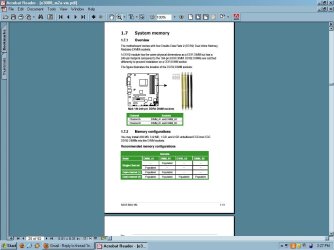
manual ram.JPG

The manual seems to disagree, unless I'm misinterpreting it.
 

My Computer My Computer

OS
Windows 7 Ultimate 64 bit
CPU
AMD Athlon 64 5600+
Motherboard
Asus M2-AVM
Memory
2 GB
Graphics Card(s)
ATI 8500
Monitor(s) Displays
AOC 22" LCD flat panel
The first set was 2*2GB PC 6400 ram by PNY. The new set is 2*2GB PC6400 ram by Patriot. The settings for the RAM have been set automatically by my BIOS, and its worth noting that the new RAM worked flawlessly in 32 bit Win7 (aside from the fact that Windows saw it but couldn't really use it) with those settings.

Did you mean 2*1GB PC 6400 PNY? Other wise you're replacing 4 GB not 2...

Mixing Ram brands and types hardly ever works right. I strongly advise against it. You also should not need more than 4GB for gaming. You will be much better off running only the matched 4GB kit then setting the memory up,..timings, divider and voltages to manufacture specs in bios manually. If you keep getting the installation errors then clear the cmos and try again.

The best way to handle higher resolutions with bigger screens is to go SLI assuming that your board supports it.

Win7 32 bit probably worked because it can't even access more than 3GB of the 6GB that you installed.

If you want to run more than 4GB there are a few 8GB kits that will work. I've been through this a million times at EVGA forums where I have 34 BR's for giving advice just like this. It may not be what you want to hear but it's the truth. ;)

Indeed. The chipset for this particular product seems to have the same issue as my eVGA 780i mobo did for many, many users.

You will want to go into bios and set up the memory timings and memory voltage manually. The Auto settings hardly ever get it right. You will need to look up the specs for your Ram for this because I'm not sure what your exact type of Ram is.

You will want to use the memory slot futhest from the CPU, then skip a space then install the other one.

wrong

Mine appear to pair directly instead of staggering, but I'll give manually tweaking the voltage a shot and post back anything useful I find out.

Correct

You should always be skipping a slot when only installing 2. The last slot and the second one get the instructions from the CPU first so if only using two slots those should be the ones to use. I'm not sure what you mean by pair directly?

You should be able to look up the specs for your 4GB Ram kit from the manufacture web site.

wrong - slot skipping is *not* universal

Yes for dual channel you want a space between the two. Starting with the slot furthest from the CPU.

Nope.

View attachment 26054

The manual seems to disagree, unless I'm misinterpreting it.

You're correct. Also, see techPowerUp :: ASUS M2A-VM Review :: Page 3 / 19 - the very last picture under the Board layout section -
To run your memory in dual-channel mode, you have to put the modules into slots of the same color
 

My Computers My Computers

System One System Two

  • Computer type
    PC/Desktop
    Computer Manufacturer/Model Number
    The Beast Model A (homebrew)
    OS
    Windows 11 21H2 Current build
    CPU
    AMD Ryzen 9 3950X
    Motherboard
    MSI MEG X570 GODLIKE
    Memory
    4 * 32 GB - Corsair Vengeance 3600 MHz
    Graphics Card(s)
    EVGA GeForce RTX 3080 Ti XC3 ULTRA GAMING (12G-P5-3955-KR)
    Sound Card
    Realtek® ALC1220 Codec
    Monitor(s) Displays
    2x Eve Spectrum ES07D03 4K Gaming Monitor (Matte) | Eve Spec
    Screen Resolution
    3x 3840 x 2160
    Hard Drives
    3x Samsung 980 Pro NVMe PCIe 4 M.2 2 TB SSD (MZ-V8P2T0B/AM) } 3x Sabrent Rocket NVMe 4.0 1 TB SSD
    PSU
    PC Power & Cooling’s Silencer Series 1050 Watt, 80 Plus Plat
    Case
    Fractal Design Define 7 XL Dark ATX Full Tower Case
    Cooling
    SteelSeries Apex Pro Wired Gaming Keyboard
    Keyboard
    SteelSeries Apex Pro
    Mouse
    Logitech MX Master 3S | MX Master 3 for business
    Internet Speed
    AT&T LightSpeed Gigabit Duplex Ftth
    Antivirus
    Windows Defender + MB 3
    Browser
    Nightly (default) + Firefox (stable),Chrome, Edge
  • Computer type
    PC/Desktop
    System Manufacturer/Model Number
    Dell Latitude E5470
    OS
    ChromeOS Flex Dev Channel (current)
    CPU
    Intel(R) Core(TM) i5-6300U CPU @ 2.40GHz, 2501 Mhz, 2 Core(s), 4 Logical Processor(s)
    Motherboard
    Dell
    Memory
    16 GB
    Graphics Card(s)
    Intel(R) HD Graphics 520
    Sound Card
    Intel(R) HD Graphics 520 + RealTek Audio
    Monitor(s) Displays
    Dell laptop display 15"
    Screen Resolution
    1920 * 1080
    Hard Drives
    Toshiba 128GB M.2 22300 drive
    INTEL Cherryville 520 Series SSDSC2CW180A 180 GB SATA III SSD
    PSU
    Dell
    Case
    Dell
    Cooling
    Dell
    Keyboard
    Dell
    Mouse
    Logitech MX Master 3S (shared w. Sys 1) | Dell TouchPad
    Internet Speed
    AT&T LightSpeed Gigabit Duplex Ftth
Did you mean 2*1GB PC 6400 PNY? Other wise you're replacing 4 GB not 2...
Perhaps some clarification is in order. Before the display upgrade and this whole mess starting, I had 2 GB of RAM made by Ballistix. The first attempt at upgrade RAM was made by PNY, 2 *2 GB (for an additive 4 GB, totaling 6 GB). I ran into the specified problems, even with the new RAM by itself (though booting with just the Ballistix RAM works, as does any combination of the two in win 7 32 bit). Thinking that perhaps the chips were bad (unlikely, but possible) or that they were in some fashion incompatible with Win 7 64 bit, I exchanged them for Patriot 2 * 2 GB chips. The issue remains the same, so I don't think there's anything inherent to the hardware that could cause it unless it's something I've got set wrong. Modifying the voltage for the Patriot RAM (by itself, without the Ballistix RAM installed) did not appear to make any difference. Windows still hangs during boot, just after the flag completes and starts to wave.
 

My Computer My Computer

OS
Windows 7 Ultimate 64 bit
CPU
AMD Athlon 64 5600+
Motherboard
Asus M2-AVM
Memory
2 GB
Graphics Card(s)
ATI 8500
Monitor(s) Displays
AOC 22" LCD flat panel
Perhaps some clarification is in order. Before the display upgrade and this whole mess starting, I had 2 GB of RAM made by Ballistix. The first attempt at upgrade RAM was made by PNY, 2 *2 GB (for an additive 4 GB, totaling 6 GB). I ran into the specified problems, even with the new RAM by itself (though booting with just the Ballistix RAM works, as does any combination of the two in win 7 32 bit). Thinking that perhaps the chips were bad (unlikely, but possible) or that they were in some fashion incompatible with Win 7 64 bit, I exchanged them for Patriot 2 * 2 GB chips. The issue remains the same, so I don't think there's anything inherent to the hardware that could cause it unless it's something I've got set wrong. Modifying the voltage for the Patriot RAM (by itself, without the Ballistix RAM installed) did not appear to make any difference. Windows still hangs during boot, just after the flag completes and starts to wave.

With 4GB you may need to increase the northbridge voltage to get it stable. It's a standard adjustment on many enthusiast boards but it goes by different names depending on the chipset and bios.

Also with your strange Dimm slot arrangement you would need to use the same colored slots as somebody pointed out. Not many are set up that way. I thought it used an Nvidia chip set with a standard Dimm slot arrangement. Thanks to John and Antman for pointing that out.
 
Last edited:

My Computer My Computer

Computer type
PC/Desktop
Computer Manufacturer/Model Number
Home built
OS
Windows 7 Ult, Windows 8.1 Pro,
CPU
Q9650-4.275GHz, E8600 4.5GHz, E6750-3.8GHz
Motherboard
Evga 780i FTW
Memory
G.Skill PC2 9600 1200Mhz 5 5 5 15 2T
Graphics Card(s)
GTX480
Sound Card
Asus Xonar D2
Monitor(s) Displays
HannsG
Screen Resolution
1680X1050
Hard Drives
GSkill Phoenix Pro 120GB SSD
PSU
ThermalTake Toughpower 1000Watt modular
Case
ThermalTake XaserV
Cooling
Xigmatek S1283
Keyboard
Logitech G15
Mouse
Logitech G9
Internet Speed
T1
I tried tinkering with the voltage for the RAM setting its would allow (not much, admittedly, just the DDR RAM Voltage from 1.8 up to 2.1 in increments of .1 V). None of the settings got the machine through the bootup sequence. When I switched back to Auto, removed the 2*2 GB chips, and put the 2 * 1 GB chips back in it booted up without issue.
 

My Computer My Computer

OS
Windows 7 Ultimate 64 bit
CPU
AMD Athlon 64 5600+
Motherboard
Asus M2-AVM
Memory
2 GB
Graphics Card(s)
ATI 8500
Monitor(s) Displays
AOC 22" LCD flat panel
Resolution

So, having tinkered with just about everything else I tried updating the BIOS (something of a trial since none of the programs available for it works in Win 7, and the BIOS utility only saw CDs in the DVD drive). For some reason, that straightened out this issue. Win 7 64 loaded without a hitch, recognized all 6 GB of RAM, and no longer spontaneously spawns BOOTMGR issues.

A relatively simple fix. It's too bad I got around to it 30 hours into the issue, though.
 

My Computer My Computer

OS
Windows 7 Ultimate 64 bit
CPU
AMD Athlon 64 5600+
Motherboard
Asus M2-AVM
Memory
2 GB
Graphics Card(s)
ATI 8500
Monitor(s) Displays
AOC 22" LCD flat panel
Glad you got this worked out, b/c I have been in here very little - only for brief periods of time, at that.

In all honesty, though, I am surprised that I never thought to mention checking for a BIOS upgrade - it took a few iterations of BIOS upgrades before this issue was solved for many folks, after which all reported smooth transitions to larger amounts of memory, but I had forgotten the end result (and also assumed that you already had the latest BIOS, which was my fault entirely).
 

My Computers My Computers

System One System Two

  • Computer type
    PC/Desktop
    Computer Manufacturer/Model Number
    The Beast Model A (homebrew)
    OS
    Windows 11 21H2 Current build
    CPU
    AMD Ryzen 9 3950X
    Motherboard
    MSI MEG X570 GODLIKE
    Memory
    4 * 32 GB - Corsair Vengeance 3600 MHz
    Graphics Card(s)
    EVGA GeForce RTX 3080 Ti XC3 ULTRA GAMING (12G-P5-3955-KR)
    Sound Card
    Realtek® ALC1220 Codec
    Monitor(s) Displays
    2x Eve Spectrum ES07D03 4K Gaming Monitor (Matte) | Eve Spec
    Screen Resolution
    3x 3840 x 2160
    Hard Drives
    3x Samsung 980 Pro NVMe PCIe 4 M.2 2 TB SSD (MZ-V8P2T0B/AM) } 3x Sabrent Rocket NVMe 4.0 1 TB SSD
    PSU
    PC Power & Cooling’s Silencer Series 1050 Watt, 80 Plus Plat
    Case
    Fractal Design Define 7 XL Dark ATX Full Tower Case
    Cooling
    SteelSeries Apex Pro Wired Gaming Keyboard
    Keyboard
    SteelSeries Apex Pro
    Mouse
    Logitech MX Master 3S | MX Master 3 for business
    Internet Speed
    AT&T LightSpeed Gigabit Duplex Ftth
    Antivirus
    Windows Defender + MB 3
    Browser
    Nightly (default) + Firefox (stable),Chrome, Edge
  • Computer type
    PC/Desktop
    System Manufacturer/Model Number
    Dell Latitude E5470
    OS
    ChromeOS Flex Dev Channel (current)
    CPU
    Intel(R) Core(TM) i5-6300U CPU @ 2.40GHz, 2501 Mhz, 2 Core(s), 4 Logical Processor(s)
    Motherboard
    Dell
    Memory
    16 GB
    Graphics Card(s)
    Intel(R) HD Graphics 520
    Sound Card
    Intel(R) HD Graphics 520 + RealTek Audio
    Monitor(s) Displays
    Dell laptop display 15"
    Screen Resolution
    1920 * 1080
    Hard Drives
    Toshiba 128GB M.2 22300 drive
    INTEL Cherryville 520 Series SSDSC2CW180A 180 GB SATA III SSD
    PSU
    Dell
    Case
    Dell
    Cooling
    Dell
    Keyboard
    Dell
    Mouse
    Logitech MX Master 3S (shared w. Sys 1) | Dell TouchPad
    Internet Speed
    AT&T LightSpeed Gigabit Duplex Ftth
Back
Top