how to disable Windows Media Center ir tramnsever

trinaz

New member
Member
VIP
Local time
8:15 AM
Messages
477
Location
Phoenix
how to disable Windows Media Center ir receiver

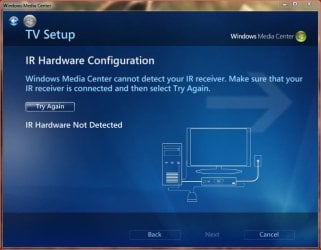
Just moved to new home...in trying to set up media Center...I keep getting an error in setup saying MC cannot detect your IR receiver.

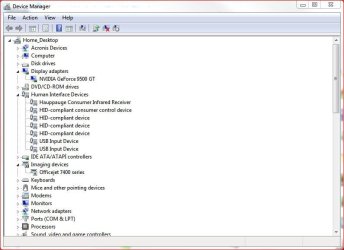
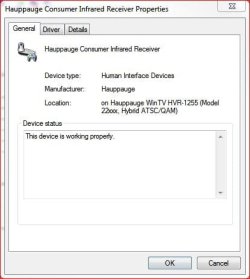
To my knowledge I have never used an the Hauppauge remote that goes with my TV tuner Card (jpg attached). This system is setup same as the old where Win 7 Pro 64bit ran Media Center without any issues or problems.

I do not want to use a remote control for Media Center...and I never had a remote (IR) setup for any Media Center running on any of the PC's in the old house

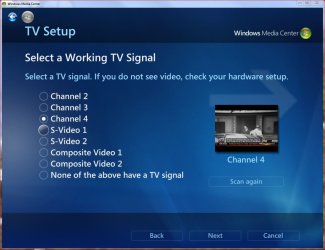
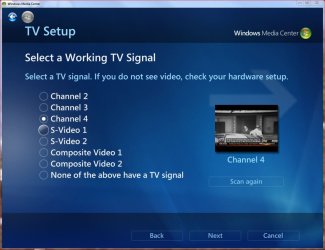
Media Center setup finds the TV signal as shown in pic 4. Can I disable or bypass the TV Setup screen that fails on IR Hardware Configuration and how ?

Thanks...TiminAz
 

Attachments
  • Capture.JPG
    Capture.JPG
    51.1 KB · Views: 1
  • Capture2.JPG
    Capture2.JPG
    53.3 KB · Views: 1
  • Capture3.JPG
    Capture3.JPG
    28.9 KB · Views: 11
  • Capture4.JPG
    Capture4.JPG
    86 KB · Views: 0
Last edited:

My Computer My Computer

At a glance

Windows 7 Pro 64bit SP1AMD FX-6100 Six-Core Processor2ea Corsair-1333MHz-PC3-10666-240-pin-CMX4GX3...NVIDIA GeForce GT 630 - 1023MB (EVGA)
Computer type
PC/Desktop
Computer Manufacturer/Model Number
Self built
OS
Windows 7 Pro 64bit SP1
CPU
AMD FX-6100 Six-Core Processor
Motherboard
M5A78L-M LX PLUS
Memory
2ea Corsair-1333MHz-PC3-10666-240-pin-CMX4GX3M1A1333C9
Graphics Card(s)
NVIDIA GeForce GT 630 - 1023MB (EVGA)
Sound Card
OnBoard Via High Def Audio
Monitor(s) Displays
Samsung 204B main - ASUS VS228 secondary
Screen Resolution
1920x1080 main - 1920x1080 secondary
Hard Drives
Samsung SSD 840 128GB Win7 Pro 64bit - Western Digital WDC 465GB - Seagate 640GB Sata B/U - Maxtor 500GB Sata B/U - Maxtor 200GB Sata
PSU
Antec 650 watt
Cooling
Multiple case fans
Keyboard
MS USB dual Wireless Keyboard - IntelliType Pro
Mouse
MS USB dual Wireless Mouse - IntelliPoint
Internet Speed
Cox Cable
Antivirus
Bitdefender IS 2014
Browser
FireFox Primary - IE 11
Other Info
Hauppaguge Win TV HVR-1250 (Model 22xxx, Hybrid ATSC/QAM)
Samsung HD103SI USB 1TB Desktop Drive - Backup & Disk Image storage
What do you use to control your MC system? I use an MC remote handset which has an infra-red receiver that pugs into a usb port, this is in addition to the handsets that came with my TV tuners.
 

My Computer My Computer

At a glance

Windows 7VariousVarious
Computer Manufacturer/Model Number
Various
OS
Windows 7
CPU
Various
Motherboard
Various
Memory
Various
What do you use to control your MC system? I use an MC remote handset which has an infra-red receiver that pugs into a usb port, this is in addition to the handsets that came with my TV tuners.

I don't use anything but the keyboard...have the Hauppauge remote that came with the TV card....but never use it. The little receiver button however was connected to the card at the old house where all was well and also at the new house....but here I can not get past the "MC cannot detect your IR receiver" in MC setup.

I had to completely uninstall MC and then reinstall because we kept getting a start-up error saying "PlayReady could not complete update"...also I find this PlayReady thing is/was a common problem with MC

At this time the coaxial cable is running from the Cox control box to the PC. I "think" at the house I had it connected before it went to the Cox box...but not sure. I know when I set up both PC's for media center at the old house I did not get any indication from setup that there was/is a "Set-Top Box.

If I bypass the set-top box in the new home...I get all the channels and guide is created along with the live TV mini-screen in the attached jpg...but...when I try in regular Media Center all I get is a scrambled color screen...picture in mini box during setup is replaced by scrambled screen...no sound either.

All equipment is the same...cox box, etc, that worked in the other house...just can't get it going here ??!!

Thanks
 

Attachments

  • Capture4.JPG
    Capture4.JPG
    86 KB · Views: 0

My Computer My Computer

At a glance

Windows 7 Pro 64bit SP1AMD FX-6100 Six-Core Processor2ea Corsair-1333MHz-PC3-10666-240-pin-CMX4GX3...NVIDIA GeForce GT 630 - 1023MB (EVGA)
Computer type
PC/Desktop
Computer Manufacturer/Model Number
Self built
OS
Windows 7 Pro 64bit SP1
CPU
AMD FX-6100 Six-Core Processor
Motherboard
M5A78L-M LX PLUS
Memory
2ea Corsair-1333MHz-PC3-10666-240-pin-CMX4GX3M1A1333C9
Graphics Card(s)
NVIDIA GeForce GT 630 - 1023MB (EVGA)
Sound Card
OnBoard Via High Def Audio
Monitor(s) Displays
Samsung 204B main - ASUS VS228 secondary
Screen Resolution
1920x1080 main - 1920x1080 secondary
Hard Drives
Samsung SSD 840 128GB Win7 Pro 64bit - Western Digital WDC 465GB - Seagate 640GB Sata B/U - Maxtor 500GB Sata B/U - Maxtor 200GB Sata
PSU
Antec 650 watt
Cooling
Multiple case fans
Keyboard
MS USB dual Wireless Keyboard - IntelliType Pro
Mouse
MS USB dual Wireless Mouse - IntelliPoint
Internet Speed
Cox Cable
Antivirus
Bitdefender IS 2014
Browser
FireFox Primary - IE 11
Other Info
Hauppaguge Win TV HVR-1250 (Model 22xxx, Hybrid ATSC/QAM)
Samsung HD103SI USB 1TB Desktop Drive - Backup & Disk Image storage
I notice your Hauppage is a hybrid card are you taking a feed from a set top box? If you are the MC expects you to be using an IR Blaster to allow MC to change the channels on the box, I have a similar hybrid card, although I don't actually use the IR Blaster it had to be plugged in to allow me to get through the card setup in MC.
 

My Computer My Computer

At a glance

Windows 7VariousVarious
Computer Manufacturer/Model Number
Various
OS
Windows 7
CPU
Various
Motherboard
Various
Memory
Various
....If you are the MC expects you to be using an IR Blaster to allow MC to change the channels on the box,....

Thanks much...I do have the IR blaster that came with the card plugged into the card at the back of the PC box. Have removed and re-plugged a number of times...no luck ?

Does media Center just check for an IR plug attached to the PC (ie. plugged into the card next to the coaxial cable input of the card)...or does the plug have to be located where the MC setup can see it...the IR button that is ? How exactly does MC read or locate the Hauppauge IR blaster ?

If the IR button & cable/jack is bad...are there generic type IR cable/buttons available

Thanks....TiminAz
 
Last edited:

My Computer My Computer

At a glance

Windows 7 Pro 64bit SP1AMD FX-6100 Six-Core Processor2ea Corsair-1333MHz-PC3-10666-240-pin-CMX4GX3...NVIDIA GeForce GT 630 - 1023MB (EVGA)
Computer type
PC/Desktop
Computer Manufacturer/Model Number
Self built
OS
Windows 7 Pro 64bit SP1
CPU
AMD FX-6100 Six-Core Processor
Motherboard
M5A78L-M LX PLUS
Memory
2ea Corsair-1333MHz-PC3-10666-240-pin-CMX4GX3M1A1333C9
Graphics Card(s)
NVIDIA GeForce GT 630 - 1023MB (EVGA)
Sound Card
OnBoard Via High Def Audio
Monitor(s) Displays
Samsung 204B main - ASUS VS228 secondary
Screen Resolution
1920x1080 main - 1920x1080 secondary
Hard Drives
Samsung SSD 840 128GB Win7 Pro 64bit - Western Digital WDC 465GB - Seagate 640GB Sata B/U - Maxtor 500GB Sata B/U - Maxtor 200GB Sata
PSU
Antec 650 watt
Cooling
Multiple case fans
Keyboard
MS USB dual Wireless Keyboard - IntelliType Pro
Mouse
MS USB dual Wireless Mouse - IntelliPoint
Internet Speed
Cox Cable
Antivirus
Bitdefender IS 2014
Browser
FireFox Primary - IE 11
Other Info
Hauppaguge Win TV HVR-1250 (Model 22xxx, Hybrid ATSC/QAM)
Samsung HD103SI USB 1TB Desktop Drive - Backup & Disk Image storage
MC needs to see the IR Blaster as it tries to send codes to change the channels on a stb, whether it needs to be connected directly or via the card will depend on whether the card exposes the Blaster to MC or it is solely used by the card, mine is directly connected so I can't help, but given that your system was working and now isn't it might be worth a couple of £s to see if the cable is damaged, alternatively, do you have any friends who can lend you a cable to check.

eBay has new Blasters for £4, they may be cheaper.
 

My Computer My Computer

At a glance

Windows 7VariousVarious
Computer Manufacturer/Model Number
Various
OS
Windows 7
CPU
Various
Motherboard
Various
Memory
Various
Back
Top