How to disable Windows Explorer's "today, yesterday, last week" groups

wayki

New member
Local time
9:01 PM
Messages
3
How to disable Windows Explorer's "today, yesterday, last week" groups

This startred a few days ago on it's own, and i hate it - i want a flat windows explorer....normal....i don't want this library style rubbish.

please help.
 

My Computer My Computer

At a glance

win7 64bit1.54gbaverage
Computer type
PC/Desktop
Computer Manufacturer/Model Number
asus
OS
win7 64bit
CPU
1.5
Memory
4gb
Graphics Card(s)
average
Antivirus
mss
Browser
chrome

My Computer My Computer

At a glance

Win-7-Pro64bit 7-H-Prem-64biti7-5930K 2nd i9-9940x both water blocked VRM'...Trident-z 3200C14 2nd Trident-z 3600C16EVGA 1080ti ftw3 2nd Titan Xp both water blocked
Computer type
PC/Desktop
Computer Manufacturer/Model Number
Custom assembled by me :}
OS
Win-7-Pro64bit 7-H-Prem-64bit
CPU
i7-5930K 2nd i9-9940x both water blocked VRM's too
Motherboard
ASUS SABERTOOTH X99 2nd ASUS x299 Apex
Memory
Trident-z 3200C14 2nd Trident-z 3600C16
Graphics Card(s)
EVGA 1080ti ftw3 2nd Titan Xp both water blocked
Sound Card
Built-in Realtek
Monitor(s) Displays
1-AOC G2460PG 24"G-Sync 144Hz/ 2nd 1-ASUS VG248QE 24" 144Hz
Screen Resolution
1920 x 1080 144Hz
Hard Drives
2-Samsung M.2 Evo & Evo Plus
2-Samsung 850 EVO 500GB SSD's/ 3-2.5 W.D. Black 1tb-&3-1tb/3-3.5 WD Black 1tb hdd's
PSU
EVGA SuperNOVA 1000-P2 2nd 1200-P2
Case
2-Corsair Obsidian Series 450D Black ATX Mid Tower
Cooling
Custom water loops
Keyboard
Logitech G710+/ 2nd Logitech G910
Mouse
2-RedDragon M901 Perdition 16400 dpi Gaming mouse = wired
Internet Speed
Comcast Ping 19ms 89.31mbps download speed 6.12mbps upload
Antivirus
Malwarebytes Pro/ Superantispyware Pro
Browser
FireFox & Pale moon
Other Info
2nd ASUS X299 Apex/Intel i9-9940x with Custom water loop/7H-Prem-x64/Corsair 450D case/Ram Trident-z 3600C16 4x8gb / Samsung970Evo plus 500gb SSD/Dual ssd EZ swap evo/PSU EVGA SuperNova 1200w-P2 80+Platinum/GPU Titan Xp /8-ML-140 on push-pull on 2-280GTX rads
that's not it....

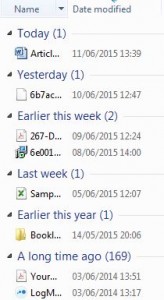
i want this today,last week, groups thing stopped....it started on its own.

Windows-Explorer-Grouped-by-Date-164x300.jpg
 

My Computer My Computer

At a glance

win7 64bit1.54gbaverage
Computer type
PC/Desktop
Computer Manufacturer/Model Number
asus
OS
win7 64bit
CPU
1.5
Memory
4gb
Graphics Card(s)
average
Antivirus
mss
Browser
chrome

My Computer My Computer

At a glance

Win-7-Pro64bit 7-H-Prem-64biti7-5930K 2nd i9-9940x both water blocked VRM'...Trident-z 3200C14 2nd Trident-z 3600C16EVGA 1080ti ftw3 2nd Titan Xp both water blocked
Computer type
PC/Desktop
Computer Manufacturer/Model Number
Custom assembled by me :}
OS
Win-7-Pro64bit 7-H-Prem-64bit
CPU
i7-5930K 2nd i9-9940x both water blocked VRM's too
Motherboard
ASUS SABERTOOTH X99 2nd ASUS x299 Apex
Memory
Trident-z 3200C14 2nd Trident-z 3600C16
Graphics Card(s)
EVGA 1080ti ftw3 2nd Titan Xp both water blocked
Sound Card
Built-in Realtek
Monitor(s) Displays
1-AOC G2460PG 24"G-Sync 144Hz/ 2nd 1-ASUS VG248QE 24" 144Hz
Screen Resolution
1920 x 1080 144Hz
Hard Drives
2-Samsung M.2 Evo & Evo Plus
2-Samsung 850 EVO 500GB SSD's/ 3-2.5 W.D. Black 1tb-&3-1tb/3-3.5 WD Black 1tb hdd's
PSU
EVGA SuperNOVA 1000-P2 2nd 1200-P2
Case
2-Corsair Obsidian Series 450D Black ATX Mid Tower
Cooling
Custom water loops
Keyboard
Logitech G710+/ 2nd Logitech G910
Mouse
2-RedDragon M901 Perdition 16400 dpi Gaming mouse = wired
Internet Speed
Comcast Ping 19ms 89.31mbps download speed 6.12mbps upload
Antivirus
Malwarebytes Pro/ Superantispyware Pro
Browser
FireFox & Pale moon
Other Info
2nd ASUS X299 Apex/Intel i9-9940x with Custom water loop/7H-Prem-x64/Corsair 450D case/Ram Trident-z 3600C16 4x8gb / Samsung970Evo plus 500gb SSD/Dual ssd EZ swap evo/PSU EVGA SuperNova 1200w-P2 80+Platinum/GPU Titan Xp /8-ML-140 on push-pull on 2-280GTX rads
Win 7: Disable Windows Explorer's "today, yesterday, etc.

Windows 7: How to disable Windows Explorer's "today, yesterday, last week" groups in Explorer

I have been fighting this problem for a few months now and finally found the answer.
Your folder options for current sub folder is set to "picture mode".
From what I've found there is only one place this can be reset.
Go to the root folder, or at least one level up and right click on the folder.
Click on "Properties"
Click on "Customize"
The top option is labelled "Optimize This folder For"
The drop down menu will list four options including "Pictures" which you DO NOT want.
Select "General Items" and apply.
You're welcome!
Mr Rick
 

My Computer My Computer

At a glance

Win 7
Computer type
PC/Desktop
OS
Win 7
Found the cure for this in Windows 10.

Hi all,


Anyone who landed here for a cure on "How to remove Today, Yesterday, Last Week" groups in Windows Explorer..


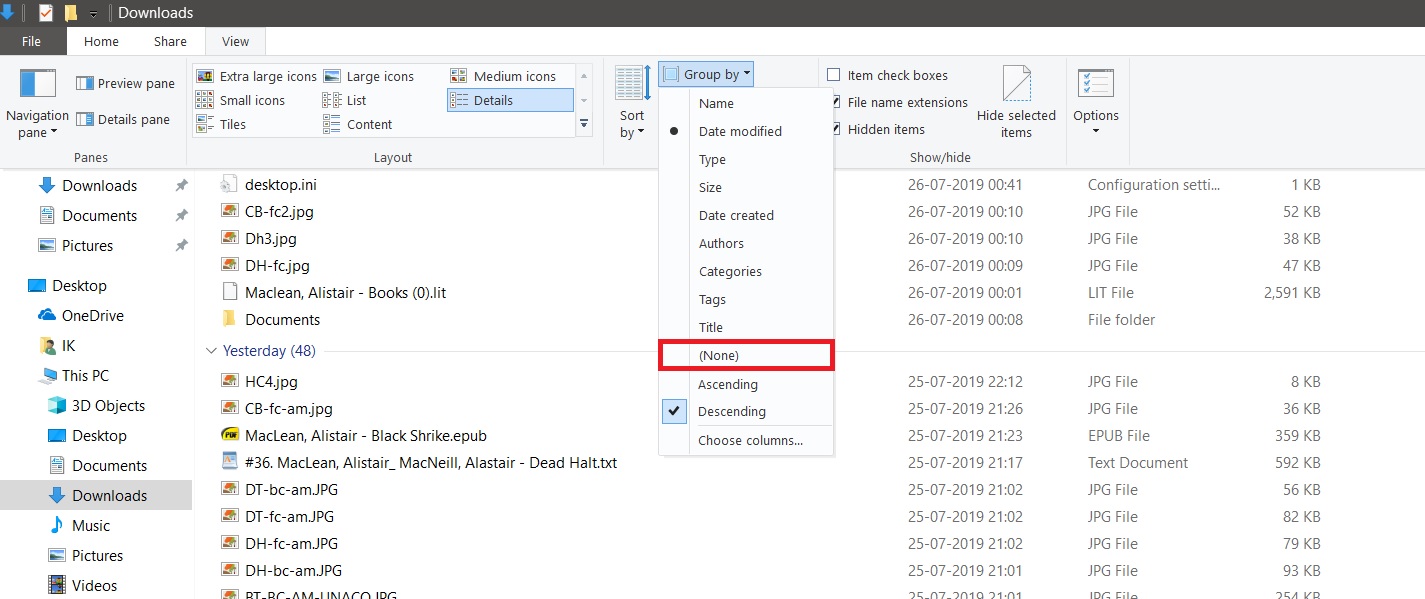
1. Go to the View Menu (Marked in Red) in File Explorer and Pull down the Group by Menu (Marked in Blue)..


qbjVz39.jpg


2. Pull down the Group by Sub-Menu and click on None :


ozRThOs.jpg


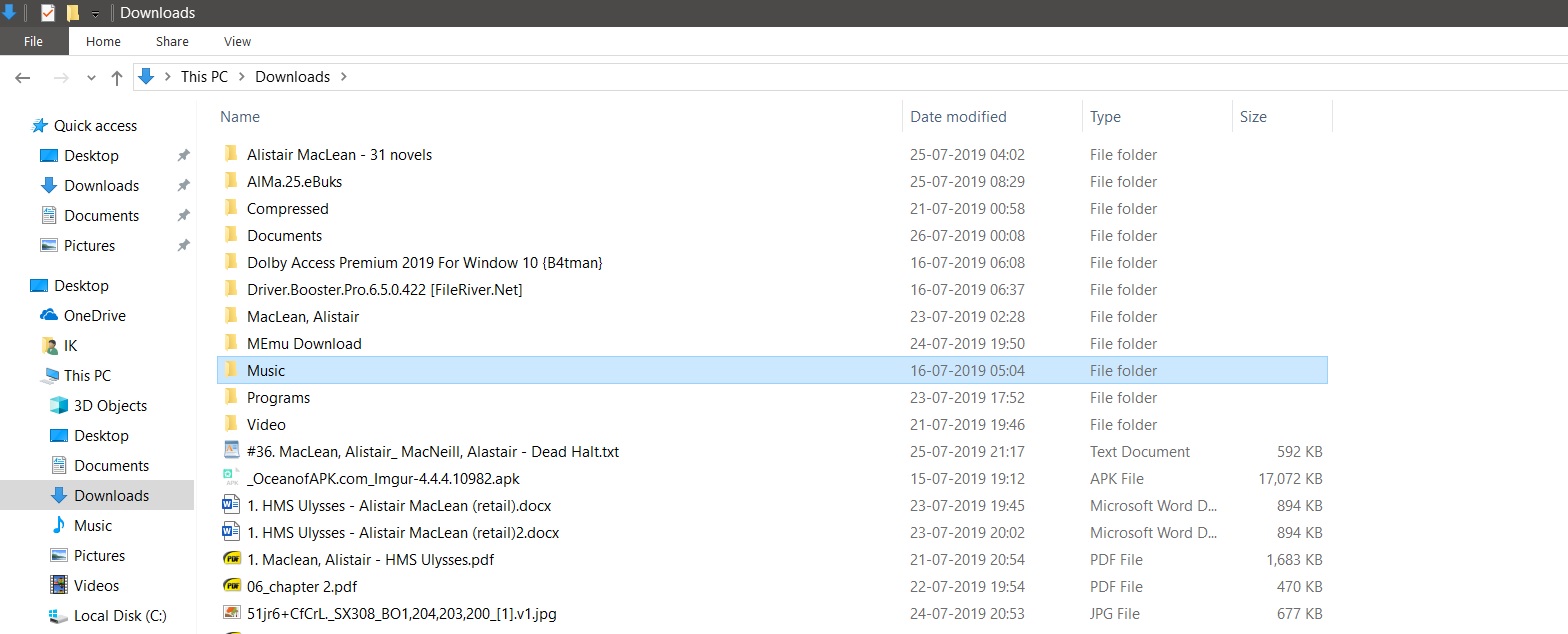
3. AAAaaaannnddd.. Viola : No More Today, Yesterday, Last Week Groups!!


nwOHYFG.jpg
 

My Computer My Computer

At a glance

Windows 7 Ultimate x86Intel Core2Duo E8400DDR2 PC-6400 4 GB @ 800 MHzIntegrated G31 Graphics Controller
Computer type
PC/Desktop
Computer Manufacturer/Model Number
ECS G31T-M
OS
Windows 7 Ultimate x86
CPU
Intel Core2Duo E8400
Motherboard
ECS G31T-M based on Intel G31/G33 chipset
Memory
DDR2 PC-6400 4 GB @ 800 MHz
Graphics Card(s)
Integrated G31 Graphics Controller
Sound Card
Realtek ALC662 Integrated
Monitor(s) Displays
Samsung B1350N 19" 1366X768 5ms Refresh rate..
Screen Resolution
1366X768 32-bit colour @ 60Hz
Hard Drives
Seagate 160 GB ST3160215A - Disk 0
Western Digital 500 GB WD5000AAKX-221CA1 - Disk 1
Case
Open Bench
Keyboard
Microsoft keyboard 400
Mouse
Dell Optical Mouse MS116
Internet Speed
12/15 Mbps Up/Dwn
Antivirus
AVAST 2016 Free
Browser
Firefox 51.0
Other Info
Novabench verified Benchmark:

https://novabench.com/view/1172172
Many thanks for your solution. After latest update windows decided on this format all on its own without my knowledge. Back to how I want it now!
 

My Computer My Computer

At a glance

windows 10 64 bit
Computer type
PC/Desktop
OS
windows 10 64 bit
in post number 5 it worked for a sub folder but i can't get rid of that today,yesterday,last week... crap out of the root c:\ Just as the original post it started on its own. How do i get rid of it for the root c: drive as there is no properties, view general listing at all for that.
 

My Computer My Computer

At a glance

7 64
Computer type
Laptop
OS
7 64
can't get the correct menu for start task manager

it has no view as to what is running so obviously no choice to terminate a program. How do i get the correct menu for that?
 

My Computer My Computer

At a glance

7 64
Computer type
Laptop
OS
7 64
Hi all,


Anyone who landed here for a cure on "How to remove Today, Yesterday, Last Week" groups in Windows Explorer..


1. Go to the View Menu (Marked in Red) in File Explorer and Pull down the Group by Menu (Marked in Blue)..


qbjVz39.jpg


2. Pull down the Group by Sub-Menu and click on None :


ozRThOs.jpg


3. AAAaaaannnddd.. Viola : No More Today, Yesterday, Last Week Groups!!


nwOHYFG.jpg

This works perfectly! Thanks!
 

My Computer My Computer

At a glance

Windows 10
Computer type
PC/Desktop
OS
Windows 10
This startred a few days ago on it's own, and i hate it - i want a flat windows explorer....normal....i don't want this library style rubbish.


please help.

try right click at the inside folder, then choose 'Group by' and select 'none'. done
 

My Computers My Computers

  • At a glance

    windows 7intel4gb
    Computer type
    Laptop
    Computer Manufacturer/Model Number
    Toshiba
    OS
    windows 7
    CPU
    intel
    Memory
    4gb
    Hard Drives
    250gb
    Antivirus
    microsoft malware
    Browser
    opera
  • Computer type
    PC/Desktop
Back
Top