Solved Want to take back control of computer.

Did you reboot when requested?
 

My Computer My Computer

At a glance

Windows 7 Ultimate X64 SP1Intel i5-2550K, Differing ~4.4-4.8GHz No buil...16GB G.Skill Sniper 1866MHz @ 2133MHz 2x8GBASUS GTX650TIB-DC2OC-2GD5, (650TI Boost)
Computer type
PC/Desktop
Computer Manufacturer/Model Number
Home Built Desktop By DataTech
OS
Windows 7 Ultimate X64 SP1
CPU
Intel i5-2550K, Differing ~4.4-4.8GHz No built in GPU
Motherboard
ASUS P8Z68-V PRO/GEN3
Memory
16GB G.Skill Sniper 1866MHz @ 2133MHz 2x8GB
Graphics Card(s)
ASUS GTX650TIB-DC2OC-2GD5, (650TI Boost)
Sound Card
Onboard Realtek 5-1
Monitor(s) Displays
Samsung P2570HD
Screen Resolution
1920x1080
Hard Drives
Samsung 840 Pro 256GB SSD for OS, 500GB Seagate Constellation (Enterprise drive) for Data
PSU
Corsair HX650W
Case
Inwin Dragon Rider
Cooling
Hyper 212 EVO w/two Noctua fans, push-pull, @1300 RPM
Keyboard
E-Z Eyes, bright yellow keys with large characters
Mouse
steelseries SENSEI Laser Pro Gaming
Internet Speed
48-51Mbs Mbs down, 11 Mbs up Xfinity Cable
Antivirus
Norton Internet Security 2013
Browser
IE 10, Opera, Pale Moon if needed
Other Info
4 case fans, LG BluRay-RE, ASUS DVD-RW, Mr. Fusion power supply, 1.21 gigawatts.
yes, each time. I know over the last 4 days I ran that program and can't seem to get rid of those 2 lines. Are they something a peson could remove manually or should not? Thanks
 

My Computer My Computer

At a glance

Windows 7 Home Premium 32 bit
OS
Windows 7 Home Premium 32 bit
What program? I'm a bit lost as to what we are trying to do now. :confused:
 

My Computer My Computer

At a glance

Windows 7 Ultimate X64 SP1Intel i5-2550K, Differing ~4.4-4.8GHz No buil...16GB G.Skill Sniper 1866MHz @ 2133MHz 2x8GBASUS GTX650TIB-DC2OC-2GD5, (650TI Boost)
Computer type
PC/Desktop
Computer Manufacturer/Model Number
Home Built Desktop By DataTech
OS
Windows 7 Ultimate X64 SP1
CPU
Intel i5-2550K, Differing ~4.4-4.8GHz No built in GPU
Motherboard
ASUS P8Z68-V PRO/GEN3
Memory
16GB G.Skill Sniper 1866MHz @ 2133MHz 2x8GB
Graphics Card(s)
ASUS GTX650TIB-DC2OC-2GD5, (650TI Boost)
Sound Card
Onboard Realtek 5-1
Monitor(s) Displays
Samsung P2570HD
Screen Resolution
1920x1080
Hard Drives
Samsung 840 Pro 256GB SSD for OS, 500GB Seagate Constellation (Enterprise drive) for Data
PSU
Corsair HX650W
Case
Inwin Dragon Rider
Cooling
Hyper 212 EVO w/two Noctua fans, push-pull, @1300 RPM
Keyboard
E-Z Eyes, bright yellow keys with large characters
Mouse
steelseries SENSEI Laser Pro Gaming
Internet Speed
48-51Mbs Mbs down, 11 Mbs up Xfinity Cable
Antivirus
Norton Internet Security 2013
Browser
IE 10, Opera, Pale Moon if needed
Other Info
4 case fans, LG BluRay-RE, ASUS DVD-RW, Mr. Fusion power supply, 1.21 gigawatts.
What program? I'm a bit lost as to what we are trying to do now. :confused:

I'm wanting to make sure I gotten rid of all the HP Printer stuff from computer before I try to reinstall HP Pinter software. Thanks
 

My Computer My Computer

At a glance

Windows 7 Home Premium 32 bit
OS
Windows 7 Home Premium 32 bit
Try the links under my sig for Revo and Driver sweeper. Use Revo first. Sorry if I'm repeating my self.

reboot after using each one, check you folders for any hp ones. Go ahead and do a delete on them, they should be empty.
 

My Computer My Computer

At a glance

Windows 7 Ultimate X64 SP1Intel i5-2550K, Differing ~4.4-4.8GHz No buil...16GB G.Skill Sniper 1866MHz @ 2133MHz 2x8GBASUS GTX650TIB-DC2OC-2GD5, (650TI Boost)
Computer type
PC/Desktop
Computer Manufacturer/Model Number
Home Built Desktop By DataTech
OS
Windows 7 Ultimate X64 SP1
CPU
Intel i5-2550K, Differing ~4.4-4.8GHz No built in GPU
Motherboard
ASUS P8Z68-V PRO/GEN3
Memory
16GB G.Skill Sniper 1866MHz @ 2133MHz 2x8GB
Graphics Card(s)
ASUS GTX650TIB-DC2OC-2GD5, (650TI Boost)
Sound Card
Onboard Realtek 5-1
Monitor(s) Displays
Samsung P2570HD
Screen Resolution
1920x1080
Hard Drives
Samsung 840 Pro 256GB SSD for OS, 500GB Seagate Constellation (Enterprise drive) for Data
PSU
Corsair HX650W
Case
Inwin Dragon Rider
Cooling
Hyper 212 EVO w/two Noctua fans, push-pull, @1300 RPM
Keyboard
E-Z Eyes, bright yellow keys with large characters
Mouse
steelseries SENSEI Laser Pro Gaming
Internet Speed
48-51Mbs Mbs down, 11 Mbs up Xfinity Cable
Antivirus
Norton Internet Security 2013
Browser
IE 10, Opera, Pale Moon if needed
Other Info
4 case fans, LG BluRay-RE, ASUS DVD-RW, Mr. Fusion power supply, 1.21 gigawatts.
I don't want to confuse, but to remove your shares (Folders with green lines) download and open the attached folder, open it up and then follow my steps listed inside the file on each folder with the green lines you want to remove.

I was currently using Windows 8.1 however please be assured that the steps are the same for Windows 7.

Hope This Helps,
Josh! :)
 

Attachments

My Computer My Computer

At a glance

Windows 7 Professional x64 SP1 ; Windows Serv...Intel Core i5 2400 @ 3.10GHz8.0GB DDR3 @ 665MHz (2GBx4)AMD Radeon HD 6870
Computer type
PC/Desktop
Computer Manufacturer/Model Number
Custom Built
OS
Windows 7 Professional x64 SP1 ; Windows Server 2012 R2 Standard
CPU
Intel Core i5 2400 @ 3.10GHz
Motherboard
Foxconn H67MP-S/-V/H67MP
Memory
8.0GB DDR3 @ 665MHz (2GBx4)
Graphics Card(s)
AMD Radeon HD 6870
Sound Card
Realtek High Definition Audio
Monitor(s) Displays
AOC 2243W & SMB1930NW
Screen Resolution
1440x900 & 1920x1080
Hard Drives
977GB Seagate ST31000524AS ATA Drive (SATA)
250GB WD iSCSI attached Drive
PSU
750W Gaming PSU
Case
Novatech Night
Cooling
Fan
Keyboard
Dell Standard PS/2 Keyboard
Mouse
R.A.T 07 Gaming Mouse
Internet Speed
Download: 10 Mbps Ping: 30ms Upload: 0.81 Mbps
Browser
Google Chrome
Other Info
Optiarc DVD RW AD-5260S ATA Device
Try the links under my sig for Revo and Driver sweeper. Use Revo first. Sorry if I'm repeating my self.

reboot after using each one, check you folders for any hp ones. Go ahead and do a delete on them, they should be empty.

OK I've been using Driver Sweeper. I'll download Revo and try it too. Thanks
 

My Computer My Computer

At a glance

Windows 7 Home Premium 32 bit
OS
Windows 7 Home Premium 32 bit
I don't want to confuse, but to remove your shares (Folders with green lines) download and open the attached folder, open it up and then follow my steps listed inside the file on each folder with the green lines you want to remove.

I was currently using Windows 8.1 however please be assured that the steps are the same for Windows 7.

Hope This Helps,
Josh! :)

So can you explain to me what you are calling the "shares folders" with the green lines under them. I tried clicking your link for the zip file and nothing happens.
I was thinking today, that about a few months ago I installed a larger Seagate HDD and everything went well. Could that be the reason for the green lines under the folders. I remember somebody said that that meant the folders were some where else? Thanks
 

My Computer My Computer

At a glance

Windows 7 Home Premium 32 bit
OS
Windows 7 Home Premium 32 bit
I don't want to confuse, but to remove your shares (Folders with green lines) download and open the attached folder, open it up and then follow my steps listed inside the file on each folder with the green lines you want to remove.

I was currently using Windows 8.1 however please be assured that the steps are the same for Windows 7.

Hope This Helps,
Josh! :)

So can you explain to me what you are calling the "shares folders" with the green lines under them. I tried clicking your link for the zip file and nothing happens.
I was thinking today, that about a few months ago I installed a larger Seagate HDD and everything went well. Could that be the reason for the green lines under the folders. I remember somebody said that that meant the folders were some where else? Thanks


Odd... I just downloaded the zip and opened it and the file is in there (Should open in IE)...


The folders with the green lines are called shares. They are linked with folders on your computer and when a share is setup a different computer on your network can then access that folder stored on your harddrive and then make any changes or retrieve files. Essentially it is a way of transferring files between two different computers on a network without copying them to a USB drive and then taking that drive to the other computer.

Unless you explicitly want this I would remove all the shares you have as this can be a security issue since remote users could have access to your files.

As for the download issue, did you check your download folder? What browser are you using?

Many Thanks,
Josh! :)
 

My Computer My Computer

At a glance

Windows 7 Professional x64 SP1 ; Windows Serv...Intel Core i5 2400 @ 3.10GHz8.0GB DDR3 @ 665MHz (2GBx4)AMD Radeon HD 6870
Computer type
PC/Desktop
Computer Manufacturer/Model Number
Custom Built
OS
Windows 7 Professional x64 SP1 ; Windows Server 2012 R2 Standard
CPU
Intel Core i5 2400 @ 3.10GHz
Motherboard
Foxconn H67MP-S/-V/H67MP
Memory
8.0GB DDR3 @ 665MHz (2GBx4)
Graphics Card(s)
AMD Radeon HD 6870
Sound Card
Realtek High Definition Audio
Monitor(s) Displays
AOC 2243W & SMB1930NW
Screen Resolution
1440x900 & 1920x1080
Hard Drives
977GB Seagate ST31000524AS ATA Drive (SATA)
250GB WD iSCSI attached Drive
PSU
750W Gaming PSU
Case
Novatech Night
Cooling
Fan
Keyboard
Dell Standard PS/2 Keyboard
Mouse
R.A.T 07 Gaming Mouse
Internet Speed
Download: 10 Mbps Ping: 30ms Upload: 0.81 Mbps
Browser
Google Chrome
Other Info
Optiarc DVD RW AD-5260S ATA Device
I don't want to confuse, but to remove your shares (Folders with green lines) download and open the attached folder, open it up and then follow my steps listed inside the file on each folder with the green lines you want to remove.

I was currently using Windows 8.1 however please be assured that the steps are the same for Windows 7.

Hope This Helps,
Josh! :)

So can you explain to me what you are calling the "shares folders" with the green lines under them. I tried clicking your link for the zip file and nothing happens.
I was thinking today, that about a few months ago I installed a larger Seagate HDD and everything went well. Could that be the reason for the green lines under the folders. I remember somebody said that that meant the folders were some where else? Thanks


Odd... I just downloaded the zip and opened it and the file is in there (Should open in IE)...


The folders with the green lines are called shares. They are linked with folders on your computer and when a share is setup a different computer on your network can then access that folder stored on your harddrive and then make any changes or retrieve files. Essentially it is a way of transferring files between two different computers on a network without copying them to a USB drive and then taking that drive to the other computer.

Unless you explicitly want this I would remove all the shares you have as this can be a security issue since remote users could have access to your files.

As for the download issue, did you check your download folder? What browser are you using?

Many Thanks,
Josh! :)
Hey, thanks, that's clearer now. This is the only computer in the house. So there should be those green lines there. I'll look harder for the zip folder. It's not a very large folder so maybe it downloaded fast and I sisn't notice. That might be another issue, because there has been times (not very often) in the past that I've had to open a link with Safari. Thanks for the answer back on share folders.
 

My Computer My Computer

At a glance

Windows 7 Home Premium 32 bit
OS
Windows 7 Home Premium 32 bit
So can you explain to me what you are calling the "shares folders" with the green lines under them. I tried clicking your link for the zip file and nothing happens.
I was thinking today, that about a few months ago I installed a larger Seagate HDD and everything went well. Could that be the reason for the green lines under the folders. I remember somebody said that that meant the folders were some where else? Thanks


Odd... I just downloaded the zip and opened it and the file is in there (Should open in IE)...


The folders with the green lines are called shares. They are linked with folders on your computer and when a share is setup a different computer on your network can then access that folder stored on your harddrive and then make any changes or retrieve files. Essentially it is a way of transferring files between two different computers on a network without copying them to a USB drive and then taking that drive to the other computer.

Unless you explicitly want this I would remove all the shares you have as this can be a security issue since remote users could have access to your files.

As for the download issue, did you check your download folder? What browser are you using?

Many Thanks,
Josh! :)
Hey, thanks, that's clearer now. This is the only computer in the house. So there should be those green lines there. I'll look harder for the zip folder. It's not a very large folder so maybe it downloaded fast and I isn't notice. That might be another issue, because there has been times (not very often) in the past that I've had to open a link with Safari. Thanks for the answer back on share folders.

I got it downloaded with Safari and opened. Why I can't do that IE some times I suppose is for another topic. I couldn't get it to work as you stated. Was you saying to click on USERS folder in Rick-PC and not Rick-PC? I clicked on Users folder and advanced share and the "share this folder" was already marked and the share name was USERS, or am I suppose to remove the check mark from the "share this folder"? Also didn't understand step 10. Thanks
 

My Computer My Computer

At a glance

Windows 7 Home Premium 32 bit
OS
Windows 7 Home Premium 32 bit
Under the network tab with the green lined folders you are meant to follow the steps and then when it comes to advanced sharing UNCHECK the box and then apply and ok etc...

Do this on every folder with the green line

Josh
 

My Computer My Computer

At a glance

Windows 7 Professional x64 SP1 ; Windows Serv...Intel Core i5 2400 @ 3.10GHz8.0GB DDR3 @ 665MHz (2GBx4)AMD Radeon HD 6870
Computer type
PC/Desktop
Computer Manufacturer/Model Number
Custom Built
OS
Windows 7 Professional x64 SP1 ; Windows Server 2012 R2 Standard
CPU
Intel Core i5 2400 @ 3.10GHz
Motherboard
Foxconn H67MP-S/-V/H67MP
Memory
8.0GB DDR3 @ 665MHz (2GBx4)
Graphics Card(s)
AMD Radeon HD 6870
Sound Card
Realtek High Definition Audio
Monitor(s) Displays
AOC 2243W & SMB1930NW
Screen Resolution
1440x900 & 1920x1080
Hard Drives
977GB Seagate ST31000524AS ATA Drive (SATA)
250GB WD iSCSI attached Drive
PSU
750W Gaming PSU
Case
Novatech Night
Cooling
Fan
Keyboard
Dell Standard PS/2 Keyboard
Mouse
R.A.T 07 Gaming Mouse
Internet Speed
Download: 10 Mbps Ping: 30ms Upload: 0.81 Mbps
Browser
Google Chrome
Other Info
Optiarc DVD RW AD-5260S ATA Device
Try the links under my sig for Revo and Driver sweeper. Use Revo first. Sorry if I'm repeating my self.

reboot after using each one, check you folders for any hp ones. Go ahead and do a delete on them, they should be empty.
Boy, that revo found stuff that Driver didn't. Thanks
 

My Computer My Computer

At a glance

Windows 7 Home Premium 32 bit
OS
Windows 7 Home Premium 32 bit
Under the network tab with the green lined folders you are meant to follow the steps and then when it comes to advanced sharing UNCHECK the box and then apply and ok etc...

Do this on every folder with the green line

Josh
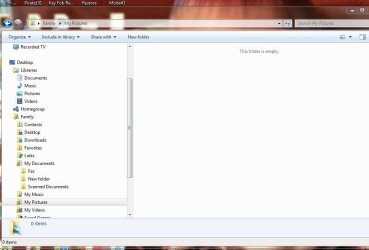
Great, done that and I can't see the folders any more. I'm assuming that they aren't available to anyone? Hope this is my last concern, you can still see Family> My Documents, My Pictures, and My Videos still have padlocks showing up on them. I can click on them and still access them but there is nothing in them. What goes there? Thanks
 

Attachments

  • Capturegood job.JPG
    Capturegood job.JPG
    46.1 KB · Views: 3

My Computer My Computer

At a glance

Windows 7 Home Premium 32 bit
OS
Windows 7 Home Premium 32 bit
You are correct, the padlocks mean that they are not allowed to be accessed by anyone but the owner.

Are you currently logged into the family account? If not then this will be why you cannot see anything. Even if you are an Administrator you will not be able to view other users files by default

Josh
 

My Computer My Computer

At a glance

Windows 7 Professional x64 SP1 ; Windows Serv...Intel Core i5 2400 @ 3.10GHz8.0GB DDR3 @ 665MHz (2GBx4)AMD Radeon HD 6870
Computer type
PC/Desktop
Computer Manufacturer/Model Number
Custom Built
OS
Windows 7 Professional x64 SP1 ; Windows Server 2012 R2 Standard
CPU
Intel Core i5 2400 @ 3.10GHz
Motherboard
Foxconn H67MP-S/-V/H67MP
Memory
8.0GB DDR3 @ 665MHz (2GBx4)
Graphics Card(s)
AMD Radeon HD 6870
Sound Card
Realtek High Definition Audio
Monitor(s) Displays
AOC 2243W & SMB1930NW
Screen Resolution
1440x900 & 1920x1080
Hard Drives
977GB Seagate ST31000524AS ATA Drive (SATA)
250GB WD iSCSI attached Drive
PSU
750W Gaming PSU
Case
Novatech Night
Cooling
Fan
Keyboard
Dell Standard PS/2 Keyboard
Mouse
R.A.T 07 Gaming Mouse
Internet Speed
Download: 10 Mbps Ping: 30ms Upload: 0.81 Mbps
Browser
Google Chrome
Other Info
Optiarc DVD RW AD-5260S ATA Device
You are correct, the padlocks mean that they are not allowed to be accessed by anyone but the owner.

Are you currently logged into the family account? If not then this will be why you cannot see anything. Even if you are an Administrator you will not be able to view other users files by default

Josh
I'm on the family account, but we done have to login on this side. I can open them and there's no picture and/or video showing up. Unlike up in Desktop/Libraries/Pictures/My Pictures/(E:) folders there are picture showing up. My pictures are stored on my (E:) drive. So can I become owner of these folders? In the clip I've got Family/My Documents open and Pictures folder open Thanks
 

Attachments

  • Captureagainagain.JPG
    Captureagainagain.JPG
    50.3 KB · Views: 6

My Computer My Computer

At a glance

Windows 7 Home Premium 32 bit
OS
Windows 7 Home Premium 32 bit
If your pictures are stored on your E: drive then yes you can become an owner however by default you should have access to them anyway.

The folders you are viewing are not on your E: drive. It is under

C:\Users\Family\My Pictures... etc

I would use you libraries that are located just above the 'Homegroup' option in the right hand pane to view your pictures and documents since these should contain your E:\ drive files. If not then you can add them.

Hope This Helps To Clarify,
Josh! :)
 

My Computer My Computer

At a glance

Windows 7 Professional x64 SP1 ; Windows Serv...Intel Core i5 2400 @ 3.10GHz8.0GB DDR3 @ 665MHz (2GBx4)AMD Radeon HD 6870
Computer type
PC/Desktop
Computer Manufacturer/Model Number
Custom Built
OS
Windows 7 Professional x64 SP1 ; Windows Server 2012 R2 Standard
CPU
Intel Core i5 2400 @ 3.10GHz
Motherboard
Foxconn H67MP-S/-V/H67MP
Memory
8.0GB DDR3 @ 665MHz (2GBx4)
Graphics Card(s)
AMD Radeon HD 6870
Sound Card
Realtek High Definition Audio
Monitor(s) Displays
AOC 2243W & SMB1930NW
Screen Resolution
1440x900 & 1920x1080
Hard Drives
977GB Seagate ST31000524AS ATA Drive (SATA)
250GB WD iSCSI attached Drive
PSU
750W Gaming PSU
Case
Novatech Night
Cooling
Fan
Keyboard
Dell Standard PS/2 Keyboard
Mouse
R.A.T 07 Gaming Mouse
Internet Speed
Download: 10 Mbps Ping: 30ms Upload: 0.81 Mbps
Browser
Google Chrome
Other Info
Optiarc DVD RW AD-5260S ATA Device
If your pictures are stored on your E: drive then yes you can become an owner however by default you should have access to them anyway.

The folders you are viewing are not on your E: drive. It is under

C:\Users\Family\My Pictures... etc

I would use you libraries that are located just above the 'Homegroup' option in the right hand pane to view your pictures and documents since these should contain your E:\ drive files. If not then you can add them.

Hope This Helps To Clarify,
Josh! :)
yes I can view them from Libraries folder and they are on my E: drive. I was wondering about just deleting those with padlocks and making new folders under Family/ My Pictures will that unlock them? Am I not in the family account? I thought I used to be able to view them there. So what do you call the picture images I viewing in Libraries? Thanks
 

My Computer My Computer

At a glance

Windows 7 Home Premium 32 bit
OS
Windows 7 Home Premium 32 bit
Your library will show all the files from different locations. For example your pictures library will show the pictures on your E:\ drive as well as any pictures stored in My Pictures

The My Pictures folder will not show the files in the E:\ drive therefore meaning if you only have pictures on your E:\ drive you will not see anything in the My Pictures folder

For example my library below shows that there are two locations with pictures that I have set. C:\Users\Josh & G:\

library.JPG

The padlock does not mean that it is restricted in any way. All it means is that you told the computer not to share that folder with other people on your network. If you wish to remove the padlock then right click on the folder with the padlock and then click on properties

Click on the security tab and then 'Edit'

Once the edit box appears , click on 'HomeUsers' and then click on 'Remove'. After that click on apply and OK etc... This should remove the padlock from the folder and show it as a normal folder

Please repeat this process on any other folders that you wish to remove the padlock from.

Hope This Helps,
Josh :)
 

My Computer My Computer

At a glance

Windows 7 Professional x64 SP1 ; Windows Serv...Intel Core i5 2400 @ 3.10GHz8.0GB DDR3 @ 665MHz (2GBx4)AMD Radeon HD 6870
Computer type
PC/Desktop
Computer Manufacturer/Model Number
Custom Built
OS
Windows 7 Professional x64 SP1 ; Windows Server 2012 R2 Standard
CPU
Intel Core i5 2400 @ 3.10GHz
Motherboard
Foxconn H67MP-S/-V/H67MP
Memory
8.0GB DDR3 @ 665MHz (2GBx4)
Graphics Card(s)
AMD Radeon HD 6870
Sound Card
Realtek High Definition Audio
Monitor(s) Displays
AOC 2243W & SMB1930NW
Screen Resolution
1440x900 & 1920x1080
Hard Drives
977GB Seagate ST31000524AS ATA Drive (SATA)
250GB WD iSCSI attached Drive
PSU
750W Gaming PSU
Case
Novatech Night
Cooling
Fan
Keyboard
Dell Standard PS/2 Keyboard
Mouse
R.A.T 07 Gaming Mouse
Internet Speed
Download: 10 Mbps Ping: 30ms Upload: 0.81 Mbps
Browser
Google Chrome
Other Info
Optiarc DVD RW AD-5260S ATA Device
rickluc do you realize that My Pictures and Pictures are two different locations? They also may or may not contain the same things. It all depends how they are set up.
 

My Computer My Computer

At a glance

Windows 10 Pro. 64/ version 1709 Windows 7 Pr...Intel i7-6800K @ 4.3Corsair Platinum 16 gig @2400EVGA GTX 1070 OC
Computer type
PC/Desktop
Computer Manufacturer/Model Number
Home made Desktop
OS
Windows 10 Pro. 64/ version 1709 Windows 7 Pro/64
CPU
Intel i7-6800K @ 4.3
Motherboard
ASUS X-99 Deluxe II
Memory
Corsair Platinum 16 gig @2400
Graphics Card(s)
EVGA GTX 1070 OC
Monitor(s) Displays
Asus 27" LED LCD/VE278Q
Screen Resolution
1920-1080 or 1280-720 HDMI
Hard Drives
INTEL SSD 730-240 Gb Sata 3.0/
PSU
EVGA Platium 1200W
Case
Phanteks Luxe Tempered Glass 8 fans/ one radiator
Cooling
XSPC/ Water Cooled CPU
Keyboard
Das 4 Professional
Mouse
Logitech M705/MX Anywhere 2-S
Internet Speed
100 mbits
Antivirus
Microsoft Security Essentials/ Malwarebytes Premium 3.0/ SAS
Browser
I.E. 11 default/Firefox/ ISP Time Warner Cable/Spectrum
Other Info
LG BluRay Burner/
Sound system-KLipsch-THX/
Icy Dock ssd Hot Swap bays.
Back
Top