Solved Want to take back control of computer.

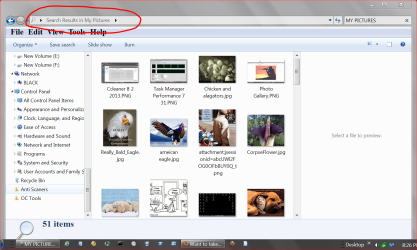
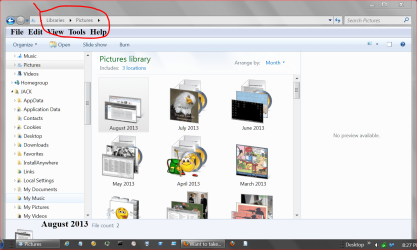
rickluc do you realize that My Pictures and Pictures are two different locations? They also may or may not contain the same things. It all depends how they are set up.
No I didn't. What are the two locations? The two folders were titled My Pictures though. I did go sign into My Admin. account and clicked on the three folders that had padlocks on them and a message window came up and it said something like this, you do not have ownership on this folder and I could have by clicking yes so I clicked yes and it away the padlocks. Whet into the family account and the padlocks are gone off of those 3 folders under Family. I can live with that. I am curious why the shortcuts don't show up like in Libraries and users>Rick? Thanks
 

My Computer My Computer

At a glance

Windows 7 Home Premium 32 bit
OS
Windows 7 Home Premium 32 bit
My Pictures.PNG

PICTURES.PNG

How you got the locks on some pictures I don't know. Maybe someone else that uses the computer did the lock thing.
 

My Computer My Computer

At a glance

Windows 10 Pro. 64/ version 1709 Windows 7 Pr...Intel i7-6800K @ 4.3Corsair Platinum 16 gig @2400EVGA GTX 1070 OC
Computer type
PC/Desktop
Computer Manufacturer/Model Number
Home made Desktop
OS
Windows 10 Pro. 64/ version 1709 Windows 7 Pro/64
CPU
Intel i7-6800K @ 4.3
Motherboard
ASUS X-99 Deluxe II
Memory
Corsair Platinum 16 gig @2400
Graphics Card(s)
EVGA GTX 1070 OC
Monitor(s) Displays
Asus 27" LED LCD/VE278Q
Screen Resolution
1920-1080 or 1280-720 HDMI
Hard Drives
INTEL SSD 730-240 Gb Sata 3.0/
PSU
EVGA Platium 1200W
Case
Phanteks Luxe Tempered Glass 8 fans/ one radiator
Cooling
XSPC/ Water Cooled CPU
Keyboard
Das 4 Professional
Mouse
Logitech M705/MX Anywhere 2-S
Internet Speed
100 mbits
Antivirus
Microsoft Security Essentials/ Malwarebytes Premium 3.0/ SAS
Browser
I.E. 11 default/Firefox/ ISP Time Warner Cable/Spectrum
Other Info
LG BluRay Burner/
Sound system-KLipsch-THX/
Icy Dock ssd Hot Swap bays.
Your library will show all the files from different locations. For example your pictures library will show the pictures on your E:\ drive as well as any pictures stored in My Pictures

The My Pictures folder will not show the files in the E:\ drive therefore meaning if you only have pictures on your E:\ drive you will not see anything in the My Pictures folder

For example my library below shows that there are two locations with pictures that I have set. C:\Users\Josh & G:\

View attachment 279404

The padlock does not mean that it is restricted in any way. All it means is that you told the computer not to share that folder with other people on your network. If you wish to remove the padlock then right click on the folder with the padlock and then click on properties

Click on the security tab and then 'Edit'

Once the edit box appears , click on 'HomeUsers' and then click on 'Remove'. After that click on apply and OK etc... This should remove the padlock from the folder and show it as a normal folder

Please repeat this process on any other folders that you wish to remove the padlock from.

Hope This Helps,
Josh :)
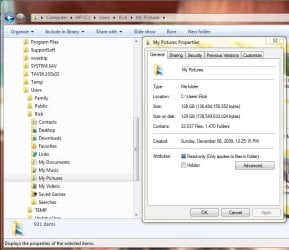
So are you saying that my pictures are actually stored in my E: drive, my C:>Libraries>picture folder>My Pictures folder, my HP (C:) drive>Users> Rick> My Pictures folder? Or are the images in everything other that the Computer>HP_Pavilion (E:) folder just a shortcut (link) to the (E:) drive folder? Thanks
 

Attachments

  • again.JPG
    again.JPG
    57.6 KB · Views: 3
  • againagain.JPG
    againagain.JPG
    51.8 KB · Views: 2

My Computer My Computer

At a glance

Windows 7 Home Premium 32 bit
OS
Windows 7 Home Premium 32 bit
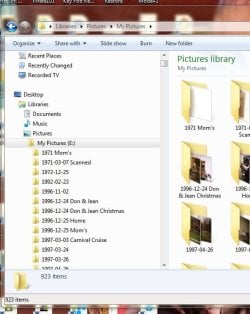
View attachment 279418

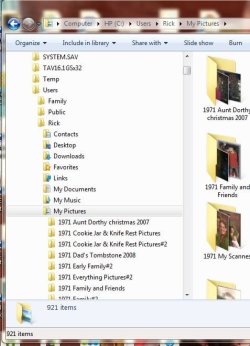
View attachment 279419

How you got the locks on some pictures I don't know. Maybe someone else that uses the computer did the lock thing.
I think I got it now. These clips are showing my Pictures are actually on my C: drive in my Computer\HP(C:)\Users\Rick\My Pictures folder . And actually on my E: drive and what's showing up in Desktop\Libraries\Pictures\My Pictures, My Documents, My Videos folders are shortcuts to the pictures on the E: drive? Thanks
 

Attachments

  • Picture Location C Users Rick.JPG
    Picture Location C Users Rick.JPG
    66.3 KB · Views: 2
  • Picture Location E.JPG
    Picture Location E.JPG
    67.2 KB · Views: 2

My Computer My Computer

At a glance

Windows 7 Home Premium 32 bit
OS
Windows 7 Home Premium 32 bit
You are correct in saying that the pictures in the 'Pictures Library' are in actual fact links to your E: drive :)

If a folder shown in the libraries have a drive letter next to it then it is a link to that drive. If it doesn't then it will be stored on your C:\Users\%USERNAME% area

Josh
 

My Computer My Computer

At a glance

Windows 7 Professional x64 SP1 ; Windows Serv...Intel Core i5 2400 @ 3.10GHz8.0GB DDR3 @ 665MHz (2GBx4)AMD Radeon HD 6870
Computer type
PC/Desktop
Computer Manufacturer/Model Number
Custom Built
OS
Windows 7 Professional x64 SP1 ; Windows Server 2012 R2 Standard
CPU
Intel Core i5 2400 @ 3.10GHz
Motherboard
Foxconn H67MP-S/-V/H67MP
Memory
8.0GB DDR3 @ 665MHz (2GBx4)
Graphics Card(s)
AMD Radeon HD 6870
Sound Card
Realtek High Definition Audio
Monitor(s) Displays
AOC 2243W & SMB1930NW
Screen Resolution
1440x900 & 1920x1080
Hard Drives
977GB Seagate ST31000524AS ATA Drive (SATA)
250GB WD iSCSI attached Drive
PSU
750W Gaming PSU
Case
Novatech Night
Cooling
Fan
Keyboard
Dell Standard PS/2 Keyboard
Mouse
R.A.T 07 Gaming Mouse
Internet Speed
Download: 10 Mbps Ping: 30ms Upload: 0.81 Mbps
Browser
Google Chrome
Other Info
Optiarc DVD RW AD-5260S ATA Device
Thanks a lot for every ones help. Extra thanks to Shadowjr. You've all had good comments and suggestions.
 

My Computer My Computer

At a glance

Windows 7 Home Premium 32 bit
OS
Windows 7 Home Premium 32 bit
I will get this thread to be marked as solved :)

If you have any further queries regarding this issue then please don't hesitate to post back here.

Josh :)
 

My Computer My Computer

At a glance

Windows 7 Professional x64 SP1 ; Windows Serv...Intel Core i5 2400 @ 3.10GHz8.0GB DDR3 @ 665MHz (2GBx4)AMD Radeon HD 6870
Computer type
PC/Desktop
Computer Manufacturer/Model Number
Custom Built
OS
Windows 7 Professional x64 SP1 ; Windows Server 2012 R2 Standard
CPU
Intel Core i5 2400 @ 3.10GHz
Motherboard
Foxconn H67MP-S/-V/H67MP
Memory
8.0GB DDR3 @ 665MHz (2GBx4)
Graphics Card(s)
AMD Radeon HD 6870
Sound Card
Realtek High Definition Audio
Monitor(s) Displays
AOC 2243W & SMB1930NW
Screen Resolution
1440x900 & 1920x1080
Hard Drives
977GB Seagate ST31000524AS ATA Drive (SATA)
250GB WD iSCSI attached Drive
PSU
750W Gaming PSU
Case
Novatech Night
Cooling
Fan
Keyboard
Dell Standard PS/2 Keyboard
Mouse
R.A.T 07 Gaming Mouse
Internet Speed
Download: 10 Mbps Ping: 30ms Upload: 0.81 Mbps
Browser
Google Chrome
Other Info
Optiarc DVD RW AD-5260S ATA Device
Just remember that Windows Explorer doesn't store things. It just keeps track of where things are located. When you tick on something it take you to the place they are actually installed. (stored) It's kind of like a index or glossary in a book. They just point you to the page or chapter in the book where the information you are looking for is located.
Example: A book on plants. You look in the glossary for roses. Their is no pictures or information on roses their. What their is the word roses and a chapter/page to go to see pictures and learn about about roses.
 

My Computer My Computer

At a glance

Windows 10 Pro. 64/ version 1709 Windows 7 Pr...Intel i7-6800K @ 4.3Corsair Platinum 16 gig @2400EVGA GTX 1070 OC
Computer type
PC/Desktop
Computer Manufacturer/Model Number
Home made Desktop
OS
Windows 10 Pro. 64/ version 1709 Windows 7 Pro/64
CPU
Intel i7-6800K @ 4.3
Motherboard
ASUS X-99 Deluxe II
Memory
Corsair Platinum 16 gig @2400
Graphics Card(s)
EVGA GTX 1070 OC
Monitor(s) Displays
Asus 27" LED LCD/VE278Q
Screen Resolution
1920-1080 or 1280-720 HDMI
Hard Drives
INTEL SSD 730-240 Gb Sata 3.0/
PSU
EVGA Platium 1200W
Case
Phanteks Luxe Tempered Glass 8 fans/ one radiator
Cooling
XSPC/ Water Cooled CPU
Keyboard
Das 4 Professional
Mouse
Logitech M705/MX Anywhere 2-S
Internet Speed
100 mbits
Antivirus
Microsoft Security Essentials/ Malwarebytes Premium 3.0/ SAS
Browser
I.E. 11 default/Firefox/ ISP Time Warner Cable/Spectrum
Other Info
LG BluRay Burner/
Sound system-KLipsch-THX/
Icy Dock ssd Hot Swap bays.
Back
Top