My Laptop started to run really slow where it would take about 10 minutes to get to the log-in screen, I ran virus checks nothing came up, done a de fragment nothing helped to speed it up. Then about 3-4 days later the Laptop would not boot into Windows 7 Home Premium.
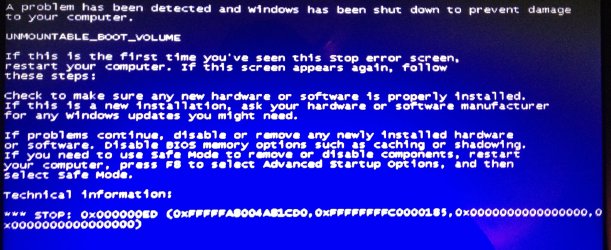
When running start Windows normally it would get to the logo then restart itself again, when I went into start-up repair I was met with a black screen and white cursor then the Windows background appeared but after about an hour nothing else happened. All the F8 option (i.e. Safe Mode) do not work either. I ran a memory diagnostics tool check and nothing came back. After disabling automatic restart I go the message UNMOUNTABLE_BOOT_VOLUME STOP: 0x000000ED.
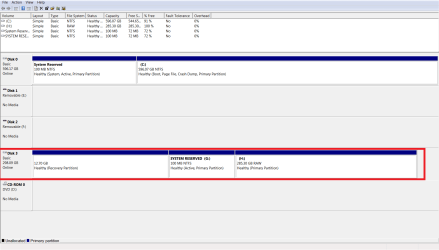
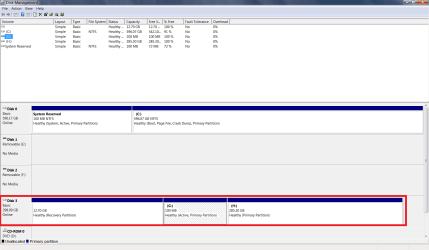
Finally to see if I could recover my files and check whether the HDD was functioning I removed it fro the Laptop and placed it into a HDD Docking Station. Under disk management I could see the HDD with all 3 of its partitions expect in Computer I could only access SYSTEM RESERVED, The other two partitions are fine but do not appear?
I do know a thing or to about Windows PC's but I have now fully exercised all my knowledgeable resources, if anyone can assist in this issue or perhaps lead me to a thread that's relevant (I haven't found any so far) then that would also be appreciated.
Attachments
photo.JPG
411.2 KB
· Views: 40
My Computer
At a glance
Windows 10 Proi7 6th Gen 6700KCorsair LPX 32GbNvidia Palit NVIDIA GeForce GTX 1060 6gb
Computer type
PC/Desktop
Computer Manufacturer/Model Number
Custom Build
OS
Windows 10 Pro
CPU
i7 6th Gen 6700K
Motherboard
Gigabyte Gaming 5 EU
Memory
Corsair LPX 32Gb
Graphics Card(s)
Nvidia Palit NVIDIA GeForce GTX 1060 6gb
Hard Drives
WD Blue 1tb
WD Blue 1tb
Samsung Pro SSD 512gb
Samsung Evo SSD 250gb
Usual causes: Hard drive problem, File system problem, Improper boot parameters
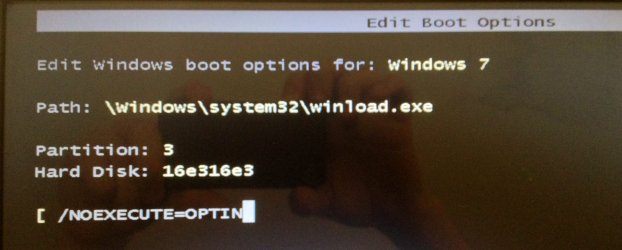
From the screenshot of device manager you uploaded, it seems that the boot parameters are right. Still follow it, from the beginning: Troubleshooting Windows 7 Failure to Start
Also, You need to do some Disc checks. Seatool for dos: SeaTools | Seagate download
Burn it in a blank cd. boot from the CD, click on "Accept", wait for it to finish detecting the drives, then in the upper left corner select "Basic Tests", then select "Long Test" and let it run.
You can use Win32 DiscImager to create a bootable USB and run Seatools for DOS. Follow this post to know how to make a bootable Seatools USB.
This test you help you to be sure if the HDD is really in problem or not.
Before I try this would it worth using a windows 7 installation disk to try and fix the problem? I only have a disk for Windows 7 Professional, but would it work for my Acer Laptop which is running Home Premium?
My Computer
At a glance
Windows 10 Proi7 6th Gen 6700KCorsair LPX 32GbNvidia Palit NVIDIA GeForce GTX 1060 6gb
Computer type
PC/Desktop
Computer Manufacturer/Model Number
Custom Build
OS
Windows 10 Pro
CPU
i7 6th Gen 6700K
Motherboard
Gigabyte Gaming 5 EU
Memory
Corsair LPX 32Gb
Graphics Card(s)
Nvidia Palit NVIDIA GeForce GTX 1060 6gb
Hard Drives
WD Blue 1tb
WD Blue 1tb
Samsung Pro SSD 512gb
Samsung Evo SSD 250gb
I would follow Arc's advice if I were you. He knows what he is talking about here hence his BSOD badge!!!
My Computer
At a glance
Microsoft Windows 7 Home Premium 64-bit 7601 ...Intel(R) Core(TM) i7-3770 CPU @ 3.40GHz8.00 GBIntel(R) HD Graphics 4000
Computer type
PC/Desktop
OS
Microsoft Windows 7 Home Premium 64-bit 7601 Multiprocessor Free Service Pack 1
CPU
Intel(R) Core(TM) i7-3770 CPU @ 3.40GHz
Motherboard
ASUSTeK COMPUTER INC. P8H77-M
Memory
8.00 GB
Graphics Card(s)
Intel(R) HD Graphics 4000
Sound Card
On Board
Monitor(s) Displays
Dell 24"
Screen Resolution
1920 x 1080
Hard Drives
(1) INTEL SSDSC2CT180A3 ATA Device (2) ST500DM002-1BD142 ATA Device (3) WDC WD3200AAKS-75L9A0 ATA Device (4) Generic- Compact Flash USB Device (5) Generic- MS/MS-Pro USB Device (6) Generic- SD/MMC USB Device (7) Generic- SM/xD-Picture USB
It will not ... but if you are afraid of doing it, dont do.
I dont know any bootable HDD scanner better than Seatools.
I think you need to check the HDD (as it is the primary suspect), but if you cannot do it (whatever the reason may be) we cannot proceed with the troubleshooting process, unfortunately.
My Computer
At a glance
Microsoft Windows 10 Pro Insider Preview 64-bitIntel(R) Core(TM) i3-4130 CPU @ 3.40GHzCorsair Vengence 4GB x2 (8.00GB Dual-Channel ...2047MB GeForce GTS 450 (ZOTAC International)
If the disk your referring to is shown in the screenshot earlier as Disk3 then it doesn't have it's System flag on System Resrved which means it can't boot itself.
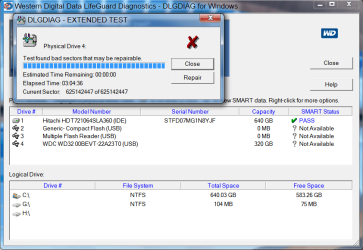
But more immediately the Win7 partition on that HD is marked RAW which means it is ruined. I'd run Disk Check along with the HD Diagnostic extended CD scan to see if it can be salvaged.
"To correct this: with the drive in the original PC, boot into System Recovery Options on the Windows 7 installer or System Repair Disk to run Startup Repair - Run up to 3 Separate Times ." - Firstly when I boot to system recovery options it does nothing in this it will not load any such options.
Where should I go from here?
Attachments
WD HDD LONG TEST.png
38.2 KB
· Views: 10
My Computer
At a glance
Windows 10 Proi7 6th Gen 6700KCorsair LPX 32GbNvidia Palit NVIDIA GeForce GTX 1060 6gb
Computer type
PC/Desktop
Computer Manufacturer/Model Number
Custom Build
OS
Windows 10 Pro
CPU
i7 6th Gen 6700K
Motherboard
Gigabyte Gaming 5 EU
Memory
Corsair LPX 32Gb
Graphics Card(s)
Nvidia Palit NVIDIA GeForce GTX 1060 6gb
Hard Drives
WD Blue 1tb
WD Blue 1tb
Samsung Pro SSD 512gb
Samsung Evo SSD 250gb
Because the Win7 partition on the HD is RAW it is likely the data is not retrievable. You can see if it is seen in Explorer but unless the Diagnostics and Disk Check can repair the partition Win7, it's data and the HD are lost.