windows 7 ultimate 64bit running far to slow.

dom979

New member
Member
Local time
5:39 AM
Messages
26
I have recently upgrade from win7 home premium to win7 ultimate. I upgrade due to my home premium running far to slow, it would take at least 20minutes to boot up and wouldn't open up programs when booted up. I reinstalled home premium and it ran fine for about a week then this issue arose again. I then have upgrade my OS to ultimate and it ran fine for a grand total of 1day, it is now running really slow and I can barely do anything on it what so ever. This issue is occurring on a Toshiba satellite c660-220 laptop. I have had Ubuntu Linux installed on this laptop and this issue didn't occur on that OS, so is it a hardware issue or a software issue? And what can I do to fix it?
 

My Computer My Computer

At a glance

Windows 7 home premium, Windows 7 Ultimate, U...i3-370m @2.40GHz4GB DDR3Intel Graphics Media Accelerator HD
Computer type
Laptop
Computer Manufacturer/Model Number
Toshiba Satellite C660-220
OS
Windows 7 home premium, Windows 7 Ultimate, Ubuntu 13.04, Windows 8 RT, Windows XP
CPU
i3-370m @2.40GHz
Memory
4GB DDR3
Graphics Card(s)
Intel Graphics Media Accelerator HD
Sound Card
Toshiba Bass Enhanced Sound System
Screen Resolution
1366 x 768
Hard Drives
500GB 5400rpm Toshiba MK5065GSNX
Internet Speed
5 MB/S down, 0.3 MB/S up
Antivirus
Microsoft Security Essentials
Browser
Google Chrome
You have a dual-core Intel Pentium T4500 processor clocked at 2.3GHz in a very entry level LT. It's going to be slow but not that slow. You should be able to tune it for 1 minute +/- startup times.

There are tons of threads here on how to do this, read them, it's worth your time.
 

My Computer My Computer

At a glance

Win8/8.1,Win7-U64, Vista U64, uncounted Linux...AMD and Intell, 9590, 8350, i5 3570kCorsair G SkillCrossfired Sapphire HD 7950 Vapor-X, ASUS R9 ...
Computer type
PC/Desktop
Computer Manufacturer/Model Number
Custom, Dell and Lenono LT's
OS
Win8/8.1,Win7-U64, Vista U64, uncounted Linux distor's
CPU
AMD and Intell, 9590, 8350, i5 3570k
Motherboard
CFVFZ, GA990FXA, Z77e-itx
Memory
Corsair G Skill
Graphics Card(s)
Crossfired Sapphire HD 7950 Vapor-X, ASUS R9 280X TOP
Sound Card
Realtek ALC889
Monitor(s) Displays
ViewSonic VX2770SMH 27" / ViewSonic VX2433 LCD 24"
Screen Resolution
1080i HD
Hard Drives
Samsung SSD 840 Pro
OCZ Agility 3's
OCZ Vector's
WD's Blue, red, green, Velociraptors
Seagate USB3 & Hybrid's
ASUS Blu-Ray
ASUS DVD
PSU
Corsair AX1200i, Seasonice 850 Gold
Case
Cooler Master HAF 922 & HAF 932, Lian Li Train case.
Cooling
Air, Glacer 240L expanded, custom EK loop with duel D5's
Keyboard
Microsoft SideWinder X4 USB Keyboard / Logitech 250 PS2
Mouse
Logitech G500 / MS wireless 5000
Internet Speed
Best of 5ms / 75+ dn / 12+ up More or less.
Antivirus
MS esentials-MalwareBytes
Browser
Firefox Chromebook
You have a dual-core Intel Pentium T4500 processor clocked at 2.3GHz in a very entry level LT. It's going to be slow but not that slow. You should be able to tune it for 1 minute +/- startup times.

There are tons of threads here on how to do this, read them, it's worth your time.
I have a Intel i3-370m processor clocked at 2.4ghz with 2 cores
 

My Computer My Computer

At a glance

Windows 7 home premium, Windows 7 Ultimate, U...i3-370m @2.40GHz4GB DDR3Intel Graphics Media Accelerator HD
Computer type
Laptop
Computer Manufacturer/Model Number
Toshiba Satellite C660-220
OS
Windows 7 home premium, Windows 7 Ultimate, Ubuntu 13.04, Windows 8 RT, Windows XP
CPU
i3-370m @2.40GHz
Memory
4GB DDR3
Graphics Card(s)
Intel Graphics Media Accelerator HD
Sound Card
Toshiba Bass Enhanced Sound System
Screen Resolution
1366 x 768
Hard Drives
500GB 5400rpm Toshiba MK5065GSNX
Internet Speed
5 MB/S down, 0.3 MB/S up
Antivirus
Microsoft Security Essentials
Browser
Google Chrome
Post your system specs please"

How to See (and save) Your System Specs with "System Info"
See here: System Info - See Your System Specs

Also,Let's see what starts when you boot your computer.

Download and run Startup List (does not need to be installed, just run it).
When done, click File then Save as and save Startuplist.txt to your Desktop or somewhere you can find it.
Start a reply here and paste the contents of Startuplist.txt into it.

Does it boot this bad if you boot to Safe Mode or Safe Mode with Networking?
 

My Computer My Computer

At a glance

Windows 10 Pro X64Intel Quad Core i7-4770 @ 3.4Ghz16.0GB PC3-12800 DDR3 SDRAM 1600 MHzIntel Integrated HD Graphics
Computer type
PC/Desktop
Computer Manufacturer/Model Number
Lenovo IdeaCenter 450
OS
Windows 10 Pro X64
CPU
Intel Quad Core i7-4770 @ 3.4Ghz
Memory
16.0GB PC3-12800 DDR3 SDRAM 1600 MHz
Graphics Card(s)
Intel Integrated HD Graphics
Sound Card
Realtek HD Audio
Monitor(s) Displays
HP 22" LCD
Screen Resolution
1680 x 1050
Hard Drives
250GB Samsung EVO SATA-3 SSD
2TB Seagate ST2000DM001 SATA-2
1.5TB Seagate ST3150041AS SATA
Keyboard
Dell USB
Mouse
Lenovo USB
Internet Speed
Cable via Road Runner 3MB Upload, 30MB Download
Antivirus
Windows Defender, MBAM Pro, MBAE
Browser
Seamonkey
Other Info
UEFI/GPT
PLDS DVD-RW DH16AERSH
Post your system specs please"

How to See (and save) Your System Specs with "System Info"
See here: System Info - See Your System Specs

Also,Let's see what starts when you boot your computer.

Download and run Startup List (does not need to be installed, just run it).
When done, click File then Save as and save Startuplist.txt to your Desktop or somewhere you can find it.
Start a reply here and paste the contents of Startuplist.txt into it. Edit this screen shows up when I boot, and then it black screens which even one I click on.

Does it boot this bad if you boot to Safe Mode or Safe Mode with Networking?
hi I can't even get on to the internet on it as the icons in the bottom right don't load and the programs which I open take way over an hour to open (just to a white screen), it also won't let me do control alt delete to get task manager. When I installed ultimate yesterday I checked my specs and they were as they should be by default, (Satellite C660-220 - Toshiba) Edit this screen come up when I boot and which ever one I click I get a black screen
 

Attachments

  • picture009.jpg
    picture009.jpg
    121 KB · Views: 11

My Computer My Computer

At a glance

Windows 7 home premium, Windows 7 Ultimate, U...i3-370m @2.40GHz4GB DDR3Intel Graphics Media Accelerator HD
Computer type
Laptop
Computer Manufacturer/Model Number
Toshiba Satellite C660-220
OS
Windows 7 home premium, Windows 7 Ultimate, Ubuntu 13.04, Windows 8 RT, Windows XP
CPU
i3-370m @2.40GHz
Memory
4GB DDR3
Graphics Card(s)
Intel Graphics Media Accelerator HD
Sound Card
Toshiba Bass Enhanced Sound System
Screen Resolution
1366 x 768
Hard Drives
500GB 5400rpm Toshiba MK5065GSNX
Internet Speed
5 MB/S down, 0.3 MB/S up
Antivirus
Microsoft Security Essentials
Browser
Google Chrome
I have a hp laptop with a core duo running at 1.6. I have only MSE load at start up. Runs rather well.
 

My Computer My Computer

At a glance

Microsoft Windows 7 Home Premium 64-bit 7601 ...AMD Phenom(tm) II X4 965 Processor8.0 GBNVIDIA GeForce GTX 560 Ti
Computer type
PC/Desktop
Computer Manufacturer/Model Number
Custom Build
OS
Microsoft Windows 7 Home Premium 64-bit 7601 Multiprocessor Free Service Pack 1
CPU
AMD Phenom(tm) II X4 965 Processor
Motherboard
ASUSTeK Computer INC. M4A785-M
Memory
8.0 GB
Graphics Card(s)
NVIDIA GeForce GTX 560 Ti
Sound Card
(1) NVIDIA High Definition Audio (2) NVIDIA High Definitio
Monitor(s) Displays
Samsung SyncMaster T220G
Screen Resolution
1680 x 1050 x 32 bits (4294967296 colors) @ 59 Hz
Hard Drives
WDC WD7500AADS-00M2B0
PSU
650 Watt
Case
Cooler Master HAF XM
Cooling
Air
Keyboard
CompUSA SK-6200
Mouse
Logitech M-510
Internet Speed
Comcast
Antivirus
MSE
Browser
Firefox 27.0 IE 11
Other Info
Belkin Hub To Go F5U706
dom979 Going from Home Premium to Ultimate will not speed up or slow down your computer.
A proper installation of the operating system will help in either case.
Where and how did you get your update to Ultimate?
Many things can cause a slow system but lets start with step
A and go from there.

Also could you explain in more detail exactly what problems you were having with your Home Premium system. Just stating that the computer was slow is not enough information.
 

My Computer My Computer

At a glance

Windows 10 Pro. 64/ version 1709 Windows 7 Pr...Intel i7-6800K @ 4.3Corsair Platinum 16 gig @2400EVGA GTX 1070 OC
Computer type
PC/Desktop
Computer Manufacturer/Model Number
Home made Desktop
OS
Windows 10 Pro. 64/ version 1709 Windows 7 Pro/64
CPU
Intel i7-6800K @ 4.3
Motherboard
ASUS X-99 Deluxe II
Memory
Corsair Platinum 16 gig @2400
Graphics Card(s)
EVGA GTX 1070 OC
Monitor(s) Displays
Asus 27" LED LCD/VE278Q
Screen Resolution
1920-1080 or 1280-720 HDMI
Hard Drives
INTEL SSD 730-240 Gb Sata 3.0/
PSU
EVGA Platium 1200W
Case
Phanteks Luxe Tempered Glass 8 fans/ one radiator
Cooling
XSPC/ Water Cooled CPU
Keyboard
Das 4 Professional
Mouse
Logitech M705/MX Anywhere 2-S
Internet Speed
100 mbits
Antivirus
Microsoft Security Essentials/ Malwarebytes Premium 3.0/ SAS
Browser
I.E. 11 default/Firefox/ ISP Time Warner Cable/Spectrum
Other Info
LG BluRay Burner/
Sound system-KLipsch-THX/
Icy Dock ssd Hot Swap bays.
dom979 Going from Home Premium to Ultimate will not speed up or slow down your computer.
A proper installation of the operating system will help in either case.
Where and how did you get your update to Ultimate?
Many things can cause a slow system but lets start with step
A and go from there.

Also could you explain in more detail exactly what problems you were having with your Home Premium system. Just stating that the computer was slow is not enough information.
I upgrade via, cd on this laptop and via usb on my pc and mums notebook. I upgrade as I wanted the extra features that ultimate offer on my pc. I got the disc from I believe it was pc world. The problem with home premium was that when it booted up it wouldn't do anything really, open start menu, open any apps anything really. It was fine and running really fast but then after an update it started doing this.
 

My Computer My Computer

At a glance

Windows 7 home premium, Windows 7 Ultimate, U...i3-370m @2.40GHz4GB DDR3Intel Graphics Media Accelerator HD
Computer type
Laptop
Computer Manufacturer/Model Number
Toshiba Satellite C660-220
OS
Windows 7 home premium, Windows 7 Ultimate, Ubuntu 13.04, Windows 8 RT, Windows XP
CPU
i3-370m @2.40GHz
Memory
4GB DDR3
Graphics Card(s)
Intel Graphics Media Accelerator HD
Sound Card
Toshiba Bass Enhanced Sound System
Screen Resolution
1366 x 768
Hard Drives
500GB 5400rpm Toshiba MK5065GSNX
Internet Speed
5 MB/S down, 0.3 MB/S up
Antivirus
Microsoft Security Essentials
Browser
Google Chrome
Your post #8
It was fine and running really fast but then after an update it started doing this.
After updating what??
 

My Computer My Computer

At a glance

Windows 10 Pro. 64/ version 1709 Windows 7 Pr...Intel i7-6800K @ 4.3Corsair Platinum 16 gig @2400EVGA GTX 1070 OC
Computer type
PC/Desktop
Computer Manufacturer/Model Number
Home made Desktop
OS
Windows 10 Pro. 64/ version 1709 Windows 7 Pro/64
CPU
Intel i7-6800K @ 4.3
Motherboard
ASUS X-99 Deluxe II
Memory
Corsair Platinum 16 gig @2400
Graphics Card(s)
EVGA GTX 1070 OC
Monitor(s) Displays
Asus 27" LED LCD/VE278Q
Screen Resolution
1920-1080 or 1280-720 HDMI
Hard Drives
INTEL SSD 730-240 Gb Sata 3.0/
PSU
EVGA Platium 1200W
Case
Phanteks Luxe Tempered Glass 8 fans/ one radiator
Cooling
XSPC/ Water Cooled CPU
Keyboard
Das 4 Professional
Mouse
Logitech M705/MX Anywhere 2-S
Internet Speed
100 mbits
Antivirus
Microsoft Security Essentials/ Malwarebytes Premium 3.0/ SAS
Browser
I.E. 11 default/Firefox/ ISP Time Warner Cable/Spectrum
Other Info
LG BluRay Burner/
Sound system-KLipsch-THX/
Icy Dock ssd Hot Swap bays.
Your post #8
It was fine and running really fast but then after an update it started doing this.
After updating what??
just a scheduled windows update, come to think of it that was the last time my ultimate was working was before windows was updating. I had to update 111 things yesterday night on my ultimate and that went fine, then today it wanted to install 7 updates and then it shut off and it hasn't worked 'properly since', I don't know what the updates where and can't get on to my laptop to check.
 

My Computer My Computer

At a glance

Windows 7 home premium, Windows 7 Ultimate, U...i3-370m @2.40GHz4GB DDR3Intel Graphics Media Accelerator HD
Computer type
Laptop
Computer Manufacturer/Model Number
Toshiba Satellite C660-220
OS
Windows 7 home premium, Windows 7 Ultimate, Ubuntu 13.04, Windows 8 RT, Windows XP
CPU
i3-370m @2.40GHz
Memory
4GB DDR3
Graphics Card(s)
Intel Graphics Media Accelerator HD
Sound Card
Toshiba Bass Enhanced Sound System
Screen Resolution
1366 x 768
Hard Drives
500GB 5400rpm Toshiba MK5065GSNX
Internet Speed
5 MB/S down, 0.3 MB/S up
Antivirus
Microsoft Security Essentials
Browser
Google Chrome

My Computer My Computer

At a glance

Windows 10 Pro. 64/ version 1709 Windows 7 Pr...Intel i7-6800K @ 4.3Corsair Platinum 16 gig @2400EVGA GTX 1070 OC
Computer type
PC/Desktop
Computer Manufacturer/Model Number
Home made Desktop
OS
Windows 10 Pro. 64/ version 1709 Windows 7 Pro/64
CPU
Intel i7-6800K @ 4.3
Motherboard
ASUS X-99 Deluxe II
Memory
Corsair Platinum 16 gig @2400
Graphics Card(s)
EVGA GTX 1070 OC
Monitor(s) Displays
Asus 27" LED LCD/VE278Q
Screen Resolution
1920-1080 or 1280-720 HDMI
Hard Drives
INTEL SSD 730-240 Gb Sata 3.0/
PSU
EVGA Platium 1200W
Case
Phanteks Luxe Tempered Glass 8 fans/ one radiator
Cooling
XSPC/ Water Cooled CPU
Keyboard
Das 4 Professional
Mouse
Logitech M705/MX Anywhere 2-S
Internet Speed
100 mbits
Antivirus
Microsoft Security Essentials/ Malwarebytes Premium 3.0/ SAS
Browser
I.E. 11 default/Firefox/ ISP Time Warner Cable/Spectrum
Other Info
LG BluRay Burner/
Sound system-KLipsch-THX/
Icy Dock ssd Hot Swap bays.
Windows 7 ultimate and home premium slow to boot up

Hi, I recently upgraded all the PC's in my house from home premium to Ultimate (due to wanting the extra features). One of my laptops which has been problematic in the past (a Toshiba Satellite C660-220) was working fine with ultimate for about a day or so, but then after installing an update it was running extremely slow, and now wont even boot up in any mode. I had the same problem with running slow in the past on home premium, but it would always boot. I then installed Ubuntu Linux on to the laptop until I could afford ultimate for it and it was running fine on Ubuntu for about 4-5 months.

Is this a Hardware issue? Windows activation issue (like I've been told by another user on this forum)? or something else? Any help would be appreciated.


Notes:
By running slow it would take about 20 minutes to boot, and once booted it wouldn't open any programs, not even the start menu. and the icons in the bottom right wouldn't appear.
I still have my product keys for both versions of windows.
When I have checked my system specs on both windows and Ubuntu in the past (as recently as 2 days ago) it showed that everything was correct as it should be, apart from Ubuntu showing 3.7gb instead of 4gb of RAM.
 
Last edited by a moderator:

My Computer My Computer

At a glance

Windows 7 home premium, Windows 7 Ultimate, U...i3-370m @2.40GHz4GB DDR3Intel Graphics Media Accelerator HD
Computer type
Laptop
Computer Manufacturer/Model Number
Toshiba Satellite C660-220
OS
Windows 7 home premium, Windows 7 Ultimate, Ubuntu 13.04, Windows 8 RT, Windows XP
CPU
i3-370m @2.40GHz
Memory
4GB DDR3
Graphics Card(s)
Intel Graphics Media Accelerator HD
Sound Card
Toshiba Bass Enhanced Sound System
Screen Resolution
1366 x 768
Hard Drives
500GB 5400rpm Toshiba MK5065GSNX
Internet Speed
5 MB/S down, 0.3 MB/S up
Antivirus
Microsoft Security Essentials
Browser
Google Chrome

My Computer My Computer

At a glance

Windows 10 Pro. 64/ version 1709 Windows 7 Pr...Intel i7-6800K @ 4.3Corsair Platinum 16 gig @2400EVGA GTX 1070 OC
Computer type
PC/Desktop
Computer Manufacturer/Model Number
Home made Desktop
OS
Windows 10 Pro. 64/ version 1709 Windows 7 Pro/64
CPU
Intel i7-6800K @ 4.3
Motherboard
ASUS X-99 Deluxe II
Memory
Corsair Platinum 16 gig @2400
Graphics Card(s)
EVGA GTX 1070 OC
Monitor(s) Displays
Asus 27" LED LCD/VE278Q
Screen Resolution
1920-1080 or 1280-720 HDMI
Hard Drives
INTEL SSD 730-240 Gb Sata 3.0/
PSU
EVGA Platium 1200W
Case
Phanteks Luxe Tempered Glass 8 fans/ one radiator
Cooling
XSPC/ Water Cooled CPU
Keyboard
Das 4 Professional
Mouse
Logitech M705/MX Anywhere 2-S
Internet Speed
100 mbits
Antivirus
Microsoft Security Essentials/ Malwarebytes Premium 3.0/ SAS
Browser
I.E. 11 default/Firefox/ ISP Time Warner Cable/Spectrum
Other Info
LG BluRay Burner/
Sound system-KLipsch-THX/
Icy Dock ssd Hot Swap bays.
Is the Toshiba Satellite C660-220 the only computer you are having this problem with? We need to stick with one computer at a time.
What comes to mind is over heating. How long has it been sense you cleaned the inside of the computer of dust bunnies?

This Tutorial can be very helpful.

By Greg:
http://www.sevenforums.com/tutorials/219533-troubleshooting-windows-7-failure-boot.html


Satellite C660-220 - Toshiba
Yeah it is the the two other computers are running with no issues what so ever. I reinstalled home premium on the Toshiba and it seems to be running fine (for now). Over heating might be possible as I often use it for long periods of time and have never cleaned it out, (is there a tutorial on how to do this?). I have ran a memory test to check if my RAM is working fine and it seemed to be okay. I have also checked my hard drive for bad sectors and it showed none, I then de-fragmented it as it was 34% fragmented.
 

My Computer My Computer

At a glance

Windows 7 home premium, Windows 7 Ultimate, U...i3-370m @2.40GHz4GB DDR3Intel Graphics Media Accelerator HD
Computer type
Laptop
Computer Manufacturer/Model Number
Toshiba Satellite C660-220
OS
Windows 7 home premium, Windows 7 Ultimate, Ubuntu 13.04, Windows 8 RT, Windows XP
CPU
i3-370m @2.40GHz
Memory
4GB DDR3
Graphics Card(s)
Intel Graphics Media Accelerator HD
Sound Card
Toshiba Bass Enhanced Sound System
Screen Resolution
1366 x 768
Hard Drives
500GB 5400rpm Toshiba MK5065GSNX
Internet Speed
5 MB/S down, 0.3 MB/S up
Antivirus
Microsoft Security Essentials
Browser
Google Chrome
As far as I can find their is not aTutorial on this Forum for such things.
You will have to Google.
 

My Computer My Computer

At a glance

Windows 10 Pro. 64/ version 1709 Windows 7 Pr...Intel i7-6800K @ 4.3Corsair Platinum 16 gig @2400EVGA GTX 1070 OC
Computer type
PC/Desktop
Computer Manufacturer/Model Number
Home made Desktop
OS
Windows 10 Pro. 64/ version 1709 Windows 7 Pro/64
CPU
Intel i7-6800K @ 4.3
Motherboard
ASUS X-99 Deluxe II
Memory
Corsair Platinum 16 gig @2400
Graphics Card(s)
EVGA GTX 1070 OC
Monitor(s) Displays
Asus 27" LED LCD/VE278Q
Screen Resolution
1920-1080 or 1280-720 HDMI
Hard Drives
INTEL SSD 730-240 Gb Sata 3.0/
PSU
EVGA Platium 1200W
Case
Phanteks Luxe Tempered Glass 8 fans/ one radiator
Cooling
XSPC/ Water Cooled CPU
Keyboard
Das 4 Professional
Mouse
Logitech M705/MX Anywhere 2-S
Internet Speed
100 mbits
Antivirus
Microsoft Security Essentials/ Malwarebytes Premium 3.0/ SAS
Browser
I.E. 11 default/Firefox/ ISP Time Warner Cable/Spectrum
Other Info
LG BluRay Burner/
Sound system-KLipsch-THX/
Icy Dock ssd Hot Swap bays.
I think you need to reinstall Windows.I'm not too sure if an update but it's the last instance.
 

My Computer My Computer

At a glance

Windows 7 Ultimate x64AMD Athlon X4 740Kingmax Semiconductor 4GB DDR3Nvidia GeForce 210 1GB
Computer type
PC/Desktop
Computer Manufacturer/Model Number
I built it with duct tape, so......
OS
Windows 7 Ultimate x64
CPU
AMD Athlon X4 740
Motherboard
MSI FM2-A55M-E33
Memory
Kingmax Semiconductor 4GB DDR3
Graphics Card(s)
Nvidia GeForce 210 1GB
Sound Card
Integrated
Monitor(s) Displays
Dell P2210
Screen Resolution
1680x1050
Hard Drives
Hitachi HDP725050GLA360 ATA 465GB
PSU
ATX
Cooling
Stock Fans
Keyboard
Serioux Noblesse 9600WR+Mouse
Internet Speed
Slow!
Antivirus
AVG Internet Security 2013
Browser
Mozzila Firefox
It's obvious you're doing something wrong besides installing a higher version which has no effect on performance whatsoever.

You should be following the steps to get a perfect http://www.sevenforums.com/tutorials/219487-clean-reinstall-factory-oem-windows-7-a.html#post1839164 using the latest official for the version which came with the laptop here: http://msft.digitalrivercontent.net/win/X17-58997.iso

You will get and keep a perfect install to the exact extent you stick with the tools and methods in the tutorial.

In your case I would also wipe the HD first using Diskpart Clean Command
from the installer's http://www.sevenforums.com/tutorials/668-system-recovery-options.html Command Line.

If you're concerned about overheating then install Speedfan to monitor temps, compare against the maximum http://www.pantherproducts.co.uk/index.php?pageid=CPUtemperatures.

To clean the fan will be similar to this:

More specific disassembly to just clean the fan, or repaste the processor if this is required to cool it down, is here:


However repasting the processor is a huge job and should be considered a last resort before junking the PC since many things can go wrong even with the utmost precaution.
 
It's obvious you're doing something wrong besides installing a higher version which has no effect on performance whatsoever.

You should be following the steps to get a perfect http://www.sevenforums.com/tutorials/219487-clean-reinstall-factory-oem-windows-7-a.html#post1839164 using the latest official for the version which came with the laptop here: http://msft.digitalrivercontent.net/win/X17-58997.iso

You will get and keep a perfect install to the exact extent you stick with the tools and methods in the tutorial.

In your case I would also wipe the HD first using Diskpart Clean Command
from the installer's http://www.sevenforums.com/tutorials/668-system-recovery-options.html Command Line.

If you're concerned about overheating then install Speedfan to monitor temps, compare against the maximum CPU Temperatures.

To clean the fan will be similar to this:

More specific disassembly to just clean the fan, or repaste the processor if this is required to cool it down, is here:


However repasting the processor is a huge job and should be considered a last resort before junking the PC since many things can go wrong even with the utmost precaution.
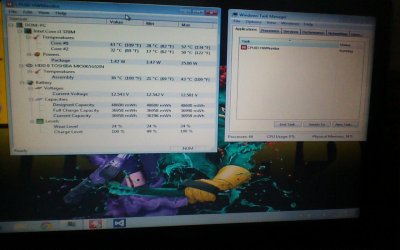
I have reinstalled a new version of home premium as your tutorial stated and it was running fine for a grand total of 2 and a half hours then it has completely slowed down to a crawl, I managed to get a pic of the temps as it slowed down. When loading web pages on Google chrome it says waiting on cache for about half an hour before just randomly shutting down chrome. I have also cleaned out the fan. Could this be down to a hardware failure of some degree?
 

My Computer My Computer

At a glance

Windows 7 home premium, Windows 7 Ultimate, U...i3-370m @2.40GHz4GB DDR3Intel Graphics Media Accelerator HD
Computer type
Laptop
Computer Manufacturer/Model Number
Toshiba Satellite C660-220
OS
Windows 7 home premium, Windows 7 Ultimate, Ubuntu 13.04, Windows 8 RT, Windows XP
CPU
i3-370m @2.40GHz
Memory
4GB DDR3
Graphics Card(s)
Intel Graphics Media Accelerator HD
Sound Card
Toshiba Bass Enhanced Sound System
Screen Resolution
1366 x 768
Hard Drives
500GB 5400rpm Toshiba MK5065GSNX
Internet Speed
5 MB/S down, 0.3 MB/S up
Antivirus
Microsoft Security Essentials
Browser
Google Chrome
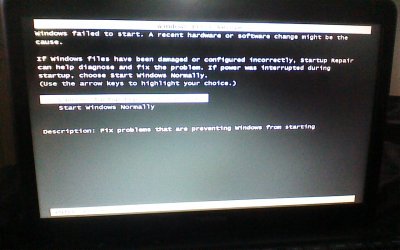
Now when I boot up it won't open any programs what so ever and gives the error message in one of the attached pictures. And you can see what temps my laptop was running at time it started to run slow in the other attached picture.
 

Attachments

  • picture011.jpg
    picture011.jpg
    96.3 KB · Views: 4
  • picture013.jpg
    picture013.jpg
    117.3 KB · Views: 2

My Computer My Computer

At a glance

Windows 7 home premium, Windows 7 Ultimate, U...i3-370m @2.40GHz4GB DDR3Intel Graphics Media Accelerator HD
Computer type
Laptop
Computer Manufacturer/Model Number
Toshiba Satellite C660-220
OS
Windows 7 home premium, Windows 7 Ultimate, Ubuntu 13.04, Windows 8 RT, Windows XP
CPU
i3-370m @2.40GHz
Memory
4GB DDR3
Graphics Card(s)
Intel Graphics Media Accelerator HD
Sound Card
Toshiba Bass Enhanced Sound System
Screen Resolution
1366 x 768
Hard Drives
500GB 5400rpm Toshiba MK5065GSNX
Internet Speed
5 MB/S down, 0.3 MB/S up
Antivirus
Microsoft Security Essentials
Browser
Google Chrome
I have just opened the bottom of my laptop to check if there was anything that looked out of order. I found that when I sent my laptop away to get fixed about 6 months ago the repair man didn't reinstall my RAM properly and left it unsecured, so I took the RAM out and put it in the second RAM slot and made sure it was properly fitted. The laptop now seems to be working fine and seems to be using less of its memory when doing simple tasks (used to use over 75% of the RAM when surfing the web, now down to only 25-30%). This may not have fully solved the issue as I suspect the HDD might have something to do with the previous errors.
 

My Computer My Computer

At a glance

Windows 7 home premium, Windows 7 Ultimate, U...i3-370m @2.40GHz4GB DDR3Intel Graphics Media Accelerator HD
Computer type
Laptop
Computer Manufacturer/Model Number
Toshiba Satellite C660-220
OS
Windows 7 home premium, Windows 7 Ultimate, Ubuntu 13.04, Windows 8 RT, Windows XP
CPU
i3-370m @2.40GHz
Memory
4GB DDR3
Graphics Card(s)
Intel Graphics Media Accelerator HD
Sound Card
Toshiba Bass Enhanced Sound System
Screen Resolution
1366 x 768
Hard Drives
500GB 5400rpm Toshiba MK5065GSNX
Internet Speed
5 MB/S down, 0.3 MB/S up
Antivirus
Microsoft Security Essentials
Browser
Google Chrome
Back
Top