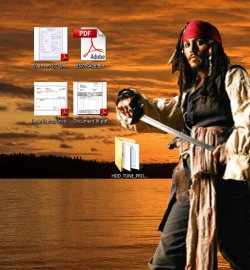
No thumbnails on desktop for PDF's and Docx

I see the same problem in another forum ... No answer yet.
I'm thinking this may have something to do with the latest version of W7 rtm x64 from M$.

That's about the time I noticed a change in the desktop pdf Thumbnail <> Icon.
What version W7 are you running ???
 

My Computer My Computer

At a glance

XP MCE .... XP Pro 64 .... W7 U x64E6750, 2.67GHz C2D4GB, PC2 6400GeForce 9400GT
Computer Manufacturer/Model Number
HP d4996t (upgraded)
OS
XP MCE .... XP Pro 64 .... W7 U x64
CPU
E6750, 2.67GHz C2D
Memory
4GB, PC2 6400
Graphics Card(s)
GeForce 9400GT
Monitor(s) Displays
Twin Samsung 2443BWT
Screen Resolution
1920x1200
Hard Drives
Many .. 3 Installed
PSU
460W
Internet Speed
Cable
Still on 7100 RC x64 at the moment but have had problems with the thumbnails of PDF files since Vista nothing major just inconsistencies
 

My Computers My Computers

  • At a glance

    Windows 11 Pro x64 [Latest Release and Releas...Ryzen 9 5950X, 3.8 - 5.2 MHz64GB [2 x 32GB] DDR4 3200MHz4GB NVIDIA GEFORCE GTX 1650 Ti
    Computer type
    PC/Desktop
    Computer Manufacturer/Model Number
    ChillBlast - Custom to my design
    OS
    Windows 11 Pro x64 [Latest Release and Release Preview]
    CPU
    Ryzen 9 5950X, 3.8 - 5.2 MHz
    Motherboard
    Asus Prime X570-Pro
    Memory
    64GB [2 x 32GB] DDR4 3200MHz
    Graphics Card(s)
    4GB NVIDIA GEFORCE GTX 1650 Ti
    Sound Card
    On-board SPDIF to 5.1 System + HDMI [5.1 system]
    Monitor(s) Displays
    32" UHD 32 Bit HDR Monitor + 43" UHD 4K 32Bit HDR TV
    Screen Resolution
    2 x 3840 x 2160 @60Hz
    Hard Drives
    1TB M2 SSD OS, 500GB Fast Access SSD, 2 x 8TB Data + Various Externals from 1TB to 4TB, 10TB NAS
    PSU
    NZXT C750 80 PLUS Gold 750W Modular PSU
    Case
    Workstation Case [Matt Black]
    Cooling
    NZXT Kraken X63 280mm CPU Cooler +2x Quiet Case fans
    Keyboard
    Logitech Wireless MX Keys & K400 + others
    Mouse
    Logitech Wireless MX Master 3S
    Internet Speed
    920 MB Down 50 MB Up
    Antivirus
    BitDefender Total Security Pro
    Browser
    Chrome (always run latest Non-Beta)
    Other Info
    Also run ...
    Laptop - Quad 8GB - Windows 10 Pro x64
    Nexus 7 Android tablet x2
    Samsung 10.2" tablet
    Blackview TAB 8 4G Android Tablet c/w Keyboard
    Wacom Intuos Pro Medium Pen Pad
    Wacom Intuos Pro Small Pen Pad
    Wacom Expresskeys Remote
    Loopdeck+ Graphics Controller
    Shuttle Pro v2 Control
  • At a glance

    Windows 11 Pro x64 Latest RPIntel I7 10750H 5.0GHz32GB [2x16GB] DDR4 2933 MHznVidia GTX1650Ti 4 GB GDDR6
    Computer type
    Laptop
    System Manufacturer/Model Number
    Dell XPS 17 10750H
    OS
    Windows 11 Pro x64 Latest RP
    CPU
    Intel I7 10750H 5.0GHz
    Motherboard
    Dell XPS
    Memory
    32GB [2x16GB] DDR4 2933 MHz
    Graphics Card(s)
    nVidia GTX1650Ti 4 GB GDDR6
    Sound Card
    Stock [Realtek] 4 Speaker
    Monitor(s) Displays
    17" IPS UHD+ Infinity Edge Touchscreen
    Screen Resolution
    3840 x 2400
    Hard Drives
    2TB M2 NVMe, 4TB External + various 500GB & 1TB External NVMe (also have access to spinner HDD from
    PSU
    Stock
    Case
    Stock XPS Aluminium & Carbon Fibre
    Cooling
    Stock - Active Fan Control
    Keyboard
    Backlit + Various Logitech
    Mouse
    Stock Track Pad + Logitech MX Trackball
    Internet Speed
    72 MB Down 18MB Up
    Browser
    Chrome
    Other Info
    Also run ...
    Laptop - Quad 8GB - Windows 10 Pro x64
    Nexus 7 Android tablet x2
    10.2" tablet
    Sony Z3 Android Smartphone
    Wacom Intuos Pro Medium Pen Pad
    Wacom Intuos Pro Small Pen Pad
    Wacom Expresskeys Remote
    Loopdeck+ Graphics Controller
    Shuttle Pro v2 Control Pad
    10TB NAS
Hello,

I am having one last issue with 7 that I can't seem to get resolved here or on Adobe's forums. My PDF thumbnails won't work. They did for a while and then they stopped showing and the standard adobe logo is there. I can copy the same PDFs over to my Vista machine and they work again, so I know the PDFs are "good". I turned everything "on" in W7 to allow the display of thumbnails and in fact, my JPG thumbnails all work perfectly. I deleted the icon cache, changed resolutions, depths, etc. I even deleted all the folder "ini" files. Nothing changes it.

I googled the issue and see conflicting answers. Other people have the same issue, but not just in W7, Vista too. I saw several suggestions to add various registry keys. Are you familiar with the problem? I have one W7 laptop that they do work and another W7 desktop where they don't. Only thing in common on the desktops is the fact they both use Nvidia cards. It's funny to also note that I have one out of 10 PDF's that does display the thumbnail. How weird is that? Like I said, they did display and then they stopped displaying. Almost makes me think I installed something that overwrote something else..... then again it could be an incompatibility with Reader and W7 too. I tried Foxit Reader.... no success their either (but I don't think it does thumbnails anyway)

Any and all thoughts on the subject would be greatly appreciated. Minor issue, but it absolutely is driving me nuts! :cry:

Charlie
 

My Computer My Computer

At a glance

7 rtm
OS
7 rtm
I saw a reference to deleting all thumbs.db files from your entire drive(s).
 
Did it. no difference.
 

My Computer My Computer

At a glance

7 rtm
OS
7 rtm
Thanks... that is my thread.... went nowhere.
 

My Computer My Computer

At a glance

7 rtm
OS
7 rtm
So posting it again served what purpose other than wasting someone else's time?

-1
 
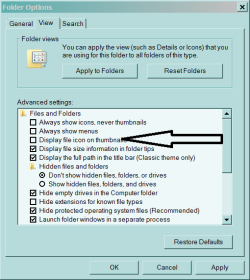
Doesn't seem to make any difference how I check Icon on Thumbnails ??
Clip.gif
But since when .. Is an Icon a Thumbnail ???
 

My Computer My Computer

At a glance

XP MCE .... XP Pro 64 .... W7 U x64E6750, 2.67GHz C2D4GB, PC2 6400GeForce 9400GT
Computer Manufacturer/Model Number
HP d4996t (upgraded)
OS
XP MCE .... XP Pro 64 .... W7 U x64
CPU
E6750, 2.67GHz C2D
Memory
4GB, PC2 6400
Graphics Card(s)
GeForce 9400GT
Monitor(s) Displays
Twin Samsung 2443BWT
Screen Resolution
1920x1200
Hard Drives
Many .. 3 Installed
PSU
460W
Internet Speed
Cable
Hmmmm. First of all Antman, I didn't post the thread a second time. Brink didn't realized I had already posted the issue and moved my specific question to him later in the day back to this part of the forum.

As far as check marks (ticks) to enable PDF thumbnails.... they should all be set correctly since JPG's display their thumbnails 100% of the time without issue.

I have found numerous registry edits on other forums to resolve the problem (supposedly). I'll test them later today and report back ASAP.
 

My Computer My Computer

At a glance

7 rtm
OS
7 rtm
I found the registry values that supposedly turn on and off the view of PDF thumbnails. Deleting this key "supposedly" turns off Thumbnail PDF view and adding it "supposedly" adds the ability.

I deleted the key and re-booted. No change. Added the key back and rebooted. No change. You can find the article at PC'sPLACE.com.

I give up. I believe this is an issue related to W7 X64 RTM. :mad:

Thanks.

Charlie
 

Attachments

My Computer My Computer

At a glance

7 rtm
OS
7 rtm
If this is the only annoyance in W7 that’s bugging you ..
Consider yourself lucky.

Some of the pdf Hacks I’ve been reading about ...
only apply to the Thumbnails in the Adobe reader when it’s opened.

They don't seem to work there either ??

Issues like this seem to be changing rapidly ..
Maybe it’ll settle down a few months after W7 is released to the public … Or maybe W7 SP1 ???
 

My Computer My Computer

At a glance

XP MCE .... XP Pro 64 .... W7 U x64E6750, 2.67GHz C2D4GB, PC2 6400GeForce 9400GT
Computer Manufacturer/Model Number
HP d4996t (upgraded)
OS
XP MCE .... XP Pro 64 .... W7 U x64
CPU
E6750, 2.67GHz C2D
Memory
4GB, PC2 6400
Graphics Card(s)
GeForce 9400GT
Monitor(s) Displays
Twin Samsung 2443BWT
Screen Resolution
1920x1200
Hard Drives
Many .. 3 Installed
PSU
460W
Internet Speed
Cable
Changing rapidly??? That is an understatement!! Today when I got home the thumbnails were back! I didn't touch the machine today and neither did Windows Update! How weird is that?

I then copied a PDF from My Documents to the desktop.... no thumbnail. Copied the same file to Vista ... thumbnail shows up!! Even weirder!

None of the 15 articles I read along with their associated reg hacks have made any difference.

This has got to be a W7/Adobe issue.........

Charlie
 

Attachments

  • 8-18-2009 8-01-19 PM.jpg
    8-18-2009 8-01-19 PM.jpg
    79.3 KB · Views: 66
Last edited:

My Computer My Computer

At a glance

7 rtm
OS
7 rtm
The problem is in the desktop manager ... not the registry.

Want some more fun ??
Put some office 2003 files on your desktop .. somewhere.
Then open them .. edit them .. and save them.
 

My Computer My Computer

At a glance

XP MCE .... XP Pro 64 .... W7 U x64E6750, 2.67GHz C2D4GB, PC2 6400GeForce 9400GT
Computer Manufacturer/Model Number
HP d4996t (upgraded)
OS
XP MCE .... XP Pro 64 .... W7 U x64
CPU
E6750, 2.67GHz C2D
Memory
4GB, PC2 6400
Graphics Card(s)
GeForce 9400GT
Monitor(s) Displays
Twin Samsung 2443BWT
Screen Resolution
1920x1200
Hard Drives
Many .. 3 Installed
PSU
460W
Internet Speed
Cable
I have no clue.... The issue is not just on the desktop... every folder exhibits same no thumbnail issue.
 

My Computer My Computer

At a glance

7 rtm
OS
7 rtm
i have been reading this and other threads about the PDF thumbnail issue and and are still waiting for "adobe patch" that address's the problem.
Like others, for me it's on seven x64. no other system has the issue.
but I just tried something... I opened a PDF and used the save as command = which opens a window... suddenly the PDF's in the folder got thumbnails!!!!
I went through folder after folder and rebooted and the thumbnails were still there... Which lends the issue being a interaction issue between seven x64 and Adobe.
but for now I have a way of getting PDF thumbnails back even if it means ploughing through folders.
 

My Computer My Computer

At a glance

vista
OS
vista
I just tried the "save as" with no success. I am using Reader 9, are you? Did you overwrite the existing PDF for the hack to work?
 

My Computer My Computer

At a glance

7 rtm
OS
7 rtm
The issue with .PDF is due to acrobat reader not supporting 64bit for the explorer extension that renders the preview image. I have seen workarounds where use of a 32bit explorer may solve the issue, but I'm not that worried to start hacking at explorer.

A related issue may be seen with certain applications that add a context menu item, (open with ..... Etc), the context menu entry does not work in x64. I know that 7Zip has this issue.

I have looked at various alternative readers but none I can find at the moment cure this issue, (although several are better readers than Adobe's ;) )

I have come to a compromise where I need to visually inspect my library of PDF's - I open he preview pane and this, (using a Foxit renderer), gives me all the detail I need until a suitable 64 bit reader comes along, (maybe Reader 10+)
 

My Computers My Computers

  • At a glance

    Windows 11 Pro x64 [Latest Release and Releas...Ryzen 9 5950X, 3.8 - 5.2 MHz64GB [2 x 32GB] DDR4 3200MHz4GB NVIDIA GEFORCE GTX 1650 Ti
    Computer type
    PC/Desktop
    Computer Manufacturer/Model Number
    ChillBlast - Custom to my design
    OS
    Windows 11 Pro x64 [Latest Release and Release Preview]
    CPU
    Ryzen 9 5950X, 3.8 - 5.2 MHz
    Motherboard
    Asus Prime X570-Pro
    Memory
    64GB [2 x 32GB] DDR4 3200MHz
    Graphics Card(s)
    4GB NVIDIA GEFORCE GTX 1650 Ti
    Sound Card
    On-board SPDIF to 5.1 System + HDMI [5.1 system]
    Monitor(s) Displays
    32" UHD 32 Bit HDR Monitor + 43" UHD 4K 32Bit HDR TV
    Screen Resolution
    2 x 3840 x 2160 @60Hz
    Hard Drives
    1TB M2 SSD OS, 500GB Fast Access SSD, 2 x 8TB Data + Various Externals from 1TB to 4TB, 10TB NAS
    PSU
    NZXT C750 80 PLUS Gold 750W Modular PSU
    Case
    Workstation Case [Matt Black]
    Cooling
    NZXT Kraken X63 280mm CPU Cooler +2x Quiet Case fans
    Keyboard
    Logitech Wireless MX Keys & K400 + others
    Mouse
    Logitech Wireless MX Master 3S
    Internet Speed
    920 MB Down 50 MB Up
    Antivirus
    BitDefender Total Security Pro
    Browser
    Chrome (always run latest Non-Beta)
    Other Info
    Also run ...
    Laptop - Quad 8GB - Windows 10 Pro x64
    Nexus 7 Android tablet x2
    Samsung 10.2" tablet
    Blackview TAB 8 4G Android Tablet c/w Keyboard
    Wacom Intuos Pro Medium Pen Pad
    Wacom Intuos Pro Small Pen Pad
    Wacom Expresskeys Remote
    Loopdeck+ Graphics Controller
    Shuttle Pro v2 Control
  • At a glance

    Windows 11 Pro x64 Latest RPIntel I7 10750H 5.0GHz32GB [2x16GB] DDR4 2933 MHznVidia GTX1650Ti 4 GB GDDR6
    Computer type
    Laptop
    System Manufacturer/Model Number
    Dell XPS 17 10750H
    OS
    Windows 11 Pro x64 Latest RP
    CPU
    Intel I7 10750H 5.0GHz
    Motherboard
    Dell XPS
    Memory
    32GB [2x16GB] DDR4 2933 MHz
    Graphics Card(s)
    nVidia GTX1650Ti 4 GB GDDR6
    Sound Card
    Stock [Realtek] 4 Speaker
    Monitor(s) Displays
    17" IPS UHD+ Infinity Edge Touchscreen
    Screen Resolution
    3840 x 2400
    Hard Drives
    2TB M2 NVMe, 4TB External + various 500GB & 1TB External NVMe (also have access to spinner HDD from
    PSU
    Stock
    Case
    Stock XPS Aluminium & Carbon Fibre
    Cooling
    Stock - Active Fan Control
    Keyboard
    Backlit + Various Logitech
    Mouse
    Stock Track Pad + Logitech MX Trackball
    Internet Speed
    72 MB Down 18MB Up
    Browser
    Chrome
    Other Info
    Also run ...
    Laptop - Quad 8GB - Windows 10 Pro x64
    Nexus 7 Android tablet x2
    10.2" tablet
    Sony Z3 Android Smartphone
    Wacom Intuos Pro Medium Pen Pad
    Wacom Intuos Pro Small Pen Pad
    Wacom Expresskeys Remote
    Loopdeck+ Graphics Controller
    Shuttle Pro v2 Control Pad
    10TB NAS
I just tried the "save as" with no success. I am using Reader 9, are you? Did you overwrite the existing PDF for the hack to work?

I have Acrobat Pro and I came across the thumbnail generation when I had opened a PDF and went to "save it as", and the existing PDF's started getting thumbnails.

Also no I did not actually save the PDF, I just browsed folders using the save as window and thumbnails would be generated AKA how it would if you where just using explorer normally.

One other thing I noticed the generated thumbnail does not get bigger (as in when you change views it will only show in a smaller size) so it still has to be a Adobe (7even x64) issue in how the OS uses the app to generate thumbnails. I guess a fix will appear for Adobe eventually...
 

My Computer My Computer

At a glance

vista
OS
vista
Back
Top