Solved New on here: need some help please

Yes, and external HD's are not easy to make bootable installers. It's not worth the trouble. Just buy a $5 4gb flash stick. You can even get a larger one and store files on it amongst the seven Win7 installation folders as long as you don't bother them. This way you'll have a bootable installer on hand which has other uses.
 
Last edited:
  • Like
Reactions: tnm
Just want to say you have been great in getting back to me - not many people do this so credit to you sir. :)

So now that the iso file is on the external HD, do I just select on the windows bootable installer thing?

"You can slipstream the latest Updates into the installer ISO to save at least an hour's Updating after install using Update 7 installation media."

No clue how to do this having opened that link. You think it is worth the hassle for such a beginner like me having asked you so many questions already?
 
Last edited:

My Computer My Computer

Computer type
Laptop
Computer Manufacturer/Model Number
Sony Vaio FZ38M
OS
Windows 7 Ultimate x64
No it would take at least the hour that it would save you to put the latest Updates into the installer ISO, so it's really only for those who install more regularly.

But it makes it even more important to run all rounds of Important and Optional Updates to completion immediate after install completes and you get online. This may take a full day. But you can set up your desktop, browser and install some programs like Flash, Reader, your Office, etc. during this time. Just be sure to honor the Updates restart requests, then go right back to Check for more Updates.

Remember to put your wireless driver into the backup so you can install it if it isn't provided during install. You can also plug in by wire which increases the chances the installer will provide the LAN driver so you can go right to running the Updates.
 
if the only prob was with your bus controller all you had to do was
ControlPanel>devicemanager>highlight bus controller>right click>properties>goto actions top left(enter) scan for hardware updates>enter and the drivers will be re-installed
 

My Computer My Computer

Computer type
PC/Desktop
Computer Manufacturer/Model Number
medionl/Aspire 6930G/acer x55a
OS
W7 home premium 32bit/W7HP 64bit/w10 tp insider ring
CPU
E5300 dual core
Motherboard
medion MS7366
Memory
3gb
Graphics Card(s)
Nvidia Geforce 7100 Nforce 630i
Monitor(s) Displays
avixc
Internet Speed
n (isp resticted to 72)
Antivirus
mse/pands
Browser
palemoon
Other Info
Belkin Fd7050 n USB using Railink RT2870 drivers, more upto date
No it would take at least the hour that it would save you to put the latest Updates into the installer ISO, so it's really only for those who install more regularly.

Thanks

But it makes it even more important to run all rounds of Important and Optional Updates to completion immediate after install completes and you get online. This may take a full day. But you can set up your desktop, browser and install some programs like Flash, Reader, your Office, etc. during this time. Just be sure to honor the Updates restart requests, then go right back to Check for more Updates.

Tell me about it, absolutely ages it took, although the DVD from the friend I mentioned does not have sp1 so should be quicker this time round.

Remember to put your wireless driver into the backup so you can install it if it isn't provided during install. You can also plug in by wire which increases the chances the installer will provide the LAN driver so you can go right to running the Updates.

Do not know what you mean here. All I know is that I have rebooted twice and I have been able to get online straight away. Are you saying because I am going to delete all partitions and start a fresh it is better to back up the wireless driver? If so, where shall I find it?

Thanks
 

My Computer My Computer

Computer type
Laptop
Computer Manufacturer/Model Number
Sony Vaio FZ38M
OS
Windows 7 Ultimate x64
Hi Greg
he asked if it was all right, and presented an out of date driver, no need for a re-install, in either case.
see my comments 2 up
 

My Computer My Computer

Computer type
PC/Desktop
Computer Manufacturer/Model Number
medionl/Aspire 6930G/acer x55a
OS
W7 home premium 32bit/W7HP 64bit/w10 tp insider ring
CPU
E5300 dual core
Motherboard
medion MS7366
Memory
3gb
Graphics Card(s)
Nvidia Geforce 7100 Nforce 630i
Monitor(s) Displays
avixc
Internet Speed
n (isp resticted to 72)
Antivirus
mse/pands
Browser
palemoon
Other Info
Belkin Fd7050 n USB using Railink RT2870 drivers, more upto date
A perfect install is what I want, and besides, the mass bus controller is out of date, but I can't find the driver.
 

My Computer My Computer

Computer type
Laptop
Computer Manufacturer/Model Number
Sony Vaio FZ38M
OS
Windows 7 Ultimate x64
Did you even read Clean Reinstall - Factory OEM Windows 7?

Following those steps to get a perfect install was the whole point of the exercise

Step1, 2 and 3 no problems.

Step 4 - don't think I can recover factory settings because I don't have any discs from sony and I used the disc from aforementioned friend which did a clean install, I think.

Step 5 - don't know what this is for

Step 6 - used magic jelly bean because sony upgraded my OS and original key on laptop is vista.

Step 7 - just the LAN driver you mentioned because sony only has the LAN driver under vista for my model.

Todd
 

My Computer My Computer

Computer type
Laptop
Computer Manufacturer/Model Number
Sony Vaio FZ38M
OS
Windows 7 Ultimate x64
Sounds good, Todd:

If you can get online then Windows Updates should provide the rest of the drivers when run to completion. If any are still missing after all arounds of Updates then find them on the Support Downloads webpage of the device maker. Unknown Devices can be traced with Hardware Identification. In rare cases you may need to use the PC's OEM Vista driver to goose Windows Updates to provide the updated Win7 driver. We can advise you on any or all.

How did Sony update from Vista to Win7? They should have provided you with an OEM or retail Product Key along with the disk. They're not even allowed to sell the OS without doing so. This may need to be addressed to their Tech Support or MS Customer Service. However any but a factory preinstalled SLP key (which you would not have under those circumstances) can indeed be audited by a keyfinder so it should work as long as you used the exact same version.

I'm glad you're committed to getting a perfect install and we will have your back until you achieve just that. That's a specialty of these forums since before Win7 was even released, and the tens of thousands of users we've helped do them have the best installs of Win7 in the world.

 
Sounds good, Todd:

If you can get online then Windows Updates should provide the rest of the drivers when run to completion. If any are still missing after all arounds of Updates then find them on the Support Downloads webpage of the device maker. Unknown Devices can be traced with Hardware Identification. In rare cases you may need to use the PC's OEM Vista driver to goose Windows Updates to provide the updated Win7 driver. We can advise you on any or all.

My issue is with the LAN driver so I can get online straight away. On my laptop support page, I can only see the LAN driver for vista - http://www.sony.co.uk/support/en/product/VGN-FZ38M/updates

How did Sony update from Vista to Win7? They should have provided you with an OEM or retail Product Key along with the disk. They're not even allowed to sell the OS without doing so. This may need to be addressed to their Tech Support or MS Customer Service. However any but a factory preinstalled SLP key (which you would not have under those circumstances) can indeed be audited by a keyfinder so it should work as long as you used the exact same version.

Basically had a problem with the battery, so sent in to sony. Came back with win7 instead of vista. No discs or anything so like I said I just used magic jelly bean and found a product key that differs from the one under the laptop.

I'm glad you're committed to getting a perfect install and we will have your back until you achieve just that. That's a specialty of these forums since before Win7 was even released, and the tens of thousands of users we've helped do them have the best installs of Win7 in the world.

Thanks for help thus far.
 

My Computer My Computer

Computer type
Laptop
Computer Manufacturer/Model Number
Sony Vaio FZ38M
OS
Windows 7 Ultimate x64
Also as I mentioned - not sure what step 5 is about.
 
Last edited:

My Computer My Computer

Computer type
Laptop
Computer Manufacturer/Model Number
Sony Vaio FZ38M
OS
Windows 7 Ultimate x64
Did you even read Clean Reinstall - Factory OEM Windows 7?

Following those steps to get a perfect install was the whole point of the exercise

Step1, 2 and 3 no problems.

Step 4 - don't think I can recover factory settings because I don't have any discs from sony and I used the disc from aforementioned friend which did a clean install, I think.

Step 5 - don't know what this is for

Step 6 - used magic jelly bean because sony upgraded my OS and original key on laptop is vista.

Step 7 - just the LAN driver you mentioned because sony only has the LAN driver under vista for my model.

Todd

The product key & COA would be part of the Sony upgrade kit.
 

My Computer My Computer

OS
ME/XP/Vista/Win7
Greg,

The iso file is now on a bootable usb, courtesy of windows 7 USB/DVD download tool.

I've downloaded belarc advisor - not sure what I'm doing this for? Noticed 1 security update missing and a low security score.

Awaiting your help here, and what to do about the LAN driver so I can access windows update straight off.
 
Last edited:

My Computer My Computer

Computer type
Laptop
Computer Manufacturer/Model Number
Sony Vaio FZ38M
OS
Windows 7 Ultimate x64
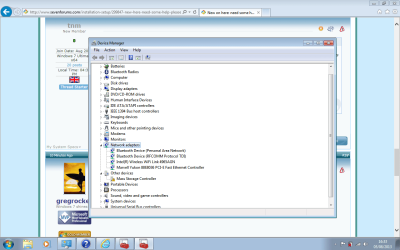
Look in Device Manager under Network Adapters to see if any where provided by the installer. It might already have the ethernet driver which you'd otherwise know only if you were plugged in by wire.

I thought you said you could get online. If not then plug in by wire and enable Automatically deliver drivers via Windows Update (Step 3) to see if it loads an ethernet driver from the Windows Driver Store in Windows folder. Then run all Updates to get the rest of the drivers.

If that doesn't do it then install the Vista wireless driver provided on the Sony webpage. You may need to run Hardware Identification to determine if its the Intel or Atheros wireless driver if you don't know or it doesn't list it, or just try all of them until it loads and is ready to connect by wire or wirelessly.

It the driver loads and it won't connect in bottom-right System tray then rightclick on the connection icon to Troubleshoot.

Belarc would have helped if you still had the factory preinstall, to see what device makes/models you have based on the drivers loaded, any Product Keys. That often doesn't show after a reinstall unless you use Hardware Identification which is how Windows Updates will deliver the newer drivers.
 
I thought you said you could get online. If not then plug in by wire and enable Automatically deliver drivers via Windows Update (Step 3) to see if it loads an ethernet driver from the Windows Driver Store in Windows folder. Then run all Updates to get the rest of the drivers.

The last time I rebooted I was able to use windows update straight away. The time before, no. Do I do enable this setting now, as in before I reinstall using the USB?

If that doesn't do it then install the Vista wireless driver provided on the Sony webpage. You may need to run Hardware Identification to determine if its the Intel or Atheros wireless driver if you don't know or it doesn't list it, or just try all of them until it loads and is ready to connect by wire or wirelessly.

It the driver loads and it won't connect in bottom-right System tray then rightclick on the connection icon to Troubleshoot.

What about this belarc thingy?
 
Last edited:

My Computer My Computer

Computer type
Laptop
Computer Manufacturer/Model Number
Sony Vaio FZ38M
OS
Windows 7 Ultimate x64
Looks like there is some stuff under network adaptors. Do I still need to back up the driver for me to get online as per step 7? If so, can you tell which driver it is on the link left by looking at the picture I posted?

http://www.sony.co.uk/support/en/product/VGN-FZ38M/updates

So regarding belarc, no point using it?
 

Attachments

  • Untitled.png
    Untitled.png
    48.2 KB · Views: 7

My Computer My Computer

Computer type
Laptop
Computer Manufacturer/Model Number
Sony Vaio FZ38M
OS
Windows 7 Ultimate x64
So it says clearly what your driver Wireless make/model is. Next you Google that for Win7 driver and find the downloads page here: https://downloadcenter.intel.com/SearchResult.aspx?lang=eng&ProductFamily=Wireless+Networking&ProductLine=Intel%C2%AE+Wi-Fi+Products&ProductProduct=Intel%C2%AE+Wireless+WiFi+Link+4965AGN

Download the Win7 driver for Windows to your backup so you have it if it isn't provided during install. But if you've already done one reinstall and those drivers were loaded then what is the worry?
 
So it says clearly what your driver Wireless make/model is. Next you Google that for Win7 driver and find the downloads page here: https://downloadcenter.intel.com/SearchResult.aspx?lang=eng&ProductFamily=Wireless+Networking&ProductLine=Intel%C2%AE+Wi-Fi+Products&ProductProduct=Intel%C2%AE+Wireless+WiFi+Link+4965AGN

Download the Win7 driver for Windows to your backup so you have it if it isn't provided during install. But if you've already done one reinstall and those drivers were loaded then what is the worry?

Great, but which one?

Intel® PROSet/Wireless Software — Intel® PROSet/ Wireless Software Downloads

Guessing the top one but this does not look like the same version when looking in device manager.
 

My Computer My Computer

Computer type
Laptop
Computer Manufacturer/Model Number
Sony Vaio FZ38M
OS
Windows 7 Ultimate x64
Back
Top