Solved New on here: need some help please

By the way, I've just tried to boot up having the USB in and it hasn't said boot from cd or DVD to allow me to press enter despite creating the bootable usb with the iso files on. :(
 
Last edited:

My Computer My Computer

Computer type
Laptop
Computer Manufacturer/Model Number
Sony Vaio FZ38M
OS
Windows 7 Ultimate x64
This is the boot thing you mentioned on YouTube. Does this info show why I can't do it?
 

Attachments

  • ImageUploadedBySeven Forums1375722466.135265.jpg
    ImageUploadedBySeven Forums1375722466.135265.jpg
    68.9 KB · Views: 6

My Computer My Computer

Computer type
Laptop
Computer Manufacturer/Model Number
Sony Vaio FZ38M
OS
Windows 7 Ultimate x64
Update: just been fiddling around with the order of those boot elements and still no luck :/
 
Last edited:

My Computer My Computer

Computer type
Laptop
Computer Manufacturer/Model Number
Sony Vaio FZ38M
OS
Windows 7 Ultimate x64
Did you try the USB flash stick menu choice? Use the up and down key to highlight it then press Enter.

Try also the one-time BIOS Boot Menu key listed on the first boot screen to press to get a boot menu. Normally it will show the name of the flash stick so you know it's recognized.

Did you write the ISO to stick using the http://www.sevenforums.com/tutorials/31541-windows-7-usb-dvd-download-tool.html?filter[2]=General%20Tips and did it complete? Will it boot on another PC?
 
USB flash* won't work. Has to enable external boot for those with an * next to it.

Can't see the one time boot thing your talking about, and yes I used the link you mentioned above.

Here's the main bit of the bios.
 

Attachments

  • ImageUploadedBySeven Forums1375735585.397955.jpg
    ImageUploadedBySeven Forums1375735585.397955.jpg
    65.2 KB · Views: 8
Last edited:

My Computer My Computer

Computer type
Laptop
Computer Manufacturer/Model Number
Sony Vaio FZ38M
OS
Windows 7 Ultimate x64
I used the up and down key and then used the + key to move it to the top then f10 to save and exit. I didn't highlight it and press enter.
 

My Computer My Computer

Computer type
Laptop
Computer Manufacturer/Model Number
Sony Vaio FZ38M
OS
Windows 7 Ultimate x64
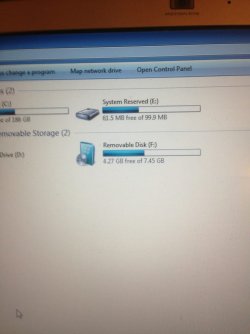
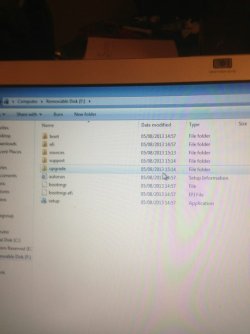
Tried on another computer to no avail. From the images below, you can see that I've downloaded the iso file so that the USB flash stick appears as a DVD. Also I've included the contents. Really not sure what to do now, feel demoralised!
 

Attachments

  • ImageUploadedBySeven Forums1375736344.878045.jpg
    ImageUploadedBySeven Forums1375736344.878045.jpg
    46.1 KB · Views: 2
  • ImageUploadedBySeven Forums1375736360.444608.jpg
    ImageUploadedBySeven Forums1375736360.444608.jpg
    49.6 KB · Views: 3
Last edited:

My Computer My Computer

Computer type
Laptop
Computer Manufacturer/Model Number
Sony Vaio FZ38M
OS
Windows 7 Ultimate x64
Try writing the ISO to stick using How To Use UltraISO Software To Create Bootable USB Flash Drive which always works when the others don't.

Use the Sony F2 Boot Menu key at boot to try to trigger the stick to boot. It should have the stick name in the menu if it's recognized.

To boot a flash stick you must have a confirmed ISO written to flash correctly, then trigger it to boot by setting it to boot first in BIOS setup, or using the one-time BIOS Boot Menu key.
 
Which of the ones should I have as the top priority because more than one say usb.

I don't know what the one time bios boot menu key is??

Really struggling now because I've done the iso file transfer correctly. You can see from the images that it looks correct.
 

My Computer My Computer

Computer type
Laptop
Computer Manufacturer/Model Number
Sony Vaio FZ38M
OS
Windows 7 Ultimate x64
As I stated above you want USB flash at the top of the boot order. I thought you had already done this.

If that fails try USB Hard Drive.
 
Finally it's working. Put the USB hard drive first and it loads straight to it. Once it's installed, should I change the priority. If so, what order?

Will need some help with some of the next steps if that's ok.

I left my usb mouse in so just took it out. Could it affect it? It was on the windows expanding file bit
 

My Computer My Computer

Computer type
Laptop
Computer Manufacturer/Model Number
Sony Vaio FZ38M
OS
Windows 7 Ultimate x64
Oh dear, it's just gone back to the windows install bit again. Now I really don't know what's happening. It basically completed installing then restarted only to go through the cycle again. Could it be because the priority is the usb hard disk. Can I cancel the install and hope that it continues with it? I really am confused now. :(
 

My Computer My Computer

Computer type
Laptop
Computer Manufacturer/Model Number
Sony Vaio FZ38M
OS
Windows 7 Ultimate x64
I cancelled the setup and now it's continuing with the install. I guess the priority made the USB drive boot the usb. Will this affect anything?
 

My Computer My Computer

Computer type
Laptop
Computer Manufacturer/Model Number
Sony Vaio FZ38M
OS
Windows 7 Ultimate x64
I cancelled the setup and now it's continuing with the install. I can only think that when it restarted to continue with the update it, the usb was booted again. Will this affect anything?

Todd
 

My Computer My Computer

Computer type
Laptop
Computer Manufacturer/Model Number
Sony Vaio FZ38M
OS
Windows 7 Ultimate x64
Yes, the flash stick autostarted so install started over which is why its best to use the one-time BIOS Boot menu key with the HDD set first to boot.

You can just pull out the flash stick and force another reboot to have it continue install. Or do it over but pull out the stick when it has its first restart.

And yes, I would move the PC HDD back to first boot device after install.

Follow the same steps as in http://www.sevenforums.com/tutorials/219487-clean-reinstall-factory-oem-windows-7-a.html#post1839164 to handle drivers and set it up perfectly. Get online then run all rounds of IMportant and Optional Windows Updates, after enabling http://www.sevenforums.com/tutorials/2803-device-installation-settings.html, Option 3. After requested reboots go right back to Check for Updates. After they're all done import any drivers still missing in Device Manager.

 
Last edited:
Yes, the flash stick autostarted so install started over which is why its best to use the one-time BIOS Boot menu key with the HDD set first to boot.

You can just pull out the flash stick and force another reboot to have it continue install. Or do it over but pull out the stick when it has its first restart.

And yes, I would move the PC HDD back to first boot device after install.

Follow the same steps as in http://www.sevenforums.com/tutorials/219487-clean-reinstall-factory-oem-windows-7-a.html#post1839164 to handle drivers and set it up perfectly. Get online then run all rounds of IMportant and Optional Windows Updates, after enabling http://www.sevenforums.com/tutorials/2803-device-installation-settings.html. After requested reboots go right back to Check for Updates. After they're all done import any drivers still missing in Device Manager.

But which is the one time bios boot menu key. I couldn't have the HDD first. I put USB hard drive disk first like I said before.
 

My Computer My Computer

Computer type
Laptop
Computer Manufacturer/Model Number
Sony Vaio FZ38M
OS
Windows 7 Ultimate x64
I suggested in Post #48 that you try the Sony F2 key at boot which is often the BIOS Boot Menu key. Did you miss that?
 
Right, I basically put the USB HDD at the top after everything else failed. I restarted windows and I didn't need to press anything as it loaded no problem. However, it auto-started when the install had to restart.

How would I have prevented this from happening. You said place the HDD at the top. This is so confusing lol.
 

My Computer My Computer

Computer type
Laptop
Computer Manufacturer/Model Number
Sony Vaio FZ38M
OS
Windows 7 Ultimate x64
OK, I'll repeat it for the third time: It's preferable with a flash stick to set the HDD first to boot then use the one-time BIOS Boot Menu key to trigger the stick so it won't autostart at reboots.

I told you the one-time BIOS Boot Menu key is F2 on most Sony's.

If you must set stick to boot first in BIOS setup then (again) when it restarts during install simply pull the stick out.

Has the install completed? Did it provide the network driver so you can connect to network and start doing your Updates as I also wrote out for you before? Follow those steps exactly:

Follow the same steps as in http://www.sevenforums.com/tutorials/219487-clean-reinstall-factory-oem-windows-7-a.html#post1839164 to handle drivers and set it up perfectly. Get online then run all rounds of IMportant and Optional Windows Updates, after enabling http://www.sevenforums.com/tutorials/2803-device-installation-settings.html, Option 3. After requested reboots go right back to Check for Updates. After they're all done import any drivers still missing in Device Manager.
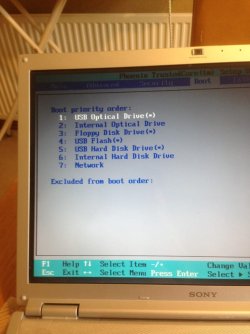
 
That is much clearer, thanks; however, when you say it is preferable with a flash stick to set the 'HDD' first to boot, which is the HDD in my BIOS? Check the pictures above for me and tell me which one it is because they all have fancy names.

When I pressed f2 it always went to the bios, it never triggered the stick to boot.
 

My Computer My Computer

Computer type
Laptop
Computer Manufacturer/Model Number
Sony Vaio FZ38M
OS
Windows 7 Ultimate x64
Back
Top