
Reinstalled Windows boot manager (removed GRUB2) does this look right?

herqulees

:3
Member
Local time
4:36 PM
Messages
85
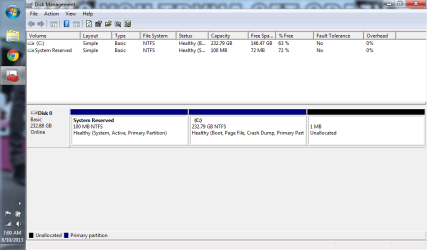
Long story short I got a netbook and as with all netbooks Windows is a little slow at times on it, I hadn't used Ubuntu in a long time and figured I'd give it a try since it was pretty fast on old computers, I shrunk Windows 7 50GB, put Ubuntu at the end of the hard drive, found out Ubuntu went WAY downhill in quality, booted into Windows 7 recovery and followed these directions exactly to reinstall the Windows bootloader (https://help.ubuntu.com/community/RestoreUbuntu/XP/Vista/7Bootloader), rebooted into Windows 7 fine with GRUB2 now gone and went into disk management to delete Ubuntu, then extended the Windows partition back but was informed it could not be extended all the way because it was marked for boot, so now I have 1MB at the end of the drive that I can't use for some reason and I'm not sure but to me the attributes look weird to me now. System Reserved has (System, Active, Primary Partition) and C: has (Boot, Page File, Crash Dump, Primary Partition).
Like I said everything is working fine again, just was wondering if that sounded right and why Windows won't let me use the last bit of the hard disk now? Tempted to use the parted command off my Ubuntu USB to extend it the rest of the way but am wondering if for once Windows was stopping me from resizing a partition for a good reason. Windows lack of functionality in the disk management area has always bugged me thus I tend to use Ubuntu for just that one task off a LiveUSB.
 

Attachments
  • Untitled.png
    Untitled.png
    33.8 KB · Views: 10

My Computer My Computer

At a glance

Windows 7 Home Premium 64bitIntel Core i5-2430M (Quad thread/dual core @ ...Kingston 6GB (4GB+2GB) DDR3 1333MHznVidia GeForce GT 540M 1GB DDR3
Computer type
Laptop
Computer Manufacturer/Model Number
Acer Aspire 5830TG-6614
OS
Windows 7 Home Premium 64bit
CPU
Intel Core i5-2430M (Quad thread/dual core @ 2.4-3GHz)
Memory
Kingston 6GB (4GB+2GB) DDR3 1333MHz
Graphics Card(s)
nVidia GeForce GT 540M 1GB DDR3
Screen Resolution
1366x768
Hard Drives
Toshiba 640GB 5400RPM 8MB Buffer
Antivirus
Avast Free
Browser
Chrome
Do you have a bootable Gparted CD? Gparted should handle that, I've do a half dozen partitions this week on my LT. Have Mint, Ubuntu and Gnome running with Vista.
 

My Computer My Computer

At a glance

Win8/8.1,Win7-U64, Vista U64, uncounted Linux...AMD and Intell, 9590, 8350, i5 3570kCorsair G SkillCrossfired Sapphire HD 7950 Vapor-X, ASUS R9 ...
Computer type
PC/Desktop
Computer Manufacturer/Model Number
Custom, Dell and Lenono LT's
OS
Win8/8.1,Win7-U64, Vista U64, uncounted Linux distor's
CPU
AMD and Intell, 9590, 8350, i5 3570k
Motherboard
CFVFZ, GA990FXA, Z77e-itx
Memory
Corsair G Skill
Graphics Card(s)
Crossfired Sapphire HD 7950 Vapor-X, ASUS R9 280X TOP
Sound Card
Realtek ALC889
Monitor(s) Displays
ViewSonic VX2770SMH 27" / ViewSonic VX2433 LCD 24"
Screen Resolution
1080i HD
Hard Drives
Samsung SSD 840 Pro
OCZ Agility 3's
OCZ Vector's
WD's Blue, red, green, Velociraptors
Seagate USB3 & Hybrid's
ASUS Blu-Ray
ASUS DVD
PSU
Corsair AX1200i, Seasonice 850 Gold
Case
Cooler Master HAF 922 & HAF 932, Lian Li Train case.
Cooling
Air, Glacer 240L expanded, custom EK loop with duel D5's
Keyboard
Microsoft SideWinder X4 USB Keyboard / Logitech 250 PS2
Mouse
Logitech G500 / MS wireless 5000
Internet Speed
Best of 5ms / 75+ dn / 12+ up More or less.
Antivirus
MS esentials-MalwareBytes
Browser
Firefox Chromebook
Your screen shot looks normal to me except for the 1MB unallocated section.

Being marked Boot is not the reason it didn't extend completely.
What indicated that was the reason?

You could use a third party partitioning program to extend.
 

My Computer My Computer

At a glance

Windows 10 Pro x64, Windows 8.1 Pro x64, Wind...INTEL i9-7920X LGA 206664 GB (4 X 16 GB) G-Skill V Series DDR4 3200 ...EVGA GTX 1060 SC 3 GB
Computer type
PC/Desktop
Computer Manufacturer/Model Number
Custom Built
OS
Windows 10 Pro x64, Windows 8.1 Pro x64, Windows 7 Ultimate x64 SP1,
CPU
INTEL i9-7920X LGA 2066
Motherboard
Gigabyte X299-WU8 F3
Memory
64 GB (4 X 16 GB) G-Skill V Series DDR4 3200 Quad Channel
Graphics Card(s)
EVGA GTX 1060 SC 3 GB
Sound Card
Realtek Onboard ALC1220
Monitor(s) Displays
2 x Samsung S27E310
Screen Resolution
1920x1080
Hard Drives
Samsung 2 x 970 EVO Plus 500 GB NVMe
1 x 6TB WD 6003FZBX SATA
1 x 6TB WD 60EFRX SATA
12 x 3TB WD 30EFRX SATA
PSU
Seasonic X-1050
Case
Thermaltake Armor+
Cooling
Corsair H80i V2 Liquid AOI Cooler
Keyboard
Logitech G510s
Mouse
Logitech MX Master 2S
Internet Speed
200 Mb/s
Antivirus
ESET NOD32 13.1
Browser
EDGE (Dev, Canary, Beta), Chrome
Other Info
ASUS RT-AC68U router
Malwarebytes 4.0.4
Is it worth trying to get 1mb back?
 

My Computer My Computer

At a glance

ME/XP/Vista/Win7
OS
ME/XP/Vista/Win7
Your screen shot looks normal to me except for the 1MB unallocated section.

Being marked Boot is not the reason it didn't extend completely.
What indicated that was the reason?

You could use a third party partitioning program to extend.

That was the reason the partition extender said it wouldn't do it. I had to do a bit of searching to find the message it said but finally found it. "You can only extend the volume to the available space shown below because your disk can not be converted to dynamic or the volume being extended is a boot or system volume." and I also wasn't sure if the attributes for the two partitions sounded right, but I guess they are, I thought I remembered Boot being on System Reserved but it doesn't seem that's right after looking around online.

And I don't think it's worth a lot of work for 1MB, I more was just wondering why it did this.
 

My Computer My Computer

At a glance

Windows 7 Home Premium 64bitIntel Core i5-2430M (Quad thread/dual core @ ...Kingston 6GB (4GB+2GB) DDR3 1333MHznVidia GeForce GT 540M 1GB DDR3
Computer type
Laptop
Computer Manufacturer/Model Number
Acer Aspire 5830TG-6614
OS
Windows 7 Home Premium 64bit
CPU
Intel Core i5-2430M (Quad thread/dual core @ 2.4-3GHz)
Memory
Kingston 6GB (4GB+2GB) DDR3 1333MHz
Graphics Card(s)
nVidia GeForce GT 540M 1GB DDR3
Screen Resolution
1366x768
Hard Drives
Toshiba 640GB 5400RPM 8MB Buffer
Antivirus
Avast Free
Browser
Chrome
Back
Top