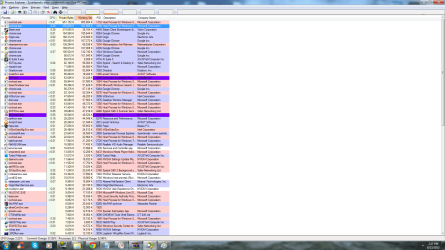
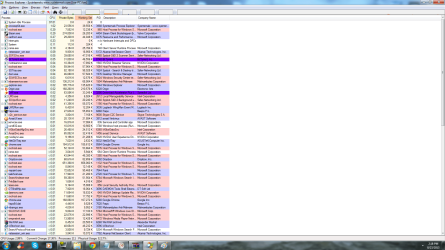
SVHost Using alot of ram (5gb)

Exeagle

New member
Local time
5:25 PM
Messages
15
Hey guy's for some odd reason my computer has been idling so loudly like im installing some performance draining program

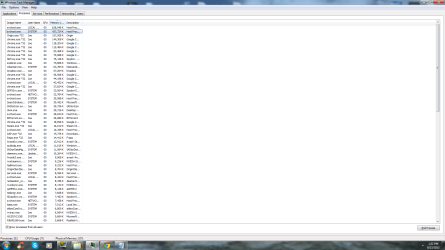
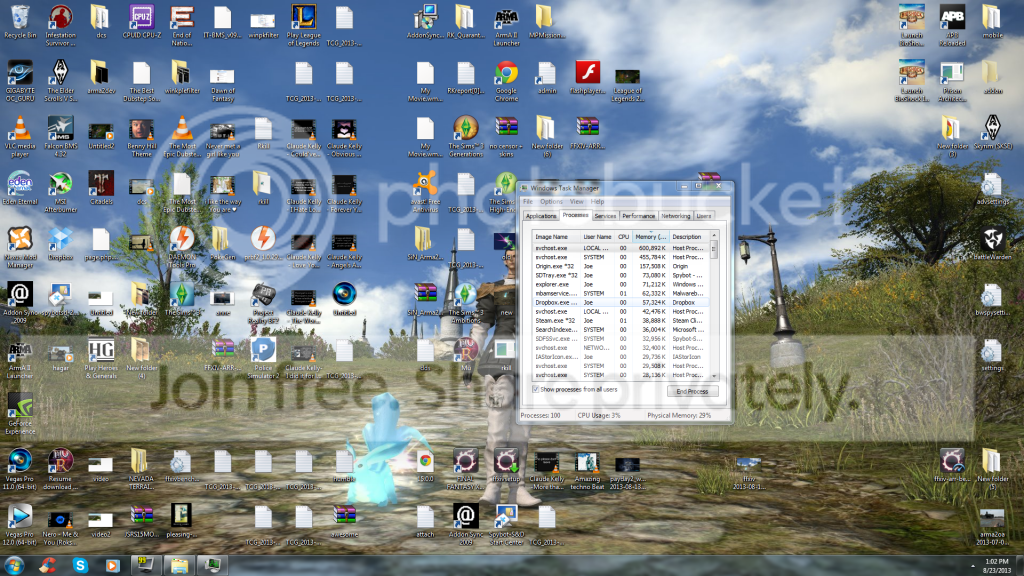
i closed all my program's and went to the desktop and for some reason my sv host's are going nut's using so much ram for no reason (i have no game's runing) everything was closed) i might of had steam and origin open in the back ground (on process) but that's about it



My Computer My Computer

At a glance

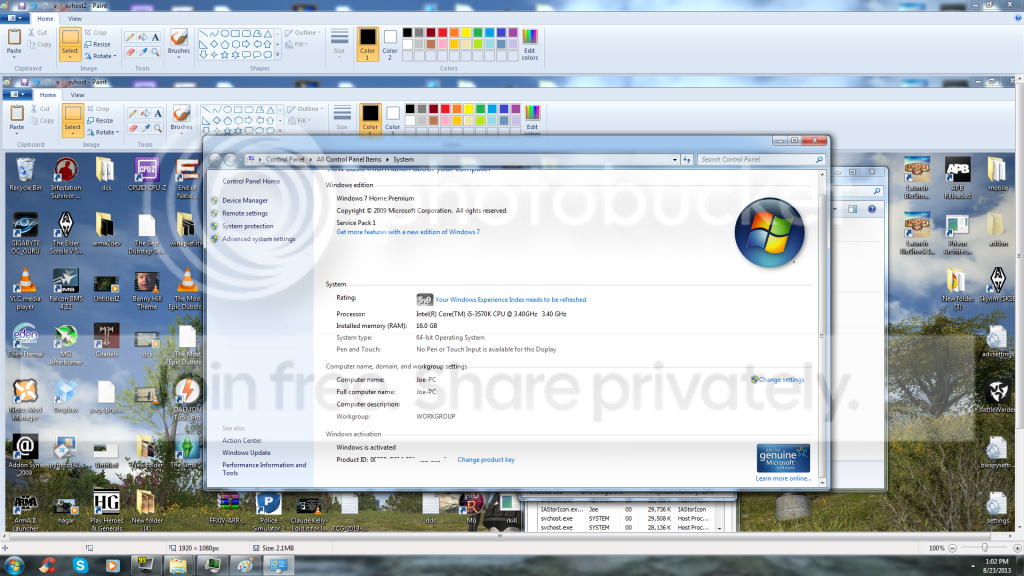
Microsoft Windows 7 Home Premium 64-bit 7601 ...Intel(R) Core(TM) i5-3570K CPU @ 3.40GHz16.00 GBNVIDIA GeForce GTX 660 Ti
Computer type
PC/Desktop
Computer Manufacturer/Model Number
Asus
OS
Microsoft Windows 7 Home Premium 64-bit 7601 Multiprocessor Free Service Pack 1
CPU
Intel(R) Core(TM) i5-3570K CPU @ 3.40GHz
Motherboard
ASUSTeK COMPUTER INC. P8Z77-V LK
Memory
16.00 GB
Graphics Card(s)
NVIDIA GeForce GTX 660 Ti
Sound Card
(1) NVIDIA Virtual Audio Device (Wave Extensible) (WDM) (2
Screen Resolution
1920 x 1080 x 32 bits (4294967296 colors) @ 60 Hz
Hard Drives
(1) ST31000524AS (2) ST3500418AS
PSU
HGC-750
Case
idk
Cooling
Intel thermal soulution rts2011LC
Internet Speed
100mbits
Antivirus
AVAST
Browser
Chrome
I also use avast as an antivirus (also use payed version of ) Malwarebyte's

(also use) C cleaner (spybot search and destory) and that's about it i think..
 

My Computer My Computer

At a glance

Microsoft Windows 7 Home Premium 64-bit 7601 ...Intel(R) Core(TM) i5-3570K CPU @ 3.40GHz16.00 GBNVIDIA GeForce GTX 660 Ti
Computer type
PC/Desktop
Computer Manufacturer/Model Number
Asus
OS
Microsoft Windows 7 Home Premium 64-bit 7601 Multiprocessor Free Service Pack 1
CPU
Intel(R) Core(TM) i5-3570K CPU @ 3.40GHz
Motherboard
ASUSTeK COMPUTER INC. P8Z77-V LK
Memory
16.00 GB
Graphics Card(s)
NVIDIA GeForce GTX 660 Ti
Sound Card
(1) NVIDIA Virtual Audio Device (Wave Extensible) (WDM) (2
Screen Resolution
1920 x 1080 x 32 bits (4294967296 colors) @ 60 Hz
Hard Drives
(1) ST31000524AS (2) ST3500418AS
PSU
HGC-750
Case
idk
Cooling
Intel thermal soulution rts2011LC
Internet Speed
100mbits
Antivirus
AVAST
Browser
Chrome
Click the start button and type in msconfig into the search box and press enter, then click on the startup tab, disable all the services you don't need starting up with your computer, if it's intel, or think it's something from windows, probably shouldn't disable it (I don't know if AMD has any special drivers that boot with your computer) Any programs that don't seem to be from a trusted source it should be immediately removed from your computer, if you have any questions, just ask. :)

Also read this >> >> http://www.sevenforums.com/tutorial...ation-conflicts-performing-clean-startup.html
 

My Computer My Computer

At a glance

.
Computer type
PC/Desktop
OS
.
Intel(R) Core(TM) i5-3570K CPU @ 3.40 (overclocked to 4.2) (have a liqud cool system)
ASUSTeK COMPUTER INC. P8Z77-V LK
BIOS Date: 11/16/12 09:51:50 Ver: 09.08
15.95 GB ram 15.95 GB usable
(1) ST31000524AS (2) ST3500418AS

(1) NVIDIA Virtual Audio Device (Wave Extensible) (WDM) (2) NVIDIA High Definition Audio (3) Realtek High Definition Audio
Microsoft Windows 7 Home Premium 64-bit 7601 Multiprocessor Free Service Pack 1

i also filled it out using the auto tool system c:


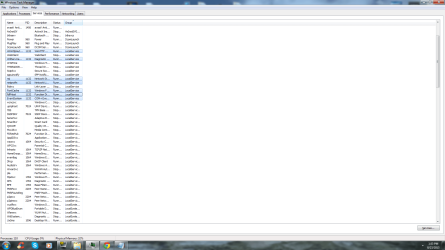
also i checked the server's tab svhost is using and this is all that showed up


and the other one using


I also did the msconfig and i have no other program's on start up just normal one's besides steam and origin.
 

My Computer My Computer

At a glance

Microsoft Windows 7 Home Premium 64-bit 7601 ...Intel(R) Core(TM) i5-3570K CPU @ 3.40GHz16.00 GBNVIDIA GeForce GTX 660 Ti
Computer type
PC/Desktop
Computer Manufacturer/Model Number
Asus
OS
Microsoft Windows 7 Home Premium 64-bit 7601 Multiprocessor Free Service Pack 1
CPU
Intel(R) Core(TM) i5-3570K CPU @ 3.40GHz
Motherboard
ASUSTeK COMPUTER INC. P8Z77-V LK
Memory
16.00 GB
Graphics Card(s)
NVIDIA GeForce GTX 660 Ti
Sound Card
(1) NVIDIA Virtual Audio Device (Wave Extensible) (WDM) (2
Screen Resolution
1920 x 1080 x 32 bits (4294967296 colors) @ 60 Hz
Hard Drives
(1) ST31000524AS (2) ST3500418AS
PSU
HGC-750
Case
idk
Cooling
Intel thermal soulution rts2011LC
Internet Speed
100mbits
Antivirus
AVAST
Browser
Chrome
did you follow the other instructions i gave you?
 

My Computer My Computer

At a glance

.
Computer type
PC/Desktop
OS
.
You have to remember that svchost is what the name implies a service host meaning it hosts other services.
Follow this Tutorial and upload Screenshots.
 

My Computer My Computer

At a glance

Windows 10Intel Core i5 3570K16GB 1600Mhz G.SkillGigabyte GTX 970 G1-Gaming
Computer type
PC/Desktop
OS
Windows 10
CPU
Intel Core i5 3570K
Motherboard
Asus P8Z77V-PRO
Memory
16GB 1600Mhz G.Skill
Graphics Card(s)
Gigabyte GTX 970 G1-Gaming
PSU
Seasonic 1000W Platinum
Case
Fractal Design Define R4
Cooling
Noctua NH-D14

My Computer My Computer

At a glance

Windows 7 Ultimate X64 SP1Intel i5-2550K, Differing ~4.4-4.8GHz No buil...16GB G.Skill Sniper 1866MHz @ 2133MHz 2x8GBASUS GTX650TIB-DC2OC-2GD5, (650TI Boost)
Computer type
PC/Desktop
Computer Manufacturer/Model Number
Home Built Desktop By DataTech
OS
Windows 7 Ultimate X64 SP1
CPU
Intel i5-2550K, Differing ~4.4-4.8GHz No built in GPU
Motherboard
ASUS P8Z68-V PRO/GEN3
Memory
16GB G.Skill Sniper 1866MHz @ 2133MHz 2x8GB
Graphics Card(s)
ASUS GTX650TIB-DC2OC-2GD5, (650TI Boost)
Sound Card
Onboard Realtek 5-1
Monitor(s) Displays
Samsung P2570HD
Screen Resolution
1920x1080
Hard Drives
Samsung 840 Pro 256GB SSD for OS, 500GB Seagate Constellation (Enterprise drive) for Data
PSU
Corsair HX650W
Case
Inwin Dragon Rider
Cooling
Hyper 212 EVO w/two Noctua fans, push-pull, @1300 RPM
Keyboard
E-Z Eyes, bright yellow keys with large characters
Mouse
steelseries SENSEI Laser Pro Gaming
Internet Speed
48-51Mbs Mbs down, 11 Mbs up Xfinity Cable
Antivirus
Norton Internet Security 2013
Browser
IE 10, Opera, Pale Moon if needed
Other Info
4 case fans, LG BluRay-RE, ASUS DVD-RW, Mr. Fusion power supply, 1.21 gigawatts.

My Computer My Computer

At a glance

.
Computer type
PC/Desktop
OS
.
You have to remember that svchost is what the name implies a service host meaning it hosts other services.
Follow this Tutorial and upload Screenshots.

I have photo's on the fourm post but i will attach some different one's here to,
 

Attachments

  • 1.png
    1.png
    78.5 KB · Views: 4
  • 2.png
    2.png
    80.3 KB · Views: 5
  • 3.png
    3.png
    78.7 KB · Views: 5
  • svhost service 1.png
    svhost service 1.png
    78.5 KB · Views: 5
  • svhost service 2.png
    svhost service 2.png
    78.5 KB · Views: 5

My Computer My Computer

At a glance

Microsoft Windows 7 Home Premium 64-bit 7601 ...Intel(R) Core(TM) i5-3570K CPU @ 3.40GHz16.00 GBNVIDIA GeForce GTX 660 Ti
Computer type
PC/Desktop
Computer Manufacturer/Model Number
Asus
OS
Microsoft Windows 7 Home Premium 64-bit 7601 Multiprocessor Free Service Pack 1
CPU
Intel(R) Core(TM) i5-3570K CPU @ 3.40GHz
Motherboard
ASUSTeK COMPUTER INC. P8Z77-V LK
Memory
16.00 GB
Graphics Card(s)
NVIDIA GeForce GTX 660 Ti
Sound Card
(1) NVIDIA Virtual Audio Device (Wave Extensible) (WDM) (2
Screen Resolution
1920 x 1080 x 32 bits (4294967296 colors) @ 60 Hz
Hard Drives
(1) ST31000524AS (2) ST3500418AS
PSU
HGC-750
Case
idk
Cooling
Intel thermal soulution rts2011LC
Internet Speed
100mbits
Antivirus
AVAST
Browser
Chrome
I think Brink has a tut on everything except how to use the power button. :D
 

My Computer My Computer

At a glance

Windows 7 Ultimate X64 SP1Intel i5-2550K, Differing ~4.4-4.8GHz No buil...16GB G.Skill Sniper 1866MHz @ 2133MHz 2x8GBASUS GTX650TIB-DC2OC-2GD5, (650TI Boost)
Computer type
PC/Desktop
Computer Manufacturer/Model Number
Home Built Desktop By DataTech
OS
Windows 7 Ultimate X64 SP1
CPU
Intel i5-2550K, Differing ~4.4-4.8GHz No built in GPU
Motherboard
ASUS P8Z68-V PRO/GEN3
Memory
16GB G.Skill Sniper 1866MHz @ 2133MHz 2x8GB
Graphics Card(s)
ASUS GTX650TIB-DC2OC-2GD5, (650TI Boost)
Sound Card
Onboard Realtek 5-1
Monitor(s) Displays
Samsung P2570HD
Screen Resolution
1920x1080
Hard Drives
Samsung 840 Pro 256GB SSD for OS, 500GB Seagate Constellation (Enterprise drive) for Data
PSU
Corsair HX650W
Case
Inwin Dragon Rider
Cooling
Hyper 212 EVO w/two Noctua fans, push-pull, @1300 RPM
Keyboard
E-Z Eyes, bright yellow keys with large characters
Mouse
steelseries SENSEI Laser Pro Gaming
Internet Speed
48-51Mbs Mbs down, 11 Mbs up Xfinity Cable
Antivirus
Norton Internet Security 2013
Browser
IE 10, Opera, Pale Moon if needed
Other Info
4 case fans, LG BluRay-RE, ASUS DVD-RW, Mr. Fusion power supply, 1.21 gigawatts.
p.s this is with all chrome and everything closed i forgot to close them in the process screenshot's but it make's no difference

also go back to page 1 please to see the other one's i attached down the bottom C:
 

Attachments

  • 11.png
    11.png
    52.4 KB · Views: 2
Last edited:

My Computer My Computer

At a glance

Microsoft Windows 7 Home Premium 64-bit 7601 ...Intel(R) Core(TM) i5-3570K CPU @ 3.40GHz16.00 GBNVIDIA GeForce GTX 660 Ti
Computer type
PC/Desktop
Computer Manufacturer/Model Number
Asus
OS
Microsoft Windows 7 Home Premium 64-bit 7601 Multiprocessor Free Service Pack 1
CPU
Intel(R) Core(TM) i5-3570K CPU @ 3.40GHz
Motherboard
ASUSTeK COMPUTER INC. P8Z77-V LK
Memory
16.00 GB
Graphics Card(s)
NVIDIA GeForce GTX 660 Ti
Sound Card
(1) NVIDIA Virtual Audio Device (Wave Extensible) (WDM) (2
Screen Resolution
1920 x 1080 x 32 bits (4294967296 colors) @ 60 Hz
Hard Drives
(1) ST31000524AS (2) ST3500418AS
PSU
HGC-750
Case
idk
Cooling
Intel thermal soulution rts2011LC
Internet Speed
100mbits
Antivirus
AVAST
Browser
Chrome
can you post some pics here on the services and startup in msconfig please :)
 

My Computer My Computer

At a glance

.
Computer type
PC/Desktop
OS
.
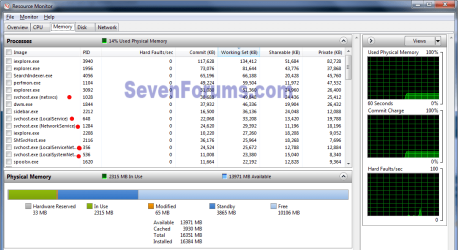
In the :orb: search field type resmon and hit enter, go to the Memory tab. Look through the list for svchost entries to tell you what is using the RAM. I've placed a red dot next to what you're looking for.

resmon.png
 

My Computer My Computer

At a glance

Windows 7 Ultimate X64 SP1Intel i5-2550K, Differing ~4.4-4.8GHz No buil...16GB G.Skill Sniper 1866MHz @ 2133MHz 2x8GBASUS GTX650TIB-DC2OC-2GD5, (650TI Boost)
Computer type
PC/Desktop
Computer Manufacturer/Model Number
Home Built Desktop By DataTech
OS
Windows 7 Ultimate X64 SP1
CPU
Intel i5-2550K, Differing ~4.4-4.8GHz No built in GPU
Motherboard
ASUS P8Z68-V PRO/GEN3
Memory
16GB G.Skill Sniper 1866MHz @ 2133MHz 2x8GB
Graphics Card(s)
ASUS GTX650TIB-DC2OC-2GD5, (650TI Boost)
Sound Card
Onboard Realtek 5-1
Monitor(s) Displays
Samsung P2570HD
Screen Resolution
1920x1080
Hard Drives
Samsung 840 Pro 256GB SSD for OS, 500GB Seagate Constellation (Enterprise drive) for Data
PSU
Corsair HX650W
Case
Inwin Dragon Rider
Cooling
Hyper 212 EVO w/two Noctua fans, push-pull, @1300 RPM
Keyboard
E-Z Eyes, bright yellow keys with large characters
Mouse
steelseries SENSEI Laser Pro Gaming
Internet Speed
48-51Mbs Mbs down, 11 Mbs up Xfinity Cable
Antivirus
Norton Internet Security 2013
Browser
IE 10, Opera, Pale Moon if needed
Other Info
4 case fans, LG BluRay-RE, ASUS DVD-RW, Mr. Fusion power supply, 1.21 gigawatts.
I can't read the tiny screenshots.
This is the preferred, best way to upload an image to a post.
http://www.sevenforums.com/tutorials/9733-screenshots-files-upload-post-seven-forums.html#post93869
You may also upload a photo or image as you would a file, without using the Snipping tool.
I was going to say something about this, but couldn't find a way to put it straightfoward, i didn't know u guys had a tutorial for this :o

Just search the Tutorials section you'll find every answer you can wish for :) .

You have to remember that svchost is what the name implies a service host meaning it hosts other services.
Follow this Tutorial and upload Screenshots.

I have photo's on the fourm post but i will attach some different one's here to,

Time to pull out the big guns.

Download | Process Explorer.

Launch Process Explorer (if you have a short list,
click "Show Processes From All Users" the right most option in the top bar):

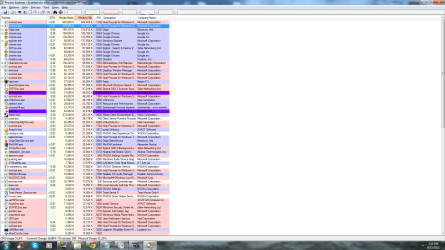
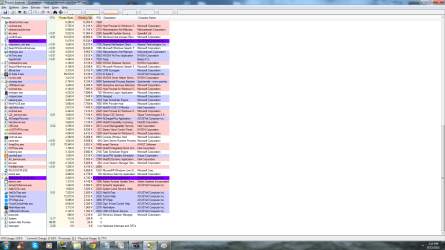
  • Arrange "Working Set" (by clicking on the top of that column) Take a screenshot.
  • Arrange "Private Bytes" (by clicking on the top of that column) Take a screenshot.
  • Arrange "CPU" (by clicking on the top of that column) Take a screenshot.
And upload the screen shots, just make sure you can see the entire service / process name!

I think Brink has a tut on everything except how to use the power button. :D

Ha ha I think he's working on one :p .
 

My Computer My Computer

At a glance

Windows 10Intel Core i5 3570K16GB 1600Mhz G.SkillGigabyte GTX 970 G1-Gaming
Computer type
PC/Desktop
OS
Windows 10
CPU
Intel Core i5 3570K
Motherboard
Asus P8Z77V-PRO
Memory
16GB 1600Mhz G.Skill
Graphics Card(s)
Gigabyte GTX 970 G1-Gaming
PSU
Seasonic 1000W Platinum
Case
Fractal Design Define R4
Cooling
Noctua NH-D14
In the :orb: search field type resmon and hit enter, go to the Memory tab. Look through the list for svchost entries to tell you what is using the RAM. I've placed a red dot next to what you're looking for.

View attachment 282789


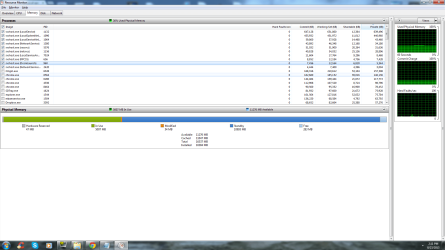
this is what showed up in all the svhost
 

Attachments

  • 232.png
    232.png
    73.6 KB · Views: 5

My Computer My Computer

At a glance

Microsoft Windows 7 Home Premium 64-bit 7601 ...Intel(R) Core(TM) i5-3570K CPU @ 3.40GHz16.00 GBNVIDIA GeForce GTX 660 Ti
Computer type
PC/Desktop
Computer Manufacturer/Model Number
Asus
OS
Microsoft Windows 7 Home Premium 64-bit 7601 Multiprocessor Free Service Pack 1
CPU
Intel(R) Core(TM) i5-3570K CPU @ 3.40GHz
Motherboard
ASUSTeK COMPUTER INC. P8Z77-V LK
Memory
16.00 GB
Graphics Card(s)
NVIDIA GeForce GTX 660 Ti
Sound Card
(1) NVIDIA Virtual Audio Device (Wave Extensible) (WDM) (2
Screen Resolution
1920 x 1080 x 32 bits (4294967296 colors) @ 60 Hz
Hard Drives
(1) ST31000524AS (2) ST3500418AS
PSU
HGC-750
Case
idk
Cooling
Intel thermal soulution rts2011LC
Internet Speed
100mbits
Antivirus
AVAST
Browser
Chrome
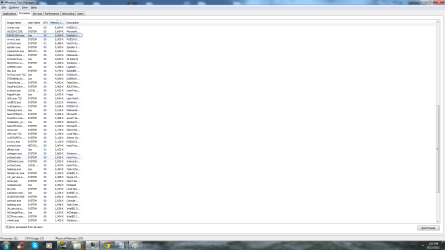
If I added right the total for all the svchost items add up to 1.17GB. If you go to the title and slide the description column over, you can see what each one is. In that snip it all looks normal. I have a total of 19 svchost.exe processes running.

You can click the "Capture.PNG" in the windows to make then easier to read, the huge ones are difficult. :)
 

My Computer My Computer

At a glance

Windows 7 Ultimate X64 SP1Intel i5-2550K, Differing ~4.4-4.8GHz No buil...16GB G.Skill Sniper 1866MHz @ 2133MHz 2x8GBASUS GTX650TIB-DC2OC-2GD5, (650TI Boost)
Computer type
PC/Desktop
Computer Manufacturer/Model Number
Home Built Desktop By DataTech
OS
Windows 7 Ultimate X64 SP1
CPU
Intel i5-2550K, Differing ~4.4-4.8GHz No built in GPU
Motherboard
ASUS P8Z68-V PRO/GEN3
Memory
16GB G.Skill Sniper 1866MHz @ 2133MHz 2x8GB
Graphics Card(s)
ASUS GTX650TIB-DC2OC-2GD5, (650TI Boost)
Sound Card
Onboard Realtek 5-1
Monitor(s) Displays
Samsung P2570HD
Screen Resolution
1920x1080
Hard Drives
Samsung 840 Pro 256GB SSD for OS, 500GB Seagate Constellation (Enterprise drive) for Data
PSU
Corsair HX650W
Case
Inwin Dragon Rider
Cooling
Hyper 212 EVO w/two Noctua fans, push-pull, @1300 RPM
Keyboard
E-Z Eyes, bright yellow keys with large characters
Mouse
steelseries SENSEI Laser Pro Gaming
Internet Speed
48-51Mbs Mbs down, 11 Mbs up Xfinity Cable
Antivirus
Norton Internet Security 2013
Browser
IE 10, Opera, Pale Moon if needed
Other Info
4 case fans, LG BluRay-RE, ASUS DVD-RW, Mr. Fusion power supply, 1.21 gigawatts.
I can't read the tiny screenshots.
This is the preferred, best way to upload an image to a post.
http://www.sevenforums.com/tutorials/9733-screenshots-files-upload-post-seven-forums.html#post93869
You may also upload a photo or image as you would a file, without using the Snipping tool.
I was going to say something about this, but couldn't find a way to put it straightfoward, i didn't know u guys had a tutorial for this :o

Just search the Tutorials section you'll find every answer you can wish for :) .

I have photo's on the fourm post but i will attach some different one's here to,

Time to pull out the big guns.

Download | Process Explorer.

Launch Process Explorer (if you have a short list,
click "Show Processes From All Users" the right most option in the top bar):

  • Arrange "Working Set" (by clicking on the top of that column) Take a screenshot.
  • Arrange "Private Bytes" (by clicking on the top of that column) Take a screenshot.
  • Arrange "CPU" (by clicking on the top of that column) Take a screenshot.
And upload the screen shots, just make sure you can see the entire service / process name!

I think Brink has a tut on everything except how to use the power button. :D

Ha ha I think he's working on one :p .


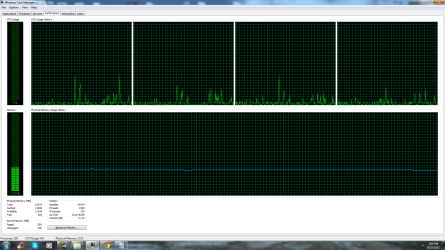
here you go c: haha may as well :P
 

Attachments

  • 1.png
    1.png
    121.8 KB · Views: 3
  • 2.png
    2.png
    119.4 KB · Views: 1
  • 3.png
    3.png
    123.7 KB · Views: 2
  • 4.png
    4.png
    125.3 KB · Views: 1

My Computer My Computer

At a glance

Microsoft Windows 7 Home Premium 64-bit 7601 ...Intel(R) Core(TM) i5-3570K CPU @ 3.40GHz16.00 GBNVIDIA GeForce GTX 660 Ti
Computer type
PC/Desktop
Computer Manufacturer/Model Number
Asus
OS
Microsoft Windows 7 Home Premium 64-bit 7601 Multiprocessor Free Service Pack 1
CPU
Intel(R) Core(TM) i5-3570K CPU @ 3.40GHz
Motherboard
ASUSTeK COMPUTER INC. P8Z77-V LK
Memory
16.00 GB
Graphics Card(s)
NVIDIA GeForce GTX 660 Ti
Sound Card
(1) NVIDIA Virtual Audio Device (Wave Extensible) (WDM) (2
Screen Resolution
1920 x 1080 x 32 bits (4294967296 colors) @ 60 Hz
Hard Drives
(1) ST31000524AS (2) ST3500418AS
PSU
HGC-750
Case
idk
Cooling
Intel thermal soulution rts2011LC
Internet Speed
100mbits
Antivirus
AVAST
Browser
Chrome
If I added right the total for all the svchost items add up to 1.17GB. If you go to the title and slide the description column over, you can see what each one is. In that snip it all looks normal. I have a total of 19 svchost.exe processes running.

You can click the "View attachment 282798" in the windows to make then easier to read, the huge ones are difficult. :)


well if it's normal then i don't know what im even worrying about then C: i just thought using 5gb ram on idle isn't normal but i suppose it is, i don't realy know much about computer's so yea haha thank you
 

My Computer My Computer

At a glance

Microsoft Windows 7 Home Premium 64-bit 7601 ...Intel(R) Core(TM) i5-3570K CPU @ 3.40GHz16.00 GBNVIDIA GeForce GTX 660 Ti
Computer type
PC/Desktop
Computer Manufacturer/Model Number
Asus
OS
Microsoft Windows 7 Home Premium 64-bit 7601 Multiprocessor Free Service Pack 1
CPU
Intel(R) Core(TM) i5-3570K CPU @ 3.40GHz
Motherboard
ASUSTeK COMPUTER INC. P8Z77-V LK
Memory
16.00 GB
Graphics Card(s)
NVIDIA GeForce GTX 660 Ti
Sound Card
(1) NVIDIA Virtual Audio Device (Wave Extensible) (WDM) (2
Screen Resolution
1920 x 1080 x 32 bits (4294967296 colors) @ 60 Hz
Hard Drives
(1) ST31000524AS (2) ST3500418AS
PSU
HGC-750
Case
idk
Cooling
Intel thermal soulution rts2011LC
Internet Speed
100mbits
Antivirus
AVAST
Browser
Chrome
Well 5GB does seem a little excessive, but in your snip it was fine. Now you at least know how to see which svchost.exe eats up the RAM if it happens again.
 

My Computer My Computer

At a glance

Windows 7 Ultimate X64 SP1Intel i5-2550K, Differing ~4.4-4.8GHz No buil...16GB G.Skill Sniper 1866MHz @ 2133MHz 2x8GBASUS GTX650TIB-DC2OC-2GD5, (650TI Boost)
Computer type
PC/Desktop
Computer Manufacturer/Model Number
Home Built Desktop By DataTech
OS
Windows 7 Ultimate X64 SP1
CPU
Intel i5-2550K, Differing ~4.4-4.8GHz No built in GPU
Motherboard
ASUS P8Z68-V PRO/GEN3
Memory
16GB G.Skill Sniper 1866MHz @ 2133MHz 2x8GB
Graphics Card(s)
ASUS GTX650TIB-DC2OC-2GD5, (650TI Boost)
Sound Card
Onboard Realtek 5-1
Monitor(s) Displays
Samsung P2570HD
Screen Resolution
1920x1080
Hard Drives
Samsung 840 Pro 256GB SSD for OS, 500GB Seagate Constellation (Enterprise drive) for Data
PSU
Corsair HX650W
Case
Inwin Dragon Rider
Cooling
Hyper 212 EVO w/two Noctua fans, push-pull, @1300 RPM
Keyboard
E-Z Eyes, bright yellow keys with large characters
Mouse
steelseries SENSEI Laser Pro Gaming
Internet Speed
48-51Mbs Mbs down, 11 Mbs up Xfinity Cable
Antivirus
Norton Internet Security 2013
Browser
IE 10, Opera, Pale Moon if needed
Other Info
4 case fans, LG BluRay-RE, ASUS DVD-RW, Mr. Fusion power supply, 1.21 gigawatts.
Back
Top