Solved Please teach me how to remove DNS completely and permanently.

hma

New member
Local time
2:16 PM
Messages
4
Hi everyone,

Could somebody teach me how to remove Windows 7 (Home Premium) DNS completely and permanently?

I want to use hosts file instead of DNS to visit less than 5 websites only.

I am not asking how to disable DNS Client Services.

Help will be greatly appreciated. :)
 

My Computer My Computer

At a glance

Windows 7 64 bit
Computer type
PC/Desktop
OS
Windows 7 64 bit
Aye, x BlueRobot is correct. Removing DNS is like trying to delete the foundations of the internet ;)

If you are obtaining an IP address stack via DHCP then it is almost certain that your DHCP server is handing out a DNS sever for you to use. Please follow this tutorial on the interface used to connect to the internet but rather than entering a severs IP address please leave the box empty.

http://www.sevenforums.com/tutorials/15037-dns-addressing-how-change-windows-7-a.html

To apply to all clients within the network you would need to edit the DHCP scope options. Typically in most home environments this is managed by the router therefore you would need to make the changes there.

   Note
Remember to either reboot the machines or type ipconfig /renew into a command prompt otherwise the clients will still use their old leases.


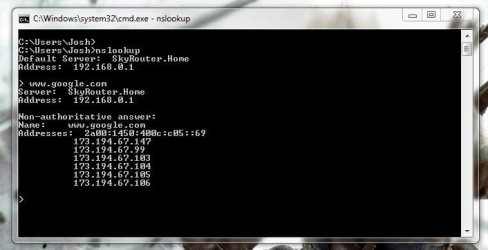
Also understand that this will not restrict any internet access but rather prevent you from accessing severs using their hostnames. Also you may find issues with websites that use load balancing unless you map all IP addresses because if the one IP address you use goes down then you will not be automatically redirected a working server. An example of Google's multiple servers can be seen below:

nslookup.JPG

Another point to consider is that internet IP addresses can change and do change all the time therefore any previous mappings in your hosts file will be rendered useless.

All in all, I would strongly advise against such task and personally would only use the HOSTS file to map local computers rather than internet addresses. If you wish to restrict internet access then I would setup an Access control list to block or allow only specific websites offering a more redundant option.

Hope This Helps,
Josh :)
 
Last edited:

My Computer My Computer

At a glance

Windows 7 Professional x64 SP1 ; Windows Serv...Intel Core i5 2400 @ 3.10GHz8.0GB DDR3 @ 665MHz (2GBx4)AMD Radeon HD 6870
Computer type
PC/Desktop
Computer Manufacturer/Model Number
Custom Built
OS
Windows 7 Professional x64 SP1 ; Windows Server 2012 R2 Standard
CPU
Intel Core i5 2400 @ 3.10GHz
Motherboard
Foxconn H67MP-S/-V/H67MP
Memory
8.0GB DDR3 @ 665MHz (2GBx4)
Graphics Card(s)
AMD Radeon HD 6870
Sound Card
Realtek High Definition Audio
Monitor(s) Displays
AOC 2243W & SMB1930NW
Screen Resolution
1440x900 & 1920x1080
Hard Drives
977GB Seagate ST31000524AS ATA Drive (SATA)
250GB WD iSCSI attached Drive
PSU
750W Gaming PSU
Case
Novatech Night
Cooling
Fan
Keyboard
Dell Standard PS/2 Keyboard
Mouse
R.A.T 07 Gaming Mouse
Internet Speed
Download: 10 Mbps Ping: 30ms Upload: 0.81 Mbps
Browser
Google Chrome
Other Info
Optiarc DVD RW AD-5260S ATA Device
The safest way I can think of achieving this in win7 is by the use of parental controls, create a standard user, apply parental controls, set to use a site white list and add your allowed sites to this list

This just controls access on a user by user basis whilst not risking issues when system processes are blocked from access the net
 

My Computers My Computers

  • At a glance

    Windows 11 Pro x64 [Latest Release and Releas...Ryzen 9 5950X, 3.8 - 5.2 MHz64GB [2 x 32GB] DDR4 3200MHz4GB NVIDIA GEFORCE GTX 1650 Ti
    Computer type
    PC/Desktop
    Computer Manufacturer/Model Number
    ChillBlast - Custom to my design
    OS
    Windows 11 Pro x64 [Latest Release and Release Preview]
    CPU
    Ryzen 9 5950X, 3.8 - 5.2 MHz
    Motherboard
    Asus Prime X570-Pro
    Memory
    64GB [2 x 32GB] DDR4 3200MHz
    Graphics Card(s)
    4GB NVIDIA GEFORCE GTX 1650 Ti
    Sound Card
    On-board SPDIF to 5.1 System + HDMI [5.1 system]
    Monitor(s) Displays
    32" UHD 32 Bit HDR Monitor + 43" UHD 4K 32Bit HDR TV
    Screen Resolution
    2 x 3840 x 2160 @60Hz
    Hard Drives
    1TB M2 SSD OS, 500GB Fast Access SSD, 2 x 8TB Data + Various Externals from 1TB to 4TB, 10TB NAS
    PSU
    NZXT C750 80 PLUS Gold 750W Modular PSU
    Case
    Workstation Case [Matt Black]
    Cooling
    NZXT Kraken X63 280mm CPU Cooler +2x Quiet Case fans
    Keyboard
    Logitech Wireless MX Keys & K400 + others
    Mouse
    Logitech Wireless MX Master 3S
    Internet Speed
    920 MB Down 50 MB Up
    Antivirus
    BitDefender Total Security Pro
    Browser
    Chrome (always run latest Non-Beta)
    Other Info
    Also run ...
    Laptop - Quad 8GB - Windows 10 Pro x64
    Nexus 7 Android tablet x2
    Samsung 10.2" tablet
    Blackview TAB 8 4G Android Tablet c/w Keyboard
    Wacom Intuos Pro Medium Pen Pad
    Wacom Intuos Pro Small Pen Pad
    Wacom Expresskeys Remote
    Loopdeck+ Graphics Controller
    Shuttle Pro v2 Control
  • At a glance

    Windows 11 Pro x64 Latest RPIntel I7 10750H 5.0GHz32GB [2x16GB] DDR4 2933 MHznVidia GTX1650Ti 4 GB GDDR6
    Computer type
    Laptop
    System Manufacturer/Model Number
    Dell XPS 17 10750H
    OS
    Windows 11 Pro x64 Latest RP
    CPU
    Intel I7 10750H 5.0GHz
    Motherboard
    Dell XPS
    Memory
    32GB [2x16GB] DDR4 2933 MHz
    Graphics Card(s)
    nVidia GTX1650Ti 4 GB GDDR6
    Sound Card
    Stock [Realtek] 4 Speaker
    Monitor(s) Displays
    17" IPS UHD+ Infinity Edge Touchscreen
    Screen Resolution
    3840 x 2400
    Hard Drives
    2TB M2 NVMe, 4TB External + various 500GB & 1TB External NVMe (also have access to spinner HDD from
    PSU
    Stock
    Case
    Stock XPS Aluminium & Carbon Fibre
    Cooling
    Stock - Active Fan Control
    Keyboard
    Backlit + Various Logitech
    Mouse
    Stock Track Pad + Logitech MX Trackball
    Internet Speed
    72 MB Down 18MB Up
    Browser
    Chrome
    Other Info
    Also run ...
    Laptop - Quad 8GB - Windows 10 Pro x64
    Nexus 7 Android tablet x2
    10.2" tablet
    Sony Z3 Android Smartphone
    Wacom Intuos Pro Medium Pen Pad
    Wacom Intuos Pro Small Pen Pad
    Wacom Expresskeys Remote
    Loopdeck+ Graphics Controller
    Shuttle Pro v2 Control Pad
    10TB NAS
Thank you very much for these quick answers.

To clarify my request further more. I want to block my PC from going out using any DNS services on the Internet. I want to use hosts file completely instead of DNS servers. I don't mind keeping updating hosts file regularly. I am not afraid of website load balancing might make me update hosts file more often.I just do not want my PC to use any DNS. Maybe DNS Client Service removed or uninstalled would do the job......, I am guessing.

I want my PC to be unable to connect to any DNS completely and permanently. I want that function disappear forever.

Thank you very much for your help.:)
 

My Computer My Computer

At a glance

Windows 7 64 bit
Computer type
PC/Desktop
OS
Windows 7 64 bit
Could you statically assign your DNS servers to your loopback address (127.0.0.1)? Go to network and sharing center in your control panel, click change adapter settings, right click your network adapter, and change your DNS servers to static under IPv4 and / or IPv6 by clicking on their respective properties. I would start here and then look at blocking DNS with something like Peerblock or by crippling services and / or changing firewall rules. There is a default windows outbound firewall rule allowing DNS (UDP-Out) that you could try disabling. Good luck!
 

My Computer My Computer

At a glance

Windows 7 Profession x64Intel Core i516 GB DDR3Intel HD Graphics
Computer type
PC/Desktop
Computer Manufacturer/Model Number
Build
OS
Windows 7 Profession x64
CPU
Intel Core i5
Motherboard
Intel DB75EN
Memory
16 GB DDR3
Graphics Card(s)
Intel HD Graphics
Sound Card
Realtek High Definition Audio
Monitor(s) Displays
Dual Viewsonic TD2220 touchscreen displays
Hard Drives
Seagate 500GB 7200 RPM
Case
Slimline
Cooling
Standard Intel heat sink / fan.
Keyboard
Microsoft boring keyboard - it works!
Could you statically assign your DNS servers to your loopback address (127.0.0.1)? .....

@OP,
The method quoted above is the best way to point DNS queries back to the local computer... but apps can still get to web based servers if they know the IP address of interest. You don't want to break the DNS process as doing so will slow stuff down as apps wait for a DNS reply.

Disabling/removing the DNS service will not stop DNS queries from being made. It will just force each app to make their own DNS queries. I keep the DNS service disabled and you should too for this setup.

How will you handle the Windows update process and anti-virus updates?

Let us know how this works out for you.
 
Last edited:

My Computer My Computer

At a glance

W7 Pro SP1 64biti78GBIntel HD Graphics
Computer type
Laptop
Computer Manufacturer/Model Number
Employer provided Dell Latitude
OS
W7 Pro SP1 64bit
CPU
i7
Memory
8GB
Graphics Card(s)
Intel HD Graphics
Hard Drives
crappy SSD
Antivirus
Employer mandated Symantec Endpoint Protection
Browser
Pale Moon 64bit, IE11 64bit & Chrome 64bit
Thank you very much for these good suggestions.:)

Once I finish testing, I will report it here to let everybody know the results.

I do not worry about Windows update and anti-virus updates. This PC will be used to do online banking and stock trading only. No surfing at all. I use at least one or two external commercial firewall(s) (like Palo Alto, Fortinet, Check Point, or Sonicwall) to protect it.
 

My Computer My Computer

At a glance

Windows 7 64 bit
Computer type
PC/Desktop
OS
Windows 7 64 bit
I do not worry about Windows update and anti-virus updates. This PC will be used to do online banking and stock trading only. No surfing at all. I use at least one or two external commercial firewall(s) (like Palo Alto, Fortinet, Check Point, or Sonicwall) to protect it.

That's even more reason to check Windows Updates and anti-virus definitions.
 

My Computer My Computer

Computer type
Laptop
I wouldn't rely on your firewall to protect you unless it has some sort of intrusion prevention system. An attack can come in the same port as your web traffic (TCP port 80). Equally if you get infected by any malware whether it be from a thumb drive or the internet then it is likely for it to remotely connect to a host without your knowledge. This could be done using TCP port 80 which is the same port as your HTTP traffic.

Also, it is possible for some malware to spoof the DNS servers and use that therefore to reduce this risk I would strongly recommend placing a deny inbound statement on the inside interface of your firewall to deny any DNS requests (UDP port 53). Please understand that this will not restrict any communications that use IP addresses and if I were to make some sort of application I would set the machine to connect to an IP address rather than a URL since my remote server will most likely not be in the public DNS servers.

   Note
This would apply to all hosts if done on your firewall. If you wish to only do it on a single PC then you would need to edit the personal firewall


Just a caution that you may wish to consider,
Josh
 
Last edited:

My Computer My Computer

At a glance

Windows 7 Professional x64 SP1 ; Windows Serv...Intel Core i5 2400 @ 3.10GHz8.0GB DDR3 @ 665MHz (2GBx4)AMD Radeon HD 6870
Computer type
PC/Desktop
Computer Manufacturer/Model Number
Custom Built
OS
Windows 7 Professional x64 SP1 ; Windows Server 2012 R2 Standard
CPU
Intel Core i5 2400 @ 3.10GHz
Motherboard
Foxconn H67MP-S/-V/H67MP
Memory
8.0GB DDR3 @ 665MHz (2GBx4)
Graphics Card(s)
AMD Radeon HD 6870
Sound Card
Realtek High Definition Audio
Monitor(s) Displays
AOC 2243W & SMB1930NW
Screen Resolution
1440x900 & 1920x1080
Hard Drives
977GB Seagate ST31000524AS ATA Drive (SATA)
250GB WD iSCSI attached Drive
PSU
750W Gaming PSU
Case
Novatech Night
Cooling
Fan
Keyboard
Dell Standard PS/2 Keyboard
Mouse
R.A.T 07 Gaming Mouse
Internet Speed
Download: 10 Mbps Ping: 30ms Upload: 0.81 Mbps
Browser
Google Chrome
Other Info
Optiarc DVD RW AD-5260S ATA Device
I wouldn't rely on your firewall to protect you unless it has some sort of intrusion prevention system. An attack can come in the same port as your web traffic (TCP port 80). Equally if you get infected by any malware whether it be from a thumb drive or the internet then it is likely for it to remotely connect to a host without your knowledge. This could be done using TCP port 80 which is the same port as your HTTP traffic.

Also, it is possible for some malware to spoof the DNS servers and use that therefore to reduce this risk I would strongly recommend placing a deny inbound statement on the inside interface of your firewall to deny any DNS requests (UDP port 53). Please understand that this will not restrict any communications that use IP addresses and if I were to make some sort of application I would set the machine to connect to an IP address rather than a URL since my remote server will most likely not be in the public DNS servers.

   Note
This would apply to all hosts if done on your firewall. If you wish to only do it on a single PC then you would need to edit the personal firewall


Just a caution that you may wish to consider,
Josh

Josh - this guy isn't running a web server, therefore he doesn't have anything open on port 80. web servers accept connections on port 80, the user end uses an ephemeral port. Also he's talking about turning DNS OFF so why talk about malware redirecting his DNS traffic? Furthermore, you're talking about the possibility of malware turning his PC into a rogue DNS server (telling him to deny port 53, as if his NAT box or doesn't have a firewall on)... why hijack this thread to talk about some unlikely malware disaster?
 

My Computer My Computer

At a glance

Windows 7 Profession x64Intel Core i516 GB DDR3Intel HD Graphics
Computer type
PC/Desktop
Computer Manufacturer/Model Number
Build
OS
Windows 7 Profession x64
CPU
Intel Core i5
Motherboard
Intel DB75EN
Memory
16 GB DDR3
Graphics Card(s)
Intel HD Graphics
Sound Card
Realtek High Definition Audio
Monitor(s) Displays
Dual Viewsonic TD2220 touchscreen displays
Hard Drives
Seagate 500GB 7200 RPM
Case
Slimline
Cooling
Standard Intel heat sink / fan.
Keyboard
Microsoft boring keyboard - it works!
I wouldn't rely on your firewall to protect you unless it has some sort of intrusion prevention system. An attack can come in the same port as your web traffic (TCP port 80). Equally if you get infected by any malware whether it be from a thumb drive or the internet then it is likely for it to remotely connect to a host without your knowledge. This could be done using TCP port 80 which is the same port as your HTTP traffic.

Also, it is possible for some malware to spoof the DNS servers and use that therefore to reduce this risk I would strongly recommend placing a deny inbound statement on the inside interface of your firewall to deny any DNS requests (UDP port 53). Please understand that this will not restrict any communications that use IP addresses and if I were to make some sort of application I would set the machine to connect to an IP address rather than a URL since my remote server will most likely not be in the public DNS servers.

   Note
This would apply to all hosts if done on your firewall. If you wish to only do it on a single PC then you would need to edit the personal firewall


Just a caution that you may wish to consider,
Josh

Josh - this guy isn't running a web server, therefore he doesn't have anything open on port 80. web servers accept connections on port 80, the user end uses an ephemeral port. Also he's talking about turning DNS OFF so why talk about malware redirecting his DNS traffic? Furthermore, you're talking about the possibility of malware turning his PC into a rogue DNS server (telling him to deny port 53, as if his NAT box or doesn't have a firewall on)... why hijack this thread to talk about some unlikely malware disaster?

Correct the host will use a source port when initiating a TCP session but the destination port for the segments are on port 80. What I'm trying to say is that some hackers will use that when trying to hijack a connection (Source port of 80 as if it came from a web server using a port sniffer to find an open port) and then if succeeded they will try to send information out on a destination of port 80. All I want to say is that they shouldn't solely rely on their hardware firewall to complete all the security. As to whether or not they are using NAT I do not know.

Yes they wish to turn DNS OFF but that doesn't stop an application from initiating a UDP request out. I am not saying that their machine turns into a DNS server but rather an application will exploit the loopback address setup as the primary DNS server on the NIC so that when it doesn't find the record requested it will use a predefined DNS server within the application and then make the request to wherever rather than the usual drop of packet. Denying UDP port 53 is the closest thing to preventing any DNS requests to the internet as you are going to get.

I just thought to mention the possible threats that could happen since the OP stated that they will not be using any Anti-Virus/malware applications. Chances of this happening are slim but its best to know especially if the OP is going to do important tasks such as banking.

Josh
 
Last edited:

My Computer My Computer

At a glance

Windows 7 Professional x64 SP1 ; Windows Serv...Intel Core i5 2400 @ 3.10GHz8.0GB DDR3 @ 665MHz (2GBx4)AMD Radeon HD 6870
Computer type
PC/Desktop
Computer Manufacturer/Model Number
Custom Built
OS
Windows 7 Professional x64 SP1 ; Windows Server 2012 R2 Standard
CPU
Intel Core i5 2400 @ 3.10GHz
Motherboard
Foxconn H67MP-S/-V/H67MP
Memory
8.0GB DDR3 @ 665MHz (2GBx4)
Graphics Card(s)
AMD Radeon HD 6870
Sound Card
Realtek High Definition Audio
Monitor(s) Displays
AOC 2243W & SMB1930NW
Screen Resolution
1440x900 & 1920x1080
Hard Drives
977GB Seagate ST31000524AS ATA Drive (SATA)
250GB WD iSCSI attached Drive
PSU
750W Gaming PSU
Case
Novatech Night
Cooling
Fan
Keyboard
Dell Standard PS/2 Keyboard
Mouse
R.A.T 07 Gaming Mouse
Internet Speed
Download: 10 Mbps Ping: 30ms Upload: 0.81 Mbps
Browser
Google Chrome
Other Info
Optiarc DVD RW AD-5260S ATA Device
Thank you very much for caring about my issue.

Sorry. I didn't report quickly. I was busy working on something else.

My PC used to keep looking for ISP DNS even though I disabled Windows 7 DNS Client Service. After I configured my PC as diplo instructed, my PC quit looking for ISP DNS servers. When I set up DNS to be 127.0.0.1, my PC became quiet. That's very nice.

The above conversation reminds me to set up my commercial firewalls to block all UDP traffic. Period. It is a very good point.

I really appreciate the help that was provided by forum members. Problem was solved.

Best luck to everyone. :)
 

My Computer My Computer

At a glance

Windows 7 64 bit
Computer type
PC/Desktop
OS
Windows 7 64 bit
I am glad you have completed what you wished :) Please understand that UDP traffic isn't just used for DNS. Other UDP ports are used for any Video streaming, VoIP and other streaming services such as gaming. By blocking all UDP traffic you will find those services will be inaccessible.

Just a pointer,
Josh ;)
 

My Computer My Computer

At a glance

Windows 7 Professional x64 SP1 ; Windows Serv...Intel Core i5 2400 @ 3.10GHz8.0GB DDR3 @ 665MHz (2GBx4)AMD Radeon HD 6870
Computer type
PC/Desktop
Computer Manufacturer/Model Number
Custom Built
OS
Windows 7 Professional x64 SP1 ; Windows Server 2012 R2 Standard
CPU
Intel Core i5 2400 @ 3.10GHz
Motherboard
Foxconn H67MP-S/-V/H67MP
Memory
8.0GB DDR3 @ 665MHz (2GBx4)
Graphics Card(s)
AMD Radeon HD 6870
Sound Card
Realtek High Definition Audio
Monitor(s) Displays
AOC 2243W & SMB1930NW
Screen Resolution
1440x900 & 1920x1080
Hard Drives
977GB Seagate ST31000524AS ATA Drive (SATA)
250GB WD iSCSI attached Drive
PSU
750W Gaming PSU
Case
Novatech Night
Cooling
Fan
Keyboard
Dell Standard PS/2 Keyboard
Mouse
R.A.T 07 Gaming Mouse
Internet Speed
Download: 10 Mbps Ping: 30ms Upload: 0.81 Mbps
Browser
Google Chrome
Other Info
Optiarc DVD RW AD-5260S ATA Device
Back
Top