
Internet Connection Sharing has been disabled by the Network Admin...

yanniclord

New member
Member
Local time
5:25 PM
Messages
43
Location
Norway/Halden/Ostfold
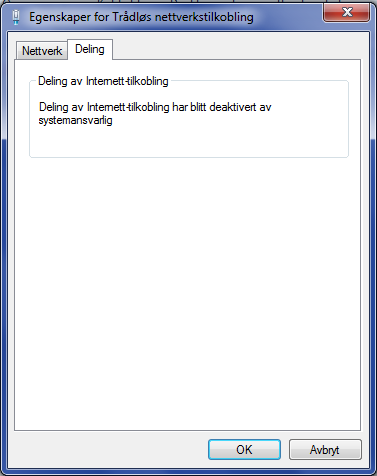
So i try to share my Wireless connection on Windows 7. When i go to Advanced Tab, it says "Internet Connection Sharing has been disabled by the Network Administrator". So i cant enable it. Help please. Here a screen shot (its in norwegian):
15656542gm.png
 

My Computer My Computer

Computer type
PC/Desktop
Computer Manufacturer/Model Number
Custom Build
OS
Windows 8.1 x64, Windows 10 Dev. Preview x64
CPU
Intel i5 4440 Quad Core 3.1GHz
Motherboard
ASRock H81M-HDS
Memory
10240 MB (10 GB) DDR3 RAM
Graphics Card(s)
NVIDIA GEFORCE GTX 680
Sound Card
Realtek HD Audio Manager (Integrated Sound Card)
Monitor(s) Displays
Samsung S22D390
Screen Resolution
1920x1080, 32bit
Hard Drives
INT: MTFDDAK 256GB SSD
INT2: TOSHIBA-DT 1000GB HDD
EXT: ASMT-2105 2000GB HDD
Case
NZXT Phantom Big Tower White
Cooling
Air Ventilation: Rear: 1x 120mm, Top: 1x 200mm, Side: 2x 120
Keyboard
Logitech K350
Mouse
Trust GXT 152
Internet Speed
100 MBP/s Download and 10 MBP/s Upload. 8 MS Ping
Antivirus
Windows Defender (In other words, Security Essentials)
Browser
Google Chrome
Probably a group policy setting. Is your computer joined to a domain or is this your personal computer?
 

My Computer My Computer

Computer type
PC/Desktop
Computer Manufacturer/Model Number
Build
OS
Windows 7 Profession x64
CPU
Intel Core i5
Motherboard
Intel DB75EN
Memory
16 GB DDR3
Graphics Card(s)
Intel HD Graphics
Sound Card
Realtek High Definition Audio
Monitor(s) Displays
Dual Viewsonic TD2220 touchscreen displays
Hard Drives
Seagate 500GB 7200 RPM
Case
Slimline
Cooling
Standard Intel heat sink / fan.
Keyboard
Microsoft boring keyboard - it works!
Probably a group policy setting. Is your computer joined to a domain or is this your personal computer?

its a joined domain. though, i have admin rights. can you help me resolve it?

edit: i managed to find to activate it in gpedit.msc (group policy), but its still deactivated.
 
Last edited:

My Computer My Computer

Computer type
PC/Desktop
Computer Manufacturer/Model Number
Custom Build
OS
Windows 8.1 x64, Windows 10 Dev. Preview x64
CPU
Intel i5 4440 Quad Core 3.1GHz
Motherboard
ASRock H81M-HDS
Memory
10240 MB (10 GB) DDR3 RAM
Graphics Card(s)
NVIDIA GEFORCE GTX 680
Sound Card
Realtek HD Audio Manager (Integrated Sound Card)
Monitor(s) Displays
Samsung S22D390
Screen Resolution
1920x1080, 32bit
Hard Drives
INT: MTFDDAK 256GB SSD
INT2: TOSHIBA-DT 1000GB HDD
EXT: ASMT-2105 2000GB HDD
Case
NZXT Phantom Big Tower White
Cooling
Air Ventilation: Rear: 1x 120mm, Top: 1x 200mm, Side: 2x 120
Keyboard
Logitech K350
Mouse
Trust GXT 152
Internet Speed
100 MBP/s Download and 10 MBP/s Upload. 8 MS Ping
Antivirus
Windows Defender (In other words, Security Essentials)
Browser
Google Chrome
Did you force an update? A policy applied on the server side will not immediately be pushed to the client in order to reduce load. In a command prompt please type the following and then restart the machine to see if your issue is resolved:

Code:
gpupdate /force

Hope This Helps,
Josh
 

My Computer My Computer

Computer type
PC/Desktop
Computer Manufacturer/Model Number
Custom Built
OS
Windows 7 Professional x64 SP1 ; Windows Server 2012 R2 Standard
CPU
Intel Core i5 2400 @ 3.10GHz
Motherboard
Foxconn H67MP-S/-V/H67MP
Memory
8.0GB DDR3 @ 665MHz (2GBx4)
Graphics Card(s)
AMD Radeon HD 6870
Sound Card
Realtek High Definition Audio
Monitor(s) Displays
AOC 2243W & SMB1930NW
Screen Resolution
1440x900 & 1920x1080
Hard Drives
977GB Seagate ST31000524AS ATA Drive (SATA)
250GB WD iSCSI attached Drive
PSU
750W Gaming PSU
Case
Novatech Night
Cooling
Fan
Keyboard
Dell Standard PS/2 Keyboard
Mouse
R.A.T 07 Gaming Mouse
Internet Speed
Download: 10 Mbps Ping: 30ms Upload: 0.81 Mbps
Browser
Google Chrome
Other Info
Optiarc DVD RW AD-5260S ATA Device
Probably a group policy setting. Is your computer joined to a domain or is this your personal computer?

its a joined domain. though, i have admin rights. can you help me resolve it?

edit: i managed to find to activate it in gpedit.msc (group policy), but its still deactivated.

Here is what I find on this. :)

Check if Prohibit use of Internet Connection Sharing on your DNS domain network is enabled, located in Computer Configuration\Administrative Templates\Network\Network Connections.

If you enable this policy setting, ICS cannot be enabled or configured by administrators, and the ICS service cannot run on the computer. In the Advanced tab in the Properties dialog box for a local area network (LAN) or remote access connection, under Internet Connection Sharing, it says “Internet Connection Sharing has been disabled by the Network Administrator.”
 

My Computer My Computer

Computer type
PC/Desktop
Computer Manufacturer/Model Number
Home built
OS
Windows 7 Ult, Windows 8.1 Pro,
CPU
Q9650-4.275GHz, E8600 4.5GHz, E6750-3.8GHz
Motherboard
Evga 780i FTW
Memory
G.Skill PC2 9600 1200Mhz 5 5 5 15 2T
Graphics Card(s)
GTX480
Sound Card
Asus Xonar D2
Monitor(s) Displays
HannsG
Screen Resolution
1680X1050
Hard Drives
GSkill Phoenix Pro 120GB SSD
PSU
ThermalTake Toughpower 1000Watt modular
Case
ThermalTake XaserV
Cooling
Xigmatek S1283
Keyboard
Logitech G15
Mouse
Logitech G9
Internet Speed
T1
Probably a group policy setting. Is your computer joined to a domain or is this your personal computer?

its a joined domain. though, i have admin rights. can you help me resolve it?

edit: i managed to find to activate it in gpedit.msc (group policy), but its still deactivated.

Here is what I find on this. :)

Check if Prohibit use of Internet Connection Sharing on your DNS domain network is enabled, located in Computer Configuration\Administrative Templates\Network\Network Connections.

If you enable this policy setting, ICS cannot be enabled or configured by administrators, and the ICS service cannot run on the computer. In the Advanced tab in the Properties dialog box for a local area network (LAN) or remote access connection, under Internet Connection Sharing, it says “Internet Connection Sharing has been disabled by the Network Administrator.”

well that is what i did in first place. found it at once. i disabled it to enabled the sharing. not working. also doing gpupdate /force didnt work. still same.
 

My Computer My Computer

Computer type
PC/Desktop
Computer Manufacturer/Model Number
Custom Build
OS
Windows 8.1 x64, Windows 10 Dev. Preview x64
CPU
Intel i5 4440 Quad Core 3.1GHz
Motherboard
ASRock H81M-HDS
Memory
10240 MB (10 GB) DDR3 RAM
Graphics Card(s)
NVIDIA GEFORCE GTX 680
Sound Card
Realtek HD Audio Manager (Integrated Sound Card)
Monitor(s) Displays
Samsung S22D390
Screen Resolution
1920x1080, 32bit
Hard Drives
INT: MTFDDAK 256GB SSD
INT2: TOSHIBA-DT 1000GB HDD
EXT: ASMT-2105 2000GB HDD
Case
NZXT Phantom Big Tower White
Cooling
Air Ventilation: Rear: 1x 120mm, Top: 1x 200mm, Side: 2x 120
Keyboard
Logitech K350
Mouse
Trust GXT 152
Internet Speed
100 MBP/s Download and 10 MBP/s Upload. 8 MS Ping
Antivirus
Windows Defender (In other words, Security Essentials)
Browser
Google Chrome
I'm sure that ICS has been enabled in services.msc etc. Which Windows server is this domain located on.


My Computer My Computer

Computer type
PC/Desktop
Computer Manufacturer/Model Number
Home built
OS
Windows 7 Ult, Windows 8.1 Pro,
CPU
Q9650-4.275GHz, E8600 4.5GHz, E6750-3.8GHz
Motherboard
Evga 780i FTW
Memory
G.Skill PC2 9600 1200Mhz 5 5 5 15 2T
Graphics Card(s)
GTX480
Sound Card
Asus Xonar D2
Monitor(s) Displays
HannsG
Screen Resolution
1680X1050
Hard Drives
GSkill Phoenix Pro 120GB SSD
PSU
ThermalTake Toughpower 1000Watt modular
Case
ThermalTake XaserV
Cooling
Xigmatek S1283
Keyboard
Logitech G15
Mouse
Logitech G9
Internet Speed
T1
I'm sure that ICS has been enabled in services.msc etc. Which Windows server is this domain located on.


thanks. i found it in services. i will try rebooting to check if it works.

i checked automatic turn on. then started all depending services. then the start button showed up. when trying to press start, it says, that it had been started and disabled, because its not needed by any process?
 

My Computer My Computer

Computer type
PC/Desktop
Computer Manufacturer/Model Number
Custom Build
OS
Windows 8.1 x64, Windows 10 Dev. Preview x64
CPU
Intel i5 4440 Quad Core 3.1GHz
Motherboard
ASRock H81M-HDS
Memory
10240 MB (10 GB) DDR3 RAM
Graphics Card(s)
NVIDIA GEFORCE GTX 680
Sound Card
Realtek HD Audio Manager (Integrated Sound Card)
Monitor(s) Displays
Samsung S22D390
Screen Resolution
1920x1080, 32bit
Hard Drives
INT: MTFDDAK 256GB SSD
INT2: TOSHIBA-DT 1000GB HDD
EXT: ASMT-2105 2000GB HDD
Case
NZXT Phantom Big Tower White
Cooling
Air Ventilation: Rear: 1x 120mm, Top: 1x 200mm, Side: 2x 120
Keyboard
Logitech K350
Mouse
Trust GXT 152
Internet Speed
100 MBP/s Download and 10 MBP/s Upload. 8 MS Ping
Antivirus
Windows Defender (In other words, Security Essentials)
Browser
Google Chrome
I'm sure that ICS has been enabled in services.msc etc. Which Windows server is this domain located on.

thanks. i found it in services. i will try rebooting to check if it works.

i checked automatic turn on. then started all depending services. then the start button showed up. when trying to press start, it says, that it had been started and disabled, because its not needed by any process?

Can you confirm is Network Discovery is staying on?

It's located at the Network and Sharing Center>Advanced Sharing Settings.

I believe we have found the cause of the problem with the ICS service not staying on, but something is keeping it from staying on apparently.
 

My Computer My Computer

Computer type
PC/Desktop
Computer Manufacturer/Model Number
Home built
OS
Windows 7 Ult, Windows 8.1 Pro,
CPU
Q9650-4.275GHz, E8600 4.5GHz, E6750-3.8GHz
Motherboard
Evga 780i FTW
Memory
G.Skill PC2 9600 1200Mhz 5 5 5 15 2T
Graphics Card(s)
GTX480
Sound Card
Asus Xonar D2
Monitor(s) Displays
HannsG
Screen Resolution
1680X1050
Hard Drives
GSkill Phoenix Pro 120GB SSD
PSU
ThermalTake Toughpower 1000Watt modular
Case
ThermalTake XaserV
Cooling
Xigmatek S1283
Keyboard
Logitech G15
Mouse
Logitech G9
Internet Speed
T1
I'm sure that ICS has been enabled in services.msc etc. Which Windows server is this domain located on.

thanks. i found it in services. i will try rebooting to check if it works.

i checked automatic turn on. then started all depending services. then the start button showed up. when trying to press start, it says, that it had been started and disabled, because its not needed by any process?

Can you confirm is Network Discovery is staying on?

It's located at the Network and Sharing Center>Advanced Sharing Settings.

I believe we have found the cause of the problem with the ICS service not staying on, but something is keeping it from staying on apparently.

Ok i will check it out. I update if i know more.
 

My Computer My Computer

Computer type
PC/Desktop
Computer Manufacturer/Model Number
Custom Build
OS
Windows 8.1 x64, Windows 10 Dev. Preview x64
CPU
Intel i5 4440 Quad Core 3.1GHz
Motherboard
ASRock H81M-HDS
Memory
10240 MB (10 GB) DDR3 RAM
Graphics Card(s)
NVIDIA GEFORCE GTX 680
Sound Card
Realtek HD Audio Manager (Integrated Sound Card)
Monitor(s) Displays
Samsung S22D390
Screen Resolution
1920x1080, 32bit
Hard Drives
INT: MTFDDAK 256GB SSD
INT2: TOSHIBA-DT 1000GB HDD
EXT: ASMT-2105 2000GB HDD
Case
NZXT Phantom Big Tower White
Cooling
Air Ventilation: Rear: 1x 120mm, Top: 1x 200mm, Side: 2x 120
Keyboard
Logitech K350
Mouse
Trust GXT 152
Internet Speed
100 MBP/s Download and 10 MBP/s Upload. 8 MS Ping
Antivirus
Windows Defender (In other words, Security Essentials)
Browser
Google Chrome
nope. still not working. cant find it in network and sharing center/advanced sharing settings.

edit: found it. its on. but i still cant activate the sharing. any suggestions?
 

My Computer My Computer

Computer type
PC/Desktop
Computer Manufacturer/Model Number
Custom Build
OS
Windows 8.1 x64, Windows 10 Dev. Preview x64
CPU
Intel i5 4440 Quad Core 3.1GHz
Motherboard
ASRock H81M-HDS
Memory
10240 MB (10 GB) DDR3 RAM
Graphics Card(s)
NVIDIA GEFORCE GTX 680
Sound Card
Realtek HD Audio Manager (Integrated Sound Card)
Monitor(s) Displays
Samsung S22D390
Screen Resolution
1920x1080, 32bit
Hard Drives
INT: MTFDDAK 256GB SSD
INT2: TOSHIBA-DT 1000GB HDD
EXT: ASMT-2105 2000GB HDD
Case
NZXT Phantom Big Tower White
Cooling
Air Ventilation: Rear: 1x 120mm, Top: 1x 200mm, Side: 2x 120
Keyboard
Logitech K350
Mouse
Trust GXT 152
Internet Speed
100 MBP/s Download and 10 MBP/s Upload. 8 MS Ping
Antivirus
Windows Defender (In other words, Security Essentials)
Browser
Google Chrome
nope. still not working. cant find it in network and sharing center/advanced sharing settings.

edit: found it. its on. but i still cant activate the sharing. any suggestions?

The second post in the following thread shows some steps you can take that is supposed to fix this problem with ICS service not starting up. The problem is most likely caused from the firewall requiring repair or the base filtering engine is corrupted.

"Windows could not start the Internet Connection Sharing (ICS) Service..."

Quoted from the link above...

To repair the firewall first, and then the ICS. Based on your screenshot, the firewall error code is 0x80070424. Here are two articles that may help you.

Error Code 0x80070424 with Windows Firewall and "Base Filtering Engine Service" Not available in services database list
http://blogs.technet.com/b/asiasupp/archive/2011/12/27/error-code-0x80070424-with-windows-firewall-and-quot-base-filtering-engine-service-quot-not-available-in-services-database-list.aspx

Error 0x80070424 occurs when you use Windows Update, Microsoft Update, or Windows Firewall
http://support.microsoft.com/kb/968002
 

My Computer My Computer

Computer type
PC/Desktop
Computer Manufacturer/Model Number
Home built
OS
Windows 7 Ult, Windows 8.1 Pro,
CPU
Q9650-4.275GHz, E8600 4.5GHz, E6750-3.8GHz
Motherboard
Evga 780i FTW
Memory
G.Skill PC2 9600 1200Mhz 5 5 5 15 2T
Graphics Card(s)
GTX480
Sound Card
Asus Xonar D2
Monitor(s) Displays
HannsG
Screen Resolution
1680X1050
Hard Drives
GSkill Phoenix Pro 120GB SSD
PSU
ThermalTake Toughpower 1000Watt modular
Case
ThermalTake XaserV
Cooling
Xigmatek S1283
Keyboard
Logitech G15
Mouse
Logitech G9
Internet Speed
T1
nope. still not working. cant find it in network and sharing center/advanced sharing settings.

edit: found it. its on. but i still cant activate the sharing. any suggestions?

The second post in the following thread shows some steps you can take that is supposed to fix this problem with ICS service not starting up. The problem is most likely caused from the firewall requiring repair or the base filtering engine is corrupted.

"Windows could not start the Internet Connection Sharing (ICS) Service..."

Quoted from the link above...

To repair the firewall first, and then the ICS. Based on your screenshot, the firewall error code is 0x80070424. Here are two articles that may help you.

Error Code 0x80070424 with Windows Firewall and "Base Filtering Engine Service" Not available in services database list
http://blogs.technet.com/b/asiasupp/archive/2011/12/27/error-code-0x80070424-with-windows-firewall-and-quot-base-filtering-engine-service-quot-not-available-in-services-database-list.aspx

Error 0x80070424 occurs when you use Windows Update, Microsoft Update, or Windows Firewall
http://support.microsoft.com/kb/968002

ok thx i try it.
 

My Computer My Computer

Computer type
PC/Desktop
Computer Manufacturer/Model Number
Custom Build
OS
Windows 8.1 x64, Windows 10 Dev. Preview x64
CPU
Intel i5 4440 Quad Core 3.1GHz
Motherboard
ASRock H81M-HDS
Memory
10240 MB (10 GB) DDR3 RAM
Graphics Card(s)
NVIDIA GEFORCE GTX 680
Sound Card
Realtek HD Audio Manager (Integrated Sound Card)
Monitor(s) Displays
Samsung S22D390
Screen Resolution
1920x1080, 32bit
Hard Drives
INT: MTFDDAK 256GB SSD
INT2: TOSHIBA-DT 1000GB HDD
EXT: ASMT-2105 2000GB HDD
Case
NZXT Phantom Big Tower White
Cooling
Air Ventilation: Rear: 1x 120mm, Top: 1x 200mm, Side: 2x 120
Keyboard
Logitech K350
Mouse
Trust GXT 152
Internet Speed
100 MBP/s Download and 10 MBP/s Upload. 8 MS Ping
Antivirus
Windows Defender (In other words, Security Essentials)
Browser
Google Chrome
To enable this again:
open regedit and navigate to the key:
HKEY_LOCAL_MACHINE\SOFTWARE\Policies\Microsoft\Windows\Network Connections

Set the "NC_ShowSharedAccessUI" to 1

Of course, this only works if you have admin priviliges.
 

My Computer My Computer

Computer type
PC/Desktop
OS
win7
thank you guido, i will try that, and since its in the registry, it will surely work. thank you :)
 

My Computer My Computer

Computer type
PC/Desktop
Computer Manufacturer/Model Number
Custom Build
OS
Windows 8.1 x64, Windows 10 Dev. Preview x64
CPU
Intel i5 4440 Quad Core 3.1GHz
Motherboard
ASRock H81M-HDS
Memory
10240 MB (10 GB) DDR3 RAM
Graphics Card(s)
NVIDIA GEFORCE GTX 680
Sound Card
Realtek HD Audio Manager (Integrated Sound Card)
Monitor(s) Displays
Samsung S22D390
Screen Resolution
1920x1080, 32bit
Hard Drives
INT: MTFDDAK 256GB SSD
INT2: TOSHIBA-DT 1000GB HDD
EXT: ASMT-2105 2000GB HDD
Case
NZXT Phantom Big Tower White
Cooling
Air Ventilation: Rear: 1x 120mm, Top: 1x 200mm, Side: 2x 120
Keyboard
Logitech K350
Mouse
Trust GXT 152
Internet Speed
100 MBP/s Download and 10 MBP/s Upload. 8 MS Ping
Antivirus
Windows Defender (In other words, Security Essentials)
Browser
Google Chrome
Back
Top