- Local time
- 9:02 AM
- Messages
- 759
Hi,
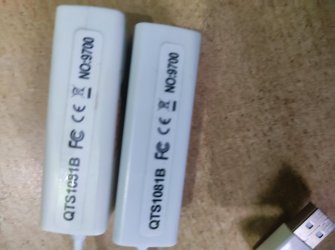
During a thunder strike, the lan portion of my pc got damaged and as a alternative, bought usb to ethernet adapter 2.0 connector.
The drivers were not automatically recognized and one has to download the drivers for it to work.
The network is not stable, in the sense, that after one or two days, this usb port is not recognized and so no network connection, with the trouble shooting alert Please pllug a ethernet plug to the pc.
The recognition is not automatic in the usb to ethernet connection.
Why this problem and how do i permanently resolve it to get stable internet connection as I would have got , had the lan port not been damaged.
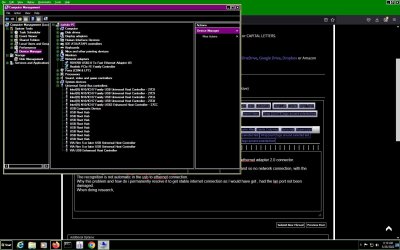
When doing research, I find that there has to be a separate device shown in device manager along with the network adapter to get this connection properly. Sometimes, the usb device is not showing and red light in the usb not glowing, and the ethernet lilght not glowing in the modem/roter.
I also find, that the VIA usb drivers , three devices shown as in the last three items in the usb ports, gets yellow exclamation marks sometimes.
please give a good solultion.
During a thunder strike, the lan portion of my pc got damaged and as a alternative, bought usb to ethernet adapter 2.0 connector.
The drivers were not automatically recognized and one has to download the drivers for it to work.
The network is not stable, in the sense, that after one or two days, this usb port is not recognized and so no network connection, with the trouble shooting alert Please pllug a ethernet plug to the pc.
The recognition is not automatic in the usb to ethernet connection.
Why this problem and how do i permanently resolve it to get stable internet connection as I would have got , had the lan port not been damaged.
When doing research, I find that there has to be a separate device shown in device manager along with the network adapter to get this connection properly. Sometimes, the usb device is not showing and red light in the usb not glowing, and the ethernet lilght not glowing in the modem/roter.
I also find, that the VIA usb drivers , three devices shown as in the last three items in the usb ports, gets yellow exclamation marks sometimes.
please give a good solultion.
Attachments
My Computer
At a glance
Microsoft Windows 7 Ultimate 64-bit 7601 Mult...Intel(R) Core(TM)2 Duo CPU E7200 @ 2.53GHz4.00 GBNVIDIA GeForce 210
- Computer type
- PC/Desktop
- Computer Manufacturer/Model Number
- custom build
- OS
- Microsoft Windows 7 Ultimate 64-bit 7601 Multiprocessor Free Service Pack 1
- CPU
- Intel(R) Core(TM)2 Duo CPU E7200 @ 2.53GHz
- Motherboard
- To be filled by O.E.M. To be filled by O.E.M.
- Memory
- 4.00 GB
- Graphics Card(s)
- NVIDIA GeForce 210
- Sound Card
- (1) NVIDIA High Definition Audio (2) Realtek High Definiti
- Screen Resolution
- 1920 x 1080 x 32 bits (4294967296 colors) @ 60 Hz
- Hard Drives
- ST3500312CS ATA Device