Solved Computer unable to store wifi passwords/ automatically connect

Neekolai

New member
Local time
12:36 AM
Messages
4
As above, my computer has been unable to recall a password for any wifi spot, let alone automatically connect when in a home network for over a month now. These spots are places I frequent and had originally been able to automatically connect to. I believe it may have something to do with two programs called Commview and Aircrack, in which my younger brother tried to bypass locks my parents had placed on the wifi. I only say this because it seems to be the only thing out of place in the last month and it's where I am currently placing the blame. I'm now back to school and my laptop is no longer up for public use. As of yet I have been unable to repair this damage. Any thoughts would be greatly appreciated.
 

My Computer My Computer

Computer type
Laptop
Computer Manufacturer/Model Number
Asus
OS
Microsoft Windows 7 Home Premium 32-bit 7601 Multiprocessor Free Service Pack 1
CPU
Intel(R) Core(TM) i3 CPU M 350 @ 2.27GHz
Motherboard
ASUSTeK Computer Inc. K52Jr
Memory
4.00 GB
Graphics Card(s)
ATI Mobility Radeon HD 5400 Series
Sound Card
(1) High Definition Audio Device (2) Conexant Cocoa II Hig
Screen Resolution
1366 x 768 x 32 bits (4294967296 colors) @ 60 Hz
Hard Drives
ST9640320AS
Antivirus
Microsoft Security Essentials
Browser
Firefox
hello,

you can try to uninstall those programs first and restart. then disconnect from the network.

go to start type "manage wireless networks" then click and delete ALL of them. restart and try to reconnect to your wifi. you will need to know the password.
 

My Computer My Computer

Computer type
PC/Desktop
Computer Manufacturer/Model Number
Weekend Warrior Rig
OS
Windows 10 Pro
CPU
Intel i7-3770K 4.4GHz
Motherboard
ASUS P8Z77-V Pro
Memory
8GB G.SKILL Ripjaws 1866 MHz
Graphics Card(s)
EVGA GTX 980 Classified
Monitor(s) Displays
Asus VH238H 23" 2ms
Screen Resolution
1920x1080
Hard Drives
Intel 330 120GB SSD /
WD Blue 1TB /
WD Black 500GB
PSU
Corsair CX750M
Case
NZXT H440
Cooling
Corsair H80i- CPU / Corsair H90- GPU
Keyboard
Logitech K360 LE
Mouse
Logitech G500
Antivirus
Avast
Browser
Chrome
Other Info
1200W 2.1 Surround Sound Audio
Hi there. I uninstalled those programs shortly after discovering them and have since restarted many times. The problem it seems is when I go to manage wireless networks, nothing is ever saved there. I think this might be the core of the problem.
 

My Computer My Computer

Computer type
Laptop
Computer Manufacturer/Model Number
Asus
OS
Microsoft Windows 7 Home Premium 32-bit 7601 Multiprocessor Free Service Pack 1
CPU
Intel(R) Core(TM) i3 CPU M 350 @ 2.27GHz
Motherboard
ASUSTeK Computer Inc. K52Jr
Memory
4.00 GB
Graphics Card(s)
ATI Mobility Radeon HD 5400 Series
Sound Card
(1) High Definition Audio Device (2) Conexant Cocoa II Hig
Screen Resolution
1366 x 768 x 32 bits (4294967296 colors) @ 60 Hz
Hard Drives
ST9640320AS
Antivirus
Microsoft Security Essentials
Browser
Firefox
Hello,

In addition, have you tried uninstalling those 2 programs and see if it helps?
If not, try updating your Wi-Fi adapter's driver to the latest version.

An update will be nice.
 

My Computer My Computer

Computer Manufacturer/Model Number
Lenovo Desktop/Samsung Laptop
OS
Win7 & Win8 64bit
CPU
Intel i5
Internet Speed
Charter-20 Mbps
Antivirus
Avast
Browser
FF, IE9 and Chrome
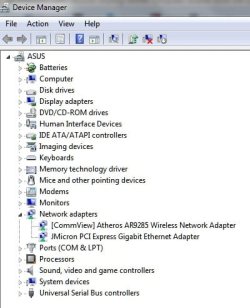
Well, something seems to have revealed itself. Commview should not be there. Should I go about removing that? I did uninstall the program, seems to have a lingering effect.
 

Attachments

  • Out of place.jpg
    Out of place.jpg
    29.6 KB · Views: 2

My Computer My Computer

Computer type
Laptop
Computer Manufacturer/Model Number
Asus
OS
Microsoft Windows 7 Home Premium 32-bit 7601 Multiprocessor Free Service Pack 1
CPU
Intel(R) Core(TM) i3 CPU M 350 @ 2.27GHz
Motherboard
ASUSTeK Computer Inc. K52Jr
Memory
4.00 GB
Graphics Card(s)
ATI Mobility Radeon HD 5400 Series
Sound Card
(1) High Definition Audio Device (2) Conexant Cocoa II Hig
Screen Resolution
1366 x 768 x 32 bits (4294967296 colors) @ 60 Hz
Hard Drives
ST9640320AS
Antivirus
Microsoft Security Essentials
Browser
Firefox
click on your wifi bars, right click on your network and click properties. click on "connection" tab. then click the first and last options. then click ok

update your wireless driver. just go to your manufacture website, download the files. then right click on the adapter in device manager and click uninstall and check delete driver. then reinstall from your downloaded one.
 

My Computer My Computer

Computer type
PC/Desktop
Computer Manufacturer/Model Number
Weekend Warrior Rig
OS
Windows 10 Pro
CPU
Intel i7-3770K 4.4GHz
Motherboard
ASUS P8Z77-V Pro
Memory
8GB G.SKILL Ripjaws 1866 MHz
Graphics Card(s)
EVGA GTX 980 Classified
Monitor(s) Displays
Asus VH238H 23" 2ms
Screen Resolution
1920x1080
Hard Drives
Intel 330 120GB SSD /
WD Blue 1TB /
WD Black 500GB
PSU
Corsair CX750M
Case
NZXT H440
Cooling
Corsair H80i- CPU / Corsair H90- GPU
Keyboard
Logitech K360 LE
Mouse
Logitech G500
Antivirus
Avast
Browser
Chrome
Other Info
1200W 2.1 Surround Sound Audio
Works perfectly now, and I updated every other driver on the system, some as outdated as 2006. Thanks a bunch :)
 

My Computer My Computer

Computer type
Laptop
Computer Manufacturer/Model Number
Asus
OS
Microsoft Windows 7 Home Premium 32-bit 7601 Multiprocessor Free Service Pack 1
CPU
Intel(R) Core(TM) i3 CPU M 350 @ 2.27GHz
Motherboard
ASUSTeK Computer Inc. K52Jr
Memory
4.00 GB
Graphics Card(s)
ATI Mobility Radeon HD 5400 Series
Sound Card
(1) High Definition Audio Device (2) Conexant Cocoa II Hig
Screen Resolution
1366 x 768 x 32 bits (4294967296 colors) @ 60 Hz
Hard Drives
ST9640320AS
Antivirus
Microsoft Security Essentials
Browser
Firefox
Works perfectly now, and I updated every other driver on the system, some as outdated as 2006. Thanks a bunch :)

np, glad to help
 

My Computer My Computer

Computer type
PC/Desktop
Computer Manufacturer/Model Number
Weekend Warrior Rig
OS
Windows 10 Pro
CPU
Intel i7-3770K 4.4GHz
Motherboard
ASUS P8Z77-V Pro
Memory
8GB G.SKILL Ripjaws 1866 MHz
Graphics Card(s)
EVGA GTX 980 Classified
Monitor(s) Displays
Asus VH238H 23" 2ms
Screen Resolution
1920x1080
Hard Drives
Intel 330 120GB SSD /
WD Blue 1TB /
WD Black 500GB
PSU
Corsair CX750M
Case
NZXT H440
Cooling
Corsair H80i- CPU / Corsair H90- GPU
Keyboard
Logitech K360 LE
Mouse
Logitech G500
Antivirus
Avast
Browser
Chrome
Other Info
1200W 2.1 Surround Sound Audio
Back
Top