
Solved Move the address bar below the menu bar in Windows Explorer

Butters

Member
Member
VIP
Local time
1:13 AM
Messages
195
This is something I've wanted to do for a long time. In Windows XP, you were able to unlock the toolbars and move them around freely, including the Address Bar. In Windows Vista/Windows 7, however, the Address Bar is always at the top of the Explorer Window. For a long time, I had disregarded it as impossible to change the location of the address bar, until I found this:

How to Put the Menu Bar Always on Top in Internet Explorer 8

Now I realize this is for Internet Explorer (I don't use IE anyway) but I also know that Windows Explorer and Internet Explorer share some code or something, and work very similar. So would it be possible to move the address bar using a similar registry tweak? Google has turned up no answers to help me, so I would appreciate any sort of help. Thanks in advance.
 
Last edited by a moderator:

My Computer My Computer

At a glance

Windows 7 Professional x64Intel Core i7-4510U CPU8 GB RAMIntel(R) HD Graphics (I so wish I could upgra...
Computer type
Laptop
Computer Manufacturer/Model Number
Dell Inspiron 15 7000 Series
OS
Windows 7 Professional x64
CPU
Intel Core i7-4510U CPU
Memory
8 GB RAM
Graphics Card(s)
Intel(R) HD Graphics (I so wish I could upgrade this)
Screen Resolution
1920x1080
Keyboard
Laptop keyboard
Mouse
Microsoft Mouse
Internet Speed
Nothing to write home about
Antivirus
Malwarebytes Anti Malware
Browser
Pale Moon (Firefox fork)
Other Info
My primary laptop has Windows 10 on it, and my shared desktop (which is actually a laptop being used as a desktop) has Windows 7 Professional on it. I still use both, but I would say I use my laptop a bit more now.
I have searched for this before, and never found any way to do it. A Guy
 

My Computer My Computer

At a glance

Windows 10 Home x64INTEL Core i5-750 Quad-Core 3.37GHzHyperX Fury Black Series 8GB (2 x 4GB) 1866MhzEVGA GeForce GTX 750 Superclocked 1GB 128-Bit...
Computer type
PC/Desktop
OS
Windows 10 Home x64
CPU
INTEL Core i5-750 Quad-Core 3.37GHz
Motherboard
ASUS P7P55D
Memory
HyperX Fury Black Series 8GB (2 x 4GB) 1866Mhz
Graphics Card(s)
EVGA GeForce GTX 750 Superclocked 1GB 128-Bit GDDR5
Monitor(s) Displays
LG 32MA68HY 32" IPS
Screen Resolution
1920 x 1080
Hard Drives
Samsung 840 Evo 120GB, SEAGATE 500GB Barracuda® 7200.12, SATA 3 Gb/s, 7200 RPM, 16MB cache
PSU
ANTEC TruePower New TP-550, 80 PLUS, 550W
Case
ANTEC Three Hundred Illusion
Cooling
COOLER MASTER Hyper 212 Plus, 4 x 120mm 1 x 140mm Noctua's
Internet Speed
85 + Mbps
Antivirus
Avast
Browser
Vivaldi
Hi, A Guy.
Thanks for your input. I know this may sound a bit stupid, but do you think it would be possible to completely remove the Address Bar altogether? I remember reading that you could remove the 'Explorer Bar' (or whatever people call it) by editing some UIFILE in Shellstyle.dll or or ExplorerFrame.dll (I don't remember which one it was, nor do I really care enough to do it) using Resource Hacker. I was wondering if there was a UIFILE string that could be modified to get rid of the Address Bar.

Now I know this may sound absurd, and perhaps it is. But let me explain my logic here:
I'm a user of Classic Shell, and that program has a feature which allows you to have a 'Classic Explorer Bar', which is really nice. I was thinking perhaps you could hide the Address Bar altogether, and maybe get an alternative (that could be moved around). To be honest, I really don't know much about how the internals for Explorer work, but I don't see why this wouldn't be possible. Any info would be nice.
 
Last edited:

My Computer My Computer

At a glance

Windows 7 Professional x64Intel Core i7-4510U CPU8 GB RAMIntel(R) HD Graphics (I so wish I could upgra...
Computer type
Laptop
Computer Manufacturer/Model Number
Dell Inspiron 15 7000 Series
OS
Windows 7 Professional x64
CPU
Intel Core i7-4510U CPU
Memory
8 GB RAM
Graphics Card(s)
Intel(R) HD Graphics (I so wish I could upgrade this)
Screen Resolution
1920x1080
Keyboard
Laptop keyboard
Mouse
Microsoft Mouse
Internet Speed
Nothing to write home about
Antivirus
Malwarebytes Anti Malware
Browser
Pale Moon (Firefox fork)
Other Info
My primary laptop has Windows 10 on it, and my shared desktop (which is actually a laptop being used as a desktop) has Windows 7 Professional on it. I still use both, but I would say I use my laptop a bit more now.
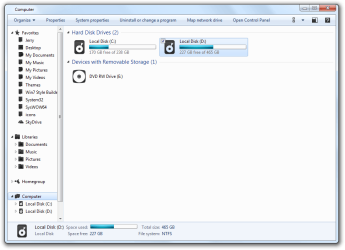
I have found a way to remove the address bar with the help of the window style builder forum.
Computer.png
If you are using the default aero theme I can change that for you, using Windows Style Builder and post it here in a zip folder.
If you are using a custom theme you will need to ask the theme maker. It's not cool to change someone else work.
&
This will be a custom theme and you will need to do 1 of these 2 ways of Enabling custom themes for it to work.
http://www.sevenforums.com/tutorials/34579-enabling-custom-themes-windows-7-a.html
Or
http://www.sevenforums.com/tutorials/28377-theme-how-apply-custom-themes.html?filter

Let me know.
Jerry
 

My Computer My Computer

At a glance

Win 7 Pro x64 / Win 10 ProIntel(R) Core(TM) i7-3630QM CPU @ 2.40GHz12 GB(1) Intel(R) HD Graphics 4000 (2) NVIDIA GeFo...
Computer type
Laptop
Computer Manufacturer/Model Number
Sager NP9170
OS
Win 7 Pro x64 / Win 10 Pro
CPU
Intel(R) Core(TM) i7-3630QM CPU @ 2.40GHz
Motherboard
CLEVO P170EM
Memory
12 GB
Graphics Card(s)
(1) Intel(R) HD Graphics 4000 (2) NVIDIA GeForce GTX 675M
Sound Card
(1) Realtek High Definition Audio (2) Intel(R) Display Aud
Monitor(s) Displays
17.3
Screen Resolution
1920x1080
Hard Drives
(1) Samsung 860 EVO 500GB(OS) (1) Samsung 860 EVO 500GB(Data)
Keyboard
Backlite
Antivirus
MSE, Malwarebytes Pro
Browser
Firefox
Other Info
DESKTOP: Custom-built.
OS: Win 10 Pro x64.
CASE: Rosewill R5.
CPU: Intel I5 4670K CPU @ 3.40GHz.
CPU COOLER: Cool Master Hyper 212 EVO.
MOTHERBOARD: Asus Z87-A.
MEMORY: Kingston HyperX 2x4 GB.
GPU: Nvidia Geforce 650 TI.
PSU: Corsair TX750.
DRIVES: (1) Samsung 840 120 GB SSD (2) Western Digital blue 500 GB 7200 RPM.
Thanks, Jerry.
I'm actually using the Windows Classic theme. Would it work for that? I mean, does it have to do with the 'Aero.msstyles' file or 'Shellstyle.dll'? Because if it's Shellstyle.dll, couldn't I modify the file in system32 (%SystemRoot%\system32\Shellstyle.dll) to make it universal for pretty much all themes (that is unless they use their own Shellstyle.dll file, which I could fix if I knew how). And does the Windows Classic theme even use the Shellstyle.dll file, or is it just for msstyles? if that's the case, then what other options do I have. Thanks again!

EDIT:
So I actually tested, Windows Classic DOES in fact use Shellstyle.dll. (I just used the Explorer Bar removal trick, just for testing). So does anyone have any information on UIFILE strings to change? Or is it in msstyles?

EDIT (again):
I feel kind of stupid, I meant UIFILE, not UFILE. Sorry. :/
 
Last edited:

My Computer My Computer

At a glance

Windows 7 Professional x64Intel Core i7-4510U CPU8 GB RAMIntel(R) HD Graphics (I so wish I could upgra...
Computer type
Laptop
Computer Manufacturer/Model Number
Dell Inspiron 15 7000 Series
OS
Windows 7 Professional x64
CPU
Intel Core i7-4510U CPU
Memory
8 GB RAM
Graphics Card(s)
Intel(R) HD Graphics (I so wish I could upgrade this)
Screen Resolution
1920x1080
Keyboard
Laptop keyboard
Mouse
Microsoft Mouse
Internet Speed
Nothing to write home about
Antivirus
Malwarebytes Anti Malware
Browser
Pale Moon (Firefox fork)
Other Info
My primary laptop has Windows 10 on it, and my shared desktop (which is actually a laptop being used as a desktop) has Windows 7 Professional on it. I still use both, but I would say I use my laptop a bit more now.
Customizing Windows classic theme is something I have tried with very little success, only thing I can recommend is trial and error and see what you can come up with. The msstyles has nothing to do with Windows classic theme.

Sorry
Jerry
 

My Computer My Computer

At a glance

Win 7 Pro x64 / Win 10 ProIntel(R) Core(TM) i7-3630QM CPU @ 2.40GHz12 GB(1) Intel(R) HD Graphics 4000 (2) NVIDIA GeFo...
Computer type
Laptop
Computer Manufacturer/Model Number
Sager NP9170
OS
Win 7 Pro x64 / Win 10 Pro
CPU
Intel(R) Core(TM) i7-3630QM CPU @ 2.40GHz
Motherboard
CLEVO P170EM
Memory
12 GB
Graphics Card(s)
(1) Intel(R) HD Graphics 4000 (2) NVIDIA GeForce GTX 675M
Sound Card
(1) Realtek High Definition Audio (2) Intel(R) Display Aud
Monitor(s) Displays
17.3
Screen Resolution
1920x1080
Hard Drives
(1) Samsung 860 EVO 500GB(OS) (1) Samsung 860 EVO 500GB(Data)
Keyboard
Backlite
Antivirus
MSE, Malwarebytes Pro
Browser
Firefox
Other Info
DESKTOP: Custom-built.
OS: Win 10 Pro x64.
CASE: Rosewill R5.
CPU: Intel I5 4670K CPU @ 3.40GHz.
CPU COOLER: Cool Master Hyper 212 EVO.
MOTHERBOARD: Asus Z87-A.
MEMORY: Kingston HyperX 2x4 GB.
GPU: Nvidia Geforce 650 TI.
PSU: Corsair TX750.
DRIVES: (1) Samsung 840 120 GB SSD (2) Western Digital blue 500 GB 7200 RPM.
Customizing Windows classic theme is something I have tried with very little success, only thing I can recommend is trial and error and see what you can come up with. The msstyles has nothing to do with Windows classic theme.

Sorry
Jerry
Yes, I'm aware that Classic doesn't use msstyles. But would you mind putting the custom Aero theme anyway? If it uses a custom shellstyle.dll, then I might be good to go. If not, I'll check it out anyway.
 

My Computer My Computer

At a glance

Windows 7 Professional x64Intel Core i7-4510U CPU8 GB RAMIntel(R) HD Graphics (I so wish I could upgra...
Computer type
Laptop
Computer Manufacturer/Model Number
Dell Inspiron 15 7000 Series
OS
Windows 7 Professional x64
CPU
Intel Core i7-4510U CPU
Memory
8 GB RAM
Graphics Card(s)
Intel(R) HD Graphics (I so wish I could upgrade this)
Screen Resolution
1920x1080
Keyboard
Laptop keyboard
Mouse
Microsoft Mouse
Internet Speed
Nothing to write home about
Antivirus
Malwarebytes Anti Malware
Browser
Pale Moon (Firefox fork)
Other Info
My primary laptop has Windows 10 on it, and my shared desktop (which is actually a laptop being used as a desktop) has Windows 7 Professional on it. I still use both, but I would say I use my laptop a bit more now.
Sure will, will post it later today.

Jerry
 

My Computer My Computer

At a glance

Win 7 Pro x64 / Win 10 ProIntel(R) Core(TM) i7-3630QM CPU @ 2.40GHz12 GB(1) Intel(R) HD Graphics 4000 (2) NVIDIA GeFo...
Computer type
Laptop
Computer Manufacturer/Model Number
Sager NP9170
OS
Win 7 Pro x64 / Win 10 Pro
CPU
Intel(R) Core(TM) i7-3630QM CPU @ 2.40GHz
Motherboard
CLEVO P170EM
Memory
12 GB
Graphics Card(s)
(1) Intel(R) HD Graphics 4000 (2) NVIDIA GeForce GTX 675M
Sound Card
(1) Realtek High Definition Audio (2) Intel(R) Display Aud
Monitor(s) Displays
17.3
Screen Resolution
1920x1080
Hard Drives
(1) Samsung 860 EVO 500GB(OS) (1) Samsung 860 EVO 500GB(Data)
Keyboard
Backlite
Antivirus
MSE, Malwarebytes Pro
Browser
Firefox
Other Info
DESKTOP: Custom-built.
OS: Win 10 Pro x64.
CASE: Rosewill R5.
CPU: Intel I5 4670K CPU @ 3.40GHz.
CPU COOLER: Cool Master Hyper 212 EVO.
MOTHERBOARD: Asus Z87-A.
MEMORY: Kingston HyperX 2x4 GB.
GPU: Nvidia Geforce 650 TI.
PSU: Corsair TX750.
DRIVES: (1) Samsung 840 120 GB SSD (2) Western Digital blue 500 GB 7200 RPM.
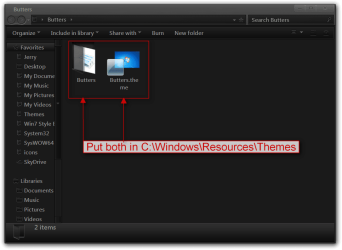
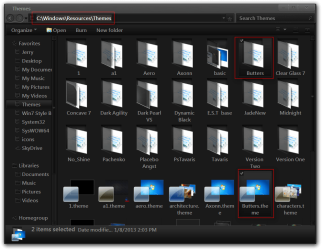
Here you go, download the zip folder below and extract it and put both 1 Butters folder and 1 Butters.theme file in C:\Windows\Resources\Themes
Butters.pngThemes.png

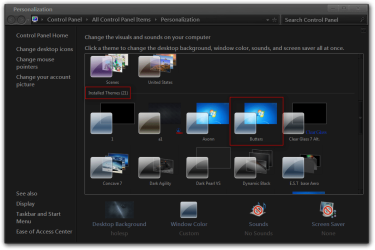
It will show up as Butters under Installed Themes in Personalization
Personalization.png

Jerry
 

Attachments

My Computer My Computer

At a glance

Win 7 Pro x64 / Win 10 ProIntel(R) Core(TM) i7-3630QM CPU @ 2.40GHz12 GB(1) Intel(R) HD Graphics 4000 (2) NVIDIA GeFo...
Computer type
Laptop
Computer Manufacturer/Model Number
Sager NP9170
OS
Win 7 Pro x64 / Win 10 Pro
CPU
Intel(R) Core(TM) i7-3630QM CPU @ 2.40GHz
Motherboard
CLEVO P170EM
Memory
12 GB
Graphics Card(s)
(1) Intel(R) HD Graphics 4000 (2) NVIDIA GeForce GTX 675M
Sound Card
(1) Realtek High Definition Audio (2) Intel(R) Display Aud
Monitor(s) Displays
17.3
Screen Resolution
1920x1080
Hard Drives
(1) Samsung 860 EVO 500GB(OS) (1) Samsung 860 EVO 500GB(Data)
Keyboard
Backlite
Antivirus
MSE, Malwarebytes Pro
Browser
Firefox
Other Info
DESKTOP: Custom-built.
OS: Win 10 Pro x64.
CASE: Rosewill R5.
CPU: Intel I5 4670K CPU @ 3.40GHz.
CPU COOLER: Cool Master Hyper 212 EVO.
MOTHERBOARD: Asus Z87-A.
MEMORY: Kingston HyperX 2x4 GB.
GPU: Nvidia Geforce 650 TI.
PSU: Corsair TX750.
DRIVES: (1) Samsung 840 120 GB SSD (2) Western Digital blue 500 GB 7200 RPM.
Thanks allot, Jerry. It's much appreciated. I'll keep looking for a solution for the classic theme, but at least thanks to you, I'm a little bit closer. I'll update on any information I find on this. And if anyone finds anything, I'd appreciate it if you'd post here. :)
 
Last edited:

My Computer My Computer

At a glance

Windows 7 Professional x64Intel Core i7-4510U CPU8 GB RAMIntel(R) HD Graphics (I so wish I could upgra...
Computer type
Laptop
Computer Manufacturer/Model Number
Dell Inspiron 15 7000 Series
OS
Windows 7 Professional x64
CPU
Intel Core i7-4510U CPU
Memory
8 GB RAM
Graphics Card(s)
Intel(R) HD Graphics (I so wish I could upgrade this)
Screen Resolution
1920x1080
Keyboard
Laptop keyboard
Mouse
Microsoft Mouse
Internet Speed
Nothing to write home about
Antivirus
Malwarebytes Anti Malware
Browser
Pale Moon (Firefox fork)
Other Info
My primary laptop has Windows 10 on it, and my shared desktop (which is actually a laptop being used as a desktop) has Windows 7 Professional on it. I still use both, but I would say I use my laptop a bit more now.
You're welcome
 

My Computer My Computer

At a glance

Win 7 Pro x64 / Win 10 ProIntel(R) Core(TM) i7-3630QM CPU @ 2.40GHz12 GB(1) Intel(R) HD Graphics 4000 (2) NVIDIA GeFo...
Computer type
Laptop
Computer Manufacturer/Model Number
Sager NP9170
OS
Win 7 Pro x64 / Win 10 Pro
CPU
Intel(R) Core(TM) i7-3630QM CPU @ 2.40GHz
Motherboard
CLEVO P170EM
Memory
12 GB
Graphics Card(s)
(1) Intel(R) HD Graphics 4000 (2) NVIDIA GeForce GTX 675M
Sound Card
(1) Realtek High Definition Audio (2) Intel(R) Display Aud
Monitor(s) Displays
17.3
Screen Resolution
1920x1080
Hard Drives
(1) Samsung 860 EVO 500GB(OS) (1) Samsung 860 EVO 500GB(Data)
Keyboard
Backlite
Antivirus
MSE, Malwarebytes Pro
Browser
Firefox
Other Info
DESKTOP: Custom-built.
OS: Win 10 Pro x64.
CASE: Rosewill R5.
CPU: Intel I5 4670K CPU @ 3.40GHz.
CPU COOLER: Cool Master Hyper 212 EVO.
MOTHERBOARD: Asus Z87-A.
MEMORY: Kingston HyperX 2x4 GB.
GPU: Nvidia Geforce 650 TI.
PSU: Corsair TX750.
DRIVES: (1) Samsung 840 120 GB SSD (2) Western Digital blue 500 GB 7200 RPM.
Well, it seems that the Address Bar has nothing to do with Shellstyle.dll. It looks more like it has something to do with the .msstyles file, or the file ExplorerFrame.dll (although I'm still looking for it in ExplorerFrame.dll's UIFILEs). If anyone else happens to find something, let me know.
 

My Computer My Computer

At a glance

Windows 7 Professional x64Intel Core i7-4510U CPU8 GB RAMIntel(R) HD Graphics (I so wish I could upgra...
Computer type
Laptop
Computer Manufacturer/Model Number
Dell Inspiron 15 7000 Series
OS
Windows 7 Professional x64
CPU
Intel Core i7-4510U CPU
Memory
8 GB RAM
Graphics Card(s)
Intel(R) HD Graphics (I so wish I could upgrade this)
Screen Resolution
1920x1080
Keyboard
Laptop keyboard
Mouse
Microsoft Mouse
Internet Speed
Nothing to write home about
Antivirus
Malwarebytes Anti Malware
Browser
Pale Moon (Firefox fork)
Other Info
My primary laptop has Windows 10 on it, and my shared desktop (which is actually a laptop being used as a desktop) has Windows 7 Professional on it. I still use both, but I would say I use my laptop a bit more now.
Removing Address Bar

@Jerry,

You referenced that you had removed the Windows Explorer address bar in the default Aero theme. Could you please send me the edited files that you created and/or point me to the forum where you found this information?
 

My Computer My Computer

At a glance

Windows 7 Ultimate x64
Computer type
PC/Desktop
OS
Windows 7 Ultimate x64
@Jerry,

You referenced that you had removed the Windows Explorer address bar in the default Aero theme. Could you please send me the edited files that you created and/or point me to the forum where you found this information?
Welcome to the Seven Forums

It's in the zip folder at the bottom of this post.

You need to replace the shellstyle.dll in C:\Windows\Resources\Themes\Aero\Shell\NormalColor folder, save the original in case you ever want to go back.

Jerry
 

Attachments

My Computer My Computer

At a glance

Win 7 Pro x64 / Win 10 ProIntel(R) Core(TM) i7-3630QM CPU @ 2.40GHz12 GB(1) Intel(R) HD Graphics 4000 (2) NVIDIA GeFo...
Computer type
Laptop
Computer Manufacturer/Model Number
Sager NP9170
OS
Win 7 Pro x64 / Win 10 Pro
CPU
Intel(R) Core(TM) i7-3630QM CPU @ 2.40GHz
Motherboard
CLEVO P170EM
Memory
12 GB
Graphics Card(s)
(1) Intel(R) HD Graphics 4000 (2) NVIDIA GeForce GTX 675M
Sound Card
(1) Realtek High Definition Audio (2) Intel(R) Display Aud
Monitor(s) Displays
17.3
Screen Resolution
1920x1080
Hard Drives
(1) Samsung 860 EVO 500GB(OS) (1) Samsung 860 EVO 500GB(Data)
Keyboard
Backlite
Antivirus
MSE, Malwarebytes Pro
Browser
Firefox
Other Info
DESKTOP: Custom-built.
OS: Win 10 Pro x64.
CASE: Rosewill R5.
CPU: Intel I5 4670K CPU @ 3.40GHz.
CPU COOLER: Cool Master Hyper 212 EVO.
MOTHERBOARD: Asus Z87-A.
MEMORY: Kingston HyperX 2x4 GB.
GPU: Nvidia Geforce 650 TI.
PSU: Corsair TX750.
DRIVES: (1) Samsung 840 120 GB SSD (2) Western Digital blue 500 GB 7200 RPM.
Thanks Jerry,

I have done as you stated and replaced my original shellstyle.dll with the one that you provided. It does not appear to have made any difference, even after a reboot.

I compared the two files via WinMerge and it states that they are identical. If you can instruct me as to what the actual changes made were, I can try to edit my existing version via ResHacker.

Just FYI....The environment that I am testing this on is Win7 Embedded (WS7E) x86.
 

My Computer My Computer

At a glance

Windows 7 Ultimate x64
Computer type
PC/Desktop
OS
Windows 7 Ultimate x64
Thanks Jerry,

I have done as you stated and replaced my original shellstyle.dll with the one that you provided. It does not appear to have made any difference, even after a reboot.

I compared the two files via WinMerge and it states that they are identical. If you can instruct me as to what the actual changes made were, I can try to edit my existing version via ResHacker.

Just FYI....The environment that I am testing this on is Win7 Embedded (WS7E) x86.

I just tried it with aero and it did not work, go to Post #9 http://www.sevenforums.com/customiz...ow-menu-bar-windows-explorer.html#post2245940 and download Butters theme I made it works. I just tried to compare the shellstyle.dll and came back the same :confused: will have to do some checking.

You will need to do 1 of these 2 ways of Enabling custom themes for it to work.
http://www.sevenforums.com/tutorials/34579-enabling-custom-themes-windows-7-a.html
Or
http://www.sevenforums.com/tutorials/28377-theme-how-apply-custom-themes.html?filter

Jerry
 

My Computer My Computer

At a glance

Win 7 Pro x64 / Win 10 ProIntel(R) Core(TM) i7-3630QM CPU @ 2.40GHz12 GB(1) Intel(R) HD Graphics 4000 (2) NVIDIA GeFo...
Computer type
Laptop
Computer Manufacturer/Model Number
Sager NP9170
OS
Win 7 Pro x64 / Win 10 Pro
CPU
Intel(R) Core(TM) i7-3630QM CPU @ 2.40GHz
Motherboard
CLEVO P170EM
Memory
12 GB
Graphics Card(s)
(1) Intel(R) HD Graphics 4000 (2) NVIDIA GeForce GTX 675M
Sound Card
(1) Realtek High Definition Audio (2) Intel(R) Display Aud
Monitor(s) Displays
17.3
Screen Resolution
1920x1080
Hard Drives
(1) Samsung 860 EVO 500GB(OS) (1) Samsung 860 EVO 500GB(Data)
Keyboard
Backlite
Antivirus
MSE, Malwarebytes Pro
Browser
Firefox
Other Info
DESKTOP: Custom-built.
OS: Win 10 Pro x64.
CASE: Rosewill R5.
CPU: Intel I5 4670K CPU @ 3.40GHz.
CPU COOLER: Cool Master Hyper 212 EVO.
MOTHERBOARD: Asus Z87-A.
MEMORY: Kingston HyperX 2x4 GB.
GPU: Nvidia Geforce 650 TI.
PSU: Corsair TX750.
DRIVES: (1) Samsung 840 120 GB SSD (2) Western Digital blue 500 GB 7200 RPM.
Thanks Jerry,

I have done as you stated and replaced my original shellstyle.dll with the one that you provided. It does not appear to have made any difference, even after a reboot.

I compared the two files via WinMerge and it states that they are identical. If you can instruct me as to what the actual changes made were, I can try to edit my existing version via ResHacker.

Just FYI....The environment that I am testing this on is Win7 Embedded (WS7E) x86.

I just tried it with aero and it did not work, go to Post #9 http://www.sevenforums.com/customiz...ow-menu-bar-windows-explorer.html#post2245940 and download Butters theme I made it works. I just tried to compare the shellstyle.dll and came back the same :confused: will have to do some checking.

You will need to do 1 of these 2 ways of Enabling custom themes for it to work.
http://www.sevenforums.com/tutorials/34579-enabling-custom-themes-windows-7-a.html
Or
http://www.sevenforums.com/tutorials/28377-theme-how-apply-custom-themes.html?filter

Jerry

OK it's not in the shellstyle.dll it's a content margin setting in the .msstyles that can be changed with Ave's Windows7 Style Builder

Jerry
 

My Computer My Computer

At a glance

Win 7 Pro x64 / Win 10 ProIntel(R) Core(TM) i7-3630QM CPU @ 2.40GHz12 GB(1) Intel(R) HD Graphics 4000 (2) NVIDIA GeFo...
Computer type
Laptop
Computer Manufacturer/Model Number
Sager NP9170
OS
Win 7 Pro x64 / Win 10 Pro
CPU
Intel(R) Core(TM) i7-3630QM CPU @ 2.40GHz
Motherboard
CLEVO P170EM
Memory
12 GB
Graphics Card(s)
(1) Intel(R) HD Graphics 4000 (2) NVIDIA GeForce GTX 675M
Sound Card
(1) Realtek High Definition Audio (2) Intel(R) Display Aud
Monitor(s) Displays
17.3
Screen Resolution
1920x1080
Hard Drives
(1) Samsung 860 EVO 500GB(OS) (1) Samsung 860 EVO 500GB(Data)
Keyboard
Backlite
Antivirus
MSE, Malwarebytes Pro
Browser
Firefox
Other Info
DESKTOP: Custom-built.
OS: Win 10 Pro x64.
CASE: Rosewill R5.
CPU: Intel I5 4670K CPU @ 3.40GHz.
CPU COOLER: Cool Master Hyper 212 EVO.
MOTHERBOARD: Asus Z87-A.
MEMORY: Kingston HyperX 2x4 GB.
GPU: Nvidia Geforce 650 TI.
PSU: Corsair TX750.
DRIVES: (1) Samsung 840 120 GB SSD (2) Western Digital blue 500 GB 7200 RPM.
I appreciate your assistance Jerry! I feel kind of 'slow' actually at this point. Perhaps if I had spent a little bit more time looking at the previous posts yesterday, I could have found the solution within the 'Butters' files.

I have confirmed that the .msstyles file included there is in fact working and has removed the Windows explorer address bar in my test environment.
 

My Computer My Computer

At a glance

Windows 7 Ultimate x64
Computer type
PC/Desktop
OS
Windows 7 Ultimate x64
I appreciate your assistance Jerry! I feel kind of 'slow' actually at this point. Perhaps if I had spent a little bit more time looking at the previous posts yesterday, I could have found the solution within the 'Butters' files.

I have confirmed that the .msstyles file included there is in fact working and has removed the Windows explorer address bar in my test environment.
Cool
 

My Computer My Computer

At a glance

Win 7 Pro x64 / Win 10 ProIntel(R) Core(TM) i7-3630QM CPU @ 2.40GHz12 GB(1) Intel(R) HD Graphics 4000 (2) NVIDIA GeFo...
Computer type
Laptop
Computer Manufacturer/Model Number
Sager NP9170
OS
Win 7 Pro x64 / Win 10 Pro
CPU
Intel(R) Core(TM) i7-3630QM CPU @ 2.40GHz
Motherboard
CLEVO P170EM
Memory
12 GB
Graphics Card(s)
(1) Intel(R) HD Graphics 4000 (2) NVIDIA GeForce GTX 675M
Sound Card
(1) Realtek High Definition Audio (2) Intel(R) Display Aud
Monitor(s) Displays
17.3
Screen Resolution
1920x1080
Hard Drives
(1) Samsung 860 EVO 500GB(OS) (1) Samsung 860 EVO 500GB(Data)
Keyboard
Backlite
Antivirus
MSE, Malwarebytes Pro
Browser
Firefox
Other Info
DESKTOP: Custom-built.
OS: Win 10 Pro x64.
CASE: Rosewill R5.
CPU: Intel I5 4670K CPU @ 3.40GHz.
CPU COOLER: Cool Master Hyper 212 EVO.
MOTHERBOARD: Asus Z87-A.
MEMORY: Kingston HyperX 2x4 GB.
GPU: Nvidia Geforce 650 TI.
PSU: Corsair TX750.
DRIVES: (1) Samsung 840 120 GB SSD (2) Western Digital blue 500 GB 7200 RPM.
Hi Guys..

i want to make this thread alive since, i have the same problem on this thread..
but i getting confused and getting a hard time to implement it..

here's the problem,

I want to re-sized my address bar on my windows explorer to make my address bar invisible to the user..
i use windows 7 style builder to customized the theme..

the theme that i have custom is the default aero theme.
Toolbars, Headers and Rebar> Rebar> NavBar> Basic> Base> Band - CONTENTMARGINS:MARGIN (0, 0, 0, -33)

Since i followed the tutorials, still i don't have luck.. if i change its value then apply after saving, Im getting an error, windows style cannot apply.

If i export the theme and put in other location then proceed to customized the theme and copy it back to its original location. C:\windows\resources\themes. I can save the settings but if i applied it, it wont apply. still no luck..


249038d1357569096-move-address-bar-below-menu-bar-windows-explorer-computer.png


This is what i want on the theme, no address bar and no navigational buttons (forward, back)
If you can give me all back theme with no address bar and no navigational buttons (forward, back), very much appreciated.. :cry:

Please help me.. any help i can get. will be much appreciated.. :)
If you have time guys, please kindly provide me a link to a theme with no address bar and no navigational buttons (forward, back) :cry:


Thank you


Note: To bongo, please forgive me for using your picture! since your picture is very good example to my problem.. hope you allowed me to use it here.
 

My Computer My Computer

At a glance

Windows 7 Ultimate 64biti716GBDual Graphics
Computer type
Laptop
Computer Manufacturer/Model Number
HP Envy 17' 3D
OS
Windows 7 Ultimate 64bit
CPU
i7
Motherboard
HP
Memory
16GB
Graphics Card(s)
Dual Graphics
Hard Drives
1.5 TB
Antivirus
nod32 64bit
Browser
google chrome, IE.
Back
Top