How do I connect laptop to internet through the ethernet cable?

pdoyle

New member
Local time
1:18 PM
Messages
22
my 3 year old Dell Studio laptop connects fine via wireless to home router and internet; but I cannot connect through the ethernet cable. I've done the troubleshooting; disabled/enabled the network adapter; updated the drivers. I'm using an ethernet cable which normally connects an XP, so I know the cable's fine.
Device Manager says the Realtek PCI-E Gigabit Ethernet Controller is working properly. I found the Receive Side Scaling value Enabled, so I Disabled that. Shut off radio for wireless Centrino adapter. Disabled wireless adapter too. Restarted not only the laptop; but also did a shutdown then restart of the entire FIOS with Asus Access Point home network, with all devices shut down. Checked BIOS setting, didn't see any setting Disabled that appeared like the ethernet controller.
Can't do system restore; I did a Repair installation of windows 7 Home Premium last week...but even before then, the System Restore failed every time. I've never been successful at getting a system restore to work on any XP or 7 pc I've tried it on, even though it's enabled and purports to work.
The laptop had been connected primarily, maybe even exclusively, via the wireless, for 3 years...so I"m not even sure the ethernet has ever been connected before.
I'd hate to buy a new ethernet controller card if i don't have to, only to have the problem be software...
Any ideas? thanks!
 

My Computer My Computer

At a glance

Microsoft Windows 10 Home 64-bit 10586 Multip...Intel(R) Core(TM) i3-2330M CPU @ 2.20GHz4.00 GBIntel(R) HD Graphics 3000
Computer type
Laptop
Computer Manufacturer/Model Number
Acer AX3950-U3022
OS
Microsoft Windows 10 Home 64-bit 10586 Multiprocessor Free
CPU
Intel(R) Core(TM) i3-2330M CPU @ 2.20GHz
Motherboard
ASUSTeK Computer Inc. K54L
Memory
4.00 GB
Graphics Card(s)
Intel(R) HD Graphics 3000
Sound Card
(1) High Definition Audio Device (2) Realtek High Definiti
Monitor(s) Displays
AOC 2216S [Monitor] (22.0"vis, s/n 41685BA034342, May 2008);
Screen Resolution
1366 x 768 x 32 bits (4294967296 colors) @ 59 Hz
Hard Drives
ST320LT0 20-9YG142 SCSI Disk Device
Antivirus
McAfee
I'd say, inspect the ethernet port on the laptop for bent contact pins. Just for grins and giggles, try another cable. Try attaching the laptop to ANY other network via ethernet cable.
 

My Computer My Computer

At a glance

Microsoft Windows 10 Home Build 15036Intel(R) Core(TM) i7-860 @ 2.80GHz4.00 GBNVIDIA GeForce GTX 750
Computer type
PC/Desktop
Computer Manufacturer/Model Number
iBuyPower NZXT
OS
Microsoft Windows 10 Home Build 15036
CPU
Intel(R) Core(TM) i7-860 @ 2.80GHz
Motherboard
Gigabyte Technology Co., Ltd. P55-UD3L
Memory
4.00 GB
Graphics Card(s)
NVIDIA GeForce GTX 750
Sound Card
(1) Line 6 UX2 (2) Realtek High Definition Audio
Monitor(s) Displays
23" acer
Screen Resolution
1920 x 1080 x 32 bits (4294967296 colors) @ 60 Hz
Hard Drives
(1) WDC WD5000AAKS-00D2B0 ATA Device (2) Seagate FreeAgent Go 250G USB Device
Cooling
Corsair H75 liquid cooler (Very easy to install, actually)
Internet Speed
60M cable modem-->Linksys E1200-->1Gbps net card
Browser
Chrome
Other Info
This is probably the longest I've ever had a Windows machine run without having to restore it to scratch. I'm used to restoring to "factory" about every 2 yrs. I've run with Win7 since new in 2009 and only recently (Nov, '14) restored to clean up the machine from all my 'xperimenting. LOL!! I may never need another machine.

Upgraded to 10 when it was still free, then installed 2017 update.
my 3 year old Dell Studio laptop connects fine via wireless to home router and internet; but I cannot connect through the ethernet cable. I've done the troubleshooting; disabled/enabled the network adapter; updated the drivers. I'm using an ethernet cable which normally connects an XP, so I know the cable's fine.
Device Manager says the Realtek PCI-E Gigabit Ethernet Controller is working properly. I found the Receive Side Scaling value Enabled, so I Disabled that. Shut off radio for wireless Centrino adapter. Disabled wireless adapter too. Restarted not only the laptop; but also did a shutdown then restart of the entire FIOS with Asus Access Point home network, with all devices shut down. Checked BIOS setting, didn't see any setting Disabled that appeared like the ethernet controller.
Can't do system restore; I did a Repair installation of windows 7 Home Premium last week...but even before then, the System Restore failed every time. I've never been successful at getting a system restore to work on any XP or 7 pc I've tried it on, even though it's enabled and purports to work.
The laptop had been connected primarily, maybe even exclusively, via the wireless, for 3 years...so I"m not even sure the ethernet has ever been connected before.
I'd hate to buy a new ethernet controller card if i don't have to, only to have the problem be software...
Any ideas? thanks!

Hi pdoyle,

Once you connect the cable to the ethernet port on the system so we see any leds on the ethernet card. Also, if you are connecting it from a router then do you see any led coming up on the router as well.

Click on start>type cmd>open command prompt> type ipconfig/all and take a screenshot of Ethernet adapter local area connection and post it here:

http://www.sevenforums.com/tutorials/9733-screenshots-files-upload-post-seven-forums.html

Keep us posted with the results so we can advise you further.
 

My Computer My Computer

At a glance

Winndows 7 32 bit
Computer type
PC/Desktop
OS
Winndows 7 32 bit
I tried connecting to a different network; different ethernet cable; there is no obvious damage to the contacts on the ethernet port. when I connect the cable, there are no lights visible near the port; and I don't have access to the router here. I'll try it again later today at home to see lights on the home router.
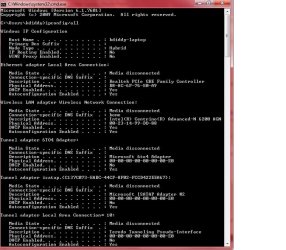
attached is the screen shot of ipconfig/all...thanks!
 

Attachments

  • screenshot pdoyle cmd.jpg
    screenshot pdoyle cmd.jpg
    79.1 KB · Views: 2

My Computer My Computer

At a glance

Microsoft Windows 10 Home 64-bit 10586 Multip...Intel(R) Core(TM) i3-2330M CPU @ 2.20GHz4.00 GBIntel(R) HD Graphics 3000
Computer type
Laptop
Computer Manufacturer/Model Number
Acer AX3950-U3022
OS
Microsoft Windows 10 Home 64-bit 10586 Multiprocessor Free
CPU
Intel(R) Core(TM) i3-2330M CPU @ 2.20GHz
Motherboard
ASUSTeK Computer Inc. K54L
Memory
4.00 GB
Graphics Card(s)
Intel(R) HD Graphics 3000
Sound Card
(1) High Definition Audio Device (2) Realtek High Definiti
Monitor(s) Displays
AOC 2216S [Monitor] (22.0"vis, s/n 41685BA034342, May 2008);
Screen Resolution
1366 x 768 x 32 bits (4294967296 colors) @ 59 Hz
Hard Drives
ST320LT0 20-9YG142 SCSI Disk Device
Antivirus
McAfee
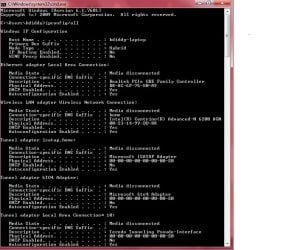
OK this screenshot taken when I ethernet connected to router at home. with other connected devices, their router ports show either a green or an amber LED...except the port my laptop is connected to; that Router port is not showing any LED lights. Same for my laptop's port; no LEDs visible at its port. attached is the screenshot of ipconfig/all...please advise? again, I don't recall whether the ethernet controller has ever been used. I've owned it for 3 years and 3 months, so don't know if the motherboard warranty might apply. thanks
 

Attachments

  • screenshot pdoyle home routeripconfigall.jpg
    screenshot pdoyle home routeripconfigall.jpg
    77 KB · Views: 1

My Computer My Computer

At a glance

Microsoft Windows 10 Home 64-bit 10586 Multip...Intel(R) Core(TM) i3-2330M CPU @ 2.20GHz4.00 GBIntel(R) HD Graphics 3000
Computer type
Laptop
Computer Manufacturer/Model Number
Acer AX3950-U3022
OS
Microsoft Windows 10 Home 64-bit 10586 Multiprocessor Free
CPU
Intel(R) Core(TM) i3-2330M CPU @ 2.20GHz
Motherboard
ASUSTeK Computer Inc. K54L
Memory
4.00 GB
Graphics Card(s)
Intel(R) HD Graphics 3000
Sound Card
(1) High Definition Audio Device (2) Realtek High Definiti
Monitor(s) Displays
AOC 2216S [Monitor] (22.0"vis, s/n 41685BA034342, May 2008);
Screen Resolution
1366 x 768 x 32 bits (4294967296 colors) @ 59 Hz
Hard Drives
ST320LT0 20-9YG142 SCSI Disk Device
Antivirus
McAfee
Well, at this point, I'm willing to be you're having adapter issues that won't be fixed short of replacing it. That's not going to be easy considering that you're dealing with a laptop, so, I'd say you were stuck with using wireless until a workable solution comes about.

Is the system under warranty? ;)
 

My Computer My Computer

At a glance

Microsoft Windows 10 Home Build 15036Intel(R) Core(TM) i7-860 @ 2.80GHz4.00 GBNVIDIA GeForce GTX 750
Computer type
PC/Desktop
Computer Manufacturer/Model Number
iBuyPower NZXT
OS
Microsoft Windows 10 Home Build 15036
CPU
Intel(R) Core(TM) i7-860 @ 2.80GHz
Motherboard
Gigabyte Technology Co., Ltd. P55-UD3L
Memory
4.00 GB
Graphics Card(s)
NVIDIA GeForce GTX 750
Sound Card
(1) Line 6 UX2 (2) Realtek High Definition Audio
Monitor(s) Displays
23" acer
Screen Resolution
1920 x 1080 x 32 bits (4294967296 colors) @ 60 Hz
Hard Drives
(1) WDC WD5000AAKS-00D2B0 ATA Device (2) Seagate FreeAgent Go 250G USB Device
Cooling
Corsair H75 liquid cooler (Very easy to install, actually)
Internet Speed
60M cable modem-->Linksys E1200-->1Gbps net card
Browser
Chrome
Other Info
This is probably the longest I've ever had a Windows machine run without having to restore it to scratch. I'm used to restoring to "factory" about every 2 yrs. I've run with Win7 since new in 2009 and only recently (Nov, '14) restored to clean up the machine from all my 'xperimenting. LOL!! I may never need another machine.

Upgraded to 10 when it was still free, then installed 2017 update.
no warranty

will Dell Fix, OutOffWarranty? It Never Worked, But Is ThreeYearsOld
 

My Computer My Computer

At a glance

Microsoft Windows 10 Home 64-bit 10586 Multip...Intel(R) Core(TM) i3-2330M CPU @ 2.20GHz4.00 GBIntel(R) HD Graphics 3000
Computer type
Laptop
Computer Manufacturer/Model Number
Acer AX3950-U3022
OS
Microsoft Windows 10 Home 64-bit 10586 Multiprocessor Free
CPU
Intel(R) Core(TM) i3-2330M CPU @ 2.20GHz
Motherboard
ASUSTeK Computer Inc. K54L
Memory
4.00 GB
Graphics Card(s)
Intel(R) HD Graphics 3000
Sound Card
(1) High Definition Audio Device (2) Realtek High Definiti
Monitor(s) Displays
AOC 2216S [Monitor] (22.0"vis, s/n 41685BA034342, May 2008);
Screen Resolution
1366 x 768 x 32 bits (4294967296 colors) @ 59 Hz
Hard Drives
ST320LT0 20-9YG142 SCSI Disk Device
Antivirus
McAfee
That's when you start talking about giving Dell more $$.
 

My Computer My Computer

At a glance

Microsoft Windows 10 Home Build 15036Intel(R) Core(TM) i7-860 @ 2.80GHz4.00 GBNVIDIA GeForce GTX 750
Computer type
PC/Desktop
Computer Manufacturer/Model Number
iBuyPower NZXT
OS
Microsoft Windows 10 Home Build 15036
CPU
Intel(R) Core(TM) i7-860 @ 2.80GHz
Motherboard
Gigabyte Technology Co., Ltd. P55-UD3L
Memory
4.00 GB
Graphics Card(s)
NVIDIA GeForce GTX 750
Sound Card
(1) Line 6 UX2 (2) Realtek High Definition Audio
Monitor(s) Displays
23" acer
Screen Resolution
1920 x 1080 x 32 bits (4294967296 colors) @ 60 Hz
Hard Drives
(1) WDC WD5000AAKS-00D2B0 ATA Device (2) Seagate FreeAgent Go 250G USB Device
Cooling
Corsair H75 liquid cooler (Very easy to install, actually)
Internet Speed
60M cable modem-->Linksys E1200-->1Gbps net card
Browser
Chrome
Other Info
This is probably the longest I've ever had a Windows machine run without having to restore it to scratch. I'm used to restoring to "factory" about every 2 yrs. I've run with Win7 since new in 2009 and only recently (Nov, '14) restored to clean up the machine from all my 'xperimenting. LOL!! I may never need another machine.

Upgraded to 10 when it was still free, then installed 2017 update.
If you've never used the Ethernet cable port before and you aren't getting any LED indications, the cables between the port and the card may be an issue. You should see some LED activity. I would open up the case and inspect the port connections. Remove the connection and replace to see if you get LED indications.

You may be able to find instructions only about opening up the case. All these parts should be able to be replaced if defective. If your wireless card is the same as your cable card, at least you know the card is working on the wireless side. Contact Dell Support about replacement parts for the port and the card. Ask about instructions on how to remove and install the components. I have an old Dell Inspiron, and Dell has sent me a replacement port connection before with instructions on how to replace. You may even be able to find the parts on eBay for a low price.

The fact that you can't do a system restore raises some issues as well. If you are trying to restore from an old restore point, that is not unusual. But, if you create a few restore points and still can't get a successful restore, I would suspect something amiss in the OS. Have you done a SFC /SCANNOW from the cmd prompt? Reload the OS from the Dell CD. If you don't have the CD, you can get one from Dell for a few bucks.

I think this issue is solvable without high cost.

Regards
 

My Computer My Computer

At a glance

Windows 7 Professional x64 SP1Intel i7-980x @ 3.6GHzCorsair 12GB DDR3 RAM (3x4GB)EVGA NVIDIA GeForce GTX 760 SC
Computer type
PC/Desktop
Computer Manufacturer/Model Number
Custom Build
OS
Windows 7 Professional x64 SP1
CPU
Intel i7-980x @ 3.6GHz
Motherboard
Intel DX58SO
Memory
Corsair 12GB DDR3 RAM (3x4GB)
Graphics Card(s)
EVGA NVIDIA GeForce GTX 760 SC
Sound Card
Intel High Definition 7.1 Audio Subsystem - Realtek ALC889
Monitor(s) Displays
Dual Display - LG Electronics Flatron L227WTG
Screen Resolution
1680 x 1050 60Hz 32-bit
Hard Drives
2 Seagate Constellation ST1000NM0033 1TB SATA 6Gb/s HDDs configured as Intel SATA Array 0, RST RAID 1, Vol. 0 (C:\) & Vol. 1 (D:\), & 2 Seagate Barracuda ST500DM002 500GB SATA 6Gb/s HDDs configured as Intel SATA Array 1 RST RAID 1, Vol. 0 (E:\)
PSU
Corsair HX850W
Case
Antec P182
Cooling
Stock Intel i7-980x Cooling Solution + 4 120mm Case Fans
Keyboard
Microsoft Wireless Multimedia Keyboard 1.1
Mouse
Microsoft Standard Wireless Optical Mouse
Internet Speed
DSL - 3.0 Mb/s download 768 Kb/s upload
Antivirus
ESET Smart Security 12, Defender & SuperAntiSpyware Pro
Browser
Firefox Quantum 64-bit
Other Info
Optical Drives: Pioneer DVR-216R & TSSTcorp SH-S223Q, Anker USB 3.0 PCI-E Card, Hauppauge WinTV-HVR 2250 Dual TV Tuner Board for Windows Media Center, Bose Companion 3 Series II multimedia speaker system, APC Smart-UPS SMT1500
OK this screenshot taken when I ethernet connected to router at home. with other connected devices, their router ports show either a green or an amber LED...except the port my laptop is connected to; that Router port is not showing any LED lights. Same for my laptop's port; no LEDs visible at its port. attached is the screenshot of ipconfig/all...please advise? again, I don't recall whether the ethernet controller has ever been used. I've owned it for 3 years and 3 months, so don't know if the motherboard warranty might apply. thanks

Hi pdoyle,

Thanks for your reply. I appreciate the time and effort that you took to troubleshoot the issue.

It seems to be an issue with the ethernet port on the system which might require replacement. Most laptops have the ethernet port integrated to the motherboard so it might be that complete motherboard would require replacement.

Do you see any changes in the LAN icon at the bottom right corner of the screen when you connect the cable.

Please check the system under safe mode with networking and let us know if there are any changes in the behavior:

http://www.sevenforums.com/tutorials/69585-safe-mode.html

Keep us posted with the results so we can advise you further.
 

My Computer My Computer

At a glance

Winndows 7 32 bit
Computer type
PC/Desktop
OS
Winndows 7 32 bit
I think I might try clearing the cmos on that board before I replaced it., there is usually a small hole on the side of the laptop for this. I've fixed many an Ethernet problem this way.
 

My Computer My Computer

At a glance

Windows 7 Ult, Windows 8.1 Pro,Q9650-4.275GHz, E8600 4.5GHz, E6750-3.8GHzG.Skill PC2 9600 1200Mhz 5 5 5 15 2TGTX480
Computer type
PC/Desktop
Computer Manufacturer/Model Number
Home built
OS
Windows 7 Ult, Windows 8.1 Pro,
CPU
Q9650-4.275GHz, E8600 4.5GHz, E6750-3.8GHz
Motherboard
Evga 780i FTW
Memory
G.Skill PC2 9600 1200Mhz 5 5 5 15 2T
Graphics Card(s)
GTX480
Sound Card
Asus Xonar D2
Monitor(s) Displays
HannsG
Screen Resolution
1680X1050
Hard Drives
GSkill Phoenix Pro 120GB SSD
PSU
ThermalTake Toughpower 1000Watt modular
Case
ThermalTake XaserV
Cooling
Xigmatek S1283
Keyboard
Logitech G15
Mouse
Logitech G9
Internet Speed
T1
paper clip inserted in the tiny hole, like resetting a router device?
I will try this and the ethernet icon...I had trouble disassembling the laptop case yesterday, not realizing the ethernet port would be part of the motherboard. tx.
 

My Computer My Computer

At a glance

Microsoft Windows 10 Home 64-bit 10586 Multip...Intel(R) Core(TM) i3-2330M CPU @ 2.20GHz4.00 GBIntel(R) HD Graphics 3000
Computer type
Laptop
Computer Manufacturer/Model Number
Acer AX3950-U3022
OS
Microsoft Windows 10 Home 64-bit 10586 Multiprocessor Free
CPU
Intel(R) Core(TM) i3-2330M CPU @ 2.20GHz
Motherboard
ASUSTeK Computer Inc. K54L
Memory
4.00 GB
Graphics Card(s)
Intel(R) HD Graphics 3000
Sound Card
(1) High Definition Audio Device (2) Realtek High Definiti
Monitor(s) Displays
AOC 2216S [Monitor] (22.0"vis, s/n 41685BA034342, May 2008);
Screen Resolution
1366 x 768 x 32 bits (4294967296 colors) @ 59 Hz
Hard Drives
ST320LT0 20-9YG142 SCSI Disk Device
Antivirus
McAfee
paper clip inserted in the tiny hole, like resetting a router device?
I will try this and the ethernet icon...I had trouble disassembling the laptop case yesterday, not realizing the ethernet port would be part of the motherboard. tx.

Yes they usually have a small hole for this like a router would have.

Ethernet NICs tend to get overloaded at times and usually have a fail safe that will shut them off. Clearing the cmos has fixed this for me in the past.
 

My Computer My Computer

At a glance

Windows 7 Ult, Windows 8.1 Pro,Q9650-4.275GHz, E8600 4.5GHz, E6750-3.8GHzG.Skill PC2 9600 1200Mhz 5 5 5 15 2TGTX480
Computer type
PC/Desktop
Computer Manufacturer/Model Number
Home built
OS
Windows 7 Ult, Windows 8.1 Pro,
CPU
Q9650-4.275GHz, E8600 4.5GHz, E6750-3.8GHz
Motherboard
Evga 780i FTW
Memory
G.Skill PC2 9600 1200Mhz 5 5 5 15 2T
Graphics Card(s)
GTX480
Sound Card
Asus Xonar D2
Monitor(s) Displays
HannsG
Screen Resolution
1680X1050
Hard Drives
GSkill Phoenix Pro 120GB SSD
PSU
ThermalTake Toughpower 1000Watt modular
Case
ThermalTake XaserV
Cooling
Xigmatek S1283
Keyboard
Logitech G15
Mouse
Logitech G9
Internet Speed
T1
paper clip inserted in the tiny hole, like resetting a router device?
I will try this and the ethernet icon...I had trouble disassembling the laptop case yesterday, not realizing the ethernet port would be part of the motherboard. tx.

Hi pdoyle,

Please try the steps at your convenience and let us know the results so we can advise you further if required. If you have any further queries, please feel free to contact us.
 

My Computer My Computer

At a glance

Winndows 7 32 bit
Computer type
PC/Desktop
OS
Winndows 7 32 bit
Had to stop disassembling case for fear of cracking something...Safe Mode with networking didn't give any different performance; again, trying to update the driver through Windows 7, it states the ethernet controller device is functioning properly, and has the best driver already. Re. suggestion of trying to reset through pinhole; no pinhole could be found in the case near the port; and I stopped short of uncovering the motherboard out of fear of snapping something.
 

My Computer My Computer

At a glance

Microsoft Windows 10 Home 64-bit 10586 Multip...Intel(R) Core(TM) i3-2330M CPU @ 2.20GHz4.00 GBIntel(R) HD Graphics 3000
Computer type
Laptop
Computer Manufacturer/Model Number
Acer AX3950-U3022
OS
Microsoft Windows 10 Home 64-bit 10586 Multiprocessor Free
CPU
Intel(R) Core(TM) i3-2330M CPU @ 2.20GHz
Motherboard
ASUSTeK Computer Inc. K54L
Memory
4.00 GB
Graphics Card(s)
Intel(R) HD Graphics 3000
Sound Card
(1) High Definition Audio Device (2) Realtek High Definiti
Monitor(s) Displays
AOC 2216S [Monitor] (22.0"vis, s/n 41685BA034342, May 2008);
Screen Resolution
1366 x 768 x 32 bits (4294967296 colors) @ 59 Hz
Hard Drives
ST320LT0 20-9YG142 SCSI Disk Device
Antivirus
McAfee
Had to stop disassembling case for fear of cracking something...Safe Mode with networking didn't give any different performance; again, trying to update the driver through Windows 7, it states the ethernet controller device is functioning properly, and has the best driver already. Re. suggestion of trying to reset through pinhole; no pinhole could be found in the case near the port; and I stopped short of uncovering the motherboard out of fear of snapping something.

Hi pdoyle,

I appreciate the time and effort that you took to troubleshoot the issue. However, it seems to be an issue with the Ethernet port itself and for which complete motherboard would require replacement.

If you primarily use the wireless to connect then would not miss the Ethernet port in the system primarily.

However, if you still wish to get the motherboard replaced in future you can contact our out of warranty team at the below link:

http://dell.to/12LmNBq

If you have any further queries, please feel free to contact us.
 

My Computer My Computer

At a glance

Winndows 7 32 bit
Computer type
PC/Desktop
OS
Winndows 7 32 bit
Back
Top