Solved Dell Laptop - Broadcom Gigabit Controller Not Connected - How Fix?

will do all this in a couple hours. on way out of the office to a meeting. Thanks

ken
 

My Computer My Computer

At a glance

Windows 7 Home Premium 64bit2.8 Ghz Intel core i7 9309GBATI Radeon HD 5700
Computer Manufacturer/Model Number
Dell Studio XPS Studio XPS Desktop 9100
OS
Windows 7 Home Premium 64bit
CPU
2.8 Ghz Intel core i7 930
Memory
9GB
Graphics Card(s)
ATI Radeon HD 5700
Sound Card
ATI HiDef Audio
Monitor(s) Displays
Dell ST2210
Hard Drives
Hitachi 1TB; WDC WD50 (500 GB)
Start by uninstalling Free VPN Service | Free VPN Software - Hotspot Shield VPN
Uninstall teamviewer as well

right click Broadcom gigabit controller and uninstall (in device manager).
Same for 2 wireless below it
Same for 3 linksys below it
Same for Marvel Fast ethernet controller

Now post device manager->network adaptor screenshot again.
Reboot.
Now post device manager->network adaptor screenshot again.
After reboot I assume:
device manager->network adapters:

-Marvel network adaptor is back
-1 Wireless adaptor is back (detach usb wireless)
-linksys stuff is gone
-teamviewer VPN adaptor is gone
-anchorfree VPN adaptor is gone.

If so: do in elevated command prompt:

Code:
netsh  int  ip  reset C:\netsh.log.txt
netsh  winsock  reset

Now tcp/ip setting are reset to defaults. Now do:
Code:
netsh  interface  ipv4  show  interfaces

Wireless adaptor is displayed? Lan-connection is displayed? If not, reboot and do last command again.
All working?

What firewall do you use and what virusscanner?
 

My Computer My Computer

At a glance

Microsoft Windows 7 Home Premium 64-bits 7601...Intel(R) Core(TM) i3 CPU M 370 @ 2.40GHz4,00 GBATI Mobility Radeon HD 5400 Series
Computer type
Laptop
Computer Manufacturer/Model Number
ACER ASPIRE 5742G
OS
Microsoft Windows 7 Home Premium 64-bits 7601 Multiprocessor Free Service Pack 1
CPU
Intel(R) Core(TM) i3 CPU M 370 @ 2.40GHz
Motherboard
Acer Aspire 5742G
Memory
4,00 GB
Graphics Card(s)
ATI Mobility Radeon HD 5400 Series
Sound Card
(1) AMD High Definition Audio Device (2) Realtek High Defi
Screen Resolution
1366 x 768 x 32 bits (4294967296 colors) @ 60 Hz
Hard Drives
WDC WD5000BEVT-22ZAT0
Start by uninstalling Free VPN Service | Free VPN Software - Hotspot Shield VPN
Uninstall teamviewer as well

right click Broadcom gigabit controller and uninstall (in device manager).
Same for 2 wireless below it
Same for 3 linksys below it
Same for Marvel Fast ethernet controller

Now post device manager->network adaptor screenshot again.
Reboot.
Now post device manager->network adaptor screenshot again.

note: before I uninstalled the 1397 card I enabled it.

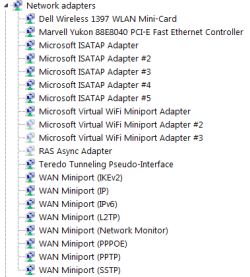
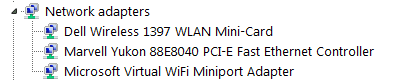
screeenshots: after uninstalls, before reboot on left. after reboot on right
 

Attachments

  • network-after-uninstall-before-reboot.png
    network-after-uninstall-before-reboot.png
    4.8 KB · Views: 23
  • network-after-reboot.png
    network-after-reboot.png
    6.2 KB · Views: 23

My Computer My Computer

At a glance

Windows 7 Home Premium 64bit2.8 Ghz Intel core i7 9309GBATI Radeon HD 5700
Computer Manufacturer/Model Number
Dell Studio XPS Studio XPS Desktop 9100
OS
Windows 7 Home Premium 64bit
CPU
2.8 Ghz Intel core i7 930
Memory
9GB
Graphics Card(s)
ATI Radeon HD 5700
Sound Card
ATI HiDef Audio
Monitor(s) Displays
Dell ST2210
Hard Drives
Hitachi 1TB; WDC WD50 (500 GB)
Start by uninstalling Free VPN Service | Free VPN Software - Hotspot Shield VPN
Uninstall teamviewer as well

right click Broadcom gigabit controller and uninstall (in device manager).
Same for 2 wireless below it
Same for 3 linksys below it
Same for Marvel Fast ethernet controller

Now post device manager->network adaptor screenshot again.
Reboot.
Now post device manager->network adaptor screenshot again.

note: before I uninstalled the 1397 card I enabled it.

screeenshots: after uninstalls, before reboot on left. after reboot on right

Screenshots looks fine!! Do netsh commands described in #22
 

My Computer My Computer

At a glance

Microsoft Windows 7 Home Premium 64-bits 7601...Intel(R) Core(TM) i3 CPU M 370 @ 2.40GHz4,00 GBATI Mobility Radeon HD 5400 Series
Computer type
Laptop
Computer Manufacturer/Model Number
ACER ASPIRE 5742G
OS
Microsoft Windows 7 Home Premium 64-bits 7601 Multiprocessor Free Service Pack 1
CPU
Intel(R) Core(TM) i3 CPU M 370 @ 2.40GHz
Motherboard
Acer Aspire 5742G
Memory
4,00 GB
Graphics Card(s)
ATI Mobility Radeon HD 5400 Series
Sound Card
(1) AMD High Definition Audio Device (2) Realtek High Defi
Screen Resolution
1366 x 768 x 32 bits (4294967296 colors) @ 60 Hz
Hard Drives
WDC WD5000BEVT-22ZAT0
Start by uninstalling Free VPN Service | Free VPN Software - Hotspot Shield VPN
Uninstall teamviewer as well

right click Broadcom gigabit controller and uninstall (in device manager).
Same for 2 wireless below it
Same for 3 linksys below it
Same for Marvel Fast ethernet controller

Now post device manager->network adaptor screenshot again.
Reboot.
Now post device manager->network adaptor screenshot again.

note: before I uninstalled the 1397 card I enabled it.

screeenshots: after uninstalls, before reboot on left. after reboot on right

Screenshots looks fine!! Do netsh commands described in #22


Here's what it looks like after everything is done

after-cmds-reboot.png

I now have a complete Wifi connection. Thank You So Much! :D :party:

You not only helped me but also our non-profit that provides rides for senior citizenswho can't drive as this is one of our laptops. I'm the default IT support for our small staff. We perform 400-600 rides a month with volunteers and a few paid drivers, 40,000 since 2007.

I assume that the Microsoft Virtual WiFi Miniport Adapter is now doing what the Broadcom Gigabit Adapter was doing? Do I need to worry about getting the Broadcom working?

Again thanks! Unless you have more for me to do we can call this one solved!

Ken
 

My Computer My Computer

At a glance

Windows 7 Home Premium 64bit2.8 Ghz Intel core i7 9309GBATI Radeon HD 5700
Computer Manufacturer/Model Number
Dell Studio XPS Studio XPS Desktop 9100
OS
Windows 7 Home Premium 64bit
CPU
2.8 Ghz Intel core i7 930
Memory
9GB
Graphics Card(s)
ATI Radeon HD 5700
Sound Card
ATI HiDef Audio
Monitor(s) Displays
Dell ST2210
Hard Drives
Hitachi 1TB; WDC WD50 (500 GB)
Make a manual restore point so you can revert back to what the situation is now.

You can do:
Install Free VPN Service | Free VPN Software - Hotspot Shield VPN
Install teamviewer as well

Both were uninstalled during the troubleshoot. Install only one and test... then the other.

Broadcom Gigabit Adapter is just a LAN network card driver. Do you really have that on your system??? It's not attached anymore (at least not found [maybe it died?])

netsh int ip reset C:\netsh.log.txt
netsh winsock reset
=>were these commands really needed, or did it work automagically after cleaning up device manager->network adapters?

Can you access the internet using Yukon Ethernet controller?
 

My Computer My Computer

At a glance

Microsoft Windows 7 Home Premium 64-bits 7601...Intel(R) Core(TM) i3 CPU M 370 @ 2.40GHz4,00 GBATI Mobility Radeon HD 5400 Series
Computer type
Laptop
Computer Manufacturer/Model Number
ACER ASPIRE 5742G
OS
Microsoft Windows 7 Home Premium 64-bits 7601 Multiprocessor Free Service Pack 1
CPU
Intel(R) Core(TM) i3 CPU M 370 @ 2.40GHz
Motherboard
Acer Aspire 5742G
Memory
4,00 GB
Graphics Card(s)
ATI Mobility Radeon HD 5400 Series
Sound Card
(1) AMD High Definition Audio Device (2) Realtek High Defi
Screen Resolution
1366 x 768 x 32 bits (4294967296 colors) @ 60 Hz
Hard Drives
WDC WD5000BEVT-22ZAT0
Make a manual restore point so you can revert back to what the situation is now.

You can do:
Install Free VPN Service | Free VPN Software - Hotspot Shield VPN
Install teamviewer as well

Both were uninstalled during the troubleshoot. Install only one and test... then the other.

Broadcom Gigabit Adapter is just a LAN network card driver. Do you really have that on your system??? It's not attached anymore (at least not found [maybe it died?])

netsh int ip reset C:\netsh.log.txt
netsh winsock reset
=>were these commands really needed, or did it work automagically after cleaning up device manager->network adapters?

Can you access the internet using Yukon Ethernet controller?


1. Reinstalled Teamviewer and all still works. I use it to remote into my office PC and occasionally give support to one of our voluteers. The Hotspot Shield VPN was rarely used so will not re-install now.

2. There is no listing at all in Device Manager for the Broadcom Gigabit Adapter now so I assume it did DIE and now the machine does not even see it anymore?

3. The networking started working after all of the netsh commands.

4. Yes, I tested an ethernet connection and it works. :D

Thanks Again!
 

My Computer My Computer

At a glance

Windows 7 Home Premium 64bit2.8 Ghz Intel core i7 9309GBATI Radeon HD 5700
Computer Manufacturer/Model Number
Dell Studio XPS Studio XPS Desktop 9100
OS
Windows 7 Home Premium 64bit
CPU
2.8 Ghz Intel core i7 930
Memory
9GB
Graphics Card(s)
ATI Radeon HD 5700
Sound Card
ATI HiDef Audio
Monitor(s) Displays
Dell ST2210
Hard Drives
Hitachi 1TB; WDC WD50 (500 GB)
You have a Marvel Yukon ethernet controller.... Why you think you have Broadcom Gigabit Adapter as well? Do you have 2 wired network cards in machine?
 

My Computer My Computer

At a glance

Microsoft Windows 7 Home Premium 64-bits 7601...Intel(R) Core(TM) i3 CPU M 370 @ 2.40GHz4,00 GBATI Mobility Radeon HD 5400 Series
Computer type
Laptop
Computer Manufacturer/Model Number
ACER ASPIRE 5742G
OS
Microsoft Windows 7 Home Premium 64-bits 7601 Multiprocessor Free Service Pack 1
CPU
Intel(R) Core(TM) i3 CPU M 370 @ 2.40GHz
Motherboard
Acer Aspire 5742G
Memory
4,00 GB
Graphics Card(s)
ATI Mobility Radeon HD 5400 Series
Sound Card
(1) AMD High Definition Audio Device (2) Realtek High Defi
Screen Resolution
1366 x 768 x 32 bits (4294967296 colors) @ 60 Hz
Hard Drives
WDC WD5000BEVT-22ZAT0
What virusscanner is on machine? And what firewall?
 

My Computer My Computer

At a glance

Microsoft Windows 7 Home Premium 64-bits 7601...Intel(R) Core(TM) i3 CPU M 370 @ 2.40GHz4,00 GBATI Mobility Radeon HD 5400 Series
Computer type
Laptop
Computer Manufacturer/Model Number
ACER ASPIRE 5742G
OS
Microsoft Windows 7 Home Premium 64-bits 7601 Multiprocessor Free Service Pack 1
CPU
Intel(R) Core(TM) i3 CPU M 370 @ 2.40GHz
Motherboard
Acer Aspire 5742G
Memory
4,00 GB
Graphics Card(s)
ATI Mobility Radeon HD 5400 Series
Sound Card
(1) AMD High Definition Audio Device (2) Realtek High Defi
Screen Resolution
1366 x 768 x 32 bits (4294967296 colors) @ 60 Hz
Hard Drives
WDC WD5000BEVT-22ZAT0
You have a Marvel Yukon ethernet controller.... Why you think you have Broadcom Gigabit Adapter as well? Do you have 2 wired network cards in machine?

One more time...The Broadcom 57xx Gigabit Controller IS/WAS on this laptop. Look at the screenshot in post #17. That device manager view shows 'hidden devices' with the Broadcom indicating 'not active,' error message said 'hardware device not connected.' Remember, we went thru all this in the beginning?

I was told early in this thread that Broadcom controller is the controller/adapter that Dell installs for wireless networking. I also know, without a doubt, that Dell has been configuring ther laptops that way for many YEARS!

So I guess that the initial configuration had the Broadcom controller handling wireless and the Yukon handling wired ethernet. Don't ask me why there are 2 controllers, I'm not that knowledgeable, but there must be a good reason or they wouldn't go to the trouble and expense.

Thanks for helping me find a way around the device's failure and get the wireless networking again.

AV/Firewall
MS Essentials, Windows Firewall. Also occasional scans with Malwarebytes.

I'm a very experienced (started with 1200 baud dialup modems) and risk-averse internet user and am always cautious with email links and attachments. Haven't had an infection in years.
 

My Computer My Computer

At a glance

Windows 7 Home Premium 64bit2.8 Ghz Intel core i7 9309GBATI Radeon HD 5700
Computer Manufacturer/Model Number
Dell Studio XPS Studio XPS Desktop 9100
OS
Windows 7 Home Premium 64bit
CPU
2.8 Ghz Intel core i7 930
Memory
9GB
Graphics Card(s)
ATI Radeon HD 5700
Sound Card
ATI HiDef Audio
Monitor(s) Displays
Dell ST2210
Hard Drives
Hitachi 1TB; WDC WD50 (500 GB)
Broadcom gigabit controller =>is for wired!!! There are NO wireless gigabit things
 

My Computer My Computer

At a glance

Microsoft Windows 7 Home Premium 64-bits 7601...Intel(R) Core(TM) i3 CPU M 370 @ 2.40GHz4,00 GBATI Mobility Radeon HD 5400 Series
Computer type
Laptop
Computer Manufacturer/Model Number
ACER ASPIRE 5742G
OS
Microsoft Windows 7 Home Premium 64-bits 7601 Multiprocessor Free Service Pack 1
CPU
Intel(R) Core(TM) i3 CPU M 370 @ 2.40GHz
Motherboard
Acer Aspire 5742G
Memory
4,00 GB
Graphics Card(s)
ATI Mobility Radeon HD 5400 Series
Sound Card
(1) AMD High Definition Audio Device (2) Realtek High Defi
Screen Resolution
1366 x 768 x 32 bits (4294967296 colors) @ 60 Hz
Hard Drives
WDC WD5000BEVT-22ZAT0
If you know all this why are you even asking me? So you can belittle me? Geez man. You're making me sorry I gave you Reps.

First you questioned me that the Broadcom device was even on the machine in the first place when it was clearly listed in the device manager screenshot.Hell, Broadcom networking devices are on every Dell machineI've seen in the last 15-20 yrs or so.

Read post #12
. If Madcratebuilder was wrong why didn't you correct him? That post is why I thought it was part of the wireless system. PLUS, the Broadcom and Wifi was broke, so naturally I assumed the wifi problem was associated with the broken Broadcom!

If the Broadcom is ethernet, what's the Yukon Marvel for?

There are undoubtedly finer points of networking hardware and technology that I simply don't know. I've gotten by this long without that DEEEEP knowledge. I know what my limitations are and when to ask for help. When I do ask for help I take extra steps to make sure the request is as detailed and logical as possible in hopes that it will speed the troubleshooting and resolution as well as make ya'll's job easier.

I'm done with this. Thanks for the help.
 

My Computer My Computer

At a glance

Windows 7 Home Premium 64bit2.8 Ghz Intel core i7 9309GBATI Radeon HD 5700
Computer Manufacturer/Model Number
Dell Studio XPS Studio XPS Desktop 9100
OS
Windows 7 Home Premium 64bit
CPU
2.8 Ghz Intel core i7 930
Memory
9GB
Graphics Card(s)
ATI Radeon HD 5700
Sound Card
ATI HiDef Audio
Monitor(s) Displays
Dell ST2210
Hard Drives
Hitachi 1TB; WDC WD50 (500 GB)
Back
Top