Solved Dell Laptop - Broadcom Gigabit Controller Not Connected - How Fix?

kenh99

New member
Local time
3:48 PM
Messages
20
Having problems with a Dell Inspiron 1545 laptop. OS is Win 7 Home Premium.

This laptop suddenly stopped connecting to anything 7 days ago. Since then I've confirmed that the wireless adapter is working (can see access points).

If I plug in a working ethernet cable there's no light at all. Device Manager that's set to show 'hidden devices' shows the Broadcom 57xx Gigabit Controller as 'not connected, Error Code 45.'

Also, when a known working ethernet cable is plugged in no light comes on at the jack.

When the internal wifi adapter, or a USB external wifi adapter, is on I can see various nearby access points and it will make an initial connection to that router BUT will not complete the negotiation and give internet access. I'm guessing it does not get an IP address?

I have updated drivers for the device but the problem remains.

How can I fix this? Is the device accessible without totally disassembling the entire laptop? I have a Dell service manual for the model but I can't find a diagram or instructions for this particular component. Point me to some diagrams that show where it is and how to access it?

Or, is it possible to just leave it alone and get a USB ??? that takes it's place and allows Wi-Fi to fully connect to the internet? If so please advise what type of device I should search for.

Appreciate any help.


My Computer My Computer

Computer Manufacturer/Model Number
Dell Studio XPS Studio XPS Desktop 9100
OS
Windows 7 Home Premium 64bit
CPU
2.8 Ghz Intel core i7 930
Memory
9GB
Graphics Card(s)
ATI Radeon HD 5700
Sound Card
ATI HiDef Audio
Monitor(s) Displays
Dell ST2210
Hard Drives
Hitachi 1TB; WDC WD50 (500 GB)
Detach the ethernet cable from laptop. Try to access internet wirelessly. works?
 

My Computer My Computer

Computer type
Laptop
Computer Manufacturer/Model Number
ACER ASPIRE 5742G
OS
Microsoft Windows 7 Home Premium 64-bits 7601 Multiprocessor Free Service Pack 1
CPU
Intel(R) Core(TM) i3 CPU M 370 @ 2.40GHz
Motherboard
Acer Aspire 5742G
Memory
4,00 GB
Graphics Card(s)
ATI Mobility Radeon HD 5400 Series
Sound Card
(1) AMD High Definition Audio Device (2) Realtek High Defi
Screen Resolution
1366 x 768 x 32 bits (4294967296 colors) @ 60 Hz
Hard Drives
WDC WD5000BEVT-22ZAT0
The device is not present.
Error Code

45
Display Message (Windows XP and later versions of Windows)

"Currently, this hardware device is not connected to the computer. (Code 45)"
"To fix this problem, reconnect this hardware device to the computer."
Recommended Resolution (Windows XP and later versions of Windows)

None. This problem code should only appear when the DEVMGR_SHOW_NONPRESENT_DEVICES environment variable is set.
====
I think your network card just died. Try to boot from some linux live cd and check if it sees the network card
 

My Computer My Computer

Computer type
Laptop
Computer Manufacturer/Model Number
ACER ASPIRE 5742G
OS
Microsoft Windows 7 Home Premium 64-bits 7601 Multiprocessor Free Service Pack 1
CPU
Intel(R) Core(TM) i3 CPU M 370 @ 2.40GHz
Motherboard
Acer Aspire 5742G
Memory
4,00 GB
Graphics Card(s)
ATI Mobility Radeon HD 5400 Series
Sound Card
(1) AMD High Definition Audio Device (2) Realtek High Defi
Screen Resolution
1366 x 768 x 32 bits (4294967296 colors) @ 60 Hz
Hard Drives
WDC WD5000BEVT-22ZAT0

My Computer My Computer

Computer type
Laptop
Computer Manufacturer/Model Number
ACER ASPIRE 5742G
OS
Microsoft Windows 7 Home Premium 64-bits 7601 Multiprocessor Free Service Pack 1
CPU
Intel(R) Core(TM) i3 CPU M 370 @ 2.40GHz
Motherboard
Acer Aspire 5742G
Memory
4,00 GB
Graphics Card(s)
ATI Mobility Radeon HD 5400 Series
Sound Card
(1) AMD High Definition Audio Device (2) Realtek High Defi
Screen Resolution
1366 x 768 x 32 bits (4294967296 colors) @ 60 Hz
Hard Drives
WDC WD5000BEVT-22ZAT0
Detach the ethernet cable from laptop. Try to access internet wirelessly. works?

No. I tested each method independently. The laptop won't fully connect via ethernet OR WiFi.
 

My Computer My Computer

Computer Manufacturer/Model Number
Dell Studio XPS Studio XPS Desktop 9100
OS
Windows 7 Home Premium 64bit
CPU
2.8 Ghz Intel core i7 930
Memory
9GB
Graphics Card(s)
ATI Radeon HD 5700
Sound Card
ATI HiDef Audio
Monitor(s) Displays
Dell ST2210
Hard Drives
Hitachi 1TB; WDC WD50 (500 GB)

from my first post:

"Or, is it possible to just leave it alone and get a USB ??? that takes it's place and allows Wi-Fi to fully connect to the internet?"

I'll be quite satisfied with a working wifi connection. I need to know what external device to get to bypass this issue and allow the wifi adapter/s to fully work?

I'll add another post later this morning that lists all of the various networking devices in the laptop. Off to the office now.
 

My Computer My Computer

Computer Manufacturer/Model Number
Dell Studio XPS Studio XPS Desktop 9100
OS
Windows 7 Home Premium 64bit
CPU
2.8 Ghz Intel core i7 930
Memory
9GB
Graphics Card(s)
ATI Radeon HD 5700
Sound Card
ATI HiDef Audio
Monitor(s) Displays
Dell ST2210
Hard Drives
Hitachi 1TB; WDC WD50 (500 GB)
Last edited:

My Computer My Computer

Computer type
Laptop
Computer Manufacturer/Model Number
ACER ASPIRE 5742G
OS
Microsoft Windows 7 Home Premium 64-bits 7601 Multiprocessor Free Service Pack 1
CPU
Intel(R) Core(TM) i3 CPU M 370 @ 2.40GHz
Motherboard
Acer Aspire 5742G
Memory
4,00 GB
Graphics Card(s)
ATI Mobility Radeon HD 5400 Series
Sound Card
(1) AMD High Definition Audio Device (2) Realtek High Defi
Screen Resolution
1366 x 768 x 32 bits (4294967296 colors) @ 60 Hz
Hard Drives
WDC WD5000BEVT-22ZAT0
I see you also posted on the Dell Laptop help forum.

You said, you had attempted to update driver.

What method did you use? Dell website, Device Manager, or Dell Utility CD?
 

My Computers My Computers

System One System Two

  • Computer type
    PC/Desktop
    Computer Manufacturer/Model Number
    HP Pavilion 6751c
    OS
    Win7, Win10, Win11
    Internet Speed
    100 Mbps
    Antivirus
    Norton 360
    Browser
    IE 11
  • Computer type
    PC/Desktop
    System Manufacturer/Model Number
    HP ENVY 750-514 & Dell XPS 8960
    OS
    Win7, Win10, Win11
    Antivirus
    Norton 360
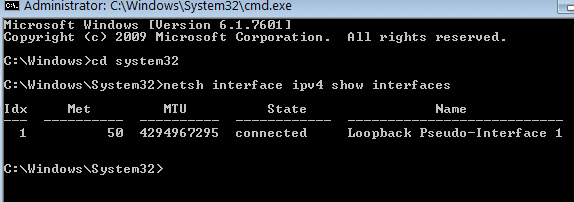
In elevated command prompt http://www.sevenforums.com/tutorials/783-elevated-command-prompt.html

Code:
netsh interface ipv4 show interfaces
Post output.

screenshot of that output

netsh_output.png


Can the laptop connect to another wireless access point and access the internet/that local network?

As stated in my OP, the laptop's internal wifi adapter and an external (second) wifi adapter both see available access points and connect to them, BUT the connections won't complete and provide internet access.
 

Attachments

  • netsh_output.png
    netsh_output.png
    3.9 KB · Views: 24

My Computer My Computer

Computer Manufacturer/Model Number
Dell Studio XPS Studio XPS Desktop 9100
OS
Windows 7 Home Premium 64bit
CPU
2.8 Ghz Intel core i7 930
Memory
9GB
Graphics Card(s)
ATI Radeon HD 5700
Sound Card
ATI HiDef Audio
Monitor(s) Displays
Dell ST2210
Hard Drives
Hitachi 1TB; WDC WD50 (500 GB)
I see you also posted on the Dell Laptop help forum.

You said, you had attempted to update driver.

What method did you use? Dell website, Device Manager, or Dell Utility CD?

I received very little (none really) help at the Dell forum.

At first used the Dell website to get driver and installed via device manager I think. That didn't help. Then went to the Broadcom website and found newer version. Believe I installed that one thru Device Mgr/Device Properties/Driver also.

After that I dropped back to the Dell updated driver. Of course, did reboots after these steps. Nothing worked. Device still shows "hardware device is not connected) code 45."
 

My Computer My Computer

Computer Manufacturer/Model Number
Dell Studio XPS Studio XPS Desktop 9100
OS
Windows 7 Home Premium 64bit
CPU
2.8 Ghz Intel core i7 930
Memory
9GB
Graphics Card(s)
ATI Radeon HD 5700
Sound Card
ATI HiDef Audio
Monitor(s) Displays
Dell ST2210
Hard Drives
Hitachi 1TB; WDC WD50 (500 GB)
If it helps, here are the other networking components this laptop has:

Dell Wireless 1397 WLAN Mini-Card
Marvell Yukon 88E8040 PCI-E Fast Ethernet Controller

Someone please explain to me what exactly the Broadcom 57xx Gigabit Controller does?

And how is it different from
the Marvell Yukon 88E8040 PCI-E Fast Ethernet Controller?

Maybe if I fully understand the functionality of the Broadcom Controller I'll be able to better participate in this discussion.

Ken
 

My Computer My Computer

Computer Manufacturer/Model Number
Dell Studio XPS Studio XPS Desktop 9100
OS
Windows 7 Home Premium 64bit
CPU
2.8 Ghz Intel core i7 930
Memory
9GB
Graphics Card(s)
ATI Radeon HD 5700
Sound Card
ATI HiDef Audio
Monitor(s) Displays
Dell ST2210
Hard Drives
Hitachi 1TB; WDC WD50 (500 GB)
The onboard ethernet died on my Dell 1525 and I needed a wired connection to setup Linux wireless. I was going to open the lap top and replace the card but I found it much cheaper to buy a Gigabyte USB LAN adapter. This evil bay seller has new product and it's the best price I could find for a NIB product, comes with current drivers on the CD.

Maybe if I fully understand the functionality of the Broadcom Controller I'll be able to better participate in this discussion.

Ken, that's the wifi controller, the Marvell is the ethernet controller. One physical device for ethernet and one physical device for wifi, different drivers for each.
 

My Computer My Computer

Computer type
PC/Desktop
Computer Manufacturer/Model Number
Custom, Dell and Lenono LT's
OS
Win8/8.1,Win7-U64, Vista U64, uncounted Linux distor's
CPU
AMD and Intell, 9590, 8350, i5 3570k
Motherboard
CFVFZ, GA990FXA, Z77e-itx
Memory
Corsair G Skill
Graphics Card(s)
Crossfired Sapphire HD 7950 Vapor-X, ASUS R9 280X TOP
Sound Card
Realtek ALC889
Monitor(s) Displays
ViewSonic VX2770SMH 27" / ViewSonic VX2433 LCD 24"
Screen Resolution
1080i HD
Hard Drives
Samsung SSD 840 Pro
OCZ Agility 3's
OCZ Vector's
WD's Blue, red, green, Velociraptors
Seagate USB3 & Hybrid's
ASUS Blu-Ray
ASUS DVD
PSU
Corsair AX1200i, Seasonice 850 Gold
Case
Cooler Master HAF 922 & HAF 932, Lian Li Train case.
Cooling
Air, Glacer 240L expanded, custom EK loop with duel D5's
Keyboard
Microsoft SideWinder X4 USB Keyboard / Logitech 250 PS2
Mouse
Logitech G500 / MS wireless 5000
Internet Speed
Best of 5ms / 75+ dn / 12+ up More or less.
Antivirus
MS esentials-MalwareBytes
Browser
Firefox Chromebook
hummm..........

1.You can eject the wire from top cut and reinsert into pc that should fix
2.If not above advice not work then should be problem in you mother board or check the wire from out side of home is there any damge:cool:
 

My Computer My Computer

Computer type
PC/Desktop
OS
Windows 8 Ultimate x64
CPU
intel i3 2100 @ 3.10 ghz
Motherboard
DH61WW ddr3
Memory
zion 2 gb & sontriam 4 gb ddr3 @1333mhz
Graphics Card(s)
Ati Radeon HD 6670 GDDR3 1GB
Monitor(s) Displays
Samsung 17.5 inches
Screen Resolution
1366x768
Hard Drives
WD CAVIAR 1 TB
PSU
Cooler Master Thunder 500 watt
Case
iball entilizer
Keyboard
Logitech K200
Mouse
Frontech
Internet Speed
1 mbps
Antivirus
eset
Browser
Google Chrome
The onboard ethernet died on my Dell 1525 and I needed a wired connection to setup Linux wireless. I was going to open the lap top and replace the card but I found it much cheaper to buy a Gigabyte USB LAN adapter. This evil bay seller has new product and it's the best price I could find for a NIB product, comes with current drivers on the CD.

Maybe if I fully understand the functionality of the Broadcom Controller I'll be able to better participate in this discussion.
Ken, that's the wifi controller, the Marvell is the ethernet controller. One physical device for ethernet and one physical device for wifi, different drivers for each.

Thanks MadCrateBuilder but the pressing need is to enable successful wireless connections.

After confirming each device's function it appears that BOTH are not working since a wired ethernet connection fails also, although device manager says the Marvel is "working properly."

I just realized that I have not tried uninstalling and re-installing either device. Will wait to see if that's recommended.
 

My Computer My Computer

Computer Manufacturer/Model Number
Dell Studio XPS Studio XPS Desktop 9100
OS
Windows 7 Home Premium 64bit
CPU
2.8 Ghz Intel core i7 930
Memory
9GB
Graphics Card(s)
ATI Radeon HD 5700
Sound Card
ATI HiDef Audio
Monitor(s) Displays
Dell ST2210
Hard Drives
Hitachi 1TB; WDC WD50 (500 GB)
Post screenshot of device manager. Expand branche "network adapters"
 

My Computer My Computer

Computer type
Laptop
Computer Manufacturer/Model Number
ACER ASPIRE 5742G
OS
Microsoft Windows 7 Home Premium 64-bits 7601 Multiprocessor Free Service Pack 1
CPU
Intel(R) Core(TM) i3 CPU M 370 @ 2.40GHz
Motherboard
Acer Aspire 5742G
Memory
4,00 GB
Graphics Card(s)
ATI Mobility Radeon HD 5400 Series
Sound Card
(1) AMD High Definition Audio Device (2) Realtek High Defi
Screen Resolution
1366 x 768 x 32 bits (4294967296 colors) @ 60 Hz
Hard Drives
WDC WD5000BEVT-22ZAT0
In elevated command prompt http://www.sevenforums.com/tutorials/783-elevated-command-prompt.html

Code:
netsh interface ipv4 show interfaces
Post output.

screenshot of that output

netsh_output.png


Can the laptop connect to another wireless access point and access the internet/that local network?

As stated in my OP, the laptop's internal wifi adapter and an external (second) wifi adapter both see available access points and connect to them, BUT the connections won't complete and provide internet access.
These screenshots are from faulty laptop I hope. What I see

-loopback adapter is working and uses tcp/ip v4.
-no wired adapter bound to tcp/ip v4 at all!
-no wireless adapter bound to tcp/ip v4 at all!
 

My Computer My Computer

Computer type
Laptop
Computer Manufacturer/Model Number
ACER ASPIRE 5742G
OS
Microsoft Windows 7 Home Premium 64-bits 7601 Multiprocessor Free Service Pack 1
CPU
Intel(R) Core(TM) i3 CPU M 370 @ 2.40GHz
Motherboard
Acer Aspire 5742G
Memory
4,00 GB
Graphics Card(s)
ATI Mobility Radeon HD 5400 Series
Sound Card
(1) AMD High Definition Audio Device (2) Realtek High Defi
Screen Resolution
1366 x 768 x 32 bits (4294967296 colors) @ 60 Hz
Hard Drives
WDC WD5000BEVT-22ZAT0
Post screenshot of device manager. Expand branche "network adapters"

screenshot attached. Device Manager set to show 'hidden devices' so you see everything.
 

Attachments

  • device-mgr-all network.png
    device-mgr-all network.png
    9.3 KB · Views: 19

My Computer My Computer

Computer Manufacturer/Model Number
Dell Studio XPS Studio XPS Desktop 9100
OS
Windows 7 Home Premium 64bit
CPU
2.8 Ghz Intel core i7 930
Memory
9GB
Graphics Card(s)
ATI Radeon HD 5700
Sound Card
ATI HiDef Audio
Monitor(s) Displays
Dell ST2210
Hard Drives
Hitachi 1TB; WDC WD50 (500 GB)
In elevated command prompt http://www.sevenforums.com/tutorials/783-elevated-command-prompt.html

Code:
netsh interface ipv4 show interfaces
Post output.

screenshot of that output

netsh_output.png


Can the laptop connect to another wireless access point and access the internet/that local network?

As stated in my OP, the laptop's internal wifi adapter and an external (second) wifi adapter both see available access points and connect to them, BUT the connections won't complete and provide internet access.

These screenshots are from faulty laptop I hope. What I see

-loopback adapter is working and uses tcp/ip v4.
-no wired adapter bound to tcp/ip v4 at all!
-no wireless adapter bound to tcp/ip v4 at all!

Yes, from the Dell Inspiron 1545.

Well, guess that explains why neither a wireless or wired connection will complete.

:confused: Now...how can I fix it? Especially the wireless?
 

My Computer My Computer

Computer Manufacturer/Model Number
Dell Studio XPS Studio XPS Desktop 9100
OS
Windows 7 Home Premium 64bit
CPU
2.8 Ghz Intel core i7 930
Memory
9GB
Graphics Card(s)
ATI Radeon HD 5700
Sound Card
ATI HiDef Audio
Monitor(s) Displays
Dell ST2210
Hard Drives
Hitachi 1TB; WDC WD50 (500 GB)
Start by uninstalling Free VPN Service | Free VPN Software - Hotspot Shield VPN
Uninstall teamviewer as well

right click Broadcom gigabit controller and uninstall (in device manager).
Same for 2 wireless below it
Same for 3 linksys below it
Same for Marvel Fast ethernet controller

Now post device manager->network adaptor screenshot again.
Reboot.
Now post device manager->network adaptor screenshot again.
 

My Computer My Computer

Computer type
Laptop
Computer Manufacturer/Model Number
ACER ASPIRE 5742G
OS
Microsoft Windows 7 Home Premium 64-bits 7601 Multiprocessor Free Service Pack 1
CPU
Intel(R) Core(TM) i3 CPU M 370 @ 2.40GHz
Motherboard
Acer Aspire 5742G
Memory
4,00 GB
Graphics Card(s)
ATI Mobility Radeon HD 5400 Series
Sound Card
(1) AMD High Definition Audio Device (2) Realtek High Defi
Screen Resolution
1366 x 768 x 32 bits (4294967296 colors) @ 60 Hz
Hard Drives
WDC WD5000BEVT-22ZAT0
Did you see the black down array in device manager screenshot!?

Down arrow
In Windows Vista, 7, and later if you see a small down arrow as shown in the below picture next to the device this is an indication that the device has been disabled.
vistaddm.jpg

What to do
To resolve this issue double-click the device, click the Driver tab, and click the Enable button. After it's been enabled restart the computer if asked.
 

My Computer My Computer

Computer type
Laptop
Computer Manufacturer/Model Number
ACER ASPIRE 5742G
OS
Microsoft Windows 7 Home Premium 64-bits 7601 Multiprocessor Free Service Pack 1
CPU
Intel(R) Core(TM) i3 CPU M 370 @ 2.40GHz
Motherboard
Acer Aspire 5742G
Memory
4,00 GB
Graphics Card(s)
ATI Mobility Radeon HD 5400 Series
Sound Card
(1) AMD High Definition Audio Device (2) Realtek High Defi
Screen Resolution
1366 x 768 x 32 bits (4294967296 colors) @ 60 Hz
Hard Drives
WDC WD5000BEVT-22ZAT0
Back
Top