Solved Unable to install Thunderbird with Mozback restore

glennc

New member
Power User
VIP
Local time
7:22 AM
Messages
1,024
Hello,
Have just reinstalled my system successfully up to now. I can not get Thunderbird 24.0, which installs and connects, to reload my settings from MozBackup. Not completely true. I can reinstall my settings under the Administrator entitled account, but on the user account which uses the same emails, but I have been saving the last five years of important correspondence here.... it will load and appear to work, but when I go into the settings of the user account it locks up with a blah/blah(correct path), Mail\(Incorrect and unchangeable) Local Folders is not proper to save mail error. This occur when I click any of the settings on that page or even to okay off that page. I am totally lost.
I have been doing this same thing a million times and it always has worked. I have tried different Mozback TBird settings, same thing.
Glenn
 

My Computer My Computer

At a glance

Windows 7 UltimateAMD Phenom-II X4 9658192 MB DDR2-SDRAMATI Radeon HD 4200
Computer type
PC/Desktop
Computer Manufacturer/Model Number
Self-Built
OS
Windows 7 Ultimate
CPU
AMD Phenom-II X4 965
Motherboard
Gigabyte GA-MA785GM-US2H
Memory
8192 MB DDR2-SDRAM
Graphics Card(s)
ATI Radeon HD 4200
Sound Card
ATI Radeon HD 4200 High Definition Audo
Monitor(s) Displays
LG Electronics W1943
Screen Resolution
1360 X 768
Hard Drives
C: 500 GB Caviar Black SATA
E: 500 GB Caviar Black SATA
PSU
Ultra LSP 750
Case
Ultra XBlaster
Cooling
2 Fans, CPU Fan, PS Fan
Keyboard
Acer
Mouse
Logitech
Internet Speed
6 MB
Which version of Thunderbird did you have when you used MozBackup?

Jerry
 

My Computer My Computer

At a glance

Win 7 Pro x64 / Win 10 ProIntel(R) Core(TM) i7-3630QM CPU @ 2.40GHz12 GB(1) Intel(R) HD Graphics 4000 (2) NVIDIA GeFo...
Computer type
Laptop
Computer Manufacturer/Model Number
Sager NP9170
OS
Win 7 Pro x64 / Win 10 Pro
CPU
Intel(R) Core(TM) i7-3630QM CPU @ 2.40GHz
Motherboard
CLEVO P170EM
Memory
12 GB
Graphics Card(s)
(1) Intel(R) HD Graphics 4000 (2) NVIDIA GeForce GTX 675M
Sound Card
(1) Realtek High Definition Audio (2) Intel(R) Display Aud
Monitor(s) Displays
17.3
Screen Resolution
1920x1080
Hard Drives
(1) Samsung 860 EVO 500GB(OS) (1) Samsung 860 EVO 500GB(Data)
Keyboard
Backlite
Antivirus
MSE, Malwarebytes Pro
Browser
Firefox
Other Info
DESKTOP: Custom-built.
OS: Win 10 Pro x64.
CASE: Rosewill R5.
CPU: Intel I5 4670K CPU @ 3.40GHz.
CPU COOLER: Cool Master Hyper 212 EVO.
MOTHERBOARD: Asus Z87-A.
MEMORY: Kingston HyperX 2x4 GB.
GPU: Nvidia Geforce 650 TI.
PSU: Corsair TX750.
DRIVES: (1) Samsung 840 120 GB SSD (2) Western Digital blue 500 GB 7200 RPM.
Which version of Thunderbird did you have when you used MozBackup?

Jerry

Howdy Bongo,
It was the same, 24.0. Had several. They all seem to create the same effect!
Glenn
 

My Computer My Computer

At a glance

Windows 7 UltimateAMD Phenom-II X4 9658192 MB DDR2-SDRAMATI Radeon HD 4200
Computer type
PC/Desktop
Computer Manufacturer/Model Number
Self-Built
OS
Windows 7 Ultimate
CPU
AMD Phenom-II X4 965
Motherboard
Gigabyte GA-MA785GM-US2H
Memory
8192 MB DDR2-SDRAM
Graphics Card(s)
ATI Radeon HD 4200
Sound Card
ATI Radeon HD 4200 High Definition Audo
Monitor(s) Displays
LG Electronics W1943
Screen Resolution
1360 X 768
Hard Drives
C: 500 GB Caviar Black SATA
E: 500 GB Caviar Black SATA
PSU
Ultra LSP 750
Case
Ultra XBlaster
Cooling
2 Fans, CPU Fan, PS Fan
Keyboard
Acer
Mouse
Logitech
Internet Speed
6 MB
Try this:

Use this tutorial to make a new profile, where it says to use Firefox.exe -P use this instead thunderbird -profilemanager

http://www.sevenforums.com/tutorials/208070-firefox-create-run-multiple-profiles.html

Then use this tutorial to show file extensions http://www.sevenforums.com/tutorials/10570-file-extensions-hide-show.html

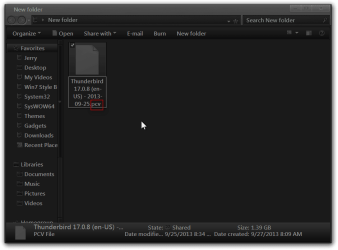
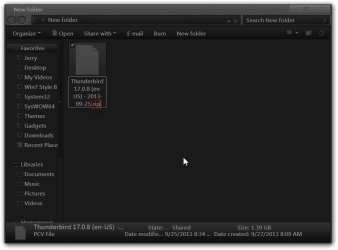
Then create a new folder on your desktop and put a copy of the Thunderbird.PCV file that was made with Mozbackup in it.

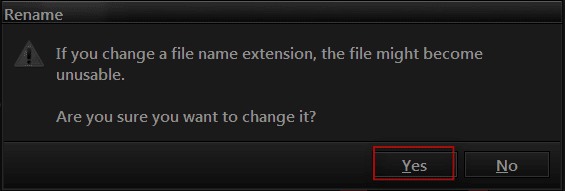
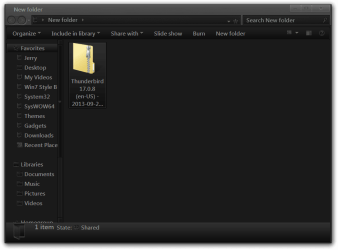
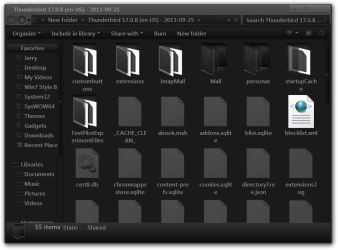
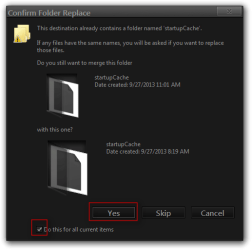
Right-click on the Thunderbird.PCV file and go down to rename and change just the .PCV to .zip you will get a warning window click yes, it will change to a zip folder double-click on it and extract it, put the contents of that extracted folder in C:\Users\your username\AppData\Roaming\Thunderbird\Profiles\the new profile you made folder (open up Thunderbird one time first and then close it out and look for the new profile folder it will be some numbers and letters followed by a . And then the new profile name), you will get two windows opening up asking about copying and recall placing existing files do that by checking the check boxes saying yes.
New folder2.png

New folder3.png

3.PNG

New folder4.png

Extract Compressed (Zipped) Folders2.png

Thunderbird 17.0.8 (en-US) - 2013-09-25.2.png

Confirm Folder Replace.png

Copy File.png

Now try the new profile in Thunderbird and see if you have your e-mails back.

Jerry
 

My Computer My Computer

At a glance

Win 7 Pro x64 / Win 10 ProIntel(R) Core(TM) i7-3630QM CPU @ 2.40GHz12 GB(1) Intel(R) HD Graphics 4000 (2) NVIDIA GeFo...
Computer type
Laptop
Computer Manufacturer/Model Number
Sager NP9170
OS
Win 7 Pro x64 / Win 10 Pro
CPU
Intel(R) Core(TM) i7-3630QM CPU @ 2.40GHz
Motherboard
CLEVO P170EM
Memory
12 GB
Graphics Card(s)
(1) Intel(R) HD Graphics 4000 (2) NVIDIA GeForce GTX 675M
Sound Card
(1) Realtek High Definition Audio (2) Intel(R) Display Aud
Monitor(s) Displays
17.3
Screen Resolution
1920x1080
Hard Drives
(1) Samsung 860 EVO 500GB(OS) (1) Samsung 860 EVO 500GB(Data)
Keyboard
Backlite
Antivirus
MSE, Malwarebytes Pro
Browser
Firefox
Other Info
DESKTOP: Custom-built.
OS: Win 10 Pro x64.
CASE: Rosewill R5.
CPU: Intel I5 4670K CPU @ 3.40GHz.
CPU COOLER: Cool Master Hyper 212 EVO.
MOTHERBOARD: Asus Z87-A.
MEMORY: Kingston HyperX 2x4 GB.
GPU: Nvidia Geforce 650 TI.
PSU: Corsair TX750.
DRIVES: (1) Samsung 840 120 GB SSD (2) Western Digital blue 500 GB 7200 RPM.
Hello Jerry!
Thank you for this wonderful tutorial and information on starting a new profile. I appreciate the time and knowledge!
I found the new profile command and cobbled a new profile for my user and copied the address book over. It is empty. So now with the -ProfileManager I can use the default that doesn't (it put all the add-ons, folders, archives in the Local Folder), but can't use it. Mozbackup even displays the default and the new account.
I will most certainly try your tutorial, I'd like to get it back together in one working profile!!
Thanks again!
Glenn
 

My Computer My Computer

At a glance

Windows 7 UltimateAMD Phenom-II X4 9658192 MB DDR2-SDRAMATI Radeon HD 4200
Computer type
PC/Desktop
Computer Manufacturer/Model Number
Self-Built
OS
Windows 7 Ultimate
CPU
AMD Phenom-II X4 965
Motherboard
Gigabyte GA-MA785GM-US2H
Memory
8192 MB DDR2-SDRAM
Graphics Card(s)
ATI Radeon HD 4200
Sound Card
ATI Radeon HD 4200 High Definition Audo
Monitor(s) Displays
LG Electronics W1943
Screen Resolution
1360 X 768
Hard Drives
C: 500 GB Caviar Black SATA
E: 500 GB Caviar Black SATA
PSU
Ultra LSP 750
Case
Ultra XBlaster
Cooling
2 Fans, CPU Fan, PS Fan
Keyboard
Acer
Mouse
Logitech
Internet Speed
6 MB
Howdy Jerry,
Did not work, it reacts just as the mozbackup restored default user account. Here is the message I get when I go into Options > Account Settings

Capture.PNG

It shows that somehow I've gotten that version of the backup to think (I'm guessing) that the messages are to be stored in the Local Folders. In the Local Folders I had several sub-directories with my data.
There is a ton of files in the Profiles\strangenumbers.default\Mail\Local Folders ???
I have Inbox, Drafts, Archives, Sent, Trash, Unsent Messages, Drafts, Junk as well as all of the with a .msf file extensions all in that folder. I need to get them back to their correct locations I am again guessing??
Hopefully it might make sense to you!
Glenn
 

My Computer My Computer

At a glance

Windows 7 UltimateAMD Phenom-II X4 9658192 MB DDR2-SDRAMATI Radeon HD 4200
Computer type
PC/Desktop
Computer Manufacturer/Model Number
Self-Built
OS
Windows 7 Ultimate
CPU
AMD Phenom-II X4 965
Motherboard
Gigabyte GA-MA785GM-US2H
Memory
8192 MB DDR2-SDRAM
Graphics Card(s)
ATI Radeon HD 4200
Sound Card
ATI Radeon HD 4200 High Definition Audo
Monitor(s) Displays
LG Electronics W1943
Screen Resolution
1360 X 768
Hard Drives
C: 500 GB Caviar Black SATA
E: 500 GB Caviar Black SATA
PSU
Ultra LSP 750
Case
Ultra XBlaster
Cooling
2 Fans, CPU Fan, PS Fan
Keyboard
Acer
Mouse
Logitech
Internet Speed
6 MB
I did what I posted and it worked just fine.
I am guessing you have a corrupt file from Mozbackup, do you have any others?

Do you have a image(backup) of your drive from before you reinstalled?

Have you tried Mozbackup support?
MozBackup - Backup tool for Firefox and Thunderbird

Jerry
 

My Computer My Computer

At a glance

Win 7 Pro x64 / Win 10 ProIntel(R) Core(TM) i7-3630QM CPU @ 2.40GHz12 GB(1) Intel(R) HD Graphics 4000 (2) NVIDIA GeFo...
Computer type
Laptop
Computer Manufacturer/Model Number
Sager NP9170
OS
Win 7 Pro x64 / Win 10 Pro
CPU
Intel(R) Core(TM) i7-3630QM CPU @ 2.40GHz
Motherboard
CLEVO P170EM
Memory
12 GB
Graphics Card(s)
(1) Intel(R) HD Graphics 4000 (2) NVIDIA GeForce GTX 675M
Sound Card
(1) Realtek High Definition Audio (2) Intel(R) Display Aud
Monitor(s) Displays
17.3
Screen Resolution
1920x1080
Hard Drives
(1) Samsung 860 EVO 500GB(OS) (1) Samsung 860 EVO 500GB(Data)
Keyboard
Backlite
Antivirus
MSE, Malwarebytes Pro
Browser
Firefox
Other Info
DESKTOP: Custom-built.
OS: Win 10 Pro x64.
CASE: Rosewill R5.
CPU: Intel I5 4670K CPU @ 3.40GHz.
CPU COOLER: Cool Master Hyper 212 EVO.
MOTHERBOARD: Asus Z87-A.
MEMORY: Kingston HyperX 2x4 GB.
GPU: Nvidia Geforce 650 TI.
PSU: Corsair TX750.
DRIVES: (1) Samsung 840 120 GB SSD (2) Western Digital blue 500 GB 7200 RPM.
Hello and thanks! As you pointed out, I think several of my mozbackups are corrupted. I took the files in the local folder and put them in a test account and it worked partially. I will indeed look into that support. There must be a way to get there :)!
Glenn
 

My Computer My Computer

At a glance

Windows 7 UltimateAMD Phenom-II X4 9658192 MB DDR2-SDRAMATI Radeon HD 4200
Computer type
PC/Desktop
Computer Manufacturer/Model Number
Self-Built
OS
Windows 7 Ultimate
CPU
AMD Phenom-II X4 965
Motherboard
Gigabyte GA-MA785GM-US2H
Memory
8192 MB DDR2-SDRAM
Graphics Card(s)
ATI Radeon HD 4200
Sound Card
ATI Radeon HD 4200 High Definition Audo
Monitor(s) Displays
LG Electronics W1943
Screen Resolution
1360 X 768
Hard Drives
C: 500 GB Caviar Black SATA
E: 500 GB Caviar Black SATA
PSU
Ultra LSP 750
Case
Ultra XBlaster
Cooling
2 Fans, CPU Fan, PS Fan
Keyboard
Acer
Mouse
Logitech
Internet Speed
6 MB
Well after much experimentation using the thunderbird -profilemanager (Big Thanks), I've discovered a possible situation that may be normal. Initially, I have been using TBird for years. Don't remember how, but I had no users shown, just an inbox. It would prompt me for both email accounts logins. Used it for years and backed it up with Mozbackup and restored with it also. I quite actually may never have gone into options > Account Settings and noted the error message. Conceivably this stored all the individual accounts and boxes in the Local Folder, don't really know.
After much experimentation I created a new profile account, then copied the relevant folders to the relevant account files using the method shown by Jerry (Big thanks again). I wound up with a working
Tbird account with all my archived data, but with the two email accounts showing. Different but it does not cause the error previously mentioned.
I have been using the first method forever. Always worked and I am pretty sure I've gone into account settings without problem, but can't be positive.
I have also usually always updated TBird and didn't do a clean install!?!!??? So I think this could technically be called solved.
Glenn
 

My Computer My Computer

At a glance

Windows 7 UltimateAMD Phenom-II X4 9658192 MB DDR2-SDRAMATI Radeon HD 4200
Computer type
PC/Desktop
Computer Manufacturer/Model Number
Self-Built
OS
Windows 7 Ultimate
CPU
AMD Phenom-II X4 965
Motherboard
Gigabyte GA-MA785GM-US2H
Memory
8192 MB DDR2-SDRAM
Graphics Card(s)
ATI Radeon HD 4200
Sound Card
ATI Radeon HD 4200 High Definition Audo
Monitor(s) Displays
LG Electronics W1943
Screen Resolution
1360 X 768
Hard Drives
C: 500 GB Caviar Black SATA
E: 500 GB Caviar Black SATA
PSU
Ultra LSP 750
Case
Ultra XBlaster
Cooling
2 Fans, CPU Fan, PS Fan
Keyboard
Acer
Mouse
Logitech
Internet Speed
6 MB
You're Welcome

Good to here you got it.

Jerry
 

My Computer My Computer

At a glance

Win 7 Pro x64 / Win 10 ProIntel(R) Core(TM) i7-3630QM CPU @ 2.40GHz12 GB(1) Intel(R) HD Graphics 4000 (2) NVIDIA GeFo...
Computer type
Laptop
Computer Manufacturer/Model Number
Sager NP9170
OS
Win 7 Pro x64 / Win 10 Pro
CPU
Intel(R) Core(TM) i7-3630QM CPU @ 2.40GHz
Motherboard
CLEVO P170EM
Memory
12 GB
Graphics Card(s)
(1) Intel(R) HD Graphics 4000 (2) NVIDIA GeForce GTX 675M
Sound Card
(1) Realtek High Definition Audio (2) Intel(R) Display Aud
Monitor(s) Displays
17.3
Screen Resolution
1920x1080
Hard Drives
(1) Samsung 860 EVO 500GB(OS) (1) Samsung 860 EVO 500GB(Data)
Keyboard
Backlite
Antivirus
MSE, Malwarebytes Pro
Browser
Firefox
Other Info
DESKTOP: Custom-built.
OS: Win 10 Pro x64.
CASE: Rosewill R5.
CPU: Intel I5 4670K CPU @ 3.40GHz.
CPU COOLER: Cool Master Hyper 212 EVO.
MOTHERBOARD: Asus Z87-A.
MEMORY: Kingston HyperX 2x4 GB.
GPU: Nvidia Geforce 650 TI.
PSU: Corsair TX750.
DRIVES: (1) Samsung 840 120 GB SSD (2) Western Digital blue 500 GB 7200 RPM.
Back
Top