Windows 7 Random Freezes Requiring Hard Reboot (no minidump files)

2013-09-22_125451.jpg
 

My Computer My Computer

At a glance

Microsoft Windows 10 Pro Insider Preview 64-bitIntel(R) Core(TM) i3-4130 CPU @ 3.40GHzCorsair Vengence 4GB x2 (8.00GB Dual-Channel ...2047MB GeForce GTS 450 (ZOTAC International)
Computer type
PC/Desktop
Computer Manufacturer/Model Number
Self Assembled
OS
Microsoft Windows 10 Pro Insider Preview 64-bit
CPU
Intel(R) Core(TM) i3-4130 CPU @ 3.40GHz
Motherboard
Gigabyte Technology Co., Ltd. B85M-D3H
Memory
Corsair Vengence 4GB x2 (8.00GB Dual-Channel DDR3 @ 798MHz)
Graphics Card(s)
2047MB GeForce GTS 450 (ZOTAC International)
Sound Card
Onboard (Realtek High Definition Audio)
Monitor(s) Displays
LG Flatron E2040T
Screen Resolution
1600x900
Hard Drives
Western Digital 1 TB
Seagate 500 GB
PSU
Corsair VS550
Case
Cooler Master K380
Cooling
Cooler Master Seidon 120V Plus
Keyboard
Logitech MK260r
Mouse
Logitech MK260r
Internet Speed
PMPL Broadband
Antivirus
Windows Defender + MBAM
Browser
Firefox
Other Info
Dell Studio 15" Laptop
But the diagnostic tool says "crash dump file copied successfully"....

I've readjusted it to write a Minidump file now instead of a Complete Dump file. Hopefully that solves the issue...

Edit: I just induced a manual crash via WhoCrashed, and a dump file was successfully written. I will wait until another crash occurs, and attach the relevant files.
 
Last edited:

My Computer My Computer

At a glance

Windows 7 Home 64 bitIntel Core i5 2500k8 GBNVIDIA GeForce GTX 780
Computer type
PC/Desktop
Computer Manufacturer/Model Number
custom build
OS
Windows 7 Home 64 bit
CPU
Intel Core i5 2500k
Motherboard
ASUS P8P67
Memory
8 GB
Graphics Card(s)
NVIDIA GeForce GTX 780
Hard Drives
Samsung SSD 840 PRO Series ATA Device
WDC WD20EARS-00MVWBO ATA Device
Antivirus
Windows Essentials
Browser
Google Chrome
Hmm... computer crashed again, but curiously, no dump file written...
Dang it.
I never get a BSOD btw. My computer just freezes up in whatever frame I'm looking at. Can't move cursor. Can only manually reboot. Maybe I'll wait longer next time before manually rebooting...
 

My Computer My Computer

At a glance

Windows 7 Home 64 bitIntel Core i5 2500k8 GBNVIDIA GeForce GTX 780
Computer type
PC/Desktop
Computer Manufacturer/Model Number
custom build
OS
Windows 7 Home 64 bit
CPU
Intel Core i5 2500k
Motherboard
ASUS P8P67
Memory
8 GB
Graphics Card(s)
NVIDIA GeForce GTX 780
Hard Drives
Samsung SSD 840 PRO Series ATA Device
WDC WD20EARS-00MVWBO ATA Device
Antivirus
Windows Essentials
Browser
Google Chrome
Please complete the "troubleshooting steps" for one more time?

The link to the troubleshooting steps is provided by gregrocker earlier.
 

My Computer My Computer

At a glance

Microsoft Windows 10 Pro Insider Preview 64-bitIntel(R) Core(TM) i3-4130 CPU @ 3.40GHzCorsair Vengence 4GB x2 (8.00GB Dual-Channel ...2047MB GeForce GTS 450 (ZOTAC International)
Computer type
PC/Desktop
Computer Manufacturer/Model Number
Self Assembled
OS
Microsoft Windows 10 Pro Insider Preview 64-bit
CPU
Intel(R) Core(TM) i3-4130 CPU @ 3.40GHz
Motherboard
Gigabyte Technology Co., Ltd. B85M-D3H
Memory
Corsair Vengence 4GB x2 (8.00GB Dual-Channel DDR3 @ 798MHz)
Graphics Card(s)
2047MB GeForce GTS 450 (ZOTAC International)
Sound Card
Onboard (Realtek High Definition Audio)
Monitor(s) Displays
LG Flatron E2040T
Screen Resolution
1600x900
Hard Drives
Western Digital 1 TB
Seagate 500 GB
PSU
Corsair VS550
Case
Cooler Master K380
Cooling
Cooler Master Seidon 120V Plus
Keyboard
Logitech MK260r
Mouse
Logitech MK260r
Internet Speed
PMPL Broadband
Antivirus
Windows Defender + MBAM
Browser
Firefox
Other Info
Dell Studio 15" Laptop
OK!
 

My Computer My Computer

At a glance

Windows 7 Home 64 bitIntel Core i5 2500k8 GBNVIDIA GeForce GTX 780
Computer type
PC/Desktop
Computer Manufacturer/Model Number
custom build
OS
Windows 7 Home 64 bit
CPU
Intel Core i5 2500k
Motherboard
ASUS P8P67
Memory
8 GB
Graphics Card(s)
NVIDIA GeForce GTX 780
Hard Drives
Samsung SSD 840 PRO Series ATA Device
WDC WD20EARS-00MVWBO ATA Device
Antivirus
Windows Essentials
Browser
Google Chrome
Let us go for some stress tests, one by one. First, let us check for the drivers. Enable Driver Verifier to monitor the drivers.
Driver Verifier - Enable and Disable
Run Driver Verifier for 24 hours or the occurrence of the next crash, whichever is earlier.

   Information
Why Driver Verifier:
It puts a stress on the drivers, ans so it makes the unstable drivers crash. Hopefully the driver that crashes is recorded in the memory dump.

How Can we know that DV is enabled:
It will make the system bit of slow, laggy.

   Warning
Before enabling DV, make it sure that you have earlier System restore points made in your computer. You can check it easily by using CCleaner looking at Tools > System Restore.

If there is no points, make a System Restore Point manually before enabling DV.

   Tip


Let us know the results, with the subsequent crash dumps, if any.
 

My Computer My Computer

At a glance

Microsoft Windows 10 Pro Insider Preview 64-bitIntel(R) Core(TM) i3-4130 CPU @ 3.40GHzCorsair Vengence 4GB x2 (8.00GB Dual-Channel ...2047MB GeForce GTS 450 (ZOTAC International)
Computer type
PC/Desktop
Computer Manufacturer/Model Number
Self Assembled
OS
Microsoft Windows 10 Pro Insider Preview 64-bit
CPU
Intel(R) Core(TM) i3-4130 CPU @ 3.40GHz
Motherboard
Gigabyte Technology Co., Ltd. B85M-D3H
Memory
Corsair Vengence 4GB x2 (8.00GB Dual-Channel DDR3 @ 798MHz)
Graphics Card(s)
2047MB GeForce GTS 450 (ZOTAC International)
Sound Card
Onboard (Realtek High Definition Audio)
Monitor(s) Displays
LG Flatron E2040T
Screen Resolution
1600x900
Hard Drives
Western Digital 1 TB
Seagate 500 GB
PSU
Corsair VS550
Case
Cooler Master K380
Cooling
Cooler Master Seidon 120V Plus
Keyboard
Logitech MK260r
Mouse
Logitech MK260r
Internet Speed
PMPL Broadband
Antivirus
Windows Defender + MBAM
Browser
Firefox
Other Info
Dell Studio 15" Laptop
Alright!
Running verifier now :)
 

My Computer My Computer

At a glance

Windows 7 Home 64 bitIntel Core i5 2500k8 GBNVIDIA GeForce GTX 780
Computer type
PC/Desktop
Computer Manufacturer/Model Number
custom build
OS
Windows 7 Home 64 bit
CPU
Intel Core i5 2500k
Motherboard
ASUS P8P67
Memory
8 GB
Graphics Card(s)
NVIDIA GeForce GTX 780
Hard Drives
Samsung SSD 840 PRO Series ATA Device
WDC WD20EARS-00MVWBO ATA Device
Antivirus
Windows Essentials
Browser
Google Chrome
PS: should I disable auto-restart? My computer crashed again before running verifier. It restarted on its own (I wasn't there to hard reboot), and no dump file was recorded. The only dump file I was able to produce thus far was from the forced crash using WhoCrashed.
 

My Computer My Computer

At a glance

Windows 7 Home 64 bitIntel Core i5 2500k8 GBNVIDIA GeForce GTX 780
Computer type
PC/Desktop
Computer Manufacturer/Model Number
custom build
OS
Windows 7 Home 64 bit
CPU
Intel Core i5 2500k
Motherboard
ASUS P8P67
Memory
8 GB
Graphics Card(s)
NVIDIA GeForce GTX 780
Hard Drives
Samsung SSD 840 PRO Series ATA Device
WDC WD20EARS-00MVWBO ATA Device
Antivirus
Windows Essentials
Browser
Google Chrome
We want to see what Driver Verifier yields. If it yields nothing, we would change our stress strategy .... but DV is the first option.

Enable or disable auto restart ... that is not a big deal. If it crashes with DV enabled, and still it does not record a crash dump, we will consider that the software environment is not causing the issue and will try to search the culprit in the hardware environment.
 

My Computer My Computer

At a glance

Microsoft Windows 10 Pro Insider Preview 64-bitIntel(R) Core(TM) i3-4130 CPU @ 3.40GHzCorsair Vengence 4GB x2 (8.00GB Dual-Channel ...2047MB GeForce GTS 450 (ZOTAC International)
Computer type
PC/Desktop
Computer Manufacturer/Model Number
Self Assembled
OS
Microsoft Windows 10 Pro Insider Preview 64-bit
CPU
Intel(R) Core(TM) i3-4130 CPU @ 3.40GHz
Motherboard
Gigabyte Technology Co., Ltd. B85M-D3H
Memory
Corsair Vengence 4GB x2 (8.00GB Dual-Channel DDR3 @ 798MHz)
Graphics Card(s)
2047MB GeForce GTS 450 (ZOTAC International)
Sound Card
Onboard (Realtek High Definition Audio)
Monitor(s) Displays
LG Flatron E2040T
Screen Resolution
1600x900
Hard Drives
Western Digital 1 TB
Seagate 500 GB
PSU
Corsair VS550
Case
Cooler Master K380
Cooling
Cooler Master Seidon 120V Plus
Keyboard
Logitech MK260r
Mouse
Logitech MK260r
Internet Speed
PMPL Broadband
Antivirus
Windows Defender + MBAM
Browser
Firefox
Other Info
Dell Studio 15" Laptop
Finally, a dump file!!! This feels like a win for us:
 

Attachments

My Computer My Computer

At a glance

Windows 7 Home 64 bitIntel Core i5 2500k8 GBNVIDIA GeForce GTX 780
Computer type
PC/Desktop
Computer Manufacturer/Model Number
custom build
OS
Windows 7 Home 64 bit
CPU
Intel Core i5 2500k
Motherboard
ASUS P8P67
Memory
8 GB
Graphics Card(s)
NVIDIA GeForce GTX 780
Hard Drives
Samsung SSD 840 PRO Series ATA Device
WDC WD20EARS-00MVWBO ATA Device
Antivirus
Windows Essentials
Browser
Google Chrome
It is caused by athdfu.sys; Qualcomm Atheros Valkyrie USB BootROM (c:\windows\system32\drivers\athdfu.sys)
Code:
*******************************************************************************
*                                                                             *
*                        Bugcheck Analysis                                    *
*                                                                             *
*******************************************************************************

Use !analyze -v to get detailed debugging information.

BugCheck D5, {fffff9801de86ff0, 0, fffff88005845e46, 0}

*** WARNING: Unable to verify timestamp for [URL="http://www.carrona.org/drivers/driver.php?id=AthDfu.sys"]AthDfu.sys[/URL]
*** ERROR: Module load completed but symbols could not be loaded for [URL="http://www.carrona.org/drivers/driver.php?id=AthDfu.sys"]AthDfu.sys[/URL]

Could not read faulting driver name
Probably caused by : [URL="http://www.carrona.org/drivers/driver.php?id=AthDfu.sys"]AthDfu.sys[/URL] ( AthDfu+1e46 )

Followup: MachineOwner
---------
And the driver is very old.
Code:
fffff880`05844000 fffff880`05855000   AthDfu   T (no symbols)           
    Loaded symbol image file: AthDfu.sys
    Image path: AthDfu.sys
[COLOR=Red]    Image name: AthDfu.sys
    Timestamp:        Mon Mar 22 12:13:38 2010[/COLOR] (4BA7119A)
    CheckSum:         0001D7CA
    ImageSize:        00011000
    Translations:     0000.04b0 0000.04e4 0409.04b0 0409.04e4
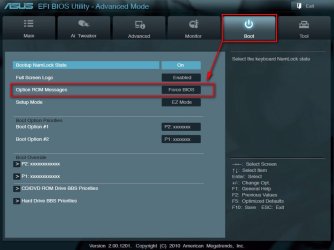
In my best guess, it comes from here:
1.jpg

Enter into BIOS. Disable any Boot From LAN/Network option if available. Also disable Bluetooth.

Then wait for Greg to suggest further on this issue.
 

My Computer My Computer

At a glance

Microsoft Windows 10 Pro Insider Preview 64-bitIntel(R) Core(TM) i3-4130 CPU @ 3.40GHzCorsair Vengence 4GB x2 (8.00GB Dual-Channel ...2047MB GeForce GTS 450 (ZOTAC International)
Computer type
PC/Desktop
Computer Manufacturer/Model Number
Self Assembled
OS
Microsoft Windows 10 Pro Insider Preview 64-bit
CPU
Intel(R) Core(TM) i3-4130 CPU @ 3.40GHz
Motherboard
Gigabyte Technology Co., Ltd. B85M-D3H
Memory
Corsair Vengence 4GB x2 (8.00GB Dual-Channel DDR3 @ 798MHz)
Graphics Card(s)
2047MB GeForce GTS 450 (ZOTAC International)
Sound Card
Onboard (Realtek High Definition Audio)
Monitor(s) Displays
LG Flatron E2040T
Screen Resolution
1600x900
Hard Drives
Western Digital 1 TB
Seagate 500 GB
PSU
Corsair VS550
Case
Cooler Master K380
Cooling
Cooler Master Seidon 120V Plus
Keyboard
Logitech MK260r
Mouse
Logitech MK260r
Internet Speed
PMPL Broadband
Antivirus
Windows Defender + MBAM
Browser
Firefox
Other Info
Dell Studio 15" Laptop
And again, thank you for your looking into this.

Your suggestions sound very promising, but being the computer illiterate I am, I am having trouble figuring out what options to change in my Bios Boot screen. The mode under "Option ROM Messages" is currently at "Force Bios"; the only other option is "Keep Current". I assume this is what I should change?

And how do I check if a boot from LAN/Network is active to disable it? How do I disable Bluetooth?

I see another header in this menu called "PCI ROM Priority," and it's currently set to "Legacy ROM." The other option here is "EFI Compatible ROM." Should I be tweaking this as well?

My apologies for my elementary questions.
 

My Computer My Computer

At a glance

Windows 7 Home 64 bitIntel Core i5 2500k8 GBNVIDIA GeForce GTX 780
Computer type
PC/Desktop
Computer Manufacturer/Model Number
custom build
OS
Windows 7 Home 64 bit
CPU
Intel Core i5 2500k
Motherboard
ASUS P8P67
Memory
8 GB
Graphics Card(s)
NVIDIA GeForce GTX 780
Hard Drives
Samsung SSD 840 PRO Series ATA Device
WDC WD20EARS-00MVWBO ATA Device
Antivirus
Windows Essentials
Browser
Google Chrome
I have requested my friend Britton30 to suggest/guide you. Whereas it is hardware, he had a deep insight.
 

My Computer My Computer

At a glance

Microsoft Windows 10 Pro Insider Preview 64-bitIntel(R) Core(TM) i3-4130 CPU @ 3.40GHzCorsair Vengence 4GB x2 (8.00GB Dual-Channel ...2047MB GeForce GTS 450 (ZOTAC International)
Computer type
PC/Desktop
Computer Manufacturer/Model Number
Self Assembled
OS
Microsoft Windows 10 Pro Insider Preview 64-bit
CPU
Intel(R) Core(TM) i3-4130 CPU @ 3.40GHz
Motherboard
Gigabyte Technology Co., Ltd. B85M-D3H
Memory
Corsair Vengence 4GB x2 (8.00GB Dual-Channel DDR3 @ 798MHz)
Graphics Card(s)
2047MB GeForce GTS 450 (ZOTAC International)
Sound Card
Onboard (Realtek High Definition Audio)
Monitor(s) Displays
LG Flatron E2040T
Screen Resolution
1600x900
Hard Drives
Western Digital 1 TB
Seagate 500 GB
PSU
Corsair VS550
Case
Cooler Master K380
Cooling
Cooler Master Seidon 120V Plus
Keyboard
Logitech MK260r
Mouse
Logitech MK260r
Internet Speed
PMPL Broadband
Antivirus
Windows Defender + MBAM
Browser
Firefox
Other Info
Dell Studio 15" Laptop
Will be with you shortly, I'm trying to get a copy of the board's manual.
And again, thank you for your looking into this.

Your suggestions sound very promising, but being the computer illiterate I am, I am having trouble figuring out what options to change in my Bios Boot screen. The mode under "Option ROM Messages" is currently at "Force Bios"; the only other option is "Keep Current". I assume this is what I should change?
Force BIOS is OK to leave as is.

And how do I check if a boot from LAN/Network is active to disable it? I had a look at the manual and it didn't mention this, however they don't always show all option. Go to you BOOT tab and all of the sub=menus, it should be there.
How do I disable Bluetooth? As above, it wasn't listed but should be found in the Onboard Devies section, l;ikely buried in another sub-menu.

I see another header in this menu called "PCI ROM Priority," and it's currently set to "Legacy ROM." The other option here is "EFI Compatible ROM." Should I be tweaking this as well? Leave set on Legacy ROM, EFI would be for a different type of install or Windows 8.

My apologies for my elementary questions. Not a problem we all were new at some point. :)
 
Last edited:

My Computer My Computer

At a glance

Windows 7 Ultimate X64 SP1Intel i5-2550K, Differing ~4.4-4.8GHz No buil...16GB G.Skill Sniper 1866MHz @ 2133MHz 2x8GBASUS GTX650TIB-DC2OC-2GD5, (650TI Boost)
Computer type
PC/Desktop
Computer Manufacturer/Model Number
Home Built Desktop By DataTech
OS
Windows 7 Ultimate X64 SP1
CPU
Intel i5-2550K, Differing ~4.4-4.8GHz No built in GPU
Motherboard
ASUS P8Z68-V PRO/GEN3
Memory
16GB G.Skill Sniper 1866MHz @ 2133MHz 2x8GB
Graphics Card(s)
ASUS GTX650TIB-DC2OC-2GD5, (650TI Boost)
Sound Card
Onboard Realtek 5-1
Monitor(s) Displays
Samsung P2570HD
Screen Resolution
1920x1080
Hard Drives
Samsung 840 Pro 256GB SSD for OS, 500GB Seagate Constellation (Enterprise drive) for Data
PSU
Corsair HX650W
Case
Inwin Dragon Rider
Cooling
Hyper 212 EVO w/two Noctua fans, push-pull, @1300 RPM
Keyboard
E-Z Eyes, bright yellow keys with large characters
Mouse
steelseries SENSEI Laser Pro Gaming
Internet Speed
48-51Mbs Mbs down, 11 Mbs up Xfinity Cable
Antivirus
Norton Internet Security 2013
Browser
IE 10, Opera, Pale Moon if needed
Other Info
4 case fans, LG BluRay-RE, ASUS DVD-RW, Mr. Fusion power supply, 1.21 gigawatts.
Hello Britton,

I see options under "Advanced" tab, "USB Configuration" for the following:
- Legacy USB Support (currently set to "Enabled." Other options include "Disabled" and "Auto")
- Legacy USB3.0 Support (same as above)
- EHCI Hand-off (Disabled)

Is this what I should be tweaking?

There is another page under Advanced, entitled "Onboard Devices Configuration," and I see the following:
- Reneasas USB 3.0 Controller (Enabled. Other choice is to Disable)
- Bluetooch Controller (same as above)
- Realtek LAN Controller (same as above)

Please kindly advise what actions I should take here. I could not find references to the USB/LAN/Bluetooth from the Boot tab.

Many thanks.
 

My Computer My Computer

At a glance

Windows 7 Home 64 bitIntel Core i5 2500k8 GBNVIDIA GeForce GTX 780
Computer type
PC/Desktop
Computer Manufacturer/Model Number
custom build
OS
Windows 7 Home 64 bit
CPU
Intel Core i5 2500k
Motherboard
ASUS P8P67
Memory
8 GB
Graphics Card(s)
NVIDIA GeForce GTX 780
Hard Drives
Samsung SSD 840 PRO Series ATA Device
WDC WD20EARS-00MVWBO ATA Device
Antivirus
Windows Essentials
Browser
Google Chrome
Leave all the USB settings as is.

The Blue Tooth controller is where to disable that. You can change it to Disabled if you don't use it. Check Control Panel/Programs and Features for a Blue Tooth device and uninstall the driver as well.
 

My Computer My Computer

At a glance

Windows 7 Ultimate X64 SP1Intel i5-2550K, Differing ~4.4-4.8GHz No buil...16GB G.Skill Sniper 1866MHz @ 2133MHz 2x8GBASUS GTX650TIB-DC2OC-2GD5, (650TI Boost)
Computer type
PC/Desktop
Computer Manufacturer/Model Number
Home Built Desktop By DataTech
OS
Windows 7 Ultimate X64 SP1
CPU
Intel i5-2550K, Differing ~4.4-4.8GHz No built in GPU
Motherboard
ASUS P8Z68-V PRO/GEN3
Memory
16GB G.Skill Sniper 1866MHz @ 2133MHz 2x8GB
Graphics Card(s)
ASUS GTX650TIB-DC2OC-2GD5, (650TI Boost)
Sound Card
Onboard Realtek 5-1
Monitor(s) Displays
Samsung P2570HD
Screen Resolution
1920x1080
Hard Drives
Samsung 840 Pro 256GB SSD for OS, 500GB Seagate Constellation (Enterprise drive) for Data
PSU
Corsair HX650W
Case
Inwin Dragon Rider
Cooling
Hyper 212 EVO w/two Noctua fans, push-pull, @1300 RPM
Keyboard
E-Z Eyes, bright yellow keys with large characters
Mouse
steelseries SENSEI Laser Pro Gaming
Internet Speed
48-51Mbs Mbs down, 11 Mbs up Xfinity Cable
Antivirus
Norton Internet Security 2013
Browser
IE 10, Opera, Pale Moon if needed
Other Info
4 case fans, LG BluRay-RE, ASUS DVD-RW, Mr. Fusion power supply, 1.21 gigawatts.
Big thanks to Gary :)

sosowie, I wouls also suggest you to uninstall anything associated with Qualcomm Atheros Valkyrie USB BootROM. The location of the driver is c:\windows\system32\drivers\athdfu.sys. Also, search in Device manager. If any Qualcomm Atheros entry is there, disable it.
 

My Computer My Computer

At a glance

Microsoft Windows 10 Pro Insider Preview 64-bitIntel(R) Core(TM) i3-4130 CPU @ 3.40GHzCorsair Vengence 4GB x2 (8.00GB Dual-Channel ...2047MB GeForce GTS 450 (ZOTAC International)
Computer type
PC/Desktop
Computer Manufacturer/Model Number
Self Assembled
OS
Microsoft Windows 10 Pro Insider Preview 64-bit
CPU
Intel(R) Core(TM) i3-4130 CPU @ 3.40GHz
Motherboard
Gigabyte Technology Co., Ltd. B85M-D3H
Memory
Corsair Vengence 4GB x2 (8.00GB Dual-Channel DDR3 @ 798MHz)
Graphics Card(s)
2047MB GeForce GTS 450 (ZOTAC International)
Sound Card
Onboard (Realtek High Definition Audio)
Monitor(s) Displays
LG Flatron E2040T
Screen Resolution
1600x900
Hard Drives
Western Digital 1 TB
Seagate 500 GB
PSU
Corsair VS550
Case
Cooler Master K380
Cooling
Cooler Master Seidon 120V Plus
Keyboard
Logitech MK260r
Mouse
Logitech MK260r
Internet Speed
PMPL Broadband
Antivirus
Windows Defender + MBAM
Browser
Firefox
Other Info
Dell Studio 15" Laptop
Thank you both for these suggestions.

Arc, I've followed your advice and deleted athdfu.sys, and disabled it under device manager. I am also given the option to "uninstall" the driver via device manager. Is it prudent to do so?
 

My Computer My Computer

At a glance

Windows 7 Home 64 bitIntel Core i5 2500k8 GBNVIDIA GeForce GTX 780
Computer type
PC/Desktop
Computer Manufacturer/Model Number
custom build
OS
Windows 7 Home 64 bit
CPU
Intel Core i5 2500k
Motherboard
ASUS P8P67
Memory
8 GB
Graphics Card(s)
NVIDIA GeForce GTX 780
Hard Drives
Samsung SSD 840 PRO Series ATA Device
WDC WD20EARS-00MVWBO ATA Device
Antivirus
Windows Essentials
Browser
Google Chrome
Thank you both for these suggestions.

Arc, I've followed your advice and deleted athdfu.sys, and disabled it under device manager. I am also given the option to "uninstall" the driver via device manager. Is it prudent to do so?
Do it. Hopefully the uninstallation will solve this particular issue.

Then it is to observe how the computer is running. If it is running well, all are good. Otherwise, we have to decide that some other problematic elements are still remaining.

So now take a time to observe, and let us know how the computer is running :)
 

My Computer My Computer

At a glance

Microsoft Windows 10 Pro Insider Preview 64-bitIntel(R) Core(TM) i3-4130 CPU @ 3.40GHzCorsair Vengence 4GB x2 (8.00GB Dual-Channel ...2047MB GeForce GTS 450 (ZOTAC International)
Computer type
PC/Desktop
Computer Manufacturer/Model Number
Self Assembled
OS
Microsoft Windows 10 Pro Insider Preview 64-bit
CPU
Intel(R) Core(TM) i3-4130 CPU @ 3.40GHz
Motherboard
Gigabyte Technology Co., Ltd. B85M-D3H
Memory
Corsair Vengence 4GB x2 (8.00GB Dual-Channel DDR3 @ 798MHz)
Graphics Card(s)
2047MB GeForce GTS 450 (ZOTAC International)
Sound Card
Onboard (Realtek High Definition Audio)
Monitor(s) Displays
LG Flatron E2040T
Screen Resolution
1600x900
Hard Drives
Western Digital 1 TB
Seagate 500 GB
PSU
Corsair VS550
Case
Cooler Master K380
Cooling
Cooler Master Seidon 120V Plus
Keyboard
Logitech MK260r
Mouse
Logitech MK260r
Internet Speed
PMPL Broadband
Antivirus
Windows Defender + MBAM
Browser
Firefox
Other Info
Dell Studio 15" Laptop
Unfortunately my computer just froze up again; same symptoms: screen freezes in frame, keyboard/mouse unresponsive, requiring hard reboot. And as with before, no minidump file is written.

I'll run verifier again in the meantime, unless you advise otherwise.

Dang it.
 

My Computer My Computer

At a glance

Windows 7 Home 64 bitIntel Core i5 2500k8 GBNVIDIA GeForce GTX 780
Computer type
PC/Desktop
Computer Manufacturer/Model Number
custom build
OS
Windows 7 Home 64 bit
CPU
Intel Core i5 2500k
Motherboard
ASUS P8P67
Memory
8 GB
Graphics Card(s)
NVIDIA GeForce GTX 780
Hard Drives
Samsung SSD 840 PRO Series ATA Device
WDC WD20EARS-00MVWBO ATA Device
Antivirus
Windows Essentials
Browser
Google Chrome
Back
Top