Solved To gamers that play LoL

MPN

New member
Power User
VIP
Local time
11:41 PM
Messages
128
Hello.

I got a question to other LoL players with a AMD graphic card.

I got a 7970ghz card in my PC and i experience alot of fps drop in the game, and white flashes on the screen. Ive been searching the grate interweb for a long time now for a fix on this porblem but all i see is other posts from people having the same problem. and for the most part it seem to be the 7xxx series that are effected by this. I just upgraded my PC with a new mobo and CPU followed by a clean instal of W7 hoping this would be gone, but no luck. I`ve had this problem since around januray. when i instaled the new AMD driver, and downloaded a huge patch to LoL. And over time none of the new patches or driver updates has helped.

Il post a youtube video that showes 1 of the screen problems.
I alos as i said get huge fps drops and white flashes


My Computer My Computer

At a glance

Windows 7 Home x64Intel Core i5-3570K ProcessorCorsair XMS3 DDR3 1600MHz 8GB CL9HIS Radeon HD 7970 GHz X 3GB GDDR5
OS
Windows 7 Home x64
CPU
Intel Core i5-3570K Processor
Motherboard
MSI Z77A-G43 Gaming, Socket-1155
Memory
Corsair XMS3 DDR3 1600MHz 8GB CL9
Graphics Card(s)
HIS Radeon HD 7970 GHz X 3GB GDDR5
Monitor(s) Displays
LG FLATRON W2453V
Hard Drives
Crusial M4 128GB
Western Digital Caviar® Black 500GB
PSU
Chieftec Nitro Series BPS-950C 950W PSU
Case
Cooler Master HAF XM Midi Tower Black
Cooling
Corsair H60 Hydro Series CPU cooler
Keyboard
Razer some thing
Mouse
Logitech G400
Internet Speed
25mb
Antivirus
MSE
Browser
Firefox
Other Info
I like turtles!
I have never like ATI/AMD graphic cards, more so because I have always had bad luck with the drivers and/or control panel (or whatever they call it). Granted, I am mostly taking about their onboard chipset cards.

Being said that and having never played that game nor knowing how old or new the game is... have you tried uninstalling the drivers and control panel, restarting in safe mode and using CCleaner to clean your registry and installing the newest driver (if game is recent) or older driver (if game is that old) to see if that solves your problem?

If the problem is just with this particular game than I would suggest uninstalling the game completely (save your saves somewhere else), restart, clean registry with ccleaner, restart and install game again, if you are ask to install DirectX, do so, do not patch the game yet and test it. Download any patches the game has manually and start patching 1 patch at a time and then testing the game... it may very well be the patches.
 

My Computer My Computer

At a glance

Windows 7 x64 (Ultimate)Intel i5-4670K8GBs Ripjaws 2133MhzAsus GTX660 (2GBs)
Computer type
PC/Desktop
Computer Manufacturer/Model Number
Custom Built... Intel/Nvidia/ASRock
OS
Windows 7 x64 (Ultimate)
CPU
Intel i5-4670K
Motherboard
ASRock Z87 Extreme 6
Memory
8GBs Ripjaws 2133Mhz
Graphics Card(s)
Asus GTX660 (2GBs)
Sound Card
Onboard Realtek HD
Monitor(s) Displays
Acer AL2216W
Screen Resolution
1680 x 1050
Hard Drives
Samsung 840 SSD 120GBs
Samsung 750GB 32MB cache
1.5 TB
PSU
PC Cooling 750w Silencer
Case
Thermaltake Spedo Advance
Cooling
Std Cooler
Keyboard
Logitech G15
Mouse
Logitech G9
Internet Speed
Comcast 20Mbit
Antivirus
Avast
Browser
Firefox
I have a code to this game but never tried it

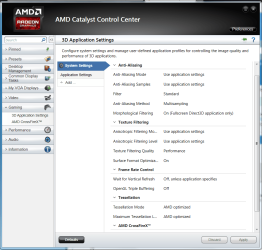
Do you happen to play without V-sync that could be why it's tearing when you have V-sync in enabled it will be forced to stay at 60 fps also look into your CCC settings and fix them up
 

Attachments

  • X.PNG
    X.PNG
    70.8 KB · Views: 2

My Computer My Computer

At a glance

Windows 10 Home Premium 64bit sp1Intel I7-6700K @ 4.6 Ghz 1.344 volts everyday OC32GB G-Skill TridentZ 3200mhz 16-18-18-38 DDR4Sli Gigabyte Windforce GTX 980 G1
Computer type
PC/Desktop
Computer Manufacturer/Model Number
CoreI7-6700K MrFingerIII Special Builds
OS
Windows 10 Home Premium 64bit sp1
CPU
Intel I7-6700K @ 4.6 Ghz 1.344 volts everyday OC
Motherboard
Asrock Fatality K6 Z170 Socket 1151
Memory
32GB G-Skill TridentZ 3200mhz 16-18-18-38 DDR4
Graphics Card(s)
Sli Gigabyte Windforce GTX 980 G1
Sound Card
AC97 Creative Rage Tactic 3D Headphones Bluetooth
Monitor(s) Displays
27" Asus ROG Swift PG278Q G-Sync 48" Vizio Smart HD TV
Screen Resolution
2560x1440p 27"- 48" Currently Gaming at 2560x1440p Res 2K
Hard Drives
250GB Samsung Evo840SSD Seagate baracuda 500 GB WD Mybook 500Gb 1TB Seagate Barracuda
PSU
HX1050w Corsair Silver 80plus certified crosfire/sli
Case
Enthod Pro Full Tower
Cooling
Corsair H110i GT 280 mm High Performance WaterBlock
Keyboard
Logitech wireless keyboard
Mouse
Logitech wireless mouse
Internet Speed
Cox Cable 100+ mb
Antivirus
WebRoot Spysweeper with Antivirus
Browser
IE-10, Chrome, Opera
Other Info
My Other Rig is a AMD FX8320E @4.6Ghz 16GB Ballistic Sport Ram
Mobo Asrock Fatality 990FX 120GB OCZ SSD 1TB Seagate Barracuda Corsair H75 Cooling PSU Corsair CX750
GPU GTX Gigabyte 970G1
Yeah I just finished installing it and it runs fine to me doesn't flicker unless you mean the pointer ?
 

My Computer My Computer

At a glance

Windows 10 Home Premium 64bit sp1Intel I7-6700K @ 4.6 Ghz 1.344 volts everyday OC32GB G-Skill TridentZ 3200mhz 16-18-18-38 DDR4Sli Gigabyte Windforce GTX 980 G1
Computer type
PC/Desktop
Computer Manufacturer/Model Number
CoreI7-6700K MrFingerIII Special Builds
OS
Windows 10 Home Premium 64bit sp1
CPU
Intel I7-6700K @ 4.6 Ghz 1.344 volts everyday OC
Motherboard
Asrock Fatality K6 Z170 Socket 1151
Memory
32GB G-Skill TridentZ 3200mhz 16-18-18-38 DDR4
Graphics Card(s)
Sli Gigabyte Windforce GTX 980 G1
Sound Card
AC97 Creative Rage Tactic 3D Headphones Bluetooth
Monitor(s) Displays
27" Asus ROG Swift PG278Q G-Sync 48" Vizio Smart HD TV
Screen Resolution
2560x1440p 27"- 48" Currently Gaming at 2560x1440p Res 2K
Hard Drives
250GB Samsung Evo840SSD Seagate baracuda 500 GB WD Mybook 500Gb 1TB Seagate Barracuda
PSU
HX1050w Corsair Silver 80plus certified crosfire/sli
Case
Enthod Pro Full Tower
Cooling
Corsair H110i GT 280 mm High Performance WaterBlock
Keyboard
Logitech wireless keyboard
Mouse
Logitech wireless mouse
Internet Speed
Cox Cable 100+ mb
Antivirus
WebRoot Spysweeper with Antivirus
Browser
IE-10, Chrome, Opera
Other Info
My Other Rig is a AMD FX8320E @4.6Ghz 16GB Ballistic Sport Ram
Mobo Asrock Fatality 990FX 120GB OCZ SSD 1TB Seagate Barracuda Corsair H75 Cooling PSU Corsair CX750
GPU GTX Gigabyte 970G1
Being said that and having never played that game nor knowing how old or new the game is... have you tried uninstalling the drivers and control panel, restarting in safe mode and using CCleaner to clean your registry and installing the newest driver (if game is recent) or older driver (if game is that old) to see if that solves your problem?

If the problem is just with this particular game than I would suggest uninstalling the game completely (save your saves somewhere else), restart, clean registry with ccleaner, restart and install game again, if you are ask to install DirectX, do so, do not patch the game yet and test it. Download any patches the game has manually and start patching 1 patch at a time and then testing the game... it may very well be the patches.

How i have tried to ersolve this problem: Updating all drivers for my PC.
Uninstaled my GPU driver, and tried to instal older onces
Tried the repair tool for the game in the game client
Reinstaled the game.
And i got some new PC komponents so ended up with a clean instal of W7, still the same problem
new parts i got was: MIS z77 mobo and a i5-3570k cpu

And as for testing the game 1 patch of the time, dosnt work. as this is a online multiplayer game only, and without patching it you cant launch the game.

And yes i have tried with and without V-sync on.
With v-sync on and capped at 60 fps i notice much more to the UI flickering as i linked in the youtube vid.
And i get alot worse fps drop in fights.
With v-sync off i get a bit more white flashes on the screen, but almost no more UI flickering and my FPS is much more stable.
Having v-sync off is at this moment the best thing for me. it still kinda suck. but its not as bad as when its on.
other games i experince screen tearing on is World of Tanks,


Hope you guys are able to read this. and that my bad english dont give you all a headache :p


My Computer My Computer

At a glance

Windows 7 Home x64Intel Core i5-3570K ProcessorCorsair XMS3 DDR3 1600MHz 8GB CL9HIS Radeon HD 7970 GHz X 3GB GDDR5
OS
Windows 7 Home x64
CPU
Intel Core i5-3570K Processor
Motherboard
MSI Z77A-G43 Gaming, Socket-1155
Memory
Corsair XMS3 DDR3 1600MHz 8GB CL9
Graphics Card(s)
HIS Radeon HD 7970 GHz X 3GB GDDR5
Monitor(s) Displays
LG FLATRON W2453V
Hard Drives
Crusial M4 128GB
Western Digital Caviar® Black 500GB
PSU
Chieftec Nitro Series BPS-950C 950W PSU
Case
Cooler Master HAF XM Midi Tower Black
Cooling
Corsair H60 Hydro Series CPU cooler
Keyboard
Razer some thing
Mouse
Logitech G400
Internet Speed
25mb
Antivirus
MSE
Browser
Firefox
Other Info
I like turtles!
You say you installed a new Mobo, did you also install the newest chipset drivers for your Mobo? Go to MSI check for newer drivers for your Mobo, download them to a temp folder and save there.

Make sure that after you have updated all of them, including Bios if needed, that your mobo does not have an Onboard graphic card and that in the bios your mobo is looking at your AMD/ATI card as primary card.
 

My Computer My Computer

At a glance

Windows 7 x64 (Ultimate)Intel i5-4670K8GBs Ripjaws 2133MhzAsus GTX660 (2GBs)
Computer type
PC/Desktop
Computer Manufacturer/Model Number
Custom Built... Intel/Nvidia/ASRock
OS
Windows 7 x64 (Ultimate)
CPU
Intel i5-4670K
Motherboard
ASRock Z87 Extreme 6
Memory
8GBs Ripjaws 2133Mhz
Graphics Card(s)
Asus GTX660 (2GBs)
Sound Card
Onboard Realtek HD
Monitor(s) Displays
Acer AL2216W
Screen Resolution
1680 x 1050
Hard Drives
Samsung 840 SSD 120GBs
Samsung 750GB 32MB cache
1.5 TB
PSU
PC Cooling 750w Silencer
Case
Thermaltake Spedo Advance
Cooling
Std Cooler
Keyboard
Logitech G15
Mouse
Logitech G9
Internet Speed
Comcast 20Mbit
Antivirus
Avast
Browser
Firefox
The newest chipset driver is instaled.
And the onboard GPU is disabled.

And just tried BF3 today. maxed all the settings with out any problems with tearing and all that crap. Only problem i had with that game was heat. GPU peaked at 69c after like 15 min of game play.
 

My Computer My Computer

At a glance

Windows 7 Home x64Intel Core i5-3570K ProcessorCorsair XMS3 DDR3 1600MHz 8GB CL9HIS Radeon HD 7970 GHz X 3GB GDDR5
OS
Windows 7 Home x64
CPU
Intel Core i5-3570K Processor
Motherboard
MSI Z77A-G43 Gaming, Socket-1155
Memory
Corsair XMS3 DDR3 1600MHz 8GB CL9
Graphics Card(s)
HIS Radeon HD 7970 GHz X 3GB GDDR5
Monitor(s) Displays
LG FLATRON W2453V
Hard Drives
Crusial M4 128GB
Western Digital Caviar® Black 500GB
PSU
Chieftec Nitro Series BPS-950C 950W PSU
Case
Cooler Master HAF XM Midi Tower Black
Cooling
Corsair H60 Hydro Series CPU cooler
Keyboard
Razer some thing
Mouse
Logitech G400
Internet Speed
25mb
Antivirus
MSE
Browser
Firefox
Other Info
I like turtles!
The newest chipset driver is instaled.
And the onboard GPU is disabled.

And just tried BF3 today. maxed all the settings with out any problems with tearing and all that crap. Only problem i had with that game was heat. GPU peaked at 69c after like 15 min of game play.

Try turning up AA settings and see if bring it around to 4x or 8x times make a difference

also what are your temps when that happens ????
 

My Computer My Computer

At a glance

Windows 10 Home Premium 64bit sp1Intel I7-6700K @ 4.6 Ghz 1.344 volts everyday OC32GB G-Skill TridentZ 3200mhz 16-18-18-38 DDR4Sli Gigabyte Windforce GTX 980 G1
Computer type
PC/Desktop
Computer Manufacturer/Model Number
CoreI7-6700K MrFingerIII Special Builds
OS
Windows 10 Home Premium 64bit sp1
CPU
Intel I7-6700K @ 4.6 Ghz 1.344 volts everyday OC
Motherboard
Asrock Fatality K6 Z170 Socket 1151
Memory
32GB G-Skill TridentZ 3200mhz 16-18-18-38 DDR4
Graphics Card(s)
Sli Gigabyte Windforce GTX 980 G1
Sound Card
AC97 Creative Rage Tactic 3D Headphones Bluetooth
Monitor(s) Displays
27" Asus ROG Swift PG278Q G-Sync 48" Vizio Smart HD TV
Screen Resolution
2560x1440p 27"- 48" Currently Gaming at 2560x1440p Res 2K
Hard Drives
250GB Samsung Evo840SSD Seagate baracuda 500 GB WD Mybook 500Gb 1TB Seagate Barracuda
PSU
HX1050w Corsair Silver 80plus certified crosfire/sli
Case
Enthod Pro Full Tower
Cooling
Corsair H110i GT 280 mm High Performance WaterBlock
Keyboard
Logitech wireless keyboard
Mouse
Logitech wireless mouse
Internet Speed
Cox Cable 100+ mb
Antivirus
WebRoot Spysweeper with Antivirus
Browser
IE-10, Chrome, Opera
Other Info
My Other Rig is a AMD FX8320E @4.6Ghz 16GB Ballistic Sport Ram
Mobo Asrock Fatality 990FX 120GB OCZ SSD 1TB Seagate Barracuda Corsair H75 Cooling PSU Corsair CX750
GPU GTX Gigabyte 970G1
Try turning up AA settings and see if bring it around to 4x or 8x times make a difference

also what are your temps when that happens ????

Dont think LoL have AA
When playing LoL my temps are around 40-50c
And world of tanks it peaks around 60c last time i played it
 

My Computer My Computer

At a glance

Windows 7 Home x64Intel Core i5-3570K ProcessorCorsair XMS3 DDR3 1600MHz 8GB CL9HIS Radeon HD 7970 GHz X 3GB GDDR5
OS
Windows 7 Home x64
CPU
Intel Core i5-3570K Processor
Motherboard
MSI Z77A-G43 Gaming, Socket-1155
Memory
Corsair XMS3 DDR3 1600MHz 8GB CL9
Graphics Card(s)
HIS Radeon HD 7970 GHz X 3GB GDDR5
Monitor(s) Displays
LG FLATRON W2453V
Hard Drives
Crusial M4 128GB
Western Digital Caviar® Black 500GB
PSU
Chieftec Nitro Series BPS-950C 950W PSU
Case
Cooler Master HAF XM Midi Tower Black
Cooling
Corsair H60 Hydro Series CPU cooler
Keyboard
Razer some thing
Mouse
Logitech G400
Internet Speed
25mb
Antivirus
MSE
Browser
Firefox
Other Info
I like turtles!
So, no tearing with other games but LoL, hmmm, is it safe to say that the problem is with the game then? Also, temps may have something to do with it, check in your bios to see if you can maximize your fans or add a couple of fans to the case to help dissipate the heat
 

My Computer My Computer

At a glance

Windows 7 x64 (Ultimate)Intel i5-4670K8GBs Ripjaws 2133MhzAsus GTX660 (2GBs)
Computer type
PC/Desktop
Computer Manufacturer/Model Number
Custom Built... Intel/Nvidia/ASRock
OS
Windows 7 x64 (Ultimate)
CPU
Intel i5-4670K
Motherboard
ASRock Z87 Extreme 6
Memory
8GBs Ripjaws 2133Mhz
Graphics Card(s)
Asus GTX660 (2GBs)
Sound Card
Onboard Realtek HD
Monitor(s) Displays
Acer AL2216W
Screen Resolution
1680 x 1050
Hard Drives
Samsung 840 SSD 120GBs
Samsung 750GB 32MB cache
1.5 TB
PSU
PC Cooling 750w Silencer
Case
Thermaltake Spedo Advance
Cooling
Std Cooler
Keyboard
Logitech G15
Mouse
Logitech G9
Internet Speed
Comcast 20Mbit
Antivirus
Avast
Browser
Firefox
As i said in my first post, it looks to be a driver problem or some thing with the AMD 7xxx cards and LoL.
But i also got tearing in World Of Tanks, but have yet to try it with my new hardware.

Now when i play LoL i set every graphic option on the lowest setting with v-sync off, i dont see much to the screen problems. But the FPS is acting up.
My fps is around 300 when im alone in the spawn. but when moving around and during team fights my FPS will drop quick down around 100+ - FPS. (i know the eye cant see more than 30 or 60 fps or what it was) but you can see the "choppynes" when it accrue. if that make any sense.

But if it is a driver problem or some thing like that, i think its wired that LoL or AMD have yet to do some thing with the problem. As this has been happenings for soon 1 year for me.
So i dont know. trying to contact LoL support aint prob gonna help much, all thay ask is if the drivers are up to date. and after that they aint to more help :sarc:
 

My Computer My Computer

At a glance

Windows 7 Home x64Intel Core i5-3570K ProcessorCorsair XMS3 DDR3 1600MHz 8GB CL9HIS Radeon HD 7970 GHz X 3GB GDDR5
OS
Windows 7 Home x64
CPU
Intel Core i5-3570K Processor
Motherboard
MSI Z77A-G43 Gaming, Socket-1155
Memory
Corsair XMS3 DDR3 1600MHz 8GB CL9
Graphics Card(s)
HIS Radeon HD 7970 GHz X 3GB GDDR5
Monitor(s) Displays
LG FLATRON W2453V
Hard Drives
Crusial M4 128GB
Western Digital Caviar® Black 500GB
PSU
Chieftec Nitro Series BPS-950C 950W PSU
Case
Cooler Master HAF XM Midi Tower Black
Cooling
Corsair H60 Hydro Series CPU cooler
Keyboard
Razer some thing
Mouse
Logitech G400
Internet Speed
25mb
Antivirus
MSE
Browser
Firefox
Other Info
I like turtles!
It may very well be that the game is badly coded and or neither one of them wants to waste time fixing the issue... the fact of the matter is that you are having tearing issues with some other games as well and that is all you or your PC. You also have mentioned having temp issues and I suggested a few things but you did not answer that question.

Here's a nice application that you can install so you can check your temps ingame... try it, test it and post a few images for us to see.

Bottom line, if you are having issues, you need more fans or get into your bios and max out your fans there.
 

My Computer My Computer

At a glance

Windows 7 x64 (Ultimate)Intel i5-4670K8GBs Ripjaws 2133MhzAsus GTX660 (2GBs)
Computer type
PC/Desktop
Computer Manufacturer/Model Number
Custom Built... Intel/Nvidia/ASRock
OS
Windows 7 x64 (Ultimate)
CPU
Intel i5-4670K
Motherboard
ASRock Z87 Extreme 6
Memory
8GBs Ripjaws 2133Mhz
Graphics Card(s)
Asus GTX660 (2GBs)
Sound Card
Onboard Realtek HD
Monitor(s) Displays
Acer AL2216W
Screen Resolution
1680 x 1050
Hard Drives
Samsung 840 SSD 120GBs
Samsung 750GB 32MB cache
1.5 TB
PSU
PC Cooling 750w Silencer
Case
Thermaltake Spedo Advance
Cooling
Std Cooler
Keyboard
Logitech G15
Mouse
Logitech G9
Internet Speed
Comcast 20Mbit
Antivirus
Avast
Browser
Firefox
Sorry to ignore the tips about adjusting the fans in BIOS.
Was more concerned about fixing the graphic bugs in LoL at first sinse i play that the most, and dont have so high temps in that game.

But i will take a look in the BIOS and see if i can do anything there.
And what application are you talking about?:huh:
 

My Computer My Computer

At a glance

Windows 7 Home x64Intel Core i5-3570K ProcessorCorsair XMS3 DDR3 1600MHz 8GB CL9HIS Radeon HD 7970 GHz X 3GB GDDR5
OS
Windows 7 Home x64
CPU
Intel Core i5-3570K Processor
Motherboard
MSI Z77A-G43 Gaming, Socket-1155
Memory
Corsair XMS3 DDR3 1600MHz 8GB CL9
Graphics Card(s)
HIS Radeon HD 7970 GHz X 3GB GDDR5
Monitor(s) Displays
LG FLATRON W2453V
Hard Drives
Crusial M4 128GB
Western Digital Caviar® Black 500GB
PSU
Chieftec Nitro Series BPS-950C 950W PSU
Case
Cooler Master HAF XM Midi Tower Black
Cooling
Corsair H60 Hydro Series CPU cooler
Keyboard
Razer some thing
Mouse
Logitech G400
Internet Speed
25mb
Antivirus
MSE
Browser
Firefox
Other Info
I like turtles!
ah crap, I forgot but it is the MSI afterburner and since you have an MSI board it should suit you well.
 

My Computer My Computer

At a glance

Windows 7 x64 (Ultimate)Intel i5-4670K8GBs Ripjaws 2133MhzAsus GTX660 (2GBs)
Computer type
PC/Desktop
Computer Manufacturer/Model Number
Custom Built... Intel/Nvidia/ASRock
OS
Windows 7 x64 (Ultimate)
CPU
Intel i5-4670K
Motherboard
ASRock Z87 Extreme 6
Memory
8GBs Ripjaws 2133Mhz
Graphics Card(s)
Asus GTX660 (2GBs)
Sound Card
Onboard Realtek HD
Monitor(s) Displays
Acer AL2216W
Screen Resolution
1680 x 1050
Hard Drives
Samsung 840 SSD 120GBs
Samsung 750GB 32MB cache
1.5 TB
PSU
PC Cooling 750w Silencer
Case
Thermaltake Spedo Advance
Cooling
Std Cooler
Keyboard
Logitech G15
Mouse
Logitech G9
Internet Speed
Comcast 20Mbit
Antivirus
Avast
Browser
Firefox
Ok, so a new patch just came out for LoL lastnight. and it looks like it kinda fixed the tearing, flashing, UI bug and somewhat fixed FPS problem aswell. can set everything on high, but need to have v-sync off tho.
And for the heat on my graphic card, its not to much i can do about it. After searching some more on google it looks like the 7970 GHz cards just runs hot cuse of the OC. And they are made to withstand high temps. as long as it keeps under the low 80c i will be fine. But still the lower temps the better ofc.
I tried to turn the GPU fan up, but it didnt change the temps at all.
So what i will do is see if i can send my GPU back to the retailer, and see if they might find any problems with it, and maybe get another card back.

Thanks so much for the help guys. Really appreciate it :geek:
 

My Computer My Computer

At a glance

Windows 7 Home x64Intel Core i5-3570K ProcessorCorsair XMS3 DDR3 1600MHz 8GB CL9HIS Radeon HD 7970 GHz X 3GB GDDR5
OS
Windows 7 Home x64
CPU
Intel Core i5-3570K Processor
Motherboard
MSI Z77A-G43 Gaming, Socket-1155
Memory
Corsair XMS3 DDR3 1600MHz 8GB CL9
Graphics Card(s)
HIS Radeon HD 7970 GHz X 3GB GDDR5
Monitor(s) Displays
LG FLATRON W2453V
Hard Drives
Crusial M4 128GB
Western Digital Caviar® Black 500GB
PSU
Chieftec Nitro Series BPS-950C 950W PSU
Case
Cooler Master HAF XM Midi Tower Black
Cooling
Corsair H60 Hydro Series CPU cooler
Keyboard
Razer some thing
Mouse
Logitech G400
Internet Speed
25mb
Antivirus
MSE
Browser
Firefox
Other Info
I like turtles!
Back
Top