Solved DXtreme set top box on network can't open shared folders on pc

billhanley

New member
Local time
11:11 AM
Messages
7
I have a 'Home' network with two pcs running win7 home premium 64 bit and a DXtreme set top box connected by cat5 cables. The two pcs can share and open folders and can ping each other and the set top box ok. The set top box can log on to the network and access the shared folders on each computer but can't open them without network username and password.I am using Homegroup on the network. The set top box does not show up on the network map or 'other devices'.I am running the main computer as administrator. The set top box can access the internet ok, I want to use it to play stored videos on the computers thru the tv.One solution I found advised using secpol.msc to disable username requirements but it isn't available on this version of win 7. Any advice would be much appreciated

Thanks Bill Hanley
 

My Computer My Computer

At a glance

windows 7 Home Premium 64 bitIntel core i3590 @ 3066 Mhz8 GB 4096 DDR3SD RAMRadeon HD 4350
Computer type
PC/Desktop
Computer Manufacturer/Model Number
self built
OS
windows 7 Home Premium 64 bit
CPU
Intel core i3590 @ 3066 Mhz
Motherboard
Gigabyte H55M-usb3
Memory
8 GB 4096 DDR3SD RAM
Graphics Card(s)
Radeon HD 4350
Sound Card
NIL
Monitor(s) Displays
Samsung 27B550-27"
Hard Drives
Corsair Force3 SSD- 120 GB
PSU
L&C Technologies LC-B300
Case
No Name
Cooling
CPU fan plus 150mm case fan
I have a 'Home' network with two pcs running win7 home premium 64 bit and a DXtreme set top box connected by cat5 cables. The two pcs can share and open folders and can ping each other and the set top box ok. The set top box can log on to the network and access the shared folders on each computer but can't open them without network username and password.I am using Homegroup on the network. The set top box does not show up on the network map or 'other devices'.I am running the main computer as administrator. The set top box can access the internet ok, I want to use it to play stored videos on the computers thru the tv.One solution I found advised using secpol.msc to disable username requirements but it isn't available on this version of win 7. Any advice would be much appreciated

Thanks Bill Hanley

So you require access to folders on the Homegroup machines from the DXtreme so you can play the video's etc. And you can't access the Homegroup shares from the DX without typing in a User name and password from one of the machines.

Have you tried turning off password protected sharing in the Advanced Sharing Settings at the Network and Sharing Center?

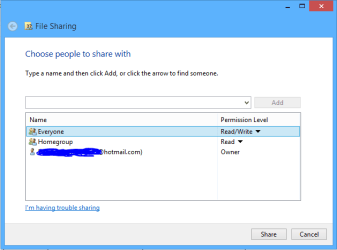
This might work better if you add the Everyone share + read/write to the Library you need to access.
 

Attachments

  • share with Everyone.PNG
    share with Everyone.PNG
    6.7 KB · Views: 17

My Computer My Computer

At a glance

Windows 7 Ult, Windows 8.1 Pro,Q9650-4.275GHz, E8600 4.5GHz, E6750-3.8GHzG.Skill PC2 9600 1200Mhz 5 5 5 15 2TGTX480
Computer type
PC/Desktop
Computer Manufacturer/Model Number
Home built
OS
Windows 7 Ult, Windows 8.1 Pro,
CPU
Q9650-4.275GHz, E8600 4.5GHz, E6750-3.8GHz
Motherboard
Evga 780i FTW
Memory
G.Skill PC2 9600 1200Mhz 5 5 5 15 2T
Graphics Card(s)
GTX480
Sound Card
Asus Xonar D2
Monitor(s) Displays
HannsG
Screen Resolution
1680X1050
Hard Drives
GSkill Phoenix Pro 120GB SSD
PSU
ThermalTake Toughpower 1000Watt modular
Case
ThermalTake XaserV
Cooling
Xigmatek S1283
Keyboard
Logitech G15
Mouse
Logitech G9
Internet Speed
T1
DXtreme set top box can't open shared folders on pc

Hi Chev65
Thanks for the reply. Yes password protected sharing is turned off and all the folder permissions are set to 'everyone'. It must be a setting on the pcs because the set top box logs on to the pcs and shows all the shared folders but when I try to open a folder I get the username request. The pcs can interact ok so the pcs aren't seeing the set top box as a device which they can talk to.Anyway as everything else works ok this seems to be the thing to concentrate on.

Thanks for trying Bill Hanley
 

My Computer My Computer

At a glance

windows 7 Home Premium 64 bitIntel core i3590 @ 3066 Mhz8 GB 4096 DDR3SD RAMRadeon HD 4350
Computer type
PC/Desktop
Computer Manufacturer/Model Number
self built
OS
windows 7 Home Premium 64 bit
CPU
Intel core i3590 @ 3066 Mhz
Motherboard
Gigabyte H55M-usb3
Memory
8 GB 4096 DDR3SD RAM
Graphics Card(s)
Radeon HD 4350
Sound Card
NIL
Monitor(s) Displays
Samsung 27B550-27"
Hard Drives
Corsair Force3 SSD- 120 GB
PSU
L&C Technologies LC-B300
Case
No Name
Cooling
CPU fan plus 150mm case fan
Okay I'm a dummy. What is a (top box)?
 

My Computer My Computer

At a glance

Windows 10 Pro. 64/ version 1709 Windows 7 Pr...Intel i7-6800K @ 4.3Corsair Platinum 16 gig @2400EVGA GTX 1070 OC
Computer type
PC/Desktop
Computer Manufacturer/Model Number
Home made Desktop
OS
Windows 10 Pro. 64/ version 1709 Windows 7 Pro/64
CPU
Intel i7-6800K @ 4.3
Motherboard
ASUS X-99 Deluxe II
Memory
Corsair Platinum 16 gig @2400
Graphics Card(s)
EVGA GTX 1070 OC
Monitor(s) Displays
Asus 27" LED LCD/VE278Q
Screen Resolution
1920-1080 or 1280-720 HDMI
Hard Drives
INTEL SSD 730-240 Gb Sata 3.0/
PSU
EVGA Platium 1200W
Case
Phanteks Luxe Tempered Glass 8 fans/ one radiator
Cooling
XSPC/ Water Cooled CPU
Keyboard
Das 4 Professional
Mouse
Logitech M705/MX Anywhere 2-S
Internet Speed
100 mbits
Antivirus
Microsoft Security Essentials/ Malwarebytes Premium 3.0/ SAS
Browser
I.E. 11 default/Firefox/ ISP Time Warner Cable/Spectrum
Other Info
LG BluRay Burner/
Sound system-KLipsch-THX/
Icy Dock ssd Hot Swap bays.
Hi Chev65
Thanks for the reply. Yes password protected sharing is turned off and all the folder permissions are set to 'everyone'. It must be a setting on the pcs because the set top box logs on to the pcs and shows all the shared folders but when I try to open a folder I get the username request. The pcs can interact ok so the pcs aren't seeing the set top box as a device which they can talk to.Anyway as everything else works ok this seems to be the thing to concentrate on.

Thanks for trying Bill Hanley

If you require unimpeded access to those drives from the set top box then follow the directions in the link which shows permissions adjustments on the Security tab of the Users folder. :)

http://www.sevenforums.com/network-sharing/92521-hdd-sharing.html#post798310
 
Last edited:

My Computer My Computer

At a glance

Windows 7 Ult, Windows 8.1 Pro,Q9650-4.275GHz, E8600 4.5GHz, E6750-3.8GHzG.Skill PC2 9600 1200Mhz 5 5 5 15 2TGTX480
Computer type
PC/Desktop
Computer Manufacturer/Model Number
Home built
OS
Windows 7 Ult, Windows 8.1 Pro,
CPU
Q9650-4.275GHz, E8600 4.5GHz, E6750-3.8GHz
Motherboard
Evga 780i FTW
Memory
G.Skill PC2 9600 1200Mhz 5 5 5 15 2T
Graphics Card(s)
GTX480
Sound Card
Asus Xonar D2
Monitor(s) Displays
HannsG
Screen Resolution
1680X1050
Hard Drives
GSkill Phoenix Pro 120GB SSD
PSU
ThermalTake Toughpower 1000Watt modular
Case
ThermalTake XaserV
Cooling
Xigmatek S1283
Keyboard
Logitech G15
Mouse
Logitech G9
Internet Speed
T1
  • Like
Reactions: Arc
Set top box problem

Hi Chev 65 I pressed the problem solved button before I posted My reply to your last suggestion. Using the Users folder instead of the C drive solved the problem for me and I can now open files from the set top box. Many thanks for your help

Bill Hanley
 
Last edited by a moderator:

My Computer My Computer

At a glance

windows 7 Home Premium 64 bitIntel core i3590 @ 3066 Mhz8 GB 4096 DDR3SD RAMRadeon HD 4350
Computer type
PC/Desktop
Computer Manufacturer/Model Number
self built
OS
windows 7 Home Premium 64 bit
CPU
Intel core i3590 @ 3066 Mhz
Motherboard
Gigabyte H55M-usb3
Memory
8 GB 4096 DDR3SD RAM
Graphics Card(s)
Radeon HD 4350
Sound Card
NIL
Monitor(s) Displays
Samsung 27B550-27"
Hard Drives
Corsair Force3 SSD- 120 GB
PSU
L&C Technologies LC-B300
Case
No Name
Cooling
CPU fan plus 150mm case fan
Hi Chev 65 I pressed the problem solved button before I posted My reply to your last suggestion. Using the Users folder instead of the C drive solved the problem for me and I can now open files from the set top box. Many thanks for your help

Bill Hanley

Figured that would do it.

In Windows, the default permissions are set up through the Users folder rather than the C: drive.

Much safer to share this way. ;)
 

My Computer My Computer

At a glance

Windows 7 Ult, Windows 8.1 Pro,Q9650-4.275GHz, E8600 4.5GHz, E6750-3.8GHzG.Skill PC2 9600 1200Mhz 5 5 5 15 2TGTX480
Computer type
PC/Desktop
Computer Manufacturer/Model Number
Home built
OS
Windows 7 Ult, Windows 8.1 Pro,
CPU
Q9650-4.275GHz, E8600 4.5GHz, E6750-3.8GHz
Motherboard
Evga 780i FTW
Memory
G.Skill PC2 9600 1200Mhz 5 5 5 15 2T
Graphics Card(s)
GTX480
Sound Card
Asus Xonar D2
Monitor(s) Displays
HannsG
Screen Resolution
1680X1050
Hard Drives
GSkill Phoenix Pro 120GB SSD
PSU
ThermalTake Toughpower 1000Watt modular
Case
ThermalTake XaserV
Cooling
Xigmatek S1283
Keyboard
Logitech G15
Mouse
Logitech G9
Internet Speed
T1
Back
Top