How to add music in FLAC to WMP 12 library?

SHUTRcz

New member
Local time
12:09 AM
Messages
14
Location
Czech republic
Hi, I have some music in FLAC but i cant add that into WMP 12 library. How do that?
 

My Computer My Computer

OS
Windows Seven build 7231
CPU
AMD Athlon X2 3800+
Motherboard
Gigabyte M61P-S3
Memory
2 GB DDR II
Graphics Card(s)
ATi 4850
Monitor(s) Displays
Samsung 223BW
Screen Resolution
1680x1050x32
Hard Drives
Samsung SpinPoint F1 3.5" 750GB | WD6400AAKS | Seagate Barracuda 160GB | WD 80 GB
PSU
Seasonic SS-500ET 500W
Case
NoName
Internet Speed
5 MB/s
Hi SHUTRcz, Welcome to the Forum!

You need CODECS that allow WMP to recognize the FLAC files since FLAC is not natively supported by WMP.
The lightest and best codec pack is Win7 Codecs. Also if you have 64bit Win7, there is a 64bit tools pack you need to be able to switch to the 32bit WMP so all files will work. Codec writers have been slow to develop 64bit codecs so we need to use the 32bit player that also comes with 64bit Windows.

Anyway, install the Codecs and the x64 tools if needed, only the codec pack if you have 32bit W7. If you have 64bit W7, after you install the tools go to Start - All Programs - Win7 Codecs - 64bit tools - default media player, and click the "set 32bit WMP as default" and then the "set 32bit registry item" to make 32bit WMP the default player. There is NO performance difference between the two players but 64bit is NOT supported by many codecs.

For Flac tag support, get WmpTagExtender and install it. Make sure it's enabled in WMP, go to Options in WMP, plug-in tab, click Background and it should show in there with a checkmark, check it if it's unchecked.

Now you need to re-scan your library so Flac will show, WMP should do this automatically but make sure.

Hope this helps.

 

My Computer My Computer

Computer Manufacturer/Model Number
Personal Build
OS
Vista Ult 64bit - Windows 7 Ult 7264 64bit
CPU
Intel Core 2 Duo E6750
Motherboard
Asus Commando
Memory
4 G's Crucial Ballistix Tracer
Graphics Card(s)
BFG Nvidia 8800 GTS 340
Sound Card
Creative Sound Blaster X-FI Platinum FATAL1TY
Monitor(s) Displays
2-22" HP W2207 LCD
Screen Resolution
1920 x 1080
Hard Drives
3 x 500G WD Caviar SATA II
PSU
Enermax Noise Taker II 600W
Case
NZXT Lexa Classic (dual doored & windowed)
Cooling
Zalman 9700 CPU cooler - 4 x 120mm, 1 x 90mm fans
Keyboard
Logitech MX 5500
Mouse
Logitech MX Revolution
Internet Speed
Blazing...
It works now :) thanks!
 

My Computer My Computer

OS
Windows Seven build 7231
CPU
AMD Athlon X2 3800+
Motherboard
Gigabyte M61P-S3
Memory
2 GB DDR II
Graphics Card(s)
ATi 4850
Monitor(s) Displays
Samsung 223BW
Screen Resolution
1680x1050x32
Hard Drives
Samsung SpinPoint F1 3.5" 750GB | WD6400AAKS | Seagate Barracuda 160GB | WD 80 GB
PSU
Seasonic SS-500ET 500W
Case
NoName
Internet Speed
5 MB/s
Codecs works, but now I cant play .mkv files in MCE :(
 

My Computer My Computer

OS
Windows Seven build 7231
CPU
AMD Athlon X2 3800+
Motherboard
Gigabyte M61P-S3
Memory
2 GB DDR II
Graphics Card(s)
ATi 4850
Monitor(s) Displays
Samsung 223BW
Screen Resolution
1680x1050x32
Hard Drives
Samsung SpinPoint F1 3.5" 750GB | WD6400AAKS | Seagate Barracuda 160GB | WD 80 GB
PSU
Seasonic SS-500ET 500W
Case
NoName
Internet Speed
5 MB/s
Same here.

Codecs works, but now I cant play .mkv files in MCE :(

Same happened to me after installing this codec on x64, I suspect it may be something to do with the x64. Previous versions of the codec (i.e. vista) distinguished between x86 and x64.

If any one has the answer I would be most interested.
 

My Computer My Computer

OS
Windows Se7en Ultimate x64
CPU
AMD Athlon Phenom II 550 (Dual Core at the moment)
Motherboard
DFI LPJR790GX-M2RS
Memory
4GB OCZ reaper DDR2 PC8500 1066
Graphics Card(s)
CrosssFire 2 x Sapphire RADEON HD3650 (512 MB GDDR3)
Sound Card
Built-in
Monitor(s) Displays
Samsung LE-40B551 40 in. HDTV, HP w2007v, Elo Touchscreen
Screen Resolution
1920 x 1080 pixels
Hard Drives
OCZ Agility Series 30GB SATA II 2.5" Solid State Drive
Samsung Spinpoint F3 1TB SATA II
Samsung Spinpoint F1 500GB SATA II
Western Digital Caviar 500GB SATA II
PSU
OCZ 600W StealthXStream
Case
Antec P180 Mini
Cooling
Scythe Ninja Copper Cooler 5th Anniversary Limited Edition
Keyboard
Cordless Desktop® EX 90
Mouse
Cordless Desktop® EX 90
Internet Speed
Hamster-in-a-wheel
Other Info
WinTV-NOVA-T PCI
Altec Lansing ACS56
Hi

Did you have any other codec pack installed?
Any other packs may interfere and need to be uninstalled before installing Win7 Codec Pack.

Also as I noted in my first post, 2 versions of WMP exist in Vista and Win7 64bit OS's, a 32bit and 64bit WMP. Most everyone finds using the 32bit version of WMP is best and there is NO FUNCTIONAL DIFFERENCE between the two. You don't get better playback or anything like that so using the tools in the x64 add-on to change the default player to the 32bit version is recommended.

Probably the best if problems continue is to try the VCP and Win7 Codec Pack forum MSFN Forums -> Vista Codec Package and see what Shark007 can do or say to help.
 

My Computer My Computer

Computer Manufacturer/Model Number
Personal Build
OS
Vista Ult 64bit - Windows 7 Ult 7264 64bit
CPU
Intel Core 2 Duo E6750
Motherboard
Asus Commando
Memory
4 G's Crucial Ballistix Tracer
Graphics Card(s)
BFG Nvidia 8800 GTS 340
Sound Card
Creative Sound Blaster X-FI Platinum FATAL1TY
Monitor(s) Displays
2-22" HP W2207 LCD
Screen Resolution
1920 x 1080
Hard Drives
3 x 500G WD Caviar SATA II
PSU
Enermax Noise Taker II 600W
Case
NZXT Lexa Classic (dual doored & windowed)
Cooling
Zalman 9700 CPU cooler - 4 x 120mm, 1 x 90mm fans
Keyboard
Logitech MX 5500
Mouse
Logitech MX Revolution
Internet Speed
Blazing...
Have now fixed it

:D Uninstalled all codecs shark win7 etc. and reinstalled cccp codec and old shark x64 on top of that, I now have mkv and mp4 back and playing in MCE.
 

My Computer My Computer

OS
Windows Se7en Ultimate x64
CPU
AMD Athlon Phenom II 550 (Dual Core at the moment)
Motherboard
DFI LPJR790GX-M2RS
Memory
4GB OCZ reaper DDR2 PC8500 1066
Graphics Card(s)
CrosssFire 2 x Sapphire RADEON HD3650 (512 MB GDDR3)
Sound Card
Built-in
Monitor(s) Displays
Samsung LE-40B551 40 in. HDTV, HP w2007v, Elo Touchscreen
Screen Resolution
1920 x 1080 pixels
Hard Drives
OCZ Agility Series 30GB SATA II 2.5" Solid State Drive
Samsung Spinpoint F3 1TB SATA II
Samsung Spinpoint F1 500GB SATA II
Western Digital Caviar 500GB SATA II
PSU
OCZ 600W StealthXStream
Case
Antec P180 Mini
Cooling
Scythe Ninja Copper Cooler 5th Anniversary Limited Edition
Keyboard
Cordless Desktop® EX 90
Mouse
Cordless Desktop® EX 90
Internet Speed
Hamster-in-a-wheel
Other Info
WinTV-NOVA-T PCI
Altec Lansing ACS56
On a related note...

Do you know how I can update my library? I tried to add folders to my Music library folder thingy from wmp, but it doesn't do the scan thing like wmp 11. I have 6 folders from the first and second times I added folders, but it won't scan any more for some reason or update the existing ones. Now that I can play all of my music with these FLAC plugins, I really want it to scan the library. Thanks!
Edit: I found the solution. For reference, I had to go to C:\Users\[USERNAME]\AppData\Local\Microsoft\Media Player and delete all the .wmdb files there. But now it has to reindex all of my thousands of songs. Oh well, it's better than not having them.
 
Last edited:

My Computer My Computer

Computer Manufacturer/Model Number
Sager NP2092
OS
Windows 7 x64 Ultimate, Chrome (soon)
CPU
Intel T9300 2.5Ghz
Memory
4GB
Graphics Card(s)
NVidia 8600M GT
Screen Resolution
1650x1080
Internet Speed
30MB/s D 1.5MB/s U
I tried that, but it still can't detect FLAC's tag, plus it takes realy long time to add one flac, left it for a day to build the library but only 20 flacs were successfully embedded. all my mp3 already on it. On top of that there's a problem of seeking when playing those flacs. That's too bad I really liked WMP12 :huh:
 

My Computer My Computer

OS
Windows 7
CPU
AMD 3500+
Motherboard
asus a8n
Memory
1 gig corsair
Graphics Card(s)
quatro fx 400
Sound Card
onboard
Monitor(s) Displays
LG flat
Hard Drives
cheetah 15K 73Gig and 1K raptors 37 X2
PSU
Generic
Case
skinned cheap one
Cooling
fresh air
Similar Problem Here....

I really don't care much about Windows Media Player or Media Center but I would like to know how to get Windows 7 to add flac files to the music library. The libraries feature was supposed to be a big deal with Windows 7, but it is pretty useless to me because I encode in flac. I figure it has to be in the registry somewhere.
 

My Computer My Computer

OS
Windows &
Last edited:

My Computer My Computer

Computer Manufacturer/Model Number
Selfbuilt
OS
Windows 7 Ultimate 64bit
CPU
i7 2600k
Motherboard
asus P8Z68-V LE
Memory
16GB (4x4) corsair vengeance
Graphics Card(s)
Intel HD3000 iGPU / AMD HD6870 1024MB
Sound Card
bitstreamed to an Onkyo 609
Monitor(s) Displays
Asus VE278 27" LED / Bravia EX7 60" LED
Screen Resolution
native 1080p x2
Hard Drives
4x 2TB int. + 2x 2TB external and a SSD for the boot drive.
PSU
650w Antec
Case
NZXT tempest evo
Cooling
air/stock
Keyboard
Dell
Mouse
logitech m505
Internet Speed
dual: cable/blackberry tether for travel use
Other Info
BD re-writer //
asus notebook G73Jw
Still a no go...

Thanks for the reply. Well Window Media Player plays flac files now, but the files still do not show up in my Windows 7 music library. It's really no different than if I wanted files with a .txt extension to show in the music library. Somewhere there are settings that tell Windows which file extensions to include in the library called "Music". But where, and how to change them to include the .flac extension? Arrrg!
 

My Computer My Computer

OS
Windows &
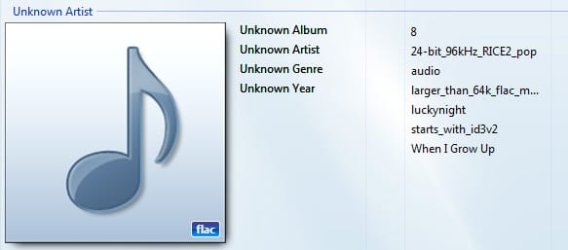
They should now be listed under unknown artist as depicted in the attached screenshot
 

Attachments

  • flac.jpg
    flac.jpg
    25.2 KB · Views: 229
Last edited:

My Computer My Computer

Computer Manufacturer/Model Number
Selfbuilt
OS
Windows 7 Ultimate 64bit
CPU
i7 2600k
Motherboard
asus P8Z68-V LE
Memory
16GB (4x4) corsair vengeance
Graphics Card(s)
Intel HD3000 iGPU / AMD HD6870 1024MB
Sound Card
bitstreamed to an Onkyo 609
Monitor(s) Displays
Asus VE278 27" LED / Bravia EX7 60" LED
Screen Resolution
native 1080p x2
Hard Drives
4x 2TB int. + 2x 2TB external and a SSD for the boot drive.
PSU
650w Antec
Case
NZXT tempest evo
Cooling
air/stock
Keyboard
Dell
Mouse
logitech m505
Internet Speed
dual: cable/blackberry tether for travel use
Other Info
BD re-writer //
asus notebook G73Jw
If you're using the Shark007.net - Windows 7 Codecs go to the Help TAB and choose to associate filetypes to WMP.
I did this, but WMP 12 still can't play .flac files. When I double click on the .flac files, the WMP 12 window opens, but all it does is give you 3 choices:
Play all music
Go to Library
Play previous list

Am I doing something wrong? WMP 12 won't even add these files to the library, but I did everything you said.

EDIT: Never mind, I fixed it, but I was forced to use the XIPH codecs, which ended up doing this:
Still, I just found a solution: XIPH
Try it out, after install it should work perfectly.

LOL @ works perfectly...
Nice solution except for the fact that it breaks several aspects on WMP.
For starters, WMP's open dialog is now hosed. It used to look like this:

filetypesv.jpg


but now the media dropdown list is missing.

In my opinion, putting up with a small annoyance, cannot seek, which only occurs when directly played, and can easily be avoided by choosing to use a rightclick of the FLAC file, and clicking on 'Add to Windows Media Player List', is better than hosing your system.
Still, I got the files to play and I don't really care about this issue too much, although if anyone knows how to get the files to play without XIPH, please let me know.
 
Last edited:

My Computer My Computer

Computer Manufacturer/Model Number
Dell Inspiron 14R N4110
OS
Windows 7 Home Premium x64
CPU
Intel Core i5-2410M Quad Core CPU @ 2.30 GHz
Memory
8 GB Shared Channel DDR3 Memory
Graphics Card(s)
Intel HD Graphics 3000, AMD Radeon HD 6470M
Sound Card
Intel Display Audio, Realtek High Definition Audio
Monitor(s) Displays
14" HD 720p LED Display
Screen Resolution
1366x768
Hard Drives
500 GB 5400 RPM SATA Hard Drive
Mouse
Microsoft USB IntelliMouse Explorer 3.0
Hi SHUTRcz, Welcome to the Forum!

You need CODECS that allow WMP to recognize the FLAC files since FLAC is not natively supported by WMP.
The lightest and best codec pack is Win7 Codecs. Also if you have 64bit Win7, there is a 64bit tools pack you need to be able to switch to the 32bit WMP so all files will work. Codec writers have been slow to develop 64bit codecs so we need to use the 32bit player that also comes with 64bit Windows.

Anyway, install the Codecs and the x64 tools if needed, only the codec pack if you have 32bit W7. If you have 64bit W7, after you install the tools go to Start - All Programs - Win7 Codecs - 64bit tools - default media player, and click the "set 32bit WMP as default" and then the "set 32bit registry item" to make 32bit WMP the default player. There is NO performance difference between the two players but 64bit is NOT supported by many codecs.

For Flac tag support, get WmpTagExtender and install it. Make sure it's enabled in WMP, go to Options in WMP, plug-in tab, click Background and it should show in there with a checkmark, check it if it's unchecked.

Now you need to re-scan your library so Flac will show, WMP should do this automatically but make sure.

Hope this helps.
I took these steps and now my FLACs show up and they do play, I can hear it.

But there are a couple problems:
- Length does not show on FLAC music
- Cannot seek FLAC music

I'd really like to be able to skip ahead in tracks and stuff and see the length of my albums. Here is a screen shot:

9sf47p.png


Does anyone know how to fix this? Thanks!

Specs:
Win 7
AMD 3700 64 bit
2GB RAM
Pretty sure WMP is 32bit (shortcut points to x86 folder)
 

My Computer My Computer

OS
Windows 7
CPU
AMD 3700 64bit
Memory
2GB
Graphics Card(s)
Nvidia 6600GT
Hard Drives
Falcon SSD 64GB
Review Posts made

This site has a nice search feature....it's available to all...this info has been posted repeatedly.
 
But there are a couple problems:
- Length does not show on FLAC music
- Cannot seek FLAC music

WMP Tag Plus is a new tag support plug-in that will fix these problems:

http://bmproductions.fixnum.org/wmptagplus

To prevent conflicts, it is recommended to uninstall or disable all other WMP tag support plug-ins before installing WMP Tag Plus.
 

My Computer My Computer

Computer type
PC/Desktop
OS
Windows 10
Thanks for this Tim! .. just what I've been looking for!

One thing though .. I found the seek bar and time display wouldn't work right away .. I had to delete my library , shut down WMP , then start it again to re-populate .. then everything was fine!

It might be worth pointing that out to folks if anyone's having problems.

In case anyone is wondering .. navigate to C:\Users\*yourname*\AppData\Local\Microsoft\Media Player .. and delete the file currentdatabase_xxx is what I did.

Gaps between tracks are still a problem though .. any ideas??
 

My Computer My Computer

OS
Windows 7 64bit RTM
CPU
AMD Athlon 64 X2 3800+
Motherboard
ASUS M2N-E SLI
Memory
4G Dual channel
Graphics Card(s)
POV GeForce 7600 GT
Sound Card
USB 2.1
Monitor(s) Displays
Samsung 17 in LCD
Hard Drives
80G Western Digital
250G Western Digital
500G Buffalo Drivestation
Yes, it's true that after installing WMP Tag Plus, existing FLAC files need to be re-added to the library for the length and other tags to be filled in. However, this can be done much easier than having to delete the database file: select the FLAC files, right-click, select Delete, Delete from library only, and click OK. Re-add the files through Tools - Advanced - Restore deleted library items.

I'm not sure what you mean with gaps between tracks. Do you mean that crossfade doesn't work for FLAC files? This is a known limitation in WMP; crossfading only works for the default supported formats such as MP3 and WMA.
 

My Computer My Computer

Computer type
PC/Desktop
OS
Windows 10
Yes, it's true that after installing WMP Tag Plus, existing FLAC files need to be re-added to the library for the length and other tags to be filled in. However, this can be done much easier than having to delete the database file: select the FLAC files, right-click, select Delete, Delete from library only, and click OK. Re-add the files through Tools - Advanced - Restore deleted library items.

I'm not sure what you mean with gaps between tracks. Do you mean that crossfade doesn't work for FLAC files? This is a known limitation in WMP; crossfading only works for the default supported formats such as MP3 and WMA.

Yes, I noticed that the crossfade wasn't working .. thanks for the info Tim.

I think I'll experiment a bit more with EAC to see if there is something else in there I've missed with regard to FLAC output.
 

My Computer My Computer

OS
Windows 7 64bit RTM
CPU
AMD Athlon 64 X2 3800+
Motherboard
ASUS M2N-E SLI
Memory
4G Dual channel
Graphics Card(s)
POV GeForce 7600 GT
Sound Card
USB 2.1
Monitor(s) Displays
Samsung 17 in LCD
Hard Drives
80G Western Digital
250G Western Digital
500G Buffalo Drivestation
Back
Top