How works display identification in Windows 7

win7confusions

New member
Local time
9:59 AM
Messages
2
Hi,

does anybody know how the display identification works in Windows 7. How does Windows(or the graphic adapter) decide which screen is number 2 and which is number 1?

Background: We develop a software that runs on systems whith 2 monitors. Usually 1 monitor is for the customer and another monitor is for the advisor. We can configure our application so that the customer application runs on display 1 and the advisor application on display 2 or the other way round.

So how do i figure out which monitor becomes screen1 and which one screen2 after installation of windows?

best wishes
Samuel
 

My Computer My Computer

At a glance

windows 7 32 bit
Computer type
PC/Desktop
OS
windows 7 32 bit
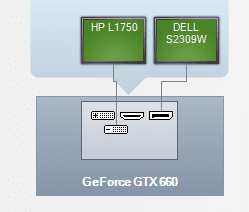
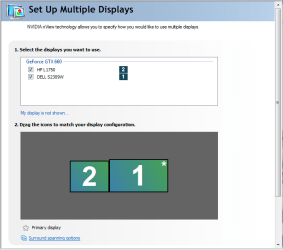
Samuel, welcome to seven forums. The graphics card determines the monitor number. Here is a pic of mine . It will start at the top left then go right and then the bottom row. Because I have my Dell on the display port it is number 1, then the HP is number 2.

graphics connection.PNG monitor numbers.PNG
 

My Computer My Computer

At a glance

Windows 10 Pro X64Intel(R) Core(TM) i5-3570K CPU OC@ 4.5GHZ Turbo8.00 GB DDR3 1600MhzMSI Gaming X GTX 1070
Computer type
PC/Desktop
Computer Manufacturer/Model Number
Dude Build
OS
Windows 10 Pro X64
CPU
Intel(R) Core(TM) i5-3570K CPU OC@ 4.5GHZ Turbo
Motherboard
MSI Z77A-G45 Gaming
Memory
8.00 GB DDR3 1600Mhz
Graphics Card(s)
MSI Gaming X GTX 1070
Sound Card
Realtek High Definition
Monitor(s) Displays
Dell S23O9W, HP L1710
Screen Resolution
DELL-1920 x 1080 HP-1280 x1024
Hard Drives
Crucial m4 256 SSD, WD 7200RPM 500GB WD 1TB
PSU
Seasonic X650 GOLD
Case
Zalman Z12
Cooling
Antec Kuhler 920
Keyboard
Logitech
Mouse
MSI DS100 Interceptor
Internet Speed
50 down and 5 up
Antivirus
MSE
Browser
Chrome, IE 11
Other Info
Logitech X-620 Speakers
Hi,

does anybody know how the display identification works in Windows 7. How does Windows(or the graphic adapter) decide which screen is number 2 and which is number 1?

Background: We develop a software that runs on systems whith 2 monitors. Usually 1 monitor is for the customer and another monitor is for the advisor. We can configure our application so that the customer application runs on display 1 and the advisor application on display 2 or the other way round.

So how do i figure out which monitor becomes screen1 and which one screen2 after installation of windows?

best wishes
Samuel

Hi Samuel,

Welcome to Seven forums.

I would also concur with Dude it is graphic card function to decide which display to set as primary. I use my laptop with a TV or Monitor and internal LCD would always be set as number 1 and then anything else.

Not quite sure about Desktops, I believe first connected Monitor would be considered as number 1 and any other monitors connected would be number accordingly.

However, you should be able to configure whether which Monitor would be primary and what display you would require on the same monitor.

Hope it helps.
 

My Computer My Computer

At a glance

Winndows 7 32 bit
Computer type
PC/Desktop
OS
Winndows 7 32 bit
Hi,

thank you for your replies. Right now I'm quite sure that it is the driver of the graphic card that determines the monitor number. I was a little bit confused - because when we installed the system with Windows XP the monitor numbers where different than with Windows 7(even with the same hardware). So if Windows does not any magic with the monitor numbers - and I think it doesnt - it should be the graphic driver.

best regards
 

My Computer My Computer

At a glance

windows 7 32 bit
Computer type
PC/Desktop
OS
windows 7 32 bit
Hi,

thank you for your replies. Right now I'm quite sure that it is the driver of the graphic card that determines the monitor number. I was a little bit confused - because when we installed the system with Windows XP the monitor numbers where different than with Windows 7(even with the same hardware). So if Windows does not any magic with the monitor numbers - and I think it doesnt - it should be the graphic driver.

best regards

Hi win7confusions,

Thanks for posting this reply. I understand graphic driver decides which one would be a primary monitor and which one would be secondary.

I am sure this information might be useful for other users as well. If you have any further queries, please feel free to contact us.
 

My Computer My Computer

At a glance

Winndows 7 32 bit
Computer type
PC/Desktop
OS
Winndows 7 32 bit
Back
Top