IDT sound problem in Dell Studio 1555...Plz help

dishary

New member
Local time
8:41 AM
Messages
5
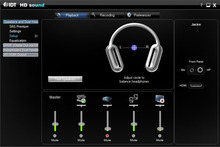
Ok this is my second posting...For a long time I can't play sound on my laptop speaker which is dell studio 1555 brought in 2008. after a clean installation of win 7 x64 the sound plays in headphones properly. In speaker, well, sometimes it plays and most of the time don't (as like machine is deciding when to roll).. And the serious issue is if I don't plug in the headphones IDT sound setting options pop ups and won't let me work..:cry:...(like the image)
8063228.jpg


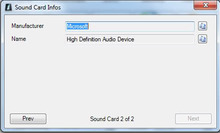
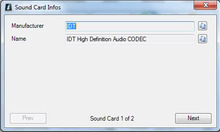
In sound card settings it shows there are two different sound card, IDT High definition audio codec and Microsoft High definition audio device...
8063252.jpg
8063257.jpg


I tried latest drivers from dell support for win7 x64...doesn't solve the problem...
Please someone help me...I really need to solve the problem...And I know its a problem with driver...but can't find the right driver for this product or whatever....:mad:...

Please Please Please help....

a%3E
 

My Computer My Computer

At a glance

Windows 7 Ultimate x642.0 GHz Intel® Core™ 2 Duo T54503 GB DDR2128MB Mobile Intel 965GM Express
Computer Manufacturer/Model Number
Dell Studio 1555
OS
Windows 7 Ultimate x64
CPU
2.0 GHz Intel® Core™ 2 Duo T5450
Motherboard
Dell Inc. Model 0J276M Version A
Memory
3 GB DDR2
Graphics Card(s)
128MB Mobile Intel 965GM Express
Monitor(s) Displays
15.4-inch WXGA with TrueLife
Hard Drives
320 GB Hitachi 5,400 rpm
The first thing I see is that you have both the IDT and Microsoft sound drivers. That will cause a conflict, you need to ONLY have the Dell supplied driver. I do a lot of support on the Dell users forum and we have found that non-Dell sound drivers either do not work or do not work correctly. Uninstall the Microsoft driver and then restart the PC. Go to the Control Panel/Hardware and Sound and finally the Sound Panel and make sure your "Speakers" are set as the default playback device.

This is the correct Dell IDT driver for Win 7 64 bit. Drivers and Downloads | Dell [United States]
 

My Computer My Computer

At a glance

Windows 10 64 bitIntel i7 6700K16GB Corsair DominatorIntel CPU Graphics
Computer type
PC/Desktop
Computer Manufacturer/Model Number
My Own Build
OS
Windows 10 64 bit
CPU
Intel i7 6700K
Motherboard
ASUS ROG Maximus VIII Hero
Memory
16GB Corsair Dominator
Graphics Card(s)
Intel CPU Graphics
Sound Card
RealTek
Monitor(s) Displays
27" Dell S2719dgf
Screen Resolution
2560X1440
Hard Drives
1 TB Samsung 850 EVO SSD for Win 10 Pro
500GB Samsung 850 EVO SSD for Win 10 Insider
2 TB drive for backup
PSU
EVGA Supernova 750G2
Case
BeQuiet Silent Base 600
Cooling
Deepcool Captain 120EX
Keyboard
Microsoft Wireless 2000
Mouse
Microsoft wireless
Internet Speed
100 MB/sec (Cable)
Antivirus
Microsoft Defender and Malwarebytes
Browser
Edge/Firefox
Other Info
Cakewalk (Sonar) by BandLab and Studio One 4.1 Pro recording studio software. MOTU 896Mk3 Hybrid recording interface, Frontier Tranzport wireless control unit, Behringer X-Touch Control Surface.
Five USB connected optical drives for CD Audio production using Nero BurningROM
I have had trouble with this issue for a long time now so decided to spend some time and try to resolve the problem. I installed "This is the correct Dell IDT driver for Win 7 64 bit." recommended by FIREBIRD above. When this was installed I saw a problem regarding the Bamboo Tablet software not being available - have removed this software and coupled with FIREBERD'S recommendation I have no more issues for days ...!

Many thanks FIREBERD
 

My Computer My Computer

At a glance

windows 7
OS
windows 7
Thanks. :)
 

My Computer My Computer

At a glance

Windows 10 64 bitIntel i7 6700K16GB Corsair DominatorIntel CPU Graphics
Computer type
PC/Desktop
Computer Manufacturer/Model Number
My Own Build
OS
Windows 10 64 bit
CPU
Intel i7 6700K
Motherboard
ASUS ROG Maximus VIII Hero
Memory
16GB Corsair Dominator
Graphics Card(s)
Intel CPU Graphics
Sound Card
RealTek
Monitor(s) Displays
27" Dell S2719dgf
Screen Resolution
2560X1440
Hard Drives
1 TB Samsung 850 EVO SSD for Win 10 Pro
500GB Samsung 850 EVO SSD for Win 10 Insider
2 TB drive for backup
PSU
EVGA Supernova 750G2
Case
BeQuiet Silent Base 600
Cooling
Deepcool Captain 120EX
Keyboard
Microsoft Wireless 2000
Mouse
Microsoft wireless
Internet Speed
100 MB/sec (Cable)
Antivirus
Microsoft Defender and Malwarebytes
Browser
Edge/Firefox
Other Info
Cakewalk (Sonar) by BandLab and Studio One 4.1 Pro recording studio software. MOTU 896Mk3 Hybrid recording interface, Frontier Tranzport wireless control unit, Behringer X-Touch Control Surface.
Five USB connected optical drives for CD Audio production using Nero BurningROM
I have had trouble with this issue for a long time now so decided to spend some time and try to resolve the problem. I installed "This is the correct Dell IDT driver for Win 7 64 bit." recommended by FIREBIRD above. When this was installed I saw a problem regarding the Bamboo Tablet software not being available - have removed this software and coupled with FIREBERD'S recommendation I have no more issues for days ...!

Many thanks FIREBERD

Hi wobuck,

Great to hear that you found the information useful here. If you have any queries in future feel free to reach out to us.


FIREBERD: Really Nice work. I tried to add some reputation but unfortunately need to spread before I can give you again.
 

My Computer My Computer

At a glance

Winndows 7 32 bit
Computer type
PC/Desktop
OS
Winndows 7 32 bit
Back
Top