dllhost.exe - many instances and consuming all CPU/RAM?!

liustephen

New member
Local time
8:07 AM
Messages
8
Hi,

I've googled and tried many suggestions, but not making any progress.

I've noted in the past few days/weeks, my computer is running MUCH more slowly. Lagging, etc. Opened up Task Manager, and noticed dllhost.exe - about 10-15 times listed, and with constant memory consumption. At times, CPU usage up to 100% and Phys memory up to 80% (with NO other programs running!).

My laptop is pretty "clean" - I use it for work when I travel, so it really only has document files on it.

I've run multiple anti-virus on it (Windows Essentials, Malaware, ESET), without nothing significant found.

I've scanned the disk for errors, I've optimized, I've cleaned out/deleted files (through Windows), without change.

I don't have any video files on the desktop (really, no video files that I can find anywhere).

I have noticed that if I have the wifi turned OFF, then dllhost never shows up in the TaskManager. As soon as I turn the wifi ON, then dllhost.exe starts popping up (listed about 10-15 times) and CPU/memory consumption goes up. If I then turn wifi OFF, then the CPU usage drops back down to 5% or so.... but the dllhost.exe stays listed in TaskManager, and Physical Memory usage remains high. As soon as I turn wifi back on, then the CPU usage starts going up again.

Any thoughts out there?

Thanks,
Stephen
 

My Computer My Computer

At a glance

windows 7 home premium 64bit SP1i5-3317U @ 1.7 ghz4gbIntel HD Graphics 4000
Computer type
Laptop
Computer Manufacturer/Model Number
samsung series 9
OS
windows 7 home premium 64bit SP1
CPU
i5-3317U @ 1.7 ghz
Memory
4gb
Graphics Card(s)
Intel HD Graphics 4000
Hard Drives
SSD
Well dllhost.exe just hosts DLLs. It is clear your Wifi driver has something to do with it.
 

My Computer My Computer

At a glance

Windows 10 Pro (x64)Intel Core i7-3930K (3.2GHz - 4.5GHz)4x Samsung 4GB PC3-12800 DDR3 (16GB 1600MHz)Nvidia Geforce GTX 690
Computer type
PC/Desktop
Computer Manufacturer/Model Number
Alienware Aurora ALX R4
OS
Windows 10 Pro (x64)
CPU
Intel Core i7-3930K (3.2GHz - 4.5GHz)
Motherboard
Alienware Aurora-R4 x79
Memory
4x Samsung 4GB PC3-12800 DDR3 (16GB 1600MHz)
Graphics Card(s)
Nvidia Geforce GTX 690
Sound Card
SteelSeries Siberia Elite
Monitor(s) Displays
Dell UltraSharp U3011
Screen Resolution
2560x1600
Hard Drives
Samsung 850 Pro 256 GB, Seagate 1TB Desktop Hybrid HDD, 2x Western Digital 4TB Green HDD
PSU
875W Some Dell PSU <.<
Case
Alienware Aurora ALX
Cooling
Custom Liquid Cooling (EK CPU & GPU blocks) dual EK 480RAD
Keyboard
Logitech G710+ Mechanical
Mouse
Logitech G700s
Internet Speed
Verizon Fios (50 mbps average)
Other Info
Server: Intel NUC D54250WYK: i5-4250U, 16GB, 256 GB mSATA, Windows Server 2012 R2

My Computer My Computer

At a glance

Windows 10 ProAMD Ryzen 5 2400G Processor with Radeon RX Ve...G.SKILL Ripjaws V Series 16GB (2 x 8GB) 288-P...2047MB NVIDIA GeForce GTX 1060 6GB (EVGA)
Computer type
PC/Desktop
Computer Manufacturer/Model Number
Custom Built
OS
Windows 10 Pro
CPU
AMD Ryzen 5 2400G Processor with Radeon RX Vega 11 Graphics
Motherboard
ASRock X470 Master SLI/AC AM4 AMD Promontory X470 SATA 6Gb/s
Memory
G.SKILL Ripjaws V Series 16GB (2 x 8GB) 288-Pin DDR4 SDRAM D
Graphics Card(s)
2047MB NVIDIA GeForce GTX 1060 6GB (EVGA)
Sound Card
Motherboard Built in
Monitor(s) Displays
Acer R240HY bidx 23.8-Inch IPS HDMI DVI VGA (1920 x 1080) Wi
Screen Resolution
1920 x 1080
Hard Drives
1TB Sandisk SSD PLUS (Main drive)
500 GB Seagate 7200 RPM (Games)
500 GB Western Digital 7200 RPM (Virtual Machines)
PSU
CORSAIR TX Series TX650M 650W 80+ Gold Modular Power Supply
Case
CORSAIR CARBIDE SPEC-02 Mid-Tower Gaming Case, Red LED Fan
Cooling
220mm, two 120mm, and four 60mm fans
Keyboard
Wired Dell keyboard
Mouse
Wireless Logitech mouse
Internet Speed
250mb down, 30mb up
Antivirus
Panda Cloud Antivirus
Browser
Chrome-ish x64
Other Info
Your awesome for reading this.
Thanks. I will update my sys info.

I've just updated my wifi driver - no change.
I don't think that it's that though....

My computer seems to be repeatedly accessing the internet.

Using CCleaner, I "clean" the system and delete "Internet Explorer - Temporary Internet Files", and then "Internet Explorer - Cookies" (+ a whole bunch of others). As soon as all of this i deleted, I re-scan, and those two "options" appear immediately, with a bunch of files. And the number of them steadily climb, every few seconds.

Also, when I use ProcessMonitor, there's a TON of entires all involving Reg Keys...
And then there will be several that appear to be accessing various internet sites (no apparent pattern to me).

Ex: TCP Receive series9-PC.gateway.2wire.nett:50516->cdn-68-142-79-70.lax.llnw.net:http

and then

...........................50521->a23-72-94-200.deploy.static.akamaitechnologies.com:http

etc

between these, there's lots of writing to temp files, and UDP send, UDP receives, and RegQueryKey, etc.

Very intermittently, I also get a "internet explorer-like box" that pops up that asks "do you want to end process".

BUT.... during all of this, I've got NOTHING ELSE running.

It almost seems like there is an instance of Internet Explorer running in the background where I don't see anything. But it is repeatedly accessing the internet (and using up CPU and memory).

In the time that it took me to type this, CCleaner shows 2500 Internet Explorer Temp Internet files (all new, since I deleted them all just before I started this post!).

Thanks for your help,
Stephen
 

My Computer My Computer

At a glance

windows 7 home premium 64bit SP1i5-3317U @ 1.7 ghz4gbIntel HD Graphics 4000
Computer type
Laptop
Computer Manufacturer/Model Number
samsung series 9
OS
windows 7 home premium 64bit SP1
CPU
i5-3317U @ 1.7 ghz
Memory
4gb
Graphics Card(s)
Intel HD Graphics 4000
Hard Drives
SSD

My Computer My Computer

At a glance

Windows 10 ProAMD Ryzen 5 2400G Processor with Radeon RX Ve...G.SKILL Ripjaws V Series 16GB (2 x 8GB) 288-P...2047MB NVIDIA GeForce GTX 1060 6GB (EVGA)
Computer type
PC/Desktop
Computer Manufacturer/Model Number
Custom Built
OS
Windows 10 Pro
CPU
AMD Ryzen 5 2400G Processor with Radeon RX Vega 11 Graphics
Motherboard
ASRock X470 Master SLI/AC AM4 AMD Promontory X470 SATA 6Gb/s
Memory
G.SKILL Ripjaws V Series 16GB (2 x 8GB) 288-Pin DDR4 SDRAM D
Graphics Card(s)
2047MB NVIDIA GeForce GTX 1060 6GB (EVGA)
Sound Card
Motherboard Built in
Monitor(s) Displays
Acer R240HY bidx 23.8-Inch IPS HDMI DVI VGA (1920 x 1080) Wi
Screen Resolution
1920 x 1080
Hard Drives
1TB Sandisk SSD PLUS (Main drive)
500 GB Seagate 7200 RPM (Games)
500 GB Western Digital 7200 RPM (Virtual Machines)
PSU
CORSAIR TX Series TX650M 650W 80+ Gold Modular Power Supply
Case
CORSAIR CARBIDE SPEC-02 Mid-Tower Gaming Case, Red LED Fan
Cooling
220mm, two 120mm, and four 60mm fans
Keyboard
Wired Dell keyboard
Mouse
Wireless Logitech mouse
Internet Speed
250mb down, 30mb up
Antivirus
Panda Cloud Antivirus
Browser
Chrome-ish x64
Other Info
Your awesome for reading this.
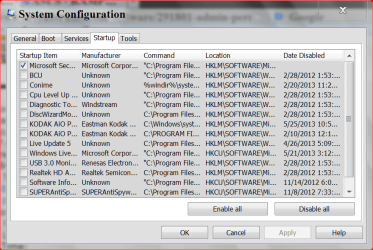
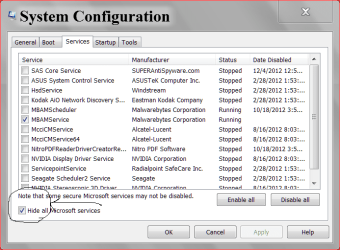
You could take a look in msconfic/Startup and NON Micorosoft Services and see if
you have something running calling home.

msconfig start up5 29 2013.PNG

services msconfig.PNG
 

My Computer My Computer

At a glance

Windows 10 Pro. 64/ version 1709 Windows 7 Pr...Intel i7-6800K @ 4.3Corsair Platinum 16 gig @2400EVGA GTX 1070 OC
Computer type
PC/Desktop
Computer Manufacturer/Model Number
Home made Desktop
OS
Windows 10 Pro. 64/ version 1709 Windows 7 Pro/64
CPU
Intel i7-6800K @ 4.3
Motherboard
ASUS X-99 Deluxe II
Memory
Corsair Platinum 16 gig @2400
Graphics Card(s)
EVGA GTX 1070 OC
Monitor(s) Displays
Asus 27" LED LCD/VE278Q
Screen Resolution
1920-1080 or 1280-720 HDMI
Hard Drives
INTEL SSD 730-240 Gb Sata 3.0/
PSU
EVGA Platium 1200W
Case
Phanteks Luxe Tempered Glass 8 fans/ one radiator
Cooling
XSPC/ Water Cooled CPU
Keyboard
Das 4 Professional
Mouse
Logitech M705/MX Anywhere 2-S
Internet Speed
100 mbits
Antivirus
Microsoft Security Essentials/ Malwarebytes Premium 3.0/ SAS
Browser
I.E. 11 default/Firefox/ ISP Time Warner Cable/Spectrum
Other Info
LG BluRay Burner/
Sound system-KLipsch-THX/
Icy Dock ssd Hot Swap bays.
.......I have noticed that if I have the wifi turned OFF, then dllhost never shows up in the TaskManager. As soon as I turn the wifi ON, then dllhost.exe starts popping up (listed about 10-15 times) and CPU/memory consumption goes up.......
Welcome to the Seven Forums.

Feel free to ignore this post. It is just the result of my curiosity.

If you have the time/interest...
...I would like to know if those dllhost.exe processes start when you do this:

Remove/delete every Wireless Network Connection* - including the one for your home.
Turn off Wi-Fi
Restart the computer
Let things settle down for 5 minutes
Turn on Wi-Fi
Do the same 10 to 15 copies of dllhost.exe appear in Task Manager?

*Start
Control Panel
Network and Internet
Network and Sharing Center
Manage wireless networks
Right click on each entry and select Remove network from the context menu.


You have excellent people involved in your thread, so I'll leave you in their very capable hands.
 

My Computer My Computer

At a glance

W7 Pro SP1 64biti78GBIntel HD Graphics
Computer type
Laptop
Computer Manufacturer/Model Number
Employer provided Dell Latitude
OS
W7 Pro SP1 64bit
CPU
i7
Memory
8GB
Graphics Card(s)
Intel HD Graphics
Hard Drives
crappy SSD
Antivirus
Employer mandated Symantec Endpoint Protection
Browser
Pale Moon 64bit, IE11 64bit & Chrome 64bit
Hi,

I tried the "clean boot" option.
It didn't work.

Even with "clean boot", dllhost.exe starts populating my task list until about 10-15 listed.

Will work on the UsernameIssues' idea tomorrow.

Thanks,
Stephen
 

My Computer My Computer

At a glance

windows 7 home premium 64bit SP1i5-3317U @ 1.7 ghz4gbIntel HD Graphics 4000
Computer type
Laptop
Computer Manufacturer/Model Number
samsung series 9
OS
windows 7 home premium 64bit SP1
CPU
i5-3317U @ 1.7 ghz
Memory
4gb
Graphics Card(s)
Intel HD Graphics 4000
Hard Drives
SSD
liustephen did you or did you not look in msconfig as I suggested in post #6?
 

My Computer My Computer

At a glance

Windows 10 Pro. 64/ version 1709 Windows 7 Pr...Intel i7-6800K @ 4.3Corsair Platinum 16 gig @2400EVGA GTX 1070 OC
Computer type
PC/Desktop
Computer Manufacturer/Model Number
Home made Desktop
OS
Windows 10 Pro. 64/ version 1709 Windows 7 Pro/64
CPU
Intel i7-6800K @ 4.3
Motherboard
ASUS X-99 Deluxe II
Memory
Corsair Platinum 16 gig @2400
Graphics Card(s)
EVGA GTX 1070 OC
Monitor(s) Displays
Asus 27" LED LCD/VE278Q
Screen Resolution
1920-1080 or 1280-720 HDMI
Hard Drives
INTEL SSD 730-240 Gb Sata 3.0/
PSU
EVGA Platium 1200W
Case
Phanteks Luxe Tempered Glass 8 fans/ one radiator
Cooling
XSPC/ Water Cooled CPU
Keyboard
Das 4 Professional
Mouse
Logitech M705/MX Anywhere 2-S
Internet Speed
100 mbits
Antivirus
Microsoft Security Essentials/ Malwarebytes Premium 3.0/ SAS
Browser
I.E. 11 default/Firefox/ ISP Time Warner Cable/Spectrum
Other Info
LG BluRay Burner/
Sound system-KLipsch-THX/
Icy Dock ssd Hot Swap bays.
Hi-
I looked at MSConfig. I didn't see anything too unusual that I could find.
When you say "calling home", did you mean like a program accessing the internet?
 

My Computer My Computer

At a glance

windows 7 home premium 64bit SP1i5-3317U @ 1.7 ghz4gbIntel HD Graphics 4000
Computer type
Laptop
Computer Manufacturer/Model Number
samsung series 9
OS
windows 7 home premium 64bit SP1
CPU
i5-3317U @ 1.7 ghz
Memory
4gb
Graphics Card(s)
Intel HD Graphics 4000
Hard Drives
SSD
Yes calling home is when things in your boot that startup and access the Internet
to give information or receive information from what ever site or program that installed them.
If you notice in the pictures in my post #6 their are very few check marks.
Their is a reason for that. The other things don't need to start until I or Windows 7 request them to.
This may help in the understanding.
Take a read through #6 and #7

By Brink:
http://www.sevenforums.com/tutorials/11728-optimize-windows-7-a.html
 

My Computer My Computer

At a glance

Windows 10 Pro. 64/ version 1709 Windows 7 Pr...Intel i7-6800K @ 4.3Corsair Platinum 16 gig @2400EVGA GTX 1070 OC
Computer type
PC/Desktop
Computer Manufacturer/Model Number
Home made Desktop
OS
Windows 10 Pro. 64/ version 1709 Windows 7 Pro/64
CPU
Intel i7-6800K @ 4.3
Motherboard
ASUS X-99 Deluxe II
Memory
Corsair Platinum 16 gig @2400
Graphics Card(s)
EVGA GTX 1070 OC
Monitor(s) Displays
Asus 27" LED LCD/VE278Q
Screen Resolution
1920-1080 or 1280-720 HDMI
Hard Drives
INTEL SSD 730-240 Gb Sata 3.0/
PSU
EVGA Platium 1200W
Case
Phanteks Luxe Tempered Glass 8 fans/ one radiator
Cooling
XSPC/ Water Cooled CPU
Keyboard
Das 4 Professional
Mouse
Logitech M705/MX Anywhere 2-S
Internet Speed
100 mbits
Antivirus
Microsoft Security Essentials/ Malwarebytes Premium 3.0/ SAS
Browser
I.E. 11 default/Firefox/ ISP Time Warner Cable/Spectrum
Other Info
LG BluRay Burner/
Sound system-KLipsch-THX/
Icy Dock ssd Hot Swap bays.
LaybackBear,

So, I've "disabled" all of the Services in the box.
So, do I now enable them one by one and re-start the computer with them enabled to see which one is spawning all of my dllhost's?
 

My Computer My Computer

At a glance

windows 7 home premium 64bit SP1i5-3317U @ 1.7 ghz4gbIntel HD Graphics 4000
Computer type
Laptop
Computer Manufacturer/Model Number
samsung series 9
OS
windows 7 home premium 64bit SP1
CPU
i5-3317U @ 1.7 ghz
Memory
4gb
Graphics Card(s)
Intel HD Graphics 4000
Hard Drives
SSD
Test the issue for a day with the services disabled. If the problem does not stay, and you restarted a few times and nothing; Then it must be some program on your pc running a service causing the issue. Yes I would re-enable them one by one, starting with your AV (if that was disabled) and then continue from there. Monitor each one turned on for a day or a few hours and do a couple restarts. If issue does not happen go to the next one until you discover the issue.
 

My Computer My Computer

At a glance

Windows 10 ProAMD Ryzen 5 2400G Processor with Radeon RX Ve...G.SKILL Ripjaws V Series 16GB (2 x 8GB) 288-P...2047MB NVIDIA GeForce GTX 1060 6GB (EVGA)
Computer type
PC/Desktop
Computer Manufacturer/Model Number
Custom Built
OS
Windows 10 Pro
CPU
AMD Ryzen 5 2400G Processor with Radeon RX Vega 11 Graphics
Motherboard
ASRock X470 Master SLI/AC AM4 AMD Promontory X470 SATA 6Gb/s
Memory
G.SKILL Ripjaws V Series 16GB (2 x 8GB) 288-Pin DDR4 SDRAM D
Graphics Card(s)
2047MB NVIDIA GeForce GTX 1060 6GB (EVGA)
Sound Card
Motherboard Built in
Monitor(s) Displays
Acer R240HY bidx 23.8-Inch IPS HDMI DVI VGA (1920 x 1080) Wi
Screen Resolution
1920 x 1080
Hard Drives
1TB Sandisk SSD PLUS (Main drive)
500 GB Seagate 7200 RPM (Games)
500 GB Western Digital 7200 RPM (Virtual Machines)
PSU
CORSAIR TX Series TX650M 650W 80+ Gold Modular Power Supply
Case
CORSAIR CARBIDE SPEC-02 Mid-Tower Gaming Case, Red LED Fan
Cooling
220mm, two 120mm, and four 60mm fans
Keyboard
Wired Dell keyboard
Mouse
Wireless Logitech mouse
Internet Speed
250mb down, 30mb up
Antivirus
Panda Cloud Antivirus
Browser
Chrome-ish x64
Other Info
Your awesome for reading this.
ok, will do.

what is AV?
 

My Computer My Computer

At a glance

windows 7 home premium 64bit SP1i5-3317U @ 1.7 ghz4gbIntel HD Graphics 4000
Computer type
Laptop
Computer Manufacturer/Model Number
samsung series 9
OS
windows 7 home premium 64bit SP1
CPU
i5-3317U @ 1.7 ghz
Memory
4gb
Graphics Card(s)
Intel HD Graphics 4000
Hard Drives
SSD
AV = antivirus
 

My Computer My Computer

At a glance

W7 Pro SP1 64biti78GBIntel HD Graphics
Computer type
Laptop
Computer Manufacturer/Model Number
Employer provided Dell Latitude
OS
W7 Pro SP1 64bit
CPU
i7
Memory
8GB
Graphics Card(s)
Intel HD Graphics
Hard Drives
crappy SSD
Antivirus
Employer mandated Symantec Endpoint Protection
Browser
Pale Moon 64bit, IE11 64bit & Chrome 64bit
A reminder!!
Do not mess with Windows 7 Services only Non Windows Services should be tested.
 

My Computer My Computer

At a glance

Windows 10 Pro. 64/ version 1709 Windows 7 Pr...Intel i7-6800K @ 4.3Corsair Platinum 16 gig @2400EVGA GTX 1070 OC
Computer type
PC/Desktop
Computer Manufacturer/Model Number
Home made Desktop
OS
Windows 10 Pro. 64/ version 1709 Windows 7 Pro/64
CPU
Intel i7-6800K @ 4.3
Motherboard
ASUS X-99 Deluxe II
Memory
Corsair Platinum 16 gig @2400
Graphics Card(s)
EVGA GTX 1070 OC
Monitor(s) Displays
Asus 27" LED LCD/VE278Q
Screen Resolution
1920-1080 or 1280-720 HDMI
Hard Drives
INTEL SSD 730-240 Gb Sata 3.0/
PSU
EVGA Platium 1200W
Case
Phanteks Luxe Tempered Glass 8 fans/ one radiator
Cooling
XSPC/ Water Cooled CPU
Keyboard
Das 4 Professional
Mouse
Logitech M705/MX Anywhere 2-S
Internet Speed
100 mbits
Antivirus
Microsoft Security Essentials/ Malwarebytes Premium 3.0/ SAS
Browser
I.E. 11 default/Firefox/ ISP Time Warner Cable/Spectrum
Other Info
LG BluRay Burner/
Sound system-KLipsch-THX/
Icy Dock ssd Hot Swap bays.
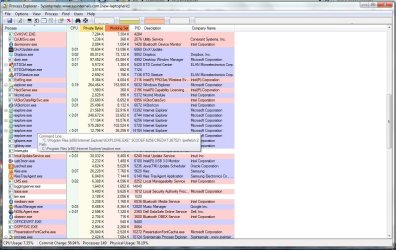
I had a customer this week with a similar problem, turmed out to be a rather nasty piece of spyware that had gotten by their antivirus, combofix, mbam, and spybot. My suggestion would be to download the program Process Explorer and run it. I will provide a link below. Once you have it running, hover over one of the dllhost entries listed in the program and a info box will pop up where it will show what called the dllhost, it will say something like " command line:" the c:\... etc.

I'll post a screenshot of what it should look like.

Here is the link to Process Explorer: Process Explorer

If you could post a screenshot of what file it shows is spawning the dllhost process we might be able to figure out how to stop it.
 

Attachments

  • process-explorer-screenshot.jpg
    process-explorer-screenshot.jpg
    140.1 KB · Views: 10

My Computer My Computer

At a glance

Win 7 x64Core I5
Computer type
PC/Desktop
Computer Manufacturer/Model Number
Dell
OS
Win 7 x64
CPU
Core I5
Here's the pic from process explorer. It does look like virus? Or some hidden program repeatedly accessing internet for spam. let me see if attaching this photo worked....

View attachment dllhostpic.docx
 

My Computer My Computer

At a glance

windows 7 home premium 64bit SP1i5-3317U @ 1.7 ghz4gbIntel HD Graphics 4000
Computer type
Laptop
Computer Manufacturer/Model Number
samsung series 9
OS
windows 7 home premium 64bit SP1
CPU
i5-3317U @ 1.7 ghz
Memory
4gb
Graphics Card(s)
Intel HD Graphics 4000
Hard Drives
SSD
Thanks for posting the screenshot. I would use another program to save the screenshot next time, like microsoft Paint and save it as a jpg. Then when you attach it to your post it will show up inline.

If you could, try hovering over a few of the other dllhost instances, the one you chose seems to be for the instance of Firefox you have open and on the duckduckgo search engine. Look for one where you see something like c:\users\... in the commandline part of the popup at the top.
 

My Computer My Computer

At a glance

Win 7 x64Core I5
Computer type
PC/Desktop
Computer Manufacturer/Model Number
Dell
OS
Win 7 x64
CPU
Core I5

My Computer My Computer

At a glance

W7 Pro SP1 64biti78GBIntel HD Graphics
Computer type
Laptop
Computer Manufacturer/Model Number
Employer provided Dell Latitude
OS
W7 Pro SP1 64bit
CPU
i7
Memory
8GB
Graphics Card(s)
Intel HD Graphics
Hard Drives
crappy SSD
Antivirus
Employer mandated Symantec Endpoint Protection
Browser
Pale Moon 64bit, IE11 64bit & Chrome 64bit
Back
Top