Solved Can't dual boot windows 7 with windows 8 ?

Esmeal

New member
Local time
1:50 PM
Messages
5
I just bought a new laptop with pre-installed Windows 8 . I tried to install windows 7 in the second partition so i can use both 7 & 8 . Used windows 7 64x DVD , i started the installation from windows 8 . It went well until restarting where i got two options "windows 8" or "windows setup rollback" which it stops at "starting windows" logo from windows 7 !! ... i tried to boot from the beginning from the dvd(second time with usb)..it didn't boot..instead i stuck again at "starting windows" logo. so i can't even boot from the dvd .

I disabled the Secure boot from the beginning ... i have been searching for a solution but nothing worked .

Do I have to delete all the partitions on the disk then install windows 7 ??..if i do...how to keep windows 8 (i don't have windows 8 DVD) ?? .... please notice i am not an expert in these things so please make it detailed.

if i can't even boot

i have Toshiba Satellite C855D

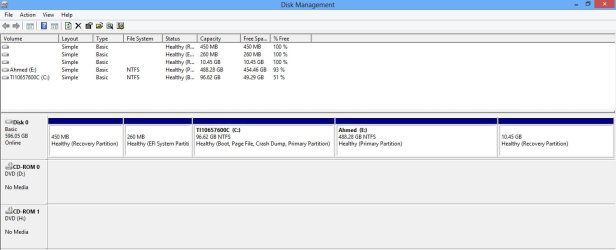
I have GPT drive and UEFI bios mode (don't know what either of that means but read it might be a problem).
 

My Computer My Computer

At a glance

Windows 8 x64 bitAMD A6
Computer type
PC/Desktop
Computer Manufacturer/Model Number
Toshiba
OS
Windows 8 x64 bit
CPU
AMD A6
What happens if you (try to) boot win8, so select windows 8 in bootmenu?
 

My Computer My Computer

At a glance

Microsoft Windows 7 Home Premium 64-bits 7601...Intel(R) Core(TM) i3 CPU M 370 @ 2.40GHz4,00 GBATI Mobility Radeon HD 5400 Series
Computer type
Laptop
Computer Manufacturer/Model Number
ACER ASPIRE 5742G
OS
Microsoft Windows 7 Home Premium 64-bits 7601 Multiprocessor Free Service Pack 1
CPU
Intel(R) Core(TM) i3 CPU M 370 @ 2.40GHz
Motherboard
Acer Aspire 5742G
Memory
4,00 GB
Graphics Card(s)
ATI Mobility Radeon HD 5400 Series
Sound Card
(1) AMD High Definition Audio Device (2) Realtek High Defi
Screen Resolution
1366 x 768 x 32 bits (4294967296 colors) @ 60 Hz
Hard Drives
WDC WD5000BEVT-22ZAT0

My Computer My Computer

At a glance

Microsoft Windows 7 Home Premium 64-bits 7601...Intel(R) Core(TM) i3 CPU M 370 @ 2.40GHz4,00 GBATI Mobility Radeon HD 5400 Series
Computer type
Laptop
Computer Manufacturer/Model Number
ACER ASPIRE 5742G
OS
Microsoft Windows 7 Home Premium 64-bits 7601 Multiprocessor Free Service Pack 1
CPU
Intel(R) Core(TM) i3 CPU M 370 @ 2.40GHz
Motherboard
Acer Aspire 5742G
Memory
4,00 GB
Graphics Card(s)
ATI Mobility Radeon HD 5400 Series
Sound Card
(1) AMD High Definition Audio Device (2) Realtek High Defi
Screen Resolution
1366 x 768 x 32 bits (4294967296 colors) @ 60 Hz
Hard Drives
WDC WD5000BEVT-22ZAT0
1) Downgrade to Windows 7.
Downgrade Windows 8 to Windows 7
Warning you must have the UEFI/BIOS firmware setting in Step Three set.

Make sure you read the NOTE at Step three.

2) If Using a USB Pen drive on a PC with a UEFI BIOS.
USB Pen drive need to be formatted to FAT32 as in
UEFI Bootable USB Flash Drive - Create in Windows
Take note of Step 11 for Windows 7.
Also you will need to use a USB 2.0 port, as there are no USB 3.0 drivers in Windows 7.
 

My Computer My Computer

At a glance

ME/XP/Vista/Win7
OS
ME/XP/Vista/Win7
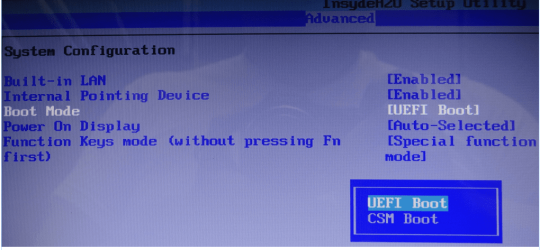
As Toshiba has no support for Windows 7 x64 install in UEFI mode, you need to install Windows 8 x64 & Windows 7 x64 in Legacy mode.

From Toshiba Support site.

How to enable CSM for a Toshiba.(Satellite Pro C870, Satellite Pro L830, Satellite Pro C850, Satellite Pro R950, Portege R930, Portege Z930)

Toshiba said:
To downgrade from a installed Windows 8 OS to a Windows 7 OS, using a Windows 7 recovery media, follow these steps:

1) Boot unit and press F2 to get into BIOS

2) Go to "Security" tab and disable "Safe Boot"

3) Go to "Advanced" tab, select "System Configuration" then change boot mode from "UEFI" to "CSM"

4) Press F10 to save changes and exit.

5) Boot unit from recovery media (Press F12 on bootup to boot from USB or DVD media)

Toshiba-003-2.PNG
 

My Computer My Computer

At a glance

ME/XP/Vista/Win7
OS
ME/XP/Vista/Win7
theog :
so I should switch from "UEFI" to "CSM" .. then try to install windows 7 from my dvd... Will i be able to log to windows 8 again after this change ... or do i have to install it again ??.... i don't have windows 8 DVD .

Kaktussoft :
yes ,windows 8 works fine
i have tried "Fast boot" disabled before .. didn't work .
 

My Computer My Computer

At a glance

Windows 8 x64 bitAMD A6
Computer type
PC/Desktop
Computer Manufacturer/Model Number
Toshiba
OS
Windows 8 x64 bit
CPU
AMD A6

My Computer My Computer

At a glance

Microsoft Windows 7 Home Premium 64-bits 7601...Intel(R) Core(TM) i3 CPU M 370 @ 2.40GHz4,00 GBATI Mobility Radeon HD 5400 Series
Computer type
Laptop
Computer Manufacturer/Model Number
ACER ASPIRE 5742G
OS
Microsoft Windows 7 Home Premium 64-bits 7601 Multiprocessor Free Service Pack 1
CPU
Intel(R) Core(TM) i3 CPU M 370 @ 2.40GHz
Motherboard
Acer Aspire 5742G
Memory
4,00 GB
Graphics Card(s)
ATI Mobility Radeon HD 5400 Series
Sound Card
(1) AMD High Definition Audio Device (2) Realtek High Defi
Screen Resolution
1366 x 768 x 32 bits (4294967296 colors) @ 60 Hz
Hard Drives
WDC WD5000BEVT-22ZAT0
i have seen this tutorial before
 

Attachments

  • Untitled.jpg
    Untitled.jpg
    56.6 KB · Views: 2

My Computer My Computer

At a glance

Windows 8 x64 bitAMD A6
Computer type
PC/Desktop
Computer Manufacturer/Model Number
Toshiba
OS
Windows 8 x64 bit
CPU
AMD A6
theog :
so I should switch from "UEFI" to "CSM" .. then try to install windows 7 from my dvd... Will i be able to log to windows 8 again after this change ... or do i have to install it again ??.... i don't have windows 8 DVD .

NO.
Windows 8 x64 & Windows 7 x64 both need to be install in Legacy mode.
 

My Computer My Computer

At a glance

ME/XP/Vista/Win7
OS
ME/XP/Vista/Win7
theog :
i read this
Create a Packard Bell Factory Default Backup in Windows 8
is a recovery media like that enough for re-installation of windows 8 ??....

will i lose the data on the third partition(the one that i won't install any windows on )??

Does make a difference which one to install first ??

sorry for the the many questions and thanks :)
 

My Computer My Computer

At a glance

Windows 8 x64 bitAMD A6
Computer type
PC/Desktop
Computer Manufacturer/Model Number
Toshiba
OS
Windows 8 x64 bit
CPU
AMD A6
theog :
i read this
Create a Packard Bell Factory Default Backup in Windows 8
is a recovery media like that enough for re-installation of windows 8 ??....

will i lose the data on the third partition(the one that i won't install any windows on )??

Does make a difference which one to install first ??

sorry for the the many questions and thanks :)


i have Toshiba Satellite C855D

You started with a Toshiba, now you have a Packard Bell??????????????????
 

My Computer My Computer

At a glance

ME/XP/Vista/Win7
OS
ME/XP/Vista/Win7
I am sorry :) ... i just wondered if there is something like that can help .... as i don't have a windows 8 dvd .
 

My Computer My Computer

At a glance

Windows 8 x64 bitAMD A6
Computer type
PC/Desktop
Computer Manufacturer/Model Number
Toshiba
OS
Windows 8 x64 bit
CPU
AMD A6
i have Toshiba Satellite C855D

   Information

We always assume you have made your Recovery Disks using the OEM manufacturer's Recovery Media Creator app the first day you had your new PC.
& made the Startup Repair CD.
http://www.eightforums.com/tutorials/5132-recovery-drive-create-usb-flash-drive-windows-8-a.html
http://www.eightforums.com/tutorials/2855-system-repair-disc-create-windows-8-a.html


You can make a Microsoft Recovery USB Drive
Recovery Drive - Create with USB Flash Drive in Windows 8

   Warning
Deleting the Recovery Partition is NOT RECOMMENDED


   Warning
I personally DO NOT RECOMMEND using this METHOD above, as of the ERRORS you may receive below with the Microsoft Recovery USB Drive.You would be best off using the OEM manufacturer's Recovery DVD's or Recovery USB drive.


I would recommend you making the OEM manufacturer's Recovery DVD's or USB drive.
How to make Toshiba Recovery disks.
Toshiba How-To: Create System Recovery Media DVDs on a Windows 8 Laptop - YouTube
Toshiba How-To: Understanding Windows 8 system recovery options - YouTube
Creating Recovery Media for Windows 8 - TOSHIBA FORUMS
http://cdgenp01.csd.toshiba.com/con.../detailed_specs/Satellite_Pro_C640-SP4015.pdf
Toshiba How-To: Create System Recovery Media on a USB Flash Drive - YouTube
Toshiba Satellite Pro C640/C650 with Windows 8, make recovery disc, page 68
http://cdgenp01.csd.toshiba.com/con...8349/GMAD00253010_SatProC640-C650_10Apr09.pdf

or
You can order the Microsoft official OEM Recovery disks from the OEM manufacturer's website.
Toshiba Service Portal - Laptop Recovery Media Services - Toshiba


The Windows Recovery USB drive & Recovery Partition can be very problematic, I recommend you also make a Windows System Image.

System Image - Create in Windows 8

Recovery Drive - Create with USB Flash Drive in Windows 8

System Repair Disc - Create in Windows 8

System Image Recovery - Restore Image on Computer in Windows 8

or
look for a 3rd party ,Backup software, which fully supports Windows 8, uEFI, GPT & Secure Boot.
Which is signed by Microsoft.
 

My Computer My Computer

At a glance

ME/XP/Vista/Win7
OS
ME/XP/Vista/Win7
theog :

will i lose the data on the third partition(the one that i won't install any windows on )??

Does make a difference which one to install first ??

sorry for the the many questions and thanks :)

You will loose all data on all partitions.
BIOS set up:
1) DISABLE Secure Boot.
2) Set OS boot to CSM.

Windows install:
To clean install:
1) Clean the HD Drive, using Step one in this tutorial:
http://www.sevenforums.com/tutorials/91339-ssd-hdd-optimize-windows-reinstallation.html
than first install Windows 7.
2) http://www.sevenforums.com/tutorials/1649-clean-install-windows-7-a.html?ltr=C
than install Windows 8.
3)Dual Boot Installation - Windows 8 and Windows 7 or Vista

You will need to buy Windows 7 & Product key, also a Windows 8 DVD.
 

My Computer My Computer

At a glance

ME/XP/Vista/Win7
OS
ME/XP/Vista/Win7
You should be able to disable Secure Boot to install WIn7 in UEFI mode to the partition you made there. I have done this several times on Win8 PC's to see how Win7 runs on them. You won't have access to Win8 unless you turn on Secure Boot. But at least you'll still have it hidden on the HDD in case you need to go back.

Of course as with any install you need to boot the installer to do this. I don't know why you would try to run it from another OS as installs are not done that way ever.
 
Back
Top