Solved Give VPC internet access without being able to access host's drives?

Jennifer1

New member
Local time
4:11 AM
Messages
4
Hi,

I've read several threads now and searched online, but am still somewhat unsure about a question I have. :confused:

Is it possible to give Virtual PC access to the internet for browsing or running a program/client that needs internet access, but not allow it to access the host's C:drive and folders?

I've found some articles that appear to say that it's possible, but they aren't very clear on how to implement it.

If my question is somewhat elementary I apologize, but I'd rather ask in advance before trying to set this up. Learned my lesson yesterday on just going for it when I almost turned my PC into a useless flower stand while trying to install 7 on a Windows 8 machine. :o

Thank in advance for any helpful tips,

Jennifer
 

My Computer My Computer

At a glance

Windows 7 64bitHP Pavilion p6-2437eg10GB DDR3-1600NVIDIA GeForce GT 640
Computer type
PC/Desktop
Computer Manufacturer/Model Number
HP
OS
Windows 7 64bit
CPU
HP Pavilion p6-2437eg
Motherboard
Joshua-H61-uATX
Memory
10GB DDR3-1600
Graphics Card(s)
NVIDIA GeForce GT 640
Hard Drives
1TB SATA
VM=virtual machine

Most VMs by default do not allow it to touch or see the hosts files or drives. (Kind of the whole point of a virtual machine.) This is something you would actually have to tell it to do.

Vmware player by default won't allow the VM to see the host drive. You would have to go into unity settings and enable it.

In addition, inside the vm you could set it up with a guest account or a limited user account for more lockdown. You could even run the virtual machine inside a guest account in windows, thus even if a breach occurred, it could not access the critical areas of the drive.

Example: If its a kiosk being used by multiple people I would do the following:
Host OS-guest account. Virtual machine-Run in guest account.
If a few users-limited account for host-limited account for VM.
 

My Computer My Computer

At a glance

Windows 10 ProAMD Ryzen 5 2400G Processor with Radeon RX Ve...G.SKILL Ripjaws V Series 16GB (2 x 8GB) 288-P...2047MB NVIDIA GeForce GTX 1060 6GB (EVGA)
Computer type
PC/Desktop
Computer Manufacturer/Model Number
Custom Built
OS
Windows 10 Pro
CPU
AMD Ryzen 5 2400G Processor with Radeon RX Vega 11 Graphics
Motherboard
ASRock X470 Master SLI/AC AM4 AMD Promontory X470 SATA 6Gb/s
Memory
G.SKILL Ripjaws V Series 16GB (2 x 8GB) 288-Pin DDR4 SDRAM D
Graphics Card(s)
2047MB NVIDIA GeForce GTX 1060 6GB (EVGA)
Sound Card
Motherboard Built in
Monitor(s) Displays
Acer R240HY bidx 23.8-Inch IPS HDMI DVI VGA (1920 x 1080) Wi
Screen Resolution
1920 x 1080
Hard Drives
1TB Sandisk SSD PLUS (Main drive)
500 GB Seagate 7200 RPM (Games)
500 GB Western Digital 7200 RPM (Virtual Machines)
PSU
CORSAIR TX Series TX650M 650W 80+ Gold Modular Power Supply
Case
CORSAIR CARBIDE SPEC-02 Mid-Tower Gaming Case, Red LED Fan
Cooling
220mm, two 120mm, and four 60mm fans
Keyboard
Wired Dell keyboard
Mouse
Wireless Logitech mouse
Internet Speed
250mb down, 30mb up
Antivirus
Panda Cloud Antivirus
Browser
Chrome-ish x64
Other Info
Your awesome for reading this.
Hi Andrew,

Awesome reply, this makes a lot of sense! Thank you for wording it the way you did! :)

Have a great one!
 

My Computer My Computer

At a glance

Windows 7 64bitHP Pavilion p6-2437eg10GB DDR3-1600NVIDIA GeForce GT 640
Computer type
PC/Desktop
Computer Manufacturer/Model Number
HP
OS
Windows 7 64bit
CPU
HP Pavilion p6-2437eg
Motherboard
Joshua-H61-uATX
Memory
10GB DDR3-1600
Graphics Card(s)
NVIDIA GeForce GT 640
Hard Drives
1TB SATA
In addition to andrew's great advice... I'll add that VMs can be frozen in time. Nothing that a user does will be saved. Any infections that users download will go away too :-)
 

My Computer My Computer

At a glance

W7 Pro SP1 64biti78GBIntel HD Graphics
Computer type
Laptop
Computer Manufacturer/Model Number
Employer provided Dell Latitude
OS
W7 Pro SP1 64bit
CPU
i7
Memory
8GB
Graphics Card(s)
Intel HD Graphics
Hard Drives
crappy SSD
Antivirus
Employer mandated Symantec Endpoint Protection
Browser
Pale Moon 64bit, IE11 64bit & Chrome 64bit
Thanks usernameissues, I cannot believe I forgot to include that.

Wow, I really can't believe I forgot to mention that....

Thanks :)

Just like He stated above, VMS can have snapshots and be easily restored to before a user even touched it. Making it very secure as well. You could even use Windows 7 previous versions feature on the actual vm file rolling it back as another way of doing this.

@Jennifer1 You are very welcome. Please post back here should you have any more questions at all.
Happy to help. If you want more advice or anything let me know in this thread.
 

My Computer My Computer

At a glance

Windows 10 ProAMD Ryzen 5 2400G Processor with Radeon RX Ve...G.SKILL Ripjaws V Series 16GB (2 x 8GB) 288-P...2047MB NVIDIA GeForce GTX 1060 6GB (EVGA)
Computer type
PC/Desktop
Computer Manufacturer/Model Number
Custom Built
OS
Windows 10 Pro
CPU
AMD Ryzen 5 2400G Processor with Radeon RX Vega 11 Graphics
Motherboard
ASRock X470 Master SLI/AC AM4 AMD Promontory X470 SATA 6Gb/s
Memory
G.SKILL Ripjaws V Series 16GB (2 x 8GB) 288-Pin DDR4 SDRAM D
Graphics Card(s)
2047MB NVIDIA GeForce GTX 1060 6GB (EVGA)
Sound Card
Motherboard Built in
Monitor(s) Displays
Acer R240HY bidx 23.8-Inch IPS HDMI DVI VGA (1920 x 1080) Wi
Screen Resolution
1920 x 1080
Hard Drives
1TB Sandisk SSD PLUS (Main drive)
500 GB Seagate 7200 RPM (Games)
500 GB Western Digital 7200 RPM (Virtual Machines)
PSU
CORSAIR TX Series TX650M 650W 80+ Gold Modular Power Supply
Case
CORSAIR CARBIDE SPEC-02 Mid-Tower Gaming Case, Red LED Fan
Cooling
220mm, two 120mm, and four 60mm fans
Keyboard
Wired Dell keyboard
Mouse
Wireless Logitech mouse
Internet Speed
250mb down, 30mb up
Antivirus
Panda Cloud Antivirus
Browser
Chrome-ish x64
Other Info
Your awesome for reading this.
VM=virtual machine

Most VMs by default do not allow it to touch or see the hosts files or drives. (Kind of the whole point of a virtual machine.) This is something you would actually have to tell it to do.
By default, most virtual machines allow guest machines to see the host.

To say that the whole point of a virtual machine is that it can't connect to host is one of the strangest things I have seen posted here at the Seven Forums, and very much untrue. In most cases virtual machines are especially meant to be part of an existing network. As the OP asks about a specific virtualization platform, Microsoft Windows Virtual PC, the XP Mode (designed for Virtual PC) is a good example: by default it is totally integrated into the host system allowing full access to its drives and devices (kind of the whole point, using your words), its main function being to offer a possibility to run legacy software or use legacy devices which would not be possible on Seven.

You could even run the virtual machine inside a guest account in windows, thus even if a breach occurred, it could not access the critical areas of the drive.

Example: If its a kiosk being used by multiple people I would do the following:
Host OS-guest account. Virtual machine-Run in guest account.
If a few users-limited account for host-limited account for VM.
First, if a vm user accessing host system is an issue, then using guest account is not an answer. It is simply too easy for the user to work around the restrictions of a guest account.

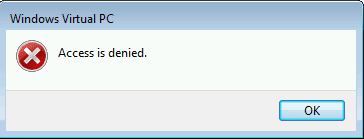
Secondly, as the OP asked about the Virtual PC, if you decide to use Guest account of the host to access your virtual machines and your desired guest system is Windows XP, remember that you cannot use the free Windows XP Mode as Guest account has no access to XP Mode on host giving an Access Denied message if it is tried to launch:

VPC_Guest_Access-Denied.png

In this case you need to install XP on a vm from your own install media, being logged in to host Guest account.

The easiest way to do what OP is asking is a three step procedure:
  1. Disable all sharing on host
  2. Set vm to belong a different workgroup than host
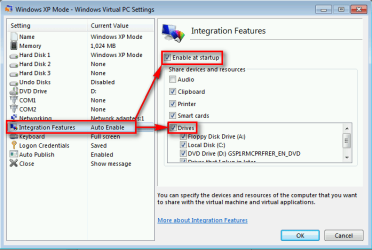
  3. Disable integration features on Virtual PC settings, either completely or at least for host drives:
    2013-10-18_060406.png
    (Screenshot from XP Mode settings. Virtual PC settings for all virtual machines are and look exactly the same.)
Point 3 above is alone enough in most cases, points 1 & 2 are for added security. However, as users (including Guest) can change these vm settings, it's quite easy to work around any restrictions.

Kari
 

My Computer My Computer

At a glance

Windows 10 Pro x64 EN-GB1.6 GHz Intel Core i7-720QM Processor6 GBATI Mobility Radeon HD 5850 Graphics
Computer type
Laptop
Computer Manufacturer/Model Number
HP ENVY 17-1150eg
OS
Windows 10 Pro x64 EN-GB
CPU
1.6 GHz Intel Core i7-720QM Processor
Memory
6 GB
Graphics Card(s)
ATI Mobility Radeon HD 5850 Graphics
Sound Card
Beats sound system with integrated subwoofer
Monitor(s) Displays
17" laptop display, 22" LED and 32" Full HD TV through HDMI
Screen Resolution
1600*900 (1), 1920*1080 (2&3)
Hard Drives
Internal: 2 x 500 GB SATA Hard Disk Drive 7200 rpm
External: 2TB for backups, 3TB USB3 network drive for media
Cooling
As Envy runs a bit warm, I have it on a Cooler Master pad
Keyboard
Logitech diNovo Media Desktop Laser (bluetooth)
Mouse
Logitech Performance Mouse MX
Internet Speed
50/10 Mbps VDSL
Antivirus
Windows Defender 4.3.9431.0
Browser
Maxthon 3.5.2., IE11
@ kari

Really? Maybe its because I use vmware player. But I know in vmware player its separate from the host. I have to force it from vmware player to see the hosts drives, or specifically set it up that way.

I do know about virtual pc and xp mode, I do understand its meant to share drives and everything as xp mode integrates applications within seven.

While xp mode is technically a virtual machine, (it is) I do not see it that way. XP mode is more of a program that links to a VM which allows applications to integrate into seven using a virtual machine. It is a virtual machine, but its not at the same time. I think of a virtual machine as being a completely separate environment OS running without being hooked up to the host files directaly unless given permission or set up to do so. That's my definition and use of a virtual machine.

My statement was on vmware player. I don't see anywhere the user speccifying them using xp mode. They wanted to use a virtual machine, so i suggested vmware player and spoke about it. I was not making this statement about all VMS

I know and understand you will have to specify for some vm's that you need to have them separated from the host. Some of them by default do allow them to be connected to host.

In vmware player you must install vmware tools in order to even then set up or allow access to the host drives.

When reading up on VMs I get this information:

System virtual machines[edit]

System virtual machine advantages:
multiple OS environments can co-exist on the same computer, in strong isolation from each other
the virtual machine can provide an instruction set architecture (ISA) that is somewhat different from that of the real machine
application provisioning, maintenance, high availability and disaster recovery[3]
The main disadvantages of VMs are:
a virtual machine is less efficient than a real machine when it accesses the hardware indirectly
when multiple VMs are concurrently running on the same physical host, each VM may exhibit a varying and unstable performance (Speed of Execution, and not results), which highly depends on the workload imposed on the system by other VMs, unless proper techniques are used for temporal isolation among virtual machines.

http://searchservervirtualization.techtarget.com/definition/virtual-machine

http://pubs.vmware.com/vsphere-4-es..._systems/c_security_and_virtual_machines.html

http://www.forensicfocus.com/downloads/virtual-machines-forensics-analysis.pdf


Not trying to have a debate, but I would love more information. If I am completely wrong, great. Please send me some links you come across.
 
Last edited:

My Computer My Computer

At a glance

Windows 10 ProAMD Ryzen 5 2400G Processor with Radeon RX Ve...G.SKILL Ripjaws V Series 16GB (2 x 8GB) 288-P...2047MB NVIDIA GeForce GTX 1060 6GB (EVGA)
Computer type
PC/Desktop
Computer Manufacturer/Model Number
Custom Built
OS
Windows 10 Pro
CPU
AMD Ryzen 5 2400G Processor with Radeon RX Vega 11 Graphics
Motherboard
ASRock X470 Master SLI/AC AM4 AMD Promontory X470 SATA 6Gb/s
Memory
G.SKILL Ripjaws V Series 16GB (2 x 8GB) 288-Pin DDR4 SDRAM D
Graphics Card(s)
2047MB NVIDIA GeForce GTX 1060 6GB (EVGA)
Sound Card
Motherboard Built in
Monitor(s) Displays
Acer R240HY bidx 23.8-Inch IPS HDMI DVI VGA (1920 x 1080) Wi
Screen Resolution
1920 x 1080
Hard Drives
1TB Sandisk SSD PLUS (Main drive)
500 GB Seagate 7200 RPM (Games)
500 GB Western Digital 7200 RPM (Virtual Machines)
PSU
CORSAIR TX Series TX650M 650W 80+ Gold Modular Power Supply
Case
CORSAIR CARBIDE SPEC-02 Mid-Tower Gaming Case, Red LED Fan
Cooling
220mm, two 120mm, and four 60mm fans
Keyboard
Wired Dell keyboard
Mouse
Wireless Logitech mouse
Internet Speed
250mb down, 30mb up
Antivirus
Panda Cloud Antivirus
Browser
Chrome-ish x64
Other Info
Your awesome for reading this.
It does not sound like VPC is the way to go for this OP.

VirtualBox prevents access to the host drive by default. To keep it that way, the user account within the VM should be a standard user or the guest account. Those users cannot install the additional drivers needed to get to the host drive (unless you share an admin password). VirtualBox's default settings also prevents accessing the host's CD/DVD and USB hardware. This prevents booting the VM to those (or to an ISO) and blanking out the admin account password.
 

My Computer My Computer

At a glance

W7 Pro SP1 64biti78GBIntel HD Graphics
Computer type
Laptop
Computer Manufacturer/Model Number
Employer provided Dell Latitude
OS
W7 Pro SP1 64bit
CPU
i7
Memory
8GB
Graphics Card(s)
Intel HD Graphics
Hard Drives
crappy SSD
Antivirus
Employer mandated Symantec Endpoint Protection
Browser
Pale Moon 64bit, IE11 64bit & Chrome 64bit
It does not sound like VPC is the way to go for this OP.

.....

That is what I was saying in my original comment. Xp mode is way different compared to a standard Virtual Machine. XP mode is nothing like a true VM
 

My Computer My Computer

At a glance

Windows 10 ProAMD Ryzen 5 2400G Processor with Radeon RX Ve...G.SKILL Ripjaws V Series 16GB (2 x 8GB) 288-P...2047MB NVIDIA GeForce GTX 1060 6GB (EVGA)
Computer type
PC/Desktop
Computer Manufacturer/Model Number
Custom Built
OS
Windows 10 Pro
CPU
AMD Ryzen 5 2400G Processor with Radeon RX Vega 11 Graphics
Motherboard
ASRock X470 Master SLI/AC AM4 AMD Promontory X470 SATA 6Gb/s
Memory
G.SKILL Ripjaws V Series 16GB (2 x 8GB) 288-Pin DDR4 SDRAM D
Graphics Card(s)
2047MB NVIDIA GeForce GTX 1060 6GB (EVGA)
Sound Card
Motherboard Built in
Monitor(s) Displays
Acer R240HY bidx 23.8-Inch IPS HDMI DVI VGA (1920 x 1080) Wi
Screen Resolution
1920 x 1080
Hard Drives
1TB Sandisk SSD PLUS (Main drive)
500 GB Seagate 7200 RPM (Games)
500 GB Western Digital 7200 RPM (Virtual Machines)
PSU
CORSAIR TX Series TX650M 650W 80+ Gold Modular Power Supply
Case
CORSAIR CARBIDE SPEC-02 Mid-Tower Gaming Case, Red LED Fan
Cooling
220mm, two 120mm, and four 60mm fans
Keyboard
Wired Dell keyboard
Mouse
Wireless Logitech mouse
Internet Speed
250mb down, 30mb up
Antivirus
Panda Cloud Antivirus
Browser
Chrome-ish x64
Other Info
Your awesome for reading this.
It does not sound like VPC is the way to go for this OP.

.....

That is what I was saying in my original comment. Xp mode is way different compared to a standard Virtual Machine. XP mode is nothing like a true VM
Honestly, somehow I was no longer surprised to read this comment.

Windows XP Mode is a full-blooded, standard virtual machine "for Windows Virtual PC containing a pre-installed, licensed copy of Windows XP Professional with Service Pack 3 as its guest OS" (source). It is in no way different than any other downloadable virtual disk (virtual appliance) containing a pre-installed operating system like for instance those pre-installed vhd's you can download to VirtualBox (VirtualBox Virtual Appliances | VirtualBoxImages.com).

XP Mode is not "way different compared to standard virtual machine". It is exactly the same than Windows XP installed to a vm from user's own install media, the only difference being it is pre-installed to a vhd compatible with Microsoft Virtual PC.

As the Windows XP Mode can easily be ported for instance to VMware, I am really wondering what you think would be the difference if let's say you have an XP vm installed from your own install media on VMware and that's according to you a "standard" vm, then you import the XP Mode to the same VMware and it's not standard?

For the OP: As I do not know about which OS you want to use on a Virtual PC guest, and as the Virtual PC is the virtualization software you were asking about, I just used XP Mode as an example on how a Virtual PC vm works. My answer is however valid whatever guest you want to install on Virtual PC, for the Windows XP Mode is really a standard Virtual PC vm, behaving exactly the same way as any other guest OS you install on Virtual PC, be it another XP from own install media, Seven or Vista or whatever.

Kari
 

My Computer My Computer

At a glance

Windows 10 Pro x64 EN-GB1.6 GHz Intel Core i7-720QM Processor6 GBATI Mobility Radeon HD 5850 Graphics
Computer type
Laptop
Computer Manufacturer/Model Number
HP ENVY 17-1150eg
OS
Windows 10 Pro x64 EN-GB
CPU
1.6 GHz Intel Core i7-720QM Processor
Memory
6 GB
Graphics Card(s)
ATI Mobility Radeon HD 5850 Graphics
Sound Card
Beats sound system with integrated subwoofer
Monitor(s) Displays
17" laptop display, 22" LED and 32" Full HD TV through HDMI
Screen Resolution
1600*900 (1), 1920*1080 (2&3)
Hard Drives
Internal: 2 x 500 GB SATA Hard Disk Drive 7200 rpm
External: 2TB for backups, 3TB USB3 network drive for media
Cooling
As Envy runs a bit warm, I have it on a Cooler Master pad
Keyboard
Logitech diNovo Media Desktop Laser (bluetooth)
Mouse
Logitech Performance Mouse MX
Internet Speed
50/10 Mbps VDSL
Antivirus
Windows Defender 4.3.9431.0
Browser
Maxthon 3.5.2., IE11
Install vmware player or virtual box. You would see they do not access the hosts file system by default.
These are true VM's.

Xp mode is a virtual machine, yes. Its runs a virtual copy of xp pro in a virtual environment. Yet by default, it connects the vm to the hosts files and drives. That is the whole point of xp mode, to install programs in it, and then have them linked to seven, so that when you launch the program, it launches it in xp mode but shows it on sevens desktop.
Using xp mode, you could use it entirely without ever seeing the virtual machine.

Real VM programs are separated (isolated) from the host OS unless you tell it to do so otherwise.
This is a real virtual environment. XP mode is not a real complete virtual environment.

This is exactly why I linked to vmware player in my first response, as I do not consider xp mode to be a true VM. The sole reason for xp modes purpose and existence is so that Microsoft could get Businesses to upgrade to Windows 7 and yet still use older applications until they had time to move over. It was not designed with security in mind, nor was it designed to be technical. Its supposed to be easy to install, and use so that deploying it on a company network is easy and less frustrating. This is also the reason it was xp pro that was included so that Group policy was supported as well, setting those to the company standards and GPOs.

I am sure you know all of this.
I feel like we are butting heads here. For that I am sorry. I mean no harm or disrespect. I am just trying to get my point across that respected virtual machine programs and solutions are much diffrent then Microsoft's solutions. They have completely different goals.
Microsoft's is for backwards compatibility, vmware and virtual box are about security in business environments as well as isoloation and easy rollback snapshots. They are for testing beds, running virtual servers (pro versions), etc.

This is also why you notice that xp mode runs a lot slower in performance too compared to a real VM program like virtual box or vmware player. Its because those programs have accelerated graphics, and thus better performance. They can even run AERO and games. Try doing that on Microsoft's virtual PC or Xp mode.

I agreed with the sources you linked me to. They are not wrong. This information I already know.

As the Windows XP Mode can easily be ported for instance to VMware, I am really wondering what you think would be the difference if let's say you have an XP vm installed from your own install media on VMware and that's according to you a "standard" vm, then you import the XP Mode to the same VMware and it's not standard?

Nope its not. Because Virtual PC is not designed with security in mind. And it by default shares with the host. (That's what it was made to do.)
Virtual box and vmware do not do this unless told to.
In fact, I have done just that. I converted xp mode to vmware, and it now could not access my host files or drives. If desired, I could set that up. But its not the default. They do share the same network connection, no disagreeing with you there.


http://arstechnica.com/information-technology/2010/01/windows-xp-mode/

http://www.pcworld.com/article/181274/windows_7_what_you_should_know_about_xp_mode.html

http://www.zdnet.com/blog/bott/why-all-the-fuss-over-xp-mode/896

http://forums.lenovo.com/t5/Windows-7-Knowledge-Base/What-is-XP-mode-and-how-do-I-use-it/ta-p/234893
 
Last edited:

My Computer My Computer

At a glance

Windows 10 ProAMD Ryzen 5 2400G Processor with Radeon RX Ve...G.SKILL Ripjaws V Series 16GB (2 x 8GB) 288-P...2047MB NVIDIA GeForce GTX 1060 6GB (EVGA)
Computer type
PC/Desktop
Computer Manufacturer/Model Number
Custom Built
OS
Windows 10 Pro
CPU
AMD Ryzen 5 2400G Processor with Radeon RX Vega 11 Graphics
Motherboard
ASRock X470 Master SLI/AC AM4 AMD Promontory X470 SATA 6Gb/s
Memory
G.SKILL Ripjaws V Series 16GB (2 x 8GB) 288-Pin DDR4 SDRAM D
Graphics Card(s)
2047MB NVIDIA GeForce GTX 1060 6GB (EVGA)
Sound Card
Motherboard Built in
Monitor(s) Displays
Acer R240HY bidx 23.8-Inch IPS HDMI DVI VGA (1920 x 1080) Wi
Screen Resolution
1920 x 1080
Hard Drives
1TB Sandisk SSD PLUS (Main drive)
500 GB Seagate 7200 RPM (Games)
500 GB Western Digital 7200 RPM (Virtual Machines)
PSU
CORSAIR TX Series TX650M 650W 80+ Gold Modular Power Supply
Case
CORSAIR CARBIDE SPEC-02 Mid-Tower Gaming Case, Red LED Fan
Cooling
220mm, two 120mm, and four 60mm fans
Keyboard
Wired Dell keyboard
Mouse
Wireless Logitech mouse
Internet Speed
250mb down, 30mb up
Antivirus
Panda Cloud Antivirus
Browser
Chrome-ish x64
Other Info
Your awesome for reading this.
You really do not get it?

The OP asked about how to do something on a specific virtualization platform, Microsoft's Virtual PC. You told her "no worries, VMware Player does that for you". It's like if the OP would have asked how to run a batch of commands on Windows command line and you had told her how easy it is to do on Linux terminal. Apples and oranges.

Running a vm using a Guest account both on host and guest is IMO not a good answer to OP's issue as long as we are not using hypervisor virtualization. Both in VirtualBox and VMware the restrictions are too easy to work around. More important, the OP was asking about Virtual PC, not VirtualBox or VMware.

Kari
 

My Computer My Computer

At a glance

Windows 10 Pro x64 EN-GB1.6 GHz Intel Core i7-720QM Processor6 GBATI Mobility Radeon HD 5850 Graphics
Computer type
Laptop
Computer Manufacturer/Model Number
HP ENVY 17-1150eg
OS
Windows 10 Pro x64 EN-GB
CPU
1.6 GHz Intel Core i7-720QM Processor
Memory
6 GB
Graphics Card(s)
ATI Mobility Radeon HD 5850 Graphics
Sound Card
Beats sound system with integrated subwoofer
Monitor(s) Displays
17" laptop display, 22" LED and 32" Full HD TV through HDMI
Screen Resolution
1600*900 (1), 1920*1080 (2&3)
Hard Drives
Internal: 2 x 500 GB SATA Hard Disk Drive 7200 rpm
External: 2TB for backups, 3TB USB3 network drive for media
Cooling
As Envy runs a bit warm, I have it on a Cooler Master pad
Keyboard
Logitech diNovo Media Desktop Laser (bluetooth)
Mouse
Logitech Performance Mouse MX
Internet Speed
50/10 Mbps VDSL
Antivirus
Windows Defender 4.3.9431.0
Browser
Maxthon 3.5.2., IE11
Yes. They stated virtual pc. Yes. Its possible to run Microsoft's Virtual PC without allowing it to access the host drives.
Yes it can browse the internet.

She said Clients. Clients want good speed in what they are doing. Microsofts virtual pc lacks gpu acceleration.
Doing anything in there is going to be slow, especially browsing the web.

This is why I stated what I suggested. In no way did I tell them to NOT use Microsoft's virtual PC. I offered my advice. They can certainly use it, and they can also use vmware player. If they really wanted to use virtual pc they would have stated that again. They just said virtual pc as well. Not Microsofts virtual PC. I have seen users just say virtual pc when talking about vmware player or virtual box. To me that is not specifically saying hey I want to use xp mode or something.


I also said "most vms" not all. I did not say all vms by default not touch drives or files.
I offered an example of a vm program that by default, does what they wanted.

Ether way the user got helped. And thats what we do. They will get updates to this thread. If the user was not happy with my answer, I think they would specify what about Microsoft virtual pc?

I apologize for any frustration I caused you.
 

My Computer My Computer

At a glance

Windows 10 ProAMD Ryzen 5 2400G Processor with Radeon RX Ve...G.SKILL Ripjaws V Series 16GB (2 x 8GB) 288-P...2047MB NVIDIA GeForce GTX 1060 6GB (EVGA)
Computer type
PC/Desktop
Computer Manufacturer/Model Number
Custom Built
OS
Windows 10 Pro
CPU
AMD Ryzen 5 2400G Processor with Radeon RX Vega 11 Graphics
Motherboard
ASRock X470 Master SLI/AC AM4 AMD Promontory X470 SATA 6Gb/s
Memory
G.SKILL Ripjaws V Series 16GB (2 x 8GB) 288-Pin DDR4 SDRAM D
Graphics Card(s)
2047MB NVIDIA GeForce GTX 1060 6GB (EVGA)
Sound Card
Motherboard Built in
Monitor(s) Displays
Acer R240HY bidx 23.8-Inch IPS HDMI DVI VGA (1920 x 1080) Wi
Screen Resolution
1920 x 1080
Hard Drives
1TB Sandisk SSD PLUS (Main drive)
500 GB Seagate 7200 RPM (Games)
500 GB Western Digital 7200 RPM (Virtual Machines)
PSU
CORSAIR TX Series TX650M 650W 80+ Gold Modular Power Supply
Case
CORSAIR CARBIDE SPEC-02 Mid-Tower Gaming Case, Red LED Fan
Cooling
220mm, two 120mm, and four 60mm fans
Keyboard
Wired Dell keyboard
Mouse
Wireless Logitech mouse
Internet Speed
250mb down, 30mb up
Antivirus
Panda Cloud Antivirus
Browser
Chrome-ish x64
Other Info
Your awesome for reading this.
Back
Top