How can I change sort order for "Search Programs and files" results?

ship691

New member
Member
VIP
Local time
12:42 AM
Messages
136
How can I change sort order for "Search Programs and files" results?

Hi

How do I get the search box "search programs and files" (i.e. the one above the Start button) to sort the results within each section by DATE, rather than by name?

Note I do NOT mean the search top right in Windows Explorer, which fwiw, is already working nicely in date order!

Clue:
I have installed Classic Shell but I read a thread saying that it wont have touched this.

J


EDIT: I am told that the files listed are ranked partly by frequency of use. And I am now wondering is this is data which my CCleaner utility is deleting. Either way the sort order have become VERY much less useful in the last couple of weeks. Any thoughts?
 
Last edited:

My Computer My Computer

At a glance

Windows 7 x64 Professional (SP1)Intel Core i5 CPU 750 @2.67GHz8GBATI Radeon HD 5700 series
Computer type
PC/Desktop
Computer Manufacturer/Model Number
custom
OS
Windows 7 x64 Professional (SP1)
CPU
Intel Core i5 CPU 750 @2.67GHz
Motherboard
Intel
Memory
8GB
Graphics Card(s)
ATI Radeon HD 5700 series
Hard Drives
INTEL SSD ATA 256GB
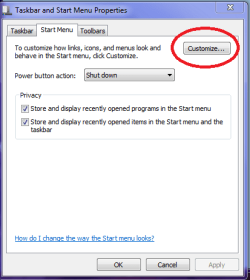
Hiyya ship mate I just went to Start > right clicked on it > Properties > Customise > there is a drop down list in there I don't know if that is of any help??
 

Attachments

  • START MENU1.PNG
    START MENU1.PNG
    10.4 KB · Views: 58
  • START MENU.PNG
    START MENU.PNG
    13.4 KB · Views: 59

My Computer My Computer

At a glance

Desk1 7 Home Prem / Desk2 10 Pro / Main lap A...Desk1 i5 3750K / Laptop i7 GTX 860M / Desk2 i...Desk1 8GB (1866) / Desk2 16GB (1333) / Laptop...Desk 1& 2NVidia GTX 650 & Laptops on board Intel
Computer type
PC/Desktop
Computer Manufacturer/Model Number
Own build (new) Desk1 / Asus ROG Win 7 / Desk2 1st build
OS
Desk1 7 Home Prem / Desk2 10 Pro / Main lap Asus ROG 10 Pro 2 laptop Toshiba 7 Pro Asus P2520 7 & 10
CPU
Desk1 i5 3750K / Laptop i7 GTX 860M / Desk2 i5 2500
Motherboard
Desk1 Asus P877-V / Desk2 Gigabyte H67 UD3H / Laptop ?
Memory
Desk1 8GB (1866) / Desk2 16GB (1333) / Laptop 8Gb DDR3
Graphics Card(s)
Desk 1& 2NVidia GTX 650 & Laptops on board Intel
Sound Card
Desk 1 & 2 -XONAR DG Realtek High Def audio Laptop
Monitor(s) Displays
Desk 1 Benq HD 2450 / Desk2 Philips 24" / Laptop 17.5"
Screen Resolution
1920x1080 D1 & D2 & Laptop 1
Hard Drives
Desk1 Samsung 120GB 830 SSD
Asus ROG 256GB 850 Pro SSD
Desk2 Samsung 840 256 SSD
Toshiba 120GB EVO
PSU
Desk 1 Corsair HX 1050/ Laptop ? / Desk 2 Corsair HX 650
Case
Desk 1 Cooler HAF XM ? Toshiba laptop / Desk2 Coolermaster
Cooling
Fans on all Desk1 -2 Desk2 - all Coolermasters 5 Laptop ?
Keyboard
Desk 1 MS Sidewinder X6 Desk 2 MS Sidewinder X 4
Mouse
Desk 1&2 - Gigabyte MS 900 gamer - laptop - Logitec wireless
Internet Speed
ADSL2+
Other Info
One other Desktop (tester) and spare Toshba laptop both with SSD's
Running Kaspersky 2016 ISS on all machines config'd identically
Logitec audio stereo systems on each machine (x3)
Canon MG5250MFC
Router/modem TP-Link running WPA2SK
Er no because I have Classic Shell installed I get a different Start button. If I right click on it one of the options is "Settings"... and then the options are very different from your screenshots.

Either way, to get clear, what I'm trying to do is simply to make the windows dynamic search sort things within their sections by date modified, not by name!
 

My Computer My Computer

At a glance

Windows 7 x64 Professional (SP1)Intel Core i5 CPU 750 @2.67GHz8GBATI Radeon HD 5700 series
Computer type
PC/Desktop
Computer Manufacturer/Model Number
custom
OS
Windows 7 x64 Professional (SP1)
CPU
Intel Core i5 CPU 750 @2.67GHz
Motherboard
Intel
Memory
8GB
Graphics Card(s)
ATI Radeon HD 5700 series
Hard Drives
INTEL SSD ATA 256GB
Hmm I have Classic Shell on my desktop 8 machine and I could find what I did now I have just clicked on Start > Programs > right click on it > Properties there was some thing about listings or some thing in there.
Sorry but have to dash - eye surgery today won't be able to answer before tomorrow as I will only have my 8 laptop with me ans it has Stardock but could be something in there. .

Oh O opted for the 7 Start up in the click on the Start button too.
 

My Computer My Computer

At a glance

Desk1 7 Home Prem / Desk2 10 Pro / Main lap A...Desk1 i5 3750K / Laptop i7 GTX 860M / Desk2 i...Desk1 8GB (1866) / Desk2 16GB (1333) / Laptop...Desk 1& 2NVidia GTX 650 & Laptops on board Intel
Computer type
PC/Desktop
Computer Manufacturer/Model Number
Own build (new) Desk1 / Asus ROG Win 7 / Desk2 1st build
OS
Desk1 7 Home Prem / Desk2 10 Pro / Main lap Asus ROG 10 Pro 2 laptop Toshiba 7 Pro Asus P2520 7 & 10
CPU
Desk1 i5 3750K / Laptop i7 GTX 860M / Desk2 i5 2500
Motherboard
Desk1 Asus P877-V / Desk2 Gigabyte H67 UD3H / Laptop ?
Memory
Desk1 8GB (1866) / Desk2 16GB (1333) / Laptop 8Gb DDR3
Graphics Card(s)
Desk 1& 2NVidia GTX 650 & Laptops on board Intel
Sound Card
Desk 1 & 2 -XONAR DG Realtek High Def audio Laptop
Monitor(s) Displays
Desk 1 Benq HD 2450 / Desk2 Philips 24" / Laptop 17.5"
Screen Resolution
1920x1080 D1 & D2 & Laptop 1
Hard Drives
Desk1 Samsung 120GB 830 SSD
Asus ROG 256GB 850 Pro SSD
Desk2 Samsung 840 256 SSD
Toshiba 120GB EVO
PSU
Desk 1 Corsair HX 1050/ Laptop ? / Desk 2 Corsair HX 650
Case
Desk 1 Cooler HAF XM ? Toshiba laptop / Desk2 Coolermaster
Cooling
Fans on all Desk1 -2 Desk2 - all Coolermasters 5 Laptop ?
Keyboard
Desk 1 MS Sidewinder X6 Desk 2 MS Sidewinder X 4
Mouse
Desk 1&2 - Gigabyte MS 900 gamer - laptop - Logitec wireless
Internet Speed
ADSL2+
Other Info
One other Desktop (tester) and spare Toshba laptop both with SSD's
Running Kaspersky 2016 ISS on all machines config'd identically
Logitec audio stereo systems on each machine (x3)
Canon MG5250MFC
Router/modem TP-Link running WPA2SK
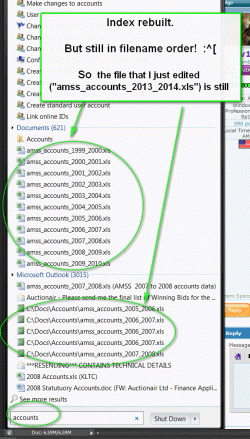
It now seems that installing Classic Shell does nasty things to the order of results that result from using the Search box (i.e. the one just above the Start Button).

Specifically within the "Documents" section, the results seem to be sorted purely by name, rather than Date Modified. Bl**dy irritating. And almost enough to make me uninstall Classic Shell completely.
 

My Computer My Computer

At a glance

Windows 7 x64 Professional (SP1)Intel Core i5 CPU 750 @2.67GHz8GBATI Radeon HD 5700 series
Computer type
PC/Desktop
Computer Manufacturer/Model Number
custom
OS
Windows 7 x64 Professional (SP1)
CPU
Intel Core i5 CPU 750 @2.67GHz
Motherboard
Intel
Memory
8GB
Graphics Card(s)
ATI Radeon HD 5700 series
Hard Drives
INTEL SSD ATA 256GB
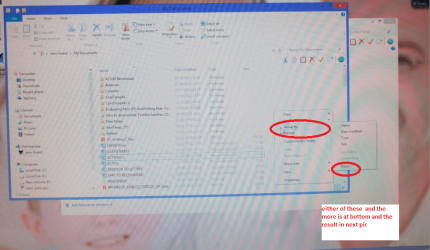
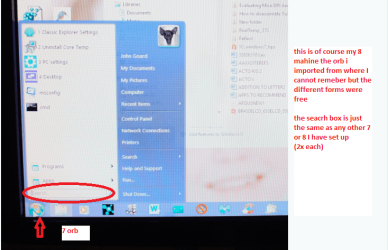
Ship I don't quite get what you mean I get this on my 8 machine sorry poor quality as I had to use camera.
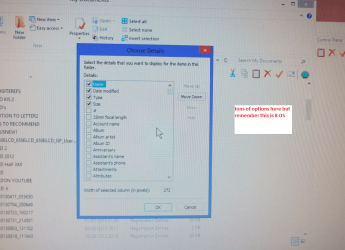
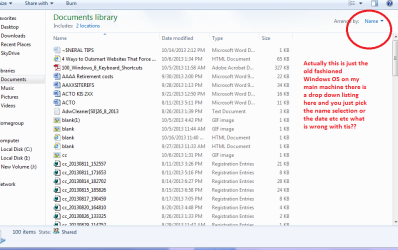
Damn it the attachment upload is not working I will send when i find the problem but essentially I go Start > Documents > right click on any area of that screen > sort or name by > pick the one you want or you can go to More > and it gives you a large drop down list of options:)
 

My Computer My Computer

At a glance

Desk1 7 Home Prem / Desk2 10 Pro / Main lap A...Desk1 i5 3750K / Laptop i7 GTX 860M / Desk2 i...Desk1 8GB (1866) / Desk2 16GB (1333) / Laptop...Desk 1& 2NVidia GTX 650 & Laptops on board Intel
Computer type
PC/Desktop
Computer Manufacturer/Model Number
Own build (new) Desk1 / Asus ROG Win 7 / Desk2 1st build
OS
Desk1 7 Home Prem / Desk2 10 Pro / Main lap Asus ROG 10 Pro 2 laptop Toshiba 7 Pro Asus P2520 7 & 10
CPU
Desk1 i5 3750K / Laptop i7 GTX 860M / Desk2 i5 2500
Motherboard
Desk1 Asus P877-V / Desk2 Gigabyte H67 UD3H / Laptop ?
Memory
Desk1 8GB (1866) / Desk2 16GB (1333) / Laptop 8Gb DDR3
Graphics Card(s)
Desk 1& 2NVidia GTX 650 & Laptops on board Intel
Sound Card
Desk 1 & 2 -XONAR DG Realtek High Def audio Laptop
Monitor(s) Displays
Desk 1 Benq HD 2450 / Desk2 Philips 24" / Laptop 17.5"
Screen Resolution
1920x1080 D1 & D2 & Laptop 1
Hard Drives
Desk1 Samsung 120GB 830 SSD
Asus ROG 256GB 850 Pro SSD
Desk2 Samsung 840 256 SSD
Toshiba 120GB EVO
PSU
Desk 1 Corsair HX 1050/ Laptop ? / Desk 2 Corsair HX 650
Case
Desk 1 Cooler HAF XM ? Toshiba laptop / Desk2 Coolermaster
Cooling
Fans on all Desk1 -2 Desk2 - all Coolermasters 5 Laptop ?
Keyboard
Desk 1 MS Sidewinder X6 Desk 2 MS Sidewinder X 4
Mouse
Desk 1&2 - Gigabyte MS 900 gamer - laptop - Logitec wireless
Internet Speed
ADSL2+
Other Info
One other Desktop (tester) and spare Toshba laptop both with SSD's
Running Kaspersky 2016 ISS on all machines config'd identically
Logitec audio stereo systems on each machine (x3)
Canon MG5250MFC
Router/modem TP-Link running WPA2SK
Trying again from my tester machine.
 

Attachments

  • CS1.PNG
    CS1.PNG
    135.7 KB · Views: 40
  • CS2.PNG
    CS2.PNG
    351.3 KB · Views: 4
  • CS3.PNG
    CS3.PNG
    370.7 KB · Views: 3

My Computer My Computer

At a glance

Desk1 7 Home Prem / Desk2 10 Pro / Main lap A...Desk1 i5 3750K / Laptop i7 GTX 860M / Desk2 i...Desk1 8GB (1866) / Desk2 16GB (1333) / Laptop...Desk 1& 2NVidia GTX 650 & Laptops on board Intel
Computer type
PC/Desktop
Computer Manufacturer/Model Number
Own build (new) Desk1 / Asus ROG Win 7 / Desk2 1st build
OS
Desk1 7 Home Prem / Desk2 10 Pro / Main lap Asus ROG 10 Pro 2 laptop Toshiba 7 Pro Asus P2520 7 & 10
CPU
Desk1 i5 3750K / Laptop i7 GTX 860M / Desk2 i5 2500
Motherboard
Desk1 Asus P877-V / Desk2 Gigabyte H67 UD3H / Laptop ?
Memory
Desk1 8GB (1866) / Desk2 16GB (1333) / Laptop 8Gb DDR3
Graphics Card(s)
Desk 1& 2NVidia GTX 650 & Laptops on board Intel
Sound Card
Desk 1 & 2 -XONAR DG Realtek High Def audio Laptop
Monitor(s) Displays
Desk 1 Benq HD 2450 / Desk2 Philips 24" / Laptop 17.5"
Screen Resolution
1920x1080 D1 & D2 & Laptop 1
Hard Drives
Desk1 Samsung 120GB 830 SSD
Asus ROG 256GB 850 Pro SSD
Desk2 Samsung 840 256 SSD
Toshiba 120GB EVO
PSU
Desk 1 Corsair HX 1050/ Laptop ? / Desk 2 Corsair HX 650
Case
Desk 1 Cooler HAF XM ? Toshiba laptop / Desk2 Coolermaster
Cooling
Fans on all Desk1 -2 Desk2 - all Coolermasters 5 Laptop ?
Keyboard
Desk 1 MS Sidewinder X6 Desk 2 MS Sidewinder X 4
Mouse
Desk 1&2 - Gigabyte MS 900 gamer - laptop - Logitec wireless
Internet Speed
ADSL2+
Other Info
One other Desktop (tester) and spare Toshba laptop both with SSD's
Running Kaspersky 2016 ISS on all machines config'd identically
Logitec audio stereo systems on each machine (x3)
Canon MG5250MFC
Router/modem TP-Link running WPA2SK
Hi ICit2lol

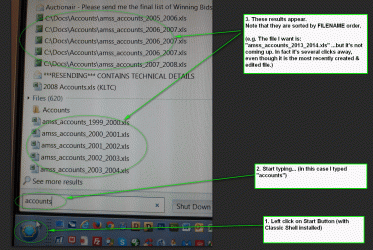
I think what you describe changes the sort order from within Windows Explorer. My sort is from when you
1. Install Classic Shell (like anyone sensible will!)
2. Left click the start button (bottom left)
3. Start typing !

Does that make sense?
 

Attachments

  • delme_search.gif
    delme_search.gif
    558.8 KB · Views: 1

My Computer My Computer

At a glance

Windows 7 x64 Professional (SP1)Intel Core i5 CPU 750 @2.67GHz8GBATI Radeon HD 5700 series
Computer type
PC/Desktop
Computer Manufacturer/Model Number
custom
OS
Windows 7 x64 Professional (SP1)
CPU
Intel Core i5 CPU 750 @2.67GHz
Motherboard
Intel
Memory
8GB
Graphics Card(s)
ATI Radeon HD 5700 series
Hard Drives
INTEL SSD ATA 256GB
Hum don't know as I only have the Classic Shell on my 8 desktop the other I have Stardock8 and hey just give me a just about what 7 is set up.
Your setting I don't recognise to be honest:)
 

Attachments

  • TYPE.PNG
    TYPE.PNG
    138.7 KB · Views: 2

My Computer My Computer

At a glance

Desk1 7 Home Prem / Desk2 10 Pro / Main lap A...Desk1 i5 3750K / Laptop i7 GTX 860M / Desk2 i...Desk1 8GB (1866) / Desk2 16GB (1333) / Laptop...Desk 1& 2NVidia GTX 650 & Laptops on board Intel
Computer type
PC/Desktop
Computer Manufacturer/Model Number
Own build (new) Desk1 / Asus ROG Win 7 / Desk2 1st build
OS
Desk1 7 Home Prem / Desk2 10 Pro / Main lap Asus ROG 10 Pro 2 laptop Toshiba 7 Pro Asus P2520 7 & 10
CPU
Desk1 i5 3750K / Laptop i7 GTX 860M / Desk2 i5 2500
Motherboard
Desk1 Asus P877-V / Desk2 Gigabyte H67 UD3H / Laptop ?
Memory
Desk1 8GB (1866) / Desk2 16GB (1333) / Laptop 8Gb DDR3
Graphics Card(s)
Desk 1& 2NVidia GTX 650 & Laptops on board Intel
Sound Card
Desk 1 & 2 -XONAR DG Realtek High Def audio Laptop
Monitor(s) Displays
Desk 1 Benq HD 2450 / Desk2 Philips 24" / Laptop 17.5"
Screen Resolution
1920x1080 D1 & D2 & Laptop 1
Hard Drives
Desk1 Samsung 120GB 830 SSD
Asus ROG 256GB 850 Pro SSD
Desk2 Samsung 840 256 SSD
Toshiba 120GB EVO
PSU
Desk 1 Corsair HX 1050/ Laptop ? / Desk 2 Corsair HX 650
Case
Desk 1 Cooler HAF XM ? Toshiba laptop / Desk2 Coolermaster
Cooling
Fans on all Desk1 -2 Desk2 - all Coolermasters 5 Laptop ?
Keyboard
Desk 1 MS Sidewinder X6 Desk 2 MS Sidewinder X 4
Mouse
Desk 1&2 - Gigabyte MS 900 gamer - laptop - Logitec wireless
Internet Speed
ADSL2+
Other Info
One other Desktop (tester) and spare Toshba laptop both with SSD's
Running Kaspersky 2016 ISS on all machines config'd identically
Logitec audio stereo systems on each machine (x3)
Canon MG5250MFC
Router/modem TP-Link running WPA2SK

My Computer My Computer

At a glance

Windows 10 ProAMD Ryzen 5 2400G Processor with Radeon RX Ve...G.SKILL Ripjaws V Series 16GB (2 x 8GB) 288-P...2047MB NVIDIA GeForce GTX 1060 6GB (EVGA)
Computer type
PC/Desktop
Computer Manufacturer/Model Number
Custom Built
OS
Windows 10 Pro
CPU
AMD Ryzen 5 2400G Processor with Radeon RX Vega 11 Graphics
Motherboard
ASRock X470 Master SLI/AC AM4 AMD Promontory X470 SATA 6Gb/s
Memory
G.SKILL Ripjaws V Series 16GB (2 x 8GB) 288-Pin DDR4 SDRAM D
Graphics Card(s)
2047MB NVIDIA GeForce GTX 1060 6GB (EVGA)
Sound Card
Motherboard Built in
Monitor(s) Displays
Acer R240HY bidx 23.8-Inch IPS HDMI DVI VGA (1920 x 1080) Wi
Screen Resolution
1920 x 1080
Hard Drives
1TB Sandisk SSD PLUS (Main drive)
500 GB Seagate 7200 RPM (Games)
500 GB Western Digital 7200 RPM (Virtual Machines)
PSU
CORSAIR TX Series TX650M 650W 80+ Gold Modular Power Supply
Case
CORSAIR CARBIDE SPEC-02 Mid-Tower Gaming Case, Red LED Fan
Cooling
220mm, two 120mm, and four 60mm fans
Keyboard
Wired Dell keyboard
Mouse
Wireless Logitech mouse
Internet Speed
250mb down, 30mb up
Antivirus
Panda Cloud Antivirus
Browser
Chrome-ish x64
Other Info
Your awesome for reading this.
Indexes rebuilt. But sort order it still in filename order. And this is irritating almost every time I use Search !
 

Attachments

  • delme01.gif
    delme01.gif
    83.9 KB · Views: 0

My Computer My Computer

At a glance

Windows 7 x64 Professional (SP1)Intel Core i5 CPU 750 @2.67GHz8GBATI Radeon HD 5700 series
Computer type
PC/Desktop
Computer Manufacturer/Model Number
custom
OS
Windows 7 x64 Professional (SP1)
CPU
Intel Core i5 CPU 750 @2.67GHz
Motherboard
Intel
Memory
8GB
Graphics Card(s)
ATI Radeon HD 5700 series
Hard Drives
INTEL SSD ATA 256GB
For now I am forced to abandon MS Search and use X1 Search (not free, and rather resource heavy but IMHO, pretty powerful). With X1 Search, my click/actions are:

1. Click on X1 Quicklaunch icon (to open X1 search)
2. Type in "accounts"
3. Double-click to open.

And note:
- Search results are sorted by date (not filename) order
- Highly customizable - unlike MS Search! (e.g. I can v easily change the sort order if required)
- You get a preview of the file on the right before you open it (occasionally useful)

Conclusion
For simple searching I would still rather use the Microsoft Search - mainly because it opens & searches so fast. But for now it is almost unusable. >:^[


Anyhow fwiw, here is a visual of what I'd do in X1 Search.
...
 

Attachments

  • delme02b.gif
    delme02b.gif
    116.5 KB · Views: 0

My Computer My Computer

At a glance

Windows 7 x64 Professional (SP1)Intel Core i5 CPU 750 @2.67GHz8GBATI Radeon HD 5700 series
Computer type
PC/Desktop
Computer Manufacturer/Model Number
custom
OS
Windows 7 x64 Professional (SP1)
CPU
Intel Core i5 CPU 750 @2.67GHz
Motherboard
Intel
Memory
8GB
Graphics Card(s)
ATI Radeon HD 5700 series
Hard Drives
INTEL SSD ATA 256GB
  • Like
Reactions: 4wd
For simple searching I would still rather use the Microsoft Search - mainly because it opens & searches so fast. But for now it is almost unusable
You got my understanding, same here.

X1 looks good. Am using Agent Ransack (FileLocator Pro) here for any important search (and windows search to find the calc and snip tool lol)
 

My Computer My Computer

At a glance

W7, W8.1
Computer type
Laptop
Computer Manufacturer/Model Number
Dell \ Lenovo\ HP \ Toshiba
OS
W7, W8.1
Antivirus
MSE, Malwarebytes
Browser
FF
Yes I tried Agent Ransack too but didn't get on with it - I cant remember why exactly. In fact I solemnly tried them all (i.e. about 8 of them) and I hated them all. But that was a couple of years ago. Strangely enough Google used to do a very good one but it stopped working so well for some reason. PLUS I suddenly realised that should the state (or anyone Evil) take control of Google they would know far, far, FAR too much about all of us so I stopped using them.

X1 Search is pretty good. But they feel like a small and poorly resourced company. Worse they are very sluggish to respond to customer requests. e.g. They are very proud of their "as fast as type" results, but even on my new computer it rather gets in the way of the typing and there is no way to turn it off. Do let me know if you try it as I'd love to know how it compares!
 

My Computer My Computer

At a glance

Windows 7 x64 Professional (SP1)Intel Core i5 CPU 750 @2.67GHz8GBATI Radeon HD 5700 series
Computer type
PC/Desktop
Computer Manufacturer/Model Number
custom
OS
Windows 7 x64 Professional (SP1)
CPU
Intel Core i5 CPU 750 @2.67GHz
Motherboard
Intel
Memory
8GB
Graphics Card(s)
ATI Radeon HD 5700 series
Hard Drives
INTEL SSD ATA 256GB
The same place where you rebuild the search indexing (indexing options) you can also add directories to indexing. Maybe that would help. For now if you feel your thread is solved, please mark it as such.

Sorry about the date not displaying the way you like.

Have a great day!
 

My Computer My Computer

At a glance

Windows 10 ProAMD Ryzen 5 2400G Processor with Radeon RX Ve...G.SKILL Ripjaws V Series 16GB (2 x 8GB) 288-P...2047MB NVIDIA GeForce GTX 1060 6GB (EVGA)
Computer type
PC/Desktop
Computer Manufacturer/Model Number
Custom Built
OS
Windows 10 Pro
CPU
AMD Ryzen 5 2400G Processor with Radeon RX Vega 11 Graphics
Motherboard
ASRock X470 Master SLI/AC AM4 AMD Promontory X470 SATA 6Gb/s
Memory
G.SKILL Ripjaws V Series 16GB (2 x 8GB) 288-Pin DDR4 SDRAM D
Graphics Card(s)
2047MB NVIDIA GeForce GTX 1060 6GB (EVGA)
Sound Card
Motherboard Built in
Monitor(s) Displays
Acer R240HY bidx 23.8-Inch IPS HDMI DVI VGA (1920 x 1080) Wi
Screen Resolution
1920 x 1080
Hard Drives
1TB Sandisk SSD PLUS (Main drive)
500 GB Seagate 7200 RPM (Games)
500 GB Western Digital 7200 RPM (Virtual Machines)
PSU
CORSAIR TX Series TX650M 650W 80+ Gold Modular Power Supply
Case
CORSAIR CARBIDE SPEC-02 Mid-Tower Gaming Case, Red LED Fan
Cooling
220mm, two 120mm, and four 60mm fans
Keyboard
Wired Dell keyboard
Mouse
Wireless Logitech mouse
Internet Speed
250mb down, 30mb up
Antivirus
Panda Cloud Antivirus
Browser
Chrome-ish x64
Other Info
Your awesome for reading this.
The same place where you rebuild the search indexing (indexing options) you can also add directories to indexing.

Er... in principle I would love to be able mark this as solved. The trouble is that my problem has not been solved.

I have already added "c:\docs" which is where I keep all my documents so the correct files are now being indexed, but I still however I still cant work out how to change the sort order so as to get the most recently changed files to appear first.
 

My Computer My Computer

At a glance

Windows 7 x64 Professional (SP1)Intel Core i5 CPU 750 @2.67GHz8GBATI Radeon HD 5700 series
Computer type
PC/Desktop
Computer Manufacturer/Model Number
custom
OS
Windows 7 x64 Professional (SP1)
CPU
Intel Core i5 CPU 750 @2.67GHz
Motherboard
Intel
Memory
8GB
Graphics Card(s)
ATI Radeon HD 5700 series
Hard Drives
INTEL SSD ATA 256GB
Now I ma just wondering why ship you have gone to such great lengths when the bog standard OS as in my pic shows how to get them up bu name?? Seems a great deal of effort for such a (to me) simple fix. I only used Classic Shell on my 8 machine to get rid of the metro crap:confused:
 

Attachments

  • DOCS.PNG
    DOCS.PNG
    34.4 KB · Views: 0

My Computer My Computer

At a glance

Desk1 7 Home Prem / Desk2 10 Pro / Main lap A...Desk1 i5 3750K / Laptop i7 GTX 860M / Desk2 i...Desk1 8GB (1866) / Desk2 16GB (1333) / Laptop...Desk 1& 2NVidia GTX 650 & Laptops on board Intel
Computer type
PC/Desktop
Computer Manufacturer/Model Number
Own build (new) Desk1 / Asus ROG Win 7 / Desk2 1st build
OS
Desk1 7 Home Prem / Desk2 10 Pro / Main lap Asus ROG 10 Pro 2 laptop Toshiba 7 Pro Asus P2520 7 & 10
CPU
Desk1 i5 3750K / Laptop i7 GTX 860M / Desk2 i5 2500
Motherboard
Desk1 Asus P877-V / Desk2 Gigabyte H67 UD3H / Laptop ?
Memory
Desk1 8GB (1866) / Desk2 16GB (1333) / Laptop 8Gb DDR3
Graphics Card(s)
Desk 1& 2NVidia GTX 650 & Laptops on board Intel
Sound Card
Desk 1 & 2 -XONAR DG Realtek High Def audio Laptop
Monitor(s) Displays
Desk 1 Benq HD 2450 / Desk2 Philips 24" / Laptop 17.5"
Screen Resolution
1920x1080 D1 & D2 & Laptop 1
Hard Drives
Desk1 Samsung 120GB 830 SSD
Asus ROG 256GB 850 Pro SSD
Desk2 Samsung 840 256 SSD
Toshiba 120GB EVO
PSU
Desk 1 Corsair HX 1050/ Laptop ? / Desk 2 Corsair HX 650
Case
Desk 1 Cooler HAF XM ? Toshiba laptop / Desk2 Coolermaster
Cooling
Fans on all Desk1 -2 Desk2 - all Coolermasters 5 Laptop ?
Keyboard
Desk 1 MS Sidewinder X6 Desk 2 MS Sidewinder X 4
Mouse
Desk 1&2 - Gigabyte MS 900 gamer - laptop - Logitec wireless
Internet Speed
ADSL2+
Other Info
One other Desktop (tester) and spare Toshba laptop both with SSD's
Running Kaspersky 2016 ISS on all machines config'd identically
Logitec audio stereo systems on each machine (x3)
Canon MG5250MFC
Router/modem TP-Link running WPA2SK
~~~
EDIT: I am told that the files listed are ranked partly by frequency of use. And I am now wondering is this is data which my CCleaner utility is deleting. Either way the sort order have become VERY much less useful in the last couple of weeks. Any thoughts?
In my testing, I saw no evidence of files being ranked by how often I opened them.


It now seems that installing Classic Shell does nasty things to the order of results that result from using the Search box (i.e. the one just above the Start Button).

Specifically within the "Documents" section, the results seem to be sorted purely by name, rather than Date Modified. Bl**dy irritating. And almost enough to make me uninstall Classic Shell completely.
Classic Shell does whatever it wants to the shell and there are no settings within Classic Shell (that I can see) to make it do what you want. There is nothing that you can do to W7 that is going to impact the sort order that Classic Shell forces. That is kind of the point of having a modified shell.

Classic Shell 4.0.0


The stock shell seems to sort by last file opened - not Date Modified. So getting rid of Classic Shell would not get you exactly what you mentioned... but it would probably do.


You might want to ask for a sort feature to be added to Classic Shell.
 

My Computer My Computer

At a glance

W7 Pro SP1 64biti78GBIntel HD Graphics
Computer type
Laptop
Computer Manufacturer/Model Number
Employer provided Dell Latitude
OS
W7 Pro SP1 64bit
CPU
i7
Memory
8GB
Graphics Card(s)
Intel HD Graphics
Hard Drives
crappy SSD
Antivirus
Employer mandated Symantec Endpoint Protection
Browser
Pale Moon 64bit, IE11 64bit & Chrome 64bit
For now I am forced to abandon MS Search and use X1 Search (not free, and rather resource heavy but IMHO, pretty powerful). With X1 Search, my click/actions are:
~~~
Like ICit2lol said, the stock W7 shell does everything that you mentioned from within the Windows (file) Explorer. If you are going to give up on using the Start Menu search (due to Classic Shell), then why not just use Windows (file) Explorer?


~~~
I still cant work out how to change the sort order so as to get the most recently changed files to appear first.
You mention the Start Menu search return sort order in post #1 and something totally different in post #12 - please clarify which you sort order you are talking about.
 

My Computer My Computer

At a glance

W7 Pro SP1 64biti78GBIntel HD Graphics
Computer type
Laptop
Computer Manufacturer/Model Number
Employer provided Dell Latitude
OS
W7 Pro SP1 64bit
CPU
i7
Memory
8GB
Graphics Card(s)
Intel HD Graphics
Hard Drives
crappy SSD
Antivirus
Employer mandated Symantec Endpoint Protection
Browser
Pale Moon 64bit, IE11 64bit & Chrome 64bit
Like ICit2lol said, the stock W7 shell does everything that you mentioned from within the Windows (file) Explorer. If you are going to give up on using the Start Menu search (due to Classic Shell), then why not just use Windows (file) Explorer?

Yes, Windows Explorer works okay, but simply put it's way too many clicks.

You mention the Start Menu search return sort order in post #1 and something totally different in post #12 - please clarify which you sort order you are talking about.

In Post 1 and Post 11 I am talking about the sort that you get when you click the Start button (bottom left) and start typing.

In Post 12, I am simply pointing out an alternative (called X1 Search) and showing how, with very few clicks you get excellent results. X1 works pretty well but it is slightly resource heavy and it is not free.

Btw, I the latest release of Classic Shell (v4.0.2) has now been fixed to show files in last modified order. It now works very much better IMO.
 

My Computer My Computer

At a glance

Windows 7 x64 Professional (SP1)Intel Core i5 CPU 750 @2.67GHz8GBATI Radeon HD 5700 series
Computer type
PC/Desktop
Computer Manufacturer/Model Number
custom
OS
Windows 7 x64 Professional (SP1)
CPU
Intel Core i5 CPU 750 @2.67GHz
Motherboard
Intel
Memory
8GB
Graphics Card(s)
ATI Radeon HD 5700 series
Hard Drives
INTEL SSD ATA 256GB
Back
Top