Random shutdowns. No warning. No BSOD. Passes all tests.

My Computer My Computer

At a glance

Microsoft Windows 7 Home Premium 64-bits 7601...Intel(R) Core(TM) i3 CPU M 370 @ 2.40GHz4,00 GBATI Mobility Radeon HD 5400 Series
Computer type
Laptop
Computer Manufacturer/Model Number
ACER ASPIRE 5742G
OS
Microsoft Windows 7 Home Premium 64-bits 7601 Multiprocessor Free Service Pack 1
CPU
Intel(R) Core(TM) i3 CPU M 370 @ 2.40GHz
Motherboard
Acer Aspire 5742G
Memory
4,00 GB
Graphics Card(s)
ATI Mobility Radeon HD 5400 Series
Sound Card
(1) AMD High Definition Audio Device (2) Realtek High Defi
Screen Resolution
1366 x 768 x 32 bits (4294967296 colors) @ 60 Hz
Hard Drives
WDC WD5000BEVT-22ZAT0
Sure you did #2 and settings are still fine?
Post screenshot of final screen with that setting

UPDATE: ERROR CAN BE REPLICATED BY RUNNING WINDOWS SYSTEM RATING
You mean http://www.sevenforums.com/tutorials/263-windows-experience-index-update-refresh-score.html ?
Really it power offs every time you run that? No relevant stuff in event log whatsoever during that run time?

I will post a screen shot and I will make a video when I get home now that I know how to reproduce it.

Yes it is the Windows Experience Index. It starts up but about 1 second in just crashes. The event log is exactly the same as when it crashes from not running the WEI.

Maybe a video will help you guys help me with this problem :)
 

My Computer My Computer

At a glance

Windows 7i7 2600kMuskin 4GB x2XFX 6950 x2
Computer type
PC/Desktop
Computer Manufacturer/Model Number
Custom
OS
Windows 7
CPU
i7 2600k
Motherboard
MSI MCII
Memory
Muskin 4GB x2
Graphics Card(s)
XFX 6950 x2
Hard Drives
1TB WD x2
64GB SSD
250GB Maxtor x4
Here is a video:


As you can see, it is not set to auto reboot, and there are no dump files.

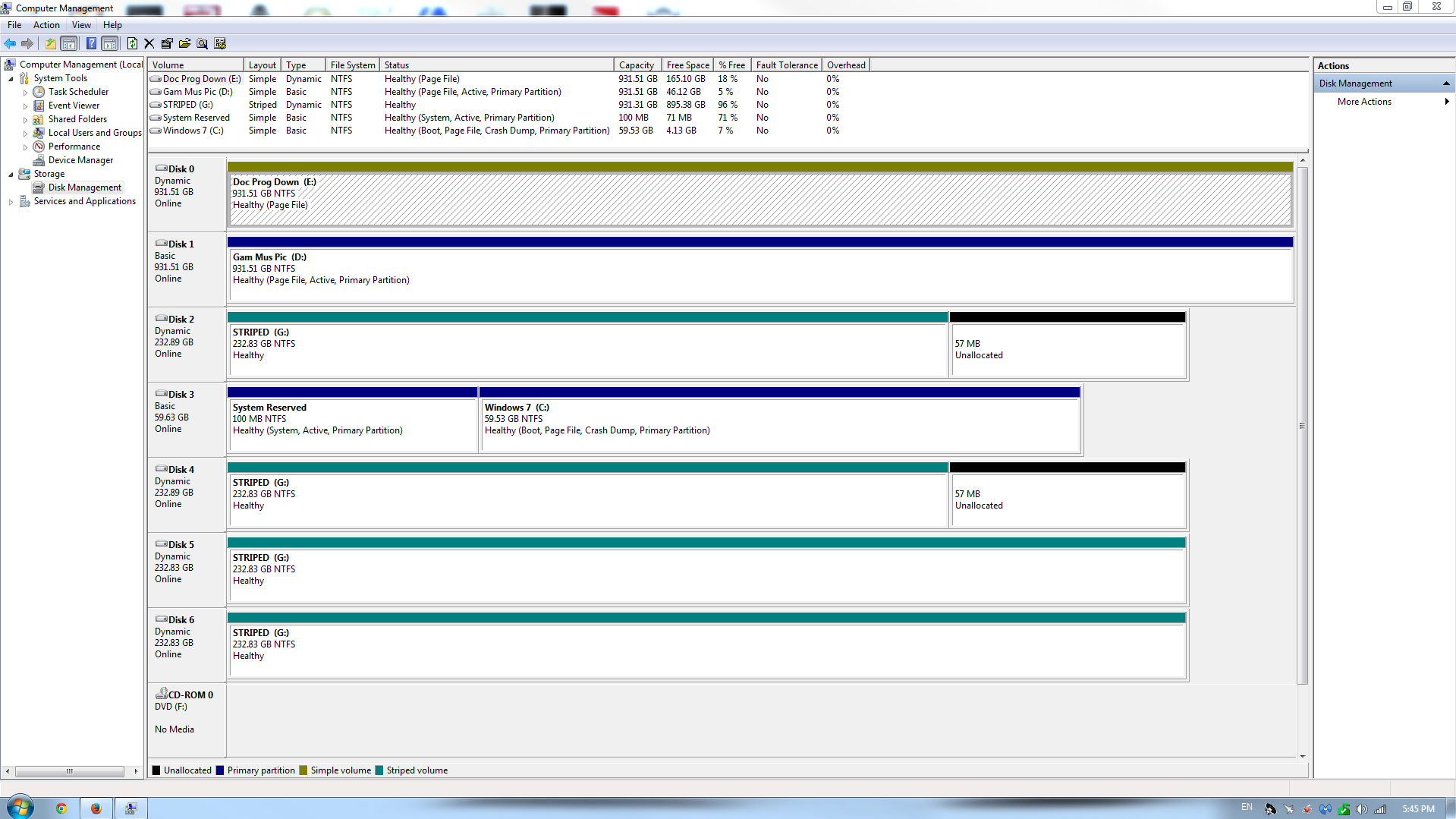
This is my disk management:

zEu1CNw.png
 
Last edited:

My Computer My Computer

At a glance

Windows 7i7 2600kMuskin 4GB x2XFX 6950 x2
Computer type
PC/Desktop
Computer Manufacturer/Model Number
Custom
OS
Windows 7
CPU
i7 2600k
Motherboard
MSI MCII
Memory
Muskin 4GB x2
Graphics Card(s)
XFX 6950 x2
Hard Drives
1TB WD x2
64GB SSD
250GB Maxtor x4
To show the Youtube video in your post the only thing that should be pasted in Youtube code box is KZRNYV0COTU

What is the controller that pops up at boot? Are you using some kind of RAID which we only see problems with? Did you install SSD Win7 in AHCI Sata mode? Has the problem occurred ever since install of SSD?

Otherwise since the problem occurs during the first calculation of WEI which is Aero I would update my display driver. First enable Automatically deliver drivers via Windows Update (Step 3) to Check for Updates, install all Important and Optional WIndows Updates which may include newer drivers or important patches needed for your system.

If no newer Display driver check the Support Downloads webpage for your model PC or adapter to try the latest driver.
 

My Computer My Computer

At a glance

Microsoft Windows 7 Home Premium 64-bits 7601...Intel(R) Core(TM) i3 CPU M 370 @ 2.40GHz4,00 GBATI Mobility Radeon HD 5400 Series
Computer type
Laptop
Computer Manufacturer/Model Number
ACER ASPIRE 5742G
OS
Microsoft Windows 7 Home Premium 64-bits 7601 Multiprocessor Free Service Pack 1
CPU
Intel(R) Core(TM) i3 CPU M 370 @ 2.40GHz
Motherboard
Acer Aspire 5742G
Memory
4,00 GB
Graphics Card(s)
ATI Mobility Radeon HD 5400 Series
Sound Card
(1) AMD High Definition Audio Device (2) Realtek High Defi
Screen Resolution
1366 x 768 x 32 bits (4294967296 colors) @ 60 Hz
Hard Drives
WDC WD5000BEVT-22ZAT0
What is the controller that pops up at boot? Are you using some kind of RAID which we only see problems with? Did you install SSD Win7 in AHCI Sata mode? Has the problem occurred ever since install of SSD?

Otherwise since the problem occurs during the first calculation of WEI which is Aero I would update my display driver. First enable Automatically deliver drivers via Windows Update (Step 3) to Check for Updates, install all Important and Optional WIndows Updates which may include newer drivers or important patches needed for your system.

If no newer Display driver check the Support Downloads webpage for your model PC or adapter to try the latest driver.

Its a Marvell Controller. I think it comes with my MB but I have never used it because I do not use RAID.

I think my default BIOS is set to IDE. I will check and change settings. It has occurred since SSD and a little before. I had another SSD as primary before this one, but it was a measly 32GB.

My computer is already set for automatic updates and is fully updated. However, I do not mind uninstalling my ATI Drivers and graphics management software.
Is there a good way to go about doing this without causing further hard to my system?

Did you enable pagefile and how large is it? Disable The Page File And Hibernation - Can You Get More Space Or Speed From Your SSD?
Don't disable it!! Just want to know the settings. Without a proper pagefile.... win7 cannot make a dmp file.

My pagefile is 2400MB.
 

My Computer My Computer

At a glance

Windows 7i7 2600kMuskin 4GB x2XFX 6950 x2
Computer type
PC/Desktop
Computer Manufacturer/Model Number
Custom
OS
Windows 7
CPU
i7 2600k
Motherboard
MSI MCII
Memory
Muskin 4GB x2
Graphics Card(s)
XFX 6950 x2
Hard Drives
1TB WD x2
64GB SSD
250GB Maxtor x4
I would install only the display driver without the bloatware package, making sure nothing from that is starting with Windows.

In fact establish a Clean Boot with only your AV starting up, and it should be free lightweight MSE - these are in Troubleshooting Steps for Windows 7

When in BIOS setup to check for AHCI, disable the Marvel controller if you're sure you are not using it. You can also if necessary convert to AHCI : Enable in Windows 7 / Vista - Windows 7 Forums
 
I would install only the display driver without the bloatware package, making sure nothing from that is starting with Windows.

In fact establish a Clean Boot with only your AV starting up, and it should be free lightweight MSE - these are in Troubleshooting Steps for Windows 7

When in BIOS setup to check for AHCI, disable the Marvel controller if you're sure you are not using it. You can also if necessary convert to AHCI : Enable in Windows 7 / Vista - Windows 7 Forums

Just finished setting everything up in AHCI.

Had some trouble, it seemed to of deleted my BOOTMGR when I tried the first time. But I am back up.

I am uninstalling CCC and my ATI Stuff and going to reinstall.
 

My Computer My Computer

At a glance

Windows 7i7 2600kMuskin 4GB x2XFX 6950 x2
Computer type
PC/Desktop
Computer Manufacturer/Model Number
Custom
OS
Windows 7
CPU
i7 2600k
Motherboard
MSI MCII
Memory
Muskin 4GB x2
Graphics Card(s)
XFX 6950 x2
Hard Drives
1TB WD x2
64GB SSD
250GB Maxtor x4
Uninstalled CCC and all ATI Drivers and MSI Tools. Cleaned up with Drive Sweeper. Reinstalled CCC and ATI Drivers.
Still crashes at WEI.
 

My Computer My Computer

At a glance

Windows 7i7 2600kMuskin 4GB x2XFX 6950 x2
Computer type
PC/Desktop
Computer Manufacturer/Model Number
Custom
OS
Windows 7
CPU
i7 2600k
Motherboard
MSI MCII
Memory
Muskin 4GB x2
Graphics Card(s)
XFX 6950 x2
Hard Drives
1TB WD x2
64GB SSD
250GB Maxtor x4
I just saw your Disk Mgmt screenshot which must have been added later.

I would disable the page file on all drives and then create it again System Managed on the C drive only.

Unless D has an OS then it should not be marked Active nor should it have a page file. If not mark it Inactive: Partition - Mark as Inactive - Windows 7 Forums.

Unless there is a reason you needed the OS drive to be plugged into the port it is, it's always better to have it in Disk0 slot for multiple reasons.
 
I just saw your Disk Mgmt screenshot which must have been added later.

I would disable the page file on all drives and then create it again System Managed on the C drive only.

Unless D has an OS then it should not be marked Active nor should it have a page file. If not mark it Inactive: Partition - Mark as Inactive - Windows 7 Forums.

Unless there is a reason you needed the OS drive to be plugged into the port it is, it's always better to have it in Disk0 slot for multiple reasons.

Ok Ill do that.

Also here is the Log from WEI:

Code:
1478171 (3868) - winsat\logging.cpp:0815: --- START 2013\10\23 22:35:25 PM ---
1478171 (3868) - winsat\main.cpp:4301: Command Line = "C:\Windows\system32\winsat.exe" formal -cancelevent 368a7f0e-b33e-4dc8-ba11-a01c6ab33c7a
1478171 (3868) - winsat\processwinsaterror.cpp:0095: ERROR: tried to read resource strings, unknown exception occured
1478203 (3868) - winsat\main.cpp:4474: > IsFormal=TRUE  IsMoobe=FALSE.
1478234 (3868) - winsat\main.cpp:4585: Watch dog system enabled
1478234 (3868) - winsat\main.cpp:4600: Main watch dog timer set to 600.0 seconds
1478530 (3868) - winsat\main.cpp:2490: > DWM Running.
1478858 (3868) - winsat\main.cpp:2497: > turning off DWM.
1478858 (3868) - winsat\main.cpp:2470: > EMD service will be restored on exit.
1478873 (3868) - winsat\syspowertools.cpp:0983: > Read the active power scheme as '8c5e7fda-e8bf-4a96-9a85-a6e23a8c635c'
1478873 (3868) - winsat\main.cpp:2793: > power policy saved.
1478920 (3868) - winsat\syspowertools.cpp:1015: > Set the active power scheme to 8c5e7fda-e8bf-4a96-9a85-a6e23a8c635c'
1478920 (3868) - winsat\main.cpp:2814: > power policy set to maximum.
1479747 (3868) - winsat\logging.cpp:1763: ERROR: pahse enter/leave imballance
1479747 (3868) - winsat\main.cpp:0948: > IsOfficial=TRUE  IsFormal=TRUE  IsMoobe=FALSE  RanOverTs=FALSE  RanOnbatteries=FALSE
1479747 (3868) - winsat\main.cpp:1775: > Run Assessment features 
1479825 (3868) - winsat\main.cpp:1775: > Run Assessment dwm -aname DWM -time 10 -fbc 10 -disp off -normalw 12 -width 1280 -height 1024 -winwidth C(1144) -winheight C(915) -rendertotex 6 -rtdelta 3 -nolock
 

My Computer My Computer

At a glance

Windows 7i7 2600kMuskin 4GB x2XFX 6950 x2
Computer type
PC/Desktop
Computer Manufacturer/Model Number
Custom
OS
Windows 7
CPU
i7 2600k
Motherboard
MSI MCII
Memory
Muskin 4GB x2
Graphics Card(s)
XFX 6950 x2
Hard Drives
1TB WD x2
64GB SSD
250GB Maxtor x4
Have you tried getting a perfect baseline Clean Reinstall which steps are the same for retail?

You can make it a diagnostic install by getting online to first enable Automatically deliver drivers via Windows Update (Step 3) then run all rounds of Important and Optional WIndows Updates with requested reboots, until there are no more when you go back to check again for Updates.

In between each round of Updates test performance, then after all Updates are finished import any drivers still missing in Device Manager, testing performance between each install.

Then install programs with time to test performance between each.

Stick with only the tools and methods in the tutorial to assure a perfect install.

Ideally this method would pinpoint the driver, Updates or program causing the problem - or just the reinstall may resolve the issue.
 
Have you tried getting a perfect baseline Clean Reinstall which steps are the same for retail?

You can make it a diagnostic install by getting online to first enable Automatically deliver drivers via Windows Update (Step 3) then run all rounds of Important and Optional WIndows Updates with requested reboots, until there are no more when you go back to check again for Updates.

In between each round of Updates test performance, then after all Updates are finished import any drivers still missing in Device Manager, testing performance between each install.

Then install programs with time to test performance between each.

Stick with only the tools and methods in the tutorial to assure a perfect install.

Ideally this method would pinpoint the driver, Updates or program causing the problem - or just the reinstall may resolve the issue.

I feel like this would solve the issue but I want to keep this as a last resort. I normally have maybe 2 hours a day to actually work on my computer and so reinstalling everything would take weeks.

But I ran into another issue....

I was being stupid and while removing the drive as active I accidentaly deleted the partition on it. So now the drive is marked as missing.

That drive had all my programs, pictures, documents, everything... I cannot afford to lose the information on that drive. Is there any way to restore the partition?

I tried reactivating it, but that doesnt work and setting it online in diskpart doesnt work either.
 

My Computer My Computer

At a glance

Windows 7i7 2600kMuskin 4GB x2XFX 6950 x2
Computer type
PC/Desktop
Computer Manufacturer/Model Number
Custom
OS
Windows 7
CPU
i7 2600k
Motherboard
MSI MCII
Memory
Muskin 4GB x2
Graphics Card(s)
XFX 6950 x2
Hard Drives
1TB WD x2
64GB SSD
250GB Maxtor x4
Do not format the partition! Nothing will be lost if you don't.

Run Partition Wizard Partition Recovery Wizard - Video Help to undelete the partition now.

I've asked for help for reading the WEI log from others who know it better. Arc has replied below for that. His idea is promising and could solve the issue outright.
 
Last edited:

My Computer My Computer

At a glance

Microsoft Windows 10 Pro Insider Preview 64-bitIntel(R) Core(TM) i3-4130 CPU @ 3.40GHzCorsair Vengence 4GB x2 (8.00GB Dual-Channel ...2047MB GeForce GTS 450 (ZOTAC International)
Computer type
PC/Desktop
Computer Manufacturer/Model Number
Self Assembled
OS
Microsoft Windows 10 Pro Insider Preview 64-bit
CPU
Intel(R) Core(TM) i3-4130 CPU @ 3.40GHz
Motherboard
Gigabyte Technology Co., Ltd. B85M-D3H
Memory
Corsair Vengence 4GB x2 (8.00GB Dual-Channel DDR3 @ 798MHz)
Graphics Card(s)
2047MB GeForce GTS 450 (ZOTAC International)
Sound Card
Onboard (Realtek High Definition Audio)
Monitor(s) Displays
LG Flatron E2040T
Screen Resolution
1600x900
Hard Drives
Western Digital 1 TB
Seagate 500 GB
PSU
Corsair VS550
Case
Cooler Master K380
Cooling
Cooler Master Seidon 120V Plus
Keyboard
Logitech MK260r
Mouse
Logitech MK260r
Internet Speed
PMPL Broadband
Antivirus
Windows Defender + MBAM
Browser
Firefox
Other Info
Dell Studio 15" Laptop
http://www.sevenforums.com/tutorials/79177-windows-experience-index-reset.html

Try it and then run the rating again. Is it the same restart?

I wish this would of worked, but if you look in the video i had reset WEI prior to making it.

Also, when I posted the log, I tried deleting the contents of the DataStore folder prior to making and posting the log.

I did not try running it from cmd, but I do not think it will work.

I want to mention, that the core of this problem is not to get my WEI score.

When WEI runs 'Testing Direct 3D 9' or something along those lines it crashes. It also crashes during gaming, not even heavy gaming. And crashes on internet use, such as heavy youtube.
 

My Computer My Computer

At a glance

Windows 7i7 2600kMuskin 4GB x2XFX 6950 x2
Computer type
PC/Desktop
Computer Manufacturer/Model Number
Custom
OS
Windows 7
CPU
i7 2600k
Motherboard
MSI MCII
Memory
Muskin 4GB x2
Graphics Card(s)
XFX 6950 x2
Hard Drives
1TB WD x2
64GB SSD
250GB Maxtor x4
I understand what you are saying. I suggested you that link, just to see if it makes any change there or not. As expected, it did not work.

What actually happens when you refresh the WEI?
It collects the performance data about CPU, RAM and GPU, mainly; and for that purpose, it puts a pressure on those hardware. Also, it consumes a lot of power.

So first check for the PSU. Check if the Power Supply Unit (PSU) supplying adequate power to the computer or not.
eXtreme Power Supply Calculator

The actual performance of the PSU is different, and it may not supply adequate power despite of its reported wattage. So better to test the situation with a replacement PSU.

Next ... do some stress test on the other hardware, individually.

Stress test the CPU.
Hardware - Stress Test With Prime95

Test your RAM modules for possible errors.
How to Test and Diagnose RAM Issues with Memtest86+
Run memtest for at least 8 passes, preferably overnight.

If it start showing errors/red lines, stop testing. A single error is enough to determine that something is going bad there.

Stress test the Graphics Card using Furmark.
Video Card - Stress Test with Furmark

One other thing is there that is to be taken under consideration, that is heat. Is the computer hot? Report us the heat of the computer after a couple of hours of your normal usage. Upload a screenshot of the summery tab of Speccy.

So, let us know the results.
 

My Computer My Computer

At a glance

Microsoft Windows 10 Pro Insider Preview 64-bitIntel(R) Core(TM) i3-4130 CPU @ 3.40GHzCorsair Vengence 4GB x2 (8.00GB Dual-Channel ...2047MB GeForce GTS 450 (ZOTAC International)
Computer type
PC/Desktop
Computer Manufacturer/Model Number
Self Assembled
OS
Microsoft Windows 10 Pro Insider Preview 64-bit
CPU
Intel(R) Core(TM) i3-4130 CPU @ 3.40GHz
Motherboard
Gigabyte Technology Co., Ltd. B85M-D3H
Memory
Corsair Vengence 4GB x2 (8.00GB Dual-Channel DDR3 @ 798MHz)
Graphics Card(s)
2047MB GeForce GTS 450 (ZOTAC International)
Sound Card
Onboard (Realtek High Definition Audio)
Monitor(s) Displays
LG Flatron E2040T
Screen Resolution
1600x900
Hard Drives
Western Digital 1 TB
Seagate 500 GB
PSU
Corsair VS550
Case
Cooler Master K380
Cooling
Cooler Master Seidon 120V Plus
Keyboard
Logitech MK260r
Mouse
Logitech MK260r
Internet Speed
PMPL Broadband
Antivirus
Windows Defender + MBAM
Browser
Firefox
Other Info
Dell Studio 15" Laptop
If you have some older known working parts you could try swapping out your gpu to see if its the gpu triggering the shut down or a known working power supply to test if the current one cant handle the load.

From your screenshots your running a raid of some kind so its more difficult but you could try running your machine back to basics. 1 stick of ram, graphics card, os hard drive and see if the pc will run without crashing. if it doesn't crash then you can put components back in until it does crash then try to work out what caused it.


a 3rd option is if you have a spare hard drive. unplug the lot (if you can with the raid setup, im not very knowledgeable about it) and plug in a new hdd; wack an OS on it and see if the issue is still there. if it isn't its likely a driver or software issue, if it is its likely hardware in my opinion

^ just some more options you haven't tried since you've tried just about everything else >.>
 
Last edited:

My Computer My Computer

At a glance

Windows 7 ultimate 64 bitAMD FX 812032 GB ddr3 corsair 1600mhz ramNvidia geforce 660ti
Computer type
PC/Desktop
Computer Manufacturer/Model Number
Self Assembled
OS
Windows 7 ultimate 64 bit
CPU
AMD FX 8120
Motherboard
Asrock 990fx extreme 4
Memory
32 GB ddr3 corsair 1600mhz ram
Graphics Card(s)
Nvidia geforce 660ti
Monitor(s) Displays
24" Wide acer gd245hq + ipex 19"
Screen Resolution
2560*1440 + 1280*1024
Hard Drives
Kingston 120gb ssd 450mb read/write
4X2TB hdds Seagate/Western Digital
PSU
m850w cooler master
Case
600t Corsair
Cooling
h80i water cooler
Mouse
g9x logitech mouse
Antivirus
Zonealarm Extreme Security Suite
Browser
Google Chrome
Do not format the partition! Nothing will be lost if you don't.

Run Partition Wizard Partition Recovery Wizard - Video Help to undelete the partition now.

I've asked for help for reading the WEI log from others who know it better. Arc has replied below for that. His idea is promising and could solve the issue outright.

I had actually ran Partition Wizard 7 last night. I was going HAM with Hirens.
And Partition Recovery Wizard found about 9 different boot partitions.

Which one do I select to recover or do I recover all of them? I will post screenshot when I get home.
 

My Computer My Computer

At a glance

Windows 7i7 2600kMuskin 4GB x2XFX 6950 x2
Computer type
PC/Desktop
Computer Manufacturer/Model Number
Custom
OS
Windows 7
CPU
i7 2600k
Motherboard
MSI MCII
Memory
Muskin 4GB x2
Graphics Card(s)
XFX 6950 x2
Hard Drives
1TB WD x2
64GB SSD
250GB Maxtor x4
I understand what you are saying. I suggested you that link, just to see if it makes any change there or not. As expected, it did not work.

What actually happens when you refresh the WEI?
It collects the performance data about CPU, RAM and GPU, mainly; and for that purpose, it puts a pressure on those hardware. Also, it consumes a lot of power.

So first check for the PSU. Check if the Power Supply Unit (PSU) supplying adequate power to the computer or not.
eXtreme Power Supply Calculator

The actual performance of the PSU is different, and it may not supply adequate power despite of its reported wattage. So better to test the situation with a replacement PSU.

Next ... do some stress test on the other hardware, individually.

Stress test the CPU.
Hardware - Stress Test With Prime95

Test your RAM modules for possible errors.
How to Test and Diagnose RAM Issues with Memtest86+
Run memtest for at least 8 passes, preferably overnight.

If it start showing errors/red lines, stop testing. A single error is enough to determine that something is going bad there.

Stress test the Graphics Card using Furmark.
Video Card - Stress Test with Furmark

One other thing is there that is to be taken under consideration, that is heat. Is the computer hot? Report us the heat of the computer after a couple of hours of your normal usage. Upload a screenshot of the summery tab of Speccy.

So, let us know the results.

Thank you for your reply.

As I mentioned previously, I had a 850W PSU, that I thought might be the issue. So I purchased a 1000W Gold Plus OCZ FATAL1TY PSU, and the problem still persists.

I have run 24 Hours Prime95, Memtest86+, and 6 Hours MSI Kombustor. All with no issues.

I have dual 6950's and I have tried running the WEI using each of them, and still crashes.

As for heat, my CPU never goes higher than 80 and my GPU never goes higher than 85-90 both under 100% load.

I appreciate your help Arc, Ive been stumped on this for too long.

If you have some older known working parts you could try swapping out your gpu to see if its the gpu triggering the shut down or a known working power supply to test if the current one cant handle the load.

From your screenshots your running a raid of some kind so its more difficult but you could try running your machine back to basics. 1 stick of ram, graphics card, os hard drive and see if the pc will run without crashing. if it doesn't crash then you can put components back in until it does crash then try to work out what caused it.

a 3rd option is if you have a spare hard drive. unplug the lot (if you can with the raid setup, im not very knowledgeable about it) and plug in a new hdd; wack an OS on it and see if the issue is still there. if it isn't its likely a driver or software issue, if it is its likely hardware in my opinion

^ just some more options you haven't tried since you've tried just about everything else >.>

I have tried swapping out the PSU, Swapping out the RAM, Swapping out my GPU.

I am not running RAID, but I have a STRIPPED Partition across my 250GBs. But I have tried unplugging all my HDDs and only running my SSD which contains my OS. And still doesn't work.
 

My Computer My Computer

At a glance

Windows 7i7 2600kMuskin 4GB x2XFX 6950 x2
Computer type
PC/Desktop
Computer Manufacturer/Model Number
Custom
OS
Windows 7
CPU
i7 2600k
Motherboard
MSI MCII
Memory
Muskin 4GB x2
Graphics Card(s)
XFX 6950 x2
Hard Drives
1TB WD x2
64GB SSD
250GB Maxtor x4
Back
Top