
You are using an out of date browser. It may not display this or other websites correctly.
You should upgrade or use an alternative browser.
You should upgrade or use an alternative browser.
IE8 Not remembering window size - moved from general
- Thread starter joschw
- Start date
- Status
- Not open for further replies.

Yet another good reason to use FF.Don't know if already mentioned, but what really drives me up the wall, is the way IE8 opens a new link window, only half window from top to the middle of the screen.

My Computer
- Computer Manufacturer/Model Number
- HP DV8t quad
- OS
- Windows 7 Ultimate x64 (Retail)
- CPU
- i7-Q 720
- Motherboard
- Motherboard Chipset Intel Ibex Peak-M PM55, Intel Lynnfield
- Memory
- 6 GB
- Graphics Card(s)
- nVidia GeForce GT 230M (1GB)
- Sound Card
- IDT High Definition Audio CODEC
- Monitor(s) Displays
- 18.4 inch HP Infinity FHD (Samsung 184HT03-001)
- Screen Resolution
- 1920 x 1080
- Hard Drives
- Hitachi 500GB 7200 rpm (x2)
Seagate FreeAgent 1.5 TB External USB (x2)
Thermaltake BlacX eSATA/USB 2.0 3.5/2.5 HD dock
- Cooling
- Zalman NC-2000 notebook cooling pad
- Keyboard
- laptop
- Mouse
- Logitech VX Revolution
- Other Info
- Backup Unit: Lenovo T61p
IE8 is opening to it's last non-maximized windows size. Resize the window to your liking. Close it. IE8 will now open to your preferred non-maximized size. Yet another reason to use IE8.Don't know if already mentioned, but what really drives me up the wall, is the way IE8 opens a new link window, only half window from top to the middle of the screen.
IE8 is opening to it's last non-maximized windows size. Resize the window to your liking. Close it. IE8 will now open to your preferred non-maximized size. Yet another reason to use IE8.
IE8 remembers the last position in XP, but not in Windows 7 (in Vista neither). It opens always the same way, no matter what the last position was.
Harpua, I'm using FF already.

My Computer
- OS
- XP

The fact that it is not free to all the people who tested it for free, for MS.
My Computer
- Computer Manufacturer/Model Number
- Self Build 64bit
- OS
- Vista Ult64, Win7600
- CPU
- Intel Core 2 Quad Q6600 @ 2400 MHz 64bit OS
- Motherboard
- Asus P5E3 Deluxe WiFi @p 64 bit OS
- Memory
- 4096 MB DDR3-SDRAM
- Graphics Card(s)
- ATI Radeon HD 3870 Series x2 Crossfired
- Sound Card
- Realtek on board
- Monitor(s) Displays
- Samsung SyncMaster - 23 inches
- Screen Resolution
- 1680x1050 pixels at 60 Hz in True Colors
- Hard Drives
- Hitachi (250 GB)/Samsung 750 GB. /Barracuda 160 GB.
My Book 1 TB external..
- PSU
- Cooler Master 1000w
- Case
- Cooler Master Cosmos 1000.
- Cooling
- Fans and fresh air,
- Keyboard
- Wireless
- Mouse
- Wireless
- Internet Speed
- Never fast enough
- Other Info
- I use a Magnum.

IE8 always remembers the last size and position in Windows 7, as it does in Vista. If you have some setting wrong or don't know how to use your software, please don't state that as a fact.IE8 is opening to it's last non-maximized windows size. Resize the window to your liking. Close it. IE8 will now open to your preferred non-maximized size. Yet another reason to use IE8.
IE8 remembers the last position in XP, but not in Windows 7 (in Vista neither). It opens always the same way, no matter what the last position was.
Harpua, I'm using FF already.
Kari
My Computer
- Computer type
- Laptop
- Computer Manufacturer/Model Number
- HP ENVY 17-1150eg
- OS
- Windows 10 Pro x64 EN-GB
- CPU
- 1.6 GHz Intel Core i7-720QM Processor
- Memory
- 6 GB
- Graphics Card(s)
- ATI Mobility Radeon HD 5850 Graphics
- Sound Card
- Beats sound system with integrated subwoofer
- Monitor(s) Displays
- 17" laptop display, 22" LED and 32" Full HD TV through HDMI
- Screen Resolution
- 1600*900 (1), 1920*1080 (2&3)
- Hard Drives
- Internal: 2 x 500 GB SATA Hard Disk Drive 7200 rpm
External: 2TB for backups, 3TB USB3 network drive for media
- Cooling
- As Envy runs a bit warm, I have it on a Cooler Master pad
- Keyboard
- Logitech diNovo Media Desktop Laser (bluetooth)
- Mouse
- Logitech Performance Mouse MX
- Internet Speed
- 50/10 Mbps VDSL
- Antivirus
- Windows Defender 4.3.9431.0
- Browser
- Maxthon 3.5.2., IE11

I kinda miss dreamscene...
My Computer
- Computer type
- PC/Desktop
- Computer Manufacturer/Model Number
- Multirama PC Expert [Bulgaria]
- OS
- Windows 7 Home Premium [64-Bit]
- CPU
- Intel Core 2 Quad CPU Q8200 @ 2.33 GHz
- Motherboard
- GIGABYTE GA-G31M-S2C
- Memory
- 4094 MB DDR2
- Graphics Card(s)
- SAPPHIRE Radeon HD 6970 (2 GB VRAM)
- Sound Card
- Realtek ALC883 @ Intel 82801GB ICH7 - High Definition Audio
- Monitor(s) Displays
- Samsung SyncMaster BX2235 [21.5" LCD with LED Backlight]
- Screen Resolution
- 1920x1080
- Hard Drives
- Hitachi HDT721075SLA360 - 750 GB
- PSU
- Cooler Master GX750 - 750W
- Case
- Multirama (Black / 2010 Revision)
- Cooling
- Stock + Cooler Master
- Keyboard
- Logitech G510 (Gaming Keyboard)
- Mouse
- Razer Lachesis (4000 DPI, Blue Version)
- Internet Speed
- Vivacom Optical [100 Mbps]
- Browser
- Chrome [Windows]
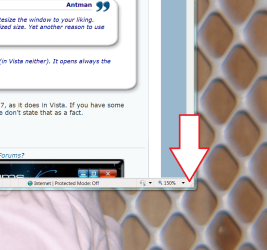
To resize a non-maximized IE8 windows, use the highlighted control. If you have more than on instance of IE8 open, the "properly" resized windows MUST be the last one you close.IE8 remembers the last position in XP, but not in Windows 7 (in Vista neither). It opens always the same way, no matter what the last position was.
This post was created to cancel out any misinformation provided earlier. If anyone is having difficulty with this particular feature, it can be addressed.
Attachments

I don't like the no spanning ability for multiple monitors. What was MS thinking? Windows 7 needs much better multiple monitor support.
My Computer
- Computer type
- PC/Desktop
- Computer Manufacturer/Model Number
- Alienware Aurora-R4
- OS
- Windows 7 Professional x64
- CPU
- Intel(R) Core(TM) i7-3820 CPU, 4 Cores, 8 Logical Cores
- Motherboard
- Alienware
- Memory
- 32 GB DDR3 1600
- Graphics Card(s)
- ATI Radeon HD 8950 3GB vDDR5 & ATI Radeon HD 7950 3GB vDDR5
- Sound Card
- Realtek 7.1 Audio
- Monitor(s) Displays
- Dell SP2309W 23 inch
- Screen Resolution
- 2048x1152
- Hard Drives
- 7.3 TB in 4 drives (Raid 0), 2TB NAS backup drive.
- PSU
- 875w
- Case
- ALX Chasis with active venting
- Cooling
- Liquid cooled with active venting and fans.
- Keyboard
- Alienware TactX
- Mouse
- Alienware TactX
- Internet Speed
- 15mb Cable
- Antivirus
- Malwarebytes
- Browser
- Pale Moon (Optimized Mozilla Based)
- Other Info
- http://www.y0himba.net

I'm not keen on the price... estimates have it the Ultimate x64 somewhere between R5000 and R6000 here in SA... not cool... 
My Computer
- Computer type
- PC/Desktop
- Computer Manufacturer/Model Number
- Own build
- OS
- Windows 7 x64 Professional
- CPU
- Intel Core i7-870 Lynnfield 2.93 GHz
- Motherboard
- Intel Whitesburg P55 LGA1156
- Memory
- Kingston Hyper X 1333MHz DDR3 4x4Gb
- Graphics Card(s)
- Nvidia GTS 250
- Monitor(s) Displays
- AOC Q3279VWF 31.5"
- Screen Resolution
- 2560x1440
- Hard Drives
- Western Digital 1000GB Hard Drive (SATA 3.0Gb/s, 7200rpm, 32MB Cache)
Verbatim 500GB (External)
- PSU
- 650W
- Case
- Coolermaster HAF 912
- Cooling
- Stock
- Keyboard
- Logitech
- Mouse
- Logitech
- Antivirus
- Avira
- Browser
- Firefox
- Other Info
- LG OptDrive 24x SATA DVDRW Lightscribe
I believe there is spanning ability for multiple monitor. Try pressing Fn plus F7 (or the win key & P, if you don't have an FN key).I don't like the no spanning ability for multiple monitors. What was MS thinking? Windows 7 needs much better multiple monitor support.
My Computer
- Computer Manufacturer/Model Number
- HP DV8t quad
- OS
- Windows 7 Ultimate x64 (Retail)
- CPU
- i7-Q 720
- Motherboard
- Motherboard Chipset Intel Ibex Peak-M PM55, Intel Lynnfield
- Memory
- 6 GB
- Graphics Card(s)
- nVidia GeForce GT 230M (1GB)
- Sound Card
- IDT High Definition Audio CODEC
- Monitor(s) Displays
- 18.4 inch HP Infinity FHD (Samsung 184HT03-001)
- Screen Resolution
- 1920 x 1080
- Hard Drives
- Hitachi 500GB 7200 rpm (x2)
Seagate FreeAgent 1.5 TB External USB (x2)
Thermaltake BlacX eSATA/USB 2.0 3.5/2.5 HD dock
- Cooling
- Zalman NC-2000 notebook cooling pad
- Keyboard
- laptop
- Mouse
- Logitech VX Revolution
- Other Info
- Backup Unit: Lenovo T61p
I use IE8 when occasionally necessary, but vastly prefer FF (along with the multitude of outstanding extensions available for it) and use that most of the time. But each to their own.. . . Yet another reason to use IE8.
My Computer
- Computer Manufacturer/Model Number
- HP DV8t quad
- OS
- Windows 7 Ultimate x64 (Retail)
- CPU
- i7-Q 720
- Motherboard
- Motherboard Chipset Intel Ibex Peak-M PM55, Intel Lynnfield
- Memory
- 6 GB
- Graphics Card(s)
- nVidia GeForce GT 230M (1GB)
- Sound Card
- IDT High Definition Audio CODEC
- Monitor(s) Displays
- 18.4 inch HP Infinity FHD (Samsung 184HT03-001)
- Screen Resolution
- 1920 x 1080
- Hard Drives
- Hitachi 500GB 7200 rpm (x2)
Seagate FreeAgent 1.5 TB External USB (x2)
Thermaltake BlacX eSATA/USB 2.0 3.5/2.5 HD dock
- Cooling
- Zalman NC-2000 notebook cooling pad
- Keyboard
- laptop
- Mouse
- Logitech VX Revolution
- Other Info
- Backup Unit: Lenovo T61p
Yes, I keep trying to leave IE(x) For no particular reason since IE8 came along. But, I keep coming back. Most likely due to familiarity, I admit. I used Maxthon for years before version 2.x. A year after Maxthon3 debuts, I might try switching again.
I am also looking forward to IE8Pro. I did like the IE7Pro addon (or whatever it is).
What I "need" in a browser is the abilty to split screen multiple pages.
I know, this is off-topic. In Windows 7, I don't like the separation between the Start button and the Aero Peek/Desktop button.
I am also looking forward to IE8Pro. I did like the IE7Pro addon (or whatever it is).
What I "need" in a browser is the abilty to split screen multiple pages.
I know, this is off-topic. In Windows 7, I don't like the separation between the Start button and the Aero Peek/Desktop button.
Everything is a fresh install ... XP, Vista and Windows 7 ... everything default. You can come here and convince yourself ... if you're right, I pay the trip ... if I'm right ... you pay your trip yourself.IE8 always remembers the last size and position in Windows 7, as it does in Vista. If you have some setting wrong or don't know how to use your software, please don't state that as a fact.IE8 is opening to it's last non-maximized windows size. Resize the window to your liking. Close it. IE8 will now open to your preferred non-maximized size. Yet another reason to use IE8.
IE8 remembers the last position in XP, but not in Windows 7 (in Vista neither). It opens always the same way, no matter what the last position was.
Harpua, I'm using FF already.
Kari

My Computer
- OS
- XP
To resize a non-maximized IE8 windows, use the highlighted control. If you have more than on instance of IE8 open, the "properly" resized windows MUST be the last one you close.IE8 remembers the last position in XP, but not in Windows 7 (in Vista neither). It opens always the same way, no matter what the last position was.
This post was created to cancel out any misinformation provided earlier. If anyone is having difficulty with this particular feature, it can be addressed.
I know how to do it. But it is how I say ... maybe others here will have the same issue.
BTW ... you can't resize a maximized window anyway.
My Computer
- OS
- XP
You obviously have an issue somewhere in your current install. If you truly desire a fix, please create a thread.I know how to do it. But it is how I say ... maybe others here will have the same issue.
BTW ... you can't resize a maximized window anyway.

You obviously have an issue somewhere in your current install. If you truly desire a fix, please create a thread.I know how to do it. But it is how I say ... maybe others here will have the same issue.
BTW ... you can't resize a maximized window anyway.
I didn't ask for a fix, the thread here says "What don't you like about Windows 7".
I'm pretty sure it's just a glitch on certain systems and will be eliminated sooner or later. I'm just wondering nobody else here experienced that annoyence ... probably lot's of FF users here.

My Computer
- OS
- XP

Antman also didn't ask you to ask for a fixYou obviously have an issue somewhere in your current install. If you truly desire a fix, please create a thread.I know how to do it. But it is how I say ... maybe others here will have the same issue.
BTW ... you can't resize a maximized window anyway.
I didn't ask for a fix, the thread here says "What don't you like about Windows 7".
I'm pretty sure it's just a glitch on certain systems and will be eliminated sooner or later. I'm just wondering nobody else here experienced that annoyence ... probably lot's of FF users here.
"IF YOU TRULY DESIRE A FIX...."
My Computer
- Computer Manufacturer/Model Number
- Compal JFT02 (Custom Build Laptop)
- OS
- Windows 7 Home Premium x64 - Mac OS X 10.6.4 x64
- CPU
- Intel Core 2 Duo T9300 2.5 GHz
- Motherboard
- JFT02
- Memory
- 4GB Kingston DDR2-800
- Graphics Card(s)
- NVIDIA Geforce 8600M GT (512MB Model)
- Sound Card
- Realtek HD Audio
- Monitor(s) Displays
- WUXGA Standard Laptop Display
- Screen Resolution
- 1680*1050
- Hard Drives
- Toshiba 320GB 5400RPM Laptop HD
- PSU
- Standard Laptop Power Supply
- Case
- Standard Laptop Case
- Cooling
- Standard Laptop Cooling
- Keyboard
- Standard Laptop 105 Key-Keyboard
- Mouse
- Synaptics Touchpad
- Internet Speed
- Verizion Online DSL 3360/864 kbs (dl/up)
No, you did not ask for a fix. What you did was make a declarative statment that is not true.... I didn't ask for a fix, the thread here says "What don't you like about Windows 7".
I'm pretty sure it's just a glitch on certain systems and will be eliminated sooner or later. I'm just wondering nobody else here experienced that annoyence ... probably lot's of FF users here.
IE8 remembers the last position in XP, but not in Windows 7 (in Vista neither). It opens always the same way, no matter what the last position was.
Your conclusion that "it's just a glitch on certain systems" is brilliant in it simplicity. The expression of wonder that "nobody else here experienced that annoyence" (sic) validates your conclusion. The failure of this affect to present on other systems may or may not have anything to do with FireFox. Given your ostensible reticence to pursue the cause of this unwelcome phenomenon, we may never know.
The quality of information provided at the site is drawn from a diverse population of career professionals and highly knowledgeable enthusiasts. Incorrect conclusions and misstatements of fact wither under scrutiny, are short-lived and shall never pass unchallenged.
Suffer here the resizing of non-maximized windows.
- Status
- Not open for further replies.
Similar threads

- Replies
- 3
- Views
- 1K
- Replies
- 22
- Views
- 12K

- Replies
- 6
- Views
- 4K