Solved Web Page opening on its own

merchant42

New member
Local time
2:14 PM
Messages
29
Location
Scotland
I have an annoying page that keeps opening on its own the path is this

C:\Users\Grant\AppData\Local\Microsoft\Windows\Temporary Internet Files\web.html

I navigate as far as Windows, the problem is there is no Temporary Internet Files folder in there


I have cleared the internet options and cookies but this still keeps opening, as I say it is a pain,

Grateful for assistance
 

My Computer My Computer

Computer type
PC/Desktop
Computer Manufacturer/Model Number
ZooStorm
OS
MS Windows 7 Pro64-bit SP1
CPU
Intel Core i5 @ 3.10GHz
Motherboard
Gigabyte Technology Co., Ltd. H81M-DS2V (SOCKET 0)
Memory
16.0GB DDR3 @ 498MHz (9-9-9-24)
Graphics Card(s)
K242HL @ 1920x1080
Sound Card
Realtek High Definition Audio
Monitor(s) Displays
K242HL on Intel HD Graphics 4600
Screen Resolution
1280x1024
Hard Drives
2930GB Western Digital WDC WD30EZRX-00D8PB0 SCSI Disk Device (SATA)
Keyboard
Zoostorm
Mouse
Zoostorm
Antivirus
Avast
Browser
IE 11 Firefox PaleMoon Opera
Review Jacee’s instructions to run Adwcleaner here,
Ignore the title of the thread,
http://www.sevenforums.com/system-security/309998-how-can-i-kill-avg-search.html
You can use these free tools to see if they find anything,
Manually Update them before running full scans,
Try not to use your computer while the scans are running, (one at a time of course).
Uncheck the box to Activate the Free trial from the final install options,
http://www.malwarebytes.org/products/malwarebytes_free
http://www.superantispyware.com/?tag=SUPERANTISPYWARE
This one is the longest up to 4 hours, the others are only about 45 minutes,
http://www.microsoft.com/security/scanner/en-us/default.aspx
 

My Computer My Computer

Computer type
PC/Desktop
Computer Manufacturer/Model Number
Custom assembled by me :}
OS
Win-7-Pro64bit 7-H-Prem-64bit
CPU
i7-5930K 2nd i9-9940x both water blocked VRM's too
Motherboard
ASUS SABERTOOTH X99 2nd ASUS x299 Apex
Memory
Trident-z 3200C14 2nd Trident-z 3600C16
Graphics Card(s)
EVGA 1080ti ftw3 2nd Titan Xp both water blocked
Sound Card
Built-in Realtek
Monitor(s) Displays
1-AOC G2460PG 24"G-Sync 144Hz/ 2nd 1-ASUS VG248QE 24" 144Hz
Screen Resolution
1920 x 1080 144Hz
Hard Drives
2-Samsung M.2 Evo & Evo Plus
2-Samsung 850 EVO 500GB SSD's/ 3-2.5 W.D. Black 1tb-&3-1tb/3-3.5 WD Black 1tb hdd's
PSU
EVGA SuperNOVA 1000-P2 2nd 1200-P2
Case
2-Corsair Obsidian Series 450D Black ATX Mid Tower
Cooling
Custom water loops
Keyboard
Logitech G710+/ 2nd Logitech G910
Mouse
2-RedDragon M901 Perdition 16400 dpi Gaming mouse = wired
Internet Speed
Comcast Ping 19ms 89.31mbps download speed 6.12mbps upload
Antivirus
Malwarebytes Pro/ Superantispyware Pro
Browser
FireFox & Pale moon
Other Info
2nd ASUS X299 Apex/Intel i9-9940x with Custom water loop/7H-Prem-x64/Corsair 450D case/Ram Trident-z 3600C16 4x8gb / Samsung970Evo plus 500gb SSD/Dual ssd EZ swap evo/PSU EVGA SuperNova 1200w-P2 80+Platinum/GPU Titan Xp /8-ML-140 on push-pull on 2-280GTX rads
Thanks

Malwarebytes did not pick it up nor SAS (I had run both of them before I posted the thread)

Fingers crossed the Adwcleaner picked up a few things which I have cleaned hopefully my problem has been solved

Thanks for your help
 

My Computer My Computer

Computer type
PC/Desktop
Computer Manufacturer/Model Number
ZooStorm
OS
MS Windows 7 Pro64-bit SP1
CPU
Intel Core i5 @ 3.10GHz
Motherboard
Gigabyte Technology Co., Ltd. H81M-DS2V (SOCKET 0)
Memory
16.0GB DDR3 @ 498MHz (9-9-9-24)
Graphics Card(s)
K242HL @ 1920x1080
Sound Card
Realtek High Definition Audio
Monitor(s) Displays
K242HL on Intel HD Graphics 4600
Screen Resolution
1280x1024
Hard Drives
2930GB Western Digital WDC WD30EZRX-00D8PB0 SCSI Disk Device (SATA)
Keyboard
Zoostorm
Mouse
Zoostorm
Antivirus
Avast
Browser
IE 11 Firefox PaleMoon Opera

My Computer My Computer

Computer type
PC/Desktop
Computer Manufacturer/Model Number
Custom assembled by me :}
OS
Win-7-Pro64bit 7-H-Prem-64bit
CPU
i7-5930K 2nd i9-9940x both water blocked VRM's too
Motherboard
ASUS SABERTOOTH X99 2nd ASUS x299 Apex
Memory
Trident-z 3200C14 2nd Trident-z 3600C16
Graphics Card(s)
EVGA 1080ti ftw3 2nd Titan Xp both water blocked
Sound Card
Built-in Realtek
Monitor(s) Displays
1-AOC G2460PG 24"G-Sync 144Hz/ 2nd 1-ASUS VG248QE 24" 144Hz
Screen Resolution
1920 x 1080 144Hz
Hard Drives
2-Samsung M.2 Evo & Evo Plus
2-Samsung 850 EVO 500GB SSD's/ 3-2.5 W.D. Black 1tb-&3-1tb/3-3.5 WD Black 1tb hdd's
PSU
EVGA SuperNOVA 1000-P2 2nd 1200-P2
Case
2-Corsair Obsidian Series 450D Black ATX Mid Tower
Cooling
Custom water loops
Keyboard
Logitech G710+/ 2nd Logitech G910
Mouse
2-RedDragon M901 Perdition 16400 dpi Gaming mouse = wired
Internet Speed
Comcast Ping 19ms 89.31mbps download speed 6.12mbps upload
Antivirus
Malwarebytes Pro/ Superantispyware Pro
Browser
FireFox & Pale moon
Other Info
2nd ASUS X299 Apex/Intel i9-9940x with Custom water loop/7H-Prem-x64/Corsair 450D case/Ram Trident-z 3600C16 4x8gb / Samsung970Evo plus 500gb SSD/Dual ssd EZ swap evo/PSU EVGA SuperNova 1200w-P2 80+Platinum/GPU Titan Xp /8-ML-140 on push-pull on 2-280GTX rads
I have done all that reset IE and still I am geting that annoying problem
 

My Computer My Computer

Computer type
PC/Desktop
Computer Manufacturer/Model Number
ZooStorm
OS
MS Windows 7 Pro64-bit SP1
CPU
Intel Core i5 @ 3.10GHz
Motherboard
Gigabyte Technology Co., Ltd. H81M-DS2V (SOCKET 0)
Memory
16.0GB DDR3 @ 498MHz (9-9-9-24)
Graphics Card(s)
K242HL @ 1920x1080
Sound Card
Realtek High Definition Audio
Monitor(s) Displays
K242HL on Intel HD Graphics 4600
Screen Resolution
1280x1024
Hard Drives
2930GB Western Digital WDC WD30EZRX-00D8PB0 SCSI Disk Device (SATA)
Keyboard
Zoostorm
Mouse
Zoostorm
Antivirus
Avast
Browser
IE 11 Firefox PaleMoon Opera
Did you remember to delete personal settings,
And did you see four green checkmarks here,
Reset%20all%20check%20marks.JPG

If so look at your add-ons page and confirm Show All add-ons doesn't have anything odd you can upload screen shots just use the link above my signature picture for how,
Also look though your Uninstall a program list and take screen shots,
Shockwave-disable.JPG
 

My Computer My Computer

Computer type
PC/Desktop
Computer Manufacturer/Model Number
Custom assembled by me :}
OS
Win-7-Pro64bit 7-H-Prem-64bit
CPU
i7-5930K 2nd i9-9940x both water blocked VRM's too
Motherboard
ASUS SABERTOOTH X99 2nd ASUS x299 Apex
Memory
Trident-z 3200C14 2nd Trident-z 3600C16
Graphics Card(s)
EVGA 1080ti ftw3 2nd Titan Xp both water blocked
Sound Card
Built-in Realtek
Monitor(s) Displays
1-AOC G2460PG 24"G-Sync 144Hz/ 2nd 1-ASUS VG248QE 24" 144Hz
Screen Resolution
1920 x 1080 144Hz
Hard Drives
2-Samsung M.2 Evo & Evo Plus
2-Samsung 850 EVO 500GB SSD's/ 3-2.5 W.D. Black 1tb-&3-1tb/3-3.5 WD Black 1tb hdd's
PSU
EVGA SuperNOVA 1000-P2 2nd 1200-P2
Case
2-Corsair Obsidian Series 450D Black ATX Mid Tower
Cooling
Custom water loops
Keyboard
Logitech G710+/ 2nd Logitech G910
Mouse
2-RedDragon M901 Perdition 16400 dpi Gaming mouse = wired
Internet Speed
Comcast Ping 19ms 89.31mbps download speed 6.12mbps upload
Antivirus
Malwarebytes Pro/ Superantispyware Pro
Browser
FireFox & Pale moon
Other Info
2nd ASUS X299 Apex/Intel i9-9940x with Custom water loop/7H-Prem-x64/Corsair 450D case/Ram Trident-z 3600C16 4x8gb / Samsung970Evo plus 500gb SSD/Dual ssd EZ swap evo/PSU EVGA SuperNova 1200w-P2 80+Platinum/GPU Titan Xp /8-ML-140 on push-pull on 2-280GTX rads
I have an annoying page that keeps opening on its own the path is this

C:\Users\Grant\AppData\Local\Microsoft\Windows\Temporary Internet Files\web.html

I navigate as far as Windows, the problem is there is no Temporary Internet Files folder in there


I have cleared the internet options and cookies but this still keeps opening, as I say it is a pain,

Grateful for assistance

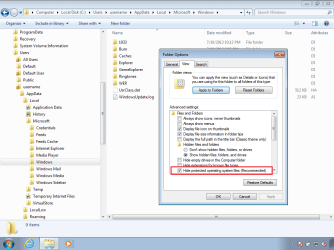
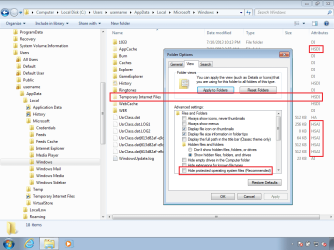
This is probably because System folders and files are hidden.
(And they should remain hidden.)

You can click on the right most part of the address bar (or path bar?) for Windows (file) Explorer...
...then copy/paste that path into that field...

paste.png

...and then press enter on the keyboard or click on the green arrow to the right of that field.


This is what the "Windows" folder might look like with the system folders and files hidden:

hide.png


This is what the "Windows" folder might look like with the system folders and files showing:

show.png


When that web.html file opens in a browser does it show any info or is it a blank web page?

If it happens again:
...copy the web.html file to your desktop
...right click on the web.html file and select...
Send to > Compressed (zipped) folder
...from the context menu.

Please upload that zipped file to the forum and we will try to see what app is generating it.
 

My Computer My Computer

Computer type
Laptop
Computer Manufacturer/Model Number
Employer provided Dell Latitude
OS
W7 Pro SP1 64bit
CPU
i7
Memory
8GB
Graphics Card(s)
Intel HD Graphics
Hard Drives
crappy SSD
Antivirus
Employer mandated Symantec Endpoint Protection
Browser
Pale Moon 64bit, IE11 64bit & Chrome 64bit
Thanks all

I have tried all your suggestions, it seems that the problem has gone (fingers crossed !) it has not happened for a while however if it does i will do as you suggest and upload it
 

My Computer My Computer

Computer type
PC/Desktop
Computer Manufacturer/Model Number
ZooStorm
OS
MS Windows 7 Pro64-bit SP1
CPU
Intel Core i5 @ 3.10GHz
Motherboard
Gigabyte Technology Co., Ltd. H81M-DS2V (SOCKET 0)
Memory
16.0GB DDR3 @ 498MHz (9-9-9-24)
Graphics Card(s)
K242HL @ 1920x1080
Sound Card
Realtek High Definition Audio
Monitor(s) Displays
K242HL on Intel HD Graphics 4600
Screen Resolution
1280x1024
Hard Drives
2930GB Western Digital WDC WD30EZRX-00D8PB0 SCSI Disk Device (SATA)
Keyboard
Zoostorm
Mouse
Zoostorm
Antivirus
Avast
Browser
IE 11 Firefox PaleMoon Opera
Ok

It happened again I am attaching the zip file
 

Attachments

My Computer My Computer

Computer type
PC/Desktop
Computer Manufacturer/Model Number
ZooStorm
OS
MS Windows 7 Pro64-bit SP1
CPU
Intel Core i5 @ 3.10GHz
Motherboard
Gigabyte Technology Co., Ltd. H81M-DS2V (SOCKET 0)
Memory
16.0GB DDR3 @ 498MHz (9-9-9-24)
Graphics Card(s)
K242HL @ 1920x1080
Sound Card
Realtek High Definition Audio
Monitor(s) Displays
K242HL on Intel HD Graphics 4600
Screen Resolution
1280x1024
Hard Drives
2930GB Western Digital WDC WD30EZRX-00D8PB0 SCSI Disk Device (SATA)
Keyboard
Zoostorm
Mouse
Zoostorm
Antivirus
Avast
Browser
IE 11 Firefox PaleMoon Opera
Do you have anything installed called newlux2?
 

My Computer My Computer

Computer type
Laptop
Computer Manufacturer/Model Number
Employer provided Dell Latitude
OS
W7 Pro SP1 64bit
CPU
i7
Memory
8GB
Graphics Card(s)
Intel HD Graphics
Hard Drives
crappy SSD
Antivirus
Employer mandated Symantec Endpoint Protection
Browser
Pale Moon 64bit, IE11 64bit & Chrome 64bit
No that is not installed
 

My Computer My Computer

Computer type
PC/Desktop
Computer Manufacturer/Model Number
ZooStorm
OS
MS Windows 7 Pro64-bit SP1
CPU
Intel Core i5 @ 3.10GHz
Motherboard
Gigabyte Technology Co., Ltd. H81M-DS2V (SOCKET 0)
Memory
16.0GB DDR3 @ 498MHz (9-9-9-24)
Graphics Card(s)
K242HL @ 1920x1080
Sound Card
Realtek High Definition Audio
Monitor(s) Displays
K242HL on Intel HD Graphics 4600
Screen Resolution
1280x1024
Hard Drives
2930GB Western Digital WDC WD30EZRX-00D8PB0 SCSI Disk Device (SATA)
Keyboard
Zoostorm
Mouse
Zoostorm
Antivirus
Avast
Browser
IE 11 Firefox PaleMoon Opera
It looks as if you did a File > Save as... to save the file.
I'm not sure if that changed things or not.

Use Windows (file) Explorer to see if the file is still on your Temporary Internet Files folded.

If you see the file (named web.html), then please copy it to your desktop, compress it and upload it.
 

My Computer My Computer

Computer type
Laptop
Computer Manufacturer/Model Number
Employer provided Dell Latitude
OS
W7 Pro SP1 64bit
CPU
i7
Memory
8GB
Graphics Card(s)
Intel HD Graphics
Hard Drives
crappy SSD
Antivirus
Employer mandated Symantec Endpoint Protection
Browser
Pale Moon 64bit, IE11 64bit & Chrome 64bit
Using explorer and in the Temporary Internet Files folder there is no web.html
 

My Computer My Computer

Computer type
PC/Desktop
Computer Manufacturer/Model Number
ZooStorm
OS
MS Windows 7 Pro64-bit SP1
CPU
Intel Core i5 @ 3.10GHz
Motherboard
Gigabyte Technology Co., Ltd. H81M-DS2V (SOCKET 0)
Memory
16.0GB DDR3 @ 498MHz (9-9-9-24)
Graphics Card(s)
K242HL @ 1920x1080
Sound Card
Realtek High Definition Audio
Monitor(s) Displays
K242HL on Intel HD Graphics 4600
Screen Resolution
1280x1024
Hard Drives
2930GB Western Digital WDC WD30EZRX-00D8PB0 SCSI Disk Device (SATA)
Keyboard
Zoostorm
Mouse
Zoostorm
Antivirus
Avast
Browser
IE 11 Firefox PaleMoon Opera
It might only be there when the browser is showing the file.

The Temporary Internet Files folder is sort of not real.
It shows you some files from other hidden folders.
C:\Users\username\AppData\Local\Microsoft\Windows\Temporary Internet Files\Content.IE5\3FNW74A1
C:\Users\username\AppData\Local\Microsoft\Windows\Temporary Internet Files\Low\Content.IE5\AKU5RBRS
The last part of the path varies.

It is probably not worth finding the actual file... I was just curious.

Process Monitor can probably find it. But if you are not familiar with the tool, it will be hard for me to document how to use it to find the app that creates this file.

Download the zipped (compressed) file
Open the zipped (compressed) file (folder)
Copy the files somewhere
Run the exe
Agree to the EULA

When it starts for the first time, it automatically starts gathering data. Let me know if you want to learn how to filter what it finds. Unfortunately, It will need to run and gather data all of the time until the donate popup occurs.
 

My Computer My Computer

Computer type
Laptop
Computer Manufacturer/Model Number
Employer provided Dell Latitude
OS
W7 Pro SP1 64bit
CPU
i7
Memory
8GB
Graphics Card(s)
Intel HD Graphics
Hard Drives
crappy SSD
Antivirus
Employer mandated Symantec Endpoint Protection
Browser
Pale Moon 64bit, IE11 64bit & Chrome 64bit
Thanks again

It does not seem to be affecting the PC as I said at the start it is just an annoyance, would it hurt to delete the contents in the Temporary Internet Files folder ? at the moment there are 4,818 items in there
 

My Computer My Computer

Computer type
PC/Desktop
Computer Manufacturer/Model Number
ZooStorm
OS
MS Windows 7 Pro64-bit SP1
CPU
Intel Core i5 @ 3.10GHz
Motherboard
Gigabyte Technology Co., Ltd. H81M-DS2V (SOCKET 0)
Memory
16.0GB DDR3 @ 498MHz (9-9-9-24)
Graphics Card(s)
K242HL @ 1920x1080
Sound Card
Realtek High Definition Audio
Monitor(s) Displays
K242HL on Intel HD Graphics 4600
Screen Resolution
1280x1024
Hard Drives
2930GB Western Digital WDC WD30EZRX-00D8PB0 SCSI Disk Device (SATA)
Keyboard
Zoostorm
Mouse
Zoostorm
Antivirus
Avast
Browser
IE 11 Firefox PaleMoon Opera

My Computer My Computer

Computer type
Laptop
Computer Manufacturer/Model Number
Employer provided Dell Latitude
OS
W7 Pro SP1 64bit
CPU
i7
Memory
8GB
Graphics Card(s)
Intel HD Graphics
Hard Drives
crappy SSD
Antivirus
Employer mandated Symantec Endpoint Protection
Browser
Pale Moon 64bit, IE11 64bit & Chrome 64bit
I think I may have sorted it, using Process Monitor found out it was being generated from an exe called Run Time which was
in the Startup Folder.

I killed the process, then deleted the exe from the Folder.

Then rebooted, hopefully that will stop it

Once again thanks for all your help I will mark this as solved.
 

My Computer My Computer

Computer type
PC/Desktop
Computer Manufacturer/Model Number
ZooStorm
OS
MS Windows 7 Pro64-bit SP1
CPU
Intel Core i5 @ 3.10GHz
Motherboard
Gigabyte Technology Co., Ltd. H81M-DS2V (SOCKET 0)
Memory
16.0GB DDR3 @ 498MHz (9-9-9-24)
Graphics Card(s)
K242HL @ 1920x1080
Sound Card
Realtek High Definition Audio
Monitor(s) Displays
K242HL on Intel HD Graphics 4600
Screen Resolution
1280x1024
Hard Drives
2930GB Western Digital WDC WD30EZRX-00D8PB0 SCSI Disk Device (SATA)
Keyboard
Zoostorm
Mouse
Zoostorm
Antivirus
Avast
Browser
IE 11 Firefox PaleMoon Opera
Good to hear :-)
 

My Computer My Computer

Computer type
Laptop
Computer Manufacturer/Model Number
Employer provided Dell Latitude
OS
W7 Pro SP1 64bit
CPU
i7
Memory
8GB
Graphics Card(s)
Intel HD Graphics
Hard Drives
crappy SSD
Antivirus
Employer mandated Symantec Endpoint Protection
Browser
Pale Moon 64bit, IE11 64bit & Chrome 64bit
Had this problem.
The things I did.
1st download Rogue Killer. Run and get shut of pup files.
then download malware bytes, Run and get shut of pup file.
Then lastly download bitdefender, 30 day trial
Run complete scan this will delete malware byte and hunt out most virus's.
when everything complete restart machine. Maybe a slow process depends on machine you have.
Everything works great now cpu usage below 10% no rogue internet pages opening with sound coming over speakers.
By the way I was running AVG before. Deleted it before I started. Now running bitdefender.
Win 7 64 bit.
 

My Computer My Computer

Computer type
PC/Desktop
OS
widows 7 64 bit
Back
Top