Display driver stop responding and recovered Win7, what do?

Nickod777

New member
Local time
2:16 PM
Messages
21
Location
EARTH
So I seem to have been having a problem when playing 2 certain games. One is called Heroes of Newerth (HON), and the other Runescape. At random peak times when my memory usage increases a lot, my screen flickers off and flickers back on randomly. It stays on for quite awhile then, and may just happen randomly after that. I'm not sure if it's actually linked to the memory usage or not, as sometimes when I play HON, my memory usage isn't incredibly high, and I tend to have this problem.
 

My Computer My Computer

At a glance

Microsoft Windows 7 Home Premium 64-bitIntel(R) Core(TM)2 Duo CPU T6600 @ 2.20GHztotal: 4.00 GB, usable: 3.84 GB(1) Mobile Intel(R) 4 Series Express Chipset ...
Computer type
Laptop
Computer Manufacturer/Model Number
VAIO VGN-NW270F
OS
Microsoft Windows 7 Home Premium 64-bit
CPU
Intel(R) Core(TM)2 Duo CPU T6600 @ 2.20GHz
Motherboard
Sony Corporation VAIO
Memory
total: 4.00 GB, usable: 3.84 GB
Graphics Card(s)
(1) Mobile Intel(R) 4 Series Express Chipset Family
Sound Card
(1) Intel(R) High Definition Audio HDMI (2) Realtek High D
Monitor(s) Displays
Generic PNP Monitor
Screen Resolution
1366x768
Hard Drives
ATA SAMSUNG HM320II SCSI Disk Device 298.09
PSU
VGP-AC19V37
Mouse
Logitech Wireless Mouse M325
Internet Speed
20 MB/s download 5 MB/s upload
Antivirus
Microsoft Security essentials
Browser
Google Chrome

My Computer My Computer

At a glance

Desk1 7 Home Prem / Desk2 10 Pro / Main lap A...Desk1 i5 3750K / Laptop i7 GTX 860M / Desk2 i...Desk1 8GB (1866) / Desk2 16GB (1333) / Laptop...Desk 1& 2NVidia GTX 650 & Laptops on board Intel
Computer type
PC/Desktop
Computer Manufacturer/Model Number
Own build (new) Desk1 / Asus ROG Win 7 / Desk2 1st build
OS
Desk1 7 Home Prem / Desk2 10 Pro / Main lap Asus ROG 10 Pro 2 laptop Toshiba 7 Pro Asus P2520 7 & 10
CPU
Desk1 i5 3750K / Laptop i7 GTX 860M / Desk2 i5 2500
Motherboard
Desk1 Asus P877-V / Desk2 Gigabyte H67 UD3H / Laptop ?
Memory
Desk1 8GB (1866) / Desk2 16GB (1333) / Laptop 8Gb DDR3
Graphics Card(s)
Desk 1& 2NVidia GTX 650 & Laptops on board Intel
Sound Card
Desk 1 & 2 -XONAR DG Realtek High Def audio Laptop
Monitor(s) Displays
Desk 1 Benq HD 2450 / Desk2 Philips 24" / Laptop 17.5"
Screen Resolution
1920x1080 D1 & D2 & Laptop 1
Hard Drives
Desk1 Samsung 120GB 830 SSD
Asus ROG 256GB 850 Pro SSD
Desk2 Samsung 840 256 SSD
Toshiba 120GB EVO
PSU
Desk 1 Corsair HX 1050/ Laptop ? / Desk 2 Corsair HX 650
Case
Desk 1 Cooler HAF XM ? Toshiba laptop / Desk2 Coolermaster
Cooling
Fans on all Desk1 -2 Desk2 - all Coolermasters 5 Laptop ?
Keyboard
Desk 1 MS Sidewinder X6 Desk 2 MS Sidewinder X 4
Mouse
Desk 1&2 - Gigabyte MS 900 gamer - laptop - Logitec wireless
Internet Speed
ADSL2+
Other Info
One other Desktop (tester) and spare Toshba laptop both with SSD's
Running Kaspersky 2016 ISS on all machines config'd identically
Logitec audio stereo systems on each machine (x3)
Canon MG5250MFC
Router/modem TP-Link running WPA2SK
Okay, done with that.

There's a DXDiag also, if you want that too.
 

Attachments

My Computer My Computer

At a glance

Microsoft Windows 7 Home Premium 64-bitIntel(R) Core(TM)2 Duo CPU T6600 @ 2.20GHztotal: 4.00 GB, usable: 3.84 GB(1) Mobile Intel(R) 4 Series Express Chipset ...
Computer type
Laptop
Computer Manufacturer/Model Number
VAIO VGN-NW270F
OS
Microsoft Windows 7 Home Premium 64-bit
CPU
Intel(R) Core(TM)2 Duo CPU T6600 @ 2.20GHz
Motherboard
Sony Corporation VAIO
Memory
total: 4.00 GB, usable: 3.84 GB
Graphics Card(s)
(1) Mobile Intel(R) 4 Series Express Chipset Family
Sound Card
(1) Intel(R) High Definition Audio HDMI (2) Realtek High D
Monitor(s) Displays
Generic PNP Monitor
Screen Resolution
1366x768
Hard Drives
ATA SAMSUNG HM320II SCSI Disk Device 298.09
PSU
VGP-AC19V37
Mouse
Logitech Wireless Mouse M325
Internet Speed
20 MB/s download 5 MB/s upload
Antivirus
Microsoft Security essentials
Browser
Google Chrome
Okay, done with that.

There's a DXDiag also, if you want that too.

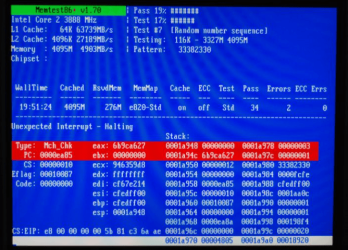
Ok mate if you think it is RAM related then best do a memtest it does take a lng time but at least it will eliminate that cause.
http://www.sevenforums.com/tutorials/105647-ram-test-memtest86.html

You will have to make a bootable disk and set the BIOS to boot from the optical and let the test run for at least 8 passes unless the errors come up straight away. You will see then as in pic If they come up straight away then you will need to then test each stick in each slot if you have more than one stick.
 

Attachments

  • MEM.PNG
    MEM.PNG
    183.7 KB · Views: 26

My Computer My Computer

At a glance

Desk1 7 Home Prem / Desk2 10 Pro / Main lap A...Desk1 i5 3750K / Laptop i7 GTX 860M / Desk2 i...Desk1 8GB (1866) / Desk2 16GB (1333) / Laptop...Desk 1& 2NVidia GTX 650 & Laptops on board Intel
Computer type
PC/Desktop
Computer Manufacturer/Model Number
Own build (new) Desk1 / Asus ROG Win 7 / Desk2 1st build
OS
Desk1 7 Home Prem / Desk2 10 Pro / Main lap Asus ROG 10 Pro 2 laptop Toshiba 7 Pro Asus P2520 7 & 10
CPU
Desk1 i5 3750K / Laptop i7 GTX 860M / Desk2 i5 2500
Motherboard
Desk1 Asus P877-V / Desk2 Gigabyte H67 UD3H / Laptop ?
Memory
Desk1 8GB (1866) / Desk2 16GB (1333) / Laptop 8Gb DDR3
Graphics Card(s)
Desk 1& 2NVidia GTX 650 & Laptops on board Intel
Sound Card
Desk 1 & 2 -XONAR DG Realtek High Def audio Laptop
Monitor(s) Displays
Desk 1 Benq HD 2450 / Desk2 Philips 24" / Laptop 17.5"
Screen Resolution
1920x1080 D1 & D2 & Laptop 1
Hard Drives
Desk1 Samsung 120GB 830 SSD
Asus ROG 256GB 850 Pro SSD
Desk2 Samsung 840 256 SSD
Toshiba 120GB EVO
PSU
Desk 1 Corsair HX 1050/ Laptop ? / Desk 2 Corsair HX 650
Case
Desk 1 Cooler HAF XM ? Toshiba laptop / Desk2 Coolermaster
Cooling
Fans on all Desk1 -2 Desk2 - all Coolermasters 5 Laptop ?
Keyboard
Desk 1 MS Sidewinder X6 Desk 2 MS Sidewinder X 4
Mouse
Desk 1&2 - Gigabyte MS 900 gamer - laptop - Logitec wireless
Internet Speed
ADSL2+
Other Info
One other Desktop (tester) and spare Toshba laptop both with SSD's
Running Kaspersky 2016 ISS on all machines config'd identically
Logitec audio stereo systems on each machine (x3)
Canon MG5250MFC
Router/modem TP-Link running WPA2SK
Completed the memtest, all 8 passes, there were no errors.
 

My Computer My Computer

At a glance

Microsoft Windows 7 Home Premium 64-bitIntel(R) Core(TM)2 Duo CPU T6600 @ 2.20GHztotal: 4.00 GB, usable: 3.84 GB(1) Mobile Intel(R) 4 Series Express Chipset ...
Computer type
Laptop
Computer Manufacturer/Model Number
VAIO VGN-NW270F
OS
Microsoft Windows 7 Home Premium 64-bit
CPU
Intel(R) Core(TM)2 Duo CPU T6600 @ 2.20GHz
Motherboard
Sony Corporation VAIO
Memory
total: 4.00 GB, usable: 3.84 GB
Graphics Card(s)
(1) Mobile Intel(R) 4 Series Express Chipset Family
Sound Card
(1) Intel(R) High Definition Audio HDMI (2) Realtek High D
Monitor(s) Displays
Generic PNP Monitor
Screen Resolution
1366x768
Hard Drives
ATA SAMSUNG HM320II SCSI Disk Device 298.09
PSU
VGP-AC19V37
Mouse
Logitech Wireless Mouse M325
Internet Speed
20 MB/s download 5 MB/s upload
Antivirus
Microsoft Security essentials
Browser
Google Chrome
Ok Nick another common problem is the PSU now I don't know what you have got but it is worth testing it out.
http://www.sevenforums.com/tutorials/86648-psu-jump-start.html
for volts refs
Power Supply 101: A Reference Of Specifications - Power Supplies

Tolerances on the volts are tight so any thing more than say 0.5v off target volts + or - something is very wrong. You could just check to see how dusty the PSU is inside by shining a very bright light source into ti through the venting slots and fan aperture.

PSU TESTING

Now you have to remember of coursecorrect volts does not always mean correct current.

Think of it as a car with a flatbattery it may test perfect at 12 - 13v but try and crank the engine it may dothat but leave no available current for the ignition and other essentialcircuits.


WARNING When you test the leads etc you will not be at any risk only when you try to take apart the PSU itself does it become VERY dangerous so leave it in situ.
Post back if you are unsure on anything there are plenty of members well versed with power supplies as I shall be on night duty tonight and may not get the chance to answer straight away.
It could be that your one has seen better times.
 

My Computer My Computer

At a glance

Desk1 7 Home Prem / Desk2 10 Pro / Main lap A...Desk1 i5 3750K / Laptop i7 GTX 860M / Desk2 i...Desk1 8GB (1866) / Desk2 16GB (1333) / Laptop...Desk 1& 2NVidia GTX 650 & Laptops on board Intel
Computer type
PC/Desktop
Computer Manufacturer/Model Number
Own build (new) Desk1 / Asus ROG Win 7 / Desk2 1st build
OS
Desk1 7 Home Prem / Desk2 10 Pro / Main lap Asus ROG 10 Pro 2 laptop Toshiba 7 Pro Asus P2520 7 & 10
CPU
Desk1 i5 3750K / Laptop i7 GTX 860M / Desk2 i5 2500
Motherboard
Desk1 Asus P877-V / Desk2 Gigabyte H67 UD3H / Laptop ?
Memory
Desk1 8GB (1866) / Desk2 16GB (1333) / Laptop 8Gb DDR3
Graphics Card(s)
Desk 1& 2NVidia GTX 650 & Laptops on board Intel
Sound Card
Desk 1 & 2 -XONAR DG Realtek High Def audio Laptop
Monitor(s) Displays
Desk 1 Benq HD 2450 / Desk2 Philips 24" / Laptop 17.5"
Screen Resolution
1920x1080 D1 & D2 & Laptop 1
Hard Drives
Desk1 Samsung 120GB 830 SSD
Asus ROG 256GB 850 Pro SSD
Desk2 Samsung 840 256 SSD
Toshiba 120GB EVO
PSU
Desk 1 Corsair HX 1050/ Laptop ? / Desk 2 Corsair HX 650
Case
Desk 1 Cooler HAF XM ? Toshiba laptop / Desk2 Coolermaster
Cooling
Fans on all Desk1 -2 Desk2 - all Coolermasters 5 Laptop ?
Keyboard
Desk 1 MS Sidewinder X6 Desk 2 MS Sidewinder X 4
Mouse
Desk 1&2 - Gigabyte MS 900 gamer - laptop - Logitec wireless
Internet Speed
ADSL2+
Other Info
One other Desktop (tester) and spare Toshba laptop both with SSD's
Running Kaspersky 2016 ISS on all machines config'd identically
Logitec audio stereo systems on each machine (x3)
Canon MG5250MFC
Router/modem TP-Link running WPA2SK
I don't have one of those 24 pin things.... I think.... I have a External power adapter though... I have no idea how to test this though... VGP-AC19V37


Now I understand why you thought I had a desktop. I kept my computer type at PC... Didn't know there was a laptop or tablet option. My apologies.
 
Last edited:

My Computer My Computer

At a glance

Microsoft Windows 7 Home Premium 64-bitIntel(R) Core(TM)2 Duo CPU T6600 @ 2.20GHztotal: 4.00 GB, usable: 3.84 GB(1) Mobile Intel(R) 4 Series Express Chipset ...
Computer type
Laptop
Computer Manufacturer/Model Number
VAIO VGN-NW270F
OS
Microsoft Windows 7 Home Premium 64-bit
CPU
Intel(R) Core(TM)2 Duo CPU T6600 @ 2.20GHz
Motherboard
Sony Corporation VAIO
Memory
total: 4.00 GB, usable: 3.84 GB
Graphics Card(s)
(1) Mobile Intel(R) 4 Series Express Chipset Family
Sound Card
(1) Intel(R) High Definition Audio HDMI (2) Realtek High D
Monitor(s) Displays
Generic PNP Monitor
Screen Resolution
1366x768
Hard Drives
ATA SAMSUNG HM320II SCSI Disk Device 298.09
PSU
VGP-AC19V37
Mouse
Logitech Wireless Mouse M325
Internet Speed
20 MB/s download 5 MB/s upload
Antivirus
Microsoft Security essentials
Browser
Google Chrome
So I seem to have been having a problem when playing 2 certain games. One is called Heroes of Newerth (HON), and the other Runescape. At random peak times when my memory usage increases a lot, my screen flickers off and flickers back on randomly. It stays on for quite awhile then, and may just happen randomly after that. I'm not sure if it's actually linked to the memory usage or not, as sometimes when I play HON, my memory usage isn't incredibly high, and I tend to have this problem.

Hi,

What you are experiencing is random TDR's.
Not much you can do about, try an older or newer driver.
If you had an Nvidia GPU I could make a modded driver for you but unfortunately it's not the case.

Regards,
 

My Computer My Computer

At a glance

Windows 7 x64 Home Premium
Computer type
Laptop
Computer Manufacturer/Model Number
Sony Vaio
OS
Windows 7 x64 Home Premium
Back
Top