Solved Dead HDD? Reallocated Sectors Count decreases.

Takuya55

New member
Local time
2:13 PM
Messages
13
Location
Romania
Hello everyone! Right now I'm here because I've been searching all the day for a sollution related on my problem, but because I haven't found anything useful, I've realized that posting here is the only way to get some proper help.

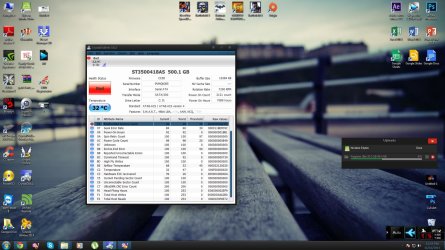
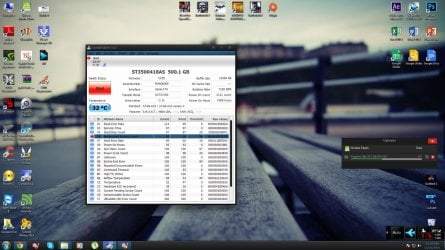
It's all about my HDD, namely Seagate Barracuda 7200rpm 500GB. I need to mentiont that my actual PC configuration is pretty new, except this component, which is almost 3 years old. So, one day I turned on my PC, and suddenly I got a message from BIOS related to a S.M.A.R.T so-called thing that gave me the next message "Bad sectors. Backup and Replace", mentioning my Hard Disk. I got a lil' bit confused, and the same message I was getting from Windows. I'd became pretty worried, so I started seeking for a sollution. I downloaded a program called "CrystalDiskInfo" which showed me that my HDD status is pretty bad. The "Reallocated Sectors Count" was dignified with a red spot, having "26" as current and worst values, "36" as threshold, and "000000000CD9" as RAW Value. After that, I tried to find a way to repair it if that was possible, so I found a program called "HDD Regenerator". From the information seen on the internet, I understood that if there are not any physical bad sectors, the HDD may be repaired, but I'm not sure if this is a 100% true fact. Anyway, when I wanted to run the program, I got the message that it is recommended to change the driver mode from "ACHI" to "IDE". I know in general what's the idea with those, but I was too desperate to resolve my problem, so I started to dig in one's heels. I rebooted my PC, then I changed in BIOS the driver mode, and then BOOM i got the well-known BSOD. I knew I was getting that because of my latest change, so I tried to find a proper way to change that without getting any error. I saw on some threads that I need to make a so-called trick in "regedit", I made it, I rebooted my PC again , changed the mode, and the again BOOM, got again BSOD. Okay, let's find another sollution. I changed back in ACHI, and then BSOD again. I said "What?". At that moment, my computer simply didn't want to reboot either in ACHI or IDE mode. I was in a way panicked, thinking that I need to re-install my Windows or maybe my HDD was DEAD already, but fortunately, by using "Last good configuration", I got almost everything at a stable situation. Why almost? Because after my PC entered in Windows, I got another problem. My network driver was corrupted for no reason, and after I resolved that problem too, I got a random BSOD, related to "ndsys", or something like that. But after that, everything went exactly as it was. Still I didn't find a proper sollution, so I stopped taking any risks related to this situation. Anyway, the next day I became more and more worried. The "Reallocated Sectors Count" decreased from "26", to "20". I wish that this would be something good, but I'm really not sure if the value needs to be higher or lower in order to make some good changes. After all I did, I have the feeling that it's even worse. But I still hope for a sollution, because, if in the worst case I need to change my HDD, okay, it's all right, I've got some money from my economies in order to replace it, but the problem is that if my HDD it's still healthy, then I don't have any reason to buy another one. I really can handle everything by using this one, and I would really like to spend my money for other things, not a new HDD. For that I need to be very sure about this. I also have important files, so luckily, I found a temporary CLOUD Service to store them, but it will be a really big problem if my HDD fails when my trial expires. I would extremely appreciate if you guys can help me to solve this. I really need to know what to do about my HDD.

Also, as some extra mentions, the temperature keeps between 19-31 degrees, and this problem started only after I abused of my HDD size, and so I downloaded so many files, that I got from 140 free GB to 24 GB! I guess this is a so-called "big deal" for a 500GB HDD, but I'm not sure. Also I post a screenshot with all the extra information from "CrystalDiskInfo".

Also, here are my PC specs ( the most important ones ) : Windows 7 Ultimate 64-bit.
me PC: 2013 In Development PC! :D
CPU: Intel(R) Core(TM) i5-4570 CPU @ 3.20Ghz (4 CPUs), ~3.2Ghz
Motherboard : ASUS B85-PLUS
RAM :Corsair Vengeance 8GB DDR3 1600MHz CL9.
HDD: Seagate Barracuda 7200rpm. 500GB
GPU: EVGA NVIDIA GeForce GTX 660 FTW 2GB GDDR5
Placa de sunet: Motherboard's default.
Boxe: Genius Old Devices.
PSU: Cooler Master Extreme Plus, 500W
Case: Cooler Master Elite 334U

I hope that everything's okay and I would be extremely grateful if there's a sollution for my problem. Thank you very much!
 

Attachments
  • 1.jpg
    1.jpg
    225.7 KB · Views: 86
  • 2.jpg
    2.jpg
    226.1 KB · Views: 46

My Computer My Computer

Computer type
PC/Desktop
Computer Manufacturer/Model Number
Homemade.
OS
Windows 7 Ultimate x64
CPU
Intel(R) Core(TM) i5-4570 CPU @ 3.20Ghz (4 CPUs), ~3.2Ghz
Motherboard
ASUS B85-PLUS
Memory
Corsair Vengeance 8GB DDR3 1600MHz CL9
Graphics Card(s)
EVGA NVIDIA GeForce GTX 660 FTW 2GB GDDR5
Sound Card
Motherboard's default
Monitor(s) Displays
SyncMaster B2230N
Screen Resolution
1920x1080
Hard Drives
Seagate Barracuda 7200rpm. 500GB
PSU
Cooler Master Extreme Plus, 500W
Case
Cooler Master Elite 334U
Cooling
Cooler Master Hyper 212 Plus cooler > Front
Keyboard
Logitech Wireless Device
Mouse
A4 Tech Bloody V7 Core Licensed
Internet Speed
100mbps
Browser
Google Chrome
Reallocated sectors counts is almost certainly a sure sign that the HDD is failing, and about to stop working permanently. There is no other solution but to replace it with a new HDD.

If I was in your position, I would immediately backup any important user data, then replace the HDD, and perform a clean install of the OS and software.
 

My Computer My Computer

Computer type
PC/Desktop
Computer Manufacturer/Model Number
Golden Mk. I.4
OS
Windows 10 Pro x64 ; Xubuntu x64
CPU
Intel i7 860 @ 2.80 GHz O/C'ed to 4.0GHz
Motherboard
Gigabyte P55A-UD3R Rev.1. Award BIOS F13
Memory
16GB Corsair Vengance DDR3 @ 661 MHz Dual Channel (9-9-9-24)
Graphics Card(s)
EVGA NVidia GTX 560 1024MB
Sound Card
Realtek Integrated
Monitor(s) Displays
Dual Samsung SyncMaster 2494HS
Screen Resolution
1920*1080 and 1920*1080
Hard Drives
1*Samsung 840 EVO 120GB SSD;
1*OCZ Vertex 2 60GB SSD;
2*Samsung F3 SpinPoint 1TB in RAID0;
1*Samsung F1 SpinPoint 1TB;
2*Western Digital 1TB External USB 3.0
1*Western Digital 500GB External USB 3.0
1*Seagate 500GB External USB 2.0
PSU
Thermaltake ToughPower QFan 750W
Case
Thermaltake Element S VK60001W2Z
Cooling
Corsair H60 Water Cooling, 2*230mm and 2*80mm case fans
Keyboard
Logitech G110
Mouse
Logitech MX518
So I guess this is it, right? I mean, there's no other possible way to keep it at least "one year". I should say bye-bye to it in the next days? Thank you for your attention and response anyway :D, even if it's not what I hoped :(.
 

My Computer My Computer

Computer type
PC/Desktop
Computer Manufacturer/Model Number
Homemade.
OS
Windows 7 Ultimate x64
CPU
Intel(R) Core(TM) i5-4570 CPU @ 3.20Ghz (4 CPUs), ~3.2Ghz
Motherboard
ASUS B85-PLUS
Memory
Corsair Vengeance 8GB DDR3 1600MHz CL9
Graphics Card(s)
EVGA NVIDIA GeForce GTX 660 FTW 2GB GDDR5
Sound Card
Motherboard's default
Monitor(s) Displays
SyncMaster B2230N
Screen Resolution
1920x1080
Hard Drives
Seagate Barracuda 7200rpm. 500GB
PSU
Cooler Master Extreme Plus, 500W
Case
Cooler Master Elite 334U
Cooling
Cooler Master Hyper 212 Plus cooler > Front
Keyboard
Logitech Wireless Device
Mouse
A4 Tech Bloody V7 Core Licensed
Internet Speed
100mbps
Browser
Google Chrome
You could take a gamble, and see how long it lasts....but its risky. I had the same thing happen to me not so long ago, and within the space of 2 weeks the disk just died without any warning.
 

My Computer My Computer

Computer type
PC/Desktop
Computer Manufacturer/Model Number
Golden Mk. I.4
OS
Windows 10 Pro x64 ; Xubuntu x64
CPU
Intel i7 860 @ 2.80 GHz O/C'ed to 4.0GHz
Motherboard
Gigabyte P55A-UD3R Rev.1. Award BIOS F13
Memory
16GB Corsair Vengance DDR3 @ 661 MHz Dual Channel (9-9-9-24)
Graphics Card(s)
EVGA NVidia GTX 560 1024MB
Sound Card
Realtek Integrated
Monitor(s) Displays
Dual Samsung SyncMaster 2494HS
Screen Resolution
1920*1080 and 1920*1080
Hard Drives
1*Samsung 840 EVO 120GB SSD;
1*OCZ Vertex 2 60GB SSD;
2*Samsung F3 SpinPoint 1TB in RAID0;
1*Samsung F1 SpinPoint 1TB;
2*Western Digital 1TB External USB 3.0
1*Western Digital 500GB External USB 3.0
1*Seagate 500GB External USB 2.0
PSU
Thermaltake ToughPower QFan 750W
Case
Thermaltake Element S VK60001W2Z
Cooling
Corsair H60 Water Cooling, 2*230mm and 2*80mm case fans
Keyboard
Logitech G110
Mouse
Logitech MX518
Well, I was a bit sure of a length like this, as a reality fact :P. I just feel bad because I really wanted to buy a camera, in a way or another I was seeing YouTube as a nice hobby :D, but I can't just let this problem persist. Anyway, thanks a lot for you support! I really appreciate it, and I'm at least happy because I know what I need to do next. Thank you again!
 

My Computer My Computer

Computer type
PC/Desktop
Computer Manufacturer/Model Number
Homemade.
OS
Windows 7 Ultimate x64
CPU
Intel(R) Core(TM) i5-4570 CPU @ 3.20Ghz (4 CPUs), ~3.2Ghz
Motherboard
ASUS B85-PLUS
Memory
Corsair Vengeance 8GB DDR3 1600MHz CL9
Graphics Card(s)
EVGA NVIDIA GeForce GTX 660 FTW 2GB GDDR5
Sound Card
Motherboard's default
Monitor(s) Displays
SyncMaster B2230N
Screen Resolution
1920x1080
Hard Drives
Seagate Barracuda 7200rpm. 500GB
PSU
Cooler Master Extreme Plus, 500W
Case
Cooler Master Elite 334U
Cooling
Cooler Master Hyper 212 Plus cooler > Front
Keyboard
Logitech Wireless Device
Mouse
A4 Tech Bloody V7 Core Licensed
Internet Speed
100mbps
Browser
Google Chrome
:thumbsup:
 

My Computer My Computer

Computer type
PC/Desktop
Computer Manufacturer/Model Number
Golden Mk. I.4
OS
Windows 10 Pro x64 ; Xubuntu x64
CPU
Intel i7 860 @ 2.80 GHz O/C'ed to 4.0GHz
Motherboard
Gigabyte P55A-UD3R Rev.1. Award BIOS F13
Memory
16GB Corsair Vengance DDR3 @ 661 MHz Dual Channel (9-9-9-24)
Graphics Card(s)
EVGA NVidia GTX 560 1024MB
Sound Card
Realtek Integrated
Monitor(s) Displays
Dual Samsung SyncMaster 2494HS
Screen Resolution
1920*1080 and 1920*1080
Hard Drives
1*Samsung 840 EVO 120GB SSD;
1*OCZ Vertex 2 60GB SSD;
2*Samsung F3 SpinPoint 1TB in RAID0;
1*Samsung F1 SpinPoint 1TB;
2*Western Digital 1TB External USB 3.0
1*Western Digital 500GB External USB 3.0
1*Seagate 500GB External USB 2.0
PSU
Thermaltake ToughPower QFan 750W
Case
Thermaltake Element S VK60001W2Z
Cooling
Corsair H60 Water Cooling, 2*230mm and 2*80mm case fans
Keyboard
Logitech G110
Mouse
Logitech MX518
Having had 4 drives fail on me this year (all with warning from HD Sentinal) I was able to back up and restore. Do it now. Seriously one of the drives I was warned about started clicking and was dead as a doornail within a day of being warned about. Golden is absolutley correct, there is no magic software fix. I also look at Seagate drives with a different light now......Good Luck Tony:D
 

My Computer My Computer

Computer type
PC/Desktop
Computer Manufacturer/Model Number
Bluethunder II
OS
Windows 7 x64 Ultimate and numerous virtual machines
CPU
AMD FX-8350 Vishera 32nm Technology @ 4.2 GHz default
Motherboard
ASUSTeK COMPUTER INC. SABERTOOTH 990FX R2.0 (Socket 942)
Memory
G Skill 32.0GB Dual-Channel DDR3 @ 1204MHz (11-13-13-31)
Graphics Card(s)
EVGA GeForce GTX 960 4GB Super SC ACX 2.0+ with Back Plate
Sound Card
Creative X-Fi Titanium HD Audiophile PCIe
Monitor(s) Displays
LG L227WTG x 3
Screen Resolution
1680 x 1050 16:10
Hard Drives
238GB Samsung850 PRO SATA Disk Device (SSD)
1863GB Seagate ST2000DM 001-1CH164 (SATA)
1397GB Seagate ST1500DL 003-9VT16L(SATA)
466GB Western Digital WDC WD50 03AZEX-00K1GA0 (SATA) x 2
932GB Seagate ST310005 28AS SATA Disk Device (SATA)
PSU
Enermax Revolution87+ 1000 Watts Gold Certified Power Supply
Case
Rocketfish Full Tower
Cooling
Cooler Master Hyper 212 EVO Push Pull 120mm Fans
Keyboard
Logitech K740
Mouse
Logitech G100S Laser LED + Logitech Gamepad F310
Internet Speed
500 mbs down and 30mbs up
Antivirus
Malwarebytes Pro & Avast and MSE on certain Virtual Machines
Browser
Firefox (Main) Chrome, Internet Explorer (Back Up)
Other Info
Logitech X 230 2.1 Stereo System and 5.1 Yamaha RX V2090
B&W DM6 Monitor Speakers + Center and Surround Speakers
Using Mouse Without Borders (Google it)
When the drive detects that a sector is bad it is replaced by one set aside for the purpose. Note that this is handled internally and the OS is not involved. The "Reallocated sectors count" is the number of sectors thus replaced. But there are only a limited number of sectors available for this purpose and I expect that number has long since been exceeded. Another issue is that the drive can only replace the sector following a write operation. There are probably many other bad sectors the drive has not yet detected.

Backup all important files on the drive and replace it. The best you could hope for with any kind of repair operation is to buy a little time, and there is no way of knowing how long it will be. Don't waste your time with a failing drive.
 

My Computer My Computer

Computer type
PC/Desktop
Computer Manufacturer/Model Number
HP
OS
Windows 7 Pro 64 bit
CPU
Xeon W3520
Memory
8 GB
Graphics Card(s)
Nvidia Geforce 210
Thank you a lot for all you support guys! I really appreciate the idea that I found someone who's able to tell me the correct information about this situation. I still feel bad for the thing that I need to say goodbye, but it's a lot more better than knowing my HDD is okay and at a moment he will die in any moment. Thank you again :D!
 

My Computer My Computer

Computer type
PC/Desktop
Computer Manufacturer/Model Number
Homemade.
OS
Windows 7 Ultimate x64
CPU
Intel(R) Core(TM) i5-4570 CPU @ 3.20Ghz (4 CPUs), ~3.2Ghz
Motherboard
ASUS B85-PLUS
Memory
Corsair Vengeance 8GB DDR3 1600MHz CL9
Graphics Card(s)
EVGA NVIDIA GeForce GTX 660 FTW 2GB GDDR5
Sound Card
Motherboard's default
Monitor(s) Displays
SyncMaster B2230N
Screen Resolution
1920x1080
Hard Drives
Seagate Barracuda 7200rpm. 500GB
PSU
Cooler Master Extreme Plus, 500W
Case
Cooler Master Elite 334U
Cooling
Cooler Master Hyper 212 Plus cooler > Front
Keyboard
Logitech Wireless Device
Mouse
A4 Tech Bloody V7 Core Licensed
Internet Speed
100mbps
Browser
Google Chrome
Reallocated sectors counts is not necessarily a sign of impending doom and destruction. I would do a backup to be safe. Reallocated sectors counts can be from a disk surface defect or bad read/write heads. You have spare sectors to be reallocated, use them.

I recommend using "Hard disk sentinel" to check drive health and the "disk check" in "Puran Utilities" to repair the hdd. I have used this method to recover bad sectors in hdd's that returned to good health and continued to operate with 100% reliability. If it's a disk surface problem that's generally fixable, if it's the heads, that is not fixable. The Hard Disk Sentinel web site has a lot of very good info on hhd's, repairs and failure rates. Since SMART has been around for some time now and the generated data has been complied and studied, it shows that a reallocated sector does not increase the likelihood of hdd failure by more than 15%.
 

My Computer My Computer

Computer type
PC/Desktop
Computer Manufacturer/Model Number
Custom, Dell and Lenono LT's
OS
Win8/8.1,Win7-U64, Vista U64, uncounted Linux distor's
CPU
AMD and Intell, 9590, 8350, i5 3570k
Motherboard
CFVFZ, GA990FXA, Z77e-itx
Memory
Corsair G Skill
Graphics Card(s)
Crossfired Sapphire HD 7950 Vapor-X, ASUS R9 280X TOP
Sound Card
Realtek ALC889
Monitor(s) Displays
ViewSonic VX2770SMH 27" / ViewSonic VX2433 LCD 24"
Screen Resolution
1080i HD
Hard Drives
Samsung SSD 840 Pro
OCZ Agility 3's
OCZ Vector's
WD's Blue, red, green, Velociraptors
Seagate USB3 & Hybrid's
ASUS Blu-Ray
ASUS DVD
PSU
Corsair AX1200i, Seasonice 850 Gold
Case
Cooler Master HAF 922 & HAF 932, Lian Li Train case.
Cooling
Air, Glacer 240L expanded, custom EK loop with duel D5's
Keyboard
Microsoft SideWinder X4 USB Keyboard / Logitech 250 PS2
Mouse
Logitech G500 / MS wireless 5000
Internet Speed
Best of 5ms / 75+ dn / 12+ up More or less.
Antivirus
MS esentials-MalwareBytes
Browser
Firefox Chromebook
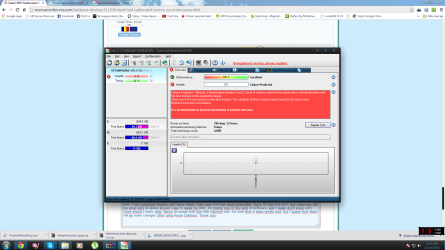
Man, I felt extremely hopeful and happy when I saw your message madcratebuilder. Sorry for the late post, but could you tell me what kind of option should I use to repair my HDD. I'm pretty new in this kind of software, and I really don't know with what should I start. Also, here's an image with the HDD-Sentinel info. I'm sure that it looks pretty bad, but I guess that there will be some changes after using Puran Utilitiess. Thank you!
 

Attachments

  • rff.png
    rff.png
    99.5 KB · Views: 53

My Computer My Computer

Computer type
PC/Desktop
Computer Manufacturer/Model Number
Homemade.
OS
Windows 7 Ultimate x64
CPU
Intel(R) Core(TM) i5-4570 CPU @ 3.20Ghz (4 CPUs), ~3.2Ghz
Motherboard
ASUS B85-PLUS
Memory
Corsair Vengeance 8GB DDR3 1600MHz CL9
Graphics Card(s)
EVGA NVIDIA GeForce GTX 660 FTW 2GB GDDR5
Sound Card
Motherboard's default
Monitor(s) Displays
SyncMaster B2230N
Screen Resolution
1920x1080
Hard Drives
Seagate Barracuda 7200rpm. 500GB
PSU
Cooler Master Extreme Plus, 500W
Case
Cooler Master Elite 334U
Cooling
Cooler Master Hyper 212 Plus cooler > Front
Keyboard
Logitech Wireless Device
Mouse
A4 Tech Bloody V7 Core Licensed
Internet Speed
100mbps
Browser
Google Chrome
Sorry for this questions guys, but right now I got pretty confused. I managed to get a bootable USB flash drive, so I started to repair my HDD using HDD Regenerator. The process took almost two hours, and surprinsingly, no bad sector was even found in order to be repaired. The same thing I got with CHKDSK. He was analyzing my whole HDD, but at the "bad sectors" category nothing was found. Is it possible to be a false alarm? Or it may be a physical problem ? Thank you!
 

My Computer My Computer

Computer type
PC/Desktop
Computer Manufacturer/Model Number
Homemade.
OS
Windows 7 Ultimate x64
CPU
Intel(R) Core(TM) i5-4570 CPU @ 3.20Ghz (4 CPUs), ~3.2Ghz
Motherboard
ASUS B85-PLUS
Memory
Corsair Vengeance 8GB DDR3 1600MHz CL9
Graphics Card(s)
EVGA NVIDIA GeForce GTX 660 FTW 2GB GDDR5
Sound Card
Motherboard's default
Monitor(s) Displays
SyncMaster B2230N
Screen Resolution
1920x1080
Hard Drives
Seagate Barracuda 7200rpm. 500GB
PSU
Cooler Master Extreme Plus, 500W
Case
Cooler Master Elite 334U
Cooling
Cooler Master Hyper 212 Plus cooler > Front
Keyboard
Logitech Wireless Device
Mouse
A4 Tech Bloody V7 Core Licensed
Internet Speed
100mbps
Browser
Google Chrome
Nope, sorry to inform you of this again, your hard drive in NOT repairable, it has faled and you need to back up URGENTLY and replace the drive. Sometimes when the drive is corrupt it can be straightened out but honestly in my experience (4 defective Seagate Hard Drives so far this year alone) once the drives get this far they are only good to get the data off if you are lucky. Then they make good door stops. Back up your data and replace the drive.
 

My Computer My Computer

Computer type
PC/Desktop
Computer Manufacturer/Model Number
Bluethunder II
OS
Windows 7 x64 Ultimate and numerous virtual machines
CPU
AMD FX-8350 Vishera 32nm Technology @ 4.2 GHz default
Motherboard
ASUSTeK COMPUTER INC. SABERTOOTH 990FX R2.0 (Socket 942)
Memory
G Skill 32.0GB Dual-Channel DDR3 @ 1204MHz (11-13-13-31)
Graphics Card(s)
EVGA GeForce GTX 960 4GB Super SC ACX 2.0+ with Back Plate
Sound Card
Creative X-Fi Titanium HD Audiophile PCIe
Monitor(s) Displays
LG L227WTG x 3
Screen Resolution
1680 x 1050 16:10
Hard Drives
238GB Samsung850 PRO SATA Disk Device (SSD)
1863GB Seagate ST2000DM 001-1CH164 (SATA)
1397GB Seagate ST1500DL 003-9VT16L(SATA)
466GB Western Digital WDC WD50 03AZEX-00K1GA0 (SATA) x 2
932GB Seagate ST310005 28AS SATA Disk Device (SATA)
PSU
Enermax Revolution87+ 1000 Watts Gold Certified Power Supply
Case
Rocketfish Full Tower
Cooling
Cooler Master Hyper 212 EVO Push Pull 120mm Fans
Keyboard
Logitech K740
Mouse
Logitech G100S Laser LED + Logitech Gamepad F310
Internet Speed
500 mbs down and 30mbs up
Antivirus
Malwarebytes Pro & Avast and MSE on certain Virtual Machines
Browser
Firefox (Main) Chrome, Internet Explorer (Back Up)
Other Info
Logitech X 230 2.1 Stereo System and 5.1 Yamaha RX V2090
B&W DM6 Monitor Speakers + Center and Surround Speakers
Using Mouse Without Borders (Google it)
Reallocated sectors counts is not necessarily a sign of impending doom and destruction. I would do a backup to be safe. Reallocated sectors counts can be from a disk surface defect or bad read/write heads. You have spare sectors to be reallocated, use them.

I recommend using "Hard disk sentinel" to check drive health and the "disk check" in "Puran Utilities" to repair the hdd. I have used this method to recover bad sectors in hdd's that returned to good health and continued to operate with 100% reliability. If it's a disk surface problem that's generally fixable, if it's the heads, that is not fixable. The Hard Disk Sentinel web site has a lot of very good info on hhd's, repairs and failure rates. Since SMART has been around for some time now and the generated data has been complied and studied, it shows that a reallocated sector does not increase the likelihood of hdd failure by more than 15%.
I am in total disagreement with your disk surface recovery advice. I have never in 25 years of messing with dying hard drives been able to recover one that is that far gone. Yes sometimes CHKDSK may fix a few errors but this is a complete failure and in a matter of days the drive will be toast. Purran Utilities is just using the Windows repair tools with a fancy UI.
 

My Computer My Computer

Computer type
PC/Desktop
Computer Manufacturer/Model Number
Bluethunder II
OS
Windows 7 x64 Ultimate and numerous virtual machines
CPU
AMD FX-8350 Vishera 32nm Technology @ 4.2 GHz default
Motherboard
ASUSTeK COMPUTER INC. SABERTOOTH 990FX R2.0 (Socket 942)
Memory
G Skill 32.0GB Dual-Channel DDR3 @ 1204MHz (11-13-13-31)
Graphics Card(s)
EVGA GeForce GTX 960 4GB Super SC ACX 2.0+ with Back Plate
Sound Card
Creative X-Fi Titanium HD Audiophile PCIe
Monitor(s) Displays
LG L227WTG x 3
Screen Resolution
1680 x 1050 16:10
Hard Drives
238GB Samsung850 PRO SATA Disk Device (SSD)
1863GB Seagate ST2000DM 001-1CH164 (SATA)
1397GB Seagate ST1500DL 003-9VT16L(SATA)
466GB Western Digital WDC WD50 03AZEX-00K1GA0 (SATA) x 2
932GB Seagate ST310005 28AS SATA Disk Device (SATA)
PSU
Enermax Revolution87+ 1000 Watts Gold Certified Power Supply
Case
Rocketfish Full Tower
Cooling
Cooler Master Hyper 212 EVO Push Pull 120mm Fans
Keyboard
Logitech K740
Mouse
Logitech G100S Laser LED + Logitech Gamepad F310
Internet Speed
500 mbs down and 30mbs up
Antivirus
Malwarebytes Pro & Avast and MSE on certain Virtual Machines
Browser
Firefox (Main) Chrome, Internet Explorer (Back Up)
Other Info
Logitech X 230 2.1 Stereo System and 5.1 Yamaha RX V2090
B&W DM6 Monitor Speakers + Center and Surround Speakers
Using Mouse Without Borders (Google it)
Chkdsk works well with logical errors when the hardware is sound. But when dealing with hardware errors it will often make things worse. SMART detects only hardware errors and has no knowledge of files, folders, or even file systems.
 

My Computer My Computer

Computer type
PC/Desktop
Computer Manufacturer/Model Number
HP
OS
Windows 7 Pro 64 bit
CPU
Xeon W3520
Memory
8 GB
Graphics Card(s)
Nvidia Geforce 210
Reallocated sectors counts is not necessarily a sign of impending doom and destruction. I would do a backup to be safe. Reallocated sectors counts can be from a disk surface defect or bad read/write heads. You have spare sectors to be reallocated, use them.

I recommend using "Hard disk sentinel" to check drive health and the "disk check" in "Puran Utilities" to repair the hdd. I have used this method to recover bad sectors in hdd's that returned to good health and continued to operate with 100% reliability. If it's a disk surface problem that's generally fixable, if it's the heads, that is not fixable. The Hard Disk Sentinel web site has a lot of very good info on hhd's, repairs and failure rates. Since SMART has been around for some time now and the generated data has been complied and studied, it shows that a reallocated sector does not increase the likelihood of hdd failure by more than 15%.
I am in total disagreement with your disk surface recovery advice. I have never in 25 years of messing with dying hard drives been able to recover one that is that far gone. Yes sometimes CHKDSK may fix a few errors but this is a complete failure and in a matter of days the drive will be toast. Purran Utilities is just using the Windows repair tools with a fancy UI.

Disagreement is good. I do agree, now that the OP has posted more info, that the hdd in question is not recoverable.

As far as recovering from RSC's, I have recovered dozens of hhd's that have gone on to be serviceable for years. These generally had a low number of reallocated sectors. A single reallocated sector triggers the SMART health flag. Most drives I have recovered have had fewer than 20 bad sectors, that's a small amount and the manufacturers set aside a area on the drive for this type of recovery operation. The manufacture expects the product to encounter reallocated sectors and provides spare sectors on the drive specifically for this purpose. Drives have reallocated sectors when they leave the manufacture.

The OP's hhd reallocated count was over 3300 sectors. He's dead Jim. Jim, he's dead. Dammit Jim, I'm a Doctor, not a brick mason. A count that high is probably a damaged head unable to read the surface.
 

My Computer My Computer

Computer type
PC/Desktop
Computer Manufacturer/Model Number
Custom, Dell and Lenono LT's
OS
Win8/8.1,Win7-U64, Vista U64, uncounted Linux distor's
CPU
AMD and Intell, 9590, 8350, i5 3570k
Motherboard
CFVFZ, GA990FXA, Z77e-itx
Memory
Corsair G Skill
Graphics Card(s)
Crossfired Sapphire HD 7950 Vapor-X, ASUS R9 280X TOP
Sound Card
Realtek ALC889
Monitor(s) Displays
ViewSonic VX2770SMH 27" / ViewSonic VX2433 LCD 24"
Screen Resolution
1080i HD
Hard Drives
Samsung SSD 840 Pro
OCZ Agility 3's
OCZ Vector's
WD's Blue, red, green, Velociraptors
Seagate USB3 & Hybrid's
ASUS Blu-Ray
ASUS DVD
PSU
Corsair AX1200i, Seasonice 850 Gold
Case
Cooler Master HAF 922 & HAF 932, Lian Li Train case.
Cooling
Air, Glacer 240L expanded, custom EK loop with duel D5's
Keyboard
Microsoft SideWinder X4 USB Keyboard / Logitech 250 PS2
Mouse
Logitech G500 / MS wireless 5000
Internet Speed
Best of 5ms / 75+ dn / 12+ up More or less.
Antivirus
MS esentials-MalwareBytes
Browser
Firefox Chromebook
I understood. Sorry for making you guys angry, it's not like I want to take something for you, of course not. I've been just hoping that in this whole thing may exist a sollution for my HDD. That's because the idea of dying is the only reason for replacing it. I know, I use to be as obstinate as a mule. But maybe sometimes just because I don't wanna give up from start. For that I had the impression that I'm on my good way of repairing my HDD. But now I'm sure that actually there's no possible way. Anyway, I really want to give you all my appreciation for the support given, because I surely learnt a lot from this situation. So we can say that even at worst things we can find something good. I'm sorry for all the trouble again, and thank you for brightening my mind :D!
 

My Computer My Computer

Computer type
PC/Desktop
Computer Manufacturer/Model Number
Homemade.
OS
Windows 7 Ultimate x64
CPU
Intel(R) Core(TM) i5-4570 CPU @ 3.20Ghz (4 CPUs), ~3.2Ghz
Motherboard
ASUS B85-PLUS
Memory
Corsair Vengeance 8GB DDR3 1600MHz CL9
Graphics Card(s)
EVGA NVIDIA GeForce GTX 660 FTW 2GB GDDR5
Sound Card
Motherboard's default
Monitor(s) Displays
SyncMaster B2230N
Screen Resolution
1920x1080
Hard Drives
Seagate Barracuda 7200rpm. 500GB
PSU
Cooler Master Extreme Plus, 500W
Case
Cooler Master Elite 334U
Cooling
Cooler Master Hyper 212 Plus cooler > Front
Keyboard
Logitech Wireless Device
Mouse
A4 Tech Bloody V7 Core Licensed
Internet Speed
100mbps
Browser
Google Chrome
I understood. Sorry for making you guys angry, it's not like I want to take something for you, of course not. I've been just hoping that in this whole thing may exist a sollution for my HDD. That's because the idea of dying is the only reason for replacing it. I know, I use to be as obstinate as a mule. But maybe sometimes just because I don't wanna give up from start. For that I had the impression that I'm on my good way of repairing my HDD. But now I'm sure that actually there's no possible way. Anyway, I really want to give you all my appreciation for the support given, because I surely learnt a lot from this situation. So we can say that even at worst things we can find something good. I'm sorry for all the trouble again, and thank you for brightening my mind :D!
No one is angry. We always have a healthy discussion and sometimes what has been suggested would have fixed your drive. But yours is too far gone. More heads looking at issues is best. No one can be 100% correct, there will always be a time when thinking outside of the box fixes something. Good Luck get a new HD quickly before it stops working.:cool::D:geek:
 

My Computer My Computer

Computer type
PC/Desktop
Computer Manufacturer/Model Number
Bluethunder II
OS
Windows 7 x64 Ultimate and numerous virtual machines
CPU
AMD FX-8350 Vishera 32nm Technology @ 4.2 GHz default
Motherboard
ASUSTeK COMPUTER INC. SABERTOOTH 990FX R2.0 (Socket 942)
Memory
G Skill 32.0GB Dual-Channel DDR3 @ 1204MHz (11-13-13-31)
Graphics Card(s)
EVGA GeForce GTX 960 4GB Super SC ACX 2.0+ with Back Plate
Sound Card
Creative X-Fi Titanium HD Audiophile PCIe
Monitor(s) Displays
LG L227WTG x 3
Screen Resolution
1680 x 1050 16:10
Hard Drives
238GB Samsung850 PRO SATA Disk Device (SSD)
1863GB Seagate ST2000DM 001-1CH164 (SATA)
1397GB Seagate ST1500DL 003-9VT16L(SATA)
466GB Western Digital WDC WD50 03AZEX-00K1GA0 (SATA) x 2
932GB Seagate ST310005 28AS SATA Disk Device (SATA)
PSU
Enermax Revolution87+ 1000 Watts Gold Certified Power Supply
Case
Rocketfish Full Tower
Cooling
Cooler Master Hyper 212 EVO Push Pull 120mm Fans
Keyboard
Logitech K740
Mouse
Logitech G100S Laser LED + Logitech Gamepad F310
Internet Speed
500 mbs down and 30mbs up
Antivirus
Malwarebytes Pro & Avast and MSE on certain Virtual Machines
Browser
Firefox (Main) Chrome, Internet Explorer (Back Up)
Other Info
Logitech X 230 2.1 Stereo System and 5.1 Yamaha RX V2090
B&W DM6 Monitor Speakers + Center and Surround Speakers
Using Mouse Without Borders (Google it)
Hey guys, sorry for this late post, it's not that I'm trying to save my HDD again, I'm just wondering about something. For the last two weeks the Reallocated sectors count stopped at 4035 bad sectors. I know that this is a really big amount, and also I'm gonna get my new HDD this week, but I'm just curious to know why the amount of bad sectours didn't raise more than this. I mean that it was increasing daily, from 3700 bad sectors to 4035, but in the last two weeks the amount stopped at this number. What should this mean? Can it represent something good or I should just ignore it because the HDD is already going to be dead? Also, I wanna mention that for "no reason" my free space has decreased pretty much without installing or downloading something. I guess that this is because of the bad sectors. But I wonder if this free space could be restored because the amount has stopped for two weeks at 4035. Just wondering, not gonna start and save again, because I know that at this rate it would be impossible. Thank you!
 

My Computer My Computer

Computer type
PC/Desktop
Computer Manufacturer/Model Number
Homemade.
OS
Windows 7 Ultimate x64
CPU
Intel(R) Core(TM) i5-4570 CPU @ 3.20Ghz (4 CPUs), ~3.2Ghz
Motherboard
ASUS B85-PLUS
Memory
Corsair Vengeance 8GB DDR3 1600MHz CL9
Graphics Card(s)
EVGA NVIDIA GeForce GTX 660 FTW 2GB GDDR5
Sound Card
Motherboard's default
Monitor(s) Displays
SyncMaster B2230N
Screen Resolution
1920x1080
Hard Drives
Seagate Barracuda 7200rpm. 500GB
PSU
Cooler Master Extreme Plus, 500W
Case
Cooler Master Elite 334U
Cooling
Cooler Master Hyper 212 Plus cooler > Front
Keyboard
Logitech Wireless Device
Mouse
A4 Tech Bloody V7 Core Licensed
Internet Speed
100mbps
Browser
Google Chrome
There is a limit to the number of sectors that can be reallocated. When that number is reached bad sectors will no longer be reallocated. That number is not documented.
 

My Computer My Computer

Computer type
PC/Desktop
Computer Manufacturer/Model Number
HP
OS
Windows 7 Pro 64 bit
CPU
Xeon W3520
Memory
8 GB
Graphics Card(s)
Nvidia Geforce 210
Back
Top