
driver for remote with HP Pavillion laptop

clockwork

New member
Local time
12:59 PM
Messages
4
i have an HP Pavillion dv9000 series laptop that came with a media center remote.
right now im using MediaMonkey for my music instead of WMP. i had the remote working in vista (original OS) but it wont recognize my remote and crashes MM when i just recently tried using it.

would installing the vista driver work or do i need something else?
 

Attachments
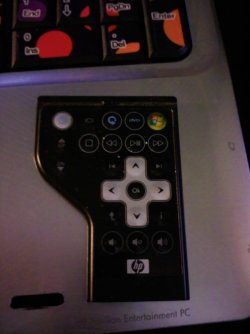
  • 0401091742.jpg
    0401091742.jpg
    143.2 KB · Views: 929

My Computer My Computer

At a glance

Windows 7AMD Turion 64 X2 @2.2GHznVidia GeForce 6150
Computer Manufacturer/Model Number
HP
OS
Windows 7
CPU
AMD Turion 64 X2 @2.2GHz
Graphics Card(s)
nVidia GeForce 6150
Screen Resolution
1440x900
Hard Drives
(2) 160 gig HDD
external 500 gig Western Digital
I'm having close to the same problem but with my dv4t-1400 remote. It turns the computer on and switches the display, but thats it...

Hopefully bumping this will get some response
 

My Computer My Computer

At a glance

Windows 7 Ultimate x64Intel P7350 Centrino 2 2.0 GHz4 GBIntel
Computer Manufacturer/Model Number
HP Pavilion dv4t-1400
OS
Windows 7 Ultimate x64
CPU
Intel P7350 Centrino 2 2.0 GHz
Motherboard
Intel 4 Series Chipset
Memory
4 GB
Graphics Card(s)
Intel
Sound Card
IDT HD
Monitor(s) Displays
14.1" HP BrightView
Screen Resolution
1280 x 800
Hard Drives
250 GB WD Int. & 250 GB Toshiba Ext.
Cooling
Belkin Laptop Cooler
Mouse
Microsoft IntelliMouse Explorer 4.0
Hi

Have you checked HP web site.
 

My Computer My Computer

At a glance

ME/XP/Vista/Win7
OS
ME/XP/Vista/Win7
Do you still have the SwSetup folder on your computer? If yes, goto subfolder SwSetup/Drivers/CIR and run the setup. This installs the drivers for infrared receiver in your HP laptop.

If you don't find the above mentioned folder, search HP's website for an installation packet sp41645.exe and download it. Run the packet, it extracts the installation files to C:\SwSetup and automatically runs the installation program.

Kari
 

My Computer My Computer

At a glance

Windows 10 Pro x64 EN-GB1.6 GHz Intel Core i7-720QM Processor6 GBATI Mobility Radeon HD 5850 Graphics
Computer type
Laptop
Computer Manufacturer/Model Number
HP ENVY 17-1150eg
OS
Windows 10 Pro x64 EN-GB
CPU
1.6 GHz Intel Core i7-720QM Processor
Memory
6 GB
Graphics Card(s)
ATI Mobility Radeon HD 5850 Graphics
Sound Card
Beats sound system with integrated subwoofer
Monitor(s) Displays
17" laptop display, 22" LED and 32" Full HD TV through HDMI
Screen Resolution
1600*900 (1), 1920*1080 (2&3)
Hard Drives
Internal: 2 x 500 GB SATA Hard Disk Drive 7200 rpm
External: 2TB for backups, 3TB USB3 network drive for media
Cooling
As Envy runs a bit warm, I have it on a Cooler Master pad
Keyboard
Logitech diNovo Media Desktop Laser (bluetooth)
Mouse
Logitech Performance Mouse MX
Internet Speed
50/10 Mbps VDSL
Antivirus
Windows Defender 4.3.9431.0
Browser
Maxthon 3.5.2., IE11

My Computer My Computer

At a glance

Windows 7 Ultimate x64Intel P7350 Centrino 2 2.0 GHz4 GBIntel
Computer Manufacturer/Model Number
HP Pavilion dv4t-1400
OS
Windows 7 Ultimate x64
CPU
Intel P7350 Centrino 2 2.0 GHz
Motherboard
Intel 4 Series Chipset
Memory
4 GB
Graphics Card(s)
Intel
Sound Card
IDT HD
Monitor(s) Displays
14.1" HP BrightView
Screen Resolution
1280 x 800
Hard Drives
250 GB WD Int. & 250 GB Toshiba Ext.
Cooling
Belkin Laptop Cooler
Mouse
Microsoft IntelliMouse Explorer 4.0
Hi

Have you checked HP web site.


I have, Ive tried installing the Quick Launch program also with no luck...
HP's Quick Launch Buttons application has known compatibility issues with Windows 7. It doesn't work, and it might cause your laptop crashing. My recommendation is not to install Quick Launch Buttons.

Kari
 

My Computer My Computer

At a glance

Windows 10 Pro x64 EN-GB1.6 GHz Intel Core i7-720QM Processor6 GBATI Mobility Radeon HD 5850 Graphics
Computer type
Laptop
Computer Manufacturer/Model Number
HP ENVY 17-1150eg
OS
Windows 10 Pro x64 EN-GB
CPU
1.6 GHz Intel Core i7-720QM Processor
Memory
6 GB
Graphics Card(s)
ATI Mobility Radeon HD 5850 Graphics
Sound Card
Beats sound system with integrated subwoofer
Monitor(s) Displays
17" laptop display, 22" LED and 32" Full HD TV through HDMI
Screen Resolution
1600*900 (1), 1920*1080 (2&3)
Hard Drives
Internal: 2 x 500 GB SATA Hard Disk Drive 7200 rpm
External: 2TB for backups, 3TB USB3 network drive for media
Cooling
As Envy runs a bit warm, I have it on a Cooler Master pad
Keyboard
Logitech diNovo Media Desktop Laser (bluetooth)
Mouse
Logitech Performance Mouse MX
Internet Speed
50/10 Mbps VDSL
Antivirus
Windows Defender 4.3.9431.0
Browser
Maxthon 3.5.2., IE11
Do you think this is what is causing the computer to recognize the power and display change buttons being pressed but not anything else os could it be something else....
 

My Computer My Computer

At a glance

Windows 7 Ultimate x64Intel P7350 Centrino 2 2.0 GHz4 GBIntel
Computer Manufacturer/Model Number
HP Pavilion dv4t-1400
OS
Windows 7 Ultimate x64
CPU
Intel P7350 Centrino 2 2.0 GHz
Motherboard
Intel 4 Series Chipset
Memory
4 GB
Graphics Card(s)
Intel
Sound Card
IDT HD
Monitor(s) Displays
14.1" HP BrightView
Screen Resolution
1280 x 800
Hard Drives
250 GB WD Int. & 250 GB Toshiba Ext.
Cooling
Belkin Laptop Cooler
Mouse
Microsoft IntelliMouse Explorer 4.0
No, that's not it. I really don't know why your remote works only partially.
 

My Computer My Computer

At a glance

Windows 10 Pro x64 EN-GB1.6 GHz Intel Core i7-720QM Processor6 GBATI Mobility Radeon HD 5850 Graphics
Computer type
Laptop
Computer Manufacturer/Model Number
HP ENVY 17-1150eg
OS
Windows 10 Pro x64 EN-GB
CPU
1.6 GHz Intel Core i7-720QM Processor
Memory
6 GB
Graphics Card(s)
ATI Mobility Radeon HD 5850 Graphics
Sound Card
Beats sound system with integrated subwoofer
Monitor(s) Displays
17" laptop display, 22" LED and 32" Full HD TV through HDMI
Screen Resolution
1600*900 (1), 1920*1080 (2&3)
Hard Drives
Internal: 2 x 500 GB SATA Hard Disk Drive 7200 rpm
External: 2TB for backups, 3TB USB3 network drive for media
Cooling
As Envy runs a bit warm, I have it on a Cooler Master pad
Keyboard
Logitech diNovo Media Desktop Laser (bluetooth)
Mouse
Logitech Performance Mouse MX
Internet Speed
50/10 Mbps VDSL
Antivirus
Windows Defender 4.3.9431.0
Browser
Maxthon 3.5.2., IE11
Back
Top