Accidentally set max memory to 2kb now won't start up. Please help!

Cobrajet12

New member
Local time
5:29 PM
Messages
4
I was trying to get an old favorite game of mine to work on my Hp with windows 7 64 bit.

I saw a post on a gamer site that said to go to msconfig boot advanced and to set the max memory to 2 mb. I typed in 2 and now my system won't reboot. I think I should have typed in 2000 instead.

Now I can't start my computer. It gives me the option to restore to an earlier point but that doesn't work.

Anyway I tried to follow the instructions on my screen to restore to an earlier point but that doesn't work.

I am not a computer guy and am very dumb on how to do anything to program or anything to do with the hardware.

Is there anything I can do to reset my max memory without being able to get into windows.

I tried to F8 to start in safe mode but that didn't do anything.

Any help would be greatly appreciated.

Thanks

Cobrajet
 

My Computer My Computer

At a glance

Windows 7 64 bit
Computer type
PC/Desktop
Computer Manufacturer/Model Number
Hp
OS
Windows 7 64 bit

My Computer My Computer

At a glance

Vista, Windows7, Mint Mate, Zorin, Windows 8from 1.6GHz Duo to i7
Computer Manufacturer/Model Number
HP, Dell, Gateway, Toshiba - 4 laptops and 2 desktops
OS
Vista, Windows7, Mint Mate, Zorin, Windows 8
CPU
from 1.6GHz Duo to i7
Monitor(s) Displays
2x HP w2207
Hard Drives
5x HDD, 7x SSD, 12x Externals
Keyboard
with trackball - no mices
Mouse
Trackball mice
Internet Speed
DSL 6000
I don't have discs

All my software was pre loaded. I don't have the windows installation discs
 

My Computer My Computer

At a glance

Windows 7 64 bit
Computer type
PC/Desktop
Computer Manufacturer/Model Number
Hp
OS
Windows 7 64 bit
And you did not make a system restore/repair disc as required and you probably have no images. What are we going to do with you.

You better make a system repair disk on the system you are posting from (assuming that is a Windows 7 system). Else go to a friend or order one from the manufacturer of your PC (costs you probably $20).

http://www.sevenforums.com/tutorials/2083-system-repair-disc-create.html
 

My Computer My Computer

At a glance

Vista, Windows7, Mint Mate, Zorin, Windows 8from 1.6GHz Duo to i7
Computer Manufacturer/Model Number
HP, Dell, Gateway, Toshiba - 4 laptops and 2 desktops
OS
Vista, Windows7, Mint Mate, Zorin, Windows 8
CPU
from 1.6GHz Duo to i7
Monitor(s) Displays
2x HP w2207
Hard Drives
5x HDD, 7x SSD, 12x Externals
Keyboard
with trackball - no mices
Mouse
Trackball mice
Internet Speed
DSL 6000
If I recall, that parameter is stored in CMOS memory. You might try clearing it to see if that works.
 

My Computer My Computer

At a glance

Windows 7 Pro-x64i7-2600 3.4GHz - 3.8GHz Turbo8Gb - 2x4GB, Muskin 991770 PC3-1333Integrated Intel HD 2000
Computer type
PC/Desktop
Computer Manufacturer/Model Number
Built 2/11/2011
OS
Windows 7 Pro-x64
CPU
i7-2600 3.4GHz - 3.8GHz Turbo
Motherboard
Intel DH67BL-B3
Memory
8Gb - 2x4GB, Muskin 991770 PC3-1333
Graphics Card(s)
Integrated Intel HD 2000
Sound Card
Integrated Intel 10.1 HD, RealTek ALC892
Monitor(s) Displays
Asus LCD VH222H, Haier HL24XSL2a
Screen Resolution
1920x1080, 1920x1080
Hard Drives
Crucial SSD C300-128Gb,
Western Digital WD5002AALX - 500Gb,
Western Digital WD7501AALS - 750Gb
PSU
Seasonic 650W 80+ Gold Modular
Case
Rosewill Defender
Cooling
Stock CPU, Four 120mm case fans, PCH fan added
Keyboard
Logitech EX100 Y-RBH94 Wireless
Mouse
Logitech EX100 M-RCE95 Wireless
Internet Speed
3.0/1.5 Mbs
Antivirus
Microsoft Security Essentials
Browser
Microsoft Internet Explorer 11
Other Info
Antec Veris Premier-Multimedia IR Station,
Cyber Accoustics-3602 Speakers,
AFT XM-5U Card Reader,
Hauppauge TV-HVR-2250,
Sony LX300 USB Turntable
If I recall, that parameter is stored in CMOS memory. You might try clearing it to see if that works.
You are correct. The BIOS RAM setting is in Cmos. But he changed it in the OS.
 

My Computer My Computer

At a glance

Vista, Windows7, Mint Mate, Zorin, Windows 8from 1.6GHz Duo to i7
Computer Manufacturer/Model Number
HP, Dell, Gateway, Toshiba - 4 laptops and 2 desktops
OS
Vista, Windows7, Mint Mate, Zorin, Windows 8
CPU
from 1.6GHz Duo to i7
Monitor(s) Displays
2x HP w2207
Hard Drives
5x HDD, 7x SSD, 12x Externals
Keyboard
with trackball - no mices
Mouse
Trackball mice
Internet Speed
DSL 6000
I know I was dumb

I know I should have made some backup discs.

I am using my wife's iPad to access this forum.

If I take my computer into a repair place is there anything they can even do?

I really appreciate your help.
 

My Computer My Computer

At a glance

Windows 7 64 bit
Computer type
PC/Desktop
Computer Manufacturer/Model Number
Hp
OS
Windows 7 64 bit
Don't go to a repair place. They will just overcharge you. First thing to do is save your files. But for anything we'll do you need access to a PC. Is that possible.

Then take an external disk and save your files like this:

http://www.sevenforums.com/tutorials/287439-emergency-kit-save-your-files-dead-os.html

Next you can reinstall your system. You need to burn a CD. All the detailed instructions are here:

http://www.sevenforums.com/tutorials/219487-clean-reinstall-factory-oem-windows-7-a.html

With the CD mentioned in this tutorial, you can also try a Startup/Repair as linked earlier.
 

My Computer My Computer

At a glance

Vista, Windows7, Mint Mate, Zorin, Windows 8from 1.6GHz Duo to i7
Computer Manufacturer/Model Number
HP, Dell, Gateway, Toshiba - 4 laptops and 2 desktops
OS
Vista, Windows7, Mint Mate, Zorin, Windows 8
CPU
from 1.6GHz Duo to i7
Monitor(s) Displays
2x HP w2207
Hard Drives
5x HDD, 7x SSD, 12x Externals
Keyboard
with trackball - no mices
Mouse
Trackball mice
Internet Speed
DSL 6000
Oh boy

I don't think I would know how to do that. Thanks for the help though.
 

My Computer My Computer

At a glance

Windows 7 64 bit
Computer type
PC/Desktop
Computer Manufacturer/Model Number
Hp
OS
Windows 7 64 bit
Why not. It is all described in great detail and if you have a question along the way, we'll help you. And you learn something along the way. Wouldn't that be fun.

What are your options? If you go to a shop, they will charge you a bundle, possibly steal your OS product key and destroy your data. That's no fun.
 
Last edited:

My Computer My Computer

At a glance

Vista, Windows7, Mint Mate, Zorin, Windows 8from 1.6GHz Duo to i7
Computer Manufacturer/Model Number
HP, Dell, Gateway, Toshiba - 4 laptops and 2 desktops
OS
Vista, Windows7, Mint Mate, Zorin, Windows 8
CPU
from 1.6GHz Duo to i7
Monitor(s) Displays
2x HP w2207
Hard Drives
5x HDD, 7x SSD, 12x Externals
Keyboard
with trackball - no mices
Mouse
Trackball mice
Internet Speed
DSL 6000
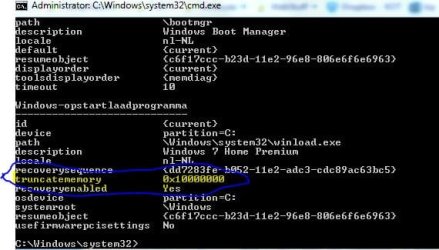
It is this setting in boot BCD menu!
Code:
bcdedit/deletevalue   {default}   truncatememory

You can enter the command from advanced boot options->repair your computer->command prompt
 

Attachments

  • Knipsel.JPG
    Knipsel.JPG
    40 KB · Views: 17

My Computer My Computer

At a glance

Microsoft Windows 7 Home Premium 64-bits 7601...Intel(R) Core(TM) i3 CPU M 370 @ 2.40GHz4,00 GBATI Mobility Radeon HD 5400 Series
Computer type
Laptop
Computer Manufacturer/Model Number
ACER ASPIRE 5742G
OS
Microsoft Windows 7 Home Premium 64-bits 7601 Multiprocessor Free Service Pack 1
CPU
Intel(R) Core(TM) i3 CPU M 370 @ 2.40GHz
Motherboard
Acer Aspire 5742G
Memory
4,00 GB
Graphics Card(s)
ATI Mobility Radeon HD 5400 Series
Sound Card
(1) AMD High Definition Audio Device (2) Realtek High Defi
Screen Resolution
1366 x 768 x 32 bits (4294967296 colors) @ 60 Hz
Hard Drives
WDC WD5000BEVT-22ZAT0
If I recall, that parameter is stored in CMOS memory. You might try clearing it to see if that works.
You are correct. The BIOS RAM setting is in Cmos. But he changed it in the OS.

Not in CMOS! It's in BCD menu. See my other post
 

My Computer My Computer

At a glance

Microsoft Windows 7 Home Premium 64-bits 7601...Intel(R) Core(TM) i3 CPU M 370 @ 2.40GHz4,00 GBATI Mobility Radeon HD 5400 Series
Computer type
Laptop
Computer Manufacturer/Model Number
ACER ASPIRE 5742G
OS
Microsoft Windows 7 Home Premium 64-bits 7601 Multiprocessor Free Service Pack 1
CPU
Intel(R) Core(TM) i3 CPU M 370 @ 2.40GHz
Motherboard
Acer Aspire 5742G
Memory
4,00 GB
Graphics Card(s)
ATI Mobility Radeon HD 5400 Series
Sound Card
(1) AMD High Definition Audio Device (2) Realtek High Defi
Screen Resolution
1366 x 768 x 32 bits (4294967296 colors) @ 60 Hz
Hard Drives
WDC WD5000BEVT-22ZAT0

My Computer My Computer

At a glance

Vista, Windows7, Mint Mate, Zorin, Windows 8from 1.6GHz Duo to i7
Computer Manufacturer/Model Number
HP, Dell, Gateway, Toshiba - 4 laptops and 2 desktops
OS
Vista, Windows7, Mint Mate, Zorin, Windows 8
CPU
from 1.6GHz Duo to i7
Monitor(s) Displays
2x HP w2207
Hard Drives
5x HDD, 7x SSD, 12x Externals
Keyboard
with trackball - no mices
Mouse
Trackball mice
Internet Speed
DSL 6000
Back
Top