SeaTools for DOS and Windows - How to Use

How to Use SeaTools for DOS and Windows Disk Check Utility

Contents:
Part One: SeaTools for Windows
Part Two: SeaTools for DOS
*Caution for AHCI Storage Controller

   Information
Seatools is a powerful tool to analyze the Hard Drives. It can perform a lot of tests like Drive Self-test, Read-Write teat, SMART (Self-Monitoring, Analysis and Reporting Technology) extraction and performs some advanced actions like bad sector repair.

Though Seatools can test all the brands of HDD, it performs the repair action for the Seagate brand HDD only.

   Warning
It is always better that you back up your data.


OPTION ONE

Seatools for Windows

1. Get it from SeaTools | Seagate

2. Click on I accept and then download. Install the program and run it within windows. It will take a time to scan the drivers, and then the program window will appear. Click on I accept. Now you are on the Seatools For Windows GUI.

3.(a) For Non Seatools Brand HDDs, you can perform Short Drive Self Test, Short Generic Test and Long Generic Test.

3.(b) For Seatools brand Hdds, you can perform all the tests.

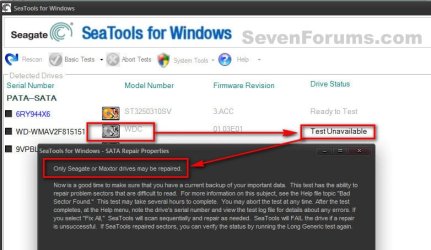
Attempted a Basic Test > Fix All > Fast on a non SeaGate HDD, and here is the result.1.jpgSo Repair works on SeaGate only, but you can test any brand of HDD.

   Warning
You are suggested to not take the Advanced tests.


OPTION TWO

Seatools for DOS, Recommended

   Information
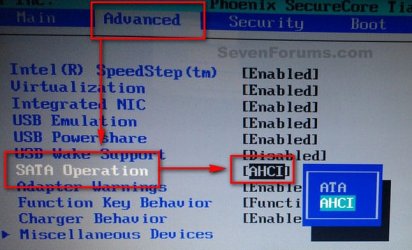
If you are using AHCI storage controller, Seatools for DOS will not be able to detect a AHCI disc. So Boot into the BIOS, set the storage controller mode to IDE/SATA before running the test.

All the BIOSs are not the same, but usually this option is found in "Advanced" BIOS settings.2.jpgWhen the test is done, Boot into the BIOS again and set the controller mode back to AHCI, otherwise windows will refuse to boot.
1. Get it from SeaTools | Seagate

2. Accept and download. It will come as a disc image file. Actually it is bundled with FreeDOS Operating System. It works as bootable, so it is to burn the downloaded ISO to either a blank CD or a USB pen drive.

PART - I: Writing the Image

1. For writing it to a CD/DVD, follow this tutorial: http://www.sevenforums.com/tutorials/548-burn-disc-image-iso-img-file.html

2. For writing it to an USB pen drive, the easy way is to use Win32 Disk Imager | Free Development software downloads at SourceForge.net

   Note
The downloaded ISO will not be written to the USB Pen Drive as it is. You need to alter the .iso file a bit to make it writable. Very little job is involved.

  • Download or install either 7-Zip (free) or WinRAR (not free).
  • Extract the downloaded .iso file.
  • Rename the SeaTools.ima to SeaTools.img.
  • Burn the SeaTools.img file using Win32 Disk Imager


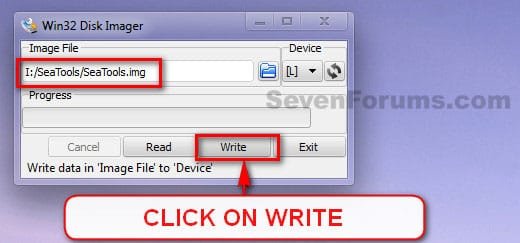
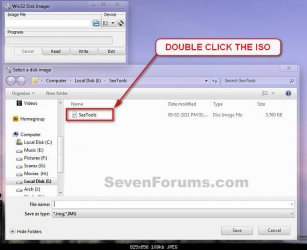
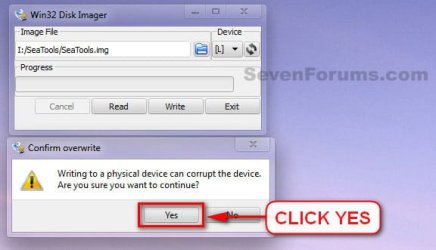
3. Download and double click to execute it. Select teh USB device, and browse for the renamed .img image.3.jpg4. Double click on the image, when found.4.jpg5. Click on Write.5.jpg6. A Confirm Overwrite message will appear. Click yes.6.jpg7. See the progress bar for a few seconds and the image is written and ready to boot from.
PART - II: Booting from Seatools for DOS

1. Now it is to boot from the CD/DVD or USB. You may do it using two alternative ways.

  • Enter into the BISO and change the BOOT order to CD (or USB) to first.
  • Use the BIOS Boot Menu Key to get the list of all possible devices to boot from. Select the CD (or USB) by using the scroll arrow keys and enter.
2. When on the GUI, at first a warning message will appear. Accept it by clicking on "I Accept".7.JPGPart - 3: Testing

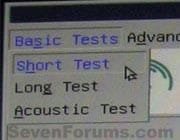
There are three types of tests.

  • Short Test;
  • Long Test; and
  • Acoustic Test.
8.jpgFor most of the cases, Short tests are enough. But if Short tests detect problems, Long tests are suggested.

   Information
Long test has a mechanism to recover/repair some disc errors like BAD sectors. But the recovery/repair options work only for Seagate brand HDDs.


PART - IV: Results

Test results are of two types, in general.

  1. Passed; and
  2. Failed with errors; which may yield two possible alternative ultimate outcomes.
    • Passed after repair
    • Failed after repair
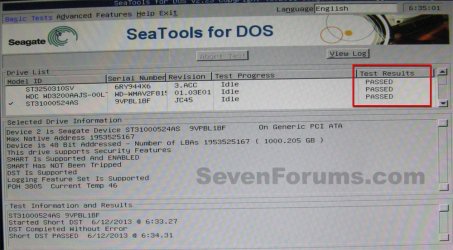
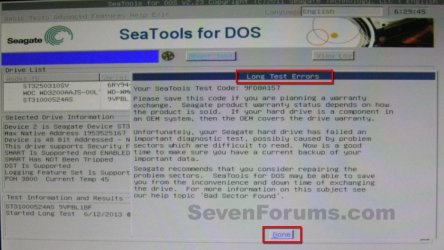
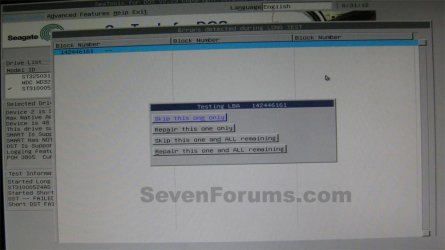
1. If passed, its all good.Passed.JPG2. If the test result a failure, with bad sectors etc, it will suggest you to have a warranty replacement, with a supplied test code.Failure.JPGClick on "Done". It will supply you some options to repair the failures.11.JPGYou need to opt for "Repair this one and all remaining".
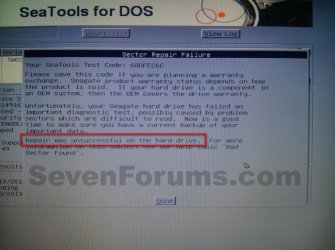
2.(a) If repairs are successful, it will show a result as passed after repair. It is good, too.14.JPG2.(b) But if the repair is unsuccessful, then there is no way but try to back up your data and replace the disc.15.jpgThat’s all.
 
Last edited:
Great job Archie. :)
 

My Computer My Computer

At a glance

64-bit Windows 11 Pro for WorkstationsIntel i7-8700K OC'd to 5 GHz64 GB (4x16GB) G.SKILL TridentZ RGB DDR4 3600...ASUS ROG-STRIX-GTX1080TI-O11G-GAMING
Computer type
PC/Desktop
Computer Manufacturer/Model Number
Self built custom
OS
64-bit Windows 11 Pro for Workstations
CPU
Intel i7-8700K OC'd to 5 GHz
Motherboard
ASUS ROG Maximus XI Formula Z390
Memory
64 GB (4x16GB) G.SKILL TridentZ RGB DDR4 3600 MHz
Graphics Card(s)
ASUS ROG-STRIX-GTX1080TI-O11G-GAMING
Sound Card
Integrated
Monitor(s) Displays
2 x Samsung Odyssey G7 27"
Screen Resolution
2560x1440
Hard Drives
1TB Samsung 990 PRO M.2,
4TB Samsung 990 PRO PRO M.2,
TerraMaster F8 SSD Plus NAS
PSU
Seasonic Prime Titanium 850W
Case
Thermaltake Core P3
Cooling
Corsair Hydro H115i
Keyboard
Logitech wireless K800
Mouse
Logitech MX Master 4
Internet Speed
2 Gb/s Download and 100 Mb/s Upload
Antivirus
Malwarebyte Anti-Malware Premium
Browser
Google Chrome
Other Info
Logitech Z625 speaker system,
Logitech BRIO 4K Pro webcam,
HP Color LaserJet Pro MFP M477fdn,
APC SMART-UPS RT 1000 XL - SURT1000XLI,
Galaxy S23 Plus phone
Awesome :D
Updated to my template!
 

My Computer My Computer

At a glance

Windows 10 Home 64BitIntel Core i5 10400 @ 2.90GHz8.00GB Single-Channel Unknown @ 1329MHz (16-2...
Computer type
PC/Desktop
Computer Manufacturer/Model Number
Self assembled
OS
Windows 10 Home 64Bit
CPU
Intel Core i5 10400 @ 2.90GHz
Motherboard
Intel Corporation DG41WV (PROCESSOR)
Memory
8.00GB Single-Channel Unknown @ 1329MHz (16-20-20-38)
Sound Card
Realtek High Definition Audio
Monitor(s) Displays
DELL E170S
Screen Resolution
1280x1024 pixels
Hard Drives
931GB TOSHIBA DT01ACA100 (SATA)
238GB TEAM TM8PS7256G (SATA SSD)
Case
Nothing Fancy
Cooling
Fans
Keyboard
A4 Tech Co LTD
Mouse
A4 Tech Co Ltd/Logitech
Internet Speed
25 Mbps
Nice work Archie
 

My Computer My Computer

At a glance

windows 7 home 64bitINTEL-CORE I716GB
Computer Manufacturer/Model Number
W530-3630QM1
OS
windows 7 home 64bit
CPU
INTEL-CORE I7
Memory
16GB
Hard Drives
750GB
Browser
Chrome

My Computer My Computer

At a glance

Microsoft Windows 10 Pro Insider Preview 64-bitIntel(R) Core(TM) i3-4130 CPU @ 3.40GHzCorsair Vengence 4GB x2 (8.00GB Dual-Channel ...2047MB GeForce GTS 450 (ZOTAC International)
Computer type
PC/Desktop
Computer Manufacturer/Model Number
Self Assembled
OS
Microsoft Windows 10 Pro Insider Preview 64-bit
CPU
Intel(R) Core(TM) i3-4130 CPU @ 3.40GHz
Motherboard
Gigabyte Technology Co., Ltd. B85M-D3H
Memory
Corsair Vengence 4GB x2 (8.00GB Dual-Channel DDR3 @ 798MHz)
Graphics Card(s)
2047MB GeForce GTS 450 (ZOTAC International)
Sound Card
Onboard (Realtek High Definition Audio)
Monitor(s) Displays
LG Flatron E2040T
Screen Resolution
1600x900
Hard Drives
Western Digital 1 TB
Seagate 500 GB
PSU
Corsair VS550
Case
Cooler Master K380
Cooling
Cooler Master Seidon 120V Plus
Keyboard
Logitech MK260r
Mouse
Logitech MK260r
Internet Speed
PMPL Broadband
Antivirus
Windows Defender + MBAM
Browser
Firefox
Other Info
Dell Studio 15" Laptop
Another great one Archie :) .
 

My Computer My Computer

At a glance

Windows 10Intel Core i5 3570K16GB 1600Mhz G.SkillGigabyte GTX 970 G1-Gaming
Computer type
PC/Desktop
OS
Windows 10
CPU
Intel Core i5 3570K
Motherboard
Asus P8Z77V-PRO
Memory
16GB 1600Mhz G.Skill
Graphics Card(s)
Gigabyte GTX 970 G1-Gaming
PSU
Seasonic 1000W Platinum
Case
Fractal Design Define R4
Cooling
Noctua NH-D14
For the seatools for DOS configuration, my SATA configuration is AHCI, however changing to ATA option is not available in my BIOS only RAID and IDE. I have also tried changing it to IDE and it doesn't work either. Seagate for DOS won't read my harddrives upon disk image boot via CD.

My motherboard is ASUS Sabretooth z77, my windows hard drive is an intel ssd and my partition hard drive is SATA seagate.

please help
 
Last edited:

My Computer My Computer

At a glance

Windows 7 ultimate x64 sp 1Intel(R) Core(TM) i7-3770K CPU @ 3.50GHz (8 C...16384MB RAMNVIDIA GeForce GTX 580
Computer type
PC/Desktop
Computer Manufacturer/Model Number
custom build
OS
Windows 7 ultimate x64 sp 1
CPU
Intel(R) Core(TM) i7-3770K CPU @ 3.50GHz (8 CPUs), ~3.5GHz
Motherboard
asus sabertooth z77
Memory
16384MB RAM
Graphics Card(s)
NVIDIA GeForce GTX 580
Hard Drives
INTEL SSDSC2CT120A3 ATA Device
ST1000DM003-9YN162 ATA Device
Antivirus
microsoft security essentials
Browser
firefox
IDE and ATA are technically the same thing.

What happens when you choose IDE and run seatools for DOS? What does it state?
 

My Computer My Computer

At a glance

Microsoft Windows 10 Pro Insider Preview 64-bitIntel(R) Core(TM) i3-4130 CPU @ 3.40GHzCorsair Vengence 4GB x2 (8.00GB Dual-Channel ...2047MB GeForce GTS 450 (ZOTAC International)
Computer type
PC/Desktop
Computer Manufacturer/Model Number
Self Assembled
OS
Microsoft Windows 10 Pro Insider Preview 64-bit
CPU
Intel(R) Core(TM) i3-4130 CPU @ 3.40GHz
Motherboard
Gigabyte Technology Co., Ltd. B85M-D3H
Memory
Corsair Vengence 4GB x2 (8.00GB Dual-Channel DDR3 @ 798MHz)
Graphics Card(s)
2047MB GeForce GTS 450 (ZOTAC International)
Sound Card
Onboard (Realtek High Definition Audio)
Monitor(s) Displays
LG Flatron E2040T
Screen Resolution
1600x900
Hard Drives
Western Digital 1 TB
Seagate 500 GB
PSU
Corsair VS550
Case
Cooler Master K380
Cooling
Cooler Master Seidon 120V Plus
Keyboard
Logitech MK260r
Mouse
Logitech MK260r
Internet Speed
PMPL Broadband
Antivirus
Windows Defender + MBAM
Browser
Firefox
Other Info
Dell Studio 15" Laptop
Hello - I want to try this tutorial and test my two Seagate external HDDs....my laptop's drive is a SSD drive and storage controller mode is set to ACHI mode. If I use the Seatools for DOS, to test the external HDDs (not the SSD), I still need to change storage controller mode to IDE/SATA? Also curious to know why the DOS option was recommended over the Windows option.

I also have a few basic questions about HDDs to be sure that they are setup correctly (in switching from one laptop to another, running different OS)....would it okay to post them here?
 

My Computer My Computer

At a glance

Windows 7 Pro Version 6.1.7601 Service Pack 1...Intel core i5-2467M CPU @160GHz4Gb installed RAMIntel HD Graphics 3000
Computer type
Laptop
Computer Manufacturer/Model Number
Dell XPS 13 (L321X) x64
OS
Windows 7 Pro Version 6.1.7601 Service Pack 1 Build 7601, clean OEM re-install
CPU
Intel core i5-2467M CPU @160GHz
Motherboard
Dell Inc. 085X6F A00
Memory
4Gb installed RAM
Graphics Card(s)
Intel HD Graphics 3000
Hard Drives
SAMSUNG SSD PM830 mSATA 128GB ATA Device, ACHI enabled
SEAGATE FREEAGENT USB HDD - 640GB
Antivirus
Kaspersky Internet Security 2014 G patch
Browser
Firefox 29.1
For anyone having problems with Seatools for DOS recognizing drives.........I believe this is a chipset issue. There are a couple of us on here with newer platforms (Sandy Bridge and up) that absolutely cannot use Seatools for DOS. Seatools for Windows, however, does work and will test drives perfectly fine. I just tested (4) 5TB Seagate drives in Windows with no issues.
 

My Computer My Computer

At a glance

Windows 7 Professional 64bit SP1Intel Core i5-3570K @ 4.5GHzCorsair Vengeance 16GB (4x4) @1866MHz CL 9-9-...EVGA GTX 750 Ti FTW
Computer type
PC/Desktop
Computer Manufacturer/Model Number
Custom Built
OS
Windows 7 Professional 64bit SP1
CPU
Intel Core i5-3570K @ 4.5GHz
Motherboard
Asus Sabertooth Z77
Memory
Corsair Vengeance 16GB (4x4) @1866MHz CL 9-9-9-24 1T
Graphics Card(s)
EVGA GTX 750 Ti FTW
Sound Card
Onboard Audio
Monitor(s) Displays
Dell S2309W
Screen Resolution
1920x1080
Hard Drives
Samsung 830 128GB SSD - OS
(4) Seagate 5TB HDD
(1) Seagate 2TB HDD
PSU
Seasonic X750 80+ Gold Full Modular
Case
Antec Eleven Hundred Super Mid Tower
Cooling
Intel Liquid Cooler
Keyboard
Max Nighthawk X8 Mechanical keyboard
Mouse
Mionix Naos 7000
Internet Speed
50 Mbps Down / 10 Mbps Up
Antivirus
Microsoft Security Essentials/Malwarebytes Anti-Malware
Browser
Chrome/Firefox
Other Info
Klipsch ProMedia 2.1's
Asus RT-N66R Wireless Router
I don't know why it took this long to find this Tut. More great work from you Archie!
 
Thank you Greg. :)
 

My Computer My Computer

At a glance

Microsoft Windows 10 Pro Insider Preview 64-bitIntel(R) Core(TM) i3-4130 CPU @ 3.40GHzCorsair Vengence 4GB x2 (8.00GB Dual-Channel ...2047MB GeForce GTS 450 (ZOTAC International)
Computer type
PC/Desktop
Computer Manufacturer/Model Number
Self Assembled
OS
Microsoft Windows 10 Pro Insider Preview 64-bit
CPU
Intel(R) Core(TM) i3-4130 CPU @ 3.40GHz
Motherboard
Gigabyte Technology Co., Ltd. B85M-D3H
Memory
Corsair Vengence 4GB x2 (8.00GB Dual-Channel DDR3 @ 798MHz)
Graphics Card(s)
2047MB GeForce GTS 450 (ZOTAC International)
Sound Card
Onboard (Realtek High Definition Audio)
Monitor(s) Displays
LG Flatron E2040T
Screen Resolution
1600x900
Hard Drives
Western Digital 1 TB
Seagate 500 GB
PSU
Corsair VS550
Case
Cooler Master K380
Cooling
Cooler Master Seidon 120V Plus
Keyboard
Logitech MK260r
Mouse
Logitech MK260r
Internet Speed
PMPL Broadband
Antivirus
Windows Defender + MBAM
Browser
Firefox
Other Info
Dell Studio 15" Laptop
For anyone having problems with Seatools for DOS recognizing drives.........I believe this is a chipset issue. There are a couple of us on here with newer platforms (Sandy Bridge and up) that absolutely cannot use Seatools for DOS. Seatools for Windows, however, does work and will test drives perfectly fine. I just tested (4) 5TB Seagate drives in Windows with no issues.
Hi Kelly. :)

It should be the storage controller mode that resists Seatools for DOS to recognize a HDD. We know that DOS cannot read AHCI. So if your storage controller mode is set to AHCI (or RAID) then it is obvious that Seatools for DOS will not recognize your HDD. And I think you use AHCI.

Set the storage controller mode to ATA/IDE and try Seatools for DOS again. The HDD should be recognized.

Dont forget to apply the native storage controller mode back after the test is done. Otherwise windows will not boot at all.

If your HDD is Seagate or Maxtor, then the long test of Seatools for DOS is the best deal; because it can rectify disk errors upto a certain level.
 

My Computer My Computer

At a glance

Microsoft Windows 10 Pro Insider Preview 64-bitIntel(R) Core(TM) i3-4130 CPU @ 3.40GHzCorsair Vengence 4GB x2 (8.00GB Dual-Channel ...2047MB GeForce GTS 450 (ZOTAC International)
Computer type
PC/Desktop
Computer Manufacturer/Model Number
Self Assembled
OS
Microsoft Windows 10 Pro Insider Preview 64-bit
CPU
Intel(R) Core(TM) i3-4130 CPU @ 3.40GHz
Motherboard
Gigabyte Technology Co., Ltd. B85M-D3H
Memory
Corsair Vengence 4GB x2 (8.00GB Dual-Channel DDR3 @ 798MHz)
Graphics Card(s)
2047MB GeForce GTS 450 (ZOTAC International)
Sound Card
Onboard (Realtek High Definition Audio)
Monitor(s) Displays
LG Flatron E2040T
Screen Resolution
1600x900
Hard Drives
Western Digital 1 TB
Seagate 500 GB
PSU
Corsair VS550
Case
Cooler Master K380
Cooling
Cooler Master Seidon 120V Plus
Keyboard
Logitech MK260r
Mouse
Logitech MK260r
Internet Speed
PMPL Broadband
Antivirus
Windows Defender + MBAM
Browser
Firefox
Other Info
Dell Studio 15" Laptop
Very nice Archie,
Did a search for harddrive tests and there you are :D
Cheers.
 

My Computer My Computer

At a glance

Win-7-Pro64bit 7-H-Prem-64biti7-5930K 2nd i9-9940x both water blocked VRM'...Trident-z 3200C14 2nd Trident-z 3600C16EVGA 1080ti ftw3 2nd Titan Xp both water blocked
Computer type
PC/Desktop
Computer Manufacturer/Model Number
Custom assembled by me :}
OS
Win-7-Pro64bit 7-H-Prem-64bit
CPU
i7-5930K 2nd i9-9940x both water blocked VRM's too
Motherboard
ASUS SABERTOOTH X99 2nd ASUS x299 Apex
Memory
Trident-z 3200C14 2nd Trident-z 3600C16
Graphics Card(s)
EVGA 1080ti ftw3 2nd Titan Xp both water blocked
Sound Card
Built-in Realtek
Monitor(s) Displays
1-AOC G2460PG 24"G-Sync 144Hz/ 2nd 1-ASUS VG248QE 24" 144Hz
Screen Resolution
1920 x 1080 144Hz
Hard Drives
2-Samsung M.2 Evo & Evo Plus
2-Samsung 850 EVO 500GB SSD's/ 3-2.5 W.D. Black 1tb-&3-1tb/3-3.5 WD Black 1tb hdd's
PSU
EVGA SuperNOVA 1000-P2 2nd 1200-P2
Case
2-Corsair Obsidian Series 450D Black ATX Mid Tower
Cooling
Custom water loops
Keyboard
Logitech G710+/ 2nd Logitech G910
Mouse
2-RedDragon M901 Perdition 16400 dpi Gaming mouse = wired
Internet Speed
Comcast Ping 19ms 89.31mbps download speed 6.12mbps upload
Antivirus
Malwarebytes Pro/ Superantispyware Pro
Browser
FireFox & Pale moon
Other Info
2nd ASUS X299 Apex/Intel i9-9940x with Custom water loop/7H-Prem-x64/Corsair 450D case/Ram Trident-z 3600C16 4x8gb / Samsung970Evo plus 500gb SSD/Dual ssd EZ swap evo/PSU EVGA SuperNova 1200w-P2 80+Platinum/GPU Titan Xp /8-ML-140 on push-pull on 2-280GTX rads
Thank you, Mike. :)
 

My Computer My Computer

At a glance

Microsoft Windows 10 Pro Insider Preview 64-bitIntel(R) Core(TM) i3-4130 CPU @ 3.40GHzCorsair Vengence 4GB x2 (8.00GB Dual-Channel ...2047MB GeForce GTS 450 (ZOTAC International)
Computer type
PC/Desktop
Computer Manufacturer/Model Number
Self Assembled
OS
Microsoft Windows 10 Pro Insider Preview 64-bit
CPU
Intel(R) Core(TM) i3-4130 CPU @ 3.40GHz
Motherboard
Gigabyte Technology Co., Ltd. B85M-D3H
Memory
Corsair Vengence 4GB x2 (8.00GB Dual-Channel DDR3 @ 798MHz)
Graphics Card(s)
2047MB GeForce GTS 450 (ZOTAC International)
Sound Card
Onboard (Realtek High Definition Audio)
Monitor(s) Displays
LG Flatron E2040T
Screen Resolution
1600x900
Hard Drives
Western Digital 1 TB
Seagate 500 GB
PSU
Corsair VS550
Case
Cooler Master K380
Cooling
Cooler Master Seidon 120V Plus
Keyboard
Logitech MK260r
Mouse
Logitech MK260r
Internet Speed
PMPL Broadband
Antivirus
Windows Defender + MBAM
Browser
Firefox
Other Info
Dell Studio 15" Laptop
About the following : 2.(a) If repairs are successful, it will show a result as passed after repair. It is good, too.
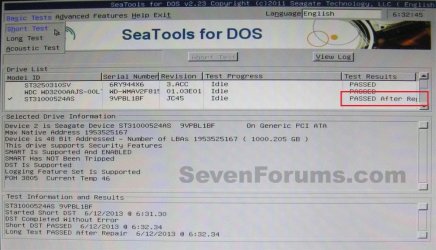
IT IS GOOD, TOO. Does this mean the harddisk is as new? As I heard that once a harddisk suffers bad sectors, the bad sectors will grow in time.

Can I 100% rely on the harddisk, after seatools repaired bad sectors? What does the tool exactly do while repairing the bad sectors? Does these sectors come free to use or are they disabled some how?

So the harddisk can be smaller in size then it was new?
 

My Computer My Computer

At a glance

windows 7 home premium SP1 64bitsAMD e350 1.60GHz4,00GB
Computer type
Laptop
Computer Manufacturer/Model Number
Sony vpcel1e1e
OS
windows 7 home premium SP1 64bits
CPU
AMD e350 1.60GHz
Memory
4,00GB
Browser
google chrome, IE
I can say my experience.

The disc that I repaired during making the tutorial is still under use, without any sort of performance drop. 11 months passed, no more problems.

But, a new disc is a new disc. You can never expect an old hardware to perform as good as a new one .... whether repaired or not.

You cannot 100% rely on a hard disc when you are unwrapping it for the first time. :)

What the tool exactly do while repairing bad sector? I dont know. Like I dont know what the reactor exactly do while producing electricity. But still I use electricity every off and on. :) One need not to be a scientist to know how to use any tool or service. :)

No, if the bad sectors are repaired, those sectors are not bad any more. So no scope of reduction in disc size.
 

My Computer My Computer

At a glance

Microsoft Windows 10 Pro Insider Preview 64-bitIntel(R) Core(TM) i3-4130 CPU @ 3.40GHzCorsair Vengence 4GB x2 (8.00GB Dual-Channel ...2047MB GeForce GTS 450 (ZOTAC International)
Computer type
PC/Desktop
Computer Manufacturer/Model Number
Self Assembled
OS
Microsoft Windows 10 Pro Insider Preview 64-bit
CPU
Intel(R) Core(TM) i3-4130 CPU @ 3.40GHz
Motherboard
Gigabyte Technology Co., Ltd. B85M-D3H
Memory
Corsair Vengence 4GB x2 (8.00GB Dual-Channel DDR3 @ 798MHz)
Graphics Card(s)
2047MB GeForce GTS 450 (ZOTAC International)
Sound Card
Onboard (Realtek High Definition Audio)
Monitor(s) Displays
LG Flatron E2040T
Screen Resolution
1600x900
Hard Drives
Western Digital 1 TB
Seagate 500 GB
PSU
Corsair VS550
Case
Cooler Master K380
Cooling
Cooler Master Seidon 120V Plus
Keyboard
Logitech MK260r
Mouse
Logitech MK260r
Internet Speed
PMPL Broadband
Antivirus
Windows Defender + MBAM
Browser
Firefox
Other Info
Dell Studio 15" Laptop
Thankx Arc for you clear explanation. Well lets hope the harddisk wil work great.

I have a recovery partition (dell) on the harddisk and it's stil visible, so I want to install it back. First step is to install a windows OS. When the laptop restarted to continu the installation, it want to check disk ... .

I cancel it.

Can this mean that The harddisk is not good anymore, even if seagate tool repaired it? Hmmm I will give it a try.
 

My Computer My Computer

At a glance

windows 7 home premium SP1 64bitsAMD e350 1.60GHz4,00GB
Computer type
Laptop
Computer Manufacturer/Model Number
Sony vpcel1e1e
OS
windows 7 home premium SP1 64bits
CPU
AMD e350 1.60GHz
Memory
4,00GB
Browser
google chrome, IE
Usually the recovery partition is the active partition. And after a clean install of OS this partition will not perform its job for which it is there. So better you do a full format of the HDD, create your own custom partition (not more than 4 primary partitions if you use it as a MBR disc) and try to clean install the OS. Does it still reboots in checkdisk? Let us know.
 

My Computer My Computer

At a glance

Microsoft Windows 10 Pro Insider Preview 64-bitIntel(R) Core(TM) i3-4130 CPU @ 3.40GHzCorsair Vengence 4GB x2 (8.00GB Dual-Channel ...2047MB GeForce GTS 450 (ZOTAC International)
Computer type
PC/Desktop
Computer Manufacturer/Model Number
Self Assembled
OS
Microsoft Windows 10 Pro Insider Preview 64-bit
CPU
Intel(R) Core(TM) i3-4130 CPU @ 3.40GHz
Motherboard
Gigabyte Technology Co., Ltd. B85M-D3H
Memory
Corsair Vengence 4GB x2 (8.00GB Dual-Channel DDR3 @ 798MHz)
Graphics Card(s)
2047MB GeForce GTS 450 (ZOTAC International)
Sound Card
Onboard (Realtek High Definition Audio)
Monitor(s) Displays
LG Flatron E2040T
Screen Resolution
1600x900
Hard Drives
Western Digital 1 TB
Seagate 500 GB
PSU
Corsair VS550
Case
Cooler Master K380
Cooling
Cooler Master Seidon 120V Plus
Keyboard
Logitech MK260r
Mouse
Logitech MK260r
Internet Speed
PMPL Broadband
Antivirus
Windows Defender + MBAM
Browser
Firefox
Other Info
Dell Studio 15" Laptop
It seems it's not the C drive (active, windows OS is installed) but the E drive (Recovery partitions, Dell image).

I ran checkdisk in windws (right clik partitions, properties, exta, check volume for errors and only the first option is selected.

It found some errors and fixed them.

restarted the laptop and no message anymore to check the disk... .

Hope it's stays like this.
 

My Computer My Computer

At a glance

windows 7 home premium SP1 64bitsAMD e350 1.60GHz4,00GB
Computer type
Laptop
Computer Manufacturer/Model Number
Sony vpcel1e1e
OS
windows 7 home premium SP1 64bits
CPU
AMD e350 1.60GHz
Memory
4,00GB
Browser
google chrome, IE
Back
Top