Solved Win7x64 only detects 3.7 GB RAM with Maximum memory

Damian Adelle

Lord of The Idiots
Member
Local time
4:14 PM
Messages
68
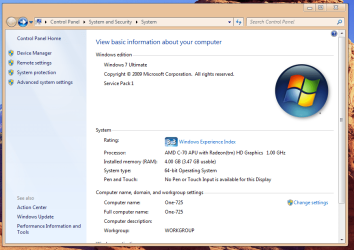
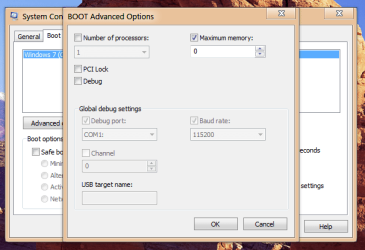
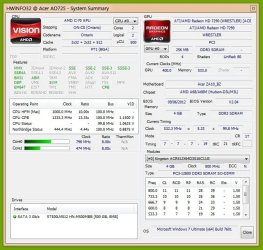
Hello. This is a very small and simple question, but it troubles me not to find an answer. As you can see, my Windows detects only 3.7 GB of RAM when in total there should be a complete (almost) 4GB. The info is in my specs. I tried to change the BOOT advanced options in the BOOT tab of msconfig to accept the maximum memory (4096). Then I restart it, but then I look and it's still the same, 3.7 usable, and when I check the advanced options, the box is checked but now it's a 0 where 4096 used to be. Now, I read in other posts that this was due to the GPU card, which takes memory, but I don't know if this applies in this model, so I post an screenshot of HWiNFO too. Can someone could please explain this to me?, thanks in advance.
 

Attachments
  • info.jpg
    info.jpg
    77.6 KB · Views: 26
  • info2.png
    info2.png
    50.9 KB · Views: 1
  • info3.png
    info3.png
    23.7 KB · Views: 26

My Computer My Computer

At a glance

Windows 7 Ultimate 64bitAMD Phenom X4 98504.00GB Crucial Dual-Channel DDR2 @ 401MHz (5-...ATI Radeon 2100 (Gigabyte)
Computer type
PC/Desktop
Computer Manufacturer/Model Number
Custom Build
OS
Windows 7 Ultimate 64bit
CPU
AMD Phenom X4 9850
Motherboard
Gigabyte Technology GA-MA74GM-S2 (Socket M2)
Memory
4.00GB Crucial Dual-Channel DDR2 @ 401MHz (5-5-5-18)
Graphics Card(s)
ATI Radeon 2100 (Gigabyte)
Sound Card
Realtek High Definition Audio
Monitor(s) Displays
LM742 on ATI Radeon 2100
Screen Resolution
1280x1024 pixels
Hard Drives
WDC WD15EARS-00Z5B1 ATA Device, 1.5 TB, 2 partitions: - 500 GB (aprox.) Where Windows 7 resides, - 1 TB (aprox.) Storage
PSU
Ultra X4 ATX 600W
Case
ST ATX Mid-Tower Case
Cooling
Ultra Carbon X3
Keyboard
Logitech K360
Mouse
Logitech MX10
Internet Speed
802.11n USB Wireless LAN Card
Antivirus
AVG Internet Security 2014
Browser
Firefox Mozilla
Other Info
I use a graphic tablet, a XBOX360 Wired Controller, a external CD/DVD Driver, and my entire system is connected to a 6 slots Protected Power-surge
Hello. This is a very small and simple question, but it troubles me not to find an answer. As you can see, my Windows detects only 3.7 GB of RAM when in total there should be a complete (almost) 4GB. The info is in my specs. I tried to change the BOOT advanced options in the BOOT tab of msconfig to accept the maximum memory (4096). Then I restart it, but then I look and it's still the same, 3.7 usable, and when I check the advanced options, the box is checked but now it's a 0 where 4096 used to be. Now, I read in other posts that this was due to the GPU card, which takes memory, but I don't know if this applies in this model, so I post an screenshot of HWiNFO too. Can someone could please explain this to me?, thanks in advance.

Hi Damian Adelle,

3.7 Gb of usable RAM is quite good and normal with most of the system. Once you would check in BIOS it would show you 4 Gb only. 3.7 Gb is available and usable for operating system, rest if for pre boot functions like loading windows and processes.

Check this article which should answer your query:

The usable memory may be less than the installed memory on Windows 7-based computers

Hope it answers your query. If you have any further queries, please feel free to contact us.
 

My Computer My Computer

At a glance

Winndows 7 32 bit
Computer type
PC/Desktop
OS
Winndows 7 32 bit
Uncheck "Maximum memory" that setting is ONLY for disabling RAM, you do not what that!
 

My Computer My Computer

At a glance

Windows 10 Pro (x64)Intel Core i7-3930K (3.2GHz - 4.5GHz)4x Samsung 4GB PC3-12800 DDR3 (16GB 1600MHz)Nvidia Geforce GTX 690
Computer type
PC/Desktop
Computer Manufacturer/Model Number
Alienware Aurora ALX R4
OS
Windows 10 Pro (x64)
CPU
Intel Core i7-3930K (3.2GHz - 4.5GHz)
Motherboard
Alienware Aurora-R4 x79
Memory
4x Samsung 4GB PC3-12800 DDR3 (16GB 1600MHz)
Graphics Card(s)
Nvidia Geforce GTX 690
Sound Card
SteelSeries Siberia Elite
Monitor(s) Displays
Dell UltraSharp U3011
Screen Resolution
2560x1600
Hard Drives
Samsung 850 Pro 256 GB, Seagate 1TB Desktop Hybrid HDD, 2x Western Digital 4TB Green HDD
PSU
875W Some Dell PSU <.<
Case
Alienware Aurora ALX
Cooling
Custom Liquid Cooling (EK CPU & GPU blocks) dual EK 480RAD
Keyboard
Logitech G710+ Mechanical
Mouse
Logitech G700s
Internet Speed
Verizon Fios (50 mbps average)
Other Info
Server: Intel NUC D54250WYK: i5-4250U, 16GB, 256 GB mSATA, Windows Server 2012 R2
Hi Damian Adelle,

3.7 Gb of usable RAM is quite good and normal with most of the system. Once you would check in BIOS it would show you 4 Gb only. 3.7 Gb is available and usable for operating system, rest if for pre boot functions like loading windows and processes.

Check this article which should answer your query:

The usable memory may be less than the installed memory on Windows 7-based computers

Hope it answers your query. If you have any further queries, please feel free to contact us.

Thanks Sandeep, I just wanted to be sure that the memory level was right and it wasn't locked or faulty.
 

My Computer My Computer

At a glance

Windows 7 Ultimate 64bitAMD Phenom X4 98504.00GB Crucial Dual-Channel DDR2 @ 401MHz (5-...ATI Radeon 2100 (Gigabyte)
Computer type
PC/Desktop
Computer Manufacturer/Model Number
Custom Build
OS
Windows 7 Ultimate 64bit
CPU
AMD Phenom X4 9850
Motherboard
Gigabyte Technology GA-MA74GM-S2 (Socket M2)
Memory
4.00GB Crucial Dual-Channel DDR2 @ 401MHz (5-5-5-18)
Graphics Card(s)
ATI Radeon 2100 (Gigabyte)
Sound Card
Realtek High Definition Audio
Monitor(s) Displays
LM742 on ATI Radeon 2100
Screen Resolution
1280x1024 pixels
Hard Drives
WDC WD15EARS-00Z5B1 ATA Device, 1.5 TB, 2 partitions: - 500 GB (aprox.) Where Windows 7 resides, - 1 TB (aprox.) Storage
PSU
Ultra X4 ATX 600W
Case
ST ATX Mid-Tower Case
Cooling
Ultra Carbon X3
Keyboard
Logitech K360
Mouse
Logitech MX10
Internet Speed
802.11n USB Wireless LAN Card
Antivirus
AVG Internet Security 2014
Browser
Firefox Mozilla
Other Info
I use a graphic tablet, a XBOX360 Wired Controller, a external CD/DVD Driver, and my entire system is connected to a 6 slots Protected Power-surge
Uncheck "Maximum memory" that setting is ONLY for disabling RAM, you do not what that!
I quite don't understand what you are saying, you mean unchecking the box will disable the RAM?, I think is actually the contrary, but as I hear that 3.7 is fine, and is all that there should be available, then I think I got the answer, thanks anyway.
 

My Computer My Computer

At a glance

Windows 7 Ultimate 64bitAMD Phenom X4 98504.00GB Crucial Dual-Channel DDR2 @ 401MHz (5-...ATI Radeon 2100 (Gigabyte)
Computer type
PC/Desktop
Computer Manufacturer/Model Number
Custom Build
OS
Windows 7 Ultimate 64bit
CPU
AMD Phenom X4 9850
Motherboard
Gigabyte Technology GA-MA74GM-S2 (Socket M2)
Memory
4.00GB Crucial Dual-Channel DDR2 @ 401MHz (5-5-5-18)
Graphics Card(s)
ATI Radeon 2100 (Gigabyte)
Sound Card
Realtek High Definition Audio
Monitor(s) Displays
LM742 on ATI Radeon 2100
Screen Resolution
1280x1024 pixels
Hard Drives
WDC WD15EARS-00Z5B1 ATA Device, 1.5 TB, 2 partitions: - 500 GB (aprox.) Where Windows 7 resides, - 1 TB (aprox.) Storage
PSU
Ultra X4 ATX 600W
Case
ST ATX Mid-Tower Case
Cooling
Ultra Carbon X3
Keyboard
Logitech K360
Mouse
Logitech MX10
Internet Speed
802.11n USB Wireless LAN Card
Antivirus
AVG Internet Security 2014
Browser
Firefox Mozilla
Other Info
I use a graphic tablet, a XBOX360 Wired Controller, a external CD/DVD Driver, and my entire system is connected to a 6 slots Protected Power-surge
No having the box check is what activates that setting to DISABLE memory. You want that box to be unchecked so Windows will NEVER disable memory.
 

My Computer My Computer

At a glance

Windows 10 Pro (x64)Intel Core i7-3930K (3.2GHz - 4.5GHz)4x Samsung 4GB PC3-12800 DDR3 (16GB 1600MHz)Nvidia Geforce GTX 690
Computer type
PC/Desktop
Computer Manufacturer/Model Number
Alienware Aurora ALX R4
OS
Windows 10 Pro (x64)
CPU
Intel Core i7-3930K (3.2GHz - 4.5GHz)
Motherboard
Alienware Aurora-R4 x79
Memory
4x Samsung 4GB PC3-12800 DDR3 (16GB 1600MHz)
Graphics Card(s)
Nvidia Geforce GTX 690
Sound Card
SteelSeries Siberia Elite
Monitor(s) Displays
Dell UltraSharp U3011
Screen Resolution
2560x1600
Hard Drives
Samsung 850 Pro 256 GB, Seagate 1TB Desktop Hybrid HDD, 2x Western Digital 4TB Green HDD
PSU
875W Some Dell PSU <.<
Case
Alienware Aurora ALX
Cooling
Custom Liquid Cooling (EK CPU & GPU blocks) dual EK 480RAD
Keyboard
Logitech G710+ Mechanical
Mouse
Logitech G700s
Internet Speed
Verizon Fios (50 mbps average)
Other Info
Server: Intel NUC D54250WYK: i5-4250U, 16GB, 256 GB mSATA, Windows Server 2012 R2
Hi Damian Adelle,

3.7 Gb of usable RAM is quite good and normal with most of the system. Once you would check in BIOS it would show you 4 Gb only. 3.7 Gb is available and usable for operating system, rest if for pre boot functions like loading windows and processes.

Check this article which should answer your query:

The usable memory may be less than the installed memory on Windows 7-based computers

Hope it answers your query. If you have any further queries, please feel free to contact us.

Thanks Sandeep, I just wanted to be sure that the memory level was right and it wasn't locked or faulty.

Hi Damian Adelle,

Its great to hear that your query has been answered. Please be assured there are no issues with the memory and under windows it would show a little less and when you check in BIOS you would see complete 4 GB is installed.

If you have any further queries, please feel free to contact us.
 

My Computer My Computer

At a glance

Winndows 7 32 bit
Computer type
PC/Desktop
OS
Winndows 7 32 bit
Back
Top