Annoying static like "pop" from speakers

unclepine

New member
Local time
8:30 AM
Messages
47
This is driving me NUTS...! I have an Asus P7P55D MoBo, Windows 7 of course, all updates, Intel i5 2.7 CPU, 8gb ram, 5770 GPU, 5.1 surround, 128SSD, 500GbHDD, Antec 900 case/4 fans, sound card is onboard. Whenever I click on a page and read for a bit then click back there is a "pop" from the speakers...! It doesn't seem to happen if you click pages quickly, only if you stay on the page for a few minutes...?

The "pop" is even audible with the sound muted via the speaker icon at bottom of screen. I checked all the cables, plugs and seem solid. The power bar has a pretty hefty surge circuit in it and the volume on the powered sub is set to 1/4 volume. The only thing that I have done recently is upgrade the video/audio drivers when I installed Rage from Steam.

Any thoughts on what I might try to alleviate this problem...?

Regards,

unclepine
 

My Computer My Computer

At a glance

Windows 7 x64Intel i5 2.64gbATI 5770 1gb mem
Computer Manufacturer/Model Number
custom
OS
Windows 7 x64
CPU
Intel i5 2.6
Motherboard
P7P55 Asus
Memory
4gb
Graphics Card(s)
ATI 5770 1gb mem
Sound Card
onboard
Monitor(s) Displays
20" Samsung
Hard Drives
500gb Seagate
PSU
650 watt
Case
Antec 900
Cooling
4 fans incl 200 mm top mount
I wonder if its static electricity cause the problem? Is everything grounded properly? As it does it with the speakers muted (on the PC) leads me to static or something external or in the speaker system.

For testing, disconnect the speakers and plug a headset into either the front panel headphone jack or into the rear GREEN speaker jack and see if you get this with the headphones. If you do or don't will help in problem isolation.
 

My Computer My Computer

At a glance

Windows 10 64 bitIntel i7 6700K16GB Corsair DominatorIntel CPU Graphics
Computer type
PC/Desktop
Computer Manufacturer/Model Number
My Own Build
OS
Windows 10 64 bit
CPU
Intel i7 6700K
Motherboard
ASUS ROG Maximus VIII Hero
Memory
16GB Corsair Dominator
Graphics Card(s)
Intel CPU Graphics
Sound Card
RealTek
Monitor(s) Displays
27" Dell S2719dgf
Screen Resolution
2560X1440
Hard Drives
1 TB Samsung 850 EVO SSD for Win 10 Pro
500GB Samsung 850 EVO SSD for Win 10 Insider
2 TB drive for backup
PSU
EVGA Supernova 750G2
Case
BeQuiet Silent Base 600
Cooling
Deepcool Captain 120EX
Keyboard
Microsoft Wireless 2000
Mouse
Microsoft wireless
Internet Speed
100 MB/sec (Cable)
Antivirus
Microsoft Defender and Malwarebytes
Browser
Edge/Firefox
Other Info
Cakewalk (Sonar) by BandLab and Studio One 4.1 Pro recording studio software. MOTU 896Mk3 Hybrid recording interface, Frontier Tranzport wireless control unit, Behringer X-Touch Control Surface.
Five USB connected optical drives for CD Audio production using Nero BurningROM
Hi there
If you are connecting to internet via Wi-Fi check you don't have a mobile phone on near the computer -- mobile phones can cause a lot of interference -- you don't have to be on a mobile phone but anybody near who has one on - or simply the mobile could just be scanning from time to time -- it IS a radio receiver after all !!.

Cheers
jimbo
 

My Computer My Computer

At a glance

Linux CENTOS 7 / various Windows OS'es and se...Intel i7 Intel i58GB, 16GBOn Motherboard
Computer type
PC/Desktop
Computer Manufacturer/Model Number
Custom built, several laptops HP/ASUS
OS
Linux CENTOS 7 / various Windows OS'es and servers
CPU
Intel i7 Intel i5
Memory
8GB, 16GB
Graphics Card(s)
On Motherboard
Sound Card
Realtek HD audio
Monitor(s) Displays
Apple Cinema display, Samsung LCD
Screen Resolution
1920 X 1080
Hard Drives
4 X 1TB SATA
Mouse
Toshiba wireless laser
Internet Speed
> 20MB up
"Popping" speakers

Hey Fireberd, you aced it man...!! I turned off the powered sub that all the speakers are plugged into, and popped in a set of hedphones on the tower front panel, cranked up the volume and opened up a bunch of web pages back and forth a few dozen times...NO POP...!!! So, seems you are on to sumthin my friend. This 5.1 is a VERY old system that I got as a gift some 6-8 yrs ago, so maybe some of the on-board components are getting weak...?

Oh BTW, I do get thar annoying Windows "click" when you open a new page. How can I turn that off...?

Regards, and THANKS again

Unc
 

My Computer My Computer

At a glance

Windows 7 x64Intel i5 2.64gbATI 5770 1gb mem
Computer Manufacturer/Model Number
custom
OS
Windows 7 x64
CPU
Intel i5 2.6
Motherboard
P7P55 Asus
Memory
4gb
Graphics Card(s)
ATI 5770 1gb mem
Sound Card
onboard
Monitor(s) Displays
20" Samsung
Hard Drives
500gb Seagate
PSU
650 watt
Case
Antec 900
Cooling
4 fans incl 200 mm top mount
Oh BTW, I do get thar annoying Windows "click" when you open a new page. How can I turn that off...?
See: How to Turn Off Sounds in Your Browser - Turn Off Browser Sounds in Windows
Make your selection, click on Apply then OK.


If by opening a new page you mean a new program.

Follow this tutorial: http://www.sevenforums.com/tutorials/285-sounds-change.html, then go to step #7A.

Scroll down to "open program" and left click on it to highlight it.
Then click on the down arrow at Sounds and select (None).

We don't like all those sounds either, so I have Sound Schemes set to no sounds; click on the down arrow at Sound Scheme and select No Sounds.

You will have to experiment with Program Sounds to find what suites you best then you can save it, how to do that is shown in step #10.
 

My Computer My Computer

At a glance

Originally Win 7 Hm Prem x64 Ver 6.1.7600 Bui...Intel i3 530 2.93GHz, 2933MHz 2 Cores 4 Logic...6GB of 1,333MHz DDR3 SDRAM32MB Intel Graphics Media Accelerator HD IGChip
Computer type
PC/Desktop
Computer Manufacturer/Model Number
Gateway DX4831-01e (Mid-Tower Desktop)
OS
Originally Win 7 Hm Prem x64 Ver 6.1.7600 Build 7601-SP1 | Upgraded to Windows 10 December 14, 2019
CPU
Intel i3 530 2.93GHz, 2933MHz 2 Cores 4 Logical Processors
Motherboard
Gateway H57M01 133 megahertz
Memory
6GB of 1,333MHz DDR3 SDRAM
Graphics Card(s)
32MB Intel Graphics Media Accelerator HD IGChip
Sound Card
Realtek High Definition Audio
Monitor(s) Displays
Gateway HX2000 20inch TFT active matrix TN
Screen Resolution
1600 x 900 x 59 hertz
Hard Drives
WDC WD10EADS-00M2B0 [HDD] (1000.20 GB) -- drive 0,
HL-DT-ST DVDRAM GH41N [CD-ROM dr]
Four card readers, and Four USB 2.0
PSU
300watts.
Case
Mid-Tower Desktop
Cooling
Stock from Gateway
Keyboard
Natural Ergonomic Keyboard 4000, see Other Info
Mouse
Orig. Gateway wore out now using Insignia USB wired optical
Internet Speed
Vz FIOS 10ms png 57.64Mbps down 65.53Mbps up Speedtest.org
Antivirus
Zamana Anti-logger with Anti-malware, MSE, Windows Firewall,
Browser
IE11.0.9600.19399-Upd ver11.0.135, Firefox 68.0.1 x64
Other Info
System Specs by Belarc.

BIOS: American Megatrends Inc. P01-A0 11/17/2009

Replaced the MS 'Natural' Standard PS/2 Enhanced 101-102 Keyboard with a new Natural Ergonomic Keyboard 4000 on August 1st 2014.

Canon Pixma MG3222 Printer.

Updated to IE11 on 12102015 | Fios Quantum Router g1100

Additional AV: SpywareBlaster, manual Mbam, SAS
Ya, I found the area for turning off those annoying Windows sounds. Thanks. The funny part about these crazy "pops" is that they don't seem to happen if I click quickly back and forth between different screens/pages/sites, but if I sit on a page and read a bit, the "pop" will happen when I jump back to the previous page..???

and so it goes...AAARRRGGHHHH...!!!

Unc
 

My Computer My Computer

At a glance

Windows 7 x64Intel i5 2.64gbATI 5770 1gb mem
Computer Manufacturer/Model Number
custom
OS
Windows 7 x64
CPU
Intel i5 2.6
Motherboard
P7P55 Asus
Memory
4gb
Graphics Card(s)
ATI 5770 1gb mem
Sound Card
onboard
Monitor(s) Displays
20" Samsung
Hard Drives
500gb Seagate
PSU
650 watt
Case
Antec 900
Cooling
4 fans incl 200 mm top mount
What you're describing is a Latency problem, and you should update any old drivers especially the audio and video.

Go to: DPC Latency Checker read through the site to learn about "Drop-Outs" and how to use it then download, and run it. Installation is not required. The program will give you tips on what to check to fix the problem.

Here's another site that offers tips on how to find, isolate, and fix drop-outs: Windows 7 Tuning Tips for Audio Processing It also has another program that:
If DPC Latency Checker (see last section) shows any yellow or red spikes, run LatencyMon to identify the exact cause of the problem. The LatencyMon installer can be downloaded from here:

Resplendence Software - LatencyMon: suitability checker for real-time audio and other tasks

Source: Windows 7 Tuning Tips for Audio Processing
Troubleshooting for latency can be a difficult process so take your time and gather your patience, we'll be here to offer assistance. I can remember fireberd and me working with other members to fix latency.

It would be a good thing to brush up on http://www.sevenforums.com/tutorials/9733-screenshots-files-upload-post-seven-forums.html It would give everyone a visual to see the results of DPC Checker, LatencyMon, and offer suggestions.
 

My Computer My Computer

At a glance

Originally Win 7 Hm Prem x64 Ver 6.1.7600 Bui...Intel i3 530 2.93GHz, 2933MHz 2 Cores 4 Logic...6GB of 1,333MHz DDR3 SDRAM32MB Intel Graphics Media Accelerator HD IGChip
Computer type
PC/Desktop
Computer Manufacturer/Model Number
Gateway DX4831-01e (Mid-Tower Desktop)
OS
Originally Win 7 Hm Prem x64 Ver 6.1.7600 Build 7601-SP1 | Upgraded to Windows 10 December 14, 2019
CPU
Intel i3 530 2.93GHz, 2933MHz 2 Cores 4 Logical Processors
Motherboard
Gateway H57M01 133 megahertz
Memory
6GB of 1,333MHz DDR3 SDRAM
Graphics Card(s)
32MB Intel Graphics Media Accelerator HD IGChip
Sound Card
Realtek High Definition Audio
Monitor(s) Displays
Gateway HX2000 20inch TFT active matrix TN
Screen Resolution
1600 x 900 x 59 hertz
Hard Drives
WDC WD10EADS-00M2B0 [HDD] (1000.20 GB) -- drive 0,
HL-DT-ST DVDRAM GH41N [CD-ROM dr]
Four card readers, and Four USB 2.0
PSU
300watts.
Case
Mid-Tower Desktop
Cooling
Stock from Gateway
Keyboard
Natural Ergonomic Keyboard 4000, see Other Info
Mouse
Orig. Gateway wore out now using Insignia USB wired optical
Internet Speed
Vz FIOS 10ms png 57.64Mbps down 65.53Mbps up Speedtest.org
Antivirus
Zamana Anti-logger with Anti-malware, MSE, Windows Firewall,
Browser
IE11.0.9600.19399-Upd ver11.0.135, Firefox 68.0.1 x64
Other Info
System Specs by Belarc.

BIOS: American Megatrends Inc. P01-A0 11/17/2009

Replaced the MS 'Natural' Standard PS/2 Enhanced 101-102 Keyboard with a new Natural Ergonomic Keyboard 4000 on August 1st 2014.

Canon Pixma MG3222 Printer.

Updated to IE11 on 12102015 | Fios Quantum Router g1100

Additional AV: SpywareBlaster, manual Mbam, SAS
The problem, as he has reported, is (apparently) in the speaker system as headphones do not get the pops.
 

My Computer My Computer

At a glance

Windows 10 64 bitIntel i7 6700K16GB Corsair DominatorIntel CPU Graphics
Computer type
PC/Desktop
Computer Manufacturer/Model Number
My Own Build
OS
Windows 10 64 bit
CPU
Intel i7 6700K
Motherboard
ASUS ROG Maximus VIII Hero
Memory
16GB Corsair Dominator
Graphics Card(s)
Intel CPU Graphics
Sound Card
RealTek
Monitor(s) Displays
27" Dell S2719dgf
Screen Resolution
2560X1440
Hard Drives
1 TB Samsung 850 EVO SSD for Win 10 Pro
500GB Samsung 850 EVO SSD for Win 10 Insider
2 TB drive for backup
PSU
EVGA Supernova 750G2
Case
BeQuiet Silent Base 600
Cooling
Deepcool Captain 120EX
Keyboard
Microsoft Wireless 2000
Mouse
Microsoft wireless
Internet Speed
100 MB/sec (Cable)
Antivirus
Microsoft Defender and Malwarebytes
Browser
Edge/Firefox
Other Info
Cakewalk (Sonar) by BandLab and Studio One 4.1 Pro recording studio software. MOTU 896Mk3 Hybrid recording interface, Frontier Tranzport wireless control unit, Behringer X-Touch Control Surface.
Five USB connected optical drives for CD Audio production using Nero BurningROM
...and so it goes...the pops that is...!

THANK YOU very much for the informative info anak. I will take off to these sites and delve in to all the suggestions. I will reply when I have tried out the tips. Hope to be able to post screen shots also. Have never really gotten into doing that sort of thing, being an 'ol fart you know, but I will give it the ol school try...!

Regards,

Unc
 

My Computer My Computer

At a glance

Windows 7 x64Intel i5 2.64gbATI 5770 1gb mem
Computer Manufacturer/Model Number
custom
OS
Windows 7 x64
CPU
Intel i5 2.6
Motherboard
P7P55 Asus
Memory
4gb
Graphics Card(s)
ATI 5770 1gb mem
Sound Card
onboard
Monitor(s) Displays
20" Samsung
Hard Drives
500gb Seagate
PSU
650 watt
Case
Antec 900
Cooling
4 fans incl 200 mm top mount
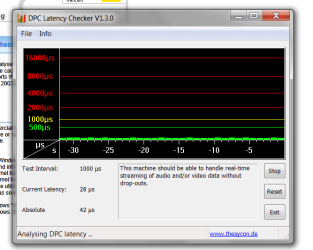
Here is a screen shot of the DPC Latency test I just ran...
Capture.PNG
Capture.PNG
 

My Computer My Computer

At a glance

Windows 7 x64Intel i5 2.64gbATI 5770 1gb mem
Computer Manufacturer/Model Number
custom
OS
Windows 7 x64
CPU
Intel i5 2.6
Motherboard
P7P55 Asus
Memory
4gb
Graphics Card(s)
ATI 5770 1gb mem
Sound Card
onboard
Monitor(s) Displays
20" Samsung
Hard Drives
500gb Seagate
PSU
650 watt
Case
Antec 900
Cooling
4 fans incl 200 mm top mount
screen shot of DPC checker

DPC Latency Checker.PNG


Don't know if this is gonna work...!!

Unv
 

My Computer My Computer

At a glance

Windows 7 x64Intel i5 2.64gbATI 5770 1gb mem
Computer Manufacturer/Model Number
custom
OS
Windows 7 x64
CPU
Intel i5 2.6
Motherboard
P7P55 Asus
Memory
4gb
Graphics Card(s)
ATI 5770 1gb mem
Sound Card
onboard
Monitor(s) Displays
20" Samsung
Hard Drives
500gb Seagate
PSU
650 watt
Case
Antec 900
Cooling
4 fans incl 200 mm top mount
The problem, as he has reported, is (apparently) in the speaker system as headphones do not get the pops.
My apologies, I mis-read the thread starter. :o

THANK YOU very much for the informative info anak. I will take off to these sites and delve in to all the suggestions. I will reply when I have tried out the tips. Hope to be able to post screen shots also. Have never really gotten into doing that sort of thing, being an 'ol fart you know, but I will give it the ol school try...!

Regards,

Unc
Your welcome, one is never too old to learn.

Here is a screen shot of the DPC Latency test I just ran...
View attachment 296351
Well, that's one way to flatten out those latency spikes! :p

View attachment 296352


Don't know if this is gonna work...!!

Unv
At least we have confirmation that your system is okay.


On the off-chance if the new game and steam might be a problem I found this: Anyone else getting horrible static? [Archive] - Steam Users' Forums most of the users complain about headphone static, but there are a few that it affects their speakers.

There are some tips in there about changing the audio.scr by adding different variables like EAX to the audio.scr file and changing the digital output properties to 2channel 16bit, looks like you'll be experimenting.

This might be helpful: Rage Crashes, Textures Fix, FOV, FPS, Freezes, Errors, and Graphics Fixes

Found this
Problem 3: How To Fix Audio Crackling/Static Sound

Solution: Go to the directory: \Documents\Rage\out\Settings, Open: "Audio.scr" with a text editor and Change: API("XAudio2") to API("aOpenAL"). According to my experience, choose a new driver for your audio card will be helpful. Realtek HD audio 2.64 is a good option.
here: Rage Black Screen, Lag and Cracking Sound Issues Fix

You may find more by searching for: "Rage" static/crackling sound problem.
 

My Computer My Computer

At a glance

Originally Win 7 Hm Prem x64 Ver 6.1.7600 Bui...Intel i3 530 2.93GHz, 2933MHz 2 Cores 4 Logic...6GB of 1,333MHz DDR3 SDRAM32MB Intel Graphics Media Accelerator HD IGChip
Computer type
PC/Desktop
Computer Manufacturer/Model Number
Gateway DX4831-01e (Mid-Tower Desktop)
OS
Originally Win 7 Hm Prem x64 Ver 6.1.7600 Build 7601-SP1 | Upgraded to Windows 10 December 14, 2019
CPU
Intel i3 530 2.93GHz, 2933MHz 2 Cores 4 Logical Processors
Motherboard
Gateway H57M01 133 megahertz
Memory
6GB of 1,333MHz DDR3 SDRAM
Graphics Card(s)
32MB Intel Graphics Media Accelerator HD IGChip
Sound Card
Realtek High Definition Audio
Monitor(s) Displays
Gateway HX2000 20inch TFT active matrix TN
Screen Resolution
1600 x 900 x 59 hertz
Hard Drives
WDC WD10EADS-00M2B0 [HDD] (1000.20 GB) -- drive 0,
HL-DT-ST DVDRAM GH41N [CD-ROM dr]
Four card readers, and Four USB 2.0
PSU
300watts.
Case
Mid-Tower Desktop
Cooling
Stock from Gateway
Keyboard
Natural Ergonomic Keyboard 4000, see Other Info
Mouse
Orig. Gateway wore out now using Insignia USB wired optical
Internet Speed
Vz FIOS 10ms png 57.64Mbps down 65.53Mbps up Speedtest.org
Antivirus
Zamana Anti-logger with Anti-malware, MSE, Windows Firewall,
Browser
IE11.0.9600.19399-Upd ver11.0.135, Firefox 68.0.1 x64
Other Info
System Specs by Belarc.

BIOS: American Megatrends Inc. P01-A0 11/17/2009

Replaced the MS 'Natural' Standard PS/2 Enhanced 101-102 Keyboard with a new Natural Ergonomic Keyboard 4000 on August 1st 2014.

Canon Pixma MG3222 Printer.

Updated to IE11 on 12102015 | Fios Quantum Router g1100

Additional AV: SpywareBlaster, manual Mbam, SAS
Well guys...

...I took the system downstairs to the shop and blasted out the tower. LOTS of dust...! Pulledout ALL the plugs, cleaned 'em and plugged 'em all back in. Che+


...I dragged the tower downstairs to the workshop and took the air gun to it. LOTS o dust...! Unplugged ALL the connections, cleaned the jacks etc., plugged 'em all back in...SAME THING...!!

The "pops" definitely DO NOT happen when using headphones right off the MoBo output at the back. The thing that stands out is that the "pops" ONLY happen when on the web, jumping from site to site, page to page. I'm thinking this narrows it down to the speaker power system in the woofer OR the router..!!??

It's a D-Link DI-604. Rather old I know but still seems to work fine. It's a hard wired style, no need for wireless as all the 'puter equipment is on 2 desks in the corner of the room.

I'm stumped. Next up is to try just 2 speakers off the Mobo WITHOUT the powered sub in line. After that, I guess a different(read new) router as the old 604 is no longer supported.

...and so it goes.....

Unc
 

My Computer My Computer

At a glance

Windows 7 x64Intel i5 2.64gbATI 5770 1gb mem
Computer Manufacturer/Model Number
custom
OS
Windows 7 x64
CPU
Intel i5 2.6
Motherboard
P7P55 Asus
Memory
4gb
Graphics Card(s)
ATI 5770 1gb mem
Sound Card
onboard
Monitor(s) Displays
20" Samsung
Hard Drives
500gb Seagate
PSU
650 watt
Case
Antec 900
Cooling
4 fans incl 200 mm top mount
Sorry about the above pics...! Hit the wrong upload...DUUHHH. Well, it looks like the sub woofer that has the control curcuits in it for all the other speakers was the issue. I unplugged the entire system and ran a couple of different speakers off the main outputs on the audio out jacks on back of MoBo. No pops at all. BUT...I cannot seem to get much volume outa these speakers even with the volume slider in the lower right taskbar icon...? Cranked all the way to the top and the sound is just normal, not loud at all...? NOW WHAT...??!?!?!
 

My Computer My Computer

At a glance

Windows 7 x64Intel i5 2.64gbATI 5770 1gb mem
Computer Manufacturer/Model Number
custom
OS
Windows 7 x64
CPU
Intel i5 2.6
Motherboard
P7P55 Asus
Memory
4gb
Graphics Card(s)
ATI 5770 1gb mem
Sound Card
onboard
Monitor(s) Displays
20" Samsung
Hard Drives
500gb Seagate
PSU
650 watt
Case
Antec 900
Cooling
4 fans incl 200 mm top mount
Run DPC Latency checker and see if its a driver issue. Dpc latency would cause that too.
 

My Computer My Computer

At a glance

Windows 10 ProIntel i7-3770K 4.4GHz8GB G.SKILL Ripjaws 1866 MHzEVGA GTX 980 Classified
Computer type
PC/Desktop
Computer Manufacturer/Model Number
Weekend Warrior Rig
OS
Windows 10 Pro
CPU
Intel i7-3770K 4.4GHz
Motherboard
ASUS P8Z77-V Pro
Memory
8GB G.SKILL Ripjaws 1866 MHz
Graphics Card(s)
EVGA GTX 980 Classified
Monitor(s) Displays
Asus VH238H 23" 2ms
Screen Resolution
1920x1080
Hard Drives
Intel 330 120GB SSD /
WD Blue 1TB /
WD Black 500GB
PSU
Corsair CX750M
Case
NZXT H440
Cooling
Corsair H80i- CPU / Corsair H90- GPU
Keyboard
Logitech K360 LE
Mouse
Logitech G500
Antivirus
Avast
Browser
Chrome
Other Info
1200W 2.1 Surround Sound Audio
Sorry about the above pics...! Hit the wrong upload...DUUHHH. Well, it looks like the sub woofer that has the control curcuits in it for all the other speakers was the issue. I unplugged the entire system and ran a couple of different speakers off the main outputs on the audio out jacks on back of MoBo. No pops at all. BUT...I cannot seem to get much volume outa these speakers even with the volume slider in the lower right taskbar icon...?

Cranked all the way to the top and the sound is just normal, not loud at all...? NOW WHAT...??!?!?!

It might be a Loudness Equalization setting. See one of my posts from earlier this year: http://www.sevenforums.com/virtualization/277690-vmware-player-windows-8-demo.html#post2287596

The Loudness Equalization setting would be found on the Enhancement tab of Speaker properties.
 

My Computer My Computer

At a glance

Originally Win 7 Hm Prem x64 Ver 6.1.7600 Bui...Intel i3 530 2.93GHz, 2933MHz 2 Cores 4 Logic...6GB of 1,333MHz DDR3 SDRAM32MB Intel Graphics Media Accelerator HD IGChip
Computer type
PC/Desktop
Computer Manufacturer/Model Number
Gateway DX4831-01e (Mid-Tower Desktop)
OS
Originally Win 7 Hm Prem x64 Ver 6.1.7600 Build 7601-SP1 | Upgraded to Windows 10 December 14, 2019
CPU
Intel i3 530 2.93GHz, 2933MHz 2 Cores 4 Logical Processors
Motherboard
Gateway H57M01 133 megahertz
Memory
6GB of 1,333MHz DDR3 SDRAM
Graphics Card(s)
32MB Intel Graphics Media Accelerator HD IGChip
Sound Card
Realtek High Definition Audio
Monitor(s) Displays
Gateway HX2000 20inch TFT active matrix TN
Screen Resolution
1600 x 900 x 59 hertz
Hard Drives
WDC WD10EADS-00M2B0 [HDD] (1000.20 GB) -- drive 0,
HL-DT-ST DVDRAM GH41N [CD-ROM dr]
Four card readers, and Four USB 2.0
PSU
300watts.
Case
Mid-Tower Desktop
Cooling
Stock from Gateway
Keyboard
Natural Ergonomic Keyboard 4000, see Other Info
Mouse
Orig. Gateway wore out now using Insignia USB wired optical
Internet Speed
Vz FIOS 10ms png 57.64Mbps down 65.53Mbps up Speedtest.org
Antivirus
Zamana Anti-logger with Anti-malware, MSE, Windows Firewall,
Browser
IE11.0.9600.19399-Upd ver11.0.135, Firefox 68.0.1 x64
Other Info
System Specs by Belarc.

BIOS: American Megatrends Inc. P01-A0 11/17/2009

Replaced the MS 'Natural' Standard PS/2 Enhanced 101-102 Keyboard with a new Natural Ergonomic Keyboard 4000 on August 1st 2014.

Canon Pixma MG3222 Printer.

Updated to IE11 on 12102015 | Fios Quantum Router g1100

Additional AV: SpywareBlaster, manual Mbam, SAS
Back
Top