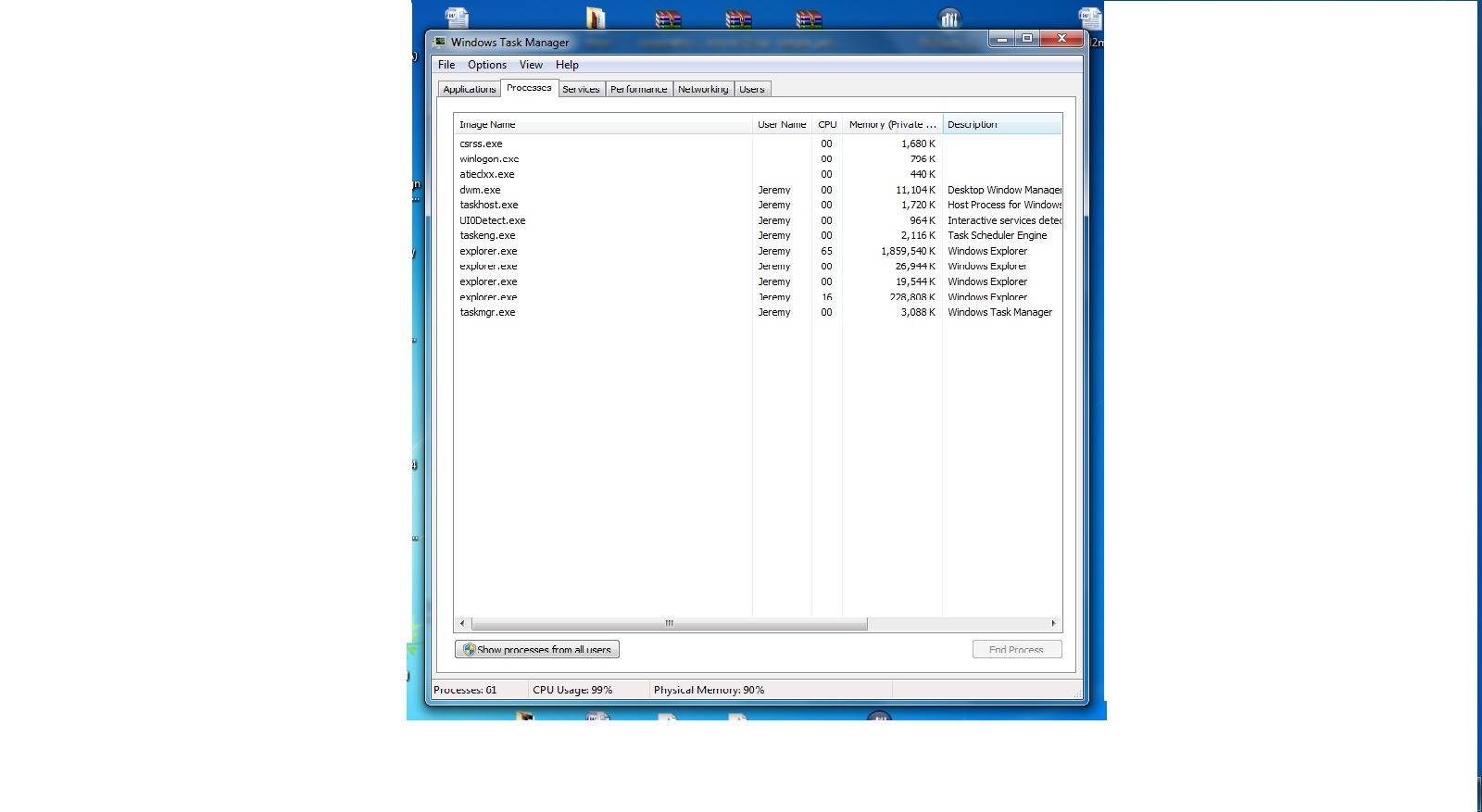
Multiple explorer.exe in task manager hogging most of ram help please?

wordstl

New member
Local time
10:11 PM
Messages
28
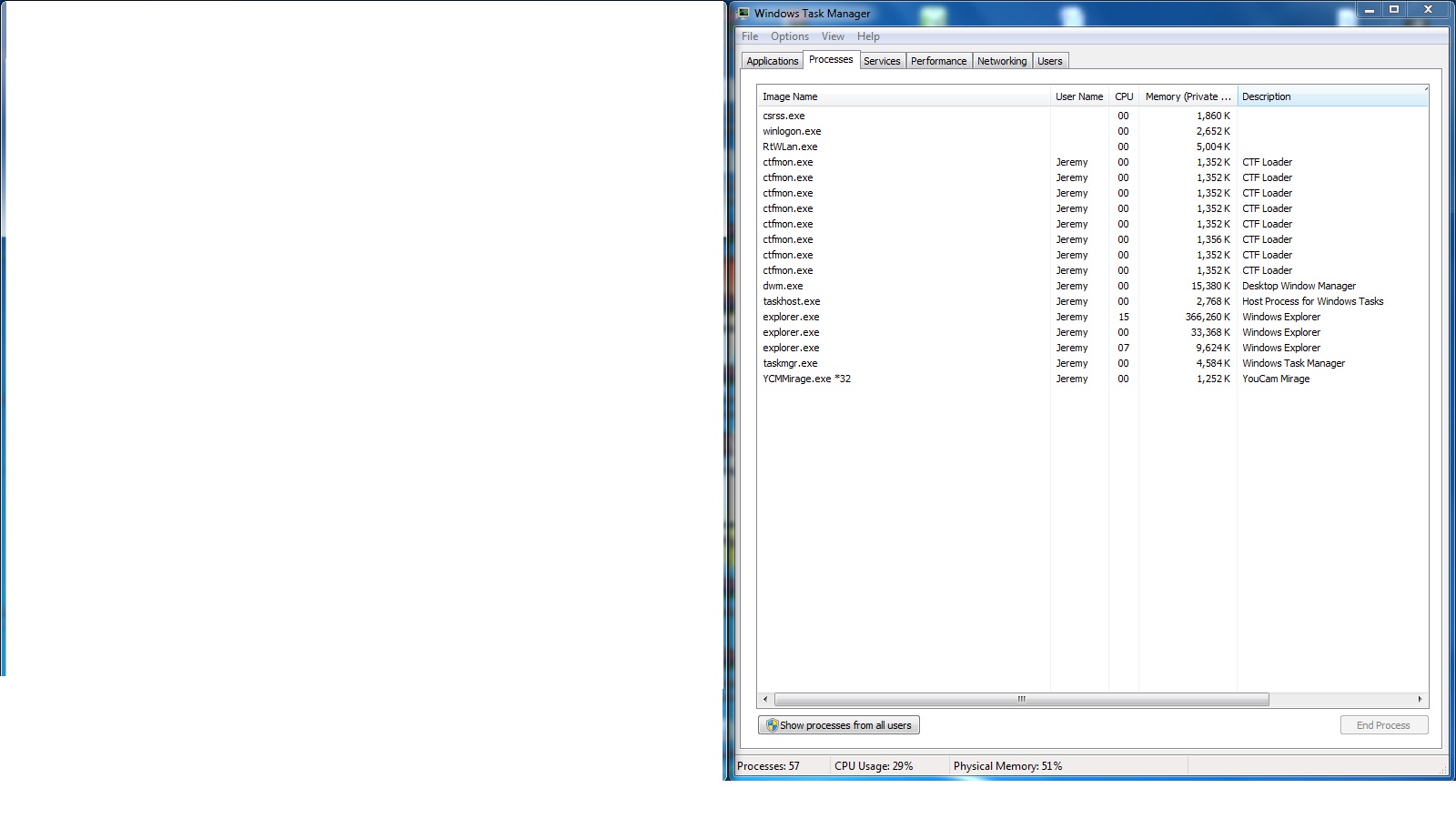
So about two days I found that for some reason my computer was going really slow out of no where. I eventually checked the task manger and saw about 4 explorer.exe process and one was taking up almost 2 gig of my ram

I first thought it saw a virus so I scanned with malwarebytes and then avg but not really was showing up. I then thought maybe my hard drive was going bad but I did hard drive scans and all the scan can out good.

When I end all explorer.exe process my computer works perfectly but doesn't have the desktop.
G02IANY.jpg
 

My Computer My Computer

At a glance

64 bit
OS
64 bit

My Computer My Computer

At a glance

Win-7-Pro64bit 7-H-Prem-64biti7-5930K 2nd i9-9940x both water blocked VRM'...Trident-z 3200C14 2nd Trident-z 3600C16EVGA 1080ti ftw3 2nd Titan Xp both water blocked
Computer type
PC/Desktop
Computer Manufacturer/Model Number
Custom assembled by me :}
OS
Win-7-Pro64bit 7-H-Prem-64bit
CPU
i7-5930K 2nd i9-9940x both water blocked VRM's too
Motherboard
ASUS SABERTOOTH X99 2nd ASUS x299 Apex
Memory
Trident-z 3200C14 2nd Trident-z 3600C16
Graphics Card(s)
EVGA 1080ti ftw3 2nd Titan Xp both water blocked
Sound Card
Built-in Realtek
Monitor(s) Displays
1-AOC G2460PG 24"G-Sync 144Hz/ 2nd 1-ASUS VG248QE 24" 144Hz
Screen Resolution
1920 x 1080 144Hz
Hard Drives
2-Samsung M.2 Evo & Evo Plus
2-Samsung 850 EVO 500GB SSD's/ 3-2.5 W.D. Black 1tb-&3-1tb/3-3.5 WD Black 1tb hdd's
PSU
EVGA SuperNOVA 1000-P2 2nd 1200-P2
Case
2-Corsair Obsidian Series 450D Black ATX Mid Tower
Cooling
Custom water loops
Keyboard
Logitech G710+/ 2nd Logitech G910
Mouse
2-RedDragon M901 Perdition 16400 dpi Gaming mouse = wired
Internet Speed
Comcast Ping 19ms 89.31mbps download speed 6.12mbps upload
Antivirus
Malwarebytes Pro/ Superantispyware Pro
Browser
FireFox & Pale moon
Other Info
2nd ASUS X299 Apex/Intel i9-9940x with Custom water loop/7H-Prem-x64/Corsair 450D case/Ram Trident-z 3600C16 4x8gb / Samsung970Evo plus 500gb SSD/Dual ssd EZ swap evo/PSU EVGA SuperNova 1200w-P2 80+Platinum/GPU Titan Xp /8-ML-140 on push-pull on 2-280GTX rads

It didnt work but I figured out something by watching the task manager. Before the multiple explorer.exe and ram hogging ocourr I see multiple processses called ctfmon.exe that appear and when they disspear there is another explorer.exe. I do know if this has to do with it but I thought it was weird, here is image to see how it looks

F6k23iq.jpg
 

My Computer My Computer

At a glance

64 bit
OS
64 bit
What program is using UI0 Interactive Services?
 

My Computer My Computer

At a glance

Windows 7 Ultimate 32bit SP1Intel(R) Core(TM)2 Quad CPU @ 2.40GHz, 2400 MHz4 GBATI Radeon HD 2600 Pro
Computer type
PC/Desktop
Computer Manufacturer/Model Number
Bruce ... somewhere in his 40's
OS
Windows 7 Ultimate 32bit SP1
CPU
Intel(R) Core(TM)2 Quad CPU @ 2.40GHz, 2400 MHz
Motherboard
INTEL/D975XBX2
Memory
4 GB
Graphics Card(s)
ATI Radeon HD 2600 Pro
Monitor(s) Displays
Samsung SyncMaster 914v
Screen Resolution
1280 x 1024
Hard Drives
2/500GB each ... ST3500630AS ATA Device.
One is not connected
PSU
Rocketfish 700 W
Case
G.Skill Gigabyte Chassis
Keyboard
Standard PS/2 Keyboard
Mouse
Microsoft PS/2 Mouse
Internet Speed
DSL
Antivirus
Avira Internet Security
Browser
IE 11
Other Info
ATI HDMI Audio
What program is using UI0 Interactive Services?

I think it has to do with this pop up in this image, I have no idea with this thing is but it keeps popping up.

GgPStCa.jpg
 

My Computer My Computer

At a glance

64 bit
OS
64 bit
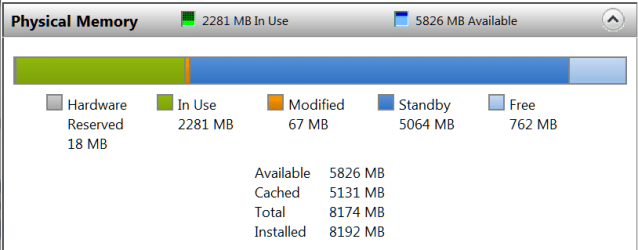
Do you have something stuck in the print queue.

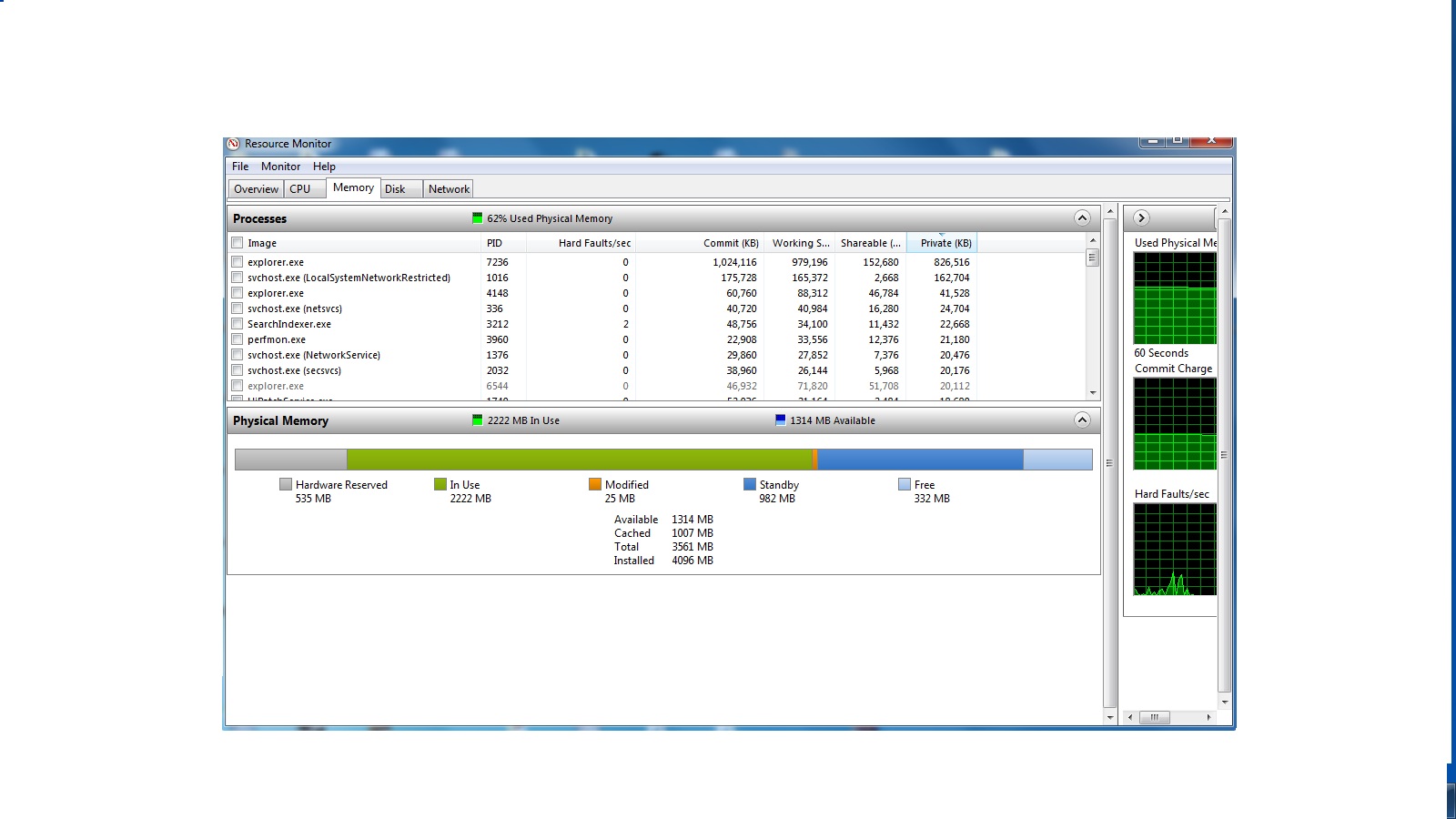
Also, could you post a picture of your Resource Monitor > Memory tab (the colored bar and the nums below). Like this:
 

Attachments

  • 2013-12-12_1557.png
    2013-12-12_1557.png
    8.3 KB · Views: 3

My Computer My Computer

At a glance

Vista, Windows7, Mint Mate, Zorin, Windows 8from 1.6GHz Duo to i7
Computer Manufacturer/Model Number
HP, Dell, Gateway, Toshiba - 4 laptops and 2 desktops
OS
Vista, Windows7, Mint Mate, Zorin, Windows 8
CPU
from 1.6GHz Duo to i7
Monitor(s) Displays
2x HP w2207
Hard Drives
5x HDD, 7x SSD, 12x Externals
Keyboard
with trackball - no mices
Mouse
Trackball mice
Internet Speed
DSL 6000
Do you have something stuck in the print queue.

Also, could you post a picture of your Resource Monitor > Memory tab (the colored bar and the nums below). Like this:

I never use this computer to print so I have no clue, I have been trying to figure what this pop was for about a week.

kPN3Qwa.jpg
 

My Computer My Computer

At a glance

64 bit
OS
64 bit
Do you have something stuck in the print queue.

Also, could you post a picture of your Resource Monitor > Memory tab (the colored bar and the nums below). Like this:

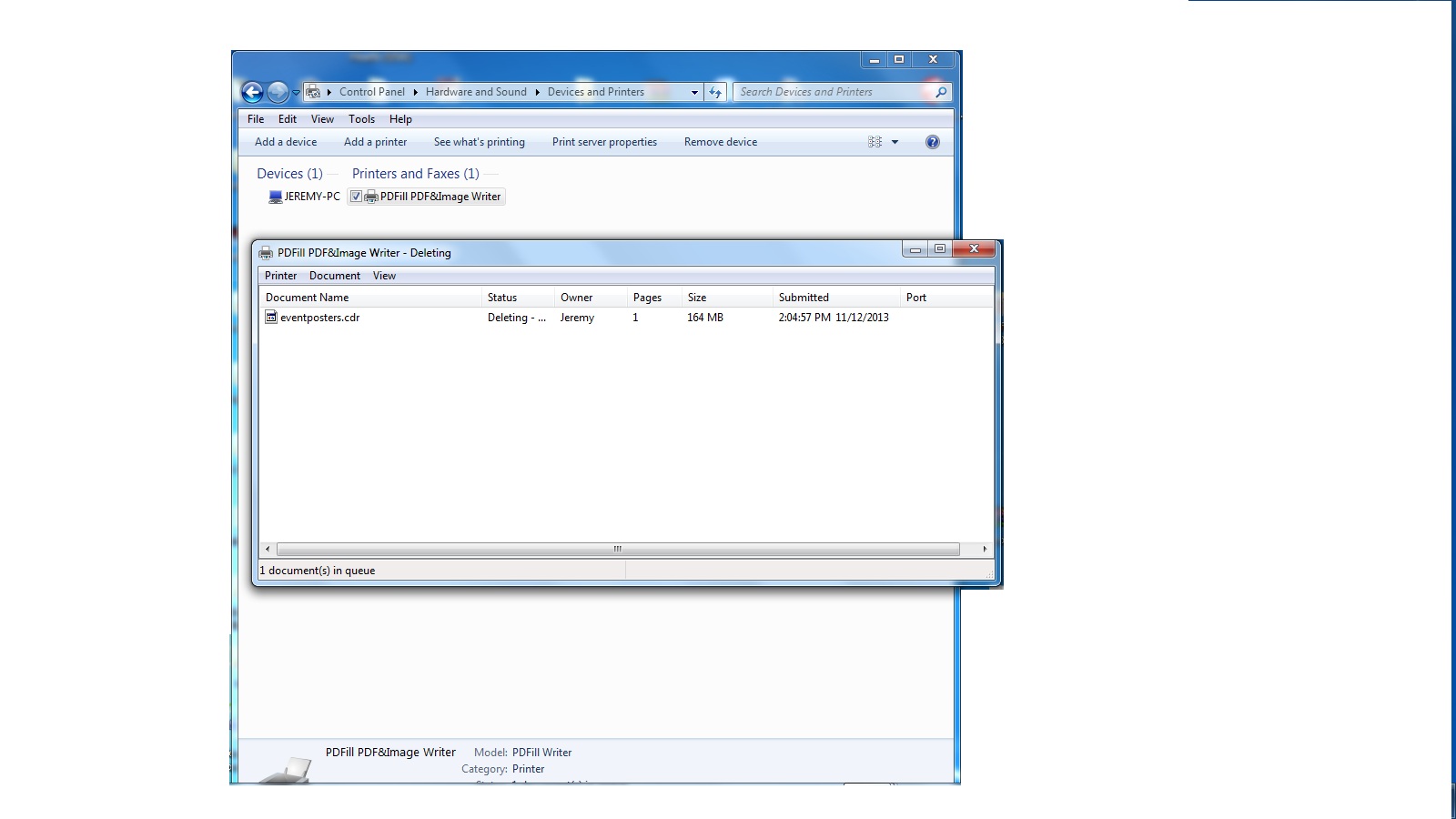
I think I found the print problem apparently a printer called pdfill is trying to print one of my homework assignments from a month ago, but what is weird is that I have uninstalled pdfill pdf program a while ago. When I click delete on the print it just sits there and says deleting printing but doesn't do it? And when I try to delete the printer it is still there with the "deleting" next to the document

cTpubHB.jpg
 

My Computer My Computer

At a glance

64 bit
OS
64 bit
Reinstall the program so that you can properly operate that print Q

Besides, multiple IE instances are normal - some are only cached. Not normal is that your active IE takes 1GB+

And next time you uninstall something, use the free Revo Uninstaller (advanced function). It cleans all files and the registry entries associated with the program.
 

My Computer My Computer

At a glance

Vista, Windows7, Mint Mate, Zorin, Windows 8from 1.6GHz Duo to i7
Computer Manufacturer/Model Number
HP, Dell, Gateway, Toshiba - 4 laptops and 2 desktops
OS
Vista, Windows7, Mint Mate, Zorin, Windows 8
CPU
from 1.6GHz Duo to i7
Monitor(s) Displays
2x HP w2207
Hard Drives
5x HDD, 7x SSD, 12x Externals
Keyboard
with trackball - no mices
Mouse
Trackball mice
Internet Speed
DSL 6000
Reinstall the program so that you can properly operate that print Q

Besides, multiple IE instances are normal - some are only cached. Not normal is that your active IE takes 1GB+

And next time you uninstall something, use the free Revo Uninstaller (advanced function). It cleans all files and the registry entries associated with the program.

I fixed all of the print queue problems now, but explorer.exe is still showing multiple and hogging the ram
 

My Computer My Computer

At a glance

64 bit
OS
64 bit
1) If you are using Paint to save your screenshots, grab the lower right corner of the whiteboard area and drag it to the upper left corner. Leave a square that is less than an inch in size. Close Paint while the whiteboard is that size. Then you screenshots should not have all of that white area around them.

http://www.sevenforums.com/tutorials/9733-screenshots-files-upload-post-seven-forums.html

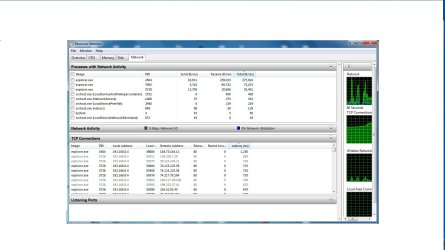
2) Are any of the Explorer instances communicating with the internet?
Resource Monitor > Network tab > Network Activity area.
 

My Computer My Computer

At a glance

W7 Pro SP1 64biti78GBIntel HD Graphics
Computer type
Laptop
Computer Manufacturer/Model Number
Employer provided Dell Latitude
OS
W7 Pro SP1 64bit
CPU
i7
Memory
8GB
Graphics Card(s)
Intel HD Graphics
Hard Drives
crappy SSD
Antivirus
Employer mandated Symantec Endpoint Protection
Browser
Pale Moon 64bit, IE11 64bit & Chrome 64bit
Any more pop-up messages?
Did you reboot?
 

My Computer My Computer

At a glance

Vista, Windows7, Mint Mate, Zorin, Windows 8from 1.6GHz Duo to i7
Computer Manufacturer/Model Number
HP, Dell, Gateway, Toshiba - 4 laptops and 2 desktops
OS
Vista, Windows7, Mint Mate, Zorin, Windows 8
CPU
from 1.6GHz Duo to i7
Monitor(s) Displays
2x HP w2207
Hard Drives
5x HDD, 7x SSD, 12x Externals
Keyboard
with trackball - no mices
Mouse
Trackball mice
Internet Speed
DSL 6000
1) If you are using Paint to save your screenshots, grab the lower right corner of the whiteboard area and drag it to the upper left corner. Leave a square that is less than an inch in size. Close Paint while the whiteboard is that size. Then you screenshots should not have all of that white area around them.

http://www.sevenforums.com/tutorials/9733-screenshots-files-upload-post-seven-forums.html

2) Are any of the Explorer instances communicating with the internet?
Resource Monitor > Network tab > Network Activity area.

Here is the network page

recnetwork.jpg
 

My Computer My Computer

At a glance

64 bit
OS
64 bit
Any more pop-up messages?
Did you reboot?

No more pop ups. Like I said in my eariler post I look at the task manager as soon as the computer starts up and there not multiple explorer.exe at first. Only a little whilel later multiple processes called ctfmon.exe show up at the same time and then go away. After that explorer.exe starts doing it's annoying thing.

newvir1.jpg
 

My Computer My Computer

At a glance

64 bit
OS
64 bit
Have a look whether the ctfmon.exe is in the startups. If yes, disable it.
 

My Computer My Computer

At a glance

Vista, Windows7, Mint Mate, Zorin, Windows 8from 1.6GHz Duo to i7
Computer Manufacturer/Model Number
HP, Dell, Gateway, Toshiba - 4 laptops and 2 desktops
OS
Vista, Windows7, Mint Mate, Zorin, Windows 8
CPU
from 1.6GHz Duo to i7
Monitor(s) Displays
2x HP w2207
Hard Drives
5x HDD, 7x SSD, 12x Externals
Keyboard
with trackball - no mices
Mouse
Trackball mice
Internet Speed
DSL 6000
Have a look whether the ctfmon.exe is in the startups. If yes, disable it.

I do not see it under startup or services
 

My Computer My Computer

At a glance

64 bit
OS
64 bit
You don't really need the ctfmon. If you want to kill it, run these 2 commands in a Run box

Regsvr32.exe /u msimtf.dll

Regsvr32.exe /u msctf.dll
 

My Computer My Computer

At a glance

Vista, Windows7, Mint Mate, Zorin, Windows 8from 1.6GHz Duo to i7
Computer Manufacturer/Model Number
HP, Dell, Gateway, Toshiba - 4 laptops and 2 desktops
OS
Vista, Windows7, Mint Mate, Zorin, Windows 8
CPU
from 1.6GHz Duo to i7
Monitor(s) Displays
2x HP w2207
Hard Drives
5x HDD, 7x SSD, 12x Externals
Keyboard
with trackball - no mices
Mouse
Trackball mice
Internet Speed
DSL 6000
You don't really need the ctfmon. If you want to kill it, run these 2 commands in a Run box

Regsvr32.exe /u msimtf.dll

Regsvr32.exe /u msctf.dll

when I attempt this I get this message

The module "msimtf.dll" was loaded but
the call to DllUnregisterServer failed with the error code
0x80004005
 

My Computer My Computer

At a glance

64 bit
OS
64 bit
Nuisance

That thing (ctfmon.exe) is a nuisance.
It is like malware.

It will use any random event as an opportunity to run.
On my PC, if I disable Avast (temporarily) ctfmon.exe starts!

It is supposed to provide "language support".
Are you using multiple languages on your PC?
 

My Computer My Computer

At a glance

W7 Ultimate SP1, LM19.2 MATE, W10 Home 1703, ...AMD Phenom II x6 1100T, 3.3 GHz12GB DDR3 1333 G-Skill (4GB x 2), G-Skill (2G...NVIDIA GeForce GTX 660
Computer type
PC/Desktop
Computer Manufacturer/Model Number
n/a
OS
W7 Ultimate SP1, LM19.2 MATE, W10 Home 1703, W10 Pro 1703 VM, #All 64 bit
CPU
AMD Phenom II x6 1100T, 3.3 GHz
Motherboard
ASUS M4A88T-M/USB3 (AM3)
Memory
12GB DDR3 1333 G-Skill (4GB x 2), G-Skill (2GB x 2)
Graphics Card(s)
NVIDIA GeForce GTX 660
Sound Card
Realtek?
Monitor(s) Displays
Samsung S23B350
Screen Resolution
1920x1080
Hard Drives
WD Green 2TB (SATA), WD Green 3TB (SATA), WD Blue 4TB (SATA), WD Blue 6TB (SATA)
PSU
Cooler Master
Case
Antec GX300 Tower
Cooling
3x Antec TRICOOL 120mm Fans
Mouse
Wired Optical
Internet Speed
DSL
Antivirus
Avast
Browser
Pale Moon (64 bit)
Other Info
2018-12-27 Upgraded HDDs
2015-12-10 Upgraded case, graphics card, storage
2015-08-15 Upgraded motherboard & RAM
2015-07-15 Upgraded LM17.1 to LM17.2
You don't really need the ctfmon. If you want to kill it, run these 2 commands in a Run box

Regsvr32.exe /u msimtf.dll

Regsvr32.exe /u msctf.dll

when I attempt this I get this message

The module "msimtf.dll" was loaded but
the call to DllUnregisterServer failed with the error code
0x80004005
Looks like you have more problems in your system. Maybe a startup/repair is in order before we get back to the ctfmon

http://www.sevenforums.com/tutorials/681-startup-repair.html
 

My Computer My Computer

At a glance

Vista, Windows7, Mint Mate, Zorin, Windows 8from 1.6GHz Duo to i7
Computer Manufacturer/Model Number
HP, Dell, Gateway, Toshiba - 4 laptops and 2 desktops
OS
Vista, Windows7, Mint Mate, Zorin, Windows 8
CPU
from 1.6GHz Duo to i7
Monitor(s) Displays
2x HP w2207
Hard Drives
5x HDD, 7x SSD, 12x Externals
Keyboard
with trackball - no mices
Mouse
Trackball mice
Internet Speed
DSL 6000
Back
Top