Multiple explorer.exe in task manager hogging most of ram help please?

That thing (ctfmon.exe) is a nuisance.
It is like malware.

It will use any random event as an opportunity to run.
On my PC, if I disable Avast (temporarily) ctfmon.exe starts!

It is supposed to provide "language support".
Are you using multiple languages on your PC?

No, just default english
 

My Computer My Computer

At a glance

64 bit
OS
64 bit

My Computer My Computer

At a glance

Windows 10 Pro. 64/ version 1709 Windows 7 Pr...Intel i7-6800K @ 4.3Corsair Platinum 16 gig @2400EVGA GTX 1070 OC
Computer type
PC/Desktop
Computer Manufacturer/Model Number
Home made Desktop
OS
Windows 10 Pro. 64/ version 1709 Windows 7 Pro/64
CPU
Intel i7-6800K @ 4.3
Motherboard
ASUS X-99 Deluxe II
Memory
Corsair Platinum 16 gig @2400
Graphics Card(s)
EVGA GTX 1070 OC
Monitor(s) Displays
Asus 27" LED LCD/VE278Q
Screen Resolution
1920-1080 or 1280-720 HDMI
Hard Drives
INTEL SSD 730-240 Gb Sata 3.0/
PSU
EVGA Platium 1200W
Case
Phanteks Luxe Tempered Glass 8 fans/ one radiator
Cooling
XSPC/ Water Cooled CPU
Keyboard
Das 4 Professional
Mouse
Logitech M705/MX Anywhere 2-S
Internet Speed
100 mbits
Antivirus
Microsoft Security Essentials/ Malwarebytes Premium 3.0/ SAS
Browser
I.E. 11 default/Firefox/ ISP Time Warner Cable/Spectrum
Other Info
LG BluRay Burner/
Sound system-KLipsch-THX/
Icy Dock ssd Hot Swap bays.
1) If you are using Paint to save your screenshots, grab the lower right corner of the whiteboard area and drag it to the upper left corner. Leave a square that is less than an inch in size. Close Paint while the whiteboard is that size. Then you screenshots should not have all of that white area around them.

http://www.sevenforums.com/tutorials/9733-screenshots-files-upload-post-seven-forums.html

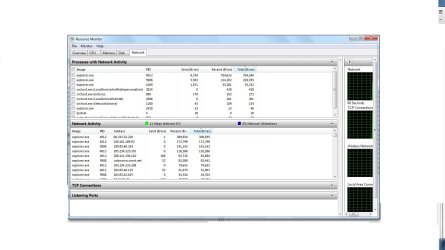
2) Are any of the Explorer instances communicating with the internet?
Resource Monitor > Network tab > Network Activity area.

Here is the network page

297247d1386893982-multiple-explorer-exe-task-manager-hogging-most-ram-help-please-recnetwork.jpg

It is easier to look at the Network Activity area, but your screenshot of the TCP Connections area shows Explorer making a lot of connects to the internet. That volume of internet traffic by Explorer, coupled with the large amount of RAM (1.8GB) taken up by that one Explorer instance, looks like an infection - perhaps, one in the Alureon family.

You can block Explorer from making internet connections with a firewall rule in you want and/or await input from Jacee.
 

My Computer My Computer

At a glance

W7 Pro SP1 64biti78GBIntel HD Graphics
Computer type
Laptop
Computer Manufacturer/Model Number
Employer provided Dell Latitude
OS
W7 Pro SP1 64bit
CPU
i7
Memory
8GB
Graphics Card(s)
Intel HD Graphics
Hard Drives
crappy SSD
Antivirus
Employer mandated Symantec Endpoint Protection
Browser
Pale Moon 64bit, IE11 64bit & Chrome 64bit
You don't really need the ctfmon. If you want to kill it, run these 2 commands in a Run box

Regsvr32.exe /u msimtf.dll

Regsvr32.exe /u msctf.dll

when I attempt this I get this message

The module "msimtf.dll" was loaded but
the call to DllUnregisterServer failed with the error code
0x80004005
Looks like you have more problems in your system. Maybe a startup/repair is in order before we get back to the ctfmon

http://www.sevenforums.com/tutorials/681-startup-repair.html

ran startup repair, it finished and there's no change
 

My Computer My Computer

At a glance

64 bit
OS
64 bit

My Computer My Computer

At a glance

64 bit
OS
64 bit
Have you checked for infection? If so what security scans have you used?
I believe that a infection is using ctfmom and it's loader to try and call home.

Did you read the sites I post in #22
What Microsoft Office are you using and where did you get it from?
 

My Computer My Computer

At a glance

Windows 10 Pro. 64/ version 1709 Windows 7 Pr...Intel i7-6800K @ 4.3Corsair Platinum 16 gig @2400EVGA GTX 1070 OC
Computer type
PC/Desktop
Computer Manufacturer/Model Number
Home made Desktop
OS
Windows 10 Pro. 64/ version 1709 Windows 7 Pro/64
CPU
Intel i7-6800K @ 4.3
Motherboard
ASUS X-99 Deluxe II
Memory
Corsair Platinum 16 gig @2400
Graphics Card(s)
EVGA GTX 1070 OC
Monitor(s) Displays
Asus 27" LED LCD/VE278Q
Screen Resolution
1920-1080 or 1280-720 HDMI
Hard Drives
INTEL SSD 730-240 Gb Sata 3.0/
PSU
EVGA Platium 1200W
Case
Phanteks Luxe Tempered Glass 8 fans/ one radiator
Cooling
XSPC/ Water Cooled CPU
Keyboard
Das 4 Professional
Mouse
Logitech M705/MX Anywhere 2-S
Internet Speed
100 mbits
Antivirus
Microsoft Security Essentials/ Malwarebytes Premium 3.0/ SAS
Browser
I.E. 11 default/Firefox/ ISP Time Warner Cable/Spectrum
Other Info
LG BluRay Burner/
Sound system-KLipsch-THX/
Icy Dock ssd Hot Swap bays.

My Computer My Computer

At a glance

Windows 7 Ultimate 32bit SP1Intel(R) Core(TM)2 Quad CPU @ 2.40GHz, 2400 MHz4 GBATI Radeon HD 2600 Pro
Computer type
PC/Desktop
Computer Manufacturer/Model Number
Bruce ... somewhere in his 40's
OS
Windows 7 Ultimate 32bit SP1
CPU
Intel(R) Core(TM)2 Quad CPU @ 2.40GHz, 2400 MHz
Motherboard
INTEL/D975XBX2
Memory
4 GB
Graphics Card(s)
ATI Radeon HD 2600 Pro
Monitor(s) Displays
Samsung SyncMaster 914v
Screen Resolution
1280 x 1024
Hard Drives
2/500GB each ... ST3500630AS ATA Device.
One is not connected
PSU
Rocketfish 700 W
Case
G.Skill Gigabyte Chassis
Keyboard
Standard PS/2 Keyboard
Mouse
Microsoft PS/2 Mouse
Internet Speed
DSL
Antivirus
Avira Internet Security
Browser
IE 11
Other Info
ATI HDMI Audio
1) If you are using Paint to save your screenshots, grab the lower right corner of the whiteboard area and drag it to the upper left corner. Leave a square that is less than an inch in size. Close Paint while the whiteboard is that size. Then you screenshots should not have all of that white area around them.

http://www.sevenforums.com/tutorials/9733-screenshots-files-upload-post-seven-forums.html

2) Are any of the Explorer instances communicating with the internet?
Resource Monitor > Network tab > Network Activity area.

Here is the network page

297247d1386893982-multiple-explorer-exe-task-manager-hogging-most-ram-help-please-recnetwork.jpg

It is easier to look at the Network Activity area, but your screenshot of the TCP Connections area shows Explorer making a lot of connects to the internet. That volume of internet traffic by Explorer, coupled with the large amount of RAM (1.8GB) taken up by that one Explorer instance, looks like an infection - perhaps, one in the Alureon family.

You can block Explorer from making internet connections with a firewall rule in you want and/or await input from Jacee.

I will try to block it with the firewall but here is the network activity area

netact.jpg
 

My Computer My Computer

At a glance

64 bit
OS
64 bit
Have you checked for infection? If so what security scans have you used?
I believe that a infection is using ctfmom and it's loader to try and call home.

Did you read the sites I post in #22
What Microsoft Office are you using and where did you get it from?

I scanned with malwarebytes and avg free with full scans since my first thought was that is was a virus but nothing came up so I was confused. It is microsoft office 2007 and I got this computer from a friend a while ago so I have no idea where he got it from.
 

My Computer My Computer

At a glance

64 bit
OS
64 bit
Do you have CorelDraw?
 

My Computer My Computer

At a glance

Windows 7 Ultimate 32bit SP1Intel(R) Core(TM)2 Quad CPU @ 2.40GHz, 2400 MHz4 GBATI Radeon HD 2600 Pro
Computer type
PC/Desktop
Computer Manufacturer/Model Number
Bruce ... somewhere in his 40's
OS
Windows 7 Ultimate 32bit SP1
CPU
Intel(R) Core(TM)2 Quad CPU @ 2.40GHz, 2400 MHz
Motherboard
INTEL/D975XBX2
Memory
4 GB
Graphics Card(s)
ATI Radeon HD 2600 Pro
Monitor(s) Displays
Samsung SyncMaster 914v
Screen Resolution
1280 x 1024
Hard Drives
2/500GB each ... ST3500630AS ATA Device.
One is not connected
PSU
Rocketfish 700 W
Case
G.Skill Gigabyte Chassis
Keyboard
Standard PS/2 Keyboard
Mouse
Microsoft PS/2 Mouse
Internet Speed
DSL
Antivirus
Avira Internet Security
Browser
IE 11
Other Info
ATI HDMI Audio
It is microsoft office 2007 and I got this computer from a friend a while ago so I have no idea where he got it from.
Possible problem :huh:
 

My Computer My Computer

At a glance

Windows 7 Ultimate 32bit SP1Intel(R) Core(TM)2 Quad CPU @ 2.40GHz, 2400 MHz4 GBATI Radeon HD 2600 Pro
Computer type
PC/Desktop
Computer Manufacturer/Model Number
Bruce ... somewhere in his 40's
OS
Windows 7 Ultimate 32bit SP1
CPU
Intel(R) Core(TM)2 Quad CPU @ 2.40GHz, 2400 MHz
Motherboard
INTEL/D975XBX2
Memory
4 GB
Graphics Card(s)
ATI Radeon HD 2600 Pro
Monitor(s) Displays
Samsung SyncMaster 914v
Screen Resolution
1280 x 1024
Hard Drives
2/500GB each ... ST3500630AS ATA Device.
One is not connected
PSU
Rocketfish 700 W
Case
G.Skill Gigabyte Chassis
Keyboard
Standard PS/2 Keyboard
Mouse
Microsoft PS/2 Mouse
Internet Speed
DSL
Antivirus
Avira Internet Security
Browser
IE 11
Other Info
ATI HDMI Audio
See this on Interactive Services ... What is Interactive Services Detection and Why is it Blinking at Me? - Pat's Windows Development Blog - Site Home - MSDN Blogs

Is this set to 'manual' in services, or 'automatic'? Click on the start button and type services.msc, click on the gear icon, scroll down to Interactive Services, click on properties, then set it to manual. Reboot, then tell us if you are still having the same problem.

Yes it is set to manual, I solved the issue with the interactive services pop up, just dealing with cftmon.exe and explorer.exe issues now
 

My Computer My Computer

At a glance

64 bit
OS
64 bit
Download CKScanner by askey127 from HERE
Important - Save it to your desktop.

Doubleclick CKScanner.exe and click Search For Files.

After a very short time, when the cursor hourglass disappears, click Save List To File.
A message box will verify the file saved.
Double-click the CKFiles.txt icon on your desktop and copy/paste the contents in your next reply.
 

My Computer My Computer

At a glance

Windows 7 Ultimate 32bit SP1Intel(R) Core(TM)2 Quad CPU @ 2.40GHz, 2400 MHz4 GBATI Radeon HD 2600 Pro
Computer type
PC/Desktop
Computer Manufacturer/Model Number
Bruce ... somewhere in his 40's
OS
Windows 7 Ultimate 32bit SP1
CPU
Intel(R) Core(TM)2 Quad CPU @ 2.40GHz, 2400 MHz
Motherboard
INTEL/D975XBX2
Memory
4 GB
Graphics Card(s)
ATI Radeon HD 2600 Pro
Monitor(s) Displays
Samsung SyncMaster 914v
Screen Resolution
1280 x 1024
Hard Drives
2/500GB each ... ST3500630AS ATA Device.
One is not connected
PSU
Rocketfish 700 W
Case
G.Skill Gigabyte Chassis
Keyboard
Standard PS/2 Keyboard
Mouse
Microsoft PS/2 Mouse
Internet Speed
DSL
Antivirus
Avira Internet Security
Browser
IE 11
Other Info
ATI HDMI Audio
Download CKScanner by askey127 from HERE
Important - Save it to your desktop.

Doubleclick CKScanner.exe and click Search For Files.

After a very short time, when the cursor hourglass disappears, click Save List To File.
A message box will verify the file saved.
Double-click the CKFiles.txt icon on your desktop and copy/paste the contents in your next reply.

I blocked explorer.exe from accessing the internet with firewall and it finally stopped duplicating and taking ram. I ran the program and got this:

CKScanner 2.4 - Additional Security Risks - These are not necessarily bad
c:\program files (x86)\tera\client\s1game\cookedpc\art_data\packages\bg\extension_01\original\ex01_blackcrack_obj.gpk
c:\program files (x86)\tera\client\s1game\cookedpc\art_data\packages\ch\npc\npc_objects\blackcrack_bigstone.gpk
c:\program files (x86)\tera\client\s1game\cookedpc\art_data\packages\ch\npc\npc_objects\blackcrack_bigstone_ani.gpk
c:\program files (x86)\tera\client\s1game\cookedpc\art_data\packages\ch\npc\npc_objects\blackcrack_npc_obj.gpk
c:\program files (x86)\tera\client\s1game\cookedpc\art_data\packages\ch\npc\npc_objects\blackcrack_npc_obj_ani.gpk
c:\program files (x86)\tera\client\s1game\cookedpc\art_data\packages\ch\npc\npc_objects\black_crack_wall.gpk
scanner sequence 3.FN.11.ULCAI0
----- EOF -----
 

My Computer My Computer

At a glance

64 bit
OS
64 bit
Download DDS from one of these links:
DDS.com
DDS.pif
  • Disable any script blocking protection
  • Double click the dds icon to run the tool.
  • When done, DDS will open two (2) logs:
    1. DDS.txt
    2. Attach.txt <--- will be minimized in the task tray
  • Save both reports to your desktop.
Include the contents of both logs in your next post.
The scan will instruct you to post Attach.txt as an attachment.
 

My Computer My Computer

At a glance

Windows 7 Ultimate 32bit SP1Intel(R) Core(TM)2 Quad CPU @ 2.40GHz, 2400 MHz4 GBATI Radeon HD 2600 Pro
Computer type
PC/Desktop
Computer Manufacturer/Model Number
Bruce ... somewhere in his 40's
OS
Windows 7 Ultimate 32bit SP1
CPU
Intel(R) Core(TM)2 Quad CPU @ 2.40GHz, 2400 MHz
Motherboard
INTEL/D975XBX2
Memory
4 GB
Graphics Card(s)
ATI Radeon HD 2600 Pro
Monitor(s) Displays
Samsung SyncMaster 914v
Screen Resolution
1280 x 1024
Hard Drives
2/500GB each ... ST3500630AS ATA Device.
One is not connected
PSU
Rocketfish 700 W
Case
G.Skill Gigabyte Chassis
Keyboard
Standard PS/2 Keyboard
Mouse
Microsoft PS/2 Mouse
Internet Speed
DSL
Antivirus
Avira Internet Security
Browser
IE 11
Other Info
ATI HDMI Audio
Download DDS from one of these links:
DDS.com
DDS.pif
  • Disable any script blocking protection
  • Double click the dds icon to run the tool.
  • When done, DDS will open two (2) logs:
    1. DDS.txt
    2. Attach.txt <--- will be minimized in the task tray
  • Save both reports to your desktop.
Include the contents of both logs in your next post.
The scan will instruct you to post Attach.txt as an attachment.

I have been trying to do the scan but now I am having an another problem. I turned the computer on with the battery in and went away for a while. My battery went low then the computer went off, when I turned it back on I got the hp battery and alert for a bad battery and tried to continue to setup but it kept going back to that screen.

Then I tried without the battery and when it starts up there is a black screen with a blinking _ symbol at the upper left corner then screen goes on and go back to the black screen with the blinking _. I even tried a new laptop battery and it still does this, I am so confused here, it is like the laptop is in limbo trying to start up.
 

My Computer My Computer

At a glance

64 bit
OS
64 bit
The blinking _ usually occurs when the BIOS cannot find the place from where to boot the OS. Your disk may be the problem.

See whether you can run a live Linux or anything from a CD or USB stick. If you don't have any CD that fits the bill, download this .iso from my Skydrive, burn that to CD and boot from that CD.

If that works, I would suspect the HDD to have a problem. We'll see what to do then.
 

My Computer My Computer

At a glance

Vista, Windows7, Mint Mate, Zorin, Windows 8from 1.6GHz Duo to i7
Computer Manufacturer/Model Number
HP, Dell, Gateway, Toshiba - 4 laptops and 2 desktops
OS
Vista, Windows7, Mint Mate, Zorin, Windows 8
CPU
from 1.6GHz Duo to i7
Monitor(s) Displays
2x HP w2207
Hard Drives
5x HDD, 7x SSD, 12x Externals
Keyboard
with trackball - no mices
Mouse
Trackball mice
Internet Speed
DSL 6000
The blinking _ usually occurs when the BIOS cannot find the place from where to boot the OS. Your disk may be the problem.

See whether you can run a live Linux or anything from a CD or USB stick. If you don't have any CD that fits the bill, download this .iso from my Skydrive, burn that to CD and boot from that CD.

If that works, I would suspect the HDD to have a problem. We'll see what to do then.

I couldnt make a windows repair cd because I dont have a blank disc or flash drive at the moment but I did find an ubuntu disc I had laying around. I made cd the first in boot order and was able to get it running. On unbuntu I was able to see my hard drive and access files from it.

At this point I'm thinking about just burning a windows 7 disc, reformatting my hard drive and doing a clean windows install. Is it too early to go for this method?
 

My Computer My Computer

At a glance

64 bit
OS
64 bit
1. First order of the day is to save your user files. The live Ubuntu disc is good for that.

2. It is not unlikely that you have a HDD problem. To check that you should run a chkdsk /f from command prompt at startup.

http://www.sevenforums.com/tutorials/682-command-prompt-startup.html

3. If the disk checks out OK, we can persue fixing your system. But let's first see that. No need to jump thru a lot of hoops if you need a new HDD.
 

My Computer My Computer

At a glance

Vista, Windows7, Mint Mate, Zorin, Windows 8from 1.6GHz Duo to i7
Computer Manufacturer/Model Number
HP, Dell, Gateway, Toshiba - 4 laptops and 2 desktops
OS
Vista, Windows7, Mint Mate, Zorin, Windows 8
CPU
from 1.6GHz Duo to i7
Monitor(s) Displays
2x HP w2207
Hard Drives
5x HDD, 7x SSD, 12x Externals
Keyboard
with trackball - no mices
Mouse
Trackball mice
Internet Speed
DSL 6000
Back
Top