Homegroup works for streaming, but not accessing/sharing files???

turbomatic73

New member
Local time
5:07 AM
Messages
6
I have set up a homegroup using Windows 7 on a desktop and Windows 8.1 on a laptop. For some reason I can directly access the documents on the laptop from the desktop, but when I try to access documents on the desktop from the laptop, I get the message "You do not have permission to access..."

There are a couple weird exceptions...

1) I can STREAM content that's on my deskop to my laptop using Windows Media Player...so pictures, videos and music come through using Media Player, I just can't physically access the folders where this content is saved (e.g., My Music, My Videos, etc.).
2) If I save items on my desktop in folders specifically labeled "Public" (e.g., Public Documents, Public Downloads, etc.) I can access the content from my laptop no problem. But ONLY if the files in in these "public" folders.

What gives? When I set up the homegroup, I clicked all boxes under "share libraries and printers" (e.g., pictures, music, documents, etc.), so not sure what's going on here...

ANY IDEAS???

THANKS!!!!
 

My Computer My Computer

At a glance

WIndows 7 64bit
Computer type
PC/Desktop
OS
WIndows 7 64bit

My Computer My Computer

At a glance

Windows 7 Ult, Windows 8.1 Pro,Q9650-4.275GHz, E8600 4.5GHz, E6750-3.8GHzG.Skill PC2 9600 1200Mhz 5 5 5 15 2TGTX480
Computer type
PC/Desktop
Computer Manufacturer/Model Number
Home built
OS
Windows 7 Ult, Windows 8.1 Pro,
CPU
Q9650-4.275GHz, E8600 4.5GHz, E6750-3.8GHz
Motherboard
Evga 780i FTW
Memory
G.Skill PC2 9600 1200Mhz 5 5 5 15 2T
Graphics Card(s)
GTX480
Sound Card
Asus Xonar D2
Monitor(s) Displays
HannsG
Screen Resolution
1680X1050
Hard Drives
GSkill Phoenix Pro 120GB SSD
PSU
ThermalTake Toughpower 1000Watt modular
Case
ThermalTake XaserV
Cooling
Xigmatek S1283
Keyboard
Logitech G15
Mouse
Logitech G9
Internet Speed
T1
tried both...troubleshooter found nothing it could fix. Also tried closing the homegroup and recreating it to no avail. I created it from the laptop and tried it, then closed it and recreated it from the desktop...neither worked. I also just tried shutting down my Windows firewall to see if that helped--didn't work. I am not using any third-party security software either.
 

My Computer My Computer

At a glance

WIndows 7 64bit
Computer type
PC/Desktop
OS
WIndows 7 64bit
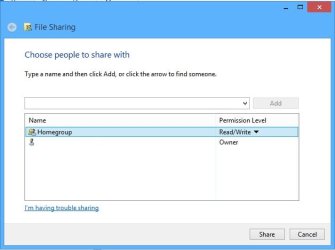
Are all of the Library folders shared with the Homegroup with read/write access like the picture is showing.
 

Attachments

  • library read and write.jpg
    library read and write.jpg
    22.7 KB · Views: 17

My Computer My Computer

At a glance

Windows 7 Ult, Windows 8.1 Pro,Q9650-4.275GHz, E8600 4.5GHz, E6750-3.8GHzG.Skill PC2 9600 1200Mhz 5 5 5 15 2TGTX480
Computer type
PC/Desktop
Computer Manufacturer/Model Number
Home built
OS
Windows 7 Ult, Windows 8.1 Pro,
CPU
Q9650-4.275GHz, E8600 4.5GHz, E6750-3.8GHz
Motherboard
Evga 780i FTW
Memory
G.Skill PC2 9600 1200Mhz 5 5 5 15 2T
Graphics Card(s)
GTX480
Sound Card
Asus Xonar D2
Monitor(s) Displays
HannsG
Screen Resolution
1680X1050
Hard Drives
GSkill Phoenix Pro 120GB SSD
PSU
ThermalTake Toughpower 1000Watt modular
Case
ThermalTake XaserV
Cooling
Xigmatek S1283
Keyboard
Logitech G15
Mouse
Logitech G9
Internet Speed
T1
Yes, I have specified read/write for all libraries - documents, videos, pictures and music. Can't figure out why anything appearing in a "public" folder works, but nothing else.
 

My Computer My Computer

At a glance

WIndows 7 64bit
Computer type
PC/Desktop
OS
WIndows 7 64bit
Yes, I have specified read/write for all libraries - documents, videos, pictures and music. Can't figure out why anything appearing in a "public" folder works, but nothing else.

You might want to check the Advanced Sharing settings at the Network and Sharing Center, make sure that File and Printer sharing, network discovery etc. are all turned on.

If the Public folders work then the share settings must be enabled at C:\Users\Public so you might also check C:\Users folder to make sure that Sharing is enabled on the sharing tab.

When in doubt it's best to leave the Homegroup on all Homegroup machines then create a new Homegroup then rejoin.
 

My Computer My Computer

At a glance

Windows 7 Ult, Windows 8.1 Pro,Q9650-4.275GHz, E8600 4.5GHz, E6750-3.8GHzG.Skill PC2 9600 1200Mhz 5 5 5 15 2TGTX480
Computer type
PC/Desktop
Computer Manufacturer/Model Number
Home built
OS
Windows 7 Ult, Windows 8.1 Pro,
CPU
Q9650-4.275GHz, E8600 4.5GHz, E6750-3.8GHz
Motherboard
Evga 780i FTW
Memory
G.Skill PC2 9600 1200Mhz 5 5 5 15 2T
Graphics Card(s)
GTX480
Sound Card
Asus Xonar D2
Monitor(s) Displays
HannsG
Screen Resolution
1680X1050
Hard Drives
GSkill Phoenix Pro 120GB SSD
PSU
ThermalTake Toughpower 1000Watt modular
Case
ThermalTake XaserV
Cooling
Xigmatek S1283
Keyboard
Logitech G15
Mouse
Logitech G9
Internet Speed
T1
Yes, I have specified read/write for all libraries - documents, videos, pictures and music. Can't figure out why anything appearing in a "public" folder works, but nothing else.

You might want to check the Advanced Sharing settings at the Network and Sharing Center, make sure that File and Printer sharing, network discovery etc. are all turned on.

If the Public folders work then the share settings must be enabled at C:\Users\Public so you might also check C:\Users folder to make sure that Sharing is enabled on the sharing tab.

When in doubt it's best to leave the Homegroup on all Homegroup machines then create a new Homegroup then rejoin.

I've done everything suggested here...

  • I checked Advanced Sharing settings and marked everything as "on" (file and printer sharing, network discovery, etc.)
  • I clicked "properties" then the "sharing" tab for My Documents, My Pictures, My Videos etc. and enabled read/write sharing on all of them
  • I have deleted and re-created the homegroup 3 times. I have created it from the laptop (then deleted it) and created it from the desktop (twice) and deleted it.

NONE of these solutions work. Exact same results for all of them.

I even tried creating a separate user account on my desktop and sharing all documents within the new user account to see if maybe it was just the Administrator account that was locked from network access...this did nothing--same results.

Really frustrating...streaming still works, and "public" folders, but nothing else.
 

My Computer My Computer

At a glance

WIndows 7 64bit
Computer type
PC/Desktop
OS
WIndows 7 64bit
Any type of third party anti virus software installed on either of these machines?
 

My Computer My Computer

At a glance

Windows 7 Ult, Windows 8.1 Pro,Q9650-4.275GHz, E8600 4.5GHz, E6750-3.8GHzG.Skill PC2 9600 1200Mhz 5 5 5 15 2TGTX480
Computer type
PC/Desktop
Computer Manufacturer/Model Number
Home built
OS
Windows 7 Ult, Windows 8.1 Pro,
CPU
Q9650-4.275GHz, E8600 4.5GHz, E6750-3.8GHz
Motherboard
Evga 780i FTW
Memory
G.Skill PC2 9600 1200Mhz 5 5 5 15 2T
Graphics Card(s)
GTX480
Sound Card
Asus Xonar D2
Monitor(s) Displays
HannsG
Screen Resolution
1680X1050
Hard Drives
GSkill Phoenix Pro 120GB SSD
PSU
ThermalTake Toughpower 1000Watt modular
Case
ThermalTake XaserV
Cooling
Xigmatek S1283
Keyboard
Logitech G15
Mouse
Logitech G9
Internet Speed
T1
Nope...just the native Windows Firewall
 

My Computer My Computer

At a glance

WIndows 7 64bit
Computer type
PC/Desktop
OS
WIndows 7 64bit
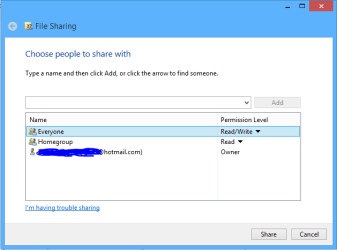
On the Windows 7 machine with the access problem try adding the Everyone share to the Homegroup sharing settings like in the picture.
 

Attachments

  • share with Everyone.PNG
    share with Everyone.PNG
    6.7 KB · Views: 7

My Computer My Computer

At a glance

Windows 7 Ult, Windows 8.1 Pro,Q9650-4.275GHz, E8600 4.5GHz, E6750-3.8GHzG.Skill PC2 9600 1200Mhz 5 5 5 15 2TGTX480
Computer type
PC/Desktop
Computer Manufacturer/Model Number
Home built
OS
Windows 7 Ult, Windows 8.1 Pro,
CPU
Q9650-4.275GHz, E8600 4.5GHz, E6750-3.8GHz
Motherboard
Evga 780i FTW
Memory
G.Skill PC2 9600 1200Mhz 5 5 5 15 2T
Graphics Card(s)
GTX480
Sound Card
Asus Xonar D2
Monitor(s) Displays
HannsG
Screen Resolution
1680X1050
Hard Drives
GSkill Phoenix Pro 120GB SSD
PSU
ThermalTake Toughpower 1000Watt modular
Case
ThermalTake XaserV
Cooling
Xigmatek S1283
Keyboard
Logitech G15
Mouse
Logitech G9
Internet Speed
T1
Already did that (see reply above)
 

My Computer My Computer

At a glance

WIndows 7 64bit
Computer type
PC/Desktop
OS
WIndows 7 64bit
I don't see anywhere that you added Everyone to the Homegroup share setting?

If this doesn't work then most likely there is a problem with the User profile on the Windows 7 machine.
 

My Computer My Computer

At a glance

Windows 7 Ult, Windows 8.1 Pro,Q9650-4.275GHz, E8600 4.5GHz, E6750-3.8GHzG.Skill PC2 9600 1200Mhz 5 5 5 15 2TGTX480
Computer type
PC/Desktop
Computer Manufacturer/Model Number
Home built
OS
Windows 7 Ult, Windows 8.1 Pro,
CPU
Q9650-4.275GHz, E8600 4.5GHz, E6750-3.8GHz
Motherboard
Evga 780i FTW
Memory
G.Skill PC2 9600 1200Mhz 5 5 5 15 2T
Graphics Card(s)
GTX480
Sound Card
Asus Xonar D2
Monitor(s) Displays
HannsG
Screen Resolution
1680X1050
Hard Drives
GSkill Phoenix Pro 120GB SSD
PSU
ThermalTake Toughpower 1000Watt modular
Case
ThermalTake XaserV
Cooling
Xigmatek S1283
Keyboard
Logitech G15
Mouse
Logitech G9
Internet Speed
T1
Back
Top