Internet Explorer 11....Cant Change Home page

Computertech101

New member
Local time
1:28 PM
Messages
18
I have windows 7 Ultimate 32 bit......custom built pc.....my problem is i cant change my home page when im in windows in IE11......i checked for viruses and spyware...none detected....i tryed to change it in safe mode...it allows me to change it....I reverted back to IE10 and same issue.....im read some place where something in the registry could be locked or deleted preventing me from the change...any ideas on what i could doo...my current home page is msn.com....im tryna change to google or anything else...when i go to change it...1 in 10 tries works......but after i restart the pc...goes back to msn
 

My Computer My Computer

At a glance

Windows 7 Home Premium 32 bitIntel Core 2 DuoGskill ddr3 800invidia gefore 6200
Computer Manufacturer/Model Number
Custom built
OS
Windows 7 Home Premium 32 bit
CPU
Intel Core 2 Duo
Motherboard
Asus P5N-E SLI
Memory
Gskill ddr3 800
Graphics Card(s)
invidia gefore 6200
Sound Card
Onboard
Monitor(s) Displays
21 inch wide screen
Hard Drives
500 gig sata
PSU
500 watt
Case
cosmos
Cooling
stock
Welcome to the Seven Forums.

What antivirus app are you using?
Any other security tools installed?
 

My Computer My Computer

At a glance

W7 Pro SP1 64biti78GBIntel HD Graphics
Computer type
Laptop
Computer Manufacturer/Model Number
Employer provided Dell Latitude
OS
W7 Pro SP1 64bit
CPU
i7
Memory
8GB
Graphics Card(s)
Intel HD Graphics
Hard Drives
crappy SSD
Antivirus
Employer mandated Symantec Endpoint Protection
Browser
Pale Moon 64bit, IE11 64bit & Chrome 64bit
computertech101, Something tells me that you have two URL's in your browsers hope page space.
Use control panel and check out the internet options. There might be several blank lines in the home page listing with msn at the
bottom where you normally can't see it..

Welcome to the windows 7 forums.

Rich
 

My Computer My Computer

At a glance

Windows 7 Pro x64 SP1Intel Core I716 GigsNVIDIA GeForce GTX 670M
Computer type
Laptop
Computer Manufacturer/Model Number
Toshiba Laptop Qosimo X870
OS
Windows 7 Pro x64 SP1
CPU
Intel Core I7
Motherboard
Toshiba Qosmio
Memory
16 Gigs
Graphics Card(s)
NVIDIA GeForce GTX 670M
Monitor(s) Displays
17.7" laptop
Screen Resolution
1600 x 900
Hard Drives
256 Gig SanDisk SSD for C
256 Gig Intel SSD for D
Internet Speed
50/25 FIOS
Antivirus
Vipre (all you can eat for 10 machines)
Browser
IE and FF
Other Info
I have dos 6.22, wfwg 3.11, win98, 2000 and xp VHD's available for testing. MS's Virtual PC works great.
Welcome to the Seven Forums.

What antivirus app are you using?
Any other security tools installed?

Im using avast free edition...thats all besides basic windows security
 

My Computer My Computer

At a glance

Windows 7 Home Premium 32 bitIntel Core 2 DuoGskill ddr3 800invidia gefore 6200
Computer Manufacturer/Model Number
Custom built
OS
Windows 7 Home Premium 32 bit
CPU
Intel Core 2 Duo
Motherboard
Asus P5N-E SLI
Memory
Gskill ddr3 800
Graphics Card(s)
invidia gefore 6200
Sound Card
Onboard
Monitor(s) Displays
21 inch wide screen
Hard Drives
500 gig sata
PSU
500 watt
Case
cosmos
Cooling
stock
computertech101, Something tells me that you have two URL's in your browsers hope page space.
Use control panel and check out the internet options. There might be several blank lines in the home page listing with msn at the
bottom where you normally can't see it..

Welcome to the windows 7 forums.

Rich

Thanks...

Can you explain more...in my internet options.....where it says home page...it says MSN.com... i delete it and put in a different site...press apply then ok...then restart explorer...nothing happens...i reinstalled internet explorer..that didnt work....
 

My Computer My Computer

At a glance

Windows 7 Home Premium 32 bitIntel Core 2 DuoGskill ddr3 800invidia gefore 6200
Computer Manufacturer/Model Number
Custom built
OS
Windows 7 Home Premium 32 bit
CPU
Intel Core 2 Duo
Motherboard
Asus P5N-E SLI
Memory
Gskill ddr3 800
Graphics Card(s)
invidia gefore 6200
Sound Card
Onboard
Monitor(s) Displays
21 inch wide screen
Hard Drives
500 gig sata
PSU
500 watt
Case
cosmos
Cooling
stock
im pretty good with the tech stuff..but this has be stoked....i read a few places other people explorer similar issues..and change some settings in the registry........but im hoping its more simple then that...but i dont know why it would be locked and work in safe mode..unless i have a bug that im not aware off
 

My Computer My Computer

At a glance

Windows 7 Home Premium 32 bitIntel Core 2 DuoGskill ddr3 800invidia gefore 6200
Computer Manufacturer/Model Number
Custom built
OS
Windows 7 Home Premium 32 bit
CPU
Intel Core 2 Duo
Motherboard
Asus P5N-E SLI
Memory
Gskill ddr3 800
Graphics Card(s)
invidia gefore 6200
Sound Card
Onboard
Monitor(s) Displays
21 inch wide screen
Hard Drives
500 gig sata
PSU
500 watt
Case
cosmos
Cooling
stock
computertech101, Something tells me that you have two URL's in your browsers hope page space.
Use control panel and check out the internet options. There might be several blank lines in the home page listing with msn at the
bottom where you normally can't see it..

Welcome to the windows 7 forums.

Rich

Thanks...

Can you explain more...
~~~
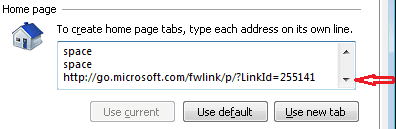
I think that richnrockville is saying that you might have some spaces - like this:

IE-1.png

IE-2.png

Of course, the word space will not be there - but they might cause the change to not take.
 

My Computer My Computer

At a glance

W7 Pro SP1 64biti78GBIntel HD Graphics
Computer type
Laptop
Computer Manufacturer/Model Number
Employer provided Dell Latitude
OS
W7 Pro SP1 64bit
CPU
i7
Memory
8GB
Graphics Card(s)
Intel HD Graphics
Hard Drives
crappy SSD
Antivirus
Employer mandated Symantec Endpoint Protection
Browser
Pale Moon 64bit, IE11 64bit & Chrome 64bit
computertech101, Something tells me that you have two URL's in your browsers hope page space.
Use control panel and check out the internet options. There might be several blank lines in the home page listing with msn at the
bottom where you normally can't see it..

Welcome to the windows 7 forums.

Rich

Thanks...

Can you explain more...
~~~
I think that richnrockville is saying that you might have some spaces - like this:

View attachment 297701

View attachment 297702

Of course, the word space will not be there - but they might cause the change to not take.

i have MSN.com on the top like the first image has it.....and i just highlight and retype Google on the top line...as far as spaces....hmmmmm......wouldnt reinstalling IE fix any issues...i never seen something like this before,besides virus or spyware issues
 

My Computer My Computer

At a glance

Windows 7 Home Premium 32 bitIntel Core 2 DuoGskill ddr3 800invidia gefore 6200
Computer Manufacturer/Model Number
Custom built
OS
Windows 7 Home Premium 32 bit
CPU
Intel Core 2 Duo
Motherboard
Asus P5N-E SLI
Memory
Gskill ddr3 800
Graphics Card(s)
invidia gefore 6200
Sound Card
Onboard
Monitor(s) Displays
21 inch wide screen
Hard Drives
500 gig sata
PSU
500 watt
Case
cosmos
Cooling
stock
The home pages are stored in the registry.

They should survive any update or downgrade to IE.

Notice in this video of mine that the homepage is set to about:blank


It survives the downgrade from IE10 to IE9 to IE8...

If you cannot scroll the list of homepages - then you don't have spaces hiding another homepage.
 

My Computer My Computer

At a glance

W7 Pro SP1 64biti78GBIntel HD Graphics
Computer type
Laptop
Computer Manufacturer/Model Number
Employer provided Dell Latitude
OS
W7 Pro SP1 64bit
CPU
i7
Memory
8GB
Graphics Card(s)
Intel HD Graphics
Hard Drives
crappy SSD
Antivirus
Employer mandated Symantec Endpoint Protection
Browser
Pale Moon 64bit, IE11 64bit & Chrome 64bit
Bummer - I could have sworn that the homepages were stored in the registry.

off to chase that rabbit...

edit:
...the computer that I am on uses about:blank as the home page.
(or so I thought)
...searching the registry for about:blank did not find anything
...the Start Page value was set to about:Home
...and yet about:blank appears in the URL as shown in the video
...hmmmm
 

My Computer My Computer

At a glance

W7 Pro SP1 64biti78GBIntel HD Graphics
Computer type
Laptop
Computer Manufacturer/Model Number
Employer provided Dell Latitude
OS
W7 Pro SP1 64bit
CPU
i7
Memory
8GB
Graphics Card(s)
Intel HD Graphics
Hard Drives
crappy SSD
Antivirus
Employer mandated Symantec Endpoint Protection
Browser
Pale Moon 64bit, IE11 64bit & Chrome 64bit
Here it is:

IE-3.png

Before you mess with the registry - manually create a restore point.
 

My Computer My Computer

At a glance

W7 Pro SP1 64biti78GBIntel HD Graphics
Computer type
Laptop
Computer Manufacturer/Model Number
Employer provided Dell Latitude
OS
W7 Pro SP1 64bit
CPU
i7
Memory
8GB
Graphics Card(s)
Intel HD Graphics
Hard Drives
crappy SSD
Antivirus
Employer mandated Symantec Endpoint Protection
Browser
Pale Moon 64bit, IE11 64bit & Chrome 64bit
Here it is:

View attachment 297713

Before you mess with the registry - manually create a restore point.


Thanks man.....im gonna try the registry edit first.....if that dont work....which it should...im gonna uninstall every version of IE like you posted in the video.........But my question is...Why would it be locked or changes not taking affect...it is due to a update..or it that common for IE11...
 

My Computer My Computer

At a glance

Windows 7 Home Premium 32 bitIntel Core 2 DuoGskill ddr3 800invidia gefore 6200
Computer Manufacturer/Model Number
Custom built
OS
Windows 7 Home Premium 32 bit
CPU
Intel Core 2 Duo
Motherboard
Asus P5N-E SLI
Memory
Gskill ddr3 800
Graphics Card(s)
invidia gefore 6200
Sound Card
Onboard
Monitor(s) Displays
21 inch wide screen
Hard Drives
500 gig sata
PSU
500 watt
Case
cosmos
Cooling
stock
I'm not sure why the changes fail. If I were working on this computer, I would run Process Monitor to see what actions occur (or fail to occur) when the home page info is written to that registry key. I would compare the info to a computer that works as expected.
 

My Computer My Computer

At a glance

W7 Pro SP1 64biti78GBIntel HD Graphics
Computer type
Laptop
Computer Manufacturer/Model Number
Employer provided Dell Latitude
OS
W7 Pro SP1 64bit
CPU
i7
Memory
8GB
Graphics Card(s)
Intel HD Graphics
Hard Drives
crappy SSD
Antivirus
Employer mandated Symantec Endpoint Protection
Browser
Pale Moon 64bit, IE11 64bit & Chrome 64bit
Go to show all add-ons and post some screen shots,
Shockwave-disable.JPG

Have you made a new administrator account and try ?
Also click Start and All programs right click Internet explorer and click on Run as administrator and see what happens on the existing account.
 

My Computer My Computer

At a glance

Win-7-Pro64bit 7-H-Prem-64biti7-5930K 2nd i9-9940x both water blocked VRM'...Trident-z 3200C14 2nd Trident-z 3600C16EVGA 1080ti ftw3 2nd Titan Xp both water blocked
Computer type
PC/Desktop
Computer Manufacturer/Model Number
Custom assembled by me :}
OS
Win-7-Pro64bit 7-H-Prem-64bit
CPU
i7-5930K 2nd i9-9940x both water blocked VRM's too
Motherboard
ASUS SABERTOOTH X99 2nd ASUS x299 Apex
Memory
Trident-z 3200C14 2nd Trident-z 3600C16
Graphics Card(s)
EVGA 1080ti ftw3 2nd Titan Xp both water blocked
Sound Card
Built-in Realtek
Monitor(s) Displays
1-AOC G2460PG 24"G-Sync 144Hz/ 2nd 1-ASUS VG248QE 24" 144Hz
Screen Resolution
1920 x 1080 144Hz
Hard Drives
2-Samsung M.2 Evo & Evo Plus
2-Samsung 850 EVO 500GB SSD's/ 3-2.5 W.D. Black 1tb-&3-1tb/3-3.5 WD Black 1tb hdd's
PSU
EVGA SuperNOVA 1000-P2 2nd 1200-P2
Case
2-Corsair Obsidian Series 450D Black ATX Mid Tower
Cooling
Custom water loops
Keyboard
Logitech G710+/ 2nd Logitech G910
Mouse
2-RedDragon M901 Perdition 16400 dpi Gaming mouse = wired
Internet Speed
Comcast Ping 19ms 89.31mbps download speed 6.12mbps upload
Antivirus
Malwarebytes Pro/ Superantispyware Pro
Browser
FireFox & Pale moon
Other Info
2nd ASUS X299 Apex/Intel i9-9940x with Custom water loop/7H-Prem-x64/Corsair 450D case/Ram Trident-z 3600C16 4x8gb / Samsung970Evo plus 500gb SSD/Dual ssd EZ swap evo/PSU EVGA SuperNova 1200w-P2 80+Platinum/GPU Titan Xp /8-ML-140 on push-pull on 2-280GTX rads
Here it is:

View attachment 297713

Before you mess with the registry - manually create a restore point.


i tryed to manually edit the registry and...still no go....im able to input a different URL....in the registry data box....but if i double click on that start page in the registry again to see if my URL i inputed stayed...it reverted back to MSN.com...so at this point...if editing the registry didnt work,might be something more going on....thats preventing this change
 

My Computer My Computer

At a glance

Windows 7 Home Premium 32 bitIntel Core 2 DuoGskill ddr3 800invidia gefore 6200
Computer Manufacturer/Model Number
Custom built
OS
Windows 7 Home Premium 32 bit
CPU
Intel Core 2 Duo
Motherboard
Asus P5N-E SLI
Memory
Gskill ddr3 800
Graphics Card(s)
invidia gefore 6200
Sound Card
Onboard
Monitor(s) Displays
21 inch wide screen
Hard Drives
500 gig sata
PSU
500 watt
Case
cosmos
Cooling
stock
I'm not sure why the changes fail. If I were working on this computer, I would run Process Monitor to see what actions occur (or fail to occur) when the home page info is written to that registry key. I would compare the info to a computer that works as expected.


ok thanks...yea im never experience something like this before....its weird...something aint working correctly...idk if its the software or the Operating system...i might just just to a repair on the OS...
 

My Computer My Computer

At a glance

Windows 7 Home Premium 32 bitIntel Core 2 DuoGskill ddr3 800invidia gefore 6200
Computer Manufacturer/Model Number
Custom built
OS
Windows 7 Home Premium 32 bit
CPU
Intel Core 2 Duo
Motherboard
Asus P5N-E SLI
Memory
Gskill ddr3 800
Graphics Card(s)
invidia gefore 6200
Sound Card
Onboard
Monitor(s) Displays
21 inch wide screen
Hard Drives
500 gig sata
PSU
500 watt
Case
cosmos
Cooling
stock

My Computer My Computer

At a glance

W7 Pro SP1 64biti78GBIntel HD Graphics
Computer type
Laptop
Computer Manufacturer/Model Number
Employer provided Dell Latitude
OS
W7 Pro SP1 64bit
CPU
i7
Memory
8GB
Graphics Card(s)
Intel HD Graphics
Hard Drives
crappy SSD
Antivirus
Employer mandated Symantec Endpoint Protection
Browser
Pale Moon 64bit, IE11 64bit & Chrome 64bit
You could try to find the app that is changing the value back via clean boot:
http://www.sevenforums.com/tutorial...ation-conflicts-performing-clean-startup.html


i looked into it....but if im able to change the home page in safe mode and not in regular mode...that means..something is not working or blocking the change in regular mode...i dont know how long this been going on for....the other day i just felot like changing the home page and thats when i noticed it...im about to reinstall the system files and upgrade to 64 bit any how.....
 

My Computer My Computer

At a glance

Windows 7 Home Premium 32 bitIntel Core 2 DuoGskill ddr3 800invidia gefore 6200
Computer Manufacturer/Model Number
Custom built
OS
Windows 7 Home Premium 32 bit
CPU
Intel Core 2 Duo
Motherboard
Asus P5N-E SLI
Memory
Gskill ddr3 800
Graphics Card(s)
invidia gefore 6200
Sound Card
Onboard
Monitor(s) Displays
21 inch wide screen
Hard Drives
500 gig sata
PSU
500 watt
Case
cosmos
Cooling
stock
You could try to find the app that is changing the value back via clean boot:
http://www.sevenforums.com/tutorial...ation-conflicts-performing-clean-startup.html


i looked into it....but if im able to change the home page in safe mode and not in regular mode...that means..something is not working or blocking the change in regular mode...i dont know how long this been going on for....the other day i just felot like changing the home page and thats when i noticed it...im about to reinstall the system files and upgrade to 64 bit any how.....
The clean boot tutorial can help you find the app causing the issue, You will probably re-install the offending app after the new OS build, so we can do the clean boot steps then :-)
 

My Computer My Computer

At a glance

W7 Pro SP1 64biti78GBIntel HD Graphics
Computer type
Laptop
Computer Manufacturer/Model Number
Employer provided Dell Latitude
OS
W7 Pro SP1 64bit
CPU
i7
Memory
8GB
Graphics Card(s)
Intel HD Graphics
Hard Drives
crappy SSD
Antivirus
Employer mandated Symantec Endpoint Protection
Browser
Pale Moon 64bit, IE11 64bit & Chrome 64bit

My Computer My Computer

At a glance

Windows 7 Ultimate 32bit SP1Intel(R) Core(TM)2 Quad CPU @ 2.40GHz, 2400 MHz4 GBATI Radeon HD 2600 Pro
Computer type
PC/Desktop
Computer Manufacturer/Model Number
Bruce ... somewhere in his 40's
OS
Windows 7 Ultimate 32bit SP1
CPU
Intel(R) Core(TM)2 Quad CPU @ 2.40GHz, 2400 MHz
Motherboard
INTEL/D975XBX2
Memory
4 GB
Graphics Card(s)
ATI Radeon HD 2600 Pro
Monitor(s) Displays
Samsung SyncMaster 914v
Screen Resolution
1280 x 1024
Hard Drives
2/500GB each ... ST3500630AS ATA Device.
One is not connected
PSU
Rocketfish 700 W
Case
G.Skill Gigabyte Chassis
Keyboard
Standard PS/2 Keyboard
Mouse
Microsoft PS/2 Mouse
Internet Speed
DSL
Antivirus
Avira Internet Security
Browser
IE 11
Other Info
ATI HDMI Audio
Back
Top