Microphone(Handheld) has 1/4 - 1/2 second delay

Tuddley3

New member
Local time
8:36 AM
Messages
2
My PC just died which had XP Home installed, and I have never had a problem recording with my microphone such as for recording karaoke. So since my computer has died, I've had to install my karaoke programs on my father's laptop/notebook. This lappy has Windows 7 Home Premium 64-bit installed.

My problem is that when I talk into my microphone, there is a slight delay and makes me sound like I'm talking in slow motion and is so distracting that I can't even thing straight. I've tried many tricks I've found on the web, but most of them were a few years old. I've tried uninstalling the sound drivers and running the updater tool. I've also tried to set it as having priority than other recording/listening devices. I figured by now this would have pissed off enough users that Microsoft would have fixed this issue.

Thank you,
Todd
 

My Computer My Computer

Computer type
Laptop
Computer Manufacturer/Model Number
Hewlett-Packard , Presario CQ57 Notebook PC
OS
Windows 7 Home Premium x64
CPU
Intel(R) Celeron(R) CPU B800 @ 1.50GHz (2 CPUs), ~1.5GHz
Motherboard
Hewlett-Packard 3672
Memory
2048MB RAM
Graphics Card(s)
Intel(R) HD Graphics
Antivirus
AVAST
Browser
Firefox
I have a recording studio. The "delay", such as trying to sing along with a Karaoke disc, is called "Latency". PC audio systems are notorious for this. We also face this with our "professional" audio recording interface devices although they can be adjusted for lower latency. This is not a "Microsoft" caused problem, Apple MAC's have the same issues or those with Linux recording systems face the same Latency problems.

Usually there isn't much you can do with the PC's sound chip audio system. Most that want to do this will buy a USB connected recording device, such as the Focusrite Scarlett 2i2 or one of the many other similar devices.
 

My Computer My Computer

Computer type
PC/Desktop
Computer Manufacturer/Model Number
My Own Build
OS
Windows 10 64 bit
CPU
Intel i7 6700K
Motherboard
ASUS ROG Maximus VIII Hero
Memory
16GB Corsair Dominator
Graphics Card(s)
Intel CPU Graphics
Sound Card
RealTek
Monitor(s) Displays
27" Dell S2719dgf
Screen Resolution
2560X1440
Hard Drives
1 TB Samsung 850 EVO SSD for Win 10 Pro
500GB Samsung 850 EVO SSD for Win 10 Insider
2 TB drive for backup
PSU
EVGA Supernova 750G2
Case
BeQuiet Silent Base 600
Cooling
Deepcool Captain 120EX
Keyboard
Microsoft Wireless 2000
Mouse
Microsoft wireless
Internet Speed
100 MB/sec (Cable)
Antivirus
Microsoft Defender and Malwarebytes
Browser
Edge/Firefox
Other Info
Cakewalk (Sonar) by BandLab and Studio One 4.1 Pro recording studio software. MOTU 896Mk3 Hybrid recording interface, Frontier Tranzport wireless control unit, Behringer X-Touch Control Surface.
Five USB connected optical drives for CD Audio production using Nero BurningROM
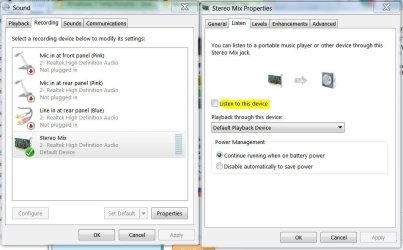
Open Sound and click on the Recording tab. Check to see if Stereo Mix is enabled. If it is, right click on it, select Properties. On that window, click on the Listen tab and clear the check box for "Listen to this device". Apply then OK out of the screens.
 

Attachments

  • Stereo Mix.JPG
    Stereo Mix.JPG
    69.3 KB · Views: 3

My Computer My Computer

Computer type
PC/Desktop
Computer Manufacturer/Model Number
Built 2/11/2011
OS
Windows 7 Pro-x64
CPU
i7-2600 3.4GHz - 3.8GHz Turbo
Motherboard
Intel DH67BL-B3
Memory
8Gb - 2x4GB, Muskin 991770 PC3-1333
Graphics Card(s)
Integrated Intel HD 2000
Sound Card
Integrated Intel 10.1 HD, RealTek ALC892
Monitor(s) Displays
Asus LCD VH222H, Haier HL24XSL2a
Screen Resolution
1920x1080, 1920x1080
Hard Drives
Crucial SSD C300-128Gb,
Western Digital WD5002AALX - 500Gb,
Western Digital WD7501AALS - 750Gb
PSU
Seasonic 650W 80+ Gold Modular
Case
Rosewill Defender
Cooling
Stock CPU, Four 120mm case fans, PCH fan added
Keyboard
Logitech EX100 Y-RBH94 Wireless
Mouse
Logitech EX100 M-RCE95 Wireless
Internet Speed
3.0/1.5 Mbs
Antivirus
Microsoft Security Essentials
Browser
Microsoft Internet Explorer 11
Other Info
Antec Veris Premier-Multimedia IR Station,
Cyber Accoustics-3602 Speakers,
AFT XM-5U Card Reader,
Hauppauge TV-HVR-2250,
Sony LX300 USB Turntable
Open Sound and click on the Recording tab. Check to see if Stereo Mix is enabled. If it is, right click on it, select Properties. On that window, click on the Listen tab and clear the check box for "Listen to this device". Apply then OK out of the screens.
I looked there and it was already unchecked.
 

My Computer My Computer

Computer type
Laptop
Computer Manufacturer/Model Number
Hewlett-Packard , Presario CQ57 Notebook PC
OS
Windows 7 Home Premium x64
CPU
Intel(R) Celeron(R) CPU B800 @ 1.50GHz (2 CPUs), ~1.5GHz
Motherboard
Hewlett-Packard 3672
Memory
2048MB RAM
Graphics Card(s)
Intel(R) HD Graphics
Antivirus
AVAST
Browser
Firefox
as fireberd mentioned; its probably just the way pc audio devices are. I guess if ya really want to record with a mic then you are probably better off using a karaoke machine rather than trying to do it via pc due to the latency issue. But if you still insist on trying to get it to work take a look at some of these results from searching google; one of which might give u what u are looking for:

https://www.google.com/#q=windows 7 latency problems
 

My Computer My Computer

Computer type
PC/Desktop
Computer Manufacturer/Model Number
custom built
OS
Windows 7 ultimate 64-bit
CPU
Intel I7 2600K 3.4ghz
Motherboard
Asus Evo P8P67
Memory
Corsair 16gb ddr3 1600mhz
Graphics Card(s)
Nvidia Geforce gt 430
Sound Card
Sound Blaster Titanium x-fi pci express
Monitor(s) Displays
Dell E198WFP
Hard Drives
1 western digital 2TB drive.
PSU
Antec 1200 watt
Case
Inwin Dragon Rider
Cooling
6 case supplied cooling fans
Keyboard
logitech mk700
Mouse
logitech m705
Internet Speed
25-50mbps download; 10mbps upload(i think)
Antivirus
avg free 2014
Browser
mozilla firefox
Other Info
Also have a pretty bad speaker setup which is a klipsch promedia 5.1 surround speaker setup with huge subwoofer and lg blu ray player/writer. Also a hp officejet pro 8600 plus wireless all in one and a logitech s7500 webcam.
It's has to be the software you're using then. A microphone, by default, won't play through the speakers. What software are you using? Check the sound driver and software options for enhancements and/or effects. There may be an option for "Acoustic Echo Cancelation" or similar in your audio driver.
 

My Computer My Computer

Computer type
PC/Desktop
Computer Manufacturer/Model Number
Built 2/11/2011
OS
Windows 7 Pro-x64
CPU
i7-2600 3.4GHz - 3.8GHz Turbo
Motherboard
Intel DH67BL-B3
Memory
8Gb - 2x4GB, Muskin 991770 PC3-1333
Graphics Card(s)
Integrated Intel HD 2000
Sound Card
Integrated Intel 10.1 HD, RealTek ALC892
Monitor(s) Displays
Asus LCD VH222H, Haier HL24XSL2a
Screen Resolution
1920x1080, 1920x1080
Hard Drives
Crucial SSD C300-128Gb,
Western Digital WD5002AALX - 500Gb,
Western Digital WD7501AALS - 750Gb
PSU
Seasonic 650W 80+ Gold Modular
Case
Rosewill Defender
Cooling
Stock CPU, Four 120mm case fans, PCH fan added
Keyboard
Logitech EX100 Y-RBH94 Wireless
Mouse
Logitech EX100 M-RCE95 Wireless
Internet Speed
3.0/1.5 Mbs
Antivirus
Microsoft Security Essentials
Browser
Microsoft Internet Explorer 11
Other Info
Antec Veris Premier-Multimedia IR Station,
Cyber Accoustics-3602 Speakers,
AFT XM-5U Card Reader,
Hauppauge TV-HVR-2250,
Sony LX300 USB Turntable
Back
Top