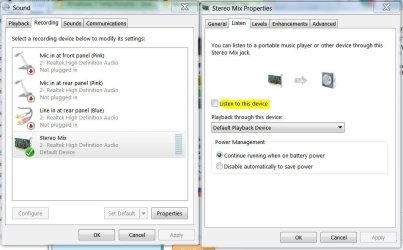
My PC just died which had XP Home installed, and I have never had a problem recording with my microphone such as for recording karaoke. So since my computer has died, I've had to install my karaoke programs on my father's laptop/notebook. This lappy has Windows 7 Home Premium 64-bit installed.
My problem is that when I talk into my microphone, there is a slight delay and makes me sound like I'm talking in slow motion and is so distracting that I can't even thing straight. I've tried many tricks I've found on the web, but most of them were a few years old. I've tried uninstalling the sound drivers and running the updater tool. I've also tried to set it as having priority than other recording/listening devices. I figured by now this would have pissed off enough users that Microsoft would have fixed this issue.
Thank you,
Todd
My problem is that when I talk into my microphone, there is a slight delay and makes me sound like I'm talking in slow motion and is so distracting that I can't even thing straight. I've tried many tricks I've found on the web, but most of them were a few years old. I've tried uninstalling the sound drivers and running the updater tool. I've also tried to set it as having priority than other recording/listening devices. I figured by now this would have pissed off enough users that Microsoft would have fixed this issue.
Thank you,
Todd
My Computer
- Computer type
- Laptop
- Computer Manufacturer/Model Number
- Hewlett-Packard , Presario CQ57 Notebook PC
- OS
- Windows 7 Home Premium x64
- CPU
- Intel(R) Celeron(R) CPU B800 @ 1.50GHz (2 CPUs), ~1.5GHz
- Motherboard
- Hewlett-Packard 3672
- Memory
- 2048MB RAM
- Graphics Card(s)
- Intel(R) HD Graphics
- Antivirus
- AVAST
- Browser
- Firefox