Windows 7 Build 7100 - Where to now

DirtRider

Just Looking
Guru
VIP
Local time
5:37 PM
Messages
603
I was running Vista Home Premium and upgraded to Windows 7 evaluation and am now on build 7100. Now with the official release just around the corner I was wondering what do I do now. What version of Win 7 should I now purchase and will I be able to upgrade my current installation or will I have to format and start on a complete clean install :confused:
 

My Computer My Computer

At a glance

Windows 7 Pro 64 bitIntel(R) Core(TM) i7 CPU 870 @ 2.93GHz4GBNVIDIA GeForce GTX 470
Computer Manufacturer/Model Number
Proline
OS
Windows 7 Pro 64 bit
CPU
Intel(R) Core(TM) i7 CPU 870 @ 2.93GHz
Motherboard
H55-G43(MS-7638)
Memory
4GB
Graphics Card(s)
NVIDIA GeForce GTX 470
Sound Card
Onboard
Monitor(s) Displays
Proline LCD 19 inch
Screen Resolution
1280 x 1024
Hard Drives
2 x SATA 250 Gig 1 x External 2TB
PSU
RX 730 SS
Case
Proline
Cooling
Standard
Keyboard
PS2
Mouse
PS2
Internet Speed
To embarrassed to tell lol
Clean install is recommended. Just backup your data first.
You can install any version you want.
 

My Computer My Computer

At a glance

OS
OS
OS
Oh dear I hate having to redo my PC all over again but I thought this was going to be the best option :cry:
 

My Computer My Computer

At a glance

Windows 7 Pro 64 bitIntel(R) Core(TM) i7 CPU 870 @ 2.93GHz4GBNVIDIA GeForce GTX 470
Computer Manufacturer/Model Number
Proline
OS
Windows 7 Pro 64 bit
CPU
Intel(R) Core(TM) i7 CPU 870 @ 2.93GHz
Motherboard
H55-G43(MS-7638)
Memory
4GB
Graphics Card(s)
NVIDIA GeForce GTX 470
Sound Card
Onboard
Monitor(s) Displays
Proline LCD 19 inch
Screen Resolution
1280 x 1024
Hard Drives
2 x SATA 250 Gig 1 x External 2TB
PSU
RX 730 SS
Case
Proline
Cooling
Standard
Keyboard
PS2
Mouse
PS2
Internet Speed
To embarrassed to tell lol
Oh dear I hate having to redo my PC all over again but I thought this was going to be the best option :cry:
It's not so bad. I reinstall my OS at least twice a year...:)
 

My Computer My Computer

At a glance

OS
OS
OS
It's not so bad. I reinstall my OS at least twice a year...:)

I do it regularly as well. nothing like a fresh install to clear the cobwebs
 

My Computer My Computer

At a glance

Windows 7 Ultimate (x64) SP1Intel 3770k 4.6GHz8GB (2x 4GB) Crucial BallistixSapphire 7950 (1060/1600)
Computer Manufacturer/Model Number
tw33k
OS
Windows 7 Ultimate (x64) SP1
CPU
Intel 3770k 4.6GHz
Motherboard
ASUS Maximus V Formula
Memory
8GB (2x 4GB) Crucial Ballistix
Graphics Card(s)
Sapphire 7950 (1060/1600)
Sound Card
On Board Realtek HD Audio
Monitor(s) Displays
27" Acer B273HU (via HDMI)
Screen Resolution
2048 x 1152
Hard Drives
Crucial M4 128GB
2TB WD Black
1TB Samsung F3 SATA
1TB WD Elite External
2TB WD USB 3.0
PSU
Corsair AX750 Gold
Case
Corsair Obsidian 800DW
Cooling
Corsair H100 (2x AP-121/2x UK-3000 push/pull)
Keyboard
Microsoft Wireless 5000
Mouse
Microsoft Wireless 5000
Internet Speed
5mb/s
Other Info
Logitech z-2300 2.1 speakers
Lamptron FC-5 v2
+1 Look at it as an educational adventure .. ;)
 

My Computer My Computer

At a glance

64-bit Windows 8.1 ProCore(TM) i5 CPU 4330 Haswell @ 3.20GHz12.00 GBIntel(R) HD Graphics
Computer type
PC/Desktop
Computer Manufacturer/Model Number
LENOVO K450 @3.0GHZ
OS
64-bit Windows 8.1 Pro
CPU
Core(TM) i5 CPU 4330 Haswell @ 3.20GHz
Motherboard
LENOVO
Memory
12.00 GB
Graphics Card(s)
Intel(R) HD Graphics
Sound Card
Intel HD integtrated
Monitor(s) Displays
HP 25' ISP Monitor
Screen Resolution
1900/1020
Hard Drives
(1) ST1000DM003-1CH162 (2) Generic STORAGE DEVICE USB Device (3) Generic STORAGE DEVICE USB Device
Internet Speed
100mb down/10mb up
It is just the time it take to get it all back to what it was but yes I also seems to have to do a fresh install every now and then especially using Win XP :D
 

My Computer My Computer

At a glance

Windows 7 Pro 64 bitIntel(R) Core(TM) i7 CPU 870 @ 2.93GHz4GBNVIDIA GeForce GTX 470
Computer Manufacturer/Model Number
Proline
OS
Windows 7 Pro 64 bit
CPU
Intel(R) Core(TM) i7 CPU 870 @ 2.93GHz
Motherboard
H55-G43(MS-7638)
Memory
4GB
Graphics Card(s)
NVIDIA GeForce GTX 470
Sound Card
Onboard
Monitor(s) Displays
Proline LCD 19 inch
Screen Resolution
1280 x 1024
Hard Drives
2 x SATA 250 Gig 1 x External 2TB
PSU
RX 730 SS
Case
Proline
Cooling
Standard
Keyboard
PS2
Mouse
PS2
Internet Speed
To embarrassed to tell lol
DirtRider check out Windows Easy Transfer, it will restore all your files and settings. you just need to reinstall your programs. I have used it several times and it works. Save hours. Chect out the tutorial on this site.
Good luck and welcome to 7 Forum!!

Ken


i
 

My Computer My Computer

At a glance

Win7 x64 Ultimate SP1Intel i7-26008 GigGeforce gt 520
Computer Manufacturer/Model Number
Dell Optiplex 980
OS
Win7 x64 Ultimate SP1
CPU
Intel i7-2600
Memory
8 Gig
Graphics Card(s)
Geforce gt 520
Monitor(s) Displays
LG & Acer
Screen Resolution
1920x1080
Internet Speed
Fios 45/35
Other Info
Windows Home Server
Thanks Ken I will check this out as I hate the time it all takes to get back to normal. Now all I have to do is just find and purchase Win7 :D
 

My Computer My Computer

At a glance

Windows 7 Pro 64 bitIntel(R) Core(TM) i7 CPU 870 @ 2.93GHz4GBNVIDIA GeForce GTX 470
Computer Manufacturer/Model Number
Proline
OS
Windows 7 Pro 64 bit
CPU
Intel(R) Core(TM) i7 CPU 870 @ 2.93GHz
Motherboard
H55-G43(MS-7638)
Memory
4GB
Graphics Card(s)
NVIDIA GeForce GTX 470
Sound Card
Onboard
Monitor(s) Displays
Proline LCD 19 inch
Screen Resolution
1280 x 1024
Hard Drives
2 x SATA 250 Gig 1 x External 2TB
PSU
RX 730 SS
Case
Proline
Cooling
Standard
Keyboard
PS2
Mouse
PS2
Internet Speed
To embarrassed to tell lol
Let us know how it goes..:D
Ken
 

My Computer My Computer

At a glance

Win7 x64 Ultimate SP1Intel i7-26008 GigGeforce gt 520
Computer Manufacturer/Model Number
Dell Optiplex 980
OS
Win7 x64 Ultimate SP1
CPU
Intel i7-2600
Memory
8 Gig
Graphics Card(s)
Geforce gt 520
Monitor(s) Displays
LG & Acer
Screen Resolution
1920x1080
Internet Speed
Fios 45/35
Other Info
Windows Home Server
Will do just need to find and purchase a copy of Win 7 now :D
 

My Computer My Computer

At a glance

Windows 7 Pro 64 bitIntel(R) Core(TM) i7 CPU 870 @ 2.93GHz4GBNVIDIA GeForce GTX 470
Computer Manufacturer/Model Number
Proline
OS
Windows 7 Pro 64 bit
CPU
Intel(R) Core(TM) i7 CPU 870 @ 2.93GHz
Motherboard
H55-G43(MS-7638)
Memory
4GB
Graphics Card(s)
NVIDIA GeForce GTX 470
Sound Card
Onboard
Monitor(s) Displays
Proline LCD 19 inch
Screen Resolution
1280 x 1024
Hard Drives
2 x SATA 250 Gig 1 x External 2TB
PSU
RX 730 SS
Case
Proline
Cooling
Standard
Keyboard
PS2
Mouse
PS2
Internet Speed
To embarrassed to tell lol
Ok I have installed Windows 7 pro using the Windows Easy Transfer option. I am pleased with how this all works. As I am now installing all my apps the system is basically returning to the way it was. great way to go and thank to you guys for suggesting it to me.

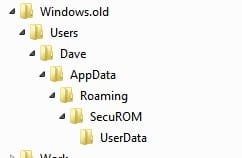
When I did the new install it created a windows.old folder with all my stuff from my old install. Now I wanted to move this off my HD but for some reason it has left the attached behind and I now cannot get rid of it at all
 

Attachments

  • Win01 Oct. 29 09.09.jpg
    Win01 Oct. 29 09.09.jpg
    4.4 KB · Views: 42
  • Win02 Oct. 29 09.10.jpg
    Win02 Oct. 29 09.10.jpg
    5.8 KB · Views: 4

My Computer My Computer

At a glance

Windows 7 Pro 64 bitIntel(R) Core(TM) i7 CPU 870 @ 2.93GHz4GBNVIDIA GeForce GTX 470
Computer Manufacturer/Model Number
Proline
OS
Windows 7 Pro 64 bit
CPU
Intel(R) Core(TM) i7 CPU 870 @ 2.93GHz
Motherboard
H55-G43(MS-7638)
Memory
4GB
Graphics Card(s)
NVIDIA GeForce GTX 470
Sound Card
Onboard
Monitor(s) Displays
Proline LCD 19 inch
Screen Resolution
1280 x 1024
Hard Drives
2 x SATA 250 Gig 1 x External 2TB
PSU
RX 730 SS
Case
Proline
Cooling
Standard
Keyboard
PS2
Mouse
PS2
Internet Speed
To embarrassed to tell lol
Can I do an In-Place upgrade from Windows 7 Release Candidate To Release Code?

The cleanest possible install is always to boot from the installer and delete/format the drive, which can be done with Win7 Upgrade as it scans the HDD when it first boots. It will see the RC and pass a flag to activate.

You can also consider a Custom install from the RC desktop which will save all of your files in windows.old and clean install the OS.
 
Ok I did not do it that way so besides having to do it all over again can I fix this issue now
 

My Computer My Computer

At a glance

Windows 7 Pro 64 bitIntel(R) Core(TM) i7 CPU 870 @ 2.93GHz4GBNVIDIA GeForce GTX 470
Computer Manufacturer/Model Number
Proline
OS
Windows 7 Pro 64 bit
CPU
Intel(R) Core(TM) i7 CPU 870 @ 2.93GHz
Motherboard
H55-G43(MS-7638)
Memory
4GB
Graphics Card(s)
NVIDIA GeForce GTX 470
Sound Card
Onboard
Monitor(s) Displays
Proline LCD 19 inch
Screen Resolution
1280 x 1024
Hard Drives
2 x SATA 250 Gig 1 x External 2TB
PSU
RX 730 SS
Case
Proline
Cooling
Standard
Keyboard
PS2
Mouse
PS2
Internet Speed
To embarrassed to tell lol
Ok I have installed Windows 7 pro using the Windows Easy Transfer option. I am pleased with how this all works. As I am now installing all my apps the system is basically returning to the way it was. great way to go and thank to you guys for suggesting it to me.

When I did the new install it created a windows.old folder with all my stuff from my old install. Now I wanted to move this off my HD but for some reason it has left the attached behind and I now cannot get rid of it at all

Ok I did not do it that way so besides having to do it all over again can I fix this issue now

Try this win7 tutorial Windows.old Folder - Delete.

It should delete those other files also.

Let us know if it works.
 

My Computer My Computer

At a glance

Windows 7 Ult x64 - SP1/ Windows 8 Pro x64Intel Core i5-3570K 4.6GHz8GB (2X4GB) DDR3 1600 Corsair Vengeance CL8 1.5vSapphire HD 7770 Vapor-X OC 1GB DDR5
Computer type
PC/Desktop
Computer Manufacturer/Model Number
76~2.0
OS
Windows 7 Ult x64 - SP1/ Windows 8 Pro x64
CPU
Intel Core i5-3570K 4.6GHz
Motherboard
Gigabyte GA-Z77X UD3H, f18
Memory
8GB (2X4GB) DDR3 1600 Corsair Vengeance CL8 1.5v
Graphics Card(s)
Sapphire HD 7770 Vapor-X OC 1GB DDR5
Sound Card
Onboard VIA VT2021
Monitor(s) Displays
22" LCD Dell
Screen Resolution
1680x1050
Hard Drives
Samsung 840Pro 128GB SSD,
Seagate Barracuda 500GB SATA2 7200rpm 32MB cache, Seagate Barracuda 1TB SATA2 7200rpm 32MB cache,
PSU
Corsair HX650W
Case
Cooler Master Storm Scout
Cooling
Corsair H80 2x12cm Noctua NF P12 , 2x14cm case fans
Keyboard
Logitech Wave
Mouse
CM Sentinel
Internet Speed
Dismal
Antivirus
Avast
Browser
Opera Next
Other Info
Haswell laptop: HP Envy 17t-j, i7-4700MQ, GeForce 740M 2GB DDR3, 17.3" Full HD 1920x1080, 16GB RAM, Samsung 840 Pro 128GB, 1TB Hitachi 7200 HDD,
Desktop: eSATA ports,
External eSATA Seagate 500GB SATA2 7200rpm,
External WD USB 500GB
Nope it did not delete that folder it is still sitting right where it was :cry: :D
 

My Computer My Computer

At a glance

Windows 7 Pro 64 bitIntel(R) Core(TM) i7 CPU 870 @ 2.93GHz4GBNVIDIA GeForce GTX 470
Computer Manufacturer/Model Number
Proline
OS
Windows 7 Pro 64 bit
CPU
Intel(R) Core(TM) i7 CPU 870 @ 2.93GHz
Motherboard
H55-G43(MS-7638)
Memory
4GB
Graphics Card(s)
NVIDIA GeForce GTX 470
Sound Card
Onboard
Monitor(s) Displays
Proline LCD 19 inch
Screen Resolution
1280 x 1024
Hard Drives
2 x SATA 250 Gig 1 x External 2TB
PSU
RX 730 SS
Case
Proline
Cooling
Standard
Keyboard
PS2
Mouse
PS2
Internet Speed
To embarrassed to tell lol
Back
Top